
Cudy R700
4.4Editor score
Multi-WAN Continuity
OpenWRT Ready
Complete VPN Suite
This guide compares the top load balancing routers for businesses and homes, highlighting key features like multi-WAN support, VPN capabilities, and network
Finding the right load balancing router is crucial for maintaining reliable internet connectivity in modern networks. These devices distribute traffic across multiple internet connections to ensure speed and uptime even if one line fails.
We evaluated ten top models based on port flexibility, security features, VPN support, and overall performance. Each product offers unique strengths tailored to different network sizes and specific business requirements.
Every pick highlights key capabilities and ideal use cases so you can make an informed decision. Please note that availability and pricing may change over time so verify details before purchasing.
4.4Editor score

4.4Editor score

4.5Editor score
This side-by-side comparison highlights the key specifications and capabilities of each router to help you find the perfect match for your network needs.


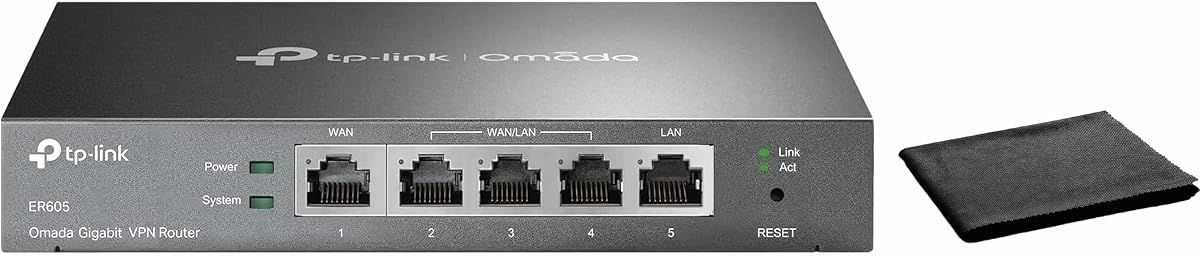


The TP-Link ER605 stands out as a robust solution for small to medium businesses needing reliable load balancing. With strong user ratings it delivers consistent performance across multiple internet connections effectively optimizing bandwidth.
We may earn a commission when you buy through this link, at no additional cost to you.
This router features five Gigabit ports including WAN and LAN options allowing flexible network configurations. Advanced security features like DoS defense and firewall policies protect your data while VPN support ensures safe remote access.
While it lacks built-in wireless capabilities the ER605 focuses on stable wired connections which is ideal for office environments. The interface is straightforward but may require time to fully utilize all advanced features.
If you need a cost-effective router with solid security and multi-WAN capabilities this model is an excellent choice. It balances performance and price well making it a top pick for budget-conscious professionals.
Advanced firewall policies and DoS defense mechanisms ensure your network remains protected from external threats and unauthorized access attempts.
Multiple WAN ports including a USB option provide redundancy and load balancing options to keep your business online even if one connection fails.
We may earn a commission when you buy through this link, at no additional cost to you.
The ER7206 is designed for professional networks requiring high capacity and centralized control. It supports up to seven hundred clients and integrates seamlessly with the Omada SDN ecosystem for streamlined management.
We may earn a commission when you buy through this link, at no additional cost to you.
Key strengths include its flexible port configuration with SFP and Gigabit WAN options. The cloud access feature allows remote management making it ideal for multi-site businesses needing consistent network policies across locations.
The SDN compatibility ensures future-proofing but requires compatible devices for full functionality. While powerful it might be overkill for very small offices that do not need such extensive networking control.
This router is best suited for growing businesses that need reliable multi-WAN performance and advanced network segmentation. Its integration with Omada products makes it a strong choice for unified network management.
Omada SDN integration allows you to control gateways switches and access points from a single interface simplifying IT operations across multiple sites.
With support for hundreds of clients this router handles high-density environments without sacrificing performance or connection stability.
We may earn a commission when you buy through this link, at no additional cost to you.
The Cudy R700 offers impressive features for its price making it an attractive option for small businesses or home labs. It supports up to five ISPs with automatic failover ensuring continuous connectivity without breaking the bank.
We may earn a commission when you buy through this link, at no additional cost to you.
Its OpenWRT-ready design provides extensive customization options including VLAN segmentation and custom QoS policies. Built-in VPN protocols like WireGuard make secure remote access straightforward without additional software costs.
While the hardware is cost-effective some users might find the interface less polished than premium brands. However the flexibility offered by OpenWRT support outweighs this limitation for technically inclined users.
For those seeking budget-friendly load balancing with enterprise-level control this router is an outstanding choice. It proves you do not need to spend heavily to get professional-grade network management capabilities.
Automatic failover and load balancing ensure your business remains online even when one internet connection fails by instantly rerouting traffic to active lines.
Full OpenWRT support unlocks advanced features like custom firewall rules and VLANs giving you complete control over your network environment.
We may earn a commission when you buy through this link, at no additional cost to you.
The Alta Labs Route10 is built for advanced networks requiring 10 Gigabit speeds and high throughput. Its quad-core Qualcomm processor ensures low latency and efficient packet processing even under heavy workloads.
We may earn a commission when you buy through this link, at no additional cost to you.
Integrated PoE+ output allows direct powering of access points reducing the need for extra adapters. Real-time monitoring tools help administrators optimize traffic flow and quickly identify issues across the network.
While it delivers impressive performance it does not broadcast Wi-Fi so additional access points are needed for wireless coverage. The specialized hardware makes it ideal for environments where wired speed is a priority.
This router is perfect for tech enthusiasts and businesses that need maximum wired speed and professional-grade control. Its robust features justify the higher cost for users who demand top-tier performance and reliability.
Supporting up to 10 Gigabit throughput this router handles high-bandwidth tasks like large file transfers and video streaming without bottlenecks.
PoE+ support on select Ethernet ports simplifies installation by powering compatible devices directly through the network cable.
We may earn a commission when you buy through this link, at no additional cost to you.
The ER7412-M2 delivers enterprise-grade security and speed with Multi-Gigabit WAN ports and extensive VPN support. It is designed for businesses that need both high throughput and advanced threat protection.
We may earn a commission when you buy through this link, at no additional cost to you.
Features like Deep Packet Inspection and IPS/IDS provide robust security against modern cyber threats. The load balancing capabilities across up to eleven WAN ports ensure efficient bandwidth utilization and failover reliability.
Setting up this router requires some technical knowledge especially when integrating with the Omada ecosystem. However once configured it offers powerful control over network traffic and security policies.
Ideal for medium to large businesses this router combines speed and security in one unit. Its comprehensive features make it a reliable backbone for secure high-performance network environments.
Deep Packet Inspection and IPS/IDS systems detect and block sophisticated threats before they can compromise your network security.
Multiple 2.5 Gigabit ports provide the bandwidth needed for demanding applications like cloud services and video conferencing.
We may earn a commission when you buy through this link, at no additional cost to you.
The TL-R470T+ offers reliable multi-WAN functionality for small offices that do not need high speeds. With four WAN ports it provides excellent redundancy and bandwidth backup capabilities at a reasonable price.
We may earn a commission when you buy through this link, at no additional cost to you.
It includes features like portal authentication and bandwidth management to optimize client usage. The built-in PPPoE server helps in scenarios where multiple users need distinct internet access accounts.
Although the ports are limited to 100Mbps this router remains effective for standard business tasks. The compact case makes it suitable for smaller spaces where physical size is a concern.
This model is best for budget-focused setups needing basic load balancing. It proves that reliable internet failover does not always require expensive high-end networking equipment.
Bandwidth marshaling allows administrators to prioritize critical applications ensuring smooth operations during peak usage times.
DDNS support enables easy remote management via a domain name so you can adjust settings without visiting the office.
We may earn a commission when you buy through this link, at no additional cost to you.
The TL-R480T+ is a compact solution for small businesses needing simple load balancing. Its three WAN ports and one LAN port make it easy to manage multiple internet connections efficiently.
We may earn a commission when you buy through this link, at no additional cost to you.
Setup is straightforward and the device handles basic traffic distribution well. While it lacks advanced features it covers the essential needs of small offices looking for uptime and cost savings.
The small form factor allows easy placement in tight spaces without drawing much attention. It is a practical choice for environments where complexity is not required.
For small setups needing redundancy without high cost this router offers solid value. It ensures you stay connected even when one line fails without investing in heavy hardware.
Its plug-and-play design allows quick setup so you can get multiple internet lines running in minutes.
The small case fits easily into server cabinets or desktops making it ideal for offices with limited physical space.
We may earn a commission when you buy through this link, at no additional cost to you.
The ER-605 offers essential business features in a compact design ideal for small offices. Dual WAN ports enable seamless load balancing and failover to keep critical apps running smoothly.
We may earn a commission when you buy through this link, at no additional cost to you.
Security is addressed with SPI firewall and standard VPN protocols ensuring safe remote access. The Omada app compatibility provides intuitive management and real-time status updates on your network.
While it supports only two WAN ports this is sufficient for many small setups. The cloud monitoring feature adds convenience for remote administrators managing distributed locations.
This router balances ease of use with practical security making it a great entry-level business device. If you need reliability without complexity it is a reliable and straightforward choice.
Cloud monitoring allows you to check network health and status from anywhere ensuring quick response to potential issues.
Built-in IPsec and PPTP VPN support ensures your remote staff can connect to office resources securely.
We may earn a commission when you buy through this link, at no additional cost to you.
The EdgeRouter 4 is highly rated for its efficiency and flexibility in wired networks. With four Gigabit ports and an SFP slot it offers solid connectivity options for small enterprise setups.
We may earn a commission when you buy through this link, at no additional cost to you.
Its fanless design ensures silent operation which is perfect for quiet environments. The compact form allows desk or wall mounting giving you deployment flexibility based on your office layout.
While it lacks built-in USB WAN support it focuses on stable wired throughput. The power consumption is low making it an energy-efficient choice for always-on network infrastructure.
Ideal for users who prefer silent and efficient networking this router delivers consistent performance. Its simplicity and reliability make it a strong contender for those avoiding complex configurations.
Fanless design eliminates noise so this router fits easily in office or home environments without distraction.
The SFP port supports fiber connections providing high-speed uplink options for growing networks.
We may earn a commission when you buy through this link, at no additional cost to you.
The Omada Fusion 2.5G combines speed and ease of use with its modern touchscreen interface. It supports up to four-WAN load balancing ensuring your network stays online and performant at all times.
We may earn a commission when you buy through this link, at no additional cost to you.
A quad-core CPU delivers fast processing while Bluetooth setup simplifies initial configuration. The built-in cloud controller offers centralized management without needing additional hardware for control.
The touchscreen provides quick insights into traffic and health scores reducing troubleshooting time. While it is part of the Omada ecosystem it offers seamless integration for those already using their APs.
This router is perfect for businesses needing fast connectivity and intuitive control. Its high rating reflects user satisfaction with its blend of speed ease of use and reliability.
Bluetooth configuration allows you to set up the router via smartphone app saving time during deployment.
The touchscreen display gives immediate access to network stats enabling faster diagnostics without extra tools.
We may earn a commission when you buy through this link, at no additional cost to you.
Selecting the right load balancing router involves considering port types, security needs, and management features to match your network size and goals.
The number of WAN ports determines how many internet lines you can connect simultaneously. More ports offer better redundancy and load distribution options for larger teams.
Choose a router with at least two WAN ports to ensure failover capability and balanced traffic flow across connections.
Look for Gigabit or Multi-Gigabit ports to ensure your router does not become a bottleneck for high-speed internet lines. SFP ports provide flexibility for fiber connections.
Ensure the router supports the maximum speed of your internet service to maintain optimal performance and avoid throttling.
Advanced security features like DoS defense and SPI firewalls protect your internal network from external threats. IP and MAC filtering add extra layers of access control.
Prioritize routers with comprehensive security suites to safeguard sensitive data and prevent unauthorized network access.
Built-in VPN support enables secure remote access for employees working off-site. Check for protocols like IPsec and OpenVPN to ensure compatibility with your existing setup.
Ensure the router supports the VPN protocols your organization uses to maintain secure and encrypted remote connections.
An intuitive web interface or mobile app simplifies network management. Cloud monitoring allows you to track status remotely without physical access to the device.
Select a router with a user-friendly management system to reduce setup time and ongoing administrative effort.
Automatic failover ensures connectivity is maintained if one line fails while load balancing distributes traffic evenly. Some routers allow custom rules for priority traffic.
Confirm the router supports automatic failover to minimize downtime and keep critical applications accessible during outages.
For growing networks choose a router that integrates with Software Defined Networking platforms for centralized control across devices. SDN support allows better future expansion.
Look for SDN compatibility if you plan to expand your network with additional switches or access points later.
Hardware-accelerated processors handle VPN traffic and packet processing more efficiently reducing latency. This is crucial for high-throughput environments.
Check for hardware acceleration features to ensure the router maintains speed under heavy workloads or VPN usage.
Start by connecting your modems to the WAN ports and your main switch to the LAN ports. Use the setup wizard on the web interface to define failover rules and security policies.
Regularly update the router firmware to patch security vulnerabilities and access new features. Use the diagnostic tools to check traffic and detect any connection drops promptly.
Keep the router in a cool dry place to ensure long-term reliability. Avoid placing it near heat sources or in humid environments to prevent hardware issues.
Load balancing distributes network traffic across multiple internet connections to optimize bandwidth and ensure redundancy. This improves speed and keeps your network online even if one line fails.
Yes, many modern routers support SFP ports or Gigabit Ethernet which work with fiber modems. Ensure the port speed matches your fiber service for maximum throughput.
Most routers offer setup wizards that guide you through basic configuration. However advanced features like VLANs may require some networking knowledge to configure correctly.
Failover automatically switches traffic to a backup connection if the primary line goes down. This happens seamlessly so users do not notice the change during internet outages.
Yes, small business models can work for power users who need multiple ISPs or high security. However they may be more complex than typical consumer home routers.
Most dedicated load balancing routers do not include Wi-Fi and require separate access points. Some models support wireless but wired-only units are more common for performance.
If all WAN ports lose connection the network will be offline until one restores. Load balancing does not create internet access it only manages existing lines.
Cloud management uses encrypted connections to protect your data. Ensure you use strong passwords and two-factor authentication to secure your access to cloud features.
The TP-Link ER605, Cudy R700, and Omada ER7412-M2 lead the pack for their blend of reliability features and price points. Each caters to different network sizes and management needs.
Prioritize features like VPN support and failover capabilities based on your business criticality. For high performance consider models with Multi-Gigabit ports to handle modern bandwidth demands.
Always check current availability and ensure the router fits your existing network infrastructure. With the right load balancing router you can enjoy faster speeds and uninterrupted internet access.