
ARCTIC Case Fan Hub
4.7Editor score
Ten PWM ports included
SATA power input
Simple synchronous control
Find the top Fan Control Hub for PC to manage airflow and RGB lighting. We compare ten models with PWM support, cable management features, and reliable power
Building a powerful PC requires careful attention to cooling and aesthetics. A Fan Control Hub for PC helps organize multiple fans and lighting strips without cluttering your motherboard. It ensures stable power delivery and keeps your system running efficiently.
We evaluated ten top-rated hubs based on port count, power handling, and ease of installation. Each model was reviewed for compatibility with standard PWM and ARGB connectors. Our list covers options for budget builds and premium custom loops alike.
Each pick highlights key features, pros, and cons to help you decide quickly. Prices and availability change often so verify details before purchasing. Use this guide to find the perfect hub for your specific case and fan setup.
4.7Editor score

4.7Editor score
4.6Editor score
The following table compares all ten hubs side by side. Look at port counts, power specs, and mounting options to find the right fit for your case and fan configuration.


The Thermalright ARGB Fan HUB is a solid choice for builders needing more ports. It supports eight fans and ARGB lighting with a simple design. The rating of 4.5 reflects reliable performance for most users.
We may earn a commission when you buy through this link, at no additional cost to you.
It uses SATA power directly to avoid motherboard strain. You get both PWM and ARGB connectors for flexibility. The magnetic and adhesive mount makes placement easy inside any case.
Note that only one fan speed is read by the motherboard. This is common for hubs and acceptable for most setups. The lack of included SATA cable is a minor inconvenience.
Buy this if you want affordable expansion with lighting support. It keeps your build tidy and fans running cool. Check compatibility before installing to avoid issues.
This hub handles both fan speed and ARGB lighting signals in one unit. It helps sync your fans and light bars without extra controllers.
SATA power ensures fans run smoothly even under high load. It prevents voltage drops that can cause fan stutter or noise.
We may earn a commission when you buy through this link, at no additional cost to you.
This ARCTIC controller stands out with individual PWM control for each fan. You get ten ports and strong power support. It rates 4.7 for its advanced features and reliability.
We may earn a commission when you buy through this link, at no additional cost to you.
Native driver support lets you control fans via software. It works on Windows and Linux systems easily. The magnetic mount keeps the hub secure inside your case.
Installation needs driver setup which some may find tricky. But once configured you gain fine control over airflow. It is ideal for advanced users.
Choose this for maximum customization and software control. It helps optimize cooling for specific tasks or loads. Verify your OS compatibility before buying.
Use ARCTIC software to set fan curves per port. It gives you more control than motherboard BIOS alone.
With 4.5A total capacity it handles high speed fans well. You avoid overloading motherboard headers with many fans.
We may earn a commission when you buy through this link, at no additional cost to you.
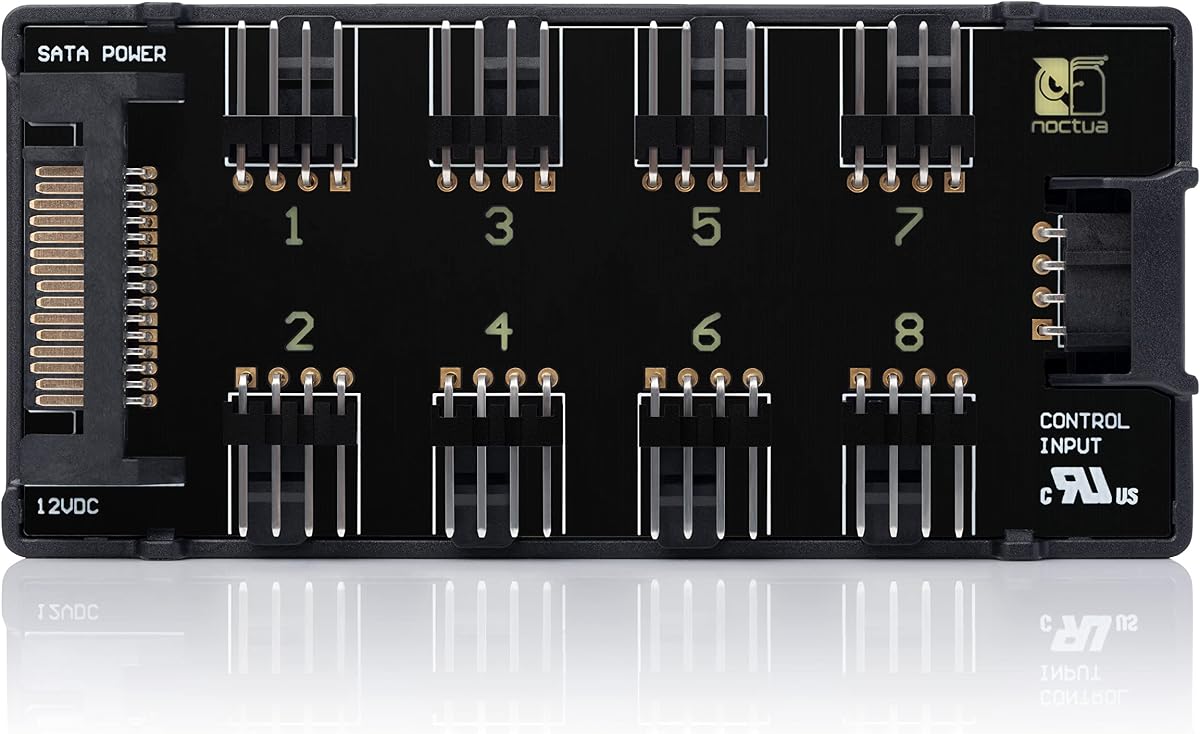
Noctua is known for quality and the NA-FH1 delivers. It offers eight PWM ports with strong safety features. The rating of 4.6 shows user trust in its durability.
We may earn a commission when you buy through this link, at no additional cost to you.
Short circuit protection keeps your components safe from faults. Magnets make mounting easy on steel panels. A six year warranty backs its long term reliability.
It costs more than budget options but lasts longer. Only supports PWM fans so check your fans first. For premium builds it is worth the investment.
Buy this if reliability and safety are your priority. It simplifies fan control without risking hardware. Ideal for users wanting a premium hub.
Built in fuses protect against overcurrent issues. This prevents damage to fans or your power supply.
A six year warranty shows confidence in product life. It gives peace of mind for long term use.
We may earn a commission when you buy through this link, at no additional cost to you.
This hub is perfect for basic setups needing more ports. It has ten PWM ports and uses SATA power. The 4.7 rating reflects its simplicity and value.
We may earn a commission when you buy through this link, at no additional cost to you.
All fans get the same PWM signal which works well for identical fans. It uses one cable to the motherboard for simplicity. The small size fits easily in any case.
It lacks individual control which might limit customization. But for most users it is sufficient and reliable. The price makes it a great starter option.
Choose this for a straightforward and cheap solution. It helps expand your fan count without complexity. Check if all your fans are PWM compatible.
Just connect one header and SATA power to start. No software or complex setup is needed here.
At a low cost it adds many ports easily. It is ideal for budget builds needing extra fans.
We may earn a commission when you buy through this link, at no additional cost to you.
The X12 model offers twelve ports for fans or RGB. It supports both PWM and 5V ARGB signals. Its rating of 4.4 shows solid but not perfect performance.
We may earn a commission when you buy through this link, at no additional cost to you.
Ideal for large cases needing many fans at once. The white finish suits light themed builds well. SATA power keeps performance stable even with all ports used.
Cable management is good but not perfect with RGB. It works well for syncing lights to motherboard. Watch out for cable length limitations.
Pick this if you need maximum port count. It handles large setups efficiently with one hub. Ensure your case has space for the size.
Twelve ports mean you can fill big cases easily. It reduces the need for multiple hubs in one build.
The white color matches white PC components nicely. It adds to the visual cohesion of your setup.
We may earn a commission when you buy through this link, at no additional cost to you.
This hub comes with an RF remote for quick control. It supports nine fans and ARGB lighting easily. The 4.6 rating shows user satisfaction with features.
We may earn a commission when you buy through this link, at no additional cost to you.
The remote allows changing colors without opening your PC. Magnetic mounting keeps the hub in place securely. It includes all cables for a smooth start.
Remote control is handy but needs battery replacement. It is less flexible than software for detailed curves. Still great for quick lighting changes.
Buy this if you love using a remote for RGB. It simplifies lighting control significantly. Check your case size for the panel.
Change lighting effects without rebooting or opening case. It is fast and easy to use daily.
All cables and remote are included out of box. It reduces extra purchases and setup time.
We may earn a commission when you buy through this link, at no additional cost to you.
A straightforward hub for ten PWM fans at good price. It uses SATA power for stable operation. The 4.6 rating indicates reliability and consistent performance.
We may earn a commission when you buy through this link, at no additional cost to you.
Ideal for cases without RGB needs but high fan count. Adhesive pads hold it securely inside. The design keeps cables tidy without extra parts.
No RGB support limits light users. And cable is sold separate which adds cost. For PWM users it works well though.
Choose this for pure cooling without lighting needs. It is reliable and cheap for fans. Check if you have SATA power available.
It focuses on fan power without lighting extras. It keeps the design simple and effective for airflow.
SATA power ensures smooth fan operation under load. It prevents fluctuations that can cause noise.
We may earn a commission when you buy through this link, at no additional cost to you.
The X8 hub balances ports and lighting support well. It handles eight fans and ARGB signals. With 4.5 rating it offers good value for money.
We may earn a commission when you buy through this link, at no additional cost to you.
Compact design fits hidden spots in most cases. Black color blends with dark builds nicely. It simplifies wiring significantly for users.
Missing SATA cable means extra purchase needed. But overall it is a solid hub choice. Good for mid tier builds needing lights.
Pick this if you need a small balanced hub. It gives both cooling and lighting without bulk. Ensure you have extra cable.
Small size lets you hide the hub easily. It keeps your case looking clean and uncluttered.
Supports both fan power and RGB lighting. You get two functions in one simple hub.
We may earn a commission when you buy through this link, at no additional cost to you.
This hub offers two ways to control lighting easily. You get an RF remote and a chassis key. The 4.4 rating shows decent but variable user satisfaction.
We may earn a commission when you buy through this link, at no additional cost to you.
Remote control lets you change lights on the fly. Magnetic mounting keeps it secure without screws. It supports up to ten fans at once.
Manuals warn about connection details strictly. If connected wrong lights may not sync. But once set up it works well.
Choose this for flexible lighting control options. It is great if you want quick changes. Make sure you follow setup guides carefully.
Use remote or chassis key for lighting. It suits different user preferences for ease.
Up to ten ports allow big case setups. It handles complex builds without extra hardware.
We may earn a commission when you buy through this link, at no additional cost to you.
This V2 hub improves on the X8 with stability. It supports eight fans and ARGB lighting. With 4.6 rating it is reliable for most users.
We may earn a commission when you buy through this link, at no additional cost to you.
Compact design fits even small cases. It keeps lighting and fan cables organized well. Adhesive mount is simple and quick to use.
SATA cable missing again is a common issue. But performance is stable and consistent overall. Great for mid tier builds needing space.
Pick this for space saving with features. It works well for standard setups needing light. Check cable needs before buying.
Small size ensures it fits hidden spots easily. It is ideal for compact cases with tight fits.
Direct SATA power keeps fans running smoothly. It reduces voltage drops for better efficiency.
We may earn a commission when you buy through this link, at no additional cost to you.
Selecting the right hub depends on your fans and case. This guide explains key factors to consider before purchasing for your setup.
Check how many fans you have and their connector types. Most hubs offer between eight and ten ports. Ensure they support PWM for speed control or ARGB for lighting.
Pick a hub with enough ports for current and future fans. Matching types avoids needing extra adapters.
Hubs need power from SATA or Molex connectors. Ensure your PSU has enough connectors. SATA is more common and offers stable voltage for fans.
Verify available cables before choosing a hub. Missing cables can delay your build.
Look for magnetic, adhesive, or screw mounts. Magnetic mounts work on steel panels. Adhesive is flexible but requires a smooth surface.
Choose based on your case materials. Secure mounts prevent vibration noise.
Some hubs handle both fan power and lighting. Others focus on PWM only. Ensure your hub matches your fans lighting needs.
Dual support hubs save space and reduce wires. Check 5V and 12V compatibility carefully.
Advanced hubs allow software control. This lets you set fan curves via apps. Standard hubs rely on motherboard BIOS only.
If you want custom curves choose a supported hub. It offers more control over cooling.
Safety features like short circuit protection are important. They protect your fans and PSU from faults. Check product specs for fuses or protection.
Protection is vital for long term reliability. Don't skip checking this factor.
Look for brands offering solid warranties. Two to six years are common. Good support helps if issues arise.
Choose brands with good reputation. It ensures better service if needed.
Organized cables improve airflow and looks. Hubs reduce the need for splitters. Check cable lengths included or required.
Plan cable routes before buying. Good hubs make this easier.
Connect the SATA power cable to your PSU first. Then attach the 4-pin header to your motherboard fan header. Ensure polarity is correct to avoid damage.
Plug fans into the ports matching their connector types. For PWM use the black header and for ARGB use the colored one. Double check arrow direction on plugs.
Keep the hub clean and dust free. Regularly check cables for wear. This ensures smooth operation and longevity.
Yes most hubs require SATA or Molex power to run. Motherboard headers cannot supply enough power for multiple fans. This prevents overloading your board and ensures stable speeds.
Some hubs support both types at once. Check if the hub has separate headers for PWM and ARGB. This allows mixing without extra controllers.
Most hubs handle between eight to ten fans. Check total power rating to avoid overloading. High performance hubs may support more if powered well.
Most work with motherboard BIOS settings alone. Some advanced models need driver for full control. Always check compatibility with your motherboard before buying.
Plugging ARGB backward can damage components. Always follow arrow marks on the connector. Correct polarity ensures lights work and prevents harm.
Yes they simplify wiring and protect motherboard headers. They also improve cable management in tight cases. It is a small investment for better airflow and looks.
Most hubs pass motherboard signals to fans. They do not control speeds without motherboard support. Ensure BIOS settings match your needs.
Find a steel surface inside your case. Clean the area before placing the hub. Press firmly to ensure it sticks well.
We reviewed ten hubs offering port counts power options. Each suits different needs from simple cooling to RGB lighting. Choose based on your current setup and future plans.
Prioritize power safety and mounting options. Compatibility with your fans is key. Avoid mismatched connectors to prevent issues.
Prices and stock change regularly. Always check current listings before finalizing your order. A good hub improves airflow and looks for your build.