
NetumScan USB 1D Barcode Scanner
4.4Editor score
Plug and play USB connection
Ergonomic anti-shock design
Supports 1D ISBN codes
Find the best barcode scanner for library tasks with this expert guide comparing top models for speed, durability, connectivity, and battery life to streamline
Libraries today rely on efficient systems to manage collections and assist patrons. A reliable barcode scanner is essential for checking out books, tracking inventory, and organizing archives without delays.
We evaluated ten top-rated scanners based on connectivity options, battery life, scanning accuracy, and durability. Each model offers unique features suited for different library environments and workflows.
Each pick highlights key strengths and ideal use cases. Prices may fluctuate, so verify current availability before purchasing. Choose the model that fits your specific operational needs.
4.4Editor score

4.4Editor score

4.3Editor score
This table compares key specifications across all ten models to help you decide quickly. Consider connection types, battery capacity, and scan technology for your library workflow.




The NETUM Bluetooth Barcode Scanner stands out for libraries needing wireless flexibility. With a 2600mAh battery, it handles high-volume scanning without frequent charging interruptions.
We may earn a commission when you buy through this link, at no additional cost to you.
Its CCD sensor excels at reading worn or damaged ISBN barcodes on old books. The support for Windows, Mac, and Linux ensures compatibility with various library management systems.
While setup involves scanning configuration codes from the manual, the effort pays off in quiet operation. The mute buzzer feature is vital for maintaining a calm reading environment.
This scanner is ideal for libraries with mixed operating systems. It balances durability, battery life, and connectivity better than most competitors in its price range.
Switch between Bluetooth, 2.4G wireless, and wired modes effortlessly to suit different library workstations.
Disable the audible beep to prevent disturbing patrons while still receiving vibration feedback on scans.
We may earn a commission when you buy through this link, at no additional cost to you.
The NetumScan USB 1D Barcode Scanner offers unbeatable value for small libraries on a tight budget. Its sturdy design withstands drops from significant heights without damage.
We may earn a commission when you buy through this link, at no additional cost to you.
With CCD technology, it reads fuzzy or reflective barcodes accurately. This makes it perfect for scanning old books where ink might be faded or worn.
Being wired means no battery worries, but it restricts mobility to the reach of the USB cable. Ensure your workstation has a nearby USB port for use.
Choose this if cost is the primary concern. It delivers reliable performance for basic checkout and inventory tasks without breaking the bank.
Built with high-quality ABS material to survive repeated drops on concrete floors in busy library environments.
Plug it into any USB port and start scanning immediately without installing drivers or software.
We may earn a commission when you buy through this link, at no additional cost to you.
The Eyoyo Mini 1D Bluetooth Barcode Scanner is incredibly portable at just 35 grams. It fits in a librarian's pocket for mobile checks across shelves.
We may earn a commission when you buy through this link, at no additional cost to you.
Its vibration mode ensures scans are confirmed without noise. This feature helps maintain quiet zones while allowing staff to move freely without cables.
Battery life is sufficient for light daily use with the auto-off feature. However, the small size means the battery is not huge compared to larger units.
Ideal for staff doing shelf reading or quick inventory. Its portability makes it a great secondary scanner for mobile tasks.
Weighing only 35 grams, this scanner reduces hand fatigue during extended scanning sessions or shelf inspections.
Adjust or turn off volume for silent feedback via vibration to keep library spaces peaceful.
We may earn a commission when you buy through this link, at no additional cost to you.
The Tera Barcode Scanner with Battery Indicator removes guesswork about power levels. A unique light shows remaining battery to prevent unexpected shutdowns.
We may earn a commission when you buy through this link, at no additional cost to you.
Protected by IP54 technology, it resists dust and minor shocks. This durability suits busy circulation desks or storage areas with debris.
While it only supports 1D codes, it handles ISBNs reliably. The wireless range extends far enough for large collection spaces.
Pick this if you need reliability and visible power status. It offers solid construction and performance for daily library tasks.
A unique light indicator displays remaining battery level so you never get caught mid-scan with low power.
IP54 technology and anti-shock silicone cover protect against dust and drops up to 6.56 feet.
We may earn a commission when you buy through this link, at no additional cost to you.
The Tera HW0009 offers premium features like an on-screen display for settings customization. It supports both 1D and 2D codes including QR and PDF417.
We may earn a commission when you buy through this link, at no additional cost to you.
Its 2500mAh battery and included cradle ensure uninterrupted operation. You can easily place it in the cradle when not in use to charge.
The programmable keypad adds flexibility for different workflows. While more expensive, the added capabilities justify the cost for advanced libraries.
Best for modern libraries needing 2D scanning. Its premium build and features make it a powerful tool for comprehensive tracking.
Customize language, volume, and connection settings directly on the built-in screen without needing external software.
Includes a convenient cradle for easy charging while keeping the device organized at the workstation.
We may earn a commission when you buy through this link, at no additional cost to you.
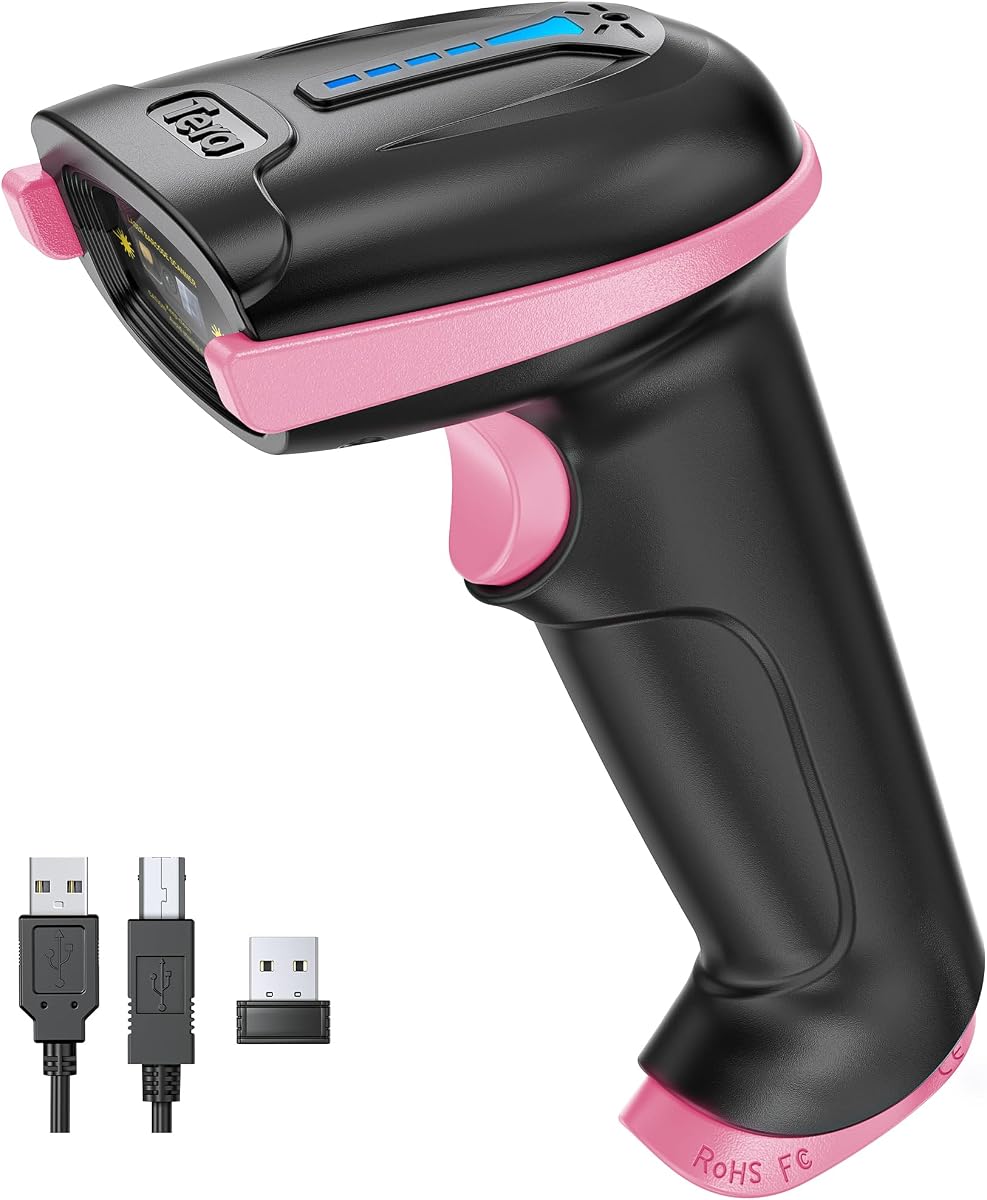
The Tera 5100 Pink is identical in function to the purple model but offers a unique color. This makes it easy to distinguish in multi-device setups.
We may earn a commission when you buy through this link, at no additional cost to you.
It retains the same battery indicator and anti-shock protection. Librarians who prefer a brighter tool will appreciate the aesthetic difference.
Performance-wise it matches the purple version perfectly. The durability and battery status display remain strong selling points for daily use.
Choose this if visual distinction matters. It provides the same reliable performance with a more vibrant look for staff members.
The pink color helps distinguish this scanner from other black or gray devices in a busy office environment.
Shares all the same battery and durability features as the standard purple model for consistent performance.
We may earn a commission when you buy through this link, at no additional cost to you.
The WoneNice USB Laser Barcode Scanner delivers speed with 200 scans per second. Its visible laser source makes it fast for high-volume checkout areas.
We may earn a commission when you buy through this link, at no additional cost to you.
With 300 configurable options it allows deep customization. This includes prefixes, suffixes, and terminating characters for complex inventory needs.
It connects via USB and works on Linux systems. While fast, the laser may struggle to read from screens which limits some modern workflows.
Best for busy desks needing raw speed. It is a reliable and robust tool for high-throughput environments.
At 200 scans per second it processes books quickly to reduce queues during peak borrowing times.
Adjust settings for 300 options including prefixes and suffixes to tailor data entry to your system.
We may earn a commission when you buy through this link, at no additional cost to you.
The Symcode Wireless Barcode Scanner offers a transmission range of up to 328 feet. This is ideal for large library stacks or distant aisles.
We may earn a commission when you buy through this link, at no additional cost to you.
Its offline storage mode allows up to 100,000 barcodes to be stored locally. Data syncs when back in range ensuring no data loss during remote tasks.
The 2000mAh battery supports over a week of continuous scanning. This endurance is perfect for staff moving through vast collections daily.
Select this for large facilities. The long range and offline capabilities address unique challenges in big library spaces.
Scan from up to 328 feet away so staff can work across large library floors without carrying cables.
Store up to 100,000 barcodes locally and upload when reconnected to avoid data loss during remote shifts.
We may earn a commission when you buy through this link, at no additional cost to you.
The Eyoyo Portable Mini 1D Bluetooth Barcode Scanner comes in a distinctive pink color. It serves as both a practical tool and a thoughtful gift for colleagues.
We may earn a commission when you buy through this link, at no additional cost to you.
It offers the same 3-in-1 connectivity as the non-pink version. Staff can switch modes easily based on device availability at their workstation.
While the battery is smaller, the auto-off feature helps extend life. It is lightweight enough for casual scanning tasks without fatigue.
Ideal for libraries that want to add some color to operations. It provides reliable performance with a friendly aesthetic.
The vibrant pink color makes scanning more enjoyable and helps differentiate devices in a multi-unit setup.
Makes an excellent gift for partners or friends who enjoy organizing or working with retail tech.
We may earn a commission when you buy through this link, at no additional cost to you.
The Barcode Scanner with Stand includes an adjustable stand for hands-free operation. It sits securely on a desk to allow scanning without holding the device.
We may earn a commission when you buy through this link, at no additional cost to you.
Its auto-sensing mode detects codes automatically when presented. This speeds up checkout for items with accessible barcodes.
While it lacks wireless freedom, the stability is beneficial for fixed points. It handles 2D QR codes which is useful for digital links.
Perfect for circulation desks. The stand design reduces hand strain and provides consistent positioning for scanning.
The adjustable stand lets you place the scanner flat so you can scan books without holding it.
Simply place items near the scanner and it will detect and read the barcode automatically.
We may earn a commission when you buy through this link, at no additional cost to you.
Choosing the right scanner depends on your library size and specific operational needs. Evaluate the following factors to find the best match.
Libraries often have diverse setups. Wired scanners are reliable but limit movement. Wireless options allow staff to scan across aisles without cables. Decide if mobility is essential for your workflow.
If your staff stays at desks, a wired unit may suffice. For shelf inventory or large collections, wireless flexibility is crucial.
For wireless units, battery life is a major factor. Some models offer days of standby while others last hours. Consider how often you can charge devices in your workflow.
Look for capacities above 2000mAh for extended use. Check if the device supports a charging cradle for easy overnight charging.
CCD and laser technologies differ in application. CCD is better for reading codes on screens or damaged paper. Laser is faster for standard barcodes but may struggle with poor print quality.
If you have many old books, choose CCD or imaging scanners. For new inventory, laser offers fast speed at checkout.
Library scanners are often used by many hands daily. Look for shock-resistant materials and protective covers. IP ratings indicate resistance to dust and moisture.
Prioritize models with anti-shock silicone if dropped frequently. A durable case extends the lifespan and reduces replacement costs.
Libraries run various systems including Linux or Mac. Ensure the scanner works with your OS without drivers. Many devices support plug and play for Windows.
Verify compatibility before buying. Incompatible drivers can stall deployment and increase setup time.
Standard libraries need 1D ISBN support. However, modern workflows may require QR or PDF417 codes. Confirm which formats your system uses regularly.
If you scan digital codes for events or programs, choose a model that supports 2D. Otherwise 1D will cover most book needs.
Libraries require quiet operations. Most scanners allow disabling the beep. Vibration feedback provides a silent confirmation of successful scans.
Look for adjustable volume settings. This ensures staff know scans work without disturbing patrons nearby.
Cost varies significantly between wired and wireless models. Determine if the flexibility of wireless justifies the price. Consider total cost including accessories like chargers.
Budget options often suffice for fixed desks. Invest in premium features only if they solve specific problems in your operations.
Start by connecting the device via USB or pairing it wirelessly. Follow the manual to scan any setup codes needed for configuration. Ensure your software accepts keyboard input for scanning.
Charge the battery fully before first use to maximize performance. Place wireless scanners on their stands or docks when not in use. Regularly update firmware if available via manufacturer support.
Clean the scanner window with a soft dry cloth to maintain accuracy. Avoid exposing the device to liquids or extreme heat. Store it in a safe place overnight to prevent drops.
Many scanners listed support Mac OS without drivers. Check the compatibility section in the product details before purchasing. If it supports HID mode it should work automatically on macOS.
Most devices require scanning a specific barcode from the manual. Switching modes changes the connection interface. Ensure you disconnect wireless receivers before switching to wired USB.
Wireless units stop working when battery is depleted. Wired units do not rely on batteries. Plan charging cycles during downtime or keep a spare battery ready for busy periods.
CCD and imaging sensors can read codes from screens. Laser sensors usually cannot. If you need to scan digital codes, choose a model with imaging technology.
Yes, a quiet environment is critical for patrons. Choose a model with a mute feature or vibration feedback. This allows staff to verify scans without noise.
Some wireless models support network mode for multiple units. Each scanner must be paired to the same receiver. Check the product specs for multi-device support.
A wireless scanner with long range is best. Look for 2.4G connectivity for extended distance. This ensures staff can scan items far from the desk.
Most offer plug and play USB connectivity. Wireless models require pairing but are generally straightforward. Always keep the manual handy for configuration barcodes.
The NETUM Bluetooth Scanner stands out as our top pick for its balance of wireless freedom and battery endurance. It suits most general library needs well.
For fixed desks, the NetumScan USB offers incredible value without sacrificing quality. It keeps costs low while maintaining reliability.
Remember that prices change frequently. Check current listings before finalizing your purchase to ensure you get the best deal.