
2pcs Keyboard Stands
4.6Editor score
Aluminum alloy construction
Improves cooling performance
Provides comfortable viewing angle
Finding the right laptop kickstand improves your workspace ergonomics significantly. A good riser lifts your screen to eye level, reducing neck strain during long work sessions. These devices also enhance airflow to keep your system cool under load.
We evaluated ten portable options based on build quality, stability, and ease of use. Our analysis focuses on invisible adhesive models and foldable stands that fit into bags. Each pick balances price with performance to suit different user needs.
Each section below highlights a specific product with its key features and pros. We explain why certain models excel for travel or office desk setups. Please note that prices and availability change frequently on retailer sites.
4.6Editor score

4.3Editor score

4.7Editor score
As an Amazon Associate we earn from qualifying purchases.
This table provides a side by side overview of key specifications for all ten models. Compare materials, adjustability, and portability features to find the best match for your laptop size and usage habits.
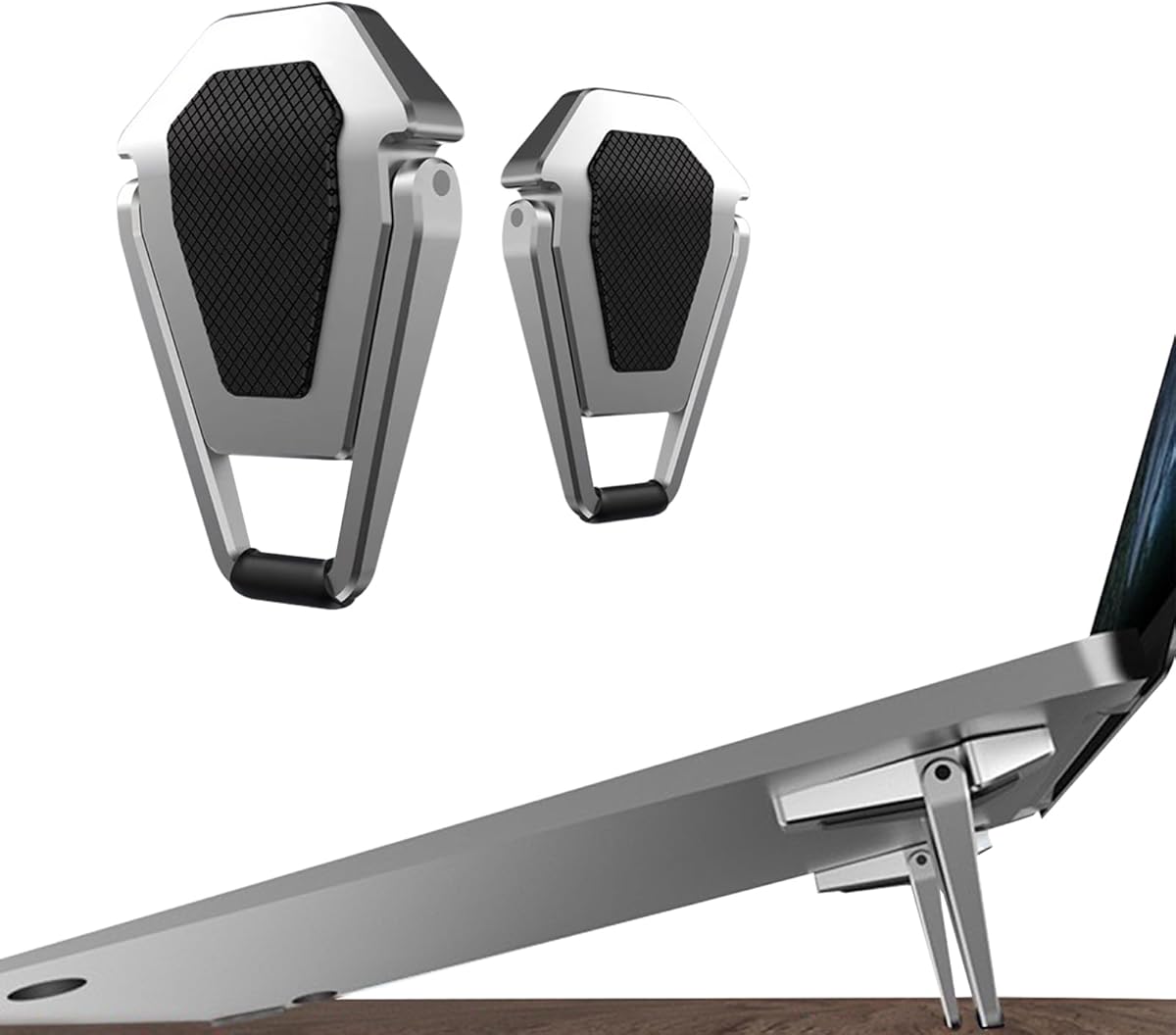




This affordable 2pcs Keyboard Stand offers a simple solution for raising your laptop. With a solid aluminum alloy build, it provides a sturdy base for typing and viewing. It aims to improve airflow and posture for a fraction of the price of larger stands.
We may earn a commission when you buy through this link, at no additional cost to you.
The stand is made from durable aluminum which resists bending over time. Its design allows air to circulate beneath the device, helping prevent overheating during long sessions. The elevated angle promotes a more relaxed posture, reducing strain on the neck and back.
Trade-offs include a lack of adjustable angles or foldable features. It is a fixed riser that requires external adhesive or friction to stay in place. While functional, it lacks the versatility found in premium models with multiple height settings.
This is an ideal choice for students or travelers needing a lightweight, low-cost lift. If you want a basic ergonomic boost without spending much, this set of two provides great value. Just ensure you have a way to secure them to your device.
The stand uses high quality aluminum alloy to ensure it lasts through daily use without bending or breaking.
Raising the laptop allows air to flow underneath, which helps dissipate heat and prevents the system from overheating.
We may earn a commission when you buy through this link, at no additional cost to you.
The Laptop Stand Portable is a tiny but mighty riser designed for commuters. Weighing just 24 grams, it folds down to a miniscule size that fits in a pocket. Its zinc alloy construction ensures it can support even heavy laptops without bending or slipping.
We may earn a commission when you buy through this link, at no additional cost to you.
This model offers an adjustable tilt between 15 and 25 degrees for ergonomic viewing. The open design promotes continuous airflow to keep the device cool. The upgraded rubber pads help secure it to surfaces, protecting both the stand and the laptop from scratches.
While sturdy, the small footprint means it relies heavily on adhesive or friction. Users might find the limited size less stable for vigorous typing compared to larger stands. However, the trade-off is immense portability for those who move locations frequently.
Ideal for business travelers who need a reliable lift without adding weight. If you want a foldable option that supports 12 to 20 inch laptops well, this is a strong contender. Just take care during setup to ensure it adheres properly.
Folding down to less than 2 inches, this stand adds zero bulk to your gear while still providing essential ergonomic support.
The open middle space allows air to circulate continuously, ensuring the laptop stays cool during intensive workloads.
We may earn a commission when you buy through this link, at no additional cost to you.
The Hagibis Laptop Stand offers adjustable height options to suit different typing preferences. Constructed from aluminum alloy, it acts as a heat sink to draw warmth away from the base. The forward tilt angle ensures better ventilation, keeping the laptop running smoothly.
We may earn a commission when you buy through this link, at no additional cost to you.
Users can switch between three heights of 10mm, 20mm, and 36mm easily. The design includes double sticking surfaces for added stability, reducing the risk of the stand falling off. This dual adhesion method makes it more reliable than single point mounts.
A minor drawback is that the heights are fixed rather than continuously adjustable. If you need fine tuning beyond these steps, this might feel limiting. Also, removing the adhesive may leave residue if not done carefully over time.
This stand is perfect for users who want a sturdy, cooling-focused lift with some adjustability. It works well for MacBooks and most Windows laptops between 12 and 17 inches. If you value thermal management and stability, this is a great pick.
Made of aluminum alloy, the stand helps conduct heat away from the laptop, acting as a thermal pad for better cooling.
The increased bottom sticking surface prevents the stand from slipping off, offering reliable support during typing.
We may earn a commission when you buy through this link, at no additional cost to you.
This portable stand stands out with its bonus privacy shield, adding security to ergonomics. It allows instant switching between 8 degrees for browsing and 13 degrees for typing. The setup takes just seconds with a peel and stick design that needs no tools.
We may earn a commission when you buy through this link, at no additional cost to you.
The triangular support design uses durable ABS plastic to hold up to 22 pounds. Anti-slip silicone pads ensure your device stays put while you work. The privacy webcam cover blocks unauthorized access, making it a smart choice for remote workers.
While practical, the ABS material is less premium than metal options like aluminum or zinc. It may wear faster over time compared to metal stands. Also, the angles are limited to two specific positions, reducing flexibility for precise ergonomic tuning.
Consider this if you want a multifunctional kit that includes privacy protection. It is a good value for students or travelers needing a quick setup. If durability is your top priority, you might prefer a metal alternative.
Includes a free webcam cover to block digital snooping, protecting both your physical health and digital security in one package.
Peel, stick, and lift is all it takes to elevate your laptop in seconds without needing screws or clamps.
We may earn a commission when you buy through this link, at no additional cost to you.
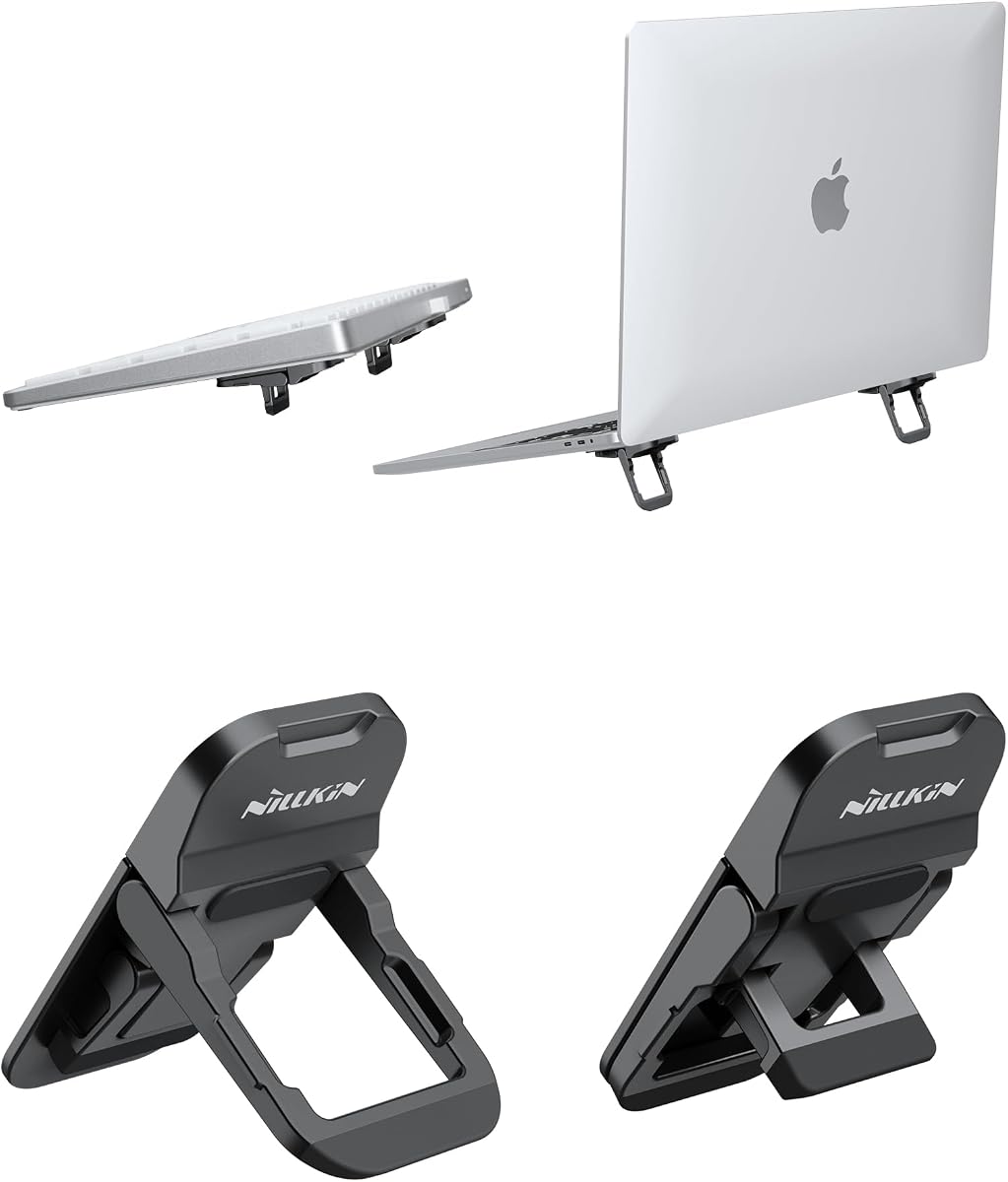
The Nillkin Portable Laptop Stand provides three precise angles of 3, 11, and 16 degrees. Crafted from zinc alloy, it offers a sturdy triangular support that resists deformation. The open design enhances air circulation, preventing the laptop from overheating during long sessions.
We may earn a commission when you buy through this link, at no additional cost to you.
It features upgraded anti-slip silicone pads for stability during typing. A nano traceless adhesive ensures firm mounting without leaving residue when removed carefully. However, users are advised to let it sit for an hour after application for full adsorption.
A key trade-off is that the adhesive does not support repeated removal. If you plan to move the stand frequently, adhesion may weaken over time. Also, the angles are fixed steps rather than continuous adjustment.
This is a great choice for office workers who want a stable, multi-angle lift. It is compact enough for travel if you do not need to swap it often. If you need frequent repositioning, consider a non-adhesive option.
Made from premium zinc alloy, the stand is both lightweight and durable enough to handle daily wear and tear.
The open structure allows air to circulate around the laptop, helping to prevent overheating during intensive tasks.
We may earn a commission when you buy through this link, at no additional cost to you.
This mini stand measures just 4.2x3cm yet offers reliable zinc alloy support. It is designed to be foldable and small enough to fit into pockets easily. The package includes anti-slip stickers and double-sided tapes for convenient installation on any surface.
We may earn a commission when you buy through this link, at no additional cost to you.
The material is reliable and durable, ensuring it does not deform easily over time. By lifting the keyboard or laptop, it improves airflow and prevents overheating. It also helps reduce neck and back pressure during long typing sessions.
Its small footprint is a trade-off for portability. It may not support very large laptops as stably as a full-sized stand. Additionally, the adhesive strength is limited compared to industrial-strength mounts.
Perfect for home or office users needing a subtle lift. If you want to carry a stand for outdoor work without bulk, this is ideal. Just ensure your device fits within its support range.
Weighing next to nothing, this stand folds down to fit in a pocket, making it perfect for outdoor or remote work.
Comes with all necessary tapes and stickers, so you can install the stand immediately without needing extra tools.
We may earn a commission when you buy through this link, at no additional cost to you.
This stand converts from a laptop riser to a tablet easel and phone holder. It features a strong N52 magnetic core that snaps onto compatible phones for dual-screen work. The aerospace aluminum build holds heavy 15.6 to 17 inch laptops without wobbling.
We may earn a commission when you buy through this link, at no additional cost to you.
There are eight distinct height slots that adjust the screen up to 5.5 inches. The custom-tensioned hinges guarantee zero sagging under load. An open X-frame design maximizes airflow to prevent CPU overheating during intensive use.
Compared to adhesive models, this is more bulky when deployed. It is not truly invisible and may not fit inside all laptop bags. The magnetic features are excellent but might be unnecessary for simple laptop lifting needs.
Ideal for power users who want a versatile EDC tool. If you use multiple devices and need magnetic integration, this is the best choice. Its stability makes it great for stationary office use as well.
Seamlessly converts between a laptop riser, tablet easel, and phone holder, replacing multiple bulky accessories.
Features a strong N52 magnetic core for snapping onto phones, creating a quick dual-screen productivity hub.
We may earn a commission when you buy through this link, at no additional cost to you.
The Ringke Laptop Stand combines premium materials with a slim, travel-friendly profile. Made from high-quality zinc alloy, it feels solid and durable in hand. The non-slip TPU ensures your device stays put during active typing or mouse usage.
We may earn a commission when you buy through this link, at no additional cost to you.
It offers three levels of height adjustment for comfortable typing and viewing angles. The design enhances airflow to support efficient heat dissipation. Easy-to-install adhesives mean no tools are required for setup.
While excellent in quality, the price is higher than basic adhesive models. The height adjustment is limited to three steps, which may not suit everyone. Also, the footprint is slightly larger than invisible options.
This is a top pick for quality-conscious users who want reliability. If you need a premium stand that looks sleek on your desk, this is it. Just be prepared to pay more for the materials and build.
Constructed from high-quality zinc alloy and non-slip TPU to ensure durability and stability on any surface.
The stand enhances airflow to support efficient heat dissipation, keeping your device cool during use.
We may earn a commission when you buy through this link, at no additional cost to you.
The Aulumu G07 stands out with its pop-up spring design that opens in 0.1 seconds. It folds down to just 4mm thick, making it incredibly compact for travel. Solid zinc alloy construction ensures it holds the device securely without wobbling.
We may earn a commission when you buy through this link, at no additional cost to you.
High-quality adhesive keeps the stand firmly attached to the back of your laptop. It raises the screen to reduce strain on eyes, hands, and neck. The airflow around the laptop helps prevent overheating during long working hours.
The spring mechanism adds complexity compared to static adhesive stands. Over time, springs may wear, affecting the pop-up reliability. Also, the clicking sound might be noisy in quiet environments.
Best for users who want a unique, ultra-compact solution. If you value speed and portability above all, this is a great pick. Just ensure the adhesive surface is clean for proper attachment.
Thanks to the built-in springs, the stand pops up instantly in just 0.1 seconds for quick setup.
Folding down to the size of an index finger, it is perfect for travel and various scenarios.
We may earn a commission when you buy through this link, at no additional cost to you.
This stand is designed for quick installation without adding weight to your device. It fits any device larger than 9 inches, offering broad compatibility. Soft slide prevention pads prevent damage to surfaces while ensuring the laptop stays put.
We may earn a commission when you buy through this link, at no additional cost to you.
3M adhesives allow for smooth adhesion that feels secure. The stand is slim and folding, making it easy to carry. However, repeated removal may lower adhesive performance, so position carefully the first time.
The main limitation is the single-use nature of the adhesive over time. It does not offer multi-angle adjustment. Also, it relies on friction for stability rather than a rigid structure.
Good for users wanting a minimal, invisible solution. If you prefer a lightweight stand that disappears when folded, this works well. Just be mindful of adhesive placement to avoid rework.
Installation is quick and easy, allowing instant use without any added weight or bulk to your device.
Soft slide prevention pads protect the surface from damage while keeping the laptop securely in place.
We may earn a commission when you buy through this link, at no additional cost to you.
Choosing the right laptop kickstand involves evaluating materials, portability, and ergonomic features. The following factors help you narrow down options based on your specific workflow and device.
Look for stands made of zinc alloy or aluminum as these materials resist bending and dissipate heat effectively. Plastic options are lighter but may not support heavier laptops as reliably over time.
For durability and thermal performance, metal is the best choice. If you prioritize minimal weight over ruggedness, high-quality plastic may suffice.
If you travel frequently, choose a foldable or adhesive model that adds minimal bulk. Some stands are designed to fit into pockets or slide into laptop sleeves without taking up space.
Prioritize lightweight options that do not hinder your ability to carry gear. Invisible designs are best for commuters who need ergonomic lifts on the go.
Adjustable stands offer multiple height settings or angles to suit different typing and viewing needs. Fixed risers are simpler but may not accommodate varied ergonomic requirements.
Check if the stand offers discrete steps or continuous adjustment. More adjustability allows for better posture customization.
Adhesive stands must stick firmly without damaging your device. Ensure the adhesive is strong enough to hold the laptop but easy to remove if needed.
Read reviews about long-term adhesion performance. Some models degrade with repeated removal, so plan your placement carefully.
An open design promotes airflow under the laptop to prevent overheating. Solid platforms may block ventilation slots depending on their thickness.
Choose a stand that raises the device sufficiently to allow air to circulate. This is vital for high-performance laptops.
Ensure the stand supports your laptop's weight and size range. Some models are optimized for specific brands like MacBook while others support generic sizes.
Check the manufacturer's specs for weight capacity and inch ranges. Compatibility ensures safety and stability.
Consider how easy the stand is to install. Adhesive models require clean surfaces and time to bond, while mechanical stands may need assembly.
A quick setup process is essential for users who move locations often. Look for tool-free installation.
Durability depends on the material quality and construction. Metal hinges and sturdy joints prevent wear from repeated folding or use.
Invest in a well-made stand if you plan to use it daily. Cheaper options may snap under stress.
Install adhesive stands on a clean, dry surface. Use alcohol wipes to remove oils before applying. Wait an hour for full bond strength.
Fold the stand properly when not in use to avoid stressing hinges. Keep it in a protective pouch to prevent scratches or loss.
Regularly check the adhesive for signs of peeling. Clean the stand gently with a damp cloth to remove dust or oils.
Most stands are designed for devices between 10 and 20 inches. Check the weight capacity to ensure safety. Adhesive models should be used on smooth, non-porous surfaces to avoid damage.
Careful removal is possible by gently lifting and applying heat. However, repeated removal may leave residue. Some adhesives are designed to be residue-free when pulled off correctly.
Yes, elevated stands improve airflow by creating space under the device. Ensure the stand does not cover the fan vents directly to avoid heat traps.
Foldable stands are rigid and detachable, while adhesive ones stick permanently to the device. Adhesive stands are more portable, while foldable ones offer better stability.
Elevating the keyboard improves posture and reduces wrist strain. It also allows better screen visibility, making typing more comfortable for long periods.
Yes, some models offer multiple height levels or adjustable tilt angles. Look for options with discrete steps if you need precise ergonomic tuning.
Raising the device increases airflow around the base, which helps dissipate heat. This is especially useful for laptops with bottom vents.
Our top picks include budget-friendly adhesive risers and premium multi-device stands. Each model offers unique benefits depending on your need for portability or stability.
Prioritize materials like zinc or aluminum for durability and heat management. Adjustable options provide flexibility for different environments and users.
Check current prices and availability before purchasing. Models may vary slightly by batch, so confirm compatibility for your specific device.