
LIUJINCAN Untwist Tool
4.2Editor score
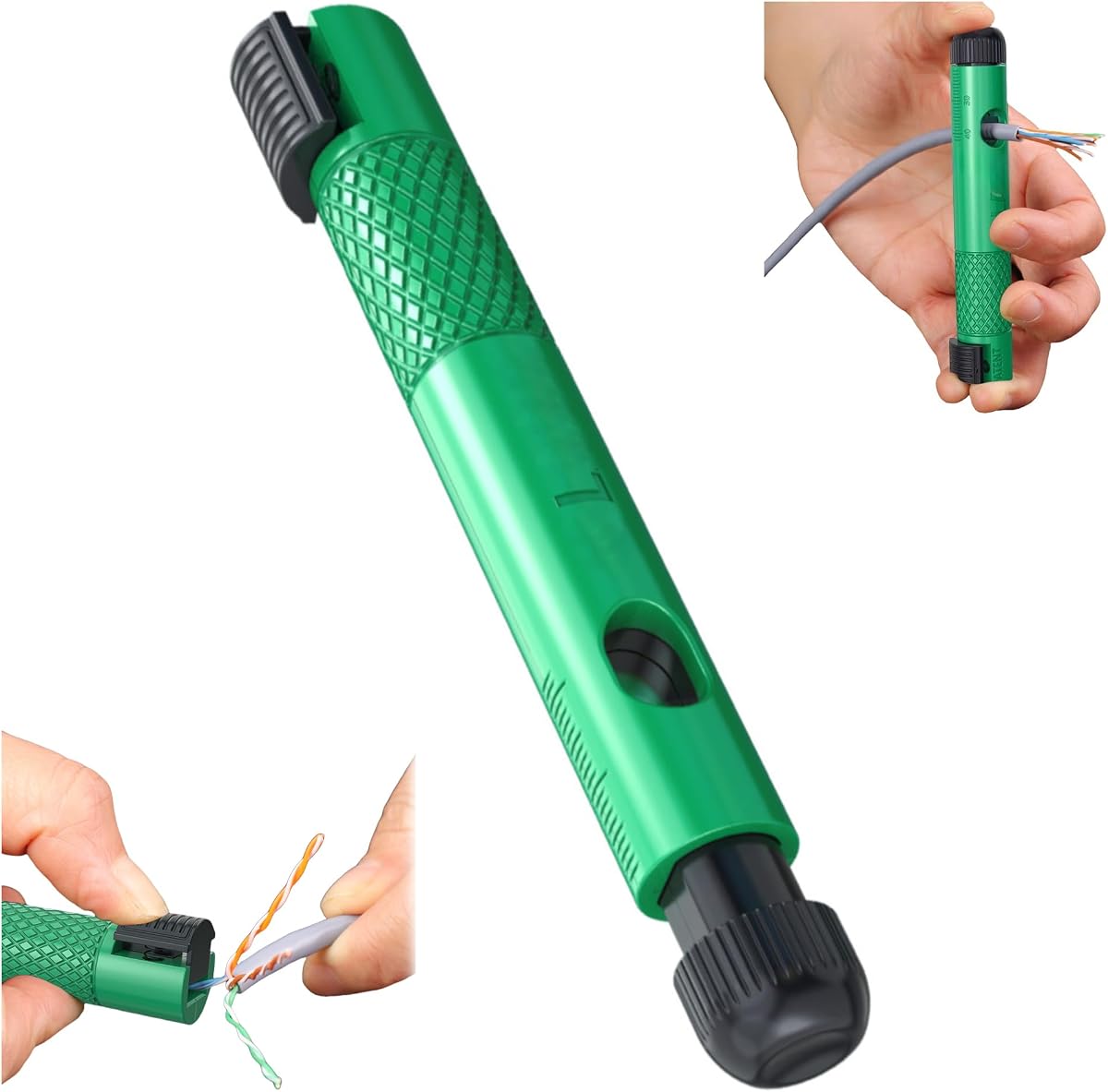
Solid brass tube construction
Dual headed for CAT5 CAT6
Heat shrink coated grip
Find the best Ethernet Untwist Tool for your networking jobs. This guide compares ten top-rated cable untwisters for speed and ease of use.
Choosing the right Ethernet Untwist Tool saves time and prevents finger fatigue during network installations. Professionals need reliable devices that separate twisted pairs quickly without damaging the internal wires or insulation.
We compared ten highly rated cable untwisters based on user feedback and technical specifications. Each product was evaluated for compatibility with common cable types and overall ease of use in daily tasks.
Each pick below shows what makes that tool stand out from the competition. Prices and availability change frequently so always verify the current details before making your final purchasing decision.
4.2Editor score

4.5Editor score

5.0Editor score
The following table presents a side by side overview of all ten Ethernet Untwist Tool options. It highlights key specifications and features to help you decide which tool fits your specific needs.



The Untwist Tool PRO-COMBO is a top rated device with a 4.5 star rating. It stands out for its ability to separate cable pairs quickly without manual strain.
We may earn a commission when you buy through this link, at no additional cost to you.
This tool untwists up to 2000 pairs per charge which makes it ideal for large network projects. The built in LED work light helps you see clearly in tight conduits or dark panels.
While it requires recharging after extended use this is a minor trade-off for the speed it provides. The USB C rechargeable battery ensures you stay ready for the next job.
Professionals who need to save time and protect their hands should buy this tool. It pays for itself quickly on the first few jobs by boosting overall efficiency.
This tool untwists up to 2000 pairs per charge making it powerful for big jobs.
The built in LED work light ensures visibility in dark corners during installation.
We may earn a commission when you buy through this link, at no additional cost to you.
This 3 piece wire untwisting tool set has a solid 4.3 star rating. It is designed for daily life and network cable making by unwinding twisted wires easily.
We may earn a commission when you buy through this link, at no additional cost to you.
The tool fits CAT5 CAT5e CAT6 CAT7 and telephone lines which makes it versatile for many tasks. Its size of about 12 cm is proper for storage in your bags or boxes.
Manual rotation is required which takes a bit of time compared to electronic tools. You must strip the network cable about 2 cm before inserting it to use effectively.
If you need a practical tool for school home or factory use this set is a good choice. It relieves burdens and makes your work more efficient on site.
The tool fits CAT5 CAT5e CAT6 CAT7 and telephone lines for wide use.
At 12 cm it fits easily into tool bags when not in use.
We may earn a commission when you buy through this link, at no additional cost to you.
The Landhoow kit has a 4.2 star rating and offers a nice combination of tools. It comes with one untwister and one stripper to meet your requirements for separating cables.
We may earn a commission when you buy through this link, at no additional cost to you.
It is practical for making network cables by unwinding and straightening the wires. The twisted wire core separator aims to avoid twisted pair hurt during separation which protects the core.
Manual twisting is required which can be slower than powered options. You must strip the network cable about 2 cm before use to ensure it operates correctly.
For office school home factory maintenance and repairing this tool is widely suitable. It is handy and practical and can be placed in your tool bags when not in use.
The package comes with a wire untwisting tool and a cable stripper.
The separator aims to avoid twisted pair hurt during separation.
We may earn a commission when you buy through this link, at no additional cost to you.
This tool has a perfect 5.0 star rating and features a 3 in 1 design. It combines wire stripping cutting and manual straightening to streamline network cable processing.
We may earn a commission when you buy through this link, at no additional cost to you.
The manual cable straightening slot guarantees smooth plug-in and connections. Precision round cable stripping peels insulation cleanly without nicking wire cores ensuring stable signal transmission.
It is not compatible with flat cables which is a limitation to keep in mind. Manual straightening may require some effort compared to electronic aids.
For network engineering data centers and smart home setups this tool is a great fit. It is built to withstand frequent professional use and is compact and portable.
Combines stripping cutting and manual straightening in one tool.
Precision stripping ensures stable signal transmission without nicking cores.
We may earn a commission when you buy through this link, at no additional cost to you.
This pen style tool has a 2.8 star rating which suggests mixed user feedback. It replaces multiple gadgets in your toolbox by combining stripping straightening and cutting functions.
We may earn a commission when you buy through this link, at no additional cost to you.
The rotating handle is designed to reduce hand fatigue during prolonged use. It features high-quality blades for clean precise cuts without damaging internal wires.
Lower ratings suggest some users may face issues with blade quality or ergonomics. Stripping the network cable is required before you can use the straightening function.
Despite the rating it is a compact option for IT technicians and data center personnel. It is perfect for carrying around to solve cable problems quickly on site.
Combines stripping straightening organizing and cutting functions in one tool.
The rotating handle is designed to reduce hand fatigue.
We may earn a commission when you buy through this link, at no additional cost to you.
This tool has a 3.8 star rating and is designed for 1.3mm Crystal Network Cables. It serves as an efficient cable comb and wires pair separator for new installations.
We may earn a commission when you buy through this link, at no additional cost to you.
The grip is crafted with ABS material which offers a comfortable and ergonomic feel. This allows it to be easy to handle and use for extended periods of time.
It is limited to 1.3mm cables which might not cover all standard types. Manual operation can be slow when compared to powered untwist solutions.
For new network installations maintenance and system upgrades this straightener is an essential tool. Its compact size fits easily into any toolkit or pocket for portable use.
Specifically designed for 1.3mm Engineer Wire category cables.
Crafted with ABS material for a comfortable ergonomic grip.
We may earn a commission when you buy through this link, at no additional cost to you.
This tool has a 4.1 star rating and is designed to untwist CAT5 CAT5e CAT6 CAT7 pairs fast. It is simple to use and easy to carry on the job site.
We may earn a commission when you buy through this link, at no additional cost to you.
It saves time and reduces finger pressure during large jobs which is a key advantage. The design specifically aims to reduce damage to twisted pair during separation.
Manual operation still requires some hand effort compared to powered tools. Durability might be lower than heavy duty alternatives for high volume industrial use.
If you need a simple tool for quick separation and straightening this is a good pick. It is specially designed for fingers to make it more simple and comfortable to use.
Can untwist and separate CAT5 CAT5e CAT6 CAT7 pairs FAST.
Specially designed for fingers for simple and comfortable use.
We may earn a commission when you buy through this link, at no additional cost to you.
This tool has a 3.2 star rating and features a pen shaped design. It combines stripping straightening and organizing functions making it a must-have for IT technicians.
We may earn a commission when you buy through this link, at no additional cost to you.
Equipped with an SK5 steel blade it delivers clean accurate cuts without damaging internal wires. The rotating handle is designed to reduce hand fatigue during prolonged use.
Lower ratings suggest reliability may vary depending on usage intensity. Manual rotating still requires effort compared to powered untwist tools.
For intricate data center or home office cabling tasks it is a good fit. Its compact size ensures quick cable fixing everywhere and anytime.
Equipped with SK5 steel blade for clean accurate cuts.
Compact 12mm long 18g lightweight design fits effortlessly.
We may earn a commission when you buy through this link, at no additional cost to you.
This tool has a 3.9 star rating and features an innovative design for quick untwisting. It includes a roller mechanism that allows for easy untwisting with a simple turn.
We may earn a commission when you buy through this link, at no additional cost to you.
You can turn the roller to untwist and press to straighten wires which ensures a smooth process. The ergonomic design provides a comfortable grip that reduces hand fatigue.
The roller mechanism may wear over time with heavy use. It is mainly ideal for Category 5/6 cables rather than broader ranges.
Made from ABS and metal it is built to last as a valuable addition to any toolkit. It simplifies the process of separating and straightening wires effectively.
The innovative roller mechanism allows for easy untwisting with a simple turn.
Made from ABS and metal to ensure durability and reliability.
We may earn a commission when you buy through this link, at no additional cost to you.
This tool has a 4.2 star rating and features a solid brass tube. It quickly untwists CAT5 CAT6 CAT7 twisted pairs before RJ45 crimping which saves time.
We may earn a commission when you buy through this link, at no additional cost to you.
The ergonomic design reduces strain during repetitive wire separation to avoid sore hands. It is made of corrosion resistant and precisely machined brass for consistent untwisting results.
Manual twisting is required which may be slower than powered solutions. Brass is durable but less hard than some heavy duty steel options.
If you are a pro installer looking for durability and efficiency this is a great pick. The heat-shrink coated handle offers excellent grip even with gloves.
Solid brass tube is durable corrosion-resistant and precisely machined.
Ergonomic design reduces finger fatigue during repetitive wire separation.
We may earn a commission when you buy through this link, at no additional cost to you.
Choosing the right Ethernet Untwist Tool requires attention to compatibility design and features. This guide explains the key factors to consider before you buy.
Ensure the tool works with your specific cable types such as CAT5e CAT6 or CAT7. Most modern tools cover a broad range but some are designed for specific sizes.
Look for tools that explicitly support your cable range to avoid compatibility issues.
Powered tools offer speed for large jobs while manual tools are lightweight and require no charging. Decide based on your typical workload and port needs.
If you have high volume jobs consider a rechargeable unit for productivity.
Tools made from brass or steel tend to last longer than plastic ones. Metal construction ensures consistent untwisting results over time.
Choose durable materials like brass or steel for long term reliability.
An ergonomic design reduces hand fatigue during extended use. Features like rotating handles or soft grips are helpful for large projects.
Prioritize comfortable grips and rotating handles to reduce strain.
Some tools combine stripping and straightening in one device. This can save time but ensure it works cleanly without damaging the core.
Check if the stripping feature is precise enough for your needs.
A compact design makes the tool easier to carry in your pocket or toolbox. Look for lightweight models that fit comfortably in your gear.
Select a compact model that fits easily into your tool bags.
Built in LED lights can be useful for dark installations like conduits. They help ensure precision when working in low light areas.
Consider models with built in LED work lights for dark areas.
More expensive tools often offer better durability and features. However manual tools can provide great value for smaller projects.
Balance the cost against the features you need for your work.
To use the tool insert the stripped end of the cable into the designated slot. Rotate the handle or trigger until the twisted pairs separate evenly.
For manual tools you may need to rotate the cable while holding the core. This ensures a smooth and straight untwisted wire for proper connection.
Clean the tool regularly and store it in a dry place. This prevents rust and keeps the mechanism working smoothly over time.
Most tools are designed to avoid damage to the internal wires. However using too much force or the wrong tool can nick the core. Always follow the manufacturer's instructions carefully.
Look for models that explicitly list CAT7 compatibility. High rated options include the PRO-COMBO and specific CAT7 wire strippers available in the market.
For large projects yes a powered tool saves significant time. For occasional use a manual tool is often sufficient and cheaper to maintain.
Not all tools work with flat cables. Always check the specifications as some are designed for round cables only to avoid jamming or damage.
Some models can untwist up to 2000 pairs per charge. Always check the specific battery capacity and charge time before buying to match your needs.
Compact tools measuring around 12 to 14 cm are ideal for travel. They fit easily into tool bags or pockets without taking up much space.
The Untwist Tool PRO-COMBO leads as the top choice for professionals seeking power and speed. Its high capacity makes it ideal for large network installations.
For budget conscious buyers the LIUJINCAN Untwist Tool offers solid brass construction and ergonomic design. It provides a great balance of cost and performance.
Always verify the current prices and availability before you buy since details may change. Choose the tool that best fits your cable types and typical workload.