
Lenovo V15 Gen 4
4.3Editor score
Intel Core i5
16GB RAM
Fast SSD Storage
Finding a laptop that lasts requires careful attention to build quality and component selection. Users seeking longevity need devices that withstand daily wear while maintaining performance over time.
We evaluated ten laptops based on durability standards, thermal management, and upgrade potential. Each model was chosen for its ability to serve professionals and students through multiple years.
Each pick highlights specific strengths like military-grade testing or robust connectivity. Prices and availability change frequently so verify details before purchasing your next reliable machine.
4.3Editor score

4.5Editor score

5.0Editor score
As an Amazon Associate we earn from qualifying purchases.
This side-by-side comparison highlights the key specifications and strengths of each top longevity model to help you find the right fit.




The HP 17 inch Business Laptop stands out for its expansive display and robust build quality. It scores highly among users who need reliable performance over several years.
We may earn a commission when you buy through this link, at no additional cost to you.
This model features a stunning 17.3 inch FHD anti-glare display that ensures comfort during extended work sessions. The full-size keyboard includes a numeric keypad which is essential for data heavy tasks.
While it is slightly heavier than ultrabooks, the trade-off offers better durability and thermal management. The long battery life supports all-day productivity without constant recharging needs.
If you need a stable workstation that balances screen real estate with reliability, this HP model is an excellent choice. It remains a top pick for longevity and daily utility.
The 17.3 inch FHD display provides sharp details and vivid colors ideal for long-term visual comfort.
Preloaded with Windows 11 for a secure and easy-to-manage work experience with built-in AI Copilot.
We may earn a commission when you buy through this link, at no additional cost to you.
Dell 16 Laptop DC16251 combines premium design with features aimed at long-term comfort and productivity. It is ideal for users who prioritize visual quality and support.
We may earn a commission when you buy through this link, at no additional cost to you.
Its edge-to-edge clarity offers a 16:10 aspect ratio for more vertical workspace. ComfortView Plus reduces harmful blue light making it safer for extended screen use.
Adaptive thermals adjust power usage to maintain efficiency and reduce wear over time. The onsite service ensures quick repairs if hardware issues arise during the warranty period.
This laptop is perfect for professionals needing a reliable machine with superior display tech. Invest in it if you value eye comfort and strong customer service support.
Reduces harmful blue light emissions while preserving true-to-life color for eye comfort.
Senses stable surfaces and adjusts power to run more efficiently and reduce heat.
We may earn a commission when you buy through this link, at no additional cost to you.
The Lenovo V15 Gen 4 Business Laptop delivers powerful performance at a budget-friendly price. It uses an Intel Core i5-13420H which offers solid multitasking capabilities.
We may earn a commission when you buy through this link, at no additional cost to you.
With 16GB RAM and Windows 11 Pro, this machine handles complex layouts and enterprise features smoothly. The numeric keypad adds efficiency for data entry tasks over time.
While it does not have a premium chassis, the design is durable enough for everyday office use. Its port selection supports legacy devices which helps extend usability.
Buy this if you need a cost-effective solution with strong processing power. It balances price and performance well for long-term daily use scenarios.
16GB high-bandwidth RAM smoothly runs multiple applications and browser tabs simultaneously.
Optimize productivity with pre-configured layouts and intuitive navigation for collaborative work.
We may earn a commission when you buy through this link, at no additional cost to you.
Lenovo Laptop Computer V15 is a reliable choice for those seeking military-grade durability. Its MIL-SPEC tested chassis resists daily wear and environmental stressors effectively.
We may earn a commission when you buy through this link, at no additional cost to you.
The AMD Ryzen 5 processor paired with DDR5 RAM ensures fast application loading and smooth multitasking. Privacy shutter on the webcam adds security for remote work environments.
While it lacks a high-end display, the anti-glare coating keeps eyes comfortable during long sessions. The build quality ensures this device can handle demanding business schedules.
This is an excellent pick for students or professionals needing a sturdy machine. Its combination of speed and resilience makes it a strong contender for longevity.
Tested to MIL-SPEC requirements for sturdy build and business security in harsh environments.
Enjoy TÜV Low Blue Light display and HD webcam with privacy shutter for security.
We may earn a commission when you buy through this link, at no additional cost to you.
The Lenovo ThinkBook 16 Gen 8 is engineered for heavy workloads with its AI-powered processor. It delivers exceptional speed for content creation and data analysis tasks.
We may earn a commission when you buy through this link, at no additional cost to you.
Massive 32GB DDR5 RAM and 1TB SSD provide ample headroom for future-proofing. The aluminum chassis maintains a sleek look while protecting internal components effectively.
Thunderbolt 4 connectivity ensures you can connect multiple high-speed peripherals without bottlenecks. Enterprise security features like BitLocker and TPM protect sensitive data over the years.
If you need a top-tier machine for professional growth this model fits the bill. It balances power and durability for users who demand performance over time.
Intel Core Ultra 7 processor with NPU delivers intelligent workload optimization for efficiency.
1TB PCIe NVMe SSD offers lightning-fast boot times and ample space for large files.
We may earn a commission when you buy through this link, at no additional cost to you.
Lenovo V15 Gen 4 offers reliable performance with a focus on user comfort and durability. The AMD Ryzen CPU provides quiet operation for home and office environments.
We may earn a commission when you buy through this link, at no additional cost to you.
Its FHD IPS display ensures clear visuals even outside with 300 nits brightness. Built for military-grade toughness it withstands harsh conditions like humidity and pressure well.
While 8GB RAM is the base this model is efficient for standard daily tasks. Environmental certifications show Lenovo is committed to sustainable manufacturing practices.
Choose this if you need a rugged yet budget-friendly option for daily work. It combines essential features with robust construction for long-lasting use.
Anti-glare 15.6 FHD IPS display ensures clear viewing in bright lighting conditions.
Made with responsibly sourced materials and sustainability certifications to reduce impact.
We may earn a commission when you buy through this link, at no additional cost to you.
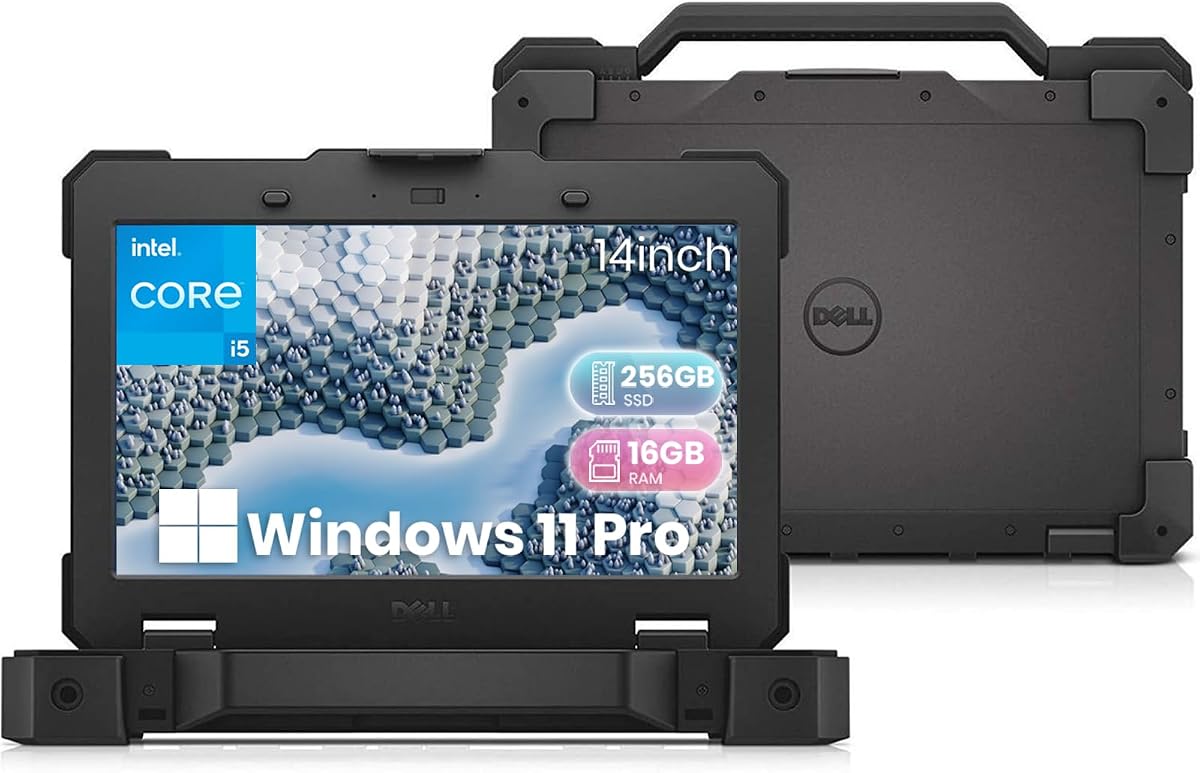
This Dell Latitude Rugged 5420 is built for the harshest environments with its reinforced chassis. It excels where standard laptops would fail due to dust or drops.
We may earn a commission when you buy through this link, at no additional cost to you.
The 14 inch Full HD touchscreen offers outdoor visibility crucial for field work. Despite its age, 16GB RAM keeps the system responsive for essential business applications.
Connectivity includes legacy ports like RJ-45 Ethernet which are vital for industrial setups. Windows 11 Pro provides enterprise management tools needed for secure deployments.
If you work in construction or logistics this laptop is unmatched for reliability. It proves that longevity often means ruggedness above raw speed.
Full HD display with outdoor-viewable technology provides sharp visuals in bright sunlight.
Includes USB 3.1 HDMI and Ethernet to connect tools and external displays easily.
We may earn a commission when you buy through this link, at no additional cost to you.
The Dell Latitude 5414 Rugged offers military-grade durability at a renewed price point. It withstands drops spills and dust making it ideal for tough conditions.
We may earn a commission when you buy through this link, at no additional cost to you.
Its rich array of ports includes RS-232 serial interfaces which are rare on modern laptops. This makes it highly versatile for connecting legacy industrial equipment effectively.
Certified refurbished status ensures the device is professionally inspected and restored fully. The 90-day service adds a layer of confidence for budget conscious buyers.
Invest in this for a reliable machine that handles rough conditions well. It combines rugged utility with affordability for extended service life.
Engineered to military-grade standards to withstand drops spills dust and extreme temperatures.
Professionally inspected restored to full working condition and backed by 90-day service.
We may earn a commission when you buy through this link, at no additional cost to you.
This Lenovo V-Series V15 stands out with 40GB RAM and 1TB SSD for massive capacity. It is ideal for users who need to handle many browser tabs and files simultaneously.
We may earn a commission when you buy through this link, at no additional cost to you.
The AMD Ryzen 7 processor delivers robust performance for data heavy tasks. Its large storage ensures you have space for years of document accumulation.
Although the display is standard FHD the functional design supports productivity well. Windows 11 Pro offers features for secure and collaborative work environments.
If you need raw capacity for long-term work this model delivers well. It remains a reliable choice for data-intensive roles.
40GB high-bandwidth RAM smoothly runs multiple applications and browser tabs all at once.
1TB PCIe NVMe SSD allows for fast bootups and massive data transfer capacity.
We may earn a commission when you buy through this link, at no additional cost to you.
The Lenovo ThinkPad L16 offers enterprise-ready performance with a durable MIL-STD-810H design. It delivers up to 10 hours of battery life for on-the-go productivity.
We may earn a commission when you buy through this link, at no additional cost to you.
Customizable RAM and SSD options ensure you can tailor the device for long-term needs. The fingerprint reader and backlit keyboard add security and typing comfort.
While it comes from a third-party seller the core ThinkPad reliability remains intact. Thunderbolt 4 connectivity ensures future-proofing for external high-speed devices.
This laptop is perfect for professionals who need enterprise security and reliability. Choose it for a balanced mix of power and endurance over years.
Engineered for reliability with MIL-STD-810H certification to withstand demanding fieldwork.
16 WUXGA IPS display with 400-nit anti-glare ensures peak productivity in sunlit offices.
We may earn a commission when you buy through this link, at no additional cost to you.
Selecting a laptop that lasts requires evaluating several key factors beyond just raw speed. This guide breaks down what matters most for long-term reliability.
A laptop that lasts starts with a durable chassis. Look for models with aluminum bodies or those certified to military standards like MIL-STD-810H. These designs resist drops spills and extreme temperatures better than plastic alternatives.
Prioritize devices with reinforced hinges and rugged keyboards if you plan to use the laptop daily for years.
Processors determine how long a laptop remains responsive. Opt for newer generations that support future software demands. AMD Ryzen and Intel Core U or P series offer efficient performance that reduces heat stress over time.
Choose a processor that matches your workload to ensure it does not struggle as software requirements increase.
16GB RAM is a safe minimum for longevity to handle multitasking. SSDs are essential for speed and reliability. Ensure the laptop allows upgrades so you can boost capacity as needed.
High-bandwidth DDR5 RAM and NVMe SSDs ensure your system remains snappy for longer.
A screen that lasts is vital for daily use. Anti-glare coatings and low blue light certifications protect eyes and the glass itself. Consider IPS panels which offer better viewing angles and color retention.
If you work outdoors or in bright spaces look for high brightness and outdoor visibility tech.
Batteries degrade over time so efficient thermal management helps prolong their life. Look for fast charging capabilities and battery health tools in the BIOS. A laptop that runs cool will maintain charge cycles longer.
Choose models with adaptive thermals or efficient power modes to extend battery lifespan.
Robust ports ensure you can connect various peripherals without dongles. Thunderbolt 4 Ethernet and HDMI are signs of modern connectivity. Legacy support like USB-A and RS-232 is useful for industrial longevity.
More ports mean you can adapt the laptop to new tools without replacing the device.
Longevity includes support after purchase. Onsite warranties or certified refurbished programs offer security against defects. Check for extended service options before buying to ensure help is available.
A strong warranty plan can save costs if hardware issues arise after the initial use period.
Many modern laptops are soldered but some business models allow RAM and SSD changes. Upgradability extends the device lifespan significantly by letting you replace aging components.
If future proofing matters choose models that explicitly state user-accessible storage or memory slots.
Keep your laptop in a temperature-controlled environment to protect internal components from heat and cold. Avoid placing it on soft surfaces like beds where airflow is restricted.
Use a surge protector when charging to prevent electrical damage to the battery and motherboard. Regularly update drivers and BIOS for optimal security and performance.
Clean the screen and keyboard with a microfiber cloth and mild solution. Close the lid fully when moving to prevent hinge stress or screen damage.
A laptop lasts longer when it has robust build quality efficient thermal management and upgradeable components. Materials like aluminum and military-grade certifications help resist physical wear over time.
Yes having sufficient RAM prevents performance bottlenecks as software demands grow. It allows the system to handle future updates without needing a hardware replacement sooner.
Rugged laptops offer superior protection against drops and dust making them ideal for harsh environments. They often outlast consumer models due to reinforced chassis and protective features.
Avoid overcharging and keep the device cool to maintain battery health. Use built-in battery limit modes if available to reduce wear on the cells during daily use.
Business laptops typically offer better build quality support and longer warranty options. They are engineered for reliability which supports long-term use compared to consumer models.
Windows 11 Pro often receives longer support cycles and enterprise features that help with management. Secure boot and encryption tools protect your data effectively over time.
Modern laptops can last five years or more with proper care. However if you need more speed check if RAM or SSD upgrades are possible before buying new.
Certified refurbished units undergo testing and repair ensuring they meet original specs. They can offer excellent value and longevity if they come with a service warranty.
We highlighted top picks like the HP 17 inch Business Laptop for overall balance and the Dell Latitude Rugged for extreme durability.
Prioritize build quality and memory capacity when looking for a machine that serves you for years. A good warranty ensures your investment is protected.
Remember to check current prices and availability before purchasing. Verify the latest specs to ensure the model fits your long-term needs.