
RREAKA TV Dock
4.4Editor score
Supports 4K 60Hz output
Includes 100W PD charging
Compact aluminium alloy design
Discover the top portable docks for Nintendo Switch play. We compare features, compatibility, and performance to help you choose the perfect travel station
Finding the right dock for Nintendo Switch portable play is essential for gamers who want seamless transitions between handheld and big screen experiences. A quality dock ensures stable connections and efficient charging during extended sessions.
We evaluated ten leading options based on build quality, video output capabilities, and port selection. Each product was analyzed for compatibility with various console models and real-world travel usability scenarios.
This guide details specific strengths and potential limitations for every model listed. Keep in mind that availability and specifications may vary over time, so verify details before making your final purchase decision.
4.4Editor score

4.2Editor score

4.4Editor score
The following table provides a side by side comparison of all ten reviewed models. Each entry highlights key specifications and links to detailed product pages for further information.
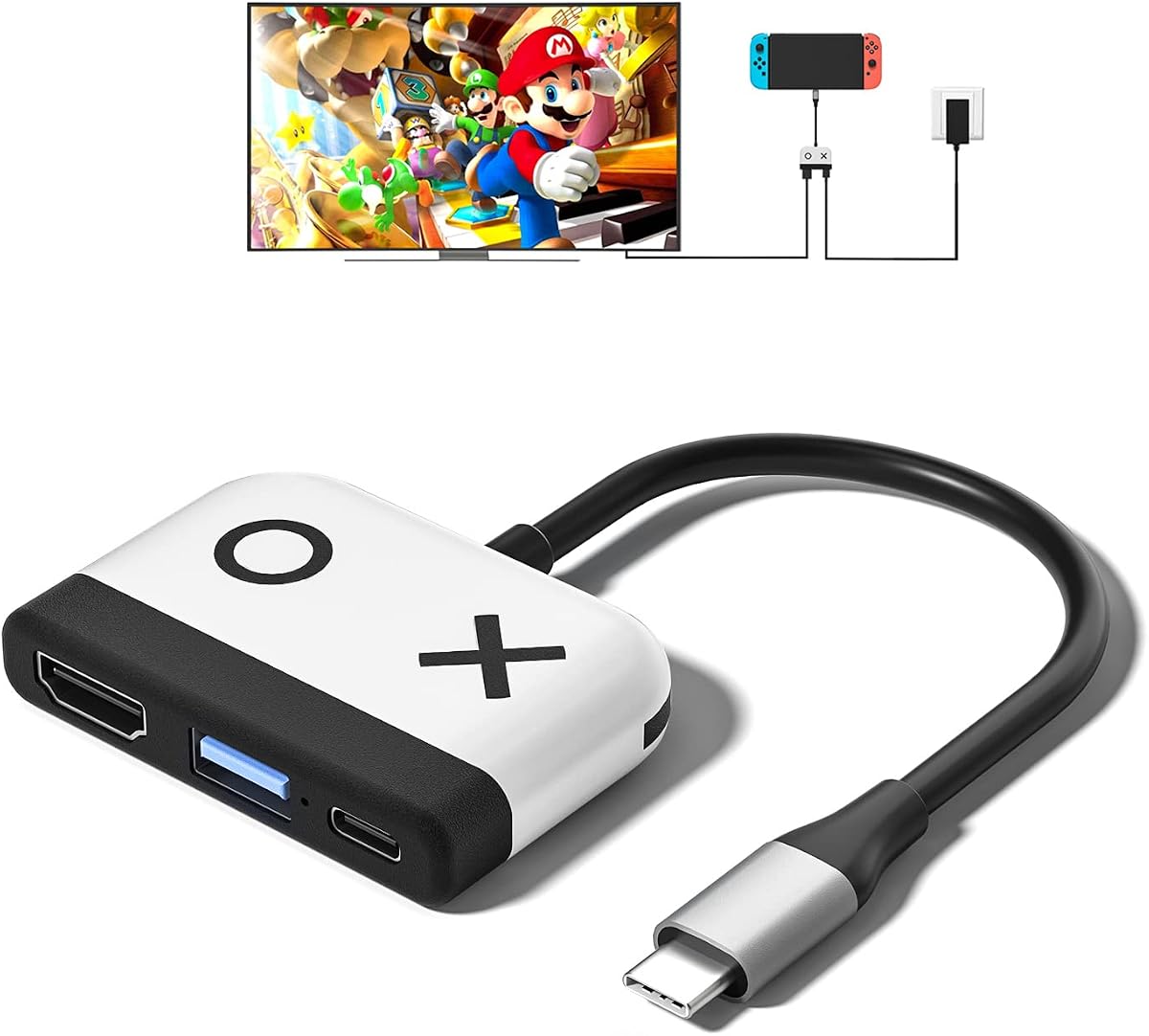


This docking station offers a reliable way to connect your console to a TV for larger screen gaming. It supports up to 4K resolution and includes essential ports for charging and data transfer.
We may earn a commission when you buy through this link, at no additional cost to you.
The build quality is solid despite its compact size. It fits easily into backpacks and works with multiple console models including the OLED variant. The HDMI 2.0 port ensures smooth video transmission.
Users should note that it does not come with a power adapter or HDMI cable. You will need to provide your own accessories to get started with this setup immediately.
Ideal for travelers who need a backup dock or a more portable alternative to the standard station. It delivers consistent performance for most gaming scenarios without significant lag.
The small form factor makes it easy to slip into any bag without adding bulk to your carry on items.
Beyond the Switch it also supports devices like the Steam Deck making it versatile for multi console gamers.
We may earn a commission when you buy through this link, at no additional cost to you.
This model stands out for offering premium features like 4K 60Hz output at a budget friendly price. It is designed to be a direct replacement for the official dock.
We may earn a commission when you buy through this link, at no additional cost to you.
The aluminium alloy casing provides excellent durability while keeping the weight down. It supports multiple USB ports allowing you to connect peripherals alongside the console.
While it is an excellent choice for most users the lack of included cables means you need to have your own accessories ready. Also ensure your charger supports the required wattage.
Perfect for anyone looking to upgrade their setup without spending too much. It handles high definition content well and maintains stable connections during long gaming sessions.
With 4K support you can enjoy crisp graphics on modern televisions that support high resolution video output.
The 100W PD port ensures your console charges quickly while you play without interruptions or power warnings.
We may earn a commission when you buy through this link, at no additional cost to you.
Designed with the latest console hardware in mind this dock ensures you are ready for future releases. It supports high resolution output and fast charging standards.
We may earn a commission when you buy through this link, at no additional cost to you.
The cable style design reduces bulk significantly making it ideal for travel. It connects directly to your console and TV without needing a large base unit.
Premium materials are used throughout the build which adds to the cost but ensures longevity. It works seamlessly with both current and new console models without compatibility issues.
Recommended for early adopters and serious gamers who want the best performance. It delivers a smooth experience for high definition gaming on large screens anywhere you go.
Support for new console generations means you will not need to buy another dock when you upgrade your system.
The minimal footprint saves space in your bag and on your desk compared to traditional bulky docking stations.
We may earn a commission when you buy through this link, at no additional cost to you.
This dock uses a high quality silicone material that resists scratches and minor impacts. It is designed for users who prioritize portability and protection for their gear.
We may earn a commission when you buy through this link, at no additional cost to you.
The compact size allows it to fit in a pocket or small bag. It supports standard video resolutions and includes a USB 3.0 port for connected devices.
While the silicone casing is durable it might attract dust more than metal options. You should keep it clean to ensure smooth operation over time.
A solid choice for casual gamers who travel often. It provides a reliable connection without adding significant weight to your travel kit.
The silicone exterior helps protect the internal components from accidental bumps during transit or storage.
Compatible with both standard and OLED models making it a versatile choice for most Switch owners.
We may earn a commission when you buy through this link, at no additional cost to you.
This model offers a 6 in 1 multi port design giving you plenty of connectivity options. It includes safety chips to protect against overheating and overcharging.
We may earn a commission when you buy through this link, at no additional cost to you.
A dedicated button allows you to switch between tabletop and TV mode easily. The blue LED indicator provides visual feedback on the current status of the connection.
Users should be aware that no cables are included so you must purchase them separately. The LED light might be bright in dark environments but can usually be ignored.
Great for users who need to connect multiple peripherals at once. It provides a functional replacement for the original dock with added safety features.
Built in protection chips help prevent damage from power surges or overheating during long usage periods.
The physical button simplifies the process of changing display modes without needing to restart the console.
We may earn a commission when you buy through this link, at no additional cost to you.
A straightforward 3 in 1 docking station that covers the essentials for TV output and charging. It supports up to 100W power input for fast charging.
We may earn a commission when you buy through this link, at no additional cost to you.
The design is minimal and functional without unnecessary features. It connects easily to your console and TV for immediate use without driver installation.
While it lacks extra ports it gets the job done efficiently. The compact size makes it a good secondary option for travel.
Best for users who want a no fuss replacement for the standard dock. It provides a stable connection for gaming and media playback.
Just plug it in and it works immediately without needing any software configuration or updates.
The high wattage input ensures your device stays charged even during intensive gaming sessions.
We may earn a commission when you buy through this link, at no additional cost to you.
This dock is designed for portability with a pocket sized build that fits easily in any bag. It supports up to 1080P output which is standard for most consoles.
We may earn a commission when you buy through this link, at no additional cost to you.
It includes a USB 3.0 port for connecting accessories like controllers. The three port layout is simple and easy to manage during travel.
The plastic construction keeps costs low but may feel less premium than metal alternatives. It is a functional solution for basic TV output needs.
Ideal for budget conscious travelers who need a reliable backup dock. It handles standard gaming sessions without issues or connection drops.
Its small size ensures it takes up minimal space in your luggage or daily carry bag.
Supports 1080P which is sufficient for most users without needing 4K displays.
We may earn a commission when you buy through this link, at no additional cost to you.
At only 1.4 ounces this is one of the lightest docks available. It supports 4K 60Hz output and is compatible with a wide range of USB C devices.
We may earn a commission when you buy through this link, at no additional cost to you.
The DP Alt Mode support allows it to work with laptops and other computers as well. It is essentially a travel hub that works for multiple device types.
Users should ensure their device supports DP Alt Mode for video output. The small connector requires careful handling to avoid bending or damage.
Excellent for tech enthusiasts who use multiple devices. It provides a versatile solution for connecting different gadgets to a single display.
Works with consoles laptops and tablets making it a versatile tool for digital nomads.
Support for 4K 60Hz ensures you get the best possible visual experience on modern screens.
We may earn a commission when you buy through this link, at no additional cost to you.
This dock features a classic black and white design that fits well with any setup. It weighs only 45g making it easy to carry in your pocket.
We may earn a commission when you buy through this link, at no additional cost to you.
It includes a USB 3.0 port and supports fast charging to keep your console powered. The HDMI 2.0 port ensures stable video transmission to your TV.
The design is simple without extra bells and whistles. It focuses on core functionality which is ideal for users who want reliability over features.
A solid choice for everyday use and occasional travel. It provides a clean aesthetic and reliable performance for standard gaming needs.
The classic color combination looks professional and matches well with other electronics in your setup.
Focused on stability it delivers consistent performance without unexpected disconnects or glitches.
We may earn a commission when you buy through this link, at no additional cost to you.
This dock includes built in ventilation to help dissipate heat during long sessions. It features a flexible spring stand that reduces pressure on the console port.
We may earn a commission when you buy through this link, at no additional cost to you.
It allows easy switching between tabletop and TV modes. The multiple USB ports provide options for connecting controllers or other accessories.
While it has advanced features it has a lower user rating compared to others. Some users may find the design complex for simple needs.
Best for users concerned about heat management. It offers a unique approach to cooling and protection for your console during extended use.
Ventilation openings help keep the console cool preventing throttling during long play sessions.
The spring stand reduces wear and tear on the charging port by minimizing insertion force.
We may earn a commission when you buy through this link, at no additional cost to you.
Selecting the right dock requires considering several factors to ensure compatibility and performance. This section outlines key aspects to evaluate before making a purchase.
Check the maximum resolution supported by the dock. Most models support 1080P which is sufficient for standard play but some offer 4K for future proofing.
Higher resolution support ensures better visual clarity on larger screens.
Ensure the dock supports enough wattage to charge your console while playing. Look for 100W PD input to guarantee stable power delivery.
Adequate power prevents interruptions during long gaming sessions.
Consider how many USB ports you need for controllers or accessories. Some docks offer multiple ports while others are limited to a single one.
More ports provide greater flexibility for connecting peripherals.
Metal alloys offer better heat dissipation and durability compared to plastic. Silicone covers protect against scratches but may attract dust.
Choose a material that suits your travel needs and usage environment.
Weight and size are critical for travel. Lightweight designs that fit in a pocket are ideal for frequent travelers.
A compact form factor reduces bulk in your bag.
Verify compatibility with your specific console model. Some docks work with Switch 2 while others are limited to older versions.
Check for compatibility with other USB C devices if needed.
Most portable docks do not include cables or chargers. Ensure you have the necessary HDMI and power cables before purchasing.
Avoid hidden costs by confirming what is included in the box.
Look for built-in chips that protect against overcharging and overheating. These features ensure safe operation during extended use.
Safety features provide peace of mind for expensive hardware.
Start by connecting the HDMI cable to the dock and your TV. Ensure the dock is powered on before inserting the console.
Insert the console into the dock until you hear a click. Check the LED indicators if available to confirm a successful connection.
Clean the dock regularly with a soft cloth to remove dust. Store it in a protective case when not in use to prevent damage.
Some docks are explicitly designed to support the Switch 2 console while others are compatible with the original models. Check the product description carefully to ensure future compatibility before buying.
Most portable docks do not include a power adapter. You will need to use your own official adapter or a compatible high-wattage charger to power the dock effectively.
Yes you can use your own HDMI cable with these docks. However ensure it is of good quality to support the resolution and refresh rate your dock provides.
Most docks include built-in protection chips to prevent overheating. However ensure proper ventilation around the dock when in use to maintain optimal performance.
Many docks support multiple USB C devices like laptops or tablets. Check the compatibility list to confirm it works with your specific non-Switch electronics.
Yes most docks support pass-through charging allowing you to play and charge simultaneously. Ensure the power adapter provides enough wattage for both functions.
No these docks are plug-and-play devices requiring no driver installation. Simply connect the cables and console to start using it immediately.
Connect or disconnect the console from the dock to switch modes. Some models have a button to toggle between TV and tabletop modes easily.
We reviewed ten top models ranging from budget options to premium builds. Each offers unique features suitable for different travel and gaming needs.
Prioritize resolution and power delivery if you play often. For casual users portability and price may be more important factors.
Prices and availability change frequently so check current listings before purchasing. Always read recent reviews to confirm the product meets your expectations.