
Coral M.2 Accelerator B+M Key
5.0Editor score
High Speed ML Inferencing
TensorFlow Lite Support
Energy Efficient Design
This guide compares the top M2 accelerator cards for AI inference and edge computing. Learn about performance, power efficiency, and compatibility with various
M2 accelerator cards are essential for modern AI and machine learning workloads. They provide dedicated hardware to speed up inference tasks efficiently. Choosing the right card depends on your specific needs and system architecture requirements.
We evaluated ten top models based on performance, compatibility, and ease of use. Each product offers unique strengths for different applications ranging from edge computing to high throughput processing. Our analysis focuses on real world capabilities and developer support.
Each pick highlights key features and ideal use cases for potential buyers. Please note that pricing and availability can change frequently online. Check the latest details directly on the product pages before making a final purchase decision.
5.0Editor score

4.3Editor score

4.6Editor score
The following table provides a side by side comparison of all ten selected M2 accelerator cards. It highlights key specifications and primary features to help you identify the best fit for your hardware setup and performance goals quickly.


The MX3 M.2 AI Accelerator stands out as a top choice for AI computer vision workloads. It delivers high performance while maintaining energy efficiency. This card is ideal for developers needing robust processing in compact form factors.
We may earn a commission when you buy through this link, at no additional cost to you.
Its high-performance AI processing capabilities handle demanding tasks effectively. The flexible integration via M.2 M-key form factor makes it easy to add to your system. Support for Linux operating systems ensures broad compatibility for developers.
While the focus on Linux is a strength for some, it limits use on other platforms. Additionally, ensuring your system has the correct slot is necessary for compatibility. These trade-offs are acceptable given the performance gains offered.
This card is best suited for developers and enthusiasts focused on Linux-based AI projects. It provides the tools needed for efficient deployment and development. We recommend it for those prioritizing performance and efficiency in their builds.
The MX3 is designed to handle the most demanding AI computer vision workloads efficiently.
The MX3 is supported by a comprehensive SDK that simplifies development and deployment.
We may earn a commission when you buy through this link, at no additional cost to you.
This accelerator features two Edge TPUs for increased processing power. It is designed for tasks requiring parallel inference capabilities. The dual setup allows for handling multiple streams or models simultaneously effectively.
We may earn a commission when you buy through this link, at no additional cost to you.
With 8 TOPS total peak performance, it handles intensive workloads efficiently. The energy efficiency is notable with 2 TOPS per watt. This makes it suitable for systems where power consumption is a concern.
The requirement for a specific slot type may limit compatibility options. Not all systems support the E-key variant needed here. Users must verify their hardware before purchasing to ensure a fit.
Ideal for developers needing dual TPU performance in a compact form. It balances power and efficiency well for edge computing. Consider this if your project benefits from parallel TPU processing.
Features 2x Google Edge TPU ML accelerator for parallel processing.
Delivers 8 TOPS total peak performance for intensive tasks.
We may earn a commission when you buy through this link, at no additional cost to you.
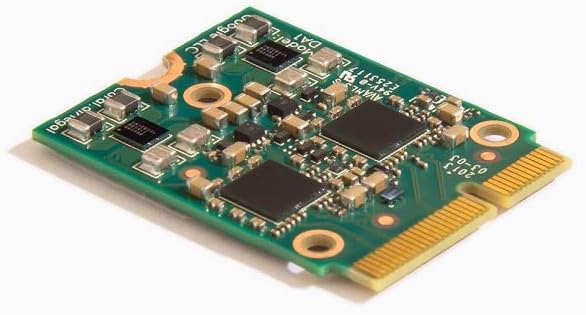
The Coral M.2 Accelerator offers excellent value for budget-conscious buyers. It performs high-speed ML inferencing with a capable Edge TPU coprocessor. Users can achieve impressive frame rates in vision applications.
We may earn a commission when you buy through this link, at no additional cost to you.
Integration with Debian Linux systems is straightforward. TensorFlow Lite models can be compiled to run efficiently on the device. This eliminates the need to build models from scratch for use.
While power efficiency is a strength, model compilation adds a step. Some users may prefer plug-and-play solutions without this process. However, the performance gains justify the extra setup for many.
Best for those using Debian Linux and needing cost effective AI acceleration. It is a reliable choice for edge vision tasks. We recommend it for developers seeking efficiency on a budget.
The on-board Edge TPU coprocessor is capable of performing 4 trillion operations per second.
Integrates with any Debian-based Linux system with a compatible card module slot.
We may earn a commission when you buy through this link, at no additional cost to you.
This card is designed to enhance performance in QNAP NAS systems. It offers both storage and networking expansion capabilities effectively. Users can add high-speed NVMe SSDs and 10GbE ports easily.
We may earn a commission when you buy through this link, at no additional cost to you.
The Marvell Ethernet controller ensures reliable connectivity. Multiple M.2 slots allow for caching or additional storage. This setup improves overall system throughput and data access speeds.
It is specialized for QNAP environments which limits broader use. Users not invested in this ecosystem may find it less useful. The focus remains on NAS performance enhancement specifically.
Ideal for QNAP users needing faster storage and network speeds. It simplifies expansion within compatible systems. We recommend it for those looking to upgrade their NAS capabilities.
10GbE ports allow connecting to high speed networking devices.
2 x M.2 slots for connecting high-speed SSDs for caching or storage.
We may earn a commission when you buy through this link, at no additional cost to you.
This adapter supports the latest PCIe 5.0 standards for high bandwidth. It allows connection of multiple NVMe devices simultaneously. Users get dedicated lanes for each port to maximize throughput.
We may earn a commission when you buy through this link, at no additional cost to you.
The bus interface ensures fast data transfer across connected drives. It supports up to four devices with dedicated bandwidth per slot. This is beneficial for RAID setups or high throughput storage.
Requires a motherboard that supports PCIe 5.0 which may be newer. Also it does not provide specific AI acceleration features. Focus is purely on storage expansion and speed for now.
Best for power users needing fast NVMe storage expansion. It is suitable for workstations and servers. We recommend it for those prioritizing data transfer speeds.
Bus Interface: PCIe 5.0 x 16 for maximum bandwidth.
4x M.2 Ports with dedicated x4 lanes per port.
We may earn a commission when you buy through this link, at no additional cost to you.
This adapter allows two Edge TPU cards to run in one slot. It is great for creating a dual-TPU machine learning workstation. Users can boost performance without needing extra PCIe slots.
We may earn a commission when you buy through this link, at no additional cost to you.
The design is space efficient and future-proof for growth. It includes a heatsink to manage heat effectively. This ensures stable operation during intensive inference tasks.
Bandwidth is split which might limit throughput per card. Two separate cards are needed to use this adapter fully. Consider your total budget before buying separate modules.
Ideal for edge AI deployments needing higher inference power. It maximizes existing hardware investment effectively. We recommend it for developers working on vision projects.
Transform your system into a dual-TPU machine learning workstation.
Perfect for TensorFlow Lite models and computer vision applications.
We may earn a commission when you buy through this link, at no additional cost to you.
This card supports up to four NVMe drives in one slot. It delivers high bandwidth for smooth data transfers effectively. Server-grade PCB ensures reliability under heavy load.
We may earn a commission when you buy through this link, at no additional cost to you.
The active fan cooling system reduces SSD temperatures. This helps prevent thermal throttling and enhances reliability. It supports RAID functions across different platforms for flexibility.
Requires a dedicated power connector and may block space. Users need to check case clearance before installation. These factors are manageable with proper planning.
Best for users needing massive storage in one slot. Ideal for workstations requiring high throughput. We recommend it for those prioritizing storage capacity and speed.
Adapted server-grade PCB supports up to four PCIe 5.0/4.0 M.2 drives.
Large heatsink and active fan reduces M.2 SSD temperatures for unthrottled transfer speeds.
We may earn a commission when you buy through this link, at no additional cost to you.
This module offers exceptional power with a 26 TOPS processor. It is designed for real-time low latency AI inferencing on edge devices. Scalability allows simultaneous processing of multiple streams.
We may earn a commission when you buy through this link, at no additional cost to you.
Support for multiple frameworks like TensorFlow and Pytorch is strong. It works with both Linux and Windows operating systems well. Compatibility with Raspberry Pi 5 makes it versatile for hobbyists.
Higher price compared to others is a consideration. The module only aspect requires separate mounting if needed. These are acceptable trade-offs for the performance it offers.
Best for users needing high performance in an edge device. We recommend it for those building Pi 5 projects. Ideal for complex vision tasks requiring scalability.
Powered by 26 Tera-Operations Per Second (TOPS) Hailo-8 AI Processor.
Scalable, enabling simultaneous processing of multi-streams and multi-models.
We may earn a commission when you buy through this link, at no additional cost to you.
This accelerator delivers 4 TOPS peak performance for ML inference. It features strong compatibility with systems using the A+E key interface. Low power design makes it ideal for embedded applications.
We may earn a commission when you buy through this link, at no additional cost to you.
Wide OS support ensures it works on Linux and Windows. Industrial-grade reliability allows use in harsh environments. This makes it a reliable choice for various deployment scenarios.
The requirement for A+E key slots limits hardware choices. Users need to verify slot type before purchase. These constraints are common for specialized accelerator cards.
Best for industrial or embedded projects needing TPU power. We recommend it for users with specific form factor needs. Consider it for harsh environment applications.
Integrates Edge TPU, delivering 4 TOPS (int8) peak performance for machine learning inference tasks.
Provides 2 TOPS per watt, ideal for embedded and energy-efficient applications.
We may earn a commission when you buy through this link, at no additional cost to you.
This adapter is designed for Coral Dual TPU modules. It fits standard M.2 2280 slots for easy integration. The bidirectional Gen2 bandwidth allows efficient data transfer.
We may earn a commission when you buy through this link, at no additional cost to you.
Includes a stainless steel mounting screw for fixation. This helps prevent vibration issues during operation. Explicit incompatibility notices prevent buyer errors with Pi CM4.
Gen2 bandwidth might limit speed for heavy tasks. Must use compatible Coral modules to function correctly. These constraints are necessary for the specialized design.
Best for users needing to mount Coral modules securely. Ideal for custom projects or builds. We recommend it for those needing precise hardware control.
Designed exclusively for Coral M.2 Accelerator with Dual Edge TPU modules to maximize AI inference performance.
Includes stainless steel mounting screw for vibration-resistant PCB fixation.
We may earn a commission when you buy through this link, at no additional cost to you.
Selecting the right M2 accelerator card requires understanding your specific workload and system capabilities. Consider the factors below to make an informed decision that matches your performance and budget needs.
Processing power determines how quickly your card can handle inference tasks. Look for metrics like TOPS which indicate operations per second. Higher numbers generally mean better performance for complex models.
Prioritize cards with performance matching your workload requirements.
M2 cards come in various sizes and key types like M-key or E-key. Ensure your system slot matches the card physically. Incompatible slots will prevent installation entirely.
Verify your motherboard or device slot type before purchasing.
Not all cards support every OS. Some focus on Linux while others include Windows. Check documentation to confirm support for your development environment.
Choose a card with native support for your OS.
Energy efficiency is vital for portable or embedded devices. Look for metrics like TOPS per watt to gauge efficiency. Low power options help extend battery life.
Select cards with efficient power ratings for mobile use.
A good SDK simplifies model compilation and deployment. Check if the card supports your preferred frameworks. Robust documentation and examples save development time.
Ensure the card has a comprehensive SDK.
Intensive tasks generate heat which affects performance. Cards with heatsinks or active fans prevent throttling. Proper cooling ensures consistent speeds during operation.
Look for cards with adequate thermal management features.
Consider if you need to add multiple cards later. Some setups allow dual TPU for higher throughput. Modular designs offer flexibility as projects grow.
Choose scalable options if you anticipate growth.
Balance features against your budget. High performance cards cost more but deliver faster results. Assess value based on real-world efficiency gains.
Find the best balance of features and price.
To install an M2 accelerator card, ensure your system is powered off. Align the key with the slot and secure it with the screw. Confirm the card is detected in system settings.
Install necessary drivers and software tools from the manufacturer. Compile models using the provided SDK for optimal performance. Test inference tasks to verify proper function.
Keep the card clean and free from dust buildup. Avoid exposing it to extreme temperatures. Regular system updates ensure stability and compatibility.
M2 accelerator cards are used to speed up machine learning inference tasks. They offload processing from the main CPU to dedicated hardware. This results in faster and more efficient model execution.
Many cards focus on Linux but some support Windows. Check the product specifications for compatibility. Ensuring OS support is crucial for deployment success.
Yes if your system supports multiple slots. Some adapters allow dual TPUs in one slot. Verify PCIe lane availability to ensure proper bandwidth.
Use the manufacturer's SDK to compile models. Tools like Edge TPU compiler convert TensorFlow Lite models. Follow documentation for step-by-step instructions.
Some specific cards are designed for Raspberry Pi 5. Others require specific slots like M-key 2280. Always verify compatibility with your Pi model before buying.
Overheating can cause performance throttling or shutdown. Use cards with cooling solutions like fans or heatsinks. Ensure proper airflow in your device case.
We have reviewed ten top M2 accelerator cards for various needs. Each offers unique strengths for different performance scenarios.
Prioritize factors like performance compatibility and OS support when choosing. Matching these to your project ensures better results.
Prices and availability change frequently. Check current details on product pages before purchasing.