
Anti Slip Laptop Rubber Feet Pad Replacement
4.4Editor score
Fits multiple laptop brands
Includes fifteen rubber feet
Slightly taller for cooling
Laptop rubber feet wear out over time causing slippage and overheating issues. Replacing them restores stability airflow and protects your work surface from scratches effectively.
We evaluated ten top-rated replacement kits based on material quality compatibility and adhesive strength to help you find the perfect match for your device model quickly.
Each pick highlights specific features and pros to guide your decision. Keep in mind that prices and availability may change so check the current listings before buying today.
4.4Editor score

4.5Editor score

4.4Editor score
As an Amazon Associate we earn from qualifying purchases.
The following table provides a quick side-by-side overview of all ten products reviewed in this guide to help you compare key specs at a glance.


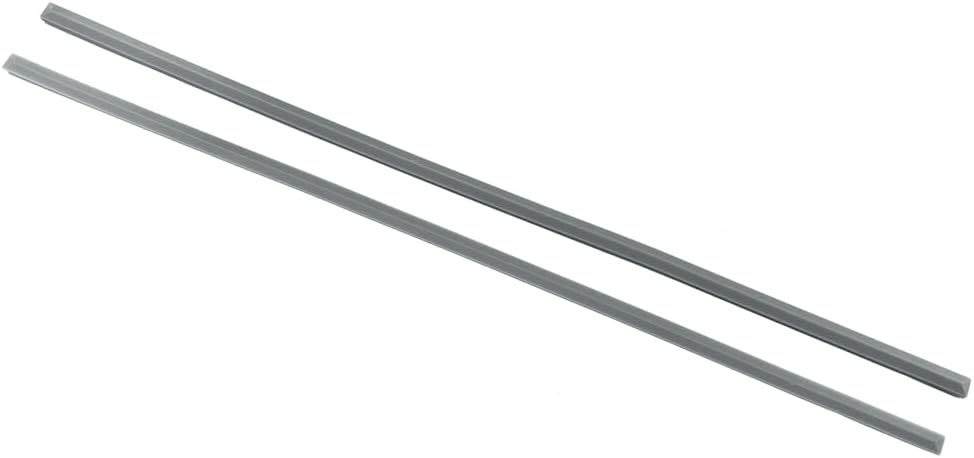


This replacement kit stands out as the top choice for HP Envy users needing reliable stability. With a high rating of 4.5 stars it offers a durable solution for worn out feet.
We may earn a commission when you buy through this link, at no additional cost to you.
The strips measure 31.5 cm in length and feature a robust adhesive backing that ensures they stay put on your laptop bottom case. The grey finish matches the original hardware seamlessly.
While the grey color is standard you must verify your exact model before purchasing to ensure perfect fit. The thickness is optimal for airflow without adding bulk to the device.
Anyone with an HP Envy X360 or related series should prioritize this kit. It restores the original grip and prevents sliding on smooth surfaces effectively.
The non slip design ensures your laptop remains secure during typing or movement on glossy desks.
The strong adhesive keeps the strips firmly attached preventing peeling or shifting over time.
We may earn a commission when you buy through this link, at no additional cost to you.
For those seeking an affordable universal solution this pack of fifteen feet is a smart buy. It works across multiple brands including MacBook and Dell making it highly versatile for diverse setups.
We may earn a commission when you buy through this link, at no additional cost to you.
The pads are slightly taller than standard feet which helps raise your laptop for better airflow and cooling. The adhesive backing is strong enough to hold securely on most surfaces.
The universal fit might not match original dimensions perfectly for some models so check measurements before applying. The extra feet ensure you have spares if one wears out or gets lost.
This is the ideal pick for budget conscious users with mixed devices. It offers great value and improves cooling efficiency without spending much money.
The generic design allows you to use these feet on laptops from different manufacturers easily.
The elevated design creates space under the device helping heat dissipate more efficiently.
We may earn a commission when you buy through this link, at no additional cost to you.
This premium option is designed specifically for the Microsoft Surface Book 1 2 or 3 models ensuring a perfect fit. The silicone bumper material offers superior durability and grip compared to generic rubber.
We may earn a commission when you buy through this link, at no additional cost to you.
The strips measure 30 cm in length and provide a nonskid surface that prevents sliding on desks. The adhesive is reliable and ensures the feet stay attached even after repeated use.
While the price is higher the precision and quality justify the cost for Surface owners. Verify your model number carefully to ensure compatibility before placing your order online.
Surface Book users seeking the most accurate replacement should choose this kit. It delivers premium quality and restores the device stability to its factory condition.
Silicone offers better resistance to wear and tear ensuring the strips last longer than standard rubber.
Tailored for Surface Book laptops this kit ensures the strips align perfectly with the bottom case grooves.
We may earn a commission when you buy through this link, at no additional cost to you.
This kit is tailored for HP 15-DY users and includes both thick and thin pads for flexible application. The rubber material is designed for high temperature performance ensuring long term durability.
We may earn a commission when you buy through this link, at no additional cost to you.
The strips improve airflow by elevating the laptop slightly which helps keep the device cool during heavy tasks. They also absorb shocks and prevent scratches on your work surface effectively.
You must confirm the product size before purchase as the package contains two different thicknesses. This variation can be useful but requires careful placement to match the original design.
Owners of HP 15-DY series laptops will find this kit highly effective. It restores grip and cooling performance while protecting your desk from damage.
The kit includes both thick and thin pads allowing you to choose the right fit for your specific model needs.
Made from quality rubber this product handles heat well ensuring long term use without degradation.
We may earn a commission when you buy through this link, at no additional cost to you.
This replacement kit targets the HP 15-EF and 15-DY series with precision. It comes with pre-applied adhesive strips making installation quick and easy without extra glue.
We may earn a commission when you buy through this link, at no additional cost to you.
The product includes both thick and thin pads to match different original specifications. Each strip is 100% brand new and tested before shipping to ensure quality and reliability.
You must check the part number and model compatibility carefully before buying. The adhesive is strong but requires a clean surface for optimal attachment and longevity.
HP users with these specific models will appreciate the ease of installation. It restores the laptop stability and prevents sliding on any smooth surface.
The built-in adhesive simplifies the process so you do not need to buy additional glue separately.
Every product is tested to ensure it meets quality standards before being sent to customers.
We may earn a commission when you buy through this link, at no additional cost to you.
This kit is ideal for HP Envy x360 users needing reliable foot replacement. The black rubber strips are designed to match the original hardware and provide a secure grip.
We may earn a commission when you buy through this link, at no additional cost to you.
Each strip measures 31.5 cm in length and comes with adhesive backing for easy installation. The product is brand new and ready to restore your laptop stability quickly.
Ensure you check your laptop model and size carefully before ordering to avoid compatibility issues. The adhesive backing is strong but works best on clean surfaces.
If you own an Envy x360 this is a straightforward solution to restore grip. It prevents sliding and keeps your device secure during use.
The included adhesive ensures the strips stay firmly attached to the bottom cover without slipping off.
The product is 100% brand new ensuring fresh materials and strong adhesive performance.
We may earn a commission when you buy through this link, at no additional cost to you.
This replacement kit is designed specifically for the Microsoft Surface Laptop Studio 14.4 inch model. The grey nonskid bumper strips restore the original look and feel of the device.
We may earn a commission when you buy through this link, at no additional cost to you.
Each kit includes two rubber strips made from high quality new product material. The adhesive is reliable and ensures the feet stay attached for consistent stability.
The rating is lower than other options but it remains a valid choice for this specific model. Always check the laptop model to ensure compatibility before purchasing online.
Surface Studio owners looking for a quick fix will find this kit useful. It restores grip and prevents sliding on smooth surfaces.
Designed for the 14.4 inch Surface Laptop Studio this kit ensures a proper fit for your device.
The nonskid surface provides extra grip to keep your laptop stable during use.
We may earn a commission when you buy through this link, at no additional cost to you.
For those needing a versatile solution this pack of eight non slip pads offers universal utility. The premium rubber foam material ensures a strong grip on any surface including glass and wood.
We may earn a commission when you buy through this link, at no additional cost to you.
The tenacious adhesive backing keeps items securely in place making them ideal for various electronic devices. Each strip is durable and designed to prevent sliding effectively.
You may need to cut the strips to match your specific laptop size. This flexibility makes it a great choice if you cannot find a model specific option easily.
Universal users seeking flexibility will appreciate this set. It offers strong adhesion and can be used on multiple devices beyond just laptops.
These strips work on many surfaces and devices offering a versatile solution for various needs.
The strong adhesive ensures the pads stay firmly attached preventing items from sliding.
We may earn a commission when you buy through this link, at no additional cost to you.
This kit is tailored for HP Elitebook X360 1030 G3 Series users. It includes two rubber foot strips that replace worn out components to restore stability effectively.
We may earn a commission when you buy through this link, at no additional cost to you.
The double sided adhesive strip helps keep the feet firmly attached. The product is 100% brand new ensuring quality and reliable performance for your device.
Always check your notebook model before purchase to ensure compatibility. The non slip rubber material ensures your laptop remains secure on any smooth surface.
Elitebook users seeking a specific replacement will find this useful. It restores grip and keeps your device stable during use.
Designed specifically for Elitebook models this kit ensures a proper fit and restoration of stability.
The adhesive helps keep the strips securely attached to the bottom case for better stability.
We may earn a commission when you buy through this link, at no additional cost to you.
This basic kit provides essential components for reattaching rubber feet to laptops. It includes two sets of feet and two pairs of adhesive strips for versatile use.
We may earn a commission when you buy through this link, at no additional cost to you.
The parts are suitable for general reattachment tasks on notebook computers. The adhesive strips help ensure the feet stay securely attached to the bottom case.
Verify compatibility with your specific model before use to ensure a proper fit. It offers a simple solution for restoring stability without complex installation.
Users needing basic parts will find this kit convenient. It provides the necessary components to restore laptop stability effectively.
This kit provides essential parts to help you reattach rubber feet to your laptop easily.
The included adhesive strips ensure the feet stay securely attached to the bottom case.
We may earn a commission when you buy through this link, at no additional cost to you.
Choosing the right replacement involves checking model compatibility material quality and adhesive strength to ensure a secure fit.
The most critical factor is ensuring the strip dimensions match your laptop specific model. Manufacturers often use unique sizes for different series so measuring your existing pads helps confirm accuracy.
Always verify the product listing for your exact model number to avoid ordering incompatible parts.
High quality rubber or silicone ensures durability and resistance to wear over time. Cheaper plastics may crack or lose grip quickly leading to frequent replacements.
Look for products labeled as premium rubber or silicone for better long term performance.
Strong adhesive backing ensures the feet stay attached even during heavy use. Weak glue can peel off leaving sticky residue that is difficult to remove.
Choose strips with tenacious adhesive backing to ensure longevity and stability.
The height of the feet affects airflow and cooling efficiency. Thicker pads raise the laptop higher allowing better air circulation under the chassis.
Measure the original thickness to ensure the replacement provides the right lift for cooling.
Matching the color of the replacement to your original hardware keeps the device looking professional. Black or grey are common choices that blend well with most laptops.
Select a color that matches your device to maintain a clean aesthetic.
Ensure the package includes enough pieces to cover all necessary spots on your laptop. Some kits include extra pads for spare use which is beneficial for future repairs.
Check that the kit includes at least two strips to cover the standard attachment points.
Buying from reputable brands or sellers ensures better quality control and customer support. Generic products may vary in quality so check reviews before purchasing.
Prioritize products with high ratings and positive user feedback for reliability.
Higher price does not always mean better quality but extremely cheap products often lack durability. Aim for a balance between cost and quality to ensure satisfaction.
Compare prices and read reviews to find the best value for your specific needs.
First clean the bottom of your laptop thoroughly with a soft cloth to remove any dust or old adhesive residue. This ensures the new strips adhere properly and last longer.
Next peel off the protective liner from the adhesive side of the strip and align it with the original footprint. Press down firmly for thirty seconds to ensure a strong bond.
Finally avoid exposing the adhesive to extreme heat or moisture during the first twenty four hours to allow it to set completely.
Measure the length width and thickness of your existing rubber feet. Compare these measurements to the product specifications in the listing before purchasing to ensure compatibility.
These strips are designed for laptop bottoms but the adhesive works best on smooth non porous surfaces. Avoid using them on rough or textured materials.
Most replacement kits come with pre-applied adhesive so you do not need extra glue. Ensure the surface is clean before attaching them.
Yes thicker strips raise the laptop higher allowing more airflow underneath. This can help improve cooling efficiency during heavy tasks.
High quality rubber feet can last years depending on usage and cleaning habits. Avoid exposing them to extreme heat to extend their lifespan.
Use a mild adhesive remover or rubbing alcohol to clean any residue after removal. Avoid harsh chemicals that could damage your laptop bottom cover.
Model specific strips ensure a perfect fit and better stability. Universal strips offer flexibility but may not match dimensions perfectly.
It is generally better to replace old feet as adhesive weakens over time. Fresh strips ensure better grip and stability for your device.
We highlighted top picks including the HP Envy X360 replacement for overall stability and the Surface Book kit for premium durability.
Prioritize model compatibility and adhesive strength to ensure your chosen strips fit securely and perform well long term.
Prices and availability change frequently so check the current listings for the best deals before making your purchase today.