
NEEWER Upgraded 660 PRO II
4.7Editor score
Full RGB color range
Smart wireless app control
Dual power options included
Creating high-quality video content requires more than just a good camera. Proper illumination is essential for making your subject stand out and ensuring your audience sees every detail clearly. The right lighting setup can transform a dark room into a professional studio environment instantly.
We have analyzed the current market to find the most reliable and effective lighting solutions for streamers and content creators. Our list includes options ranging from budget-friendly kits to professional-grade RGB panels with app control. Each product offers unique features to suit different streaming needs.
Every pick in this guide showcases specific strengths like color accuracy, brightness levels, and portability. We highlight what makes each product unique so you can match the gear to your specific use case. Please note that availability and pricing can change frequently on retailer platforms.
4.7Editor score

4.5Editor score

4.4Editor score
As an Amazon Associate we earn from qualifying purchases.
This side-by-side comparison reviews all ten selected lighting kits to help you understand the differences in brightness, control options, and included accessories. We break down the technical specifications so you can easily identify which model fits your streaming workflow best.




This Torjim 12 Inch Video Light Kit stands out as a comprehensive solution for creators needing immediate setup. It offers a solid 30W brightness level that easily overcomes dim room lighting issues. The rating of 4.5 reflects user satisfaction with the overall package quality and ease of use.
We may earn a commission when you buy through this link, at no additional cost to you.
The kit includes two lights two tripods and phone holders making it ready to use right out of the box. You can adjust the color temperature from warm to cool to match different streaming scenarios. The in-line controller allows you to change brightness without disrupting your recording session.
While the lights are bright they rely on constant power which limits mobility compared to battery-powered options. The remote control works well but has a limited range compared to more expensive smart systems. These trade-offs are acceptable given the affordable price point and complete accessory set.
This kit is ideal for streamers or home office users who want a professional look without complex setup. If you need a reliable two-light solution that covers your main subject and background this is a strong recommendation for your studio needs.
The inclusion of phone holders and tripods means you do not need to buy separate stands for your gear.
Switching between warm and cool light helps you match the mood of your content without extra filters.
We may earn a commission when you buy through this link, at no additional cost to you.
The NiceVeedi Studio Light Kit is a strong contender for those seeking high color accuracy at a reasonable price. With a CRI of 97+ the colors in your video will look true to life which is crucial for product showcases. The 73-inch tripods offer excellent height adjustment for various shooting angles.
We may earn a commission when you buy through this link, at no additional cost to you.
You can power these lights via USB which gives you flexibility to run them from a power bank or laptop. The light panels use thickened shells to diffuse the light and reduce harsh shadows on your face. The brightness can be adjusted from ten to one hundred percent using the included remote.
The lower 15W output might not be enough for large rooms or situations requiring strong key lighting. The remote is functional but lacks advanced features found in higher-end models. These limitations are minor considering the price and the quality of the light output it provides.
This kit works well for podcasters or YouTubers who need soft accurate lighting for smaller setups. If you prioritize color rendering over raw brightness this kit delivers excellent value for your investment.
A CRI of 97+ ensures that skin tones and product colors appear natural and vibrant on camera.
Powering via USB allows you to set up without finding a nearby wall outlet.
We may earn a commission when you buy through this link, at no additional cost to you.
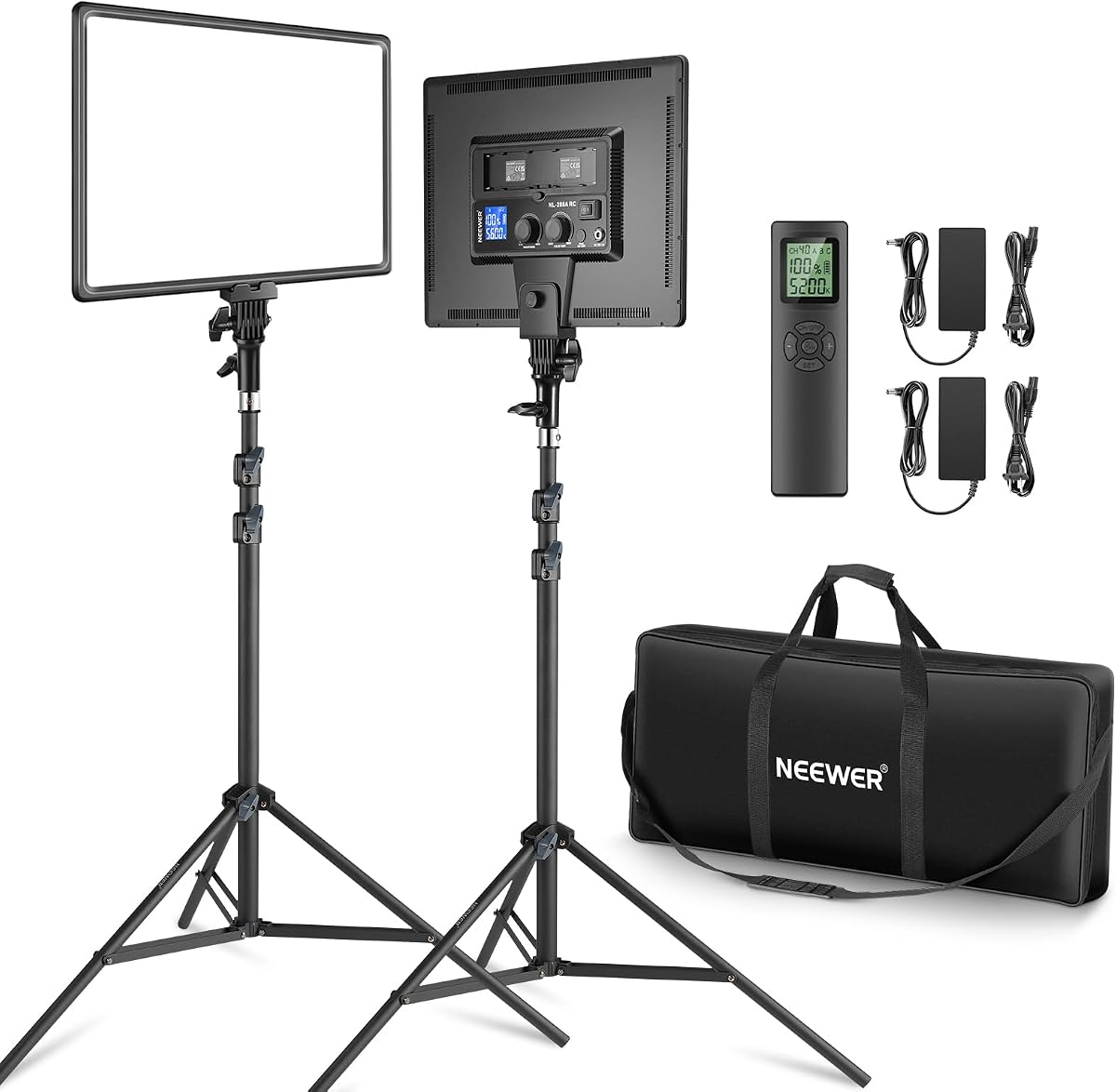
This Neewer 18 LED Video Light Panel set provides a significant step up in power with 45W output per light. It is designed to serve as a key light or fill light in professional studio environments. The bi-color feature allows you to match your existing room lighting easily.
We may earn a commission when you buy through this link, at no additional cost to you.
You can use the remote to manage up to eight channels and control groups of lights simultaneously. This makes it easy to sync multiple panels for larger setups. The option to run on NP-F batteries means you can film outdoors or in rooms without outlets.
Since batteries are not included you will need to purchase them separately if you plan to use the power option. The panels are heavier than smaller portable kits so you need sturdy stands which are included. These factors add to the initial cost but provide professional versatility.
This kit is suitable for streamers who want to upgrade to a more powerful and flexible lighting system. If you need reliable output for professional video production this is a dependable choice for your studio.
The 2.4GHz remote allows you to control multiple lights from a distance without interference.
Using NP-F batteries allows for true wireless lighting freedom for on-the-go streaming.
We may earn a commission when you buy through this link, at no additional cost to you.
The NEEWER Upgraded 660 PRO II is a top-tier choice for creators who want full color control. With 360-degree RGB capabilities you can create dynamic backgrounds or match specific branding colors. The smart wireless app control adds a layer of convenience not found in many competitors.
We may earn a commission when you buy through this link, at no additional cost to you.
You can select from nine preset scenes like Fireworks or Police Car to add flair to your streams. The light uses a robust aluminum alloy panel for better heat dissipation allowing longer continuous use. Dual power options ensure you never run out of power during an important broadcast.
The price is higher than basic kits but the RGB features justify the cost for creative content. You need a smartphone to access the app which might be a small hurdle for some users. These are minor cons for a light that offers such high creative potential.
This is the best choice for influencers who need to customize their visual style quickly. If you want to stand out with unique lighting effects this premium light is a powerful investment.
Nine preset scenes allow you to instantly change the vibe of your video for special segments.
Controlling light settings from your phone allows for easy adjustments during live shows.
We may earn a commission when you buy through this link, at no additional cost to you.
The UBeesize 2-Pack LED Video Light Kit delivers impressive brightness for its price point. With 3000 lumens of soft lighting it easily fills rooms that might otherwise look dark on camera. The 72-inch tripod stands offer enough height to position lights above the subject for better angles.
We may earn a commission when you buy through this link, at no additional cost to you.
You get two lights in the box which allows you to create a classic two-point lighting setup. The in-line controller lets you adjust power and mode without interrupting your recording. It is ideal for creators who want to upgrade their lighting without breaking the bank.
While it lacks the RGB options of premium models it covers the basics of white balance and brightness well. The remote control is functional but has a limited range compared to smart systems. These limitations are acceptable for a budget-friendly kit that performs reliably.
This kit is perfect for beginners or home streamers looking for a solid starting setup. If you need bright even light for tutorials or product videos this is a great value option.
High lumen count ensures your face and products are well illuminated even in dark rooms.
Having two lights allows you to balance your lighting by creating depth and shadows.
We may earn a commission when you buy through this link, at no additional cost to you.
The Logitech Litra Glow Premium is designed specifically for desktop users who want simplicity. It uses TrueSoft technology to provide balanced light that is flattering for video calls. The frameless diffuser eliminates harsh shadows so you look natural on camera.
We may earn a commission when you buy through this link, at no additional cost to you.
You can control the settings using the G HUB desktop app to save presets for different times of day. It is lightweight and plugs directly into your USB port so no extra cables are needed. The monitor mount ensures the light stays securely on your desk.
This light is fixed to your desk which limits its use for larger studio setups or floor standing. It relies on USB power which restricts where you can place it on your desk. These constraints are minor for users who primarily work from a single computer setup.
If you need a quick upgrade for Zoom calls or podcasts this is the best tool for the job. It prioritizes ease of use and consistent performance over complex features.
This technology ensures the light is balanced and prevents harsh shadows on your face.
Software integration allows you to save your favorite brightness and color presets.
We may earn a commission when you buy through this link, at no additional cost to you.
The NEEWER Pro 600W RGB LED is a powerhouse for professional productions needing high output. It delivers 52500 lux of continuous light which is suitable for large studio spaces. The RGBWW blending technology allows for precise color mixing that matches any environment.
We may earn a commission when you buy through this link, at no additional cost to you.
You can control the light via panel app 2.4G or DMX for full integration into a complex setup. The Bowens mount means you can attach softboxes or other modifiers easily. Smart cooling ensures the light runs quietly without distracting during recording.
The physical size is large so it requires a sturdy stand and significant space in the room. It consumes significant power so you need an outlet nearby for continuous shooting. These factors are standard for professional lights but might be overkill for home users.
This is the best tool for large scale filming or high-end streaming setups. If you need top-tier brightness and professional control this light is an industry-grade solution.
DMX compatibility allows seamless integration with other professional lighting consoles.
Use standard Bowens modifiers like softboxes to shape the light exactly how you want.
We may earn a commission when you buy through this link, at no additional cost to you.
The Zoom Lighting for Computer is a compact solution that fits seamlessly into a desktop workspace. It uses edge-lit technology to provide even illumination that reduces eye strain during long sessions. The 7-inch screen design looks stylish and blends well with modern office setups.
We may earn a commission when you buy through this link, at no additional cost to you.
You can rotate the head 360 degrees to direct the light exactly where you need it. The metal base offers stability and includes a non-slip pad to protect your desk surface. It is USB powered making it easy to plug into your laptop or monitor.
Since it is a desk light it cannot be positioned on the floor for overhead lighting effects. The brightness is suitable for personal use but may not light up a whole room. These limitations are reasonable for a light designed to be close to the subject.
This is ideal for remote workers or streamers who need a simple plug-and-play light. If you want a tidy and effective solution for daily video calls this is a strong pick.
This technology provides a soft light that eliminates harsh shadows and glare.
Adjustable height and rotation help you find the perfect angle to reduce eye strain.
We may earn a commission when you buy through this link, at no additional cost to you.
This Torjim Softbox Photography Lighting Kit is designed to create soft even light for portraits. The softbox spreads the light over a wider area to minimize harsh shadows on the subject. It uses a durable fabric cover and a silver baffle to maximize the light efficiency.
We may earn a commission when you buy through this link, at no additional cost to you.
The 85W bulb saves energy while providing constant illumination for your recording. You get two stands and two softboxes so you can set up a dual light system easily. The independent locking knobs on the tripods ensure the stands stay secure during use.
Setting up softboxes takes more time than flat panel lights which might slow down quick changes. They are also bulkier to carry around for mobile streaming setups. These factors are acceptable for users who prioritize the quality of the light output over portability.
If you need professional soft lighting for beauty or product videos this kit is effective. It is a solid choice for home studios where setup time is not a major constraint.
Softboxes diffuse light to create soft shadows that are flattering for portraits.
Independent locking knobs on the tripods keep your lights stable during filming.
We may earn a commission when you buy through this link, at no additional cost to you.
This Torjim Softbox Photography Lighting Kit offers a single unit solution for simpler needs. It is an affordable way to get soft even light for videos or photos. The 16 by 16 inch size provides enough spread for a key light in a home studio.
We may earn a commission when you buy through this link, at no additional cost to you.
The light uses energy saving bulbs to reduce running costs. It includes a tripod and remote so you can adjust settings from a distance. The softbox is foldable making it easy to store in a closet when not in use.
Since it is a single kit you may need to buy another if you want to use fill lights. The remote control is basic compared to smart systems but works for standard adjustments. These trade-offs are minor for a budget-friendly light.
If you need an affordable and reliable option for a single light setup this is a strong pick. It is ideal for beginners who want to learn about lighting without a large investment.
Get professional soft lighting quality without the high cost of a full kit.
The foldable design ensures the softbox takes up minimal space when not in use.
We may earn a commission when you buy through this link, at no additional cost to you.
Selecting the right lighting involves balancing power control and portability to match your environment. Understanding the specific technical factors will help you avoid overbuying or underbuying for your needs.
Brightness is measured in watts or lumens and determines how well the light illuminates your subject. Higher wattage is necessary for larger rooms or when you need to overpower ambient light in the background.
Color temperature measured in Kelvin affects whether your light looks warm or cool. A high CRI ensures that colors in your video appear natural and vibrant rather than washed out or tinted.
Consider if you need to move your lights frequently or keep them in one spot. Adjustable stands are essential for reaching the right height to avoid casting shadows on your face.
Some lights run on AC adapters while others support battery power. Battery options are crucial if you plan to stream outdoors or in rooms without convenient access to wall outlets.
Controls can range from manual knobs to remotes and smartphone apps. Smart apps allow for precise control but may require a compatible device to function properly.
Many kits include tripods and phone holders which saves you the cost of buying them separately. Always check what comes in the box to ensure you have a complete setup.
Prices vary significantly from basic panels to high-end RGB systems. Determine your budget early and prioritize features that matter most to your specific content style.
High power lights generate heat and require cooling fans. Look for lights with silent cooling modes to prevent noise interference during recording.
Always position your key light at about 45 degrees to the side of your camera to create depth. Avoid placing the light directly behind your camera as this can cause harsh shadows.
The UBeesize 2-Pack kit is highly recommended for beginners because it includes everything you need in one package. It is affordable and easy to set up without requiring complex adjustments.
Yes all the lights in this list are versatile enough for both video and photography. Ensure you have a steady stand to avoid camera shake during long exposures.
It depends on the model. Some kits include batteries while others require you to purchase them separately. Always check the product specifications before buying.
Mount your light slightly above your eye level to mimic natural sunlight. This angle helps to illuminate your face evenly and reduces double chins.
For video calls 5000K is a good standard setting. For creative streams try using warmer 3000K settings to create a cozy atmosphere.
Use a soft dry cloth to wipe the surface gently. Avoid using chemicals that might damage the LED beads or the plastic housing of the unit.
We found that the Torjim 12 Inch Video Light Kit offers the best balance of features for most creators. It is versatile enough for home use and provides professional results at a reasonable price.