
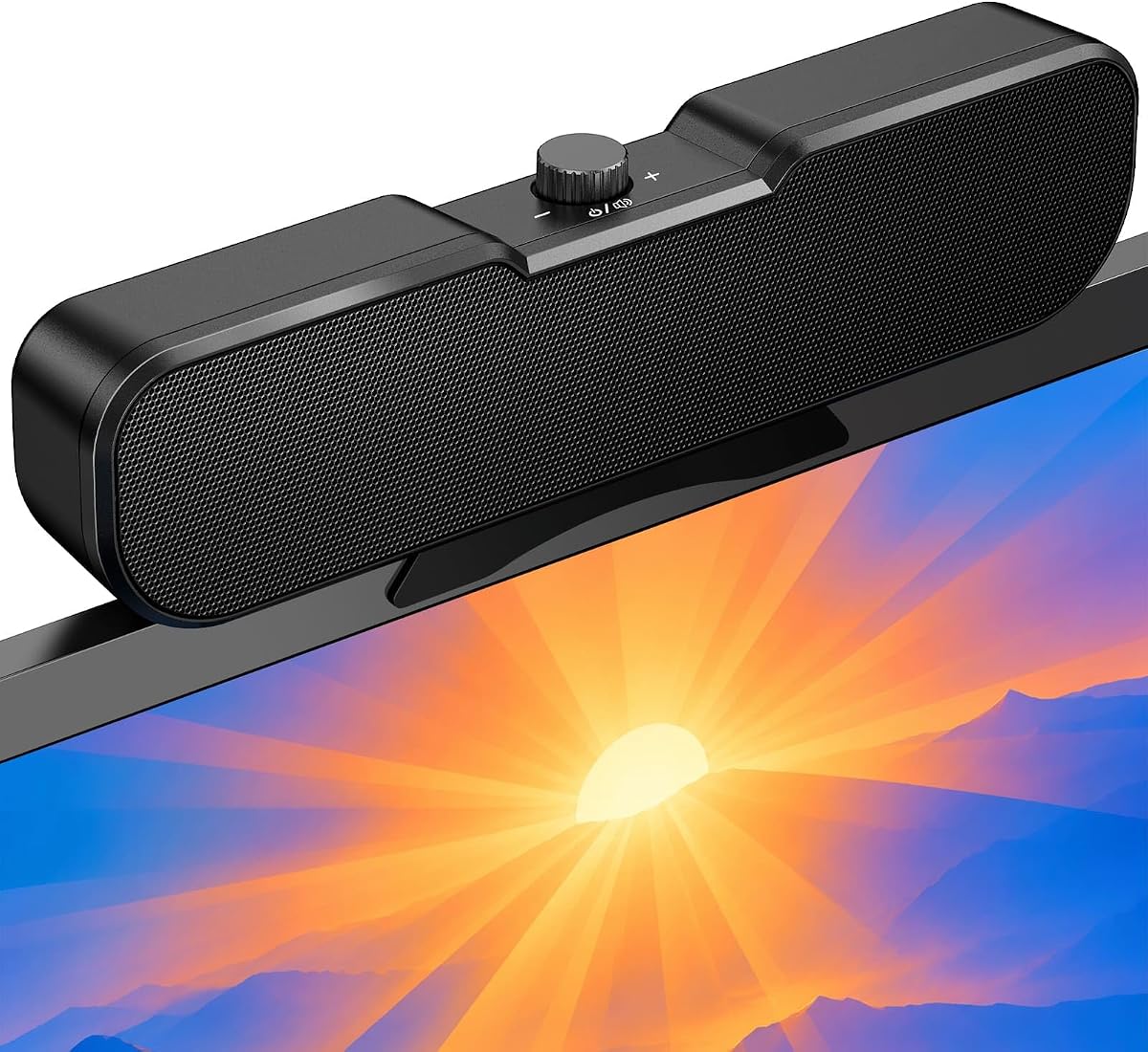
Inwa Computer Speakers for Desktop PC
4.2Editor score
10 watts power for loud stereo sound
Spring clip design for easy monitor attachment
Volume up down and mute top buttons
This guide compares the top clip on speakers for laptop and desktop setups to help you find the best sound quality and space-saving audio solution for your
Finding the right audio solution for your laptop or desktop setup can be challenging when space is limited. Clip on speakers offer a practical way to enhance sound without cluttering your desk. They attach directly to your monitor, providing clear audio while keeping your workspace organized and efficient for daily tasks.
We evaluated ten top-rated models based on sound quality, ease of installation, compatibility, and overall value. Our comparison looks at build quality, connectivity options, and user feedback to ensure you get a reliable product. Each option was selected to meet different needs, from budget-friendly choices to premium performers.
Every pick includes detailed insights on features, pros, cons, and real-world performance to help you decide. Prices and availability can change frequently, so verify current details before purchasing. Use this guide to find the perfect speaker that fits your specific setup and audio requirements for work or entertainment.
4.2Editor score

4.5Editor score

4.2Editor score
This side-by-side comparison highlights the key specifications and features of each speaker to help you quickly identify the best fit for your laptop or desktop setup based on your specific audio needs and budget constraints.


This speaker delivers powerful sound with adaptive channel switching that automatically adjusts based on clip position. It features dual ultra-magnetic drivers and passive radiators for rich audio. The touch controls and USB-C adapter make it versatile for modern laptops and desktops.
We may earn a commission when you buy through this link, at no additional cost to you.
The adaptive-channel-switching with G-sensor ensures left and right channels stay correct whether clipped top or bottom. This avoids audio confusion during media consumption. The loud sound and deep bass provide an immersive experience even at higher volumes.
While the touch buttons are convenient, users must ensure their computer audio driver is updated. Compatibility notes mention monitors and TVs may not work. These trade-offs are minor compared to the space-saving design and strong performance.
Ideal for users wanting a clean setup without sacrificing audio quality. It fits most monitors and offers a neat alternative to bulky speakers. Check your system audio settings before installation for best results.
The G-sensor detects orientation and switches audio channels automatically to maintain stereo integrity regardless of mounting position.
Clips securely to monitor edges freeing desk space while keeping audio close to listeners for better sound projection.
We may earn a commission when you buy through this link, at no additional cost to you.
OHAYO speakers stand out with Bluetooth 5.3 and USB dual-mode allowing seamless switching between wireless and wired. The G-sensor auto switches channels based on clip position. A built-in microphone and RGB lighting add utility and style to your desk.
We may earn a commission when you buy through this link, at no additional cost to you.
With 16W output and dual magnetic drivers plus a passive radiator, sound is clear and balanced. The volume roller offers precise control. RGB lighting includes a mode that syncs with music for a dynamic visual experience during playback.
The USB power requirement means it needs a port even in Bluetooth mode. Compatibility excludes gaming consoles like Xbox. These limits are acceptable given the strong audio quality and added features like the microphone and lighting.
Great for users wanting wireless flexibility plus clip-on convenience. The microphone helps during video conferences. Ensure your monitor thickness fits the clamp and USB ports are available for power.
Bluetooth 5.3 supports Low Energy Audio for stable transmission up to twenty meters without signal dropouts.
RGB lighting can sync with system notifications or music rhythm adding a customized touch to your workspace.
We may earn a commission when you buy through this link, at no additional cost to you.
Cirqon speakers simplify control with a single knob that handles power and volume. The sturdy clamp fits thin screens and the USB-C adapter ensures modern compatibility. Compact design saves space while delivering clear sound for daily tasks.
We may earn a commission when you buy through this link, at no additional cost to you.
The innovative easy volume knob allows quick adjustments without button hunting. Clear loud sound is maintained even at max volume. The included cable tie helps manage the 51-inch cable keeping your desk neat.
Some monitors do not support audio through their USB ports which is a limitation. Lack of Bluetooth means wired use only. These are minor compared to the ease of use and affordable price point.
Perfect for office users preferring simple physical controls over touch or digital menus. The knob is accessible from any position. Verify your system audio settings before use.
A single knob controls power on off and volume making it fast to adjust without navigating menus or buttons.
High-quality USB-C adapter included for compatibility with Mac Android Linux and other devices needing USB-C ports.
We may earn a commission when you buy through this link, at no additional cost to you.
This speaker delivers amazing sound with dual super-magnetic drivers and a passive radiator for rich bass. The clamp fits most monitors from 0.1 to 1 inch thick. System volume control means no extra buttons on the device itself.
We may earn a commission when you buy through this link, at no additional cost to you.
Plug-and-play setup makes it easy to use with Windows macOS Chrome OS and Linux. USB-C adapter extends compatibility to Mac iPad and tablets. The sound is powerful despite the compact size keeping desks tidy.
Without dedicated volume knobs you rely on your computer system for adjustments. This can require checking audio settings initially. It is a minor inconvenience for a streamlined and affordable audio solution.
Great for users wanting a no-fuss speaker that blends into any workspace. The clip-on design keeps sound close to you. Ensure playback devices are selected correctly in system settings.
Connect via USB for power and audio without extra drivers or software ensuring instant sound upon connection.
Clips to top side or bottom of monitors and can rest on desk when needed for flexible placement.
We may earn a commission when you buy through this link, at no additional cost to you.
These speakers feature both USB and Type-C cables for broad device compatibility. The tactile volume wheel and one-touch Mute offer superior control. Spring-loaded clip with silicone protection fits monitors up to 1.26 inches thick securely.
We may earn a commission when you buy through this link, at no additional cost to you.
Dual high-performance drivers and a passive radiator deliver immersive sound for gaming and video. The design keeps desktops clean. Support for iPhone and iPad sets it apart from many competitors that lack Apple support.
Lack of Bluetooth limits wireless use. USB power is constant so no batteries to replace. These trade-offs are reasonable for the precise controls and wide compatibility it offers to users.
Ideal for gamers and mobile users needing quick mute and volume tweaks. The wheel feels smoother than buttons. Check your monitor thickness before purchase to ensure fit.
The tactile volume wheel allows smooth precise adjustments while the M-Button provides instant muting without interrupting flow.
Includes USB-C adapter and supports Mac Windows iPhone iPad and Android devices without needing extra cables or drivers.
We may earn a commission when you buy through this link, at no additional cost to you.
Inwa speakers provide excellent value with 10 watts of power for clear loud sound. The spring clip design protects monitors and is easy to attach. Top buttons for volume and mute make control intuitive without extra software.
We may earn a commission when you buy through this link, at no additional cost to you.
Dual large-sized speakers and a passive radiator create a stereo experience that lifts sound forward. USB powered setup avoids messy cables. The converter helps with modern Mac and Android devices needing USB-C.
Wireless capability is not available and audio settings must be configured properly. These are common trade-offs for budget speakers. The lifetime technical support adds confidence for potential buyers.
Perfect for students or home offices needing reliable sound without high cost. The top controls are convenient. Verify system playback device selection after plugging in.
10 watts of power ensures speakers produce amazing quality even in compact design without sacrificing clarity or volume.
Silicone pads on the clip protect your monitor surface from scratches during attachment and daily use.
We may earn a commission when you buy through this link, at no additional cost to you.
These speakers feature an ultra-narrow clip and adjustable angle to direct sound effectively. Dual 5W drivers deliver clear balanced sound. The slim design keeps visuals uninterrupted while enhancing audio. USB-C adapter supports Mac iPad and Android devices.
We may earn a commission when you buy through this link, at no additional cost to you.
Top panel buttons handle power volume and mute for easy access. Plug and play setup avoids software installation. The build ensures speakers sit flat or clip to monitor edges securely without blocking view.
Users must ensure audio drivers are current and USB ports work correctly. Wireless streaming is not available. These are minor constraints for a reliable and affordable solution for laptops and desktops.
Great for professionals needing clean visuals with enhanced audio. The adjustable angle is a useful feature. Check current compatibility notes before purchasing.
The adjustable angle allows you to direct sound exactly where you need it improving the listening experience.
Ultra-narrow clip and slim profile stay out of your screen way ensuring uninterrupted visuals during use.
We may earn a commission when you buy through this link, at no additional cost to you.
This model combines USB and Type-C connectivity for wide compatibility. The one-touch mute and volume wheel give quick control. Spring-loaded clip fits monitors up to 1.26 inches and protects with silicone. Ideal for laptops needing clear sound.
We may earn a commission when you buy through this link, at no additional cost to you.
Dual drivers and passive radiator deliver immersive audio for gaming and movies. Top buttons keep adjustments accessible without looking. The design suits gaming and office setups keeping desk space clear.
Lack of Bluetooth means it stays wired. Monitor thickness must be checked before purchase. These limits are reasonable for the control features and price point offered to buyers.
Perfect for users wanting easy silencing and volume tweaks on the fly. The wheel is smoother than buttons. Ensure your system settings are configured correctly.
One-touch mute lets you silence sound instantly during calls or meetings without navigating menus or system settings.
Includes USB-C adapter and works with Mac Windows iPhone iPad and Android without needing extra cables or software.
We may earn a commission when you buy through this link, at no additional cost to you.
Cirqon speakers focus on simplicity with one knob controlling power and volume. The sturdy clamp fits thin screens and USB-C adapter ensures modern compatibility. Clear sound is maintained even at max volume for daily use.
We may earn a commission when you buy through this link, at no additional cost to you.
Plug-and-play setup means no drivers are needed. The cable tie keeps the 51-inch cord organized. Compact design saves space while delivering balanced audio suitable for office or home setups.
Users must check their monitor USB port audio support. Bluetooth is absent which limits wireless use. These are common trade-offs for a simple and affordable solution.
Best for users preferring minimal controls and reliable performance. The knob is accessible from any mount position. Verify system audio settings before use.
A single knob simplifies adjustments making it easy to power on and set volume without complex menus or buttons.
Cable tie included to keep cords organized and prevent tangling on your workspace desk or table.
We may earn a commission when you buy through this link, at no additional cost to you.
This speaker is designed for compact setups delivering loud sound with deep bass. The clamp fits most monitors and USB-C adapter ensures compatibility with newer devices. Volume controls via your computer system remove the need for buttons on the speaker.
We may earn a commission when you buy through this link, at no additional cost to you.
Dual super-magnetic drivers and a passive radiator enhance audio quality despite the small size. Plug-and-play setup works with Windows macOS Chrome OS and Linux. The design keeps desks tidy and organized.
Lack of physical knobs means relying on system volume which may require initial setup. These are minor compared to the benefits of space saving and clear audio output.
Perfect for users wanting a neat workspace with good audio. Ensure playback devices are selected in system settings for best performance and reliability.
Slim design and clip mount free desk space keeping your workspace neat and organized without clutter.
Volume adjustments handled via computer system reducing device buttons and simplifying the audio experience.
We may earn a commission when you buy through this link, at no additional cost to you.
Selecting the right clip on speakers involves evaluating several factors to ensure compatibility, sound quality, and ease of use. This guide helps you focus on key aspects that impact performance and setup for your specific workspace.
Most clip on speakers use USB for power and audio or support both USB and USB-C. Check your laptop ports to ensure a match. Some models also offer Bluetooth for wireless use though USB remains standard for stable audio.
Always verify the connection type your device supports before purchasing to avoid extra adapters or incompatible setups.
Clips are designed to fit specific monitor thickness ranges usually from 0.1 to 1 inch or more. Measure your monitor edge before buying. Some clips have silicone pads to protect surfaces while others use spring tension.
Ensure the clip fits your screen thickness to secure attachment without risking damage or instability during use.
Look for features like dual drivers and passive radiators which enhance bass and clarity. Wattage output influences volume potential. Models with G-sensor or stereo imaging provide better balance during media playback.
Prioritize specs that match your listening needs whether for voice calls gaming or music to get the best experience.
Control options vary from touch buttons to physical knobs wheels or one-touch mute. Some models include RGB lighting or built-in microphones. Choose based on how you prefer to adjust volume or mute quickly.
Simple physical controls are often more reliable than touch surfaces especially in active or gaming environments.
Most speakers support Windows macOS Chrome OS and Linux but some exclude TVs or gaming consoles. Check product notes for device limitations. USB-C adapters extend compatibility to mobile devices and newer laptops.
Confirm your operating system and device type match the speaker specs to avoid connectivity issues.
Sturdy clamps and durable materials affect longevity. Check for soft silicone or rubber pads to protect monitors. Lightweight designs reduce strain on thin screens.
Invest in models with proven build quality to ensure secure attachment and long-term reliability.
Plug-and-play speakers do not need extra drivers making installation quick. Some may require audio driver updates for best performance. Cable management accessories like ties help keep desks tidy.
Choose speakers that require minimal setup to start using them right away without technical hurdles.
Prices vary based on features like Bluetooth, RGB lighting, and build quality. Balance budget with needed features. Affordable models can still offer good sound for daily use.
Consider total value including warranty and support to find the best deal for your needs.
First attach the speaker to your monitor using the clamp ensuring it fits securely. Connect the USB cable to your laptop or desktop. The system should recognize the audio device automatically.
Adjust the volume using your speaker controls or system settings. If applicable, set the playback device to the speaker in audio options. Test with a video to confirm sound output.
Keep the speaker and mount clean with a soft dry cloth. Avoid placing heavy objects on the clamp to maintain stability. Regularly check connections to ensure consistent performance.
They work with laptops that have USB or USB-C ports. Check your ports match the speaker requirements. Adapters may be needed for some older models.
Yes, they are designed for quick plug-and-play setup. No drivers are usually needed. Just clip and connect to start using.
Yes, many can sit on the desk without clamping. Check product specs for standalone placement options to ensure stability.
Some models offer Bluetooth while others are USB only. Check the product details for wireless capabilities before buying.
Most fit 0.1 to 1 inch thickness but models vary. Measure your screen edge to confirm compatibility before purchasing.
Usually one USB cable handles power and audio. Adapters may be included for USB-C. No extra AUX cables are needed.
The top picks offer a range of features from Bluetooth dual-mode to simple knob controls. Each model provides clear sound while saving valuable desk space for your setup.
Prioritize connection type and mounting fit to ensure compatibility with your devices. Consider control preferences for ease of use during daily tasks or entertainment.
Prices and availability change so check current details before buying. Use this guide to find the right speaker that matches your audio and workspace needs.