
Heavy Duty 3D Printer Stand with Filament Storage
4.8Editor score
Thick steel tubing base
Dual-tier 32 spool storage
Adjustable leveling feet
Finding the right workspace for your 3D printer is crucial for high-quality results and efficient workflows. A dedicated stand with filament storage keeps your materials organized and reduces clutter in your workshop or home office environment.
We evaluated ten top-rated models based on stability, storage capacity, assembly ease, and build quality. Our comparison focuses on how well each unit supports printers while keeping spools accessible and tools within reach for daily use.
Each pick highlights key features and trade-offs to help you decide quickly. Note that prices and availability change frequently, so check the latest details before purchasing your new 3D printer table stand.
4.8Editor score

4.4Editor score

4.6Editor score
As an Amazon Associate we earn from qualifying purchases.
Below is a detailed side-by-side comparison of all ten models. This table helps you quickly identify key differences in dimensions, storage capacity, and unique features to find the perfect fit for your setup.

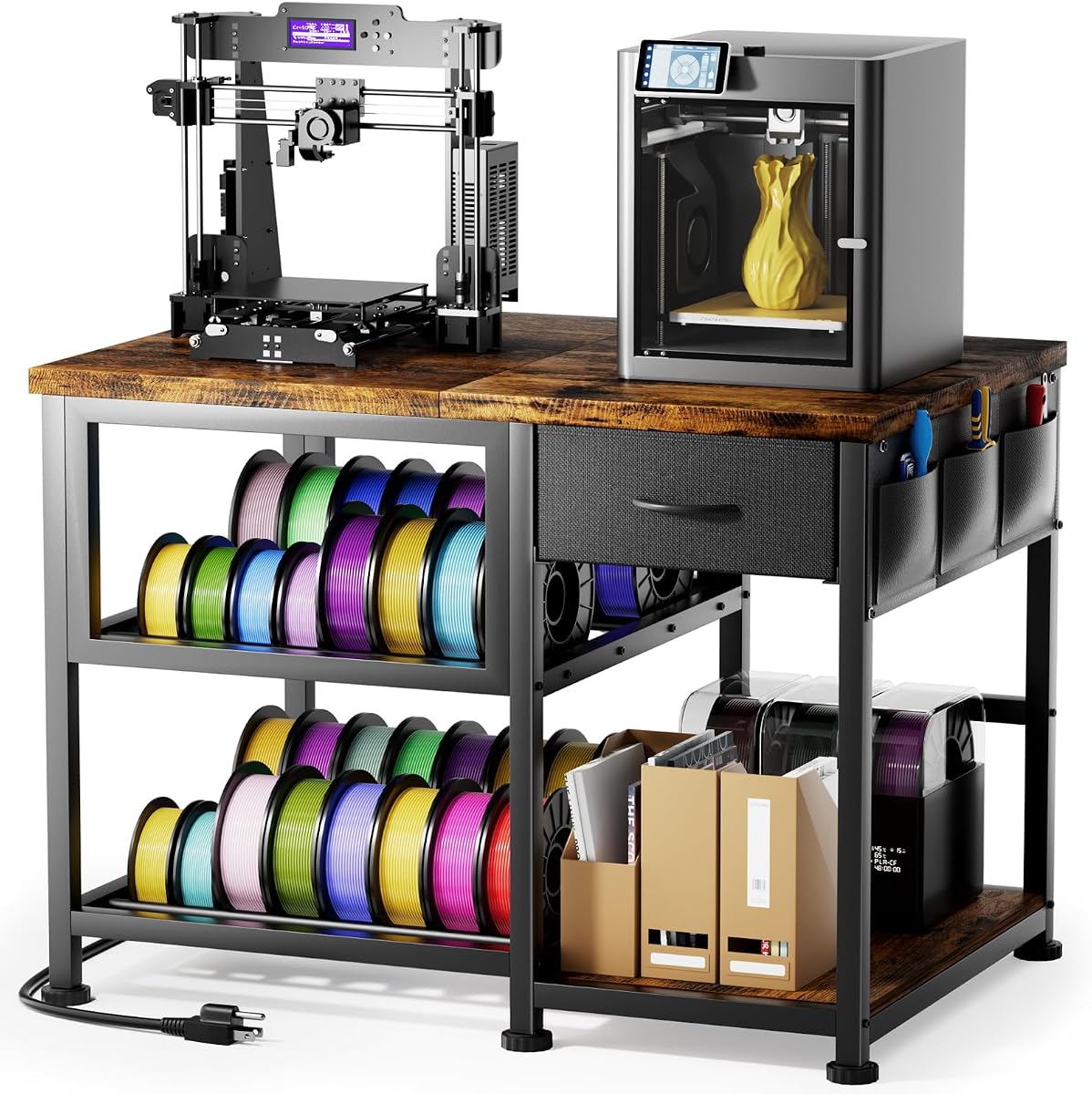


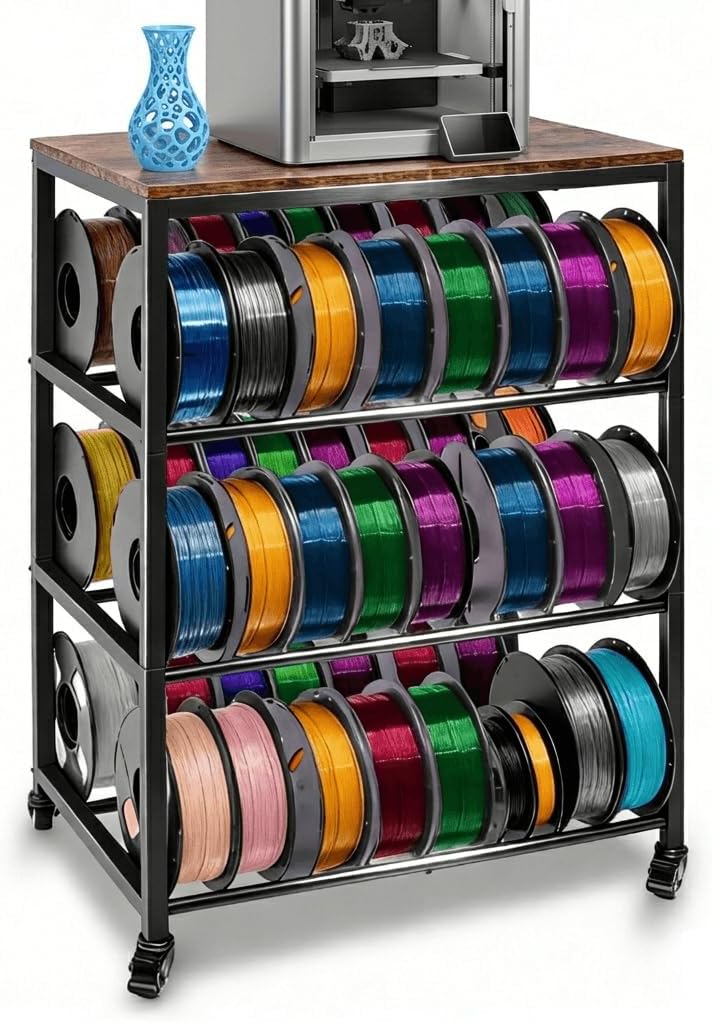
This model stands out for its heavy-duty construction and massive storage capacity. With a 4.3 rating, it appeals to users needing a stable base for large prints while keeping their filament stash organized efficiently in one unit.
We may earn a commission when you buy through this link, at no additional cost to you.
The standout feature is its ability to absorb vibrations, ensuring smoother print surfaces. The 56-spool capacity keeps your workshop clutter-free, and the dedicated drawer protects essential tools from getting lost or damaged during busy sessions.
While assembly requires about 25 minutes, the included hardware makes it straightforward. The weight ensures stability but can make relocation difficult if you need to reorganize your workspace frequently after setup is complete.
It is ideal for serious makers with multiple printers or large filament collections. If you prioritize stability and storage over portability, this station delivers excellent value and long-term reliability for daily printing tasks.
The patented design reduces wobble and ghosting, leading to higher quality prints with smoother surfaces on tall or complex models.
Up to 56 spools fit neatly on open shelves, centralizing your materials and saving valuable floor space in smaller workshops.
We may earn a commission when you buy through this link, at no additional cost to you.
This model earns a high 4.7 rating for blending durability with modern design. Its wood and metal combination suits home offices or studios where aesthetics matter as much as functionality for your 3D printing needs.
We may earn a commission when you buy through this link, at no additional cost to you.
The design features integrated side pockets for quick access to cutters and scrapers, keeping essentials handy. Its mobility allows you to rearrange your studio easily, making it a flexible choice for evolving workspaces.
While it lacks a built-in power strip, the storage organization compensates well. The wood finish requires some care to avoid scratches, but the overall look elevates the workspace beyond typical industrial metal stands.
It is perfect for hobbyists who value style alongside utility. If you want a centerpiece that reflects creativity while keeping tools organized, this stand offers a balanced solution for daily use and long-term enjoyment.
Natural wood finish paired with metal accents creates a modern look that fits seamlessly into any home office or professional studio.
The lightweight design allows easy transport of filaments and tools around your workshop without needing heavy lifting or disassembly.
We may earn a commission when you buy through this link, at no additional cost to you.
Ranked third, this unit integrates a power hub directly into the stand, streamlining your workflow. With a 4.4 rating, it appeals to users wanting all-in-one functionality without relying on external power strips or messy cables cluttering their desk.
We may earn a commission when you buy through this link, at no additional cost to you.
The built-in strip offers outlets and USB ports for printers and laptops, reducing prep time significantly. Reinforced X-brackets enhance stability, ensuring clean layers even on large-format printers where vibration control is critical for precision and detail.
The weight ensures solid stability but makes moving it harder once assembled. While limited in color choice, the industrial look remains versatile. It prioritizes function and connectivity, making it a practical choice for active production environments.
Ideal for professionals needing reliable power and stable support, this station reduces clutter and boosts efficiency. If you value convenience and consistent print quality, the integrated hub and robust frame make it a smart investment.
Eliminates cable clutter by providing AC and USB ports directly on the stand, keeping devices charged and connected centrally.
X-bracket reinforcement reduces wobble by up to 40%, ensuring precise layers on large prints without sacrificing structural integrity.
We may earn a commission when you buy through this link, at no additional cost to you.
This model leads with a 4.8 rating and offers exceptional value for budget-conscious users. Its compact square design fits tight spaces while maintaining stability for smaller printers, making it a practical start for beginners or limited setups.
We may earn a commission when you buy through this link, at no additional cost to you.
The thick steel tubing ensures a wobble-free base for smooth prints, and dual-tier storage holds up to 32 spools. Assembly takes just 20 minutes, letting you start printing almost immediately without waiting for complex setup or instructions.
While the capacity is lower than larger models, it suits standard filament needs well. The compact size saves floor space, though it may not fit industrial machines. It prioritizes essential stability and simplicity over extra features.
Perfect for entry-level makers or small rooms, this stand delivers reliability without breaking the bank. If you need a sturdy, no-fuss solution for one printer and moderate storage, it is a top choice to consider.
Designed for smaller footprints, this stand fits neatly in corners or small workshops without sacrificing stability or usability.
Modular design and clear guides allow assembly in 20 minutes, saving time so you can focus on printing instead of building.
We may earn a commission when you buy through this link, at no additional cost to you.
Built for multi-printer setups, this model supports two devices side-by-side with dedicated zones. A 4.2 rating reflects its niche utility, appealing to users running simultaneous prints or needing separate spaces for different projects in their workshop.
We may earn a commission when you buy through this link, at no additional cost to you.
Each zone has a closed-loop frame to isolate vibrations and maintain stability. The 48+ spool capacity ensures ample supply for heavy printing, while side mesh racks maximize space. The 300-pound load capacity supports even heavy industrial setups comfortably.
Its larger size may not fit compact rooms, and assembly requires attention to ensure structural integrity. However, the separation benefits workflow by allowing maintenance on one machine without interrupting the other. This design aids productivity and organization.
Ideal for small studios or labs with multiple printers, this table optimizes workflow and storage. If you run multiple machines regularly, the dual-zone layout and robust construction justify the space it requires in your environment.
Dedicated working areas prevent vibration interference between printers, allowing you to service one unit while the other prints.
Side mesh racks and lower shelves hold over 48 spools, keeping materials organized and easily accessible for large projects.
We may earn a commission when you buy through this link, at no additional cost to you.
This model features fabric drawers designed for storing tools, making small accessories easy to grab and use. A 4.1 rating shows it meets basic needs, appealing to users who value quick access and simple organization over heavy-duty storage.
We may earn a commission when you buy through this link, at no additional cost to you.
The dual drawers separate tools from parts, keeping scrapers and wrenches handy. With 50+ spool storage, it handles significant inventory without clutter. The 150-pound capacity supports most standard printers securely on the sturdy black steel frame.
Fabric may wear faster than metal under heavy use, but it offers flexibility and cost savings. The open shelves aid visibility, though they expose items to dust. It is a practical, lightweight option for regular hobbyist use.
Best for users prioritizing easy tool access, this stand balances storage with simplicity. If you want affordable organization that adapts to your needs, the fabric drawers and open shelves make it a versatile choice.
Dual fabric drawers let you reach tools like scrapers and pliers quickly without opening heavy drawers or digging through bins.
Bottom shelves store over 50 spools securely, keeping PLA and PETG reels organized and within easy reach during printing.
We may earn a commission when you buy through this link, at no additional cost to you.
This unit blends style and function with a wood desktop and modern metal frame. A 4.3 rating indicates strong satisfaction among users seeking a clean look. It fits well in home offices where aesthetics matter for daily printing tasks.
We may earn a commission when you buy through this link, at no additional cost to you.
The desktop supports printers and tools comfortably, while the 4-tier rack organizes spools effectively. Built-in power ports reduce cable clutter, allowing easy access to outlets. The drawer keeps small items protected, maintaining a tidy workspace.
The wood surface may require care against scratches, and load capacity is moderate compared to industrial models. However, for typical hobbyist use, it offers sufficient stability. The modern look elevates your workspace beyond basic utility furniture.
Ideal for those who value design alongside function, this table is a great choice. If you want a workstation that looks good and performs well without excess bulk, it balances looks and utility effectively.
Wood-style tabletop combined with a sturdy metal frame creates a clean aesthetic suitable for professional or home offices.
AC and USB ports on the unit provide convenient power access, reducing the need for extra extension cords nearby.
We may earn a commission when you buy through this link, at no additional cost to you.
The AHOWPD model is a compact solution with a 4.5 rating. Its small footprint fits tight spaces well while offering essential features like a power strip and fabric drawers. It serves students or small rooms effectively without sacrificing organization.
We may earn a commission when you buy through this link, at no additional cost to you.
Two levels of storage with metal tube racks keep spools organized and accessible. The power strip simplifies setup, allowing direct device connection. Fabric drawers store small tools securely, ensuring everything needed stays within easy reach for maintenance or adjustments.
While it lacks vertical expansion, it maximizes available space efficiently. The compact design may limit use for larger industrial machines but suits most desktop printers. It prioritizes practicality and cleanliness for everyday tasks in limited environments.
Ideal for small studios or apartments, this table delivers reliable performance. If you need a clean, space-efficient workspace with built-in power, it offers great value and simplicity for regular 3D printing needs.
Compact 39-inch length fits into corners or tight spots without taking up excessive room in your workshop or home.
Embedded power strip keeps devices charged and reduces clutter by providing AC and USB outlets directly on the table.
We may earn a commission when you buy through this link, at no additional cost to you.
This premium option stands out for its protective features and mobility. A 4.6 rating reflects excellent user satisfaction, appealing to professionals who demand protection from dust and moisture while needing easy transport across large workspaces or studios.
We may earn a commission when you buy through this link, at no additional cost to you.
The enclosed cabinet safeguards sensitive materials from environmental factors, preserving filament quality over time. Locking wheels ensure stability during printing while allowing quick movement when needed. The robust metal frame supports equipment securely without flexing or wobbling under pressure.
The higher cost is justified by the durability and specialized protection. Its height may require ceiling clearance in low rooms, but it maximizes vertical space efficiently. It prioritizes long-term protection and professional utility over basic storage.
Best for professional studios with sensitive materials, this cart offers superior protection and flexibility. If you need a rugged, mobile solution that keeps your gear safe, the investment delivers reliability and premium build quality.
Dustproof and moisture-proof cabinet preserves filament quality by shielding materials from air and humidity during long-term storage.
360-degree swivel casters with locks allow easy transport while ensuring stability during operation to prevent machine damage.
We may earn a commission when you buy through this link, at no additional cost to you.
This model offers massive capacity with a 4.6 rating. It supports up to 480 pounds, making it ideal for multiple printers or heavy tools. The wheels enable smooth transport across garages or studios, accommodating diverse setups easily.
We may earn a commission when you buy through this link, at no additional cost to you.
Three lower layers hold 48 spools, ensuring ample storage without clutter. Silent casters allow quiet movement when relocating equipment, while adjustable feet compensate for uneven floors. The design prioritizes utility and stability over style.
The top surface is lower than standard tables, so tall printers might feel cramped. However, its strength and mobility make up for this limitation. It is a pragmatic choice for users who need robust, flexible storage for heavy workflows.
Ideal for workshops needing high capacity and mobility, this cart delivers reliability. If you want to move equipment easily while keeping supplies organized and protected, it offers outstanding load capacity and practical design.
Each layer supports over 120 pounds, ensuring safety and stability even with heavy printers and full filament spools loaded.
Silent casters allow quiet movement across floors without leaving marks, making it easy to reposition the setup as needed.
We may earn a commission when you buy through this link, at no additional cost to you.
Selecting the right stand involves considering several factors to ensure stability, storage, and compatibility with your equipment. This guide breaks down key elements to help you make an informed decision.
Stability is critical for print quality as vibrations can cause layer shifts or ghosting. Look for stands with thick metal frames, reinforced brackets, or rubber feet designed to absorb motion effectively. Heavy-duty construction ensures the machine stays level even during complex prints.
Choose models with proven vibration reduction features to maintain print accuracy.
Assess how many filament spools and tools you need to store daily. Open shelves offer visibility and easy access, while enclosed cabinets protect materials from dust and moisture. Fabric or metal drawers are useful for organizing small tools securely.
Match the storage type to your workflow and environmental needs for better organization.
Measure your available floor space to ensure the stand fits comfortably. Consider both width and height, especially if you have tall printers or need clearance for cable management. Compact models suit small rooms while larger ones support industrial setups.
Prioritize models that maximize space efficiency without overcrowding your workspace.
If you need to move the stand frequently, check for built-in casters. Swivel wheels with locking brakes offer flexibility and stability during operation. Ensure the wheels are silent and non-marking to avoid floor damage.
Select locking wheels to keep the stand secure while printing and mobile when needed.
Confirm the maximum weight the stand can safely hold, including the printer, spools, and accessories. Exceeding the limit risks structural failure. Look for sturdy steel frames and reinforced legs for heavier loads.
Always choose a stand with a higher load rating than your total equipment weight.
Stands with integrated power strips simplify wiring by offering AC outlets and USB ports directly on the unit. This reduces cable clutter and keeps connected devices powered centrally. Some models include smart storage options for tools and accessories.
Consider units with built-in power to streamline your setup and reduce extension cord usage.
Check user reviews for assembly times and clarity of instructions. Modular designs with clear diagrams save time. Some stands require tools while others include everything necessary for quick setup.
Prioritize models with straightforward assembly to get started faster with minimal frustration.
Metal frames generally offer superior durability compared to particleboard or wood. Powder coatings protect against scratches and corrosion over time. Ensure the finish suits your environment, whether indoor or outdoor.
Choose durable materials like steel to ensure the stand withstands daily workshop conditions.
Proper assembly is the first step to ensure stability. Follow the provided instructions closely, securing all bolts tightly, and use a level to ensure the surface is even before placing your printer.
Organize your filament spools by type or color on the shelves to streamline material selection. Store small tools in drawers or side pockets for easy access and to prevent accidental drops during maintenance.
Regularly clean the stand to remove dust and filament residue. Wipe surfaces with a damp cloth and check wheels or feet for wear. Avoid overloading shelves beyond the stated capacity to maintain structural integrity.
Yes, most stands are versatile and support both 2D and 3D printers. Check the weight capacity and surface dimensions to ensure compatibility with your specific model. The storage helps organize tools common to both printer types.
Many models are engineered to absorb vibrations through thick steel frames and reinforced brackets. This reduces wobble and improves print quality. Look for specific mentions of vibration dampening in the product features.
Some stands have adjustable shelving to accommodate various spool diameters. Others have fixed spacing optimized for standard sizes. Check product specifications to confirm flexibility before purchasing for your needs.
Most models provide clear instructions and include necessary tools. Assembly times range from 20 to 30 minutes. Modular designs make the process straightforward, even for those with limited DIY experience.
Yes, most stands are designed to be disassembled if relocation is needed. However, frequent moving may loosen joints over time. Consider models with wheels if mobility is a priority to simplify transport.
Some models include integrated power strips with AC and USB ports for convenience. Others do not, requiring external outlets. Check the product features to confirm if power management is included in your choice.
The top picks offer diverse options for every budget and space. From compact solutions to heavy-duty models, these stands combine stability and storage to enhance your printing workflow efficiently.
Prioritize stability and storage capacity based on your equipment and workspace. Consider mobility and built-in features if they match your specific operational needs and daily workflow habits.
Prices and availability change frequently so always check current listings before buying. Investing in the right stand will improve your print quality and workspace organization significantly over time.