
JADENS Portable US Letter
4.6Editor score
Inkless thermal printing
1800mAh battery life
Bluetooth connectivity
Finding a reliable battery powered portable printer can transform how you work outside the office. These devices let you print documents, photos, and labels anywhere without needing a wall outlet. We evaluate the best options available today to help you choose the right fit for your mobile lifestyle.
Our selection process involved analyzing real-world performance, battery life, and connectivity options across ten distinct models. We considered inkjet and thermal technologies, weighing their pros and cons for various use cases. Each product was reviewed based on its ability to deliver consistent quality while remaining truly portable and easy to use.
Every pick below showcases a unique strength, whether it is superior print quality, extended battery life, or compact design. Prices and availability can change rapidly, so always check the latest details before purchasing. Our goal is to provide clear, honest insights that empower you to make an informed decision for your specific printing requirements.
4.6Editor score

4.2Editor score
4.5Editor score
As an Amazon Associate we earn from qualifying purchases.
The following table provides a side-by-side comparison of all ten models, detailing their core specifications to help you quickly identify the device that matches your unique needs.



The Canon PIXMA TR160 stands out as a top contender in the battery powered portable printers category. With a solid 4.2 rating, it offers a blend of portability and print quality that few competitors match. Its lightweight chassis fits easily into bags, making it ideal for professionals who travel frequently.
We may earn a commission when you buy through this link, at no additional cost to you.
This device uses a 5-Color Hybrid Ink System to deliver sharp black text and vibrant photo details. You can print up to 8.5 by 11 inches with borderless options for a professional finish. Connectivity is seamless via the Canon PRINT app, Apple AirPrint, or Mopria, and Wireless Direct Mode means you can connect without a router.
While the print quality is impressive, users should note that ink costs can add up over time compared to thermal options. Additionally, battery performance may vary depending on usage intensity and ambient temperature. These trade-offs are acceptable given the superior color output and standard paper compatibility it provides.
If you need a portable printer that handles full-size documents and photos with color fidelity, the TR160 is an excellent choice. It is best suited for small business owners, students, and travelers who value quality and versatility over extreme cost savings on consumables.
The 5-color hybrid ink system ensures rich details and sharp text, making it perfect for client-facing documents and photos.
With wireless direct mode and cloud support, you can print from almost any device without needing a complex network setup.
We may earn a commission when you buy through this link, at no additional cost to you.
The HP OfficeJet 250 is designed for professionals who need more than just printing on the go. Rated 4.3 stars, it integrates scanning and copying capabilities into a compact mobile unit. The included battery ensures you can start working immediately without hunting for power sources.
We may earn a commission when you buy through this link, at no additional cost to you.
Its business-ready design supports a wide range of paper sizes including legal and executive formats. You can connect via laptop, tablet, or smartphone using the HP app, and setup is streamlined with Auto Wireless Connect. The Fast Charge feature allows you to power up quickly while the device is off.
While versatile, the device is slightly bulkier than single-function thermal printers, which might be a consideration for tight spaces. The reliance on ink cartridges also means recurring costs compared to inkless alternatives. However, the ability to scan and copy on-site justifies these factors for many users.
This model is ideal for consultants, real estate agents, or field service technicians who need to process documents fully while away from an office. It balances comprehensive functionality with true portability, making it a robust tool for dynamic work environments.
Beyond printing, the ability to scan and copy allows for full document workflows without returning to a stationary office.
The included battery and fast charging capabilities ensure minimal downtime during critical business tasks on the road.
We may earn a commission when you buy through this link, at no additional cost to you.
Rated 4.4 stars, the HP OfficeJet 200 is a focused solution for users who prioritize lightweight mobility. It is slightly smaller than the 250 model, fitting easily into backpacks and briefcases. The included battery ensures you are always ready to print anywhere without external power.
We may earn a commission when you buy through this link, at no additional cost to you.
This printer uses Original HP 62 series cartridges for high page yields, reducing the frequency of supply replacements. It supports letter, legal, and various photo and envelope sizes, giving you flexibility for different document types. Setup is quick with Auto Wireless Connect, and the HP app makes mobile printing straightforward.
Since it lacks scanning and copying features, it is strictly a printing tool. This simplifies the design but limits functionality compared to all-in-one units. However, for users who only need to print contracts, invoices, or lists, this focused approach is highly efficient and cost-effective.
The HP OfficeJet 200 is perfect for travelers and small business owners who need to produce documents quickly without carrying heavy equipment. Its combination of battery inclusion and compact size makes it a reliable companion for on-the-go productivity.
The use of 62 series cartridges delivers higher page yields, meaning fewer interruptions for ink changes during busy periods.
With a compact form factor and included battery, it is designed to fit seamlessly into any travel bag or car storage.
We may earn a commission when you buy through this link, at no additional cost to you.
The Epson Workforce WF-110 is rated 4.1 stars and is known for delivering reliable color prints in a small package. It is designed for professionals who need to print vibrant marketing materials or photos while traveling. The built-in lithium-ion battery ensures you are not tied to a power outlet.
We may earn a commission when you buy through this link, at no additional cost to you.
Charging is flexible, allowing you to use a USB port or AC adapter depending on availability. It supports Wi-Fi Direct, making it easy to connect to devices like iPads or smartphones without a network. The use of Genuine Cartridges ensures consistent quality, though non-genuine ink may void the warranty.
Users should be aware that relying on ink means ongoing supply costs, unlike thermal printers. Also, as with any rechargeable device, battery capacity may degrade over years of heavy use. These factors are standard for inkjet technology but worth considering for long-term budgeting.
This printer is an excellent choice for creative professionals, photographers, and students who need color output on the move. Its balance of performance and portability makes it a standout option for those who cannot compromise on print quality.
The ability to print true color on the go makes it invaluable for presentations, brochures, and personal photo projects.
With both USB charging and Wi-Fi Direct, you have multiple ways to power and connect the device in various settings.
We may earn a commission when you buy through this link, at no additional cost to you.
The Gloryang Inkless Portable printer is rated 4.2 stars and uses advanced thermal technology to eliminate the need for ink. It weighs just 1.75 pounds and fits easily into backpacks or briefcases. The included carry case and paper rolls make it a complete ready-to-use kit for travelers.
We may earn a commission when you buy through this link, at no additional cost to you.
Connectivity is handled via Bluetooth through the Jadens Printer app on iOS and Android devices. It features a built-in paper bin to keep your workspace tidy and supports a range of paper widths from 2 to 8.5 inches. This makes it versatile for printing documents, contracts, and lists.
Because it uses thermal paper, the output is black and white and sensitive to heat over time. You must use specific thermal paper rolls which limits compatibility with regular plain paper. Despite this, the savings on ink and toner make it a cost-effective solution for many users.
Ideal for students and professionals who need to print text documents or lists on the go, this printer offers a clean, simple solution. Its portability and lack of consumables beyond paper make it a smart choice for everyday mobile tasks.
Eliminating ink and toner means you never have to worry about spills or clogged print heads, keeping your workspace clean.
Including a carry case and initial paper rolls, it arrives ready to use immediately without needing extra purchases.
We may earn a commission when you buy through this link, at no additional cost to you.
Rated 4.0 stars, the Portable Printers A285M is designed for versatility with support for five different thermal paper sizes. It is incredibly light at 1.5 pounds and includes a built-in paper bin. This makes it easy to carry for business travel, school, or construction site use.
We may earn a commission when you buy through this link, at no additional cost to you.
You can connect via Bluetooth to phones and tablets using a specific app, or use a USB-C cable for laptops. It prints documents, receipts, and lists clearly without ink. Note that for computer use, you must download a driver first, which is a minor setup step.
Since it relies on thermal paper, the output is black and white and cannot handle regular copy paper. While this limits some use cases, it ensures cost savings and reliability. The compact size and multiple paper size options give it an edge for diverse printing needs.
This model is perfect for students, teachers, and field workers who need to print varied formats on the go. Its affordability and lightweight design make it a practical choice for anyone needing simple, quick printing without carrying heavy gear.
Supporting five different paper sizes allows you to print everything from small receipts to full letter documents with ease.
With both USB-C and Bluetooth options, you can choose the most convenient connection method for your specific device and setting.
We may earn a commission when you buy through this link, at no additional cost to you.
The D90E Inkless Portable is rated 4.3 stars and stands out for its inclusion of a travel case. It is designed for on-the-go printing with a compact design that fits into backpacks. The thermal technology ensures you do not need ink, toner, or ribbons for operation.
We may earn a commission when you buy through this link, at no additional cost to you.
Connectivity options include Bluetooth for mobile devices via the Labelnize app and USB for PCs. It supports 8.5×11 inch thermal paper, making it suitable for standard documents. A handy feature is the paper eject function which helps resolve jams easily without force.
As with all thermal printers, it is limited to black and white output and specific paper types. You cannot use ordinary copy paper, which is a trade-off for the convenience and cost savings. However, for text-based documents, this limitation is often acceptable.
This printer is ideal for notaries, truckers, and teachers who need reliable document printing in the field. The included case and easy operation make it a thoughtful gift for professionals who value simplicity and portability.
The included travel case protects the printer during transit, ensuring it remains in good condition for future use.
Simple paper eject mechanisms allow you to clear jams quickly, minimizing downtime when you are away from a desk.
We may earn a commission when you buy through this link, at no additional cost to you.
Rated 4.6 stars, the JADENS Portable US Letter printer is a high-value option for those needing reliable mobile printing. It features a 1800mAh battery that supports up to 3 hours of continuous printing or 360 sheets per charge. This makes it one of the most efficient devices on the market.
We may earn a commission when you buy through this link, at no additional cost to you.
Using direct thermal technology, it produces clear black-and-white text and images at 203 DPI. It connects via Bluetooth to iOS and Android devices using the Jadens Printer app, which includes creative tools like AI image generation. Privacy is maintained through local printing without cloud uploads.
The main limitation is the requirement for specific US Letter thermal paper. You cannot use regular inkjet paper, which might be a slight inconvenience for some. However, the savings on ink and the portability benefits far outweigh this minor constraint for most users.
This model is perfect for homework, business contracts, and travel documents where cost and battery life are priorities. The combination of high capacity and high ratings makes it a top choice for budget-conscious professionals and students.
With up to 360 sheets per charge, you can go days without needing to plug in, ensuring uninterrupted work.
Local printing ensures your sensitive documents never leave your device or go through the cloud, keeping your data secure.
We may earn a commission when you buy through this link, at no additional cost to you.
The N80 Bluetooth Thermal Printer is rated 4.1 stars and is ideal for those who need a lightweight travel companion. It weighs only 1.5 pounds and supports printing 160 sheets on a single charge. Its compact size makes it easy to carry anywhere without burden.
We may earn a commission when you buy through this link, at no additional cost to you.
With 203 DPI resolution, it delivers clear results for documents and even tattoo transfer paper. You can connect via Bluetooth to phones or USB to laptops. The package includes a Type-C adapter which is helpful for charging on the go without needing an extra charger.
It is limited to black and white thermal printing, so color documents are not possible. Also, you must use specific thermal paper rather than standard sheets. For text-heavy tasks or specialty prints like tattoos, these limitations are minor compared to the portability.
This printer is great for students and travelers who need to print boarding passes, lists, or homework. Its versatility and light weight make it a perfect gift for anyone who values convenience and simplicity in their daily routine.
High definition printing ensures that text and simple images are sharp and easy to read in any lighting condition.
Unique compatibility with tattoo transfer paper makes it useful for artists and hobbyists needing mobile design prints.
We may earn a commission when you buy through this link, at no additional cost to you.
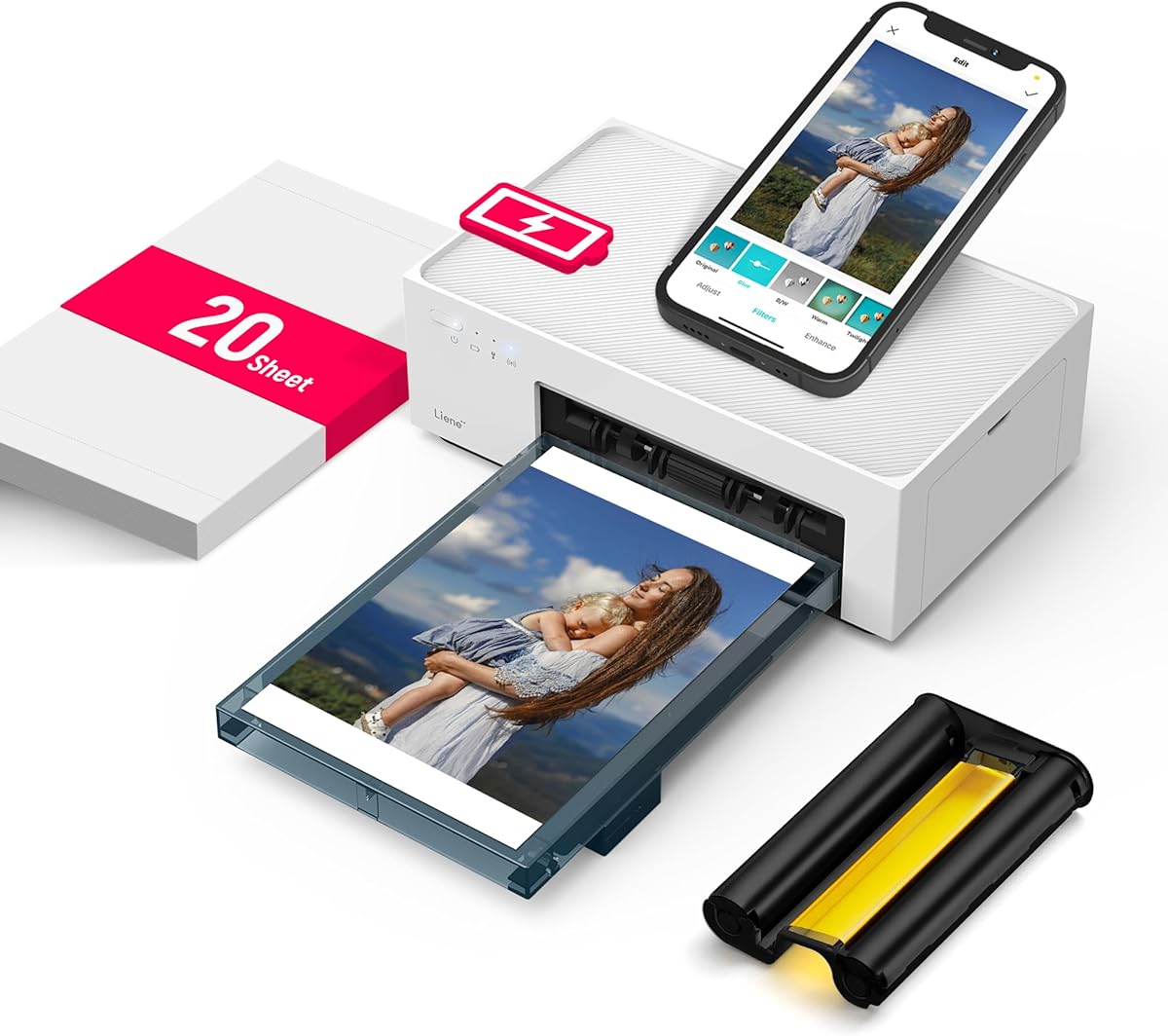
The Liene White M200 is rated 4.5 stars and offers a unique take on portable printing with full-color photo output. It uses dye sublimation technology to produce vibrant images that are water-resistant and durable. With 40 prints per charge, it is perfect for travel memories.
We may earn a commission when you buy through this link, at no additional cost to you.
It includes a built-in WiFi hotspot that allows up to five users to connect simultaneously without needing a router. The app offers editing features and filters, making it a creative tool. Its sleek design with magnetic top storage makes it both functional and stylish.
While it cannot print standard documents, its photo quality is unmatched in this size class. The need for specific photo paper is a consideration but ensures high quality results. For memory keepers and social creators, this is a minor price to pay for professional photos.
This device is best for families, travelers, and anyone who wants to print physical photos instantly. Its ability to produce high-quality, durable prints on the go makes it a standout choice for capturing and sharing life moments.
Dye sublimation printing ensures rich colors and a protective layer that keeps photos safe from water and scratches.
With support for up to five simultaneous connections, it is perfect for group events where everyone wants to print.
We may earn a commission when you buy through this link, at no additional cost to you.
Selecting the right portable printer involves considering several critical factors to ensure it meets your specific workflow and technical needs.
The most important decision is choosing between inkjet and thermal technologies. Inkjet printers offer color and handle standard paper but require ink cartridges. Thermal printers are ink-free, cheaper to operate, but only print black and white on specific paper. Decide based on whether you need color or cost savings.
Inkjet is best for documents and photos while thermal is better for labels and receipts.
Battery life dictates how long you can work without an outlet. Look for models with rechargeable lithium-ion batteries that support at least 100 prints per charge. Some models offer 360 sheets, which is ideal for long trips. Check if the battery is included or sold separately.
Higher capacity batteries reduce downtime and increase reliability during extended use.
Ensure the printer supports the devices you use most. Bluetooth is standard for mobile, but some models also offer USB-C for laptops. Wi-Fi Direct or hotspot features allow connection without a router. Compatibility with iOS, Android, and PC drivers is essential for seamless printing.
Choose models that offer multiple connection paths to avoid compatibility issues in different settings.
Portability is key for these devices. Aim for units that weigh under 2 pounds and fit into standard backpacks. Consider if it includes a carry case for protection. A compact design ensures you can take it everywhere without adding too much weight to your luggage.
Lightweight and compact designs are crucial for frequent travelers and field workers.
Check if the printer supports the paper sizes you need. Some models only handle receipts while others support full 8.5×11 inch sheets. If you need to print legal or A4 documents, verify the specs. Thermal printers often have specific width requirements for rolls.
Ensure the paper size matches your typical document needs to avoid frustration during use.
Resolution is measured in DPI, with 203 being standard for text. For photos, dye sublimation offers the best quality. Check user reviews for clarity of text and images. Good print quality ensures your documents look professional and readable in various lighting conditions.
Higher DPI and good reviews indicate better sharpness for text and graphics.
Consider long-term costs beyond the initial purchase. Inkjet printers require cartridges while thermal models need specific paper rolls. Calculate the cost per page for each type. Models with high yields or low-cost paper are more economical over time.
Thermal often saves money on consumables while inkjet has higher recurring supply costs.
Look for a one-year warranty or longer to protect your investment. Check if the brand offers customer support for setup and driver issues. Models with strong support networks reduce the hassle of troubleshooting. Ensure the vendor provides clear manuals and app instructions.
Reliable warranty and support are essential for handling any technical issues on the go.
To get started, fully charge the device using the provided cable before first use. Connect via Bluetooth by enabling the setting on your phone and opening the corresponding app. For laptop use, download the necessary drivers from the manufacturer's website to ensure compatibility.
Load the paper correctly to avoid jams. For thermal printers, ensure the thermal side faces up as directed. For inkjet models, align the paper guides to prevent skewing. Always use compatible paper types to protect the print mechanism and ensure clear output.
No, thermal portable printers are designed to work exclusively with special thermal paper. Regular paper does not react to the heat head and will not produce any image. Using the correct paper ensures the device functions correctly and prevents damage.
Battery life varies by model but typically ranges from 100 to 360 prints per charge. Some high-end models offer up to 3 hours of continuous use. Always check the manufacturer specs for specific battery capacity to plan your usage accordingly.
Most portable printers do not need a Wi-Fi router. They use Bluetooth or Wi-Fi Direct to connect directly to your device. This makes them ideal for remote areas where internet or router access is not available.
Thermal prints can fade over time if exposed to heat or sunlight but are generally durable enough for documents. For permanent records, inkjet or dye sublimation is better. Using high-quality thermal paper helps extend the life of the print.
Yes, some models like the Liene M200 are designed for photos using dye sublimation. Others like JADENS are text-focused. Choose a model based on whether color images or standard documents are your priority.
Visit the manufacturer's website to download the latest driver version. Follow the installation instructions to ensure your laptop recognizes the device. Keeping drivers updated helps maintain connectivity and print quality.
Choosing the right battery powered portable printer depends on your specific needs for color, cost, and convenience. The Canon PIXMA TR160 offers great versatility while the JADENS model excels in budget-friendly efficiency.
Prioritize battery life and paper compatibility to ensure the device fits your workflow. Whether you need color documents or simple thermal lists, there is an option to suit your style.
Remember to check current availability and compatibility details before purchasing to get the best value for your needs.