
QUI Presentation Clicker with Volume Control
4.3Editor score
Affordable price point
328-foot wireless range
Includes volume controls
This guide compares the top laser pointer for presentations to help you choose the best wireless remote with laser, rechargeable battery, and slide control
Presentations require reliable tools to keep your audience engaged and focused on your message. A quality laser pointer for presentations ensures you can highlight key points clearly without technical distractions during critical moments.
We evaluated ten top-rated wireless presenter remotes based on laser visibility, connectivity options, battery life, and ease of use. Our analysis covers budget-friendly options and premium models designed for professionals and educators.
Each product review highlights specific strengths and weaknesses to help you match a device to your needs. Please note that prices and availability may change, so verify current details before purchasing your chosen tool.
4.3Editor score

4.6Editor score

4.6Editor score
This table provides a side-by-side overview of key specifications across all ten reviewed models to help you quickly identify the right fit for your presentation environment.




This green light presentation clicker stands out as a top choice for educators and professionals who need reliable visibility in bright rooms. Its 532nm green laser cuts through ambient light better than standard red pointers, ensuring your audience follows your every move without strain.
We may earn a commission when you buy through this link, at no additional cost to you.
The USB-C rechargeable battery eliminates the hassle of constantly hunting for AAA batteries before a presentation. A single one-hour charge powers weeks of daily use, making it an eco-friendly and cost-effective solution for frequent presenters in classrooms or conference halls.
While the price is higher than basic models, the durability and convenience justify the investment. The only minor trade-off is that the charging cable is not included in the box, which might be inconvenient if you need to charge the device immediately upon arrival.
If you prioritize visibility and reliability, this clicker is the ideal choice for your next presentation. Its plug-and-play functionality works instantly with Mac and Windows systems, allowing you to focus entirely on delivering your message without technical interruptions.
The green laser offers significantly better visibility on screens and whiteboards compared to red lasers, ensuring clarity in all lighting conditions.
Rechargeable USB-C power means you never run out of batteries unexpectedly, saving time and money over the long term.
We may earn a commission when you buy through this link, at no additional cost to you.
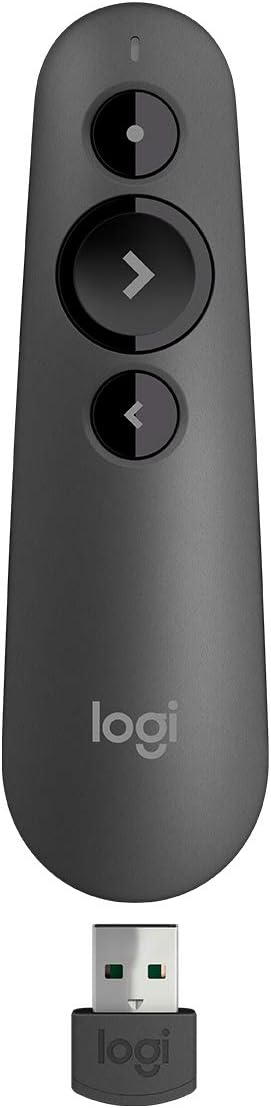
The Logitech R400 is a classic wireless presenter known for its reliability and ease of use. It features a built-in red laser pointer and intuitive touch keys that make slide control effortless during live presentations or training sessions.
We may earn a commission when you buy through this link, at no additional cost to you.
Its 2.4GHz RF wireless technology provides a solid connection up to fifty feet, which is sufficient for most standard meeting rooms. The receiver stores safely inside the device, preventing loss when you are packing up after a long day of teaching or presenting.
One drawback is the reliance on AAA batteries, which can add up in cost and waste over time compared to rechargeable models. Additionally, the range is shorter than some competitors, so you may need to stay closer to the screen for optimal control.
For those seeking a trusted name in presentation tools without breaking the bank, the R400 delivers excellent value. It remains a popular choice for classrooms and small offices where simplicity and dependability are more important than advanced features.
Logitech has built a strong reputation for durable electronics, making the R400 a safe choice for professional environments.
Its small footprint and internal receiver storage make it easy to carry in a pocket or laptop bag on the go.
We may earn a commission when you buy through this link, at no additional cost to you.
The Logitech R800 is a premium presenter designed for speakers who need advanced time management features. Its built-in LCD timer allows you to track your presentation length discreetly, ensuring you stay on schedule without constantly checking a wall clock.
We may earn a commission when you buy through this link, at no additional cost to you.
The green laser pointer is exceptionally bright and visible even on LCD screens or in well-lit rooms, providing a distinct advantage over standard red pointers. The one hundred foot wireless range grants you the freedom to move around large auditoriums or stages with confidence.
The vibration alerts are a thoughtful touch that lets you know when time is running out without interrupting your flow with beeps. However, the premium price and reliance on disposable batteries might be a deterrent for users on a tighter budget or those seeking eco-friendly options.
If you are a keynote speaker or frequent presenter, this device offers professional-grade control and features. It is an investment in confidence, giving you the tools to manage your time and engage your audience effectively during high-stakes presentations.
The integrated LCD timer helps presenters pace their talk perfectly, reducing the risk of running over or finishing too early.
The green laser ensures your pointer is seen clearly on any surface, including glossy screens where red lasers often struggle.
We may earn a commission when you buy through this link, at no additional cost to you.
This wireless presenter offers a strong set of features at a competitive price point, making it an attractive option for budget-conscious buyers. It includes dedicated buttons for hyperlinks and volume control, which are rarely found on basic models at this price level.
We may earn a commission when you buy through this link, at no additional cost to you.
The one hundred foot wireless range ensures you have plenty of mobility during presentations in large rooms. The buttons are soft and rubberized, providing a tactile feel that helps you navigate slides without looking down at the device during a speech.
One limitation is that the red pointer is not recommended for LCD or LED screens, which may be common in modern conference rooms. Additionally, you will need to purchase AAA batteries separately, adding a small upfront cost before you can start using it.
For daily presentations in classrooms or offices with projector setups, this device offers excellent utility. Its ability to manage volume and hyperlinks directly from the remote adds significant convenience for users who value control over their presentation environment.
Dedicated buttons for volume and hyperlinks allow for seamless media management without needing to touch the computer.
The ergonomic shape and rubberized buttons reduce hand fatigue during long presentation sessions or multiple back-to-back talks.
We may earn a commission when you buy through this link, at no additional cost to you.
The R500s is designed for versatility, supporting both USB and Bluetooth connectivity to work with a wide range of devices. This flexibility makes it ideal for users who switch between Mac, Windows, and even mobile devices during their workday or travel.
We may earn a commission when you buy through this link, at no additional cost to you.
Its companion app allows you to customize button functions and monitor battery life, providing a tailored experience. The smart battery management system can extend usage up to twelve months on a single AAA battery by disabling the laser when not in use.
Some users may find the initial setup for customization requires installing software, which can be a hurdle if you need to present immediately. Additionally, the Mac setup involves an extra step compared to the instant plug-and-play experience on Windows systems.
If you work in diverse environments and need a reliable tool that adapts to different systems, this model is a solid choice. Its long battery life and customization options make it a practical long-term investment for frequent presenters.
Dual connection modes ensure compatibility with modern laptops that may lack USB-A ports while maintaining reliability with older models.
Intelligent power management extends battery life significantly, reducing the frequency of replacements and maintenance for users.
We may earn a commission when you buy through this link, at no additional cost to you.
For those seeking an affordable yet functional tool, this QUI Presentation Clicker offers impressive specs for the price. It supports page up and down navigation along with volume controls, making it a versatile companion for multimedia presentations.
We may earn a commission when you buy through this link, at no additional cost to you.
The three hundred twenty eight foot range is outstanding, allowing you to roam freely in very large lecture halls or event spaces. The included clip makes it easy to attach the remote to a notebook or pocket, ensuring it is always ready when you need it.
While the build quality is basic compared to premium models, it performs well for routine presentations. The main trade-off is that it requires AAA batteries, which are not included in the package, so you may need to buy them separately before first use.
This device is perfect for teachers or students on a tight budget who still want useful features like volume control. It provides a cost-effective solution for enhancing your presentations without spending a significant amount on advanced technology.
The three hundred twenty eight foot range ensures you can interact with audiences in large venues without losing connection.
The portable clip allows for easy attachment to bags or books, keeping the device secure and accessible at all times.
We may earn a commission when you buy through this link, at no additional cost to you.
The Norwii N95 features a dual USB receiver that connects to both USB-A and USB-C ports, making it highly compatible with modern tablets and laptops. This versatility is essential for users who frequently connect to different devices in classrooms or conference rooms.
We may earn a commission when you buy through this link, at no additional cost to you.
Its rechargeable battery eliminates the need for disposable cells, and the green laser ensures clear visibility even in bright environments. The buttons are reprogrammable via an app, allowing you to tailor the device to your specific presentation workflow and habits.
The one hundred meter range supports movement in large auditoriums or auditoriums, giving you the freedom to engage directly with your audience. However, the charging cable is not included, and you may need to spend time learning the app features to customize the buttons effectively.
This clicker is an excellent choice for mobile professionals who need flexibility and modern connectivity options. It balances cost and functionality well, offering features typically found in higher-end models at a more accessible price point.
Supporting both USB-A and USB-C ensures you can use the device with almost any laptop or tablet without adapters.
Reprogrammable buttons let you assign functions that match your specific workflow, improving efficiency during live presentations.
We may earn a commission when you buy through this link, at no additional cost to you.
This compact presenter remote features a simple and ergonomic design that fits comfortably in the hand during extended use. It includes both USB-A and USB-C options for broader compatibility, ensuring you can connect to most devices without extra adapters.
We may earn a commission when you buy through this link, at no additional cost to you.
The forty nine foot range is suitable for standard meeting rooms, keeping you close enough to maintain a connection. The device supports Linux systems and offers basic slide control functions, making it a practical tool for users on various operating systems.
While it lacks some advanced features like volume control or a timer, its simplicity is often a benefit for straightforward presentations. The receiver stores under the battery cover, preventing loss and ensuring the device is ready whenever you need to present.
For users who prefer a no-frills tool that just works, this remote is an excellent choice. It is lightweight, portable, and reliable, making it ideal for everyday use in small to medium-sized presentation settings.
The plug and play design means you can start presenting immediately without downloading software or complex configurations.
Ergonomic contours and a rubber feeling surface reduce hand fatigue during long sessions of continuous slide control.
We may earn a commission when you buy through this link, at no additional cost to you.
This unique clicker features a receiver with both USB-A and USB-C connectors built right in, eliminating the need for multiple dongles. This design ensures you have the right connection for any computer, from older PCs to the latest MacBooks.
We may earn a commission when you buy through this link, at no additional cost to you.
It includes volume controls and a bright red pointer that remains visible in large conference halls. The ergonomic body fits naturally in your hand, and the magnetic slot at the bottom securely holds the receiver so it never goes missing between presentations.
While the build quality is standard, the functionality covers all the basics for effective slide management. The primary downside is that it requires two AAA batteries, which are not included, adding a small extra step before you can start using it.
If you often present on mixed hardware or prefer having a single device that works everywhere, this model is highly practical. It simplifies your tech setup and provides essential controls like volume management for a seamless presentation experience.
Having both port types in one receiver means you never have to worry about compatibility when switching devices.
The magnetic receiver slot keeps the dongle safe and attached to the device, reducing the risk of losing essential parts.
We may earn a commission when you buy through this link, at no additional cost to you.
This wireless clicker offers a simple and comfortable experience for presentations without unnecessary complexity. Its ergonomic design ensures it feels natural in your hand, and the dark gray buttons make it easy to identify controls even in low light.
We may earn a commission when you buy through this link, at no additional cost to you.
With a one hundred foot control distance, you have ample room to move around the stage or classroom while maintaining a solid connection. The device supports various systems including Linux and Mac, making it a versatile tool for different office environments.
The compact size allows it to fit easily in your pocket or bag, ensuring you are ready to present whenever the opportunity arises. However, it is a basic model, so it lacks features like volume control or a timer that might be needed for complex sessions.
For those who want a straightforward and reliable tool for basic slide advancement, this is a great option. It is lightweight, easy to use, and affordable, making it a practical choice for occasional presenters or students.
The ergonomic design and button layout ensure comfort and ease of use even during extended periods of active presenting.
Its compact size and low weight make it easy to carry daily, ensuring you are prepared for unexpected presentation needs.
We may earn a commission when you buy through this link, at no additional cost to you.
Choosing the right laser pointer involves considering several key factors to ensure it meets your specific presentation needs and environment.
Laser color significantly impacts visibility depending on your screen type and ambient light. Green lasers are generally brighter and more visible on LCD screens and in bright rooms, while red lasers are adequate for most projector setups and standard whiteboards.
If you frequently present in well-lit rooms or on digital screens, a green laser is a superior choice. For traditional projectors, a red laser is often sufficient and more budget-friendly.
The wireless range determines how far you can move from your computer while controlling slides. Most models offer between fifty and one hundred feet, but some extend further for large auditoriums or lecture halls.
Ensure the range matches your venue size to avoid connection dropouts. A longer range provides more freedom to interact with your audience without being tethered to a podium.
Power sources vary from disposable batteries to rechargeable options. Rechargeable units reduce waste and save money over time, while battery-operated ones offer simplicity without needing charging cables.
Consider your presentation frequency when choosing. Frequent presenters benefit from rechargeable batteries, while occasional users might prefer the convenience of disposable cells.
Modern laptops often lack USB-A ports, requiring USB-C compatibility. Some clickers come with dual receivers or Bluetooth connectivity to ensure they work with newer devices.
Check your computer's ports before buying. A dual receiver or Bluetooth option guarantees compatibility without needing adapters.
Look for useful features like volume control, blackout screens, or timers. Volume control helps manage audio during multimedia slides, while timers keep you on track without needing to look at a clock.
These features add versatility to your toolkit. Identify which ones are essential for your workflow before making a purchase decision.
Most clickers work with Windows and Mac, but some also support Linux or mobile systems. Always verify compatibility with your specific operating system to avoid setup issues.
Cross-platform compatibility is crucial for users who switch between devices. Ensuring the device works across systems saves time and frustration.
Build quality affects longevity and comfort. Models with rubberized buttons and ergonomic shapes are more comfortable for long sessions and less prone to damage from drops.
Investing in a sturdy clicker pays off in daily use. Look for materials that feel robust and designed to withstand regular handling.
Losing the USB receiver can render a clicker useless. Models with internal storage for the receiver ensure it stays with the device and is ready for every presentation.
Always check for integrated storage options. This small feature prevents the common issue of losing the receiver and ensures uninterrupted presentations.
To begin using your wireless presenter, insert the receiver into your computer's USB port. Most devices are plug-and-play, so you can start controlling slides immediately without installing drivers.
Hold the clicker comfortably and use the navigation buttons to advance your slides. Ensure you press buttons firmly but gently to avoid accidental clicks, especially during critical moments.
For maintenance, replace or recharge batteries when the indicator light turns low. Store the device in a safe place to prevent damage, and keep the receiver stored inside the unit for future use.
Green lasers are generally brighter and more visible, especially on LCD screens or in bright rooms. Red lasers are standard and cost-effective, working well for most projector setups. Your choice depends on your venue lighting and display type.
No, most wireless presenters require a computer to function as they send signals to presentation software. Some may work with tablets via Bluetooth, but a connected device is necessary for slide control.
Battery life varies by model. Rechargeable units can last weeks on a single charge, while AAA batteries may last months depending on usage frequency. Check the specifications for specific details.
Yes, all reviewed clickers are compatible with PowerPoint. They also work with other software like Keynote and Google Slides, making them versatile tools for various presentation platforms.
If your device lacks USB-A ports, look for a clicker with USB-C compatibility or Bluetooth. Some models come with dual receivers to cover both USB types.
Most presentation lasers are Class 2 and safe for brief accidental exposure, but avoid staring directly into the beam. Never point it at people or animals to ensure safety.
We explored ten top-rated laser pointers for presentations, highlighting unique features like green lasers, rechargeable batteries, and versatile connectivity options to suit different needs.
Prioritize visibility and battery life if you present frequently. Consider your operating system and hardware compatibility to ensure seamless integration with your daily workflow.
Prices and availability may change, so always verify the latest details before purchasing. Choose a model that fits your budget and presentation style for the best results.