
E1000 Heat Shrink Label Maker
4.4Editor score
Includes heat shrink tapes
QWERTY keyboard layout
USB C power option
This guide compares the top ten label makers for network cables to help you choose the right tool for professional wire identification and cable management.
Network cables require precise identification to maintain organized systems and prevent costly troubleshooting errors. A dedicated label maker for network cables ensures each wire is clearly marked for easy tracking and maintenance.
We compared ten highly rated devices based on durability, printing quality, and specialized features for wire management. Each product was evaluated on its ability to produce legible, long lasting labels in demanding environments.
Each pick highlights specific strengths like battery life or print resolution to help you find your ideal match. Prices and availability may change so verify details before purchasing your preferred model.
4.4Editor score

4.6Editor score
4.3Editor score
This table provides a side by side overview of key specifications and capabilities across all ten models to simplify your decision making process.


The E1000 Heat Shrink Label Maker offers a powerful solution for identifying network cables without breaking the bank. With a 4.4 rating it delivers solid performance for home and office use.
We may earn a commission when you buy through this link, at no additional cost to you.
It features a familiar QWERTY keyboard for fast text entry and includes both heat shrink and flexible ID tapes in its package. The three cable modes simplify tasks like wrapping and flagging.
While it lacks some premium features like a backlit screen the device compensates with tape savings and versatile power options via USB or batteries. Users appreciate the straightforward setup and intuitive menus.
This label maker is ideal for budget conscious users needing reliable heat shrink labeling for data wiring. It balances cost and functionality well for standard cable management tasks.
The included heat shrink tapes provide durable identification that adheres tightly to wires and resists environmental factors.
Users can power the device using six AAA cells or a USB C cable for extended use without battery swaps.
We may earn a commission when you buy through this link, at no additional cost to you.
This VolenGo label maker stands out with its backlit LCD screen making it easier to use in dimly lit server rooms or basements. It scored well for usability and basic labeling tasks.
We may earn a commission when you buy through this link, at no additional cost to you.
The device supports three cable modes and uses laminated tapes that resist water oil and abrasion ensuring labels remain legible over time. Its 203 DPI printer delivers crisp text.
Though it lacks some advanced formatting features of higher end models it remains a strong choice for quick cable identification. The lightweight design aids portability.
Ideal for general home or office network setups this machine provides essential features without unnecessary complexity. It is a practical tool for organized wiring.
The backlit LCD ensures you can read text clearly even when working in dark enclosures or cabinets.
Laminated tapes withstand harsh conditions making them suitable for industrial or outdoor wiring environments.
We may earn a commission when you buy through this link, at no additional cost to you.
The Makeid P31S earns Editor's Choice status for its industrial grade thermal transfer technology and compliance with ANSI TIA standards. It produces labels that last ten years in tough conditions.
We may earn a commission when you buy through this link, at no additional cost to you.
With a 300 DPI print head it delivers sharp barcodes and text suitable for complex schedules. The 2600 mAh rechargeable battery supports extended jobsite projects without frequent charging.
It is heavier than budget models but supports a wide range of materials including vinyl and heat shrink. Its compliance with industry standards makes it essential for professional datacom work.
This label maker is recommended for network professionals who need durable compliant labels. It offers unmatched value for long term reliability and performance.
Meeting ANSI and TIA EIA 606 A standards ensures your labels meet professional requirements for electrical and datacom wiring.
The rechargeable battery provides up to ninety days of standby use allowing for uninterrupted work on large projects.
We may earn a commission when you buy through this link, at no additional cost to you.
The Brother P-touch PTH111 is designed for easy portability with a lightweight body and detachable wrist strap. Its 4.6 rating reflects strong user satisfaction with its usability.
We may earn a commission when you buy through this link, at no additional cost to you.
One touch keys help simplify cable wrap and flag creation reducing the need for complex menus. The graphical LCD lets you preview labels before printing to avoid errors.
It supports a variety of P-touch TZe tapes but requires separate purchase of AC adapter for continuous power. The three font options are limited compared to industrial models.
This model suits technicians needing quick reliable labeling on the go. It is ideal for organizing cables in office panels or home networks.
Previewing labels before printing helps prevent mistakes and saves tape during repeated labeling tasks.
Support for four tape widths allows customization from thin wire tags to broader asset labels.
We may earn a commission when you buy through this link, at no additional cost to you.
The BRADY M210 handheld label maker is built for durability in industrial settings. It maintains a 4.6 rating by offering reliable performance in tough environments.
We may earn a commission when you buy through this link, at no additional cost to you.
Its compact form factor makes it easy to carry during maintenance tasks. The industrial grade construction ensures it withstands drops and daily wear.
Features are streamlined for quick tasks but lack advanced software connectivity. It focuses on core labeling capabilities with minimal fuss.
Best for workers needing a no frills device for cable tags this model delivers dependability. It is a practical choice for heavy duty use.
The device is constructed to resist wear and tear ensuring longevity in demanding job sites.
Simple controls allow users to create labels quickly without extensive training or configuration.
We may earn a commission when you buy through this link, at no additional cost to you.
The Epson LW-PX700 industrial label maker stands out with its unmatched lifetime warranty covering breaks and damage. It is built to withstand rigorous use in data centers.
We may earn a commission when you buy through this link, at no additional cost to you.
It supports up to 24mm tape width and includes a large preview screen to confirm label layout before printing. The auto rewind feature saves time.
While proprietary tapes add to long term costs the durability justifies the investment. It offers robust features for complex industrial labeling needs.
Recommended for businesses valuing long term support this model ensures peace of mind. It is ideal for high volume industrial labeling.
Users benefit from a full service lifetime warranty in the US and Canada ensuring replacement regardless of damage.
Compatible with PX tapes including standard industrial heat shrink and self laminating wraps for versatile use.
We may earn a commission when you buy through this link, at no additional cost to you.
The Brady M211 portable label printer kit allows mobile creation via Bluetooth and a dedicated app. It is designed for technicians who need hands free operation.
We may earn a commission when you buy through this link, at no additional cost to you.
With attachable magnets and a belt clip the device offers versatility in the field. Its military grade shock resistance ensures reliability during transport.
It depends on a smartphone to run the Express Labels app which may not suit all users. The kit includes a hard case for protection.
Best for modern workflows using mobile devices this printer streamlines labeling. It is suitable for field service professionals.
Wireless connectivity allows quick edits and printing from your phone without physical cables.
The hard case and resistant design protect the printer from drops and crush damage.
We may earn a commission when you buy through this link, at no additional cost to you.
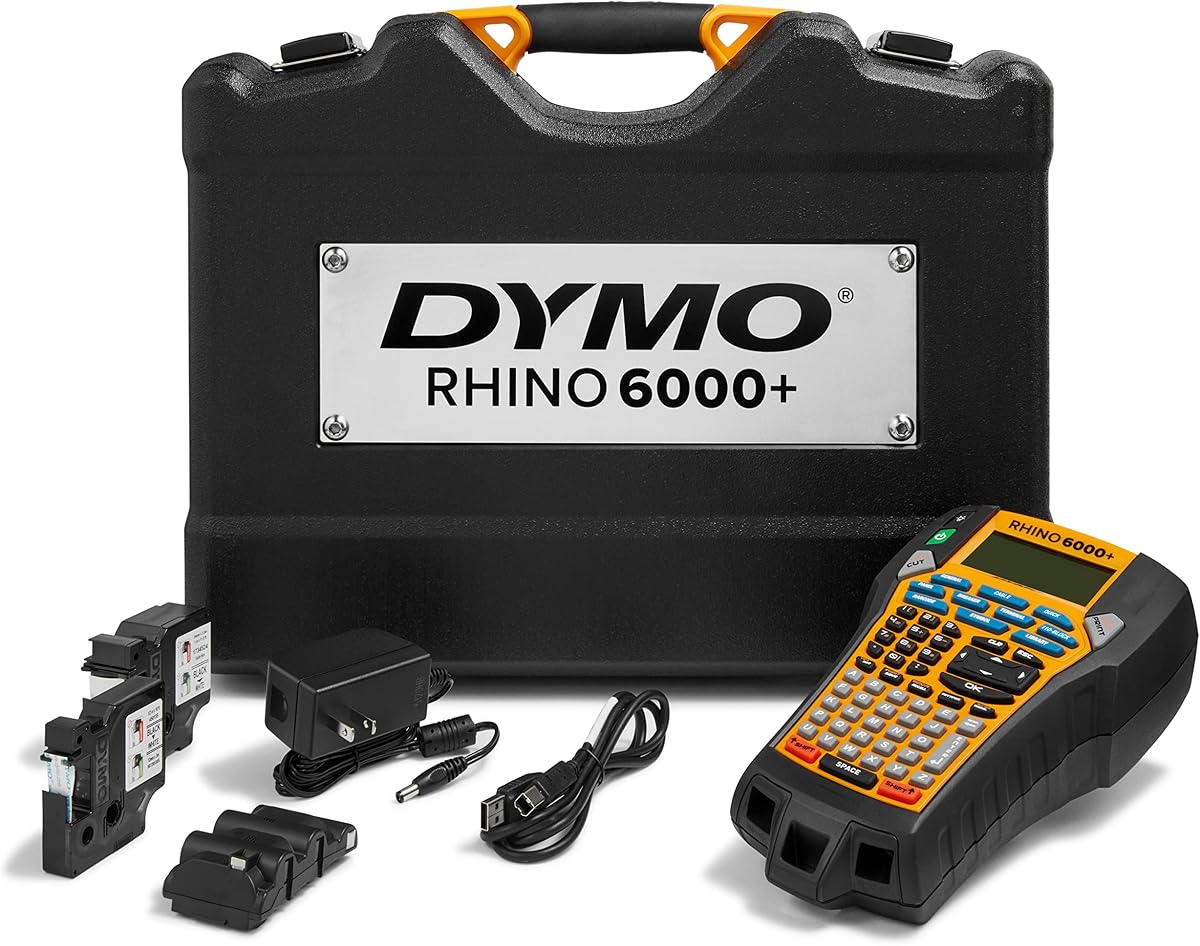
The DYMO Rhino 6000 is a premium industrial label maker connected to computers for advanced editing via Rhino ID software. It supports complex layouts and barcodes.
We may earn a commission when you buy through this link, at no additional cost to you.
Its hot keys automate sizing and spacing for faster label creation. The device meets TIA standards and includes c rechargeable battery for jobsite use.
The heavy build and high cost limit it to professional users needing detailed labels. It is less suited for quick casual tasks.
Ideal for large enterprises needing asset tags this model offers top tier customization. It is the ultimate tool for complex labeling.
PC connected editing allows for bulk data import and complex layouts difficult to create on device.
Hot keys automatically format text saving time on repetitive labeling tasks in large projects.
We may earn a commission when you buy through this link, at no additional cost to you.
The DYMO Rhino 5200 maintains the highest rating of 4.8 for its user friendly design and reliability. It offers five lines of text on its display for detailed labels.
We may earn a commission when you buy through this link, at no additional cost to you.
Hot keys automate layout formatting making it faster to produce standard industrial labels. The backlit display aids visibility in various lighting conditions.
It lacks modern PC connectivity but remains a preferred choice for standalone industrial tasks. The design is proven over years of use.
Best for users preferring simplicity this model delivers consistent results. It is excellent for quick and professional label creation.
The backlit five line screen ensures you can view all text clearly before printing.
Exclusive hot keys reduce manual effort by automatically sizing and formatting label text.
We may earn a commission when you buy through this link, at no additional cost to you.
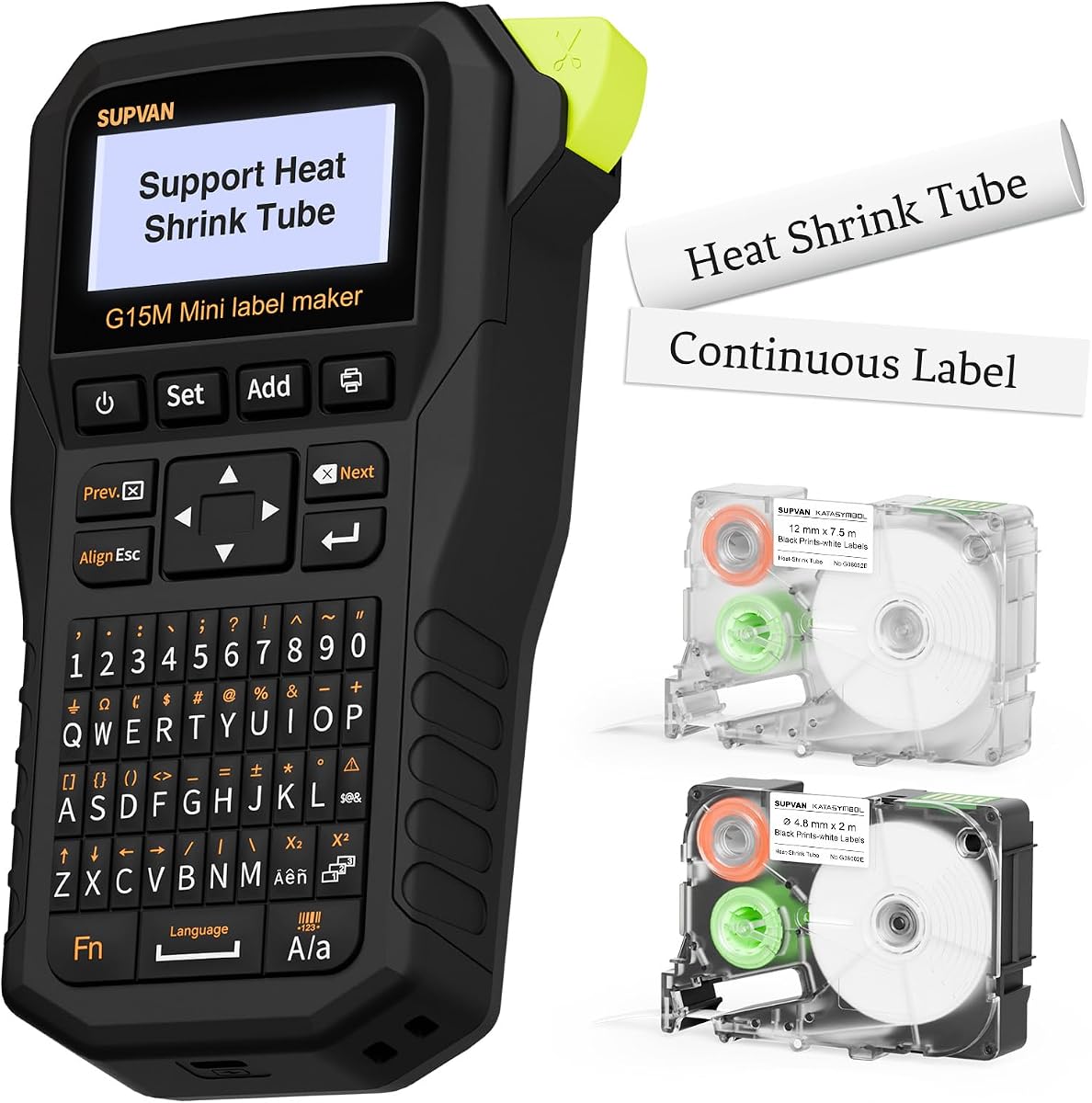
The SUPVAN G15M mini portable label maker is designed for portability with a lightweight body and long battery life. It supports heat shrink tubes for wire protection.
We may earn a commission when you buy through this link, at no additional cost to you.
Its minimal margin printing saves material while thermal transfer ensures ten years of durability. It is suitable for indoor and outdoor labeling.
Users can customize labels with multiple fonts and icons though options are limited compared to larger models. The battery supports three months of use.
Ideal for home garage or small office setups this device balances size and utility. It is a convenient tool for organized wiring.
The compact design allows you to carry the label maker easily to any location for quick tasks.
A built in rechargeable battery provides up to three months of use on a single charge.
We may earn a commission when you buy through this link, at no additional cost to you.
Selecting the right label maker involves evaluating durability, print quality, and specific features that match your workspace needs.
Thermal transfer printers offer longer lasting labels than direct thermal options especially in harsh environments. They are better for outdoor or industrial cable identification.
Look for thermal transfer technology to ensure your labels resist fading and wear over time.
Different models support various tape widths and materials including heat shrink and vinyl. Ensure the device supports the type of labels you need for cables.
Check supported tape widths to match your cable thickness and labeling requirements.
Industrial grade devices withstand drops and harsh conditions better than consumer models. For server rooms or construction sites choose rugged designs.
Prioritize durability features if working in physical challenging environments.
Long battery life ensures uninterrupted work during large projects. Rechargeable batteries are often more convenient than disposable options.
Consider battery capacity and runtime when planning extended labeling sessions.
Models with PC connectivity allow for complex label designs and bulk imports. Bluetooth options enable mobile editing from smartphones or tablets.
Choose connectivity options that fit your workflow complexity and editing needs.
User friendly interfaces with one touch keys speed up labeling tasks. Backlit screens help in low light areas like cable racks.
Opt for intuitive controls to reduce training time and errors.
Professional networks often require labels meeting ANSI or TIA standards. Ensure the printer supports compliant formats for electrical and datacom wiring.
Verify industry standard compliance to meet regulatory or organizational requirements.
Initial price is only part of the cost. Consider tape expenses and warranty coverage to evaluate long term value effectively.
Assess ongoing consumable costs and warranty support before purchasing.
Always load the tape correctly ensuring the print head is clean before starting. This prevents smudges and ensures clear text on your labels.
After use remove the battery or power down the device to preserve battery life. Store the machine in a cool dry place to avoid damage.
Clean the print head periodically with a soft cloth or cleaning pen for consistent quality. Regular maintenance extends the lifespan of your labeling equipment.
For network cables heat shrink tapes or self laminating vinyl wraps are ideal. They provide durable resistance to moisture and abrasion ensuring labels last longer in various environments.
While basic models work many industrial makers offer higher heat resistance and compliance standards. Choose devices rated for electrical environments to ensure safety and longevity.
Use a lint free cloth lightly dampened with isopropyl alcohol to wipe the print head gently. Allow it to dry completely before reinserting tape to avoid residue.
Direct thermal prints use heat on coated paper which fades over time. Thermal transfer uses a ribbon for permanent ink that withstands harsh conditions and lasts years.
Most industrial and higher end models support code 39 and code 128 barcodes. Check specifications to confirm barcode capabilities for your specific device model.
Replace alkaline batteries when the device indicates low power or print quality drops. For rechargeable models charge the battery every few months if not in use.
Yes many manufacturers offer waterproof laminated tapes specifically designed for outdoor use. These labels resist water UV rays and extreme temperatures effectively.
Some models with PC software support bulk data import via CSV or Excel files. This saves time for large projects requiring many sequential labels.
The top picks include budget friendly options like the E1000 and industrial powerhouses like the Makeid P31S. Each model serves different needs from home organization to professional network management.
Prioritize durability and print quality if working in industrial settings. For quick tasks consider models with one touch keys and backlit screens for efficiency.
Always check current availability and specific tape compatibility before finalizing your choice. Verify details to ensure the device fits your unique cable labeling needs.