
Brother HL-L2405W
4.1Editor score
Fast 30ppm output speed
Dual band wireless connectivity
Compact home office design
Compare the top 10 Brother laser printers of October 2026 to find the best monochrome and color models for home offices and small businesses today.
Finding the right Brother laser printer can transform your daily workflow significantly. These devices offer speed and reliability that inkjets struggle to match for text documents.
We evaluated ten top models based on print quality, connectivity options, and overall value for money. Our analysis covers features from compact designs to high capacity solutions.
Each pick highlights specific strengths and potential trade-offs to help you decide. Note that prices fluctuate frequently so check current listings before you buy your unit.
4.1Editor score

4.1Editor score
4.2Editor score
This table provides a side by side look at the key specifications and capabilities of every model featured in our guide.





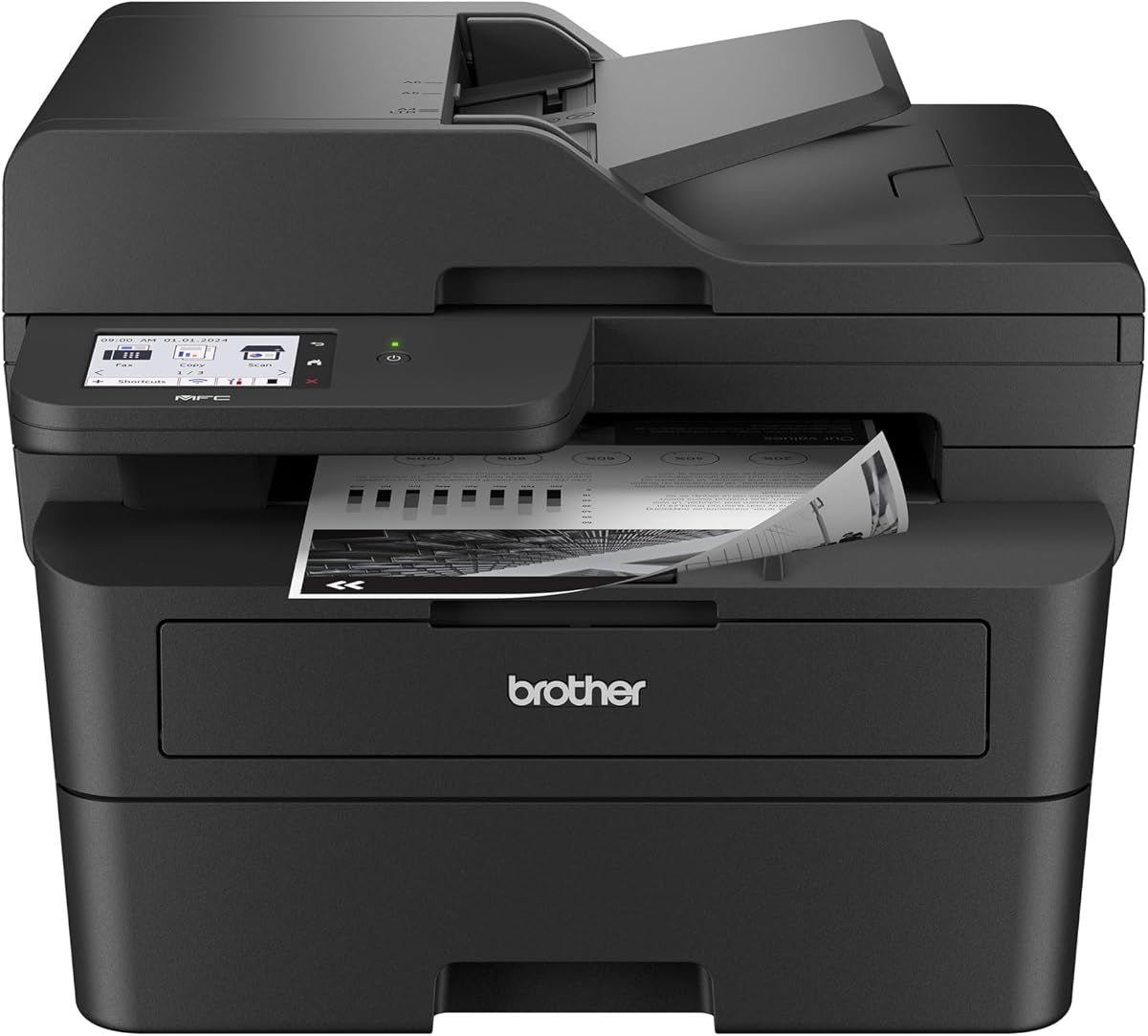
The Brother DCP-L2640DW stands out as a top contender in the laser printer market. It boasts a strong rating for its reliability and performance in small business settings.
We may earn a commission when you buy through this link, at no additional cost to you.
Its standout qualities include rapid printing speeds up to 36 pages per minute and efficient scanning with a 50 page auto document feeder. This combination saves time significantly.
Trade-offs include the lack of fax functionality and monochrome only output which may not suit all users. These are acceptable given the focused design for text document productivity.
It is ideal for small businesses needing fast reliable black and white printing. We recommend this model for anyone prioritizing speed and efficiency in a compact package.
The 50 page auto document feeder allows for quick multi page scanning and copying tasks.
Use the Brother Mobile Connect app to manage print jobs from anywhere remotely.
We may earn a commission when you buy through this link, at no additional cost to you.
The Brother HL-L2405W is an excellent choice for home offices needing reliable printing. It offers solid performance at a very competitive entry level price point.
We may earn a commission when you buy through this link, at no additional cost to you.
It delivers crisp black and white prints at speeds up to 30 pages per minute. The compact design fits easily into small spaces without sacrificing connectivity options.
Users should note it lacks automatic duplex printing and relies on a manual feed slot for specialty paper. These limitations are minor for light volume users.
This model is best for individuals or light home users. We recommend it for its value and ease of use in everyday printing scenarios.
Built in dual band wireless allows easy connection to multiple devices securely.
Works with Alexa for hands free printing commands and status checks.
We may earn a commission when you buy through this link, at no additional cost to you.
The Brother HL-L2460DW balances speed and efficiency well for home offices. It features automatic duplex printing which reduces paper waste and operational costs.
We may earn a commission when you buy through this link, at no additional cost to you.
It produces clear crisp documents at up to 36 pages per minute. The 250 sheet paper tray supports moderate high volume printing needs without constant refills.
Trade-offs include the lack of a touchscreen and color output. These are acceptable trade-offs for users who prioritize speed and cost efficiency over advanced features.
This printer suits home offices needing fast duplex printing. We recommend it for its reliable performance and space saving design.
Automatic duplex printing saves time and reduces paper waste significantly.
Connect via dual band wireless or Ethernet for seamless network sharing.
We may earn a commission when you buy through this link, at no additional cost to you.
The Brother MFC-L2820DW combines print scan copy and fax in one unit. It offers a high user experience with a dedicated touchscreen for easy navigation.
We may earn a commission when you buy through this link, at no additional cost to you.
Print speeds reach up to 36 pages per minute with a 50 page auto document feeder. This ensures efficient handling of multi page documents and tasks.
Trade-offs include monochrome only output which limits color needs. The higher initial cost is offset by the versatility and functionality of an all in one device.
It is best for small offices needing fax capabilities. We recommend it for its comprehensive feature set and ease of use.
The 2.7 inch touchscreen enables effortless navigation through all functions.
Access popular cloud services like Google Drive directly from the display.
We may earn a commission when you buy through this link, at no additional cost to you.
The Brother HL-L3220CDW brings color printing to home offices with impressive quality. It delivers crisp text and vibrant graphics suitable for professional documents.
We may earn a commission when you buy through this link, at no additional cost to you.
It prints at 19 pages per minute with automatic duplex to save paper. The 250 sheet tray minimizes refills while supporting various media types.
Trade-offs include slower speeds compared to monochrome models and higher toner costs. These are acceptable for users who need color for branding or marketing materials.
This printer suits professional home offices needing color. We recommend it for its vibrant output and reliable wireless connectivity.
Stunning business documents with crisp text and vibrant graphics.
Built in security protocols safeguard sensitive business documents during printing.
We may earn a commission when you buy through this link, at no additional cost to you.
The Brother HL-L2480DW is an efficient 3 in 1 printer for small offices. It combines print scan and copy in a compact footprint with a convenient flatbed scan glass.
We may earn a commission when you buy through this link, at no additional cost to you.
It prints at up to 36 pages per minute with a 2.7 inch touchscreen for easy control. This interface allows seamless navigation and cloud integration.
Trade-offs include no fax capability and monochrome only output. These limitations are minor for most users focusing on daily document handling.
It is ideal for home offices needing versatile scanning. We recommend it for its fast performance and compact size.
Flatbed scan glass allows scanning of books and delicate documents safely.
Print from and scan to popular cloud apps like Dropbox easily.
We may earn a commission when you buy through this link, at no additional cost to you.
The Brother MFC-L2900DW delivers professional performance with a responsive 3.5 inch touchscreen. It features single pass scanning for rapid document processing in busy offices.
We may earn a commission when you buy through this link, at no additional cost to you.
Print speeds reach up to 36 pages per minute with energy efficient design reducing electricity consumption. The large display simplifies cloud service integration and navigation.
Trade-offs include a higher price point and monochrome only output. These are acceptable for businesses prioritizing speed efficiency and professional results.
This model suits small businesses needing high end features. We recommend it for its advanced workflow capabilities and sustainability focus.
Single pass two-sided scanning ensures rapid document processing.
Enhanced fuser design reduces electricity consumption by 22 percent.
We may earn a commission when you buy through this link, at no additional cost to you.
The Brother HL-6210DW dominates high volume printing with 50 pages per minute speed. It supports large capacities for uninterrupted professional grade printing performance.
We may earn a commission when you buy through this link, at no additional cost to you.
Features include a 520 sheet main tray and Gigabit Ethernet for robust sharing. Advanced security features safeguard documents during transmission and printing.
Trade-offs include a larger footprint and higher initial investment. These are acceptable for enterprises needing speed and security for heavy workloads.
It is best for offices with heavy printing demands. We recommend it for its exceptional efficiency and capacity.
520 sheet main tray and 100 sheet multipurpose tray reduce refills.
Triple Layer Security features ensure comprehensive protection for network.
We may earn a commission when you buy through this link, at no additional cost to you.
The Brother MFC-L3720CDW offers a full color multifunction solution for businesses. It delivers exceptional print speeds up to 19 ppm with stunning quality.
We may earn a commission when you buy through this link, at no additional cost to you.
Features include a 50 sheet auto document feeder and a 3.5 inch color touchscreen. The interface provides direct access to cloud services and mobile management.
Trade-offs include slower speeds and a complex setup for color toners. These are acceptable for users needing comprehensive color multifunction capabilities.
It is ideal for businesses needing color fax and scan. We recommend it for its productivity features and output quality.
3.5 inch color touchscreen features 48 customizable shortcuts.
Levage mobile printing with remote access and toner monitoring.
We may earn a commission when you buy through this link, at no additional cost to you.
The Brother Work Smart 1360 is an affordable alternative for home offices. It offers print copy and scan in a compact design with a 1.8 inch display.
We may earn a commission when you buy through this link, at no additional cost to you.
It prints up to 16 pages per minute in black and 9 in color. The Page Gauge app helps monitor ink usage to avoid running out.
Trade-offs include being an inkjet rather than a laser which affects speed and cost. These are acceptable for light volume users seeking low entry costs.
It is best for home users needing an all in one unit. We recommend it for its affordability and ease of use.
Print from and scan to popular Cloud apps like Box easily.
Monitor ink usage with Page Gauge on your mobile device.
We may earn a commission when you buy through this link, at no additional cost to you.
Choosing the right printer depends on your specific workflow needs and budget constraints.
Print speed is measured in pages per minute and determines how quickly documents are produced. Look for models that match your volume needs to avoid bottlenecks during busy times.
Prioritize speeds above 30ppm for small offices to ensure efficient daily operations.
Monochrome printers are faster and cheaper to run for text documents. Color laser printers are essential for marketing materials but cost more upfront and in toner.
Choose monochrome for text heavy tasks and color only if branding is a priority.
Modern printers should offer dual band wireless Ethernet and USB connections. This flexibility ensures multiple devices can connect easily across home or office networks.
Look for dual band wireless to avoid interference and ensure stable connections.
Check the paper tray capacity and the presence of an auto document feeder. Higher capacity trays reduce refills while ADFs streamline scanning multi page documents.
Select models with at least 250 sheet trays for uninterrupted printing sessions.
Decide if you need a single function printer or an all in one unit. All in one models include scanning copying and faxing which adds convenience for small teams.
All in one units save desk space by combining multiple functions into one device.
Initial printer price is often lower than ongoing toner costs. Evaluate high yield options to reduce long term expenses especially for high volume users.
Opt for models with high yield toner to lower your per page printing cost.
Mobile printing capabilities allow you to send documents from smartphones or tablets. Look for dedicated apps that manage settings and track supply levels remotely.
Ensure the printer supports the Brother Mobile Connect app for remote management.
Security features protect sensitive documents from unauthorized access during printing. Look for models with advanced security protocols especially for business environments.
Prioritize printers with triple layer security to safeguard your network data.
Start by connecting the printer to your network via wireless or Ethernet for best performance. Install the latest drivers and software from the Brother website to ensure full functionality.
Use Brother Genuine toner cartridges to maintain high print quality and reliability. Third party supplies may cause jams or errors that void your warranty over time.
Clean the exterior and scan glass regularly with a soft lint free cloth. Keep the interior free of dust and debris to prevent paper jams and maintain consistent output.
Yes Brother laser printers are excellent for small businesses due to their speed and reliability. They offer affordable models that handle high volume text printing efficiently. The connectivity options support seamless sharing across multiple devices in an office environment.
The TN830XL toner cartridge offers a higher page yield compared to the standard TN830. This means you can print more pages before needing a replacement which reduces the frequency of changes. Both ensure consistent quality for your Brother laser printer models.
Most modern Brother laser printers support mobile printing through the Brother Mobile Connect app. You can print from smartphones and tablets directly over a wireless network connection. This feature works with both iOS and Android devices for easy on the go access.
Yes many Brother models allow direct printing from USB drives or via mobile apps. The touchscreen interfaces also enable you to manage printing tasks independently of a computer. This independence streamlines workflows especially in shared office environments.
When toner runs out the printer will notify you via the display or connected app. You can order genuine supplies through the Brother Mobile Connect app directly. Using the Refresh EZ Print subscription ensures you never run out unexpectedly.
Automatic duplex printing is available on most models except the budget friendly HL-L2405W. This feature saves paper by printing on both sides of the sheet automatically. It is highly recommended for reducing operational costs and environmental impact.
We have highlighted ten top models ranging from budget friendly home units to professional grade office solutions. Each offers unique strengths tailored to different workflow demands and space constraints.
Prioritize features like print speed and connectivity based on your specific needs. A slightly higher initial investment often pays off in long term efficiency and reliability.
Remember to check current prices and availability as these fluctuate frequently. Select the model that aligns best with your daily tasks and budget constraints today.