
HUION Keydial Mini Bluetooth Programmable Keypad
4.2Editor score
Eighteen programmable shortcut keys
One dial for brush control
Long battery life support
This guide compares the top ten iPad drawing Bluetooth controllers to help artists and designers find the perfect shortcut device for their creative workflow
Finding the right accessory for your tablet can transform your digital art workflow entirely. A dedicated Bluetooth controller offers physical shortcuts that speed up editing and drawing tasks significantly without leaving your canvas.
We evaluated ten top rated devices based on compatibility, battery life, button customization, and build quality. Each entry was assessed for its ability to integrate seamlessly with popular creative software on iPad and other platforms.
Every selection below highlights specific strengths for different user needs and budgets. Please note that availability and pricing may change frequently so verify current details before making your final purchasing decision online today.
4.2Editor score

5.0Editor score

4.4Editor score
The following table provides a side by side comparison of all ten selected controllers to help you quickly identify the best fit for your specific drawing and editing requirements.


The DIGIDRAW K30 Wireless Remote Controller stands out as the top choice for serious digital artists seeking precision and efficiency. With a perfect rating and robust feature set, it offers dual dials and eleven custom keys that streamline complex drawing workflows significantly without constant keyboard dependency.
We may earn a commission when you buy through this link, at no additional cost to you.
Its dual dial system provides intuitive control over brush size and zoom levels, while the eleven custom shortcut keys grant instant access to frequently used functions like undo or layer switching. The tactile markers on each key allow blind operation, ensuring your eyes stay locked on the canvas for uninterrupted creative flow during long sessions.
Despite its premium features, the device remains ultra lightweight at only eighty two grams, making it easy to hold for extended periods without fatigue. The 600mAh battery delivers forty hours of continuous use and up to ten months of standby time, though the reliance on a driver for full customization may be a minor hurdle for some users.
This controller is ideal for professionals who demand high performance and reliability in their digital art setup. Whether you use Photoshop, Sai, or CorelDRAW, the K30 adapts seamlessly to your needs. We recommend it highly for anyone looking to elevate their iPad drawing experience with dedicated physical controls.
The two precision dials allow independent control over different parameters like zoom and brush size simultaneously without interrupting your creative process or needing to navigate menus.
Raised markers on each key let you locate commands by feel alone, ensuring you never lose focus on your artwork while adjusting settings or executing shortcuts quickly.
We may earn a commission when you buy through this link, at no additional cost to you.
The HUION Keydial Mini Bluetooth Programmable Keypad offers an excellent balance of features and affordability for artists on a budget. Its eighteen programmable keys and dedicated dial provide significant workflow improvements without a high cost, making it accessible to hobbyists and professionals alike seeking efficiency.
We may earn a commission when you buy through this link, at no additional cost to you.
This device features Bluetooth 5.0 for reliable wireless connectivity up to ten meters, ensuring you can move freely around your workspace without cables. The anti-ghosting technology supports up to five key presses simultaneously, allowing complex shortcuts to be executed smoothly. A built-in preview function lets you check current settings easily without memorizing every button assignment.
While the price is attractive, you will need to install the Huion driver to unlock full customization capabilities for the keys and dial. The one handed design is thin and light with a seventy hour battery life, but some users might find the button spacing slightly tight for larger fingers during intensive use sessions.
We recommend this keypad for anyone looking to boost productivity without breaking the bank. It pairs well with most creative software like Photoshop and Illustrator. Its portability makes it a great companion for artists who work in multiple locations or prefer a clutter free desk environment.
Each of the eighteen buttons can be mapped to any shortcut you want, giving you massive flexibility to tailor the device to your specific software and workflow needs easily.
The single dial allows quick adjustments to brush sizes or timeline navigation with a simple turn, reducing repetitive strain and speeding up common editing tasks significantly.
We may earn a commission when you buy through this link, at no additional cost to you.
The TourBox Lite Bluetooth Creative Controller brings a premium feel and unified control approach to digital art workflows. Designed for creativity and everyday tasks alike, it simplifies complex operations through an eight key layout that is easy to learn and use across multiple creative applications without constant reconfiguration.
We may earn a commission when you buy through this link, at no additional cost to you.
Its wireless freedom allows you to create anywhere with a sleek form that travels easily between home and office setups. The on screen HUD shows custom controls in real time, meaning you never have to memorize shortcuts. The natural grip supports long sessions with clear tactile feedback from knobs and raised buttons for confident adjustments.
While the build quality and software integration are outstanding, the price point is higher than many alternatives. Additionally, while it works with Windows and macOS effectively, iPad support may be less direct than dedicated tablet accessories. However, for those invested in the TourBox ecosystem, it remains a top tier choice for creative efficiency.
This controller is perfect for artists who value ergonomics and seamless app switching. Whether you use Clip Studio Paint, Photoshop, or Premiere Pro, the TourBox adapts to your active application automatically. We suggest it for professionals who want a sophisticated tool that enhances their creative process with style and precision.
The unified control approach ensures a natural feel across multiple creative apps without needing to switch devices or reconfigure controls for every new task you work on.
Shaped from extensive ergonomic data, the design supports long drawing sessions with a natural grip that reduces strain on your hand and wrist during extended creative work.
We may earn a commission when you buy through this link, at no additional cost to you.
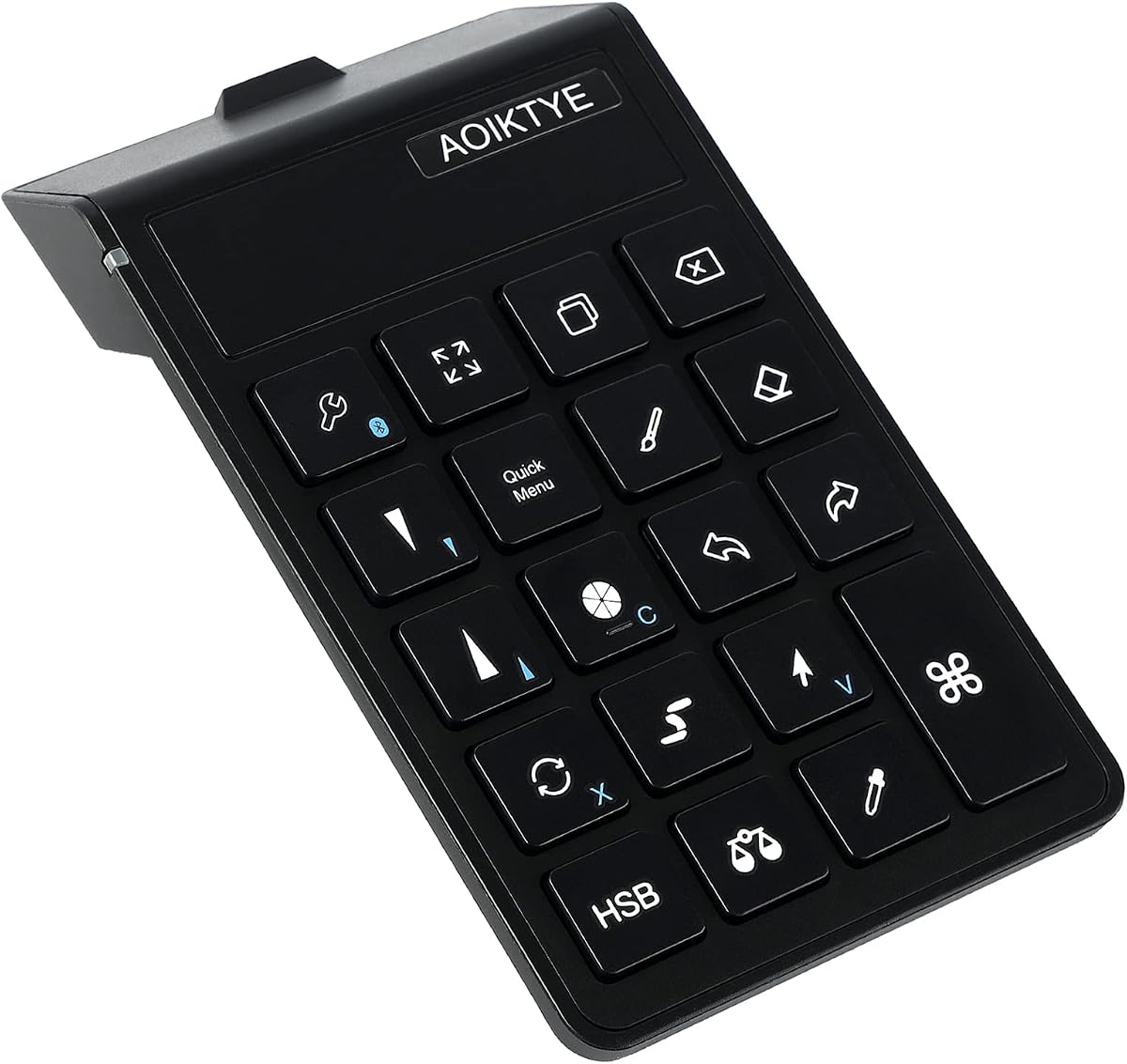
The AOIKTYE Keyboard for Procreate is designed specifically to make working in Procreate easier for digital artists on iPad. With twenty two shortcut functions including brush adjustment and undo, it allows you to draw with your right hand while controlling the keyboard with your left for a more efficient painting process.
We may earn a commission when you buy through this link, at no additional cost to you.
This device features a built-in rechargeable battery that provides up to eighty four hours of continuous use and over six months of standby time. The second generation upgrades include improved key sequencing to place the most frequently used keys in the most accessible positions for better ergonomics and workflow speed.
Although it works with other software like Painter and AI, its primary focus is Procreate which limits its versatility for users who switch apps frequently. The design is simple and stylish, fitting well on a desk or tablet stand. OTA upgrades promise future customization potential without needing hardware changes over time.
We recommend this keyboard for artists who primarily use Procreate and want a dedicated tool to streamline their workflow. It is also a great gift for beginners learning digital drawing. Its long battery life and ergonomic improvements make it a solid choice for daily use without frequent interruptions.
The keyboard specializes in providing innovative technology for Procreate users, ensuring that essential functions like color adjustment and layer management are always within easy reach.
A full charge takes only two hours but provides up to eighty four hours of continuous use, ensuring you can work for days without needing to plug in for power.
We may earn a commission when you buy through this link, at no additional cost to you.
The XPPen Mini Keydial ACK05 Wireless Shortcut Keyboard is a compact and powerful tool for creative professionals seeking a clean workspace. With ten customizable keys and a dial, it offers flexible connectivity including Bluetooth, USB, or dongle for stable transmission across different work scenarios and operating systems.
We may earn a commission when you buy through this link, at no additional cost to you.
A standout feature is the built-in 1000 mAh battery which ensures continuous working for about three hundred hours on a single charge. The thin profile and light weight make it easy to hold in one hand, while a small protruding dot on the middle key aids identification without needing to look down during use.
For iPad users, you will need to download the Shortcut Remote app to set up and use this product properly since driver support is limited on iOS. This adds a step to the setup process compared to desktop systems but ensures functionality once configured. The anti-ghosting performance supports all ten keys for complex inputs.
We suggest this keyboard for users who value portability and long battery life in their creative kit. It works well with Windows and Mac for Photoshop and SAI. The versatility of connection options makes it a reliable tool for both home studios and on the go work environments without connectivity issues.
You can connect via Bluetooth, a Bluetooth dongle, or USB cable offering you flexible and stable transmission options that meet different work scenarios and device requirements easily.
The 1000 mAh battery ensures continuous working for about three hundred hours so you can speed up your creation whenever you grab it without worrying about running out of power.
We may earn a commission when you buy through this link, at no additional cost to you.
The ShanWan Portable Wireless Game Controller offers a unique approach by supporting keyboard, mouse, and drawing control features across multiple platforms. This versatility makes it an interesting option for users who want a single device for both gaming and creative work without carrying separate accessories for different tasks and uses.
We may earn a commission when you buy through this link, at no additional cost to you.
Designed to work with multiple platforms including Switch 2, PC, PS, and tablets, it features responsive analog sticks, triggers, and buttons for accurate performance. The wireless connectivity provides a responsive cable-free experience up to a range that allows freedom of movement during sessions without tethered connections to your host device.
However, it carries a lower rating compared to dedicated drawing accessories, which suggests that specialized tools may offer better performance for art. The ergonomic design ensures comfort during extended sessions, but the dual purpose nature might compromise some fine-tuning capabilities for precision drawing. Users will need to map buttons carefully to suit drawing needs.
We recommend this controller for casual users or students who want one device for multiple needs. Its rechargeable battery reduces interruptions. While not the top choice for professional artists, it provides a cost effective way to access basic drawing controls and gaming on one device if versatility is your main priority.
Designed to work with multiple platforms, this controller is a versatile choice for a wide range of gaming and creative setups that need cross functionality support and utility.
Features responsive analog sticks and buttons for accurate in-game performance that can also be mapped for drawing control functions when using the controller for creative tasks.
We may earn a commission when you buy through this link, at no additional cost to you.
The TNP iPad Remote Control is designed primarily for media and cursor control rather than dedicated art shortcuts but it offers useful functionality for general navigation and app switching on iPad and iPhone devices. It supports a trackpad for moving mouse cursor just like a laptop which aids in precise on screen selection.
We may earn a commission when you buy through this link, at no additional cost to you.
You can control music, videos, and streaming apps with dedicated media buttons, and it also works as a wireless camera remote shutter. The built-in Home button helps switch between apps or activate Siri quickly. Bluetooth 5.0 ensures improved speed and range for wireless connection to your device without lag or disconnects during use.
While it can aid in navigating drawing apps, it lacks dedicated shortcut keys for brush or layer management which limits its efficiency for heavy creative work. It is more of a general remote solution that supports tablets and PCs. The trackpad arrows are useful for presentations in PowerPoint or Keynote as well.
We suggest this remote for users who want broad device control and media convenience. It pairs well with tablets for navigation tasks. If your workflow relies heavily on cursor movement and general app control instead of specialized drawing shortcuts, this device offers a practical and versatile solution for your needs.
Move the mouse cursor on iPhone or iPad screen or swipe on the trackpad just as you would with a desktop or laptop computer for intuitive navigation across screens.
Control your favorite music, videos, podcasts, and streaming apps adjusting volume or playback at the convenience of your fingertips while keeping your focus on content.
We may earn a commission when you buy through this link, at no additional cost to you.
The Modded Tablet Controller G8 PLUS is a robust Bluetooth controller tailored for tablet gaming and extended use. With Hall Effect sticks and triggers, it provides smooth, accurate, and long-lasting control for precise inputs. Its magnetic interchangeable parts allow you to personalize the look and function to match your preference.
We may earn a commission when you buy through this link, at no additional cost to you.
Designed to fit a wide range of tablets including iPad Pro and Samsung Galaxy Tab models without holders, it features an extendable design. The 6-axis gyroscope enables motion controls that are great for specific game styles. Dual motors provide strong and subtle feedback enhancing your immersion during intensive gameplay sessions.
While it is a top rated gaming controller, it is not primarily built for drawing workflows. However, its precision and motion sensing could support casual creative tasks if mapped properly. The battery life is split per side with 500mAh ensuring power for extended use without frequent charging interruptions during your work.
We recommend this for gamers who also do light creative work on tablets. Its durability and customization options are excellent. If you need a controller that adapts to different tablet sizes and offers high precision, this is a strong choice for a reliable connection and comfortable grip.
Hall Effect sticks and triggers provide smooth, accurate, and long-lasting control that ensures precise inputs without drift over time for consistent performance across long gaming sessions.
A 6-axis gyroscope enables precise motion controls that are great for specific game styles and interactive drawing tasks when mapping motion to creative functions appropriately.
We may earn a commission when you buy through this link, at no additional cost to you.
The Celsys Clip Studio Tabmate 2 is a handheld shortcut device designed specifically for Clip Studio Paint on iPad. It assigns frequently used operations to buttons to greatly enhance production speed. With Bluetooth Low Energy 5.1, it offers stable connectivity without draining your tablet battery excessively during long drawing sessions.
We may earn a commission when you buy through this link, at no additional cost to you.
This device includes a Clip Studio Paint Debut single device 12-month license making it a comprehensive package for those adopting the software. However, it is not compatible with older versions of Clip Studio Paint which may limit usability for some users. The AA battery requirement means you must purchase separate batteries for operation.
While focused on Clip Studio Paint, it supports iOS, Android, and Windows devices broadly. The handheld design helps reduce strain by keeping shortcuts within easy reach while drawing. For dedicated Clip Studio Paint users, this dedicated controller streamlines workflows significantly with specialized shortcuts that map directly to software functions and tools.
We recommend this for artists deeply invested in Clip Studio Paint. The included license is a major plus. If you use other software heavily, it may be too specific. Ensure you check compatibility with your specific software version before purchasing to avoid setup issues with older installations.
The Tabmate 2 supports Clip Studio Paint Ver. 3.0 and later with features that allow artists to create faster while enjoying the drawing experience without constant menu navigation.
Using Bluetooth Low Energy 5.1 ensures stable communication without draining your tablet battery excessively during long drawing sessions for reliable wireless performance.
We may earn a commission when you buy through this link, at no additional cost to you.
The Wacom Intuos Small Bluetooth Graphic Drawing Tablet offers industry leading performance with a battery free pen that feels like pen on paper. It works with all software to explore new facets of digital creativity. Wireless connectivity via Bluetooth enables you to work, draw, or create whether it is at a desk or on the sofa.
We may earn a commission when you buy through this link, at no additional cost to you.
Registration gives you access to some of the best creative software and Wacom online training. Over forty years in the market means you can trust their precision and control. While not a controller with physical buttons, the pen and tablet surface provide the most natural input method for drawing and editing tasks.
This product is ideal for artists who need pressure sensitivity and precise pen control. It connects via Bluetooth or USB-A cable for flexibility. The included software and training help beginners get started quickly. It complements a controller well if you need dedicated shortcut keys alongside pen input.
We recommend this as the foundation for any serious drawing setup. Its precision is unmatched. If you are looking for a controller to add physical shortcuts, consider pairing this with a keypad. For pure drawing, it remains the gold standard for reliable and comfortable pen input in your workflow.
Wacom's EMR battery free technology feels like pen on paper for superior control and precision that brings your ideas and creativity to life naturally.
Register your tablet and gain access to some of the best creative software and Wacom's online training to help you learn and create effectively right from the start.
We may earn a commission when you buy through this link, at no additional cost to you.
Selecting the right Bluetooth controller for iPad drawing depends on several key factors that influence performance, comfort, and workflow efficiency.
Ensure the controller supports the creative apps you use most often like Procreate or Photoshop. Some devices offer specialized keys or presets that work only with specific software which may limit your options if you use multiple programs regularly.
Choose a device with broad compatibility or customizable shortcuts so it can adapt to your entire software suite without requiring multiple peripherals for different apps.
More buttons provide access to more shortcuts but can make the device cluttered. Look for programmable keys that let you map actions like undo or layer switching to physical buttons for faster access.
Prioritize devices with intuitive software that makes mapping easy and supports profiles for different tasks so you can switch modes without resetting your configuration.
A comfortable grip prevents fatigue during long sessions. Check the weight and dimensions to ensure it fits your hand and desk space comfortably without obstructing your view of the screen.
Select a device that supports your dominant hand preference and offers tactile feedback so you can operate buttons without looking away from your work.
Wireless freedom is essential for a clean setup but requires a reliable battery. Check for battery hours and charging options such as USB-C for convenience and minimal downtime.
Bluetooth 5.0 offers better range and stability than older versions. Ensure the device connects without lag and supports auto reconnection after waking from sleep modes.
Solid build quality ensures longevity. Look for devices with robust materials and tested switch mechanisms that withstand frequent pressing over time.
Consider warranty terms and customer support options to protect your investment against defects or wear from daily usage in professional or home environments.
Some controllers require installing software to unlock all features which can be a hurdle for iOS users. Verify if setup is plug-and-play or if drivers are needed for full customization.
Choose a controller with clear instructions and responsive support teams to help you troubleshoot any connection or mapping issues that arise during use.
Higher prices often bring better build quality and features but budget options may suffice for casual users. Compare what each device offers against your specific needs.
Focus on value by considering which features you actually use regularly and avoid paying for extras you will not utilize in your workflow.
Begin by charging the device fully using the provided USB cable to ensure optimal battery performance from the start. Pair the controller with your iPad through the Bluetooth settings menu following any on-screen prompts to establish a secure connection.
Install any required drivers or companion apps from the manufacturer to unlock full customization features. Configure buttons to your preferred shortcuts and save profiles so your settings persist across sessions.
Store the controller in a cool, dry place when not in use to prevent damage from moisture or heat. Regularly clean the buttons with a soft dry cloth to remove dust and debris that might affect responsiveness.
Many of these controllers support a range of creative software including Photoshop, Illustrator, and SAI. However, some models are optimized for specific apps so you should verify the supported list before purchase.
Most devices require downloading a companion app or driver on your tablet or computer. Through this software you can map any function to a specific button and save your layout.
For most users there is a slight learning curve as you map shortcuts but it becomes intuitive over time. Many controllers offer preset profiles to reduce initial setup time.
Yes, most of these controllers are designed to sit flat on a desk or be held in one hand allowing you to draw with the other hand while the iPad is on a stand.
Most modern controllers use rechargeable lithium-ion batteries charged via USB-C but some specialized models may use standard AA batteries depending on the brand and model.
Many controllers offer compatibility with Android tablets but you should check the specific model details as iOS support is often more widely available in creative accessories.
The DIGIDRAW K30, HUION Keydial Mini, and TourBox Lite offer distinct advantages for different needs and budgets. Each provides unique strengths from dual dials to extensive key customization.
Prioritize the controller that matches your software stack and comfort preferences. Ergonomics and battery life often matter most for daily use and productivity gains.
Check current prices and availability as these models may vary across retailers. Investing in the right accessory can significantly enhance your creative workflow and enjoyment.