
22MP Film & Slide Scanner with 5" LCD
4.3Editor score
Affordable price point
Built in memory storage
Includes HDMI output cable
Preserving precious memories from the past requires reliable tools to convert old film into digital formats. A good 35mm slide scanner offers high resolution, easy loading, and standalone operation without needing a computer for quick previews and edits.
We compared ten leading models based on sensor quality, screen size, film format support, and ease of use. Each product was evaluated for its ability to handle negatives, slides, and various film types while delivering crisp digital JPEG files for long-term archiving.
Each pick highlights specific strengths like touch screens, large displays, or budget-friendly designs to match different user needs. Prices and availability may change over time, so verify current details before purchasing to ensure you get the best value for your collection.
4.3Editor score

4.3Editor score

5.0Editor score
As an Amazon Associate we earn from qualifying purchases.
This side-by-side comparison outlines the key specifications and capabilities of each top-rated 35mm slide scanner to help you find the perfect fit for your digitization needs.






The KODAK Slide N Scan Film & Slide Scanner stands out as a reliable choice for digitizing old memories. With a 4.3 rating from users, it offers a solid balance of performance and ease of use for both beginners and seasoned archivists.
We may earn a commission when you buy through this link, at no additional cost to you.
Its 22MP resolution ensures that details from old slides and negatives are captured with clarity. The 5-inch LCD screen allows you to preview and edit images directly on the device, making it easy to adjust brightness and color without needing a computer.
While the software is straightforward, it lacks advanced features like AI enhancement found in higher-end models. However, the included adapters for 135, 110, and 126mm films make it versatile enough for most collections.
This scanner is ideal for families looking to preserve physical photos quickly and efficiently. If you need a user-friendly device that handles various formats without complex setup, this model is a strong recommendation for your home office.
The device allows you to save files directly to an SD card, eliminating the need for constant computer connections during bulk scanning sessions.
Adapters for 135, 110, and 126mm films ensure that you can digitize a wide variety of formats stored in your attic or basement.
We may earn a commission when you buy through this link, at no additional cost to you.
The Magnasonic All-in-One 24MP Film Scanner is designed for users who need high resolution and format versatility. With a 4.3 rating, it is praised for its ability to handle Super 8 film alongside standard slides and negatives.
We may earn a commission when you buy through this link, at no additional cost to you.
Its 24MP resolution provides detailed images that are suitable for printing or large digital displays. The 5-inch screen offers a wide viewing angle, allowing you to review scanned photos instantly on the device or connect to a TV via HDMI.
One minor downside is that the HDMI and SD cards are not included in the box, which adds to the initial cost. However, the ability to scan Super 8 film makes it unique compared to many competitors in this price range.
If you have a collection that includes movie film or varied slide sizes, this scanner offers the flexibility you need. It is a robust choice for preserving family histories in high quality without relying on a PC.
This scanner supports Super 8 film, allowing you to digitize old home movies into digital files for easier sharing and archival.
The built-in display lets you check the quality of your scans immediately, ensuring you catch any issues before saving files to storage.
We may earn a commission when you buy through this link, at no additional cost to you.
The KODAK Slide N Scan Max Film Scanner focuses on efficiency with its streamlined tray design. It holds a 4.2 rating and is appreciated for its ability to feed film smoothly without constant repositioning.
We may earn a commission when you buy through this link, at no additional cost to you.
Users benefit from direct SD saving up to 32GB, which enhances portability and reduces cable clutter. The device handles 135, 110, and 126mm films, making it a versatile option for mixed collections.
While the editing tools are simple, they are sufficient for basic adjustments like resizing and color correction. The lack of HDMI output limits its use for large screen viewing, but the USB connection covers standard transfer needs.
This scanner is perfect for users who value speed and simplicity. If you have a large volume of slides to digitize and want a device that minimizes manual effort, this model is a worthy consideration.
The smooth-moving tray allows for continuous loading action, making scanning fast and simple for bulk projects.
Direct SD card saving eliminates the need for a computer, allowing you to work from any location with a card reader.
We may earn a commission when you buy through this link, at no additional cost to you.
This Photo Slide & Negative Scanner offers a 4.4 rating, reflecting user satisfaction with its performance and value. It stands out by supporting printed photos in 3R, 4R, and 5R sizes alongside standard slides and negatives.
We may earn a commission when you buy through this link, at no additional cost to you.
The 5-inch HD screen ensures vibrant previews, and the inclusion of an 8GB SD card adds immediate value. A 3-year warranty provides peace of mind for those investing in long-term archival projects.
While it may not support as many film formats as others, its all-in-one design for photos and slides makes it convenient for mixed media collections. The one-touch operation is straightforward for users of all technical levels.
If you need a scanner that can handle both printed prints and film, this model is an excellent choice. The warranty and included accessories make it a complete package for home digitization.
Digitize both slides and printed photos with one device, simplifying your workflow for diverse memory collections.
Backed by a 3-year warranty, this scanner offers long-term support for users who plan to digitize large archives over time.
We may earn a commission when you buy through this link, at no additional cost to you.
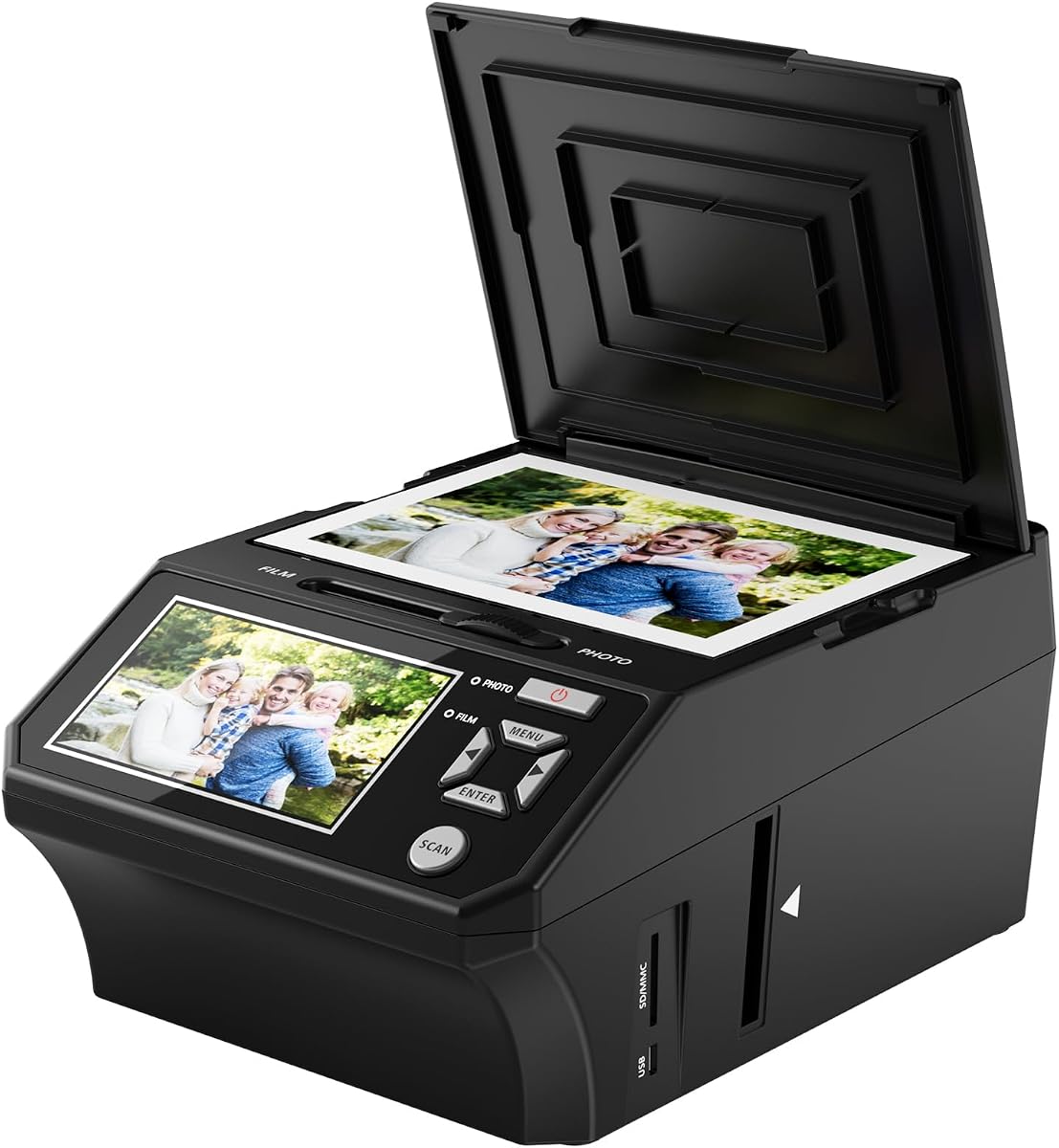
This 22MP Film & Slide Scanner delivers strong performance at a budget-friendly price. With a 4.3 rating, it is popular for those seeking cost-effective solutions without sacrificing basic quality or features.
We may earn a commission when you buy through this link, at no additional cost to you.
The built-in 128MB memory allows you to save a few scans without an SD card, which is convenient for quick testing. It supports 35mm, 126, and 110 films, and the 5-inch screen ensures clear previews.
The inclusion of an HDMI cable adds value, letting you view photos on a TV. However, for large collections, you will need to purchase an SD card separately since the internal memory is limited.
For beginners or those with small collections, this scanner is an ideal entry point. It balances functionality and cost effectively, making it easy to start digitizing memories without a large investment.
The internal 128MB memory lets you save initial scans without extra accessories, providing immediate utility out of the box.
Priced lower than many competitors, this scanner offers a low-risk way to try digitizing slides and negatives at home.
We may earn a commission when you buy through this link, at no additional cost to you.
The HP Film & Slide Scanner features a large 7-inch touch screen that simplifies navigation and editing. Despite a 4.0 rating, it is appreciated for its modern interface that appeals to tech-savvy users.
We may earn a commission when you buy through this link, at no additional cost to you.
The quick-feed loading tray makes processing 135, 126, and 110 formats efficient. You can crop and adjust scans directly on the screen, removing the need for software installation on your computer.
While the 13MP sensor is lower than some competitors, the touch functionality compensates with ease of use. Gallery mode transforms the scanner into a digital picture frame, keeping memories on display.
This scanner is best for those who prefer touch controls over physical buttons. If you want a sleek device that feels modern and offers convenient on-device editing, it is a solid option.
The large touch screen allows intuitive scrolling and selection, making it easier for beginners to navigate menus.
The scanner can function as a digital picture frame, allowing you to showcase scanned photos directly on the device.
We may earn a commission when you buy through this link, at no additional cost to you.
The HP Film & Slide Scanner HPFS500 offers modern USB-C connectivity for easy power and data transfer. With a 4.3 rating, it is praised for its sleek design and straightforward operation.
We may earn a commission when you buy through this link, at no additional cost to you.
The 5-inch touch screen enables preview and editing directly on the device. It supports 135, 126, and 110 formats, ensuring compatibility with most standard slide and negative types.
While the 13MP sensor is lower than 22MP or 24MP models, it delivers clear results for web use or printing. The USB-C port ensures compatibility with newer computers without needing adapters.
If you value modern connectivity and a touch interface, this scanner fits well. It is a reliable choice for digitizing collections with a device that aligns with current technology trends.
Powered via USB-C, this scanner works with modern computers and external adapters, reducing cable clutter and improving versatility.
The 5-inch all-angle LCD touch screen makes navigation intuitive, allowing quick access to settings and previews.
We may earn a commission when you buy through this link, at no additional cost to you.
The KODAK SCANZA Film & Slide Scanner is notable for its support of 8mm film alongside standard formats. With a 4.2 rating, it offers a practical solution for collectors with varied media types.
We may earn a commission when you buy through this link, at no additional cost to you.
The 3.5-inch LCD is smaller than other models but includes a tilt feature for better viewing. Adapters for various formats allow for flexible operation, and the included HDMI cable is a generous addition.
While the screen is compact, the one-touch buttons make it user-friendly for seniors. It supports SD cards up to 128GB, providing ample space for large archives without needing constant transfers.
This scanner is a good choice if you have 8mm film to digitize. It balances functionality and simplicity, making it a practical tool for preserving diverse family memories.
Unlike many modern scanners, this model supports 8mm film, allowing you to digitize older home movies.
The adjustable brightness and tilt feature on the LCD screen help improve visibility during scanning in different lighting conditions.
We may earn a commission when you buy through this link, at no additional cost to you.
The DigitConvert 35mm Film Scanner & Slide Scanner is designed for portability with a 2.4-inch LCD. It holds a 3.9 rating and is suitable for users who need a simple, budget-friendly solution.
We may earn a commission when you buy through this link, at no additional cost to you.
It supports 35mm negatives and slides with fast-load adapters to prevent shifting. The plug-and-play functionality ensures no software installation is required, making it easy to set up immediately.
The smaller screen may require closer viewing for detailed edits, but it remains effective for basic previews. The TV-out interface allows for sharing photos on a larger display when connected to a TV.
If you need a lightweight, affordable scanner for occasional use, this model is a practical option. It covers essential functions well enough for simple digitization tasks without complexity.
Its small size makes it easy to store and transport, ideal for digitizing photos in different locations.
Precision adapters ensure film stability during scanning, preventing blurring and delivering sharper digital results.
We may earn a commission when you buy through this link, at no additional cost to you.
The ClearScan T7 7" Touch Screen Film Scanner earns a perfect 5.0 rating for its ease of use and included accessories. It is designed to be comfortable for beginners and families with its touch interface.
We may earn a commission when you buy through this link, at no additional cost to you.
The 7-inch touch screen simplifies previewing and saving without button confusion. It supports 35mm, 135, 126, 110, and Super 8 formats, and comes with a 16GB SD card included in the box.
While it is priced higher than budget models, the inclusion of the SD card and superior touch controls justify the cost. The 24MP output ensures high-quality files suitable for printing and sharing.
This scanner is the best premium choice for those who want an effortless experience. If you value user-friendly design and high-quality results without extra purchases, it is a top recommendation.
With a 5.0 rating, this scanner is highly praised for its intuitive design and reliability in converting old film to digital.
The included 16GB SD card means you can start scanning immediately without worrying about buying storage first.
We may earn a commission when you buy through this link, at no additional cost to you.
Selecting the right scanner involves considering resolution, screen size, and supported formats to match your specific archiving needs.
Resolution is a critical factor when choosing a 35mm slide scanner as it determines how much detail can be captured from your old film. Higher resolutions like 22MP or 24MP allow for larger prints and better digital preservation, ensuring that fine textures and text are not lost during conversion. While some models offer 13MP sensors, they may suffice for screen viewing but could limit print quality if you plan to create physical copies of your photos.
The size and quality of the built-in display impact how easy it is to preview and edit your images without a computer. Larger screens such as 7-inch or 5-inch models provide better visibility for checking colors and details directly on the device. Touch screens can enhance user experience by making navigation more intuitive, while traditional button-based interfaces may be simpler for some users who prefer tactile controls.
Ensure the scanner supports all the formats in your collection, such as 35mm, 110, 126, Super 8, or 8mm. Some models specialize in 35mm only, while others offer versatile adapters for multiple types. Checking the compatibility list before purchasing prevents the need to buy multiple devices if you have a diverse range of old film and slides to digitize.
A good 35mm slide scanner should operate independently without requiring a computer connection for basic scanning and saving functions. Look for models that allow direct SD card storage, which enhances portability and speeds up the workflow. This feature is particularly useful for users who want to digitize photos in different locations or prefer not to manage driver installations on multiple computers.
Consider the connectivity options available for transferring your digitized files, such as USB, USB-C, or HDMI ports. HDMI output allows you to display photos directly on a TV, which is great for family viewing sessions, while USB connections facilitate easy transfer to computers. Having versatile ports ensures you can share your memories in the way that suits your setup best.
Check what comes in the box, as some scanners include SD cards, cleaning brushes, or adapters, while others require separate purchases. A comprehensive accessory kit can save money and time by providing everything needed to start scanning immediately. Additionally, a longer warranty period offers peace of mind, protecting your investment against potential defects during the digitization process.
The interface should be simple enough for all family members to use, with clear buttons or intuitive touch menus. Look for models with one-touch scanning options that reduce the complexity of editing and saving files. If you plan to digitize many photos, a user-friendly interface will significantly reduce frustration and make the process more enjoyable for everyone involved.
Prices vary significantly across models, so determine your budget before deciding on specific features. Higher-priced scanners often offer better build quality and advanced features like touch screens, while budget options may cover basic needs effectively. Balance the cost against your long-term usage plans to ensure you get the best value without overspending on features you may not use.
Begin by connecting your scanner to power and installing an SD card if it is not already included. Place your slide or film negative into the appropriate holder, ensuring it is clean and aligned correctly within the tray to avoid blurring or misalignment during the scan process.
Turn on the device and select your desired film type using the on-screen menu or buttons. Press the scan button to capture the image, then use the built-in tools to adjust brightness or color if needed. Save the file to the SD card immediately so you can review it on the device or transfer it later.
After finishing your sessions, use the included cleaning brush to remove dust from the light box and lenses to maintain image clarity. Store the scanner in a cool, dry place and keep all adapters organized to prevent loss. Regular cleaning and proper storage will ensure the scanner remains in good working condition for years of use.
Most modern 35mm slide scanners operate independently, allowing you to scan and save directly to an SD card. This standalone capability means you can digitize photos without needing a computer installed, though some models offer USB connections for transferring files to a PC later for organization.
35mm film is the standard format used for most cameras, while 110 film is a smaller, compact cartridge format popular in the 1970s and 80s. When choosing a scanner, ensure it supports both formats if you have mixed collections, as adapters for 110 are usually specific and not universal to 35mm trays.
Use a soft, dry brush to gently remove dust from the surface of slides or negatives. Avoid using water or harsh chemicals as they can damage the emulsion layer. Most scanners include a cleaning brush that fits the light box area, helping you achieve clearer scans without scratches or speckles.
Yes, most 35mm slide scanners support both color and black and white negatives. The built-in software often includes options to adjust contrast and brightness to ensure the best results. Always select the correct film type in the menu to apply appropriate settings for black and white film specifically.
Scanner models typically support SD cards ranging from 8GB to 32GB, with some supporting up to 128GB. Higher capacity cards allow you to store more images before transferring. Always check the specific maximum supported capacity in the user manual to ensure compatibility and avoid errors during saving.
This issue usually occurs when the film or slide is loaded incorrectly into the holder. Most scanners have indicators showing the correct orientation. Refer to the quick setup guide or look for small markings on the tray to ensure the image is upright relative to the scanner's light source.
Not all scanners include an HDMI cable; some may only provide USB or power cords. If you plan to view photos on a TV, check the product details to see if HDMI is included or if you need to purchase it separately for display connections.
Scanning times vary by model but generally take a few seconds per image, with some high-speed scanners completing a scan in under five seconds. Factors like resolution settings and image processing can affect this time, so batch scanning is often recommended for large collections to save time.
We have reviewed the top 10 scanners for digitizing your old film, slides, and negatives. The KODAK Slide N Scan offers a balanced experience, while the ClearScan T7 stands out for its premium touch screen and included storage card.
Prioritize resolution and ease of use based on your specific needs. If you have a variety of formats like Super 8, ensure the model supports them to avoid the need for multiple devices when digitizing your collection.
Prices and stock may change over time, so verify current offers before purchasing. Choosing the right scanner today ensures your precious memories are preserved in high quality for future generations to enjoy.