
YOOPAI 3D Printer Enclosure
4.4Editor score
Built-in LED light strip
Real-time temperature monitoring
Fire-resistant materials used
Fast five-minute setup
This guide compares ten top 3D printer enclosures for ABS printing, evaluating ventilation, thermal stability, and safety features to help you choose the
Printing with ABS requires a controlled environment to prevent warping and ensure high-quality results. An enclosure maintains stable temperatures and blocks drafts that can ruin prints.
We evaluated ten models based on ventilation efficiency, thermal retention, and safety features like fire resistance. Each option offers unique benefits for different printer sizes and budgets.
Our picks highlight key strengths and limitations for every model. Prices may change frequently, so verify current availability before making your final purchasing decision today.
4.4Editor score

4.8Editor score
4.5Editor score
The following table provides a side-by-side overview of all ten models, highlighting key specifications and core benefits to help you make an informed selection.


This large enclosure stands out with its impressive dimensions and dual-side opening design. It holds a high rating for its ability to accommodate multiple printers or large-format machines like the CR-10 Max.
We may earn a commission when you buy through this link, at no additional cost to you.
The waterproof fabric and sealing zippers effectively contain odors and fumes. For ABS printing, the thermal insulation lining helps maintain a stable ambient temperature, reducing warping risks significantly.
One trade-off is that the ventilation kit is not included and must be ordered separately. Additionally, its massive footprint requires careful planning for workspace layout.
This model is ideal for users needing a large, versatile chamber for multiple machines or big prints. If you prioritize flexibility and thermal stability, this is a top contender.
The dual-side opening allows flexible printer placement, accommodating everything from small resin units to large FDM machines in one unit.
Specialized warming layers help maintain consistent temperature, crucial for preventing layer cracks and warping when printing with ABS.
We may earn a commission when you buy through this link, at no additional cost to you.
The YOOPAI enclosure is a budget-friendly option specifically designed for Creality Ender 3 models. It offers essential features like temperature monitoring and LED lighting without breaking the bank.
We may earn a commission when you buy through this link, at no additional cost to you.
Its built-in LED strip improves visibility, making it easier to spot jams early. The advanced monitoring system provides real-time temperature data to help optimize print conditions.
While it is affordable, you must verify printer dimensions carefully before ordering as it has a fixed maximum size. Installation is quick but requires attention to detail.
This enclosure is perfect for Ender 3 owners looking for a simple, cost-effective solution. It balances basic functionality with essential safety and monitoring features well.
The innovative LED light strip ensures you can monitor the printing process effectively even in low-light conditions.
With fast installation and disassembly, it is convenient for users who need to move their workspace frequently.
We may earn a commission when you buy through this link, at no additional cost to you.
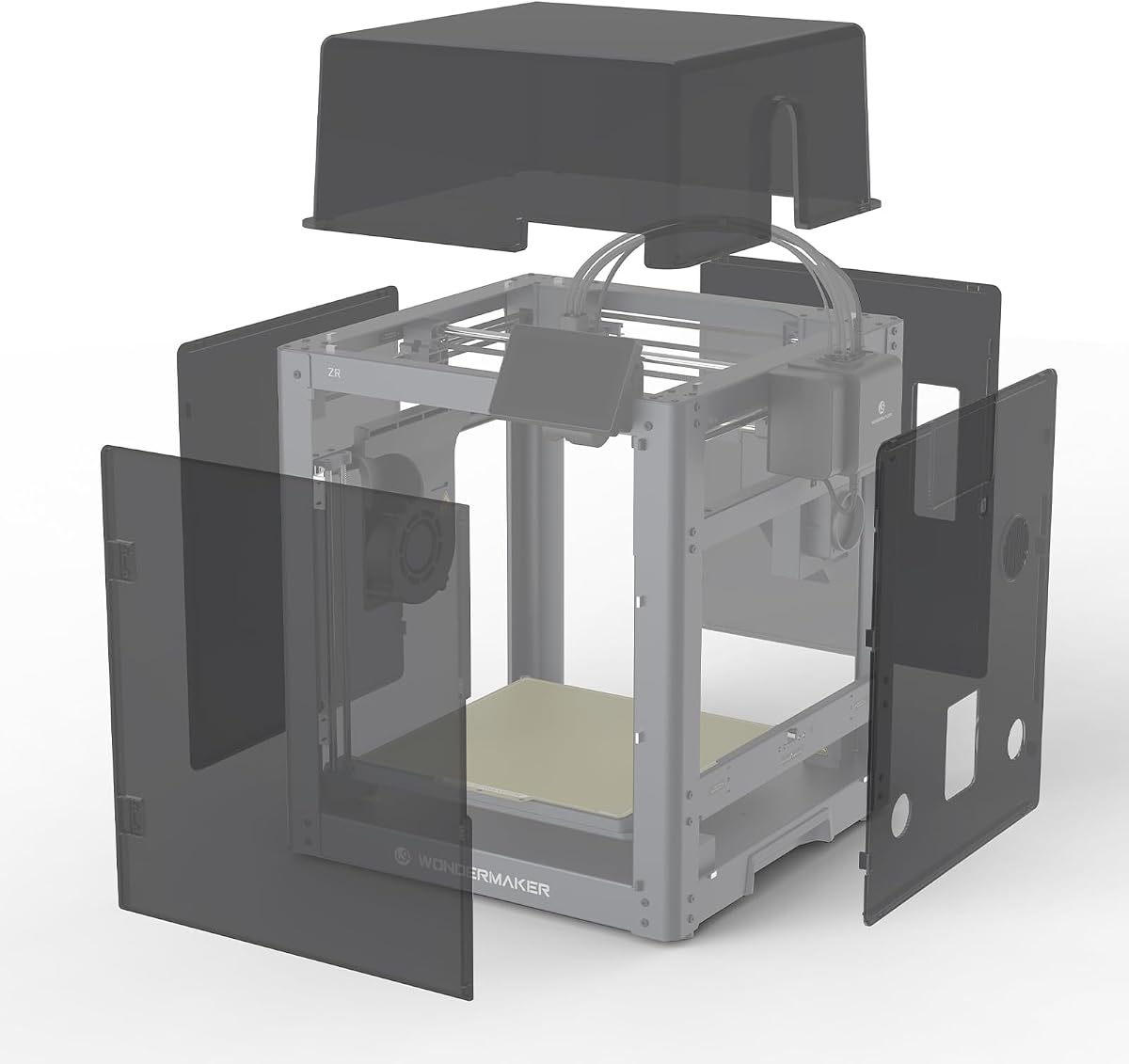
This custom-fitted enclosure for the ZR printer delivers premium features like active air filtration and exceptional noise reduction. It is designed to handle high-performance filaments like ABS efficiently.
We may earn a commission when you buy through this link, at no additional cost to you.
The built-in filtration fan removes odors and fine particles, keeping the workspace clean. Its quiet operation modes make it ideal for home offices where noise is a concern.
The magnetic top cover simplifies access without tools, though the price is higher than generic tents. It is a specialized product rather than a universal fit.
If you own a ZR printer and prioritize air quality and quietness, this is the best choice. Its specific design ensures a perfect fit and maximum performance.
The high-efficiency filtration fan actively removes odors, making it perfect for home studios and classrooms.
Designed specifically for the ZR, it ensures a secure setup that minimizes vibrations and maximizes print precision.
We may earn a commission when you buy through this link, at no additional cost to you.
This versatile tent is designed primarily for resin printing but offers solid ventilation features. The UV block window is a standout feature for protecting sensitive resin prints from light.
We may earn a commission when you buy through this link, at no additional cost to you.
It includes a 12V fan filter system with speed control to manage odors. The stainless steel pipes provide better durability compared to standard iron frames found in cheaper models.
Users may need to print an adaptor to fit the fan bracket properly, which is a small hurdle. The enclosure is best suited for smaller machines like Photon or Mars printers.
Ideal for resin users who need UV protection and odor control, this model excels in safety features. It is a practical choice for hobbyists with limited workspace.
The UV block window allows monitoring while preventing premature curing of resin during the printing process.
Fire-resistant fabric and stainless steel pipes ensure a safer and longer-lasting enclosure for your printing station.
We may earn a commission when you buy through this link, at no additional cost to you.
This enclosure is custom-designed for the Bambu Lab A1 with AMS Lite. It ensures safe operating temperatures while providing excellent visibility through a large transparent window.
We may earn a commission when you buy through this link, at no additional cost to you.
Tests show internal temperatures stay safely under 40°C, protecting the printer motherboard. The integrated LED strip helps monitor prints even in dark rooms.
If you do not have AMS Lite, the dimensions might not fit correctly. It is a specialized product meant strictly for A1 users with the combo version.
For A1 owners, this provides the best balance of temperature control and accessibility. It simplifies setup while protecting your expensive printer from dust and accidents.
The design ensures internal temperature never exceeds 40°C, protecting the motherboard while maintaining stable printing conditions.
Full enclosure design reduces noise levels significantly, making your print station much quieter for home environments.
We may earn a commission when you buy through this link, at no additional cost to you.
This complete kit comes with a fan and ducting, making setup easier than buying parts separately. The insulation lining helps raise internal temperature for better print consistency.
We may earn a commission when you buy through this link, at no additional cost to you.
Users report successful ABS printing thanks to the passive drying feature that lowers humidity. The dark TPU window blocks UV light, which is useful for resin users too.
Check Y-axis travel limits before buying as it may not fit taller printers. However, for standard desktop machines, it offers excellent value and thermal management features.
A strong choice for those wanting a ready-to-use solution with thermal benefits. The included shelf adds convenience for organizing tools and materials inside.
Includes insulation enclosure, stainless steel shelf, fan, and ducting for a complete solution right out of the box.
Long-term use lowers internal humidity naturally, helping to keep ABS filament dry while printing.
We may earn a commission when you buy through this link, at no additional cost to you.
This enclosure allows you to customize the outside color and material to match your style. It is designed to maintain constant temperature for high-temperature filaments like ABS.
We may earn a commission when you buy through this link, at no additional cost to you.
The dustproof cover protects your printer from debris and accidental touches by kids or pets. Odor isolation features help create a pleasant environment in classrooms or offices.
As a specialized product, you need the specific AD5M model. DIY customization options make it unique but require some effort to set up correctly.
Perfect for users who want a personalized look for their print station. It delivers essential protection and thermal benefits in a versatile package.
The outside color and material can be tailored to your preferences, expressing your distinct personal style.
Designed to support high-temperature filaments such as ASA and ABS for stable and quality printing.
We may earn a commission when you buy through this link, at no additional cost to you.
Designed specifically for the Adventurer 5M, this kit offers customizable exterior colors. It optimizes heat dissipation to maintain stable temperatures for high-temperature materials like ASA.
We may earn a commission when you buy through this link, at no additional cost to you.
Safety is a key focus, preventing pets and children from touching hot components. The enclosure effectively isolates odors, creating a cleaner environment for printing.
It requires some DIY effort and is strictly for the 5M model. However, the safety and customization benefits make it a strong option for owners.
This is the ideal choice for Adventurer 5M users wanting a tailored solution. It balances customization with essential protection features well.
Optimizes heat dissipation to maintain stable internal temperature, enhancing print quality for high-performance materials.
Prevents pets and children from touching hot components, increasing safety in shared home spaces.
We may earn a commission when you buy through this link, at no additional cost to you.
This large enclosure is ideal for the Bambu Lab A1 with AMS Lite. It includes an 8025 fan to quickly remove smoke and dust during printing operations.
We may earn a commission when you buy through this link, at no additional cost to you.
Built-in LED lights provide clear visibility for monitoring prints. Fireproof materials safeguard your printer and workspace against potential accidents.
Ensure you have AMS Lite as the dimensions may be too short without it. It is a robust option for users needing reliable ventilation and safety.
Great for A1 users wanting complete ventilation right out of the box. The fireproof features add an extra layer of safety for your investment.
Equipped with an 8025 fan to quickly remove smoke and dust, creating a clean and safe environment.
Built-in LED lights provide clear visibility, making it easy to monitor prints even in low-light conditions.
We may earn a commission when you buy through this link, at no additional cost to you.
This open enclosure is designed specifically for the Sovol SV08 with metal and tempered glass panels. It helps maintain stable temperatures to reduce issues like warping.
We may earn a commission when you buy through this link, at no additional cost to you.
The tempered glass provides transparency for monitoring while keeping dust out. It includes an exhaust fan to remove odors from materials like ABS or PETG.
While the open design helps dissipate heat for PLA, it may not retain heat as well as full tents. Ensure you verify compatibility with your SV08 before purchasing.
An excellent aesthetic option for SV08 owners wanting a modern look. It offers protection and temperature benefits with a stylish transparent design.
Constructed with tempered glass panels to provide transparency and style while maintaining safety and dust protection.
Downloadable extension kits help dissipate heat when printing PLA, offering flexibility for different materials.
We may earn a commission when you buy through this link, at no additional cost to you.
Selecting the right enclosure depends on several factors including printer size, ventilation needs, and thermal retention capabilities.
Always check the internal dimensions against your printer's footprint and Z-height. Enclosures designed for specific models ensure a better fit but limit flexibility.
Measure your printer before ordering to avoid return hassles.
ABS releases harmful fumes, so look for enclosures with exhaust ports and compatible fans. Some models include filtration systems to reduce odors effectively.
Choose one with air-tight zippers to contain fumes well.
Effective insulation helps maintain a constant temperature crucial for ABS printing. Look for models with thermal lining or warming layers.
Better insulation reduces warping and layer separation risks.
Fire-resistant and dustproof materials ensure safety and long-term durability. Stainless steel frames are often more durable than iron pipes.
Prioritize safety features to protect your workspace.
Some enclosures take minutes to assemble while others need tools. Quick setup options are convenient for temporary or mobile setups.
Check if assembly requires special tools or adapters.
Transparent windows allow you to monitor prints without opening the chamber. Integrated LED lights help in low-light conditions.
Look for UV-blocking windows for resin printing too.
Fully enclosed designs significantly reduce noise from fans and motors. This is important for home offices or shared living spaces.
Check decibel reduction ratings provided by the manufacturer.
Start by assembling the enclosure according to manufacturer instructions. Ensure all seals are tight to maximize thermal retention and containment.
Connect your ventilation fan to the exhaust port if included. Adjust the fan speed to maintain airflow without cooling the chamber too much.
Regularly clean dust from fans and replace filters if applicable. Check zippers and seams for wear to maintain safety and efficiency over time.
Yes, an enclosure is highly recommended for ABS to maintain stable temperatures and prevent warping. It also helps contain harmful fumes effectively.
Measure your printer's total dimensions including spool holders. Choose an enclosure with internal dimensions slightly larger than your printer for proper fit.
Some enclosures support resin with UV-blocking windows. Check if the model is designed for LCD or DLP printing before purchase.
Use a compatible exhaust fan connected to the ventilation port. Ensure the fan is positioned to pull air out efficiently without disturbing prints.
Many enclosures use fire-resistant fabrics. Look for fireproof materials and ensure proper electrical connections for safety.
Larger models can fit multiple printers but check internal dimensions carefully. Ensure enough airflow for all units.
Our top picks range from budget-friendly options to premium custom-fit solutions for different needs. Each model offers unique benefits for thermal stability and safety.
Prioritize ventilation and thermal retention when selecting an enclosure. These factors directly impact print success and safety in your workspace.
Prices and availability change frequently so verify current details before buying. Choose the model that best fits your specific printer and printing goals.