
ASUS Vivobook S16 Laptop (2026)
5.0Editor score
Ryzen AI 9 465 Processor
Up to 50 NPU TOPS Performance
32 GB RAM and 1TB SSD
Artificial intelligence is transforming how we work and create, making AI laptops the most exciting category in computing today. These devices integrate dedicated neural processing units to handle complex tasks locally, offering speed and privacy that cloud services cannot match for everyday users.
We have evaluated ten leading models released or updated in 2026, focusing on their AI capabilities, performance, battery life, and display quality. Our analysis considers real-world usage scenarios, from creative professionals needing rendering power to students requiring all-day portability and efficiency.
Each pick below highlights specific strengths, such as battery endurance, screen technology, or processor architecture. Prices and availability change frequently, so please verify the latest details before purchasing to ensure you get the best value for your specific needs and budget constraints.
5.0Editor score

4.3Editor score

4.4Editor score
As an Amazon Associate we earn from qualifying purchases.
The following table provides a side-by-side comparison of all ten AI laptops featured in this guide, allowing you to quickly assess their key specifications, ratings, and essential features to determine which model best aligns with your specific workflow requirements.
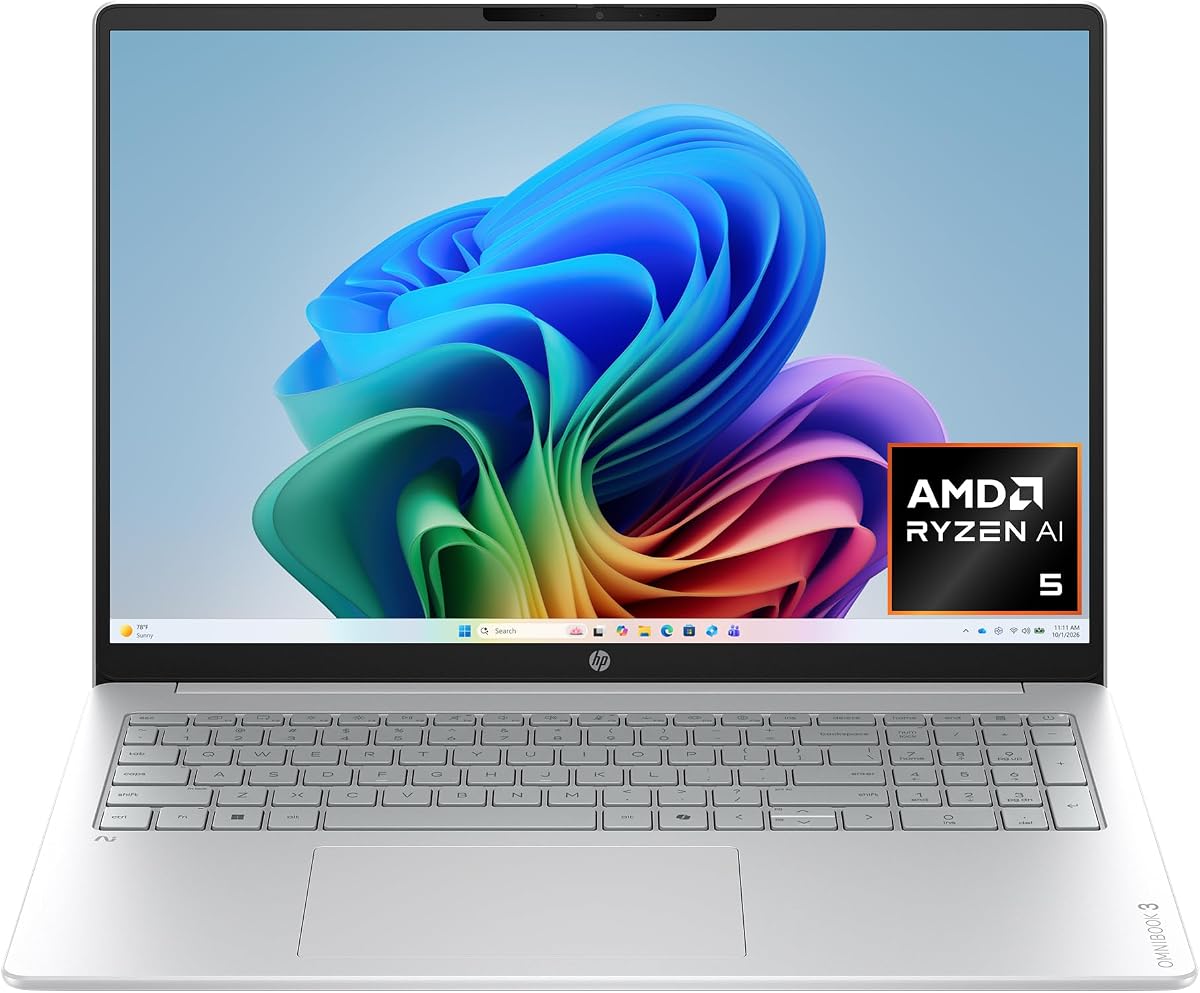


The HP OmniBook 3 16 inch stands out as the top choice for users seeking a balanced AI laptop experience. With a high 4.8 rating, it delivers powerful AI-driven features powered by the AMD Ryzen AI 5 430 processor, making it ideal for creativity and productivity.
We may earn a commission when you buy through this link, at no additional cost to you.
Its standout qualities include an advanced AI noise reduction system that isolates your voice during calls, ensuring professional communication. The 2K IPS touchscreen provides vibrant colors and wide viewing angles, while the AMD Radeon 840M GPU supports smooth graphics for entertainment and light creative work.
While the 16GB RAM is sufficient for most tasks, heavy users might find it limiting over time. Additionally, the 512GB SSD storage may require external drives for large media libraries. However, these trade-offs are acceptable given the impressive battery life and performance efficiency.
This laptop is perfect for professionals and students who need reliable AI tools without breaking the bank. Its combination of speed, display quality, and smart features makes it a compelling recommendation for anyone looking to upgrade to a next-generation AI PC.
Advanced Personal Mode tracks your voice during conferences, automatically filtering background noise and other speakers for focused communication.
HP Fast Charge restores battery from 0 to 50% in just 45 minutes, ensuring you stay productive even when time is tight.
We may earn a commission when you buy through this link, at no additional cost to you.
The Lenovo ThinkBook 16 Gen 8 is engineered specifically for business professionals who need robust AI performance and security. With an Intel Ultra 7 processor and 32GB of DDR5 RAM, it effortlessly handles complex spreadsheets, video calls, and enterprise applications.
We may earn a commission when you buy through this link, at no additional cost to you.
Key strengths include the 1TB PCIe SSD which eliminates lag when running multiple apps, and enterprise-grade security features like a fingerprint reader and Windows 11 Professional. The 16-inch FHD+ display offers ample screen real estate for data analysis and multitasking.
The lack of a touchscreen option might disappoint users who prefer touch interaction for presentations. Also, the price point is higher than consumer models, reflecting its enterprise focus. These are acceptable trade-offs for businesses needing reliable, secure computing power.
Ideal for IT teams and office workers, this laptop ensures seamless collaboration and data protection. Its combination of performance, memory, and security features makes it a top recommendation for professional environments requiring heavy AI workloads.
Fingerprint reader and Windows 11 Professional protect sensitive business data with advanced security features tailored for corporate use.
32GB DDR5 RAM ensures smooth multitasking across multiple business applications without performance bottlenecks.
We may earn a commission when you buy through this link, at no additional cost to you.
The HP OmniBook X 14 inch offers a premium experience with its breathtaking 3K OLED touchscreen and incredible battery endurance. Rated 4.3, it delivers powerful performance via the Intel Core Ultra 7 Processor, revolutionizing how you create and work anywhere.
We may earn a commission when you buy through this link, at no additional cost to you.
The OLED display provides deeper blacks and vibrant colors, making it perfect for creative tasks. Smart Sense AI technology automatically optimizes performance and temperature based on your activity, ensuring comfort. Poly Studio audio ensures crystal-clear collaboration.
The main trade-off is the higher price, and the lack of a discrete GPU limits heavy gaming. However, the Intel Graphics handle everyday tasks well, and the battery life is unmatched. These compromises are acceptable for users prioritizing portability and visual fidelity.
This laptop is best for creatives and travelers who need a stunning display and all-day power. Its premium features and efficiency make it a top recommendation for those willing to invest in quality.
AI-driven optimizer switches modes to manage warmth and noise levels for comfort based on your activity.
Enjoy up to 27 hours and 30 minutes of battery life, with fast charge restoring 50% in just 30 minutes.
We may earn a commission when you buy through this link, at no additional cost to you.
The HP OmniBook 5 16" balances power and usability for everyday users. With an Intel Core Ultra 7 processor, it offers fast AI performance for multitasking and creative workloads. The 16-inch touchscreen provides an immersive experience for work and streaming.
We may earn a commission when you buy through this link, at no additional cost to you.
Key features include the massive 1TB SSD for extensive file storage and a premium aluminum design with a backlit keyboard. Wi-Fi 6E connectivity ensures stable internet speeds for video conferencing. The Copilot AI assistant helps streamline workflows efficiently.
While the 16GB RAM is good for most, some power users may need more. The larger chassis adds weight compared to smaller models, but the screen real estate is worth it. These trade-offs are acceptable for general use.
Ideal for students and professionals needing a reliable daily driver, this laptop combines style with smart features. Its robust configuration makes it a strong recommendation for general productivity and entertainment.
Windows 11 with Copilot AI support offers intelligent suggestions and enhanced security features.
1TB SSD ensures smooth multitasking and plenty of storage for files, photos, and applications.
We may earn a commission when you buy through this link, at no additional cost to you.
The HP OmniBook 5 16 inch excels in mobility with its Snapdragon X processor delivering long-lasting battery life. Rated 4.2, it offers essential performance and AI capabilities for on-the-go productivity. The 2K OLED display provides rich colors and crisp visuals.
We may earn a commission when you buy through this link, at no additional cost to you.
Key strengths include Otter.ai integration for automated note-taking during meetings and Wi-Fi 6E for fast connectivity. The privacy camera closes when not in use for added security. Battery life can reach up to 34 hours, making it ideal for travel.
App compatibility on Snapdragon can sometimes be a limitation, and the GPU is optimized for power efficiency rather than heavy gaming. However, for productivity, these trade-offs are minimal. The efficiency and battery life are unmatched.
Perfect for travelers and mobile workers, this laptop ensures productivity without constant charging. Its integration of AI assistants and long battery life makes it a top recommendation for those on the move.
AI assistant can record audio, write notes, transcribe, and generate meeting summaries.
Harness the power of 6 GHz spectrum for faster speeds and enhanced connectivity with Wi-Fi 6E.
We may earn a commission when you buy through this link, at no additional cost to you.
The HP OmniBook 3 14 inch offers incredible value with its powerful Snapdragon X processor and long battery life. Rated 4.4, it delivers essential AI capabilities and efficiency. The 2K OLED display ensures rich colors and crisp visuals for everyday productivity.
We may earn a commission when you buy through this link, at no additional cost to you.
Key features include an amazing 41 hours battery life and a lightweight design ideal for students. HP Fast Charge restores 50% in 45 minutes. Otter.ai helps organize notes. Connectivity via Wi-Fi 6E is seamless.
The 256 GB storage fills up quickly, and 16GB RAM may limit heavy multitasking. However, external storage and cloud services can mitigate this. For the price, the performance and battery life are exceptional.
Ideal for budget-conscious users needing long battery life, this laptop delivers great AI features. It is a top recommendation for students and light users requiring portability.
Enjoy up to 41 hours and 45 minutes of battery life for extended use without charging.
Qualcomm Wi-Fi 6E offers lightning fast speeds and expanded capacity for seamless connectivity.
We may earn a commission when you buy through this link, at no additional cost to you.
The Dell 16 Plus is a powerhouse designed for enterprise productivity with AI. Rated 4.5, it features Intel Core Ultra 9 and 32GB RAM for unmatched multitasking. The modular design enhances durability for business use. Copilot+ PC features streamline workflows.
We may earn a commission when you buy through this link, at no additional cost to you.
Key strengths include Wi-Fi 7 for ultra-fast connectivity and AI noise cancellation for clear calls. The 16-inch touchscreen with ComfortView reduces eye strain. It replaces older Latitude models with superior specs.
Windows 11 Home lacks some enterprise features found in Pro, and the price is higher. However, for IT departments needing remote manageability and robust security via vPro, these are minor issues. The performance justifies the cost.
Ideal for business IT needs, this laptop offers the stability and security required by enterprises. Its combination of speed and durability makes it a top recommendation for corporate environments.
Wi-Fi 7 Gig+ and Bluetooth 5.3 ensure unprecedented wireless performance and stable connections.
Enjoy clear, distraction-free calls and recordings with AI noise cancellation for enhanced communication.
We may earn a commission when you buy through this link, at no additional cost to you.
The ASUS Vivobook S16 stands out with its perfect 5.0 rating and premium features. Powered by AMD Ryzen AI 9, it offers up to 50 NPU TOPS for on-device AI. The sleek design is just 3.75 lbs and 0.7 inches thin.
We may earn a commission when you buy through this link, at no additional cost to you.
Key strengths include an immersive OLED display with vivid detail and up to 23 hours battery life. Audio is rich with Dolby Atmos. Port selection includes HDMI 2.1 and USB-C without needing hubs. Windows Hello ensures quick secure access.
The price is higher than budget models, and it lacks WiFi 7. However, the performance and visual quality are unmatched for professionals. These trade-offs are acceptable for users needing premium features in a portable form factor.
Ideal for professionals and creatives, this laptop combines power with style. Its premium features and high rating make it a top recommendation for those seeking the best.
Delivering deep contrast, vivid detail, and smooth viewing for work or entertainment.
Dolby Atmos and Audio Booster add clarity and volume for richer sound.
We may earn a commission when you buy through this link, at no additional cost to you.
The acer Aspire 16 AI brings next-level AI performance to a budget-friendly package. Rated 4.2, it uses Snapdragon X for optimized processing. The 16-inch 120Hz WUXGA display offers smooth visuals and vibrant colors for entertainment.
We may earn a commission when you buy through this link, at no additional cost to you.
Key strengths include Wi-Fi 7 readiness for fast speeds and AcerSense AI solutions for easy settings optimization. The 45 TOPS NPU supports efficient AI workloads. It is a great option for those entering the AI PC space.
Build quality is standard, and internal upgrade options are limited. However, the performance per dollar is excellent. For general users, these trade-offs are acceptable given the modern connectivity features and smooth display.
Ideal for entry-level AI users, this laptop offers future-proof connectivity. Its affordability and screen quality make it a strong recommendation for general productivity and media consumption.
120Hz WUXGA touchscreen provides smooth visuals and vibrant colors for entertainment.
Wi-Fi 7 ensures lightning fast speeds and expanded capacity for seamless connectivity.
We may earn a commission when you buy through this link, at no additional cost to you.
The HP Omnibook 16 offers elite performance with Ryzen AI 7 350 and 32GB RAM. Rated 4.6, it handles heavy multitasking seamlessly. The 2K IPS touchscreen provides crystal-clear detail. Windows 11 Pro adds enterprise-grade security.
We may earn a commission when you buy through this link, at no additional cost to you.
Key strengths include the 50 Tops NPU for seamless AI workloads and ample 1TB SSD for professional workflows. The backlit keyboard ensures fast work in low light. DTS:X Ultra audio enhances media and collaboration.
The price is higher than entry-level models, and weight increases slightly compared to 14-inch laptops. However, for creators needing power and multitasking, these are minor drawbacks. The combination of speed and display quality is compelling.
Ideal for power users, this laptop delivers reliability and speed for professional workflows. Its high-end specs and display make it a top recommendation for demanding workloads.
Ryzen AI 7 delivers exceptional speed for heavy multitasking and future-ready performance.
Two USB Type-C, HDMI 2.1, and USB Type-A ports offer versatile connectivity options.
We may earn a commission when you buy through this link, at no additional cost to you.
Choosing the right AI laptop involves balancing performance, battery life, and specific AI features that match your workflow needs.
Modern AI laptops use processors like Snapdragon X, Intel Core Ultra, or AMD Ryzen AI, which include Neural Processing Units (NPUs) dedicated to handling AI tasks locally. Look for NPUs offering at least 40+ TOPS (trillion operations per second) to ensure smooth on-device features like background noise cancellation and smart assistants.
Higher NPU performance allows for faster local processing of complex tasks without relying on cloud connectivity, ensuring better privacy and efficiency for daily workflows.
AI applications often run alongside heavy multitasking workloads, so aim for at least 16GB of RAM for basic tasks and 32GB for professional or creative use. Storage should be at least 512GB SSD to handle large files and applications efficiently.
Sufficient RAM and SSD speed ensure smooth performance when running multiple apps simultaneously and prevent bottlenecks during intensive AI processing tasks.
A high-quality display enhances productivity and media consumption. Look for OLED or IPS panels with at least 2K resolution and touch capabilities for interactive workflows. Consider 14-inch models for portability and 16-inch for productivity space.
Choosing the right screen size and resolution balances portability with usability, ensuring comfortable viewing and accurate color representation for visual tasks.
AI tasks can drain battery quickly, so prioritize laptops promising extended battery life. Models with efficient processors like Snapdragon or optimized ARM chips can offer up to 20-30 hours on a single charge, ideal for travel.
Long battery life ensures uninterrupted productivity throughout the day without frequent charging, especially important for mobile professionals or students.
Check if the laptop supports Copilot+ PC features and includes useful AI software like Otter.ai for transcription. Ensure compatibility with your existing apps and Windows version for seamless integration.
Access to relevant software tools maximizes the benefits of AI hardware, improving productivity and simplifying daily workflows effectively.
Future-proof connectivity like Wi-Fi 7 or Wi-Fi 6E ensures stable fast internet for cloud backups and video calls. Check for sufficient USB-C and HDMI ports to avoid needing extra dongles.
Robust connectivity options enable seamless collaboration and fast data transfer, essential for professional environments and remote work.
A lightweight, durable build ensures your laptop survives daily travel. Aluminum chassis offer durability while keeping weight down. Consider keyboard comfort and hinge quality for extended typing sessions.
Prioritizing build quality ensures long-term reliability and comfort, making it suitable for frequent use in various environments.
AI laptops range from budget models under $600 to premium options over $1,500. Balance features like RAM and screen quality with your budget. Entry-level models may lack top-tier NPUs but offer sufficient performance for casual use.
Understanding your budget helps select a device that offers the best performance-to-cost ratio for your specific needs and usage scenarios.
Optimize AI features by enabling Copilot+ settings and configuring privacy features like voice isolation in your system settings. This ensures you get the most out of dedicated hardware accelerators for everyday tasks.
Regularly update BIOS and drivers to maintain compatibility with new AI models and features. Check for updates monthly to ensure optimal performance and security patches are applied promptly.
Care for your device by using a protective sleeve, avoiding exposure to extreme temperatures, and cleaning the screen with a microfiber cloth. Avoid overcharging batteries and keep ports clean to extend hardware longevity.
An AI laptop includes a dedicated Neural Processing Unit (NPU) designed to handle AI tasks locally without relying on the cloud. This allows for features like real-time translation, background noise reduction, and smart assistants to run efficiently.
Yes, AI laptops often provide better battery life and faster performance for productivity tasks. They also offer future-proofing with hardware designed to handle evolving AI software features that standard processors may struggle with.
HP OmniBook 3 14 inch and HP OmniBook 5 16 inch excel with Snapdragon processors offering over 34 hours of battery life. ARM-based chips in these devices prioritize efficiency, making them ideal for travel and long work sessions.
Yes, especially models with dedicated GPUs and 32GB RAM like the Dell 16 Plus or ASUS Vivobook S16. They handle video editing and complex multitasking efficiently while leveraging AI for acceleration and rendering.
Most modern AI laptops support traditional x86 Windows applications natively. Models with ARM processors may require compatibility layers but generally offer broad support for standard software ecosystems.
Copilot+ PC features provide an AI assistant integrated into Windows for smart tasks like summarizing content or searching files locally. These features streamline productivity and enhance interaction with your system without needing internet access.
Use built-in security features like Windows Hello, fingerprint readers, and AI noise cancellation that runs locally. Keep your OS updated and use strong passwords to protect your data and system integrity.
HP OmniBook 3 14 inch or Acer Aspire 16 AI offer great balance of portability, battery life, and affordability. Their efficient processors ensure all-day study sessions without frequent charging.
Choosing the right AI laptop depends on your specific needs whether you prioritize battery life, display quality, or raw processing power. The models highlighted above offer exceptional value and cutting-edge AI capabilities suited for various workflows.
Prioritize RAM and NPU power for future-proofing and smooth performance. Consider screen size and connectivity to match your work style. Whether you choose a premium or budget model, ensure it supports the AI features you plan to use.
Remember that prices and availability change frequently. Always check current offers and read verified user reviews before purchasing to confirm the latest performance and compatibility details.