This comprehensive guide compares the top automated keyboard clicker devices for gaming and productivity, highlighting physical tools and switches that ensure
As an Amazon Associate we earn from qualifying purchases. We may earn a commission when you buy through links on this page, at no additional cost to you. Read our affiliate disclosure.As an Amazon Associate we earn from qualifying purchases.Purchases through our links may earn us a commission, at no extra cost to you. Read our affiliate disclosure.
Automated keyboard clickers are essential tools for gamers and professionals who need to maintain activity without constant manual input. These devices simulate keystrokes or mouse clicks to prevent systems from going idle or locking up during critical tasks.
We evaluated ten leading products based on their build quality, customization options, and ease of use. Our comparison includes physical clickers, programmable arms, and mechanical switches designed to meet diverse user requirements effectively.
Each pick in this list showcases unique features tailored to specific needs like random speed settings or silent operation. Please note that product availability and pricing may vary over time so check current listings before purchasing.
Top 3 Picks for Best Automated Keyboard Clicker
Best Budget
Pankia Box Physical Click Keyboard Auto Clicker Mouse Jigglier Game Assistance Hang Up Artifact (Clicking arm only)
Top 10 Best Automated Keyboard Clicker in 2026 Compared
The following table provides a side-by-side comparison of all ten automated keyboard clicker models reviewed in this guide. It highlights key specifications to help you quickly identify the device that best suits your specific workflow or gaming needs.
ProductsSpecificationsEditor scorePrice
1
Best Budget
Pankia Auto Keyboard Clicker Hang up Game Assist Mouse Jiggler Random Speed Physical Clicking Tool
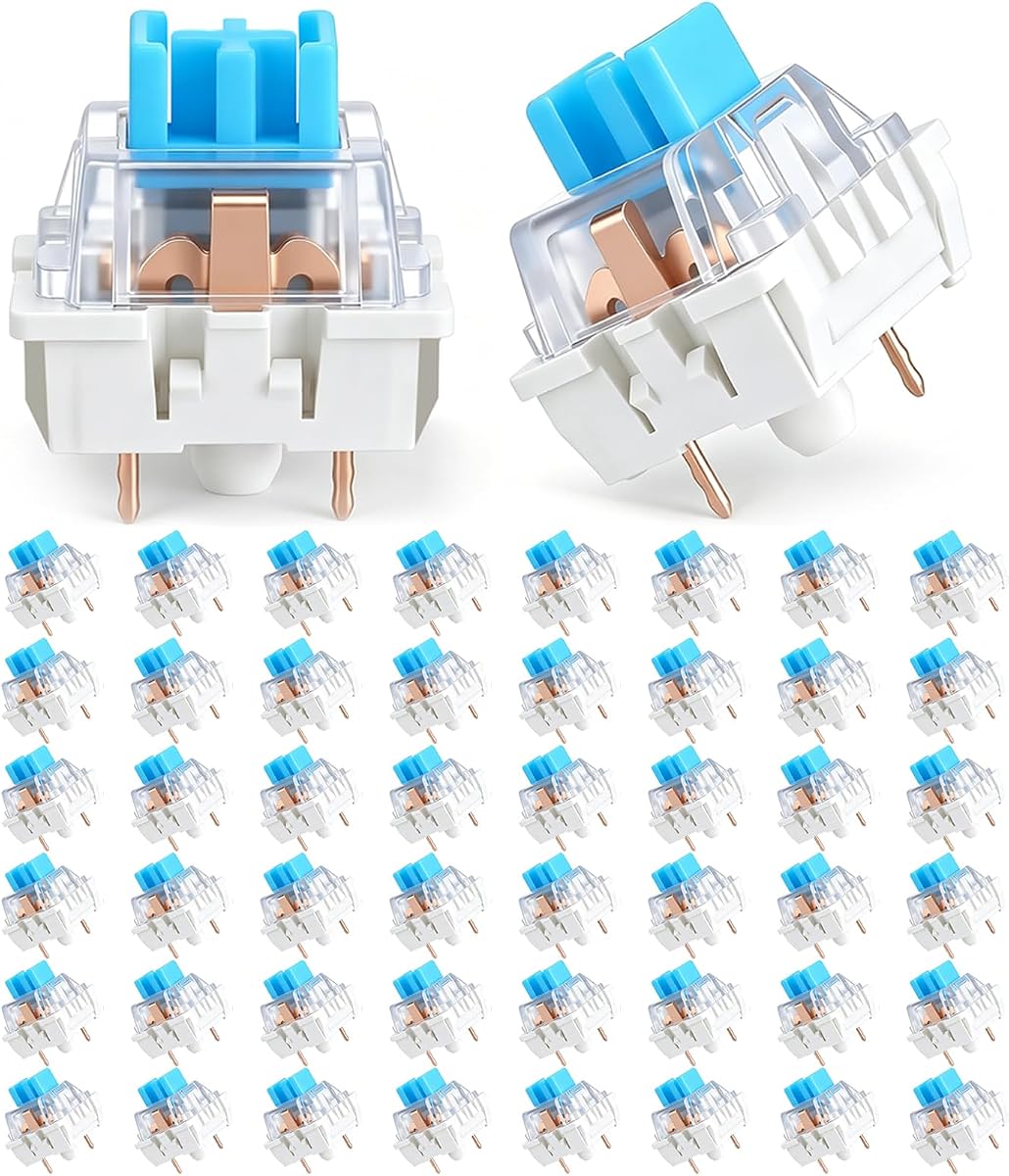
Keyboard Clickers for 3D Prints, 50PCS Keyboard Switches, 3-Pin Blue Keyboard Clicker Replacement Dustproof Mechanical Keyboards Switches for Most Gaming Keyboards
Physical Click Auto Keyboard Clicker Device Jiggler Mouse Mover Auto Prevent Offline Physical Click Hang Up Equipment
Random click setup for activity
Physical device no install needed
Efficient gaming assistant features
Safe durable motor design
This physical clicker device stands out as the top choice for those seeking reliability without software dependencies. With a perfect rating it is highly trusted by users who need consistent performance for online tasks or gaming.
Pros
Highly rated by users
Random intervals mimic human action
No software installation required
Sturdy and durable construction
Low noise during operation
Cons
Adjustment requires manual setup
Limited to physical key areas
We may earn a commission when you buy through this link, at no additional cost to you.
Its random click setup allows you to customize intervals to mimic human activity closely which enhances effectiveness across various platforms. The device operates independently of your computer software ensuring consistent performance without risking security vulnerabilities.
While it requires manual setup for height and position adjustments this trade-off ensures precise control over where clicks occur. The sturdy build quality and low noise operation make it suitable for extended use in shared environments.
Anyone looking for a secure and efficient way to keep games active or prevent systems from logging off should consider this tool. It offers a straightforward solution that prioritizes safety and durability over complex software features.
Security and Software Independence
Using a physical device eliminates the risk of software conflicts or security flags that might arise from digital automation tools.
Customizable Human-Like Intervals
The random click setup lets you fine-tune intervals to ensure your activity looks natural to online monitoring systems.
Pankia Box Physical Click Keyboard Auto Clicker Mouse Jigglier Game Assistance Hang Up Artifact (Clicking arm only)
Clicking arm only purchase note
Universal for Pankia Box
Release your hands with auto click
Wide compatibility for applications
This clicking arm offers an affordable entry point into automated clicking when paired with the Pankia Box controller. It is designed specifically to work with the box to automate keyboard and mouse interactions effectively.
Pros
Affordable pricing option
Compatible with Pankia Box system
Adjustable clicking arm parts
Saves time on repetitive tasks
Cons
Requires separate Pankia Box purchase
Limited functionality on its own
We may earn a commission when you buy through this link, at no additional cost to you.
The arm features three adjusting parts that make it easier to position over specific keys on your keyboard. This modularity allows for some customization depending on your setup needs and keyboard layout variations.
However buyers should note that this item cannot function independently and requires the Pankia Box to operate. This dependency means you must invest in the full system to get the intended benefits of automated clicking.
Budget-conscious users who already own the Pankia Box will find this arm a practical add-on for expanding their automation setup. It provides a cost-effective way to free up your hands during repetitive gaming or work tasks.
Modular Design Benefits
The adjustable clicking arm parts allow you to target specific keys without needing a dedicated device for every task.
Compatibility Considerations
Ensure you have the Pankia Box before purchasing this arm to avoid compatibility issues or incomplete functionality.
Auto Keyboard Clicker, Adjustable Height, Wide Range Time, Mouse Jiggler, Gaming Computer Accessory for Tablet, Desktop, Laptop
Adjustable height for different keyboards
Wide range time settings available
Simulates manual clicking effectively
Rubberized cover for protection
This premium keyboard clicker distinguishes itself with an adjustable height mechanism that fits a wide variety of keyboard and market models. Its wide range time settings provide extensive control over automation timing to suit diverse needs.
Pros
Adjustable height fits many keyboards
Wide range time from 0.1 to 99 seconds
Rubberized cover protects keys
No programming required for settings
Realistic manual clicking simulation
Cons
Higher price point than others
Limited to physical click points
We may earn a commission when you buy through this link, at no additional cost to you.
The device simulates manual clicking with fixed drop and random time options to create realistic interaction patterns. You can set times directly on the host without programming making it easier to use for non technical users.
While the price is higher than some alternatives the protection offered by the rubberized cover justifies the investment for many users. It prevents damage to keyboard keys during extended automated operation sessions ensuring hardware longevity.
Premium users who need flexibility and protection for their equipment will appreciate this comprehensive tool. It balances advanced features with ease of use to deliver a high-quality automated clicking experience.
Height Adjustability Advantage
The adjustable height feature ensures compatibility with various keyboard thicknesses and stand-off distances.
Protection for Hardware
The rubberized cover prevents wear and tear on keys during long automation sessions keeping your keyboard in good shape.
Pankia Auto Keyboard Clicker Hang up Game Assist Mouse Jiggler Random Speed Physical Clicking Tool
15 random click speeds available
Three independent ports for settings
Indicator light shows active mode
Supports most keyboards and mice
The Pankia Auto Keyboard Clicker offers a basic solution with fifteen different random click speeds to choose from. It uses three ports to manage different speeds which can be useful for simple automation needs without complex programming.
Pros
Fifteen random click speeds
Multiple ports for different settings
Indicator light shows modes
Wide compatibility supported
Cons
Lower rating among users
Limited customization options
We may earn a commission when you buy through this link, at no additional cost to you.
An indicator light flashes to show the active mode making it easy to verify settings at a glance. This simplicity allows you to start using the device quickly without reading extensive manuals or documentation.
However user feedback suggests it may not be as reliable as other options on the market. Limited customization beyond speed settings might restrict its utility for advanced gaming scenarios or specific professional tasks.
Casual users who need simple speed variations without detailed programming might find this tool adequate. It serves as a straightforward option for those who prefer physical controls over software interfaces.
Simple Speed Controls
The fifteen available speeds allow you to match click rates to different game or application requirements easily.
Visual Feedback
Indicator lights provide immediate visual confirmation of the selected mode so you know the device is active.
Physical Keyboard Clicker, Keyboard Jiggler Presser Mouse Striking Tool for Game Assistance, Adjustable Speed, Programmable
Programmable loop time and intervals
Three adjustable ports for speed
Clicking arm with three parts
Wide application for various tasks
This programmable physical clicker offers a high degree of customization for users with diverse clicking needs. You can define loop times click intervals and even random time ranges to tailor the device to specific tasks.
Pros
Highly programmable features
Independent speed per port
Adjustable clicking arm parts
Suitable for game assistance
Cons
Setup can be time consuming
Requires careful adjustment
We may earn a commission when you buy through this link, at no additional cost to you.
Each of the three ports supports independent speed adjustments which allows for complex multi task automation. The clicking arm includes three adjustable parts to help target keys precisely on your keyboard layout.
While the programming capabilities are robust they may require some time to set up correctly for optimal performance. Users must ensure they do not exceed five clicks per second to avoid heat related damage to the device.
Users who need tailored automation beyond simple clicking will appreciate the flexibility this device offers. It is a strong middle ground for those wanting some custom control without full software complexity.
Port Independence
Independent speed settings per port enable different click rates for different keys or actions simultaneously.
Adjustable Clicking Arm
The three part clicking arm adjusts easily to reach specific keys without slipping during operation.
Pankia Box Physical Click Keyboard Auto Clicker Mouse Jigglier Simulated Finger Tapper Game Assistance Keep Computer Laptop Active
Adjustable speed for all ports
Clicking arm with three parts
Wide compatibility with devices
Satisfaction guarantee included
This Pankia Box model acts as a simulated finger tapper to keep your computer active during long sessions. It allows separate speed adjustments for all three ports giving you flexibility to match different keyboard areas.
Pros
Adjustable speeds for ports
Three part clicking arm design
Wide compatibility supported
Satisfaction guarantee offered
Cons
Moderate user rating
Heat risk at high speeds
We may earn a commission when you buy through this link, at no additional cost to you.
The clicking arm is designed with three parts to make it easier to click on keys accurately. It supports both keyboards and mice so you can use it across various input devices without needing multiple tools.
Users should be mindful of the heat damage warning which advises against clicking more than five times per second. This limitation ensures longevity but restricts very high frequency automation needs that some games may require.
Gaming assistance seekers looking for a reliable simulated tapping solution will find this device useful. The satisfaction guarantee adds confidence to your purchase should you encounter any issues with performance.
Simulated Finger Action
The simulated finger tapper design mimics human pressure to keep your session active without manual effort.
Speed Control per Port
Adjusting speeds separately per port lets you tailor click rates for different key zones easily.
Physical Click Auto Keyboard Clicker Mouse Jigglier;Auto Random Clicking Game Assist; Mouse Mover Auto clicking Tool (ABC)
Powered by 5V USB source
Digital display for click speed
Configurable click head travel
Fixed and random time combinations
This ABC tool features a digital display that clearly shows the click speed in numbers for precise control. It allows configuration of click head travel distance and direction to adapt to different keyboard layouts or needs.
Pros
Digital display shows speed
Configurable travel and directions
Fixed random time combinations
Powered via standard USB
Cons
Complex ABC grouping logic
Requires external power source
We may earn a commission when you buy through this link, at no additional cost to you.
You can combine fixed and random time dimensions to create unique timing patterns that suit your workflow. The device supports continuous click rates up to six times per second which covers many standard automation requirements.
The ABC grouping logic can be complex for new users requiring careful setup to ensure groups run sequentially as intended. Additionally it requires a standard USB power source which is common but adds a cable to your setup.
Users comfortable with detailed settings will appreciate the granular control this tool provides. It is a strong choice for those who want clear feedback via a digital display and flexible timing combinations.
Digital Speed Display
The numeric display ensures you know exactly what speed is active without guessing based on lights.
Configurable Travel
Adjusting click head travel allows you to target specific keys or switches accurately.
Physical Click Auto Keyboard, Clicker Device Jiggler Mouse Mover Auto Prevent Offline Physical Click Hang Up Equipment
Random click setup for activity
Physical device no install needed
Efficient gaming assistant features
Safe durable motor design
This duplicate listing of the physical clicker device shares the same high rating and features as the first model. It emphasizes random click setup to mimic human activity and prevent offline status automatically during gaming or work.
Pros
Random click setup available
No software installation required
Efficient for gaming tasks
Durable and safe design
Cons
Adjustment needed for positioning
Physical limits on usage
We may earn a commission when you buy through this link, at no additional cost to you.
The physical design ensures no installation is needed making it a plug and play solution that does not rely on computer software. It is safe and durable with a motor that does not heat up easily during extended operation.
While it shares all the strengths of the primary listing users should note the physical limitations regarding where clicks can be applied. It remains one of the safest options for preventing automated logging out without risking security flags.
Anyone seeking a robust physical solution for activity maintenance will find this model reliable. Its efficient gaming assistant features make it a top contender for keeping sessions active with minimal fuss.
Physical Security
Using hardware instead of software means no antivirus flags or security risks during automated sessions.
Motor Durability
The motor design ensures low heat generation so the device lasts longer under repeated use.
Keyboard Clicker Fidget 2 Pack, Silent & Clicky 4-Key Mechanical Keyboard Fidget Toys with Keychains for Adults, Work, Office and Travel
Two sound profiles in one set
Tactile 4-key pressing feel
Clip-on keychain design included
Made for shared and private spaces
This 2-pack offers manual keyboard fidgets rather than automation tools making it ideal for stress relief instead of system activity. It includes a quiet pink profile for discreet pressing and a clicky green profile for audible feedback.
Pros
Two sound profiles included
Tactile mechanical feel
Keychain design for portability
Quiet option for offices
Cons
Not an automated tool
Manual operation only
We may earn a commission when you buy through this link, at no additional cost to you.
Each unit features four mechanical keys that provide a familiar tactile pressing feel similar to typing on a real keyboard. The clip-on keychain design lets you carry them easily on keys or bags for use during commutes.
While it does not automate clicking it is perfect for users who want a tactile toy without disturbing others in shared spaces. The quiet pink option works well in offices while the clicky version suits home or private settings.
Those looking for manual tactile satisfaction rather than automated input should consider this fidget set. It supports relaxation and focus without the technical requirements of a physical clicker device.
Dual Sound Profiles
You can switch between silent and clicky modes depending on your environment and preference for sound.
Portable Keychain Design
The clip-on keychain allows you to take the tactile feedback with you anywhere for stress relief.
ZhouWang 108PCS Blue Click Switch,Clicker for 3D Prints 、Gaming Keyboards.
Distinct tactile clicky feedback
Type clicky with 2mm pretravel
Made of plastic housing and copper
Exquisite packaging included box
These blue click switches are mechanical components rather than automated tools making them suitable for building custom keyboards or projects. They provide a distinct tactile clicky sensation that helps reduce fatigue during extended typing or gaming sessions.
Pros
Distinct tactile clicky sound
High cycle life durability
Packaged in protective box
Suitable for builds
Cons
Not an automated device
Requires keyboard assembly
We may earn a commission when you buy through this link, at no additional cost to you.
With a service life of 80 million cycles they are built for durability and long term use in high demand environments. The switches come packed in a protective PVC box to keep them safe from damage before installation.
While they do not automate clicking they are perfect for enthusiasts who want to build their own custom mechanical keyboards. Users should be aware that the loud sound may not be suitable for quiet shared environments like offices.
DIY keyboard builders and gaming enthusiasts looking for tactile feedback will find these switches a strong choice. They deliver the mechanical feel and audible feedback desired for custom input devices effectively.
Mechanical Feel
The distinct tactile feedback provides a clear click sensation that improves typing and gaming responsiveness.
Protective Packaging
The PVC box ensures switches arrive safely without pin bending so they are ready to install.
We may earn a commission when you buy through this link, at no additional cost to you.
Buying Guide – How to Choose the Best Automated Keyboard Clicker
Selecting the right automated keyboard clicker depends on understanding your specific needs for automation, budget, and physical setup. This guide outlines key factors to consider before making a purchase.
Physical vs Software Solutions
Physical clickers operate independently of your operating system and do not require software installation which reduces security risks. They are generally safer for gaming platforms that might flag automated input tools. Software solutions often offer more flexibility but can be detected and blocked by games.
Choose physical tools if security and detection prevention are your top priorities for online activities.
Customization and Programmability
Some models allow detailed customization of click intervals random ranges and loop times while others offer preset speeds. Advanced programmable options let you tailor the automation to complex tasks or multi key scenarios. Simpler devices may suffice for basic keep alive tasks.
Look for devices with adjustable parameters if you need to match human-like irregular patterns.
Adjustability and Physical Fit
The clicking arm should be adjustable in height and position to match your keyboard layout or mouse size. Devices with multiple parts allow you to target specific keys accurately without slipping. Ensure the arm length matches your needs for reach.
Check that the device can physically reach the keys you need to automate without instability.
Speed and Frequency Limits
Consider the maximum clicks per second the device supports to avoid overheating or damage. Most physical clickers recommend staying under five clicks per second to maintain device lifespan. Verify this limit aligns with your application requirements.
Respect speed limits to ensure the device remains durable and does not fail prematurely.
Compatibility with Devices
Ensure the clicker works with your specific keyboard type and mouse model. Some products support both inputs while others may be restricted to keyboards only. Universal compatibility gives you more flexibility across different setups.
Verify device compatibility with your existing hardware before buying to avoid return hassles.
Noise Levels
Physical clickers often make audible sounds when pressing keys or motors that can be disturbing in quiet spaces. Look for models with low noise motors or rubberized covers to minimize sound. If shared spaces are common choose quieter options.
Prioritize low noise features if you work in an office or shared environment.
Power Source
Most physical clickers draw power from USB ports on your computer or external chargers. Ensure you have access to a USB source where you plan to use the device. Some may require specific voltage like 5V so check specifications.
Confirm the device uses standard USB power to ensure easy setup and portability.
Warranty and Support
Manufacturers often provide satisfaction guarantees or warranties to cover defects or issues. Look for clear contact options if you need assistance with setup or replacement. A good warranty adds security to your purchase investment.
Check for warranty details and customer support availability to protect your purchase.
How to Use and Care for Your Automated Keyboard Clicker
To start using your physical clicker place the device on a stable surface near your keyboard or mouse. Adjust the clicking arm height and position to target the desired key or button accurately.
Set your desired speed or interval using the device controls or programming interface. Begin with lower speeds to ensure proper alignment and to avoid excessive wear on the motor or keys.
Regularly clean the clicking arm and contacts to remove dust that could affect performance. Do not exceed recommended click frequencies to prevent heat related damage and extend the lifespan of your tool.
Frequently Asked Questions
Are automated keyboard clickers safe to use?
Physical clickers are generally safe as they do not require software installation and reduce detection risks on games. They protect your system from potential security flags while automating simple tasks effectively. Always use within manufacturer limits.
Can I use these clickers for gaming?
Yes many users employ physical clickers to prevent games from timing out or logging out automatically. They simulate keyboard and mouse activity to keep sessions active without manual input. Always check game terms before using.
What is the best speed setting for human-like clicking?
Random intervals and speeds help mimic human behavior better than fixed repetitive patterns. Aim for irregular timing that does not follow a predictable rhythm to appear more natural. Use random features if available.
Do these devices require a computer to run?
Physical clickers usually need a USB power source which can be from your computer or a separate charger. They operate independently of your operating system software. Ensure you have access to a USB port nearby.
How do I prevent damage to my keyboard keys?
Use the rubberized cover options if available and avoid clicking more than five times per second. Excessive frequency can lead to wear or overheating of the device. Position the arm to minimize unnecessary friction.
Can I use one clicker for multiple devices?
Most physical clickers are universal and work with various keyboards and mice without dedicated software. You may need to adjust settings if you switch between different devices frequently. Check compatibility with each device.
Do automated clickers affect warranty on keyboards?
Mechanical wear from external devices might void specific hardware warranties if damage occurs. It is advisable to check your keyboard's warranty terms before using external automation tools. Physical damage is typically not covered.
How long do physical clickers last?
Quality physical clickers can last years with proper use and avoidance of excessive click speeds. Maintenance and correct positioning help extend the lifespan of the motor and parts. Follow manufacturer guidelines for best results.
Final Thoughts on Choosing the Best Automated Keyboard Clicker
We reviewed ten devices ranging from fully programmable physical tools to simple fidget switches to cover diverse user needs. The top picks offer security and efficiency for those needing automated input without software risks.
Prioritize physical devices that match your specific setup requirements and allow enough customization for your tasks. Consider speed limits and noise levels to ensure the tool fits your environment comfortably.
Remember that product availability and prices can change so always check current listings before purchasing. Use this guide to find the right automated keyboard clicker for your workflow.