
Corded Landline Phones for Seniors
4.2Editor score
Photo speed dial buttons
110dB loud ringer
Hands-free calling mode
This guide compares the top captioned telephone options for seniors and hearing impaired users, featuring real-time captions and amplified sound for clearer
Finding the right communication tool is essential for maintaining independence. A captioned telephone provides real-time text for voice calls, helping users with hearing loss stay connected with loved ones effortlessly.
We evaluated ten distinct models based on clarity, ease of use, and accessibility features. Our analysis covers traditional landline options and modern VoIP solutions designed for diverse needs and environments.
Each selection highlights unique strengths like large displays or voice activation. Please note that specific features and availability may vary by region and service provider at the time of purchase.
4.2Editor score

4.3Editor score

5.0Editor score
This side-by-side comparison highlights the key specifications and unique capabilities of each model to help you find the perfect match for your specific communication requirements.




The Hamilton CapTel 2400iSPNBT stands out as a leading choice for those seeking reliable captioned phone technology. With a strong rating from users, it delivers real-time captions on a large touchscreen ensuring no words are missed during important calls.
We may earn a commission when you buy through this link, at no additional cost to you.
Its core strength lies in the combination of amplified sound and visual text support. Users can adjust volume up to 40dB and customize caption sizes to fit personal comfort needs. The inclusion of both auto and assisted caption modes provides flexibility depending on call complexity and user preference.
While the need for high-speed internet is a requirement, the service itself is provided at no cost for eligible US residents. The trade-off involves ensuring a stable internet connection is available at the location where the phone will be installed permanently.
This device is ideal for seniors or individuals with hearing loss who want to maintain clear communication lines. It bridges the gap between traditional telephony and modern accessibility tools making it a top recommendation for those prioritizing conversation clarity.
The captioning service converts speech to text instantly allowing users to read along as the conversation happens in real time.
Adjustable tone controls and screen navigation options ensure the phone adapts to the specific hearing and vision needs of the user.
We may earn a commission when you buy through this link, at no additional cost to you.
This corded landline phone offers a cost-effective solution for seniors needing simplified communication tools. It focuses on visual cues and high volume rather than digital captioning making it accessible for those with memory or visual impairments.
We may earn a commission when you buy through this link, at no additional cost to you.
Key strengths include the photo dialing feature which allows users to call family members by pressing an image rather than memorizing numbers. The 110dB loud ringer ensures that incoming calls are never missed even in noisy environments or when the user is away from the device.
The main limitation is the absence of captioned text which might be essential for users with significant hearing loss. However for those who struggle with numbers or have limited dexterity the simplified interface provides a reliable alternative for staying connected.
Ideal for users on a budget or those needing a backup phone during power outages this model prioritizes reliability and ease of use over advanced digital features.
Users can assign family photos to specific buttons allowing for instant one-touch calling without needing to recall phone numbers.
A flashing visual indicator light accompanies the loud ringer ensuring that users who are hard of hearing are notified of incoming calls.
We may earn a commission when you buy through this link, at no additional cost to you.
The FLYINGVOICE FIP12WP represents a premium approach to senior communication by integrating VoIP technology with accessibility-focused design. Its perfect rating highlights user satisfaction with its robust features and ease of use for those with specific needs.
We may earn a commission when you buy through this link, at no additional cost to you.
Its standout features include customizable image keys that allow photos to be inserted for quick contact access and a dedicated help key for emergencies. The audio system delivers over 110dB ensuring clarity in challenging acoustic environments while visual alerts keep users informed.
The requirement for a VoIP service means users cannot simply plug it into a standard wall jack without prior setup. This adds a layer of technical preparation but offers modern benefits like lower calling costs and enhanced connectivity options for long-term use.
Best suited for tech-ready households or facilities like nursing homes this phone combines safety high volume and visual aids to create a secure communication experience for seniors with dementia or hearing loss.
The phone allows users to insert personal photos into key slots making it intuitive to identify contacts without reading small text.
A dedicated help key provides instant access to pre-programmed assistance ensuring rapid contact when needed most.
We may earn a commission when you buy through this link, at no additional cost to you.
The VTech SN5147 offers a hybrid system combining a reliable corded base with a cordless handset for increased mobility. It is designed for seniors who need amplified sound and visual alerts but do not necessarily require full captioning services.
We may earn a commission when you buy through this link, at no additional cost to you.
Key strengths include the one-touch volume boost that can increase sound by 50dB and a smart call blocker to prevent unwanted robocalls. The large backlit display makes it easy to read caller ID and dial numbers even in low light conditions.
While it lacks the specific real-time text feature of dedicated captioned phones the amplified audio and large interface serve similar accessibility needs. The main trade-off is the higher cost compared to standard landline options with similar basic features.
This model is best for users who want the freedom of a cordless handset while maintaining a reliable backup during power outages. It balances convenience with accessibility features for a broad range of senior needs.
The corded base ensures connectivity during power failures while the cordless handset allows movement around the home during calls.
Flashing visual alerts ensure that users are notified of incoming calls even if the ringer volume is adjusted down or turned off.
We may earn a commission when you buy through this link, at no additional cost to you.
This unique device focuses entirely on voice activation allowing users to answer dial and hang up calls using only their voice. It is designed for those with mobility or vision difficulties who find pressing buttons challenging or impossible.
We may earn a commission when you buy through this link, at no additional cost to you.
Its primary strength is the elimination of physical interaction with the device. The always active listening feature ensures the phone is ready to respond to commands immediately making it highly accessible for users with severe physical limitations.
However without any visual display or text captioning users with hearing loss may still miss parts of a conversation. The voice command technology also relies on clear speech which can be a limitation for some users.
This phone serves as a specialized tool for accessibility rather than a universal captioned solution. It is best suited for individuals who need maximum hands-free convenience and can rely on voice prompts for interaction.
Commands like dial answer and hang up are recognized instantly reducing the need for physical dexterity or visual focus.
The phone maintains an active listening state ensuring immediate response to voice commands without needing to press a start button.
We may earn a commission when you buy through this link, at no additional cost to you.
This big button phone provides a straightforward solution for seniors with low vision or memory issues. It prioritizes physical ease of use with large keys and picture assist buttons to simplify the calling process.
We may earn a commission when you buy through this link, at no additional cost to you.
Key features include up to 40dB of amplified volume and three replaceable picture buttons that store favorite contacts. The memory protection ensures that stored numbers are not lost if the phone line is temporarily unplugged.
The lack of captioning limits its utility for users who rely on text for conversation clarity. However the combination of amplification and visual memory aids makes it a solid choice for those needing a simplified and robust communication tool.
It is well suited for home use where stability and ease of use are paramount. The wall mounting option adds flexibility for users who prefer to have the device within easy reach at a fixed location.
Replaceable picture buttons help users identify contacts quickly without relying on small text or complex dialing procedures.
Adjustable volume settings allow the phone to adapt to varying degrees of hearing loss ensuring clear audio reception.
We may earn a commission when you buy through this link, at no additional cost to you.
The Serene Innovations High Definition Amplified Phone is marketed for its audio quality and performance capabilities. It aims to deliver clear sound for users who struggle with traditional telephone audio clarity.
We may earn a commission when you buy through this link, at no additional cost to you.
Its strengths lie in the promise of high definition audio which can make voices sound more natural and easier to understand. The focus on performance suggests a design that prioritizes consistent call quality over complex extra features.
However detailed feature lists are sparse compared to other models which might make it less appealing for those seeking specific accessibility tools like visual alerts or picture dialing. Users may need to verify specific capabilities before purchase.
This model is a consideration for those who prioritize sound fidelity above all else. It serves as a functional tool for enhanced audio but may not offer the comprehensive accessibility suite found in other options.
The high definition audio aims to reduce distortion and improve voice clarity for users with mild hearing impairments.
The device is engineered to provide reliable and consistent performance ensuring that calls are not dropped or interrupted.
We may earn a commission when you buy through this link, at no additional cost to you.
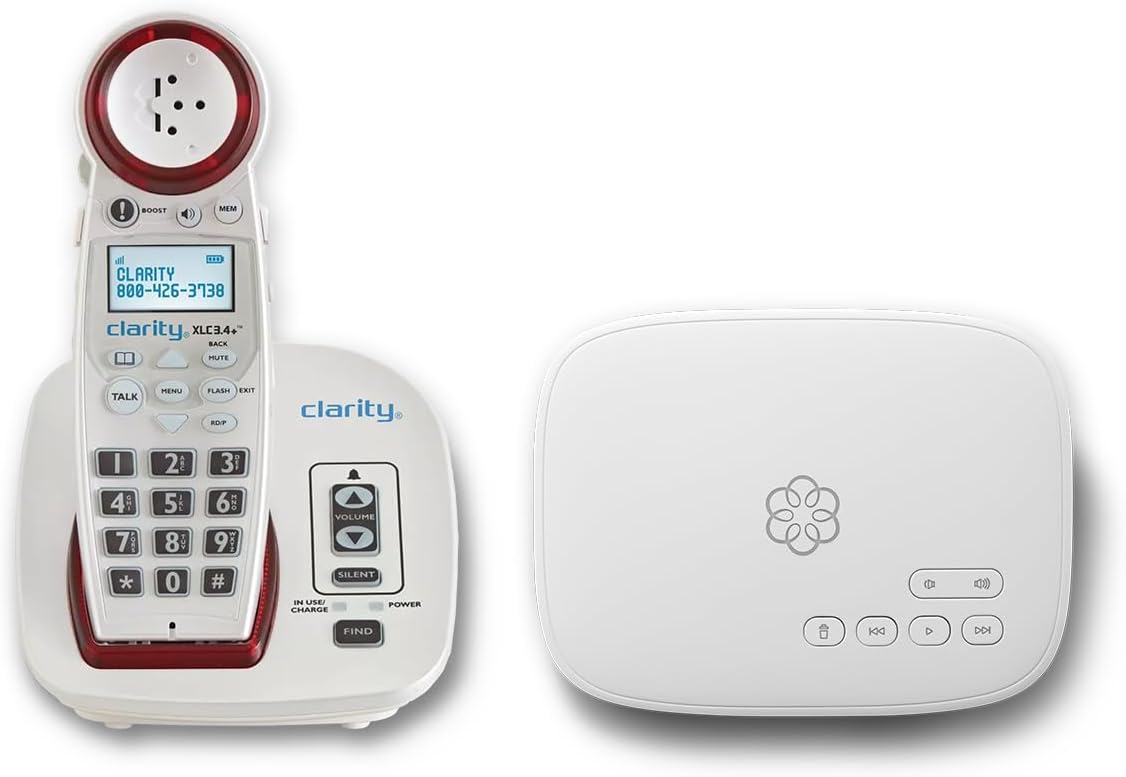
The Ooma Telo bundle combines a hardware phone with a dedicated service plan offering extensive support features for seniors. It includes visual alerts and hearing aid compatibility which are vital for users with sensory impairments.
We may earn a commission when you buy through this link, at no additional cost to you.
Key strengths include the 24/7 concierge plan that provides personal setup assistance and advanced call blocking. The ability to send text alerts when 911 is dialed adds a layer of safety that is valuable for families concerned about emergencies.
The need for a subscription service means ongoing costs beyond the initial hardware purchase. This trade-off is often acceptable for the peace of mind and added safety features that the plan provides over time.
This bundle is ideal for users who want a comprehensive solution covering both communication and safety needs. It is best for those comfortable with subscription models who value dedicated customer support.
The 24/7 concierge plan ensures that technical setup and usage questions are addressed by professional support staff.
Text alerts are sent to loved ones when 911 is dialed keeping family informed during emergency situations.
We may earn a commission when you buy through this link, at no additional cost to you.
This Voice Dialer Phone offers an early version of voice-activated calling allowing users to make and answer calls without touching the device. It includes talking caller ID and visual ring alerts to assist with identification.
We may earn a commission when you buy through this link, at no additional cost to you.
Its strengths include the convenience of voice commands and a visual LED indicator for incoming calls. The talking caller ID announces who is calling which is helpful for those with memory or vision limitations.
However the lower rating suggests potential issues with voice recognition accuracy or overall reliability. Users may find that the setup is complex or that the voice commands do not work consistently in all environments.
It serves as a specialized option for those who rely heavily on voice interaction but caution is advised due to reported reliability concerns. It is best used as a secondary device where primary needs are met by more robust options.
Users can issue simple commands to dial answer or end calls making the device accessible for those with limited dexterity.
The talking caller ID feature announces the name or number of the caller aloud to ensure no incoming call goes unnoticed.
We may earn a commission when you buy through this link, at no additional cost to you.
This corded landline phone focuses on photo memory keys and amplified sound to support seniors with memory loss or hearing impairments. It is designed to make calling effortless through one-touch dialing.
We may earn a commission when you buy through this link, at no additional cost to you.
Key features include nine photo memory keys for instant contact access and ringtones that reach over 110dB to ensure calls are never missed. The LED call flash alert provides a visual cue for incoming calls which is helpful in noisy settings.
While it lacks captioning capabilities the robust volume and visual aids make it effective for those who need clear audio and reminders. The hands-free mode adds convenience for users with limited mobility or arthritis.
It is a reliable option for families looking for a simple and accessible communication tool for elderly parents. The focus on ease of use and clear signals makes it suitable for those with cognitive or physical challenges.
Nine dedicated buttons allow for the storage of family and friend photos ensuring quick access to important contacts.
The LED light flashes in sync with the ringer ensuring that users who are hard of hearing are aware of incoming calls.
We may earn a commission when you buy through this link, at no additional cost to you.
Selecting the right captioned telephone involves evaluating features that match your specific hearing and mobility needs.
Look for models that offer real-time captioning services which transcribe voice to text during calls. Ensure the service is available in your region and that the device supports the necessary internet connection for captions to work properly.
Prioritize phones with clear displays and customizable text sizes to reduce eye strain.
Consider devices that offer adjustable volume control often ranging up to 40dB or more. High amplification helps users with moderate to severe hearing loss hear conversations clearly without straining.
Check for features like one-touch volume boost for quick adjustments during calls.
Visual indicators like flashing lights or large icons are crucial for users who might not hear the ringer. These alerts ensure that no call is missed even in noisy environments.
Choose models with bright and clearly visible LED or screen indicators.
Simplified dialing options such as photo speed dial or large buttons can significantly reduce the effort required to make calls. This is especially important for users with vision loss or cognitive challenges.
Look for models with programmable buttons for quick access to family members.
Hands-free modes allow users to conduct calls without holding the receiver which is beneficial for those with arthritis or mobility issues. Speakerphone quality should be tested for clarity.
Ensure the device supports full-duplex audio to avoid cutting off speech during conversations.
Many captioned phones require specific internet connections or subscription services to function. Verify that your home internet setup is compatible with the device before purchasing.
Check if the service is free or if there are ongoing monthly fees associated with the captioning feature.
Decide between corded and cordless options based on your need for mobility versus reliability. Corded models often work during power outages while cordless ones offer greater movement.
Ensure the phone is compatible with your existing telephone line infrastructure.
Features like dedicated help buttons or 911 text alerts add a layer of safety for seniors living alone. These can be critical in situations where quick assistance is needed.
Choose models that allow for easy programming of emergency contact numbers.
Set up your captioned telephone by connecting it to a reliable high-speed internet source and a standard telephone line. Follow the manufacturer's instructions to register the device for the captioning service if required.
Regularly test the volume and caption display settings to ensure they are optimized for your hearing needs. Adjust brightness or text size as needed to maintain comfort during long calls.
Keep the device and its buttons clean and free of dust to prevent malfunctions. Avoid placing the phone in humid areas or near heat sources to extend its lifespan and maintain sound quality.
Most captioned telephones require a combination of a standard telephone line and a high-speed internet connection to function properly. The internet allows the device to access the captioning service that transcribes voice calls into text. Without both connections the captions will not appear on the screen.
Many providers offer captioning services at no cost for eligible US residents with hearing loss. However some bundle services may require a subscription for features like concierge support or advanced call blocking. Always verify the specific terms with your service provider before signing up.
Yes many captioned phones include features like photo dialing and simplified interfaces that cater to seniors with memory loss. These visual aids help users identify contacts and make calls without needing to recall numbers. Look for models with large clear buttons and minimal menus.
If the internet connection is lost the real-time captioning feature will stop working. However the voice call itself will often continue as long as the telephone line is active. Users may need to rely on hearing alone until the connection is restored or switch to a backup device.
Yes captioned telephones are specifically designed for hard-of-hearing users. They combine amplified audio with visual text to provide dual channels of communication. This ensures that even if sound is unclear the text captions convey the full message accurately.
Many manufacturers provide detailed setup guides or concierge support to assist with installation. Some models offer plug-and-play features that minimize the steps required to get started. If needed family members or caregivers can help with the initial configuration to ensure everything is ready.
Choosing the right captioned telephone depends heavily on your specific hearing needs and daily usage habits. Models like the Hamilton CapTel offer robust captioning while others prioritize simple visual dialing for those with memory challenges.
Prioritize features such as amplified volume and visual alerts if you want to ensure every call is received clearly. The right combination of technology and ease of use can significantly improve communication quality.
Remember to verify current availability and service requirements as these can change over time. Checking updated product details ensures you select a device that meets your needs today.