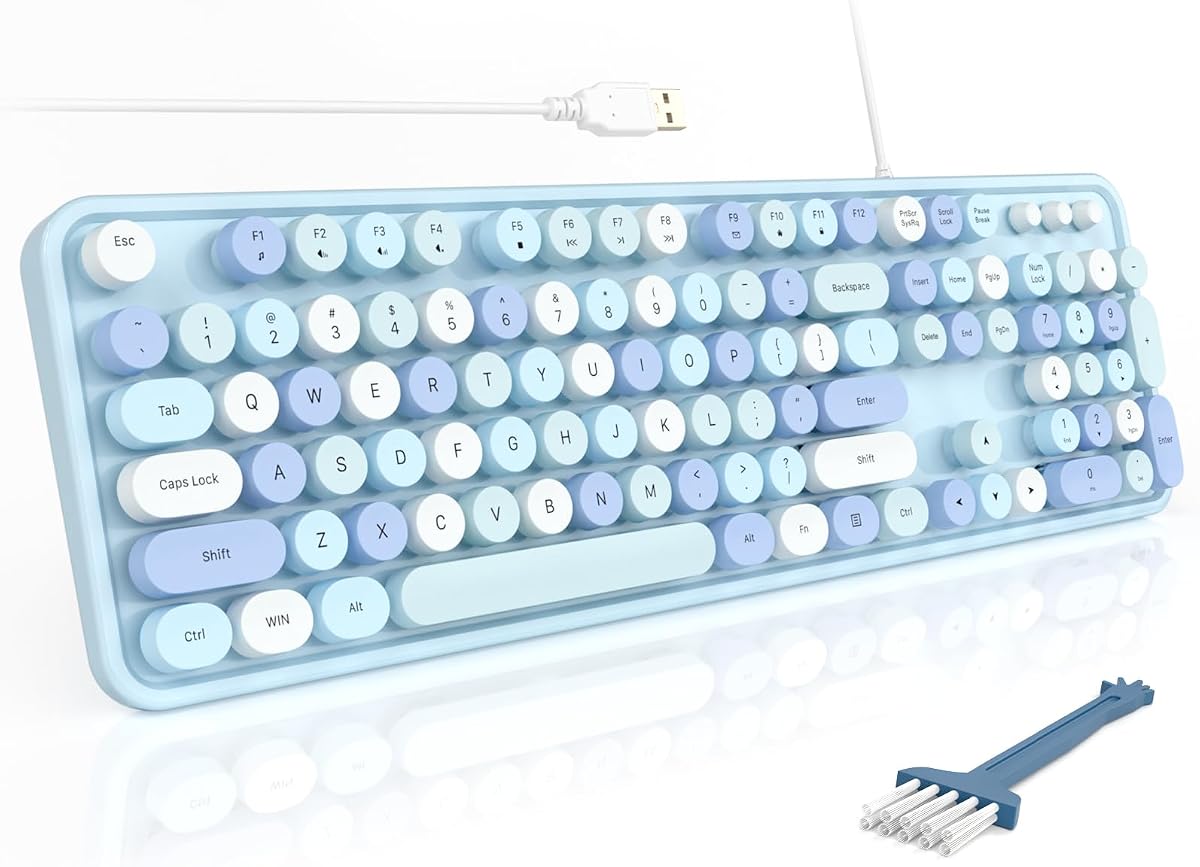
MOFII Computer Keyboards Wired
4.6Editor score
Retro typewriter aesthetic
Full size number pad
Foldable ergonomic stand
Discover the top colorful keyboards for 2026. This guide compares style, typing feel, and connectivity to help you choose the perfect vibrant keyboard for your
Finding the right colorful keyboards can transform your workspace into a vibrant and inspiring environment. Whether you prefer retro typewriter styles or modern mechanical designs, there are many options to suit every taste. These keyboards combine aesthetic appeal with practical functionality for daily use.
We compared ten top-rated models based on user feedback, build quality, and unique features. Our analysis covers wired and wireless options, different keycap styles, and compatibility across various operating systems. This list helps you find a keyboard that matches your workflow and visual preferences.
Each pick highlights specific strengths like battery life, wireless range, or ergonomic design. We also note trade-offs to help you make an informed decision. Keep in mind that prices and availability may change over time, so check current listings before purchasing your new desk accessory.
4.6Editor score

4.7Editor score

4.4Editor score
This side-by-side comparison highlights the key specifications and features of all ten models. Use this table to quickly identify which keyboard offers the best value, design, and performance for your specific needs.


The KNOWSQT Wireless Keyboard and Mouse Combo stands out as a top contender for those seeking a vibrant desk setup. With a solid rating, it delivers on both aesthetics and functionality. The milk tea color scheme offers a unique retro vibe that catches the eye.
We may earn a commission when you buy through this link, at no additional cost to you.
Its detachable keycaps and floating button design provide a satisfying typing experience reminiscent of classic typewriters. The wireless connectivity ensures a clean workspace without clutter from cables. Users appreciate the long range and plug-and-play simplicity.
While the battery life is good, the need for replacements adds a minor maintenance task. The specific color choice might not suit every preference, but it remains a popular option for its cheerful look. These trade-offs are reasonable given the overall performance.
This keyboard is ideal for anyone wanting a colorful upgrade for home or office work. Its compatibility across multiple operating systems makes it versatile for various users. We recommend it for its balance of style and practicality in daily tasks.
The round keycaps and floating design recreate the nostalgic feel of old typewriters while maintaining modern comfort for long typing sessions.
Using a single nano receiver for both keyboard and mouse reduces desk clutter and ensures stable connections without software installation.
We may earn a commission when you buy through this link, at no additional cost to you.
The MOFII Computer Keyboards Wired offers an affordable entry point into colorful keyboard designs. Rated highly by users, it combines a retro look with solid build quality. The blue colorful theme adds a pop of color to any desk.
We may earn a commission when you buy through this link, at no additional cost to you.
Its wired connection ensures reliability without worrying about batteries or signal drops. The foldable stand improves typing posture significantly. Multimedia keys enhance productivity by allowing quick access to common functions.
Lack of wireless freedom is a trade-off for the lower price and stable connection. The fixed cable might limit placement options on larger desks. However, these are minor issues for budget-conscious buyers.
This keyboard is perfect for students or office workers seeking style without breaking the bank. Its wide compatibility covers most Windows systems. We suggest it for those prioritizing cost-effectiveness and comfort.
The foldable stands adjust the keyboard angle to reduce wrist strain during extended typing periods.
A included dust brush helps keep the space between round keycaps clean for a fresh look.
We may earn a commission when you buy through this link, at no additional cost to you.
This Wireless Keyboard and Mouse Combo brings a classic typewriter feel to modern desks. With a black colorful theme, it blends well with various setups. Users value the convenience of sharing a single receiver for both devices.
We may earn a commission when you buy through this link, at no additional cost to you.
The noise reduction keys provide a quiet typing environment suitable for shared spaces. Auto power-saving features extend battery usage significantly. Plug-and-play functionality ensures immediate use without setup hassles.
Excluded batteries mean an upfront cost for operation. The design is functional but lacks advanced customization options. These factors are acceptable for general office tasks and casual use.
Ideal for professionals needing reliable wireless tools, this combo delivers good value. Its compatibility with Mac and PC makes it versatile. We recommend it for those seeking simplicity and reliability.
Sleep modes activate after inactivity to conserve power, extending battery life up to 36 months.
Noise reduction keys ensure minimal disturbance to others while maintaining responsive feedback.
We may earn a commission when you buy through this link, at no additional cost to you.
The UBOTIE Wireless Keyboards and Mouse Combo features a stunning purple rainbow design. This model stands out for its vibrant appearance and durable materials. It offers a satisfying clicky feel typical of typewriter-style keyboards.
We may earn a commission when you buy through this link, at no additional cost to you.
Upgraded materials prevent fading, keeping the keyboard looking fresh over time. The stable wireless connection supports a wide range for flexible workspace arrangements. Independent switches allow users to manage power for each device efficiently.
Some users note minor color variations from images. The price is slightly higher than basic models but justified by durability. These points do not detract from its overall appeal.
This combo suits users wanting a bold visual statement for their workspace. It works well for editing and daily productivity. We suggest it for those prioritizing style and build quality.
Specialized coatings keep the vibrant purple colors bright even with daily use and exposure.
Separate switches for keyboard and mouse let users turn off unused devices to save power.
We may earn a commission when you buy through this link, at no additional cost to you.
The MOFII Wireless Keyboard and Mouse Combo introduces a green colorful theme to your desk. It combines full-size functionality with wireless freedom. Users appreciate the ergonomic folding holder that aids comfortable typing angles.
We may earn a commission when you buy through this link, at no additional cost to you.
With up to 18 months of battery life, this keyboard reduces the frequency of replacements. The reliable wireless connection maintains stability during use. Removable keycaps simplify cleaning dust and debris from the surface.
Wireless range is standard and may not suit very large setups. The typing feel is pleasant but not exceptional compared to premium models. These factors are reasonable for the price point.
This option is great for users needing a reliable wireless setup with a unique color. It fits well in home offices and dorms. We recommend it for its practical features and aesthetic appeal.
A folding holder tilts the keyboard to reduce strain on wrists during long typing sessions.
Removable keycaps allow easy removal of dirt and debris to maintain a clean look.
We may earn a commission when you buy through this link, at no additional cost to you.
The FOPETT 2.4GHz Wireless Keyboard and Mouse Set offers a blue colorful design with reliable performance. It emphasizes quiet operation to minimize noise in shared environments. Splash resistance adds a layer of protection against spills.
We may earn a commission when you buy through this link, at no additional cost to you.
Laser-engraved keycaps ensure characters remain visible and clear. The power-saving switch provides control over battery usage. Wireless stability is strong for daily office and home tasks.
Some users report minor compatibility issues with certain Mac shortcuts. The shared receiver design can be inconvenient if devices are separated. These issues do not significantly impact core functionality.
This set is suitable for quiet offices or shared spaces where noise is a concern. It balances durability with style effectively. We suggest it for users needing a dependable and quiet setup.
Silent micro-motion technology reduces click noise to keep your workspace peaceful during typing.
A waterproof conductive film helps prevent liquid damage from accidental spills on the keyboard.
We may earn a commission when you buy through this link, at no additional cost to you.
The Atelus Computer Wired Keyboard delivers a reliable wired experience with a purple colorful theme. It features a full-size layout with a large number pad for efficient data entry. The retro design appeals to users seeking nostalgia.
We may earn a commission when you buy through this link, at no additional cost to you.
Plug-and-play functionality ensures easy setup without drivers. The foldable stands adjust the typing angle for comfort. Detachable keycaps facilitate easy cleaning and maintenance over time.
Being wired limits flexibility compared to wireless models. It lacks advanced multimedia features found in more expensive options. These limitations are minor for those focused on stability.
This keyboard is ideal for home offices or stationary setups where wireless is not essential. It provides consistent performance at a reasonable cost. We recommend it for users seeking a colorful wired option.
Wired USB ensures zero latency and reliable input without battery concerns or signal interference.
Detachable keycaps allow you to remove them for thorough cleaning without tools.
We may earn a commission when you buy through this link, at no additional cost to you.
The Womier SK80 75% Keyboard stands out with a multimedia display screen showing system status and images. This premium model combines style with advanced customization features. It appeals to users seeking a personalized typing experience.
We may earn a commission when you buy through this link, at no additional cost to you.
The hot-swappable design allows easy switch changes without soldering. A gasket mount enhances typing feel and reduces noise. The RGB backlighting offers diverse modes for aesthetic flexibility.
Software customization is limited to Windows systems, which may inconvenience Mac users. The 75% layout reduces available keys for those needing a full number pad. These factors affect suitability for specific workflows.
This keyboard is perfect for enthusiasts wanting a custom setup with visual flair. It suits gaming and productivity well. We recommend it for tech-savvy users who value unique features.
The multimedia screen allows users to display custom GIFs and system status for added flair.
Gasket mount design provides stable keystrokes and reduces noise for a more immersive feel.
We may earn a commission when you buy through this link, at no additional cost to you.
The UBOTIE Colorful Wireless Keyboard and Mouse Combo features a unique mirror surface finish. This model combines vibrant design with reliable wireless performance. It offers a modern take on the typewriter style.
We may earn a commission when you buy through this link, at no additional cost to you.
Updated color coating resists fading, ensuring the look remains appealing. The wireless connection is stable and responsive for daily tasks. Plug-and-play setup makes it easy to use immediately.
The mirror finish can show fingerprints and smudges more easily. Some Mac shortcuts may not work as intended. These are minor inconveniences for the overall style and function.
This option is great for stylish home offices or professional desks. It balances aesthetics with functionality effectively. We suggest it for users wanting a modern look and reliable performance.
The mirror-finish panel adds a unique reflective look that elevates desk aesthetics.
Improved chips ensure stable and responsive connections for consistent performance.
We may earn a commission when you buy through this link, at no additional cost to you.
The HUO JI Wired Gaming Keyboard offers vibrant rainbow LED lighting in a purple blue theme. It is built for durability with anti-conflict keys for smooth gaming performance. The water-resistant design provides practical protection.
We may earn a commission when you buy through this link, at no additional cost to you.
Double shot injection keycaps ensure characters remain legible. Adjustable brightness allows users to customize lighting preferences. The ergonomic design supports comfortable typing during long sessions.
Software customization is limited compared to high-end models. The gaming aesthetic may not suit all professional environments. These trade-offs are acceptable for the performance and price.
This keyboard suits gamers and users seeking colorful lighting effects. It is robust and versatile for various tasks. We recommend it for those needing a colorful and durable wired option.
Adjustable rainbow LED modes let users customize brightness and effects to match their mood.
Double shot keycaps and water-resistant design ensure longevity and protection from spills.
We may earn a commission when you buy through this link, at no additional cost to you.
Selecting the right colorful keyboard involves evaluating several key factors to ensure it meets your needs and preferences.
Wireless keyboards offer freedom from cables and reduce desk clutter but rely on batteries. Wired models ensure stable connections without power concerns but limit placement flexibility.
Choose wireless for mobility and clean setups, or wired for reliability and consistent performance without interruptions.
Round keycaps provide a nostalgic typewriter feel, while standard square caps offer traditional tactile feedback. Materials like ABS or PBT affect durability and resistance to shine over time.
Consider keycap style for comfort and material quality for long-term use in daily typing tasks.
Colorful keyboards come in many themes from retro pastels to vibrant rainbows. The finish such as matte or mirror impacts how easily it shows fingerprints and dirt.
Select colors and finishes that match your workspace aesthetics and require manageable cleaning habits.
Battery-powered keyboards should offer sufficient runtime to reduce replacement frequency. Auto-sleep modes and power switches extend usage significantly between charges.
Prioritize models with efficient power management if you use the keyboard frequently throughout the day.
Most keyboards work with Windows but macOS compatibility may vary especially for special function keys. Check product details to ensure full functionality on your system.
Verify compatibility with your OS to avoid limitations in using shortcuts or multimedia features.
Features like folding stands and adjustable angles improve typing posture. Comfortable key travel and noise levels reduce strain during long sessions.
Look for ergonomic designs that support wrist comfort and minimize fatigue over time.
Water resistance and fade-resistant keycaps protect against common desk hazards. Solid construction ensures the keyboard withstands regular use without damage.
Invest in models with protective features to extend the lifespan of your colorful keyboard.
Prices range from budget friendly to premium with extra features. Higher costs often bring better materials and customization options like displays or hot-swap switches.
Balance your budget against desired features to find the best value for your specific needs.
When setting up your new keyboard, ensure all batteries are correctly installed or connect the USB receiver securely. For wireless models, pair the keyboard and mouse if required and check that the power switch is on.
Clean your keyboard regularly using the included dust brush or a soft cloth to prevent debris buildup between keys. If the keycaps are detachable, remove them occasionally for deeper cleaning to maintain appearance.
Adjust the folding stands or feet to find the most comfortable typing angle for your workspace. Avoid placing liquids near the keyboard to protect against spills and extend the life of the device.
Most colorful keyboards are compatible with Mac systems but some function keys may behave differently. Always check the product description for macOS support. Specific models include dedicated Mac mode switches for full compatibility.
Battery life varies but many wireless models last up to 18 to 36 months with normal use. Power-saving features like auto-sleep help extend runtime. Some keyboards indicate low battery with visual signals.
Many colorful keyboards offer sufficient responsiveness for gaming though some are designed primarily for office use. Look for anti-conflict keys or gaming-specific modes if you play games regularly.
Some models with detachable or hot-swappable keycaps allow customization. Others have fixed keycaps which cannot be replaced easily. Check if the product specifies replaceable keycaps before buying.
Use a dust brush to remove debris from between keys and a slightly damp cloth for the surface. Avoid harsh chemicals that may fade the color. Detachable keycaps can be washed gently if allowed.
Interference from other devices or low battery can cause disconnections. Ensure the USB receiver is in a clear port and batteries are fresh. Keeping within the recommended range helps maintain a stable connection.
We explored ten top colorful keyboards ranging from retro wireless combos to advanced mechanical designs. Each model offers unique style and functionality to suit different preferences and needs.
Prioritize features such as connectivity type, battery life, and color finish based on your workflow. Balancing aesthetics with ergonomic comfort ensures a satisfying experience for daily use.
Always check current prices and availability before purchasing since offers may change. This guide provides a reliable foundation for selecting a keyboard that brightens your workspace and improves productivity.