
Calibrite Display 123
4.0Editor score
Simple 1 2 3 workflow
Supports up to two displays
Compact and portable design
This guide compares the top colorimeter for monitor calibration tools to help professionals and hobbyists achieve accurate screen color for editing and viewing.
Finding the right colorimeter for monitor calibration is essential for anyone who relies on accurate visuals. Whether you edit photos or produce video, consistent color ensures your work looks correct across devices. This guide explores the best tools available today to help you make an informed choice for your setup.
We evaluated ten leading calibration devices based on sensor quality, software features, and ease of use. Our analysis considers compatibility with modern displays like OLED and Mini LED as well as workflow efficiency. Each product offers unique strengths tailored to different budgets and professional needs.
Each pick highlights specific benefits and trade-offs to match your workflow. You will find options for beginners and advanced colorists alike. Please note that pricing and availability can change frequently so check current details before purchasing your preferred tool.
4.0Editor score
4.5Editor score

4.0Editor score
The following table provides a side by side overview of each product key specifications and capabilities to help you compare options quickly before making a purchase decision.


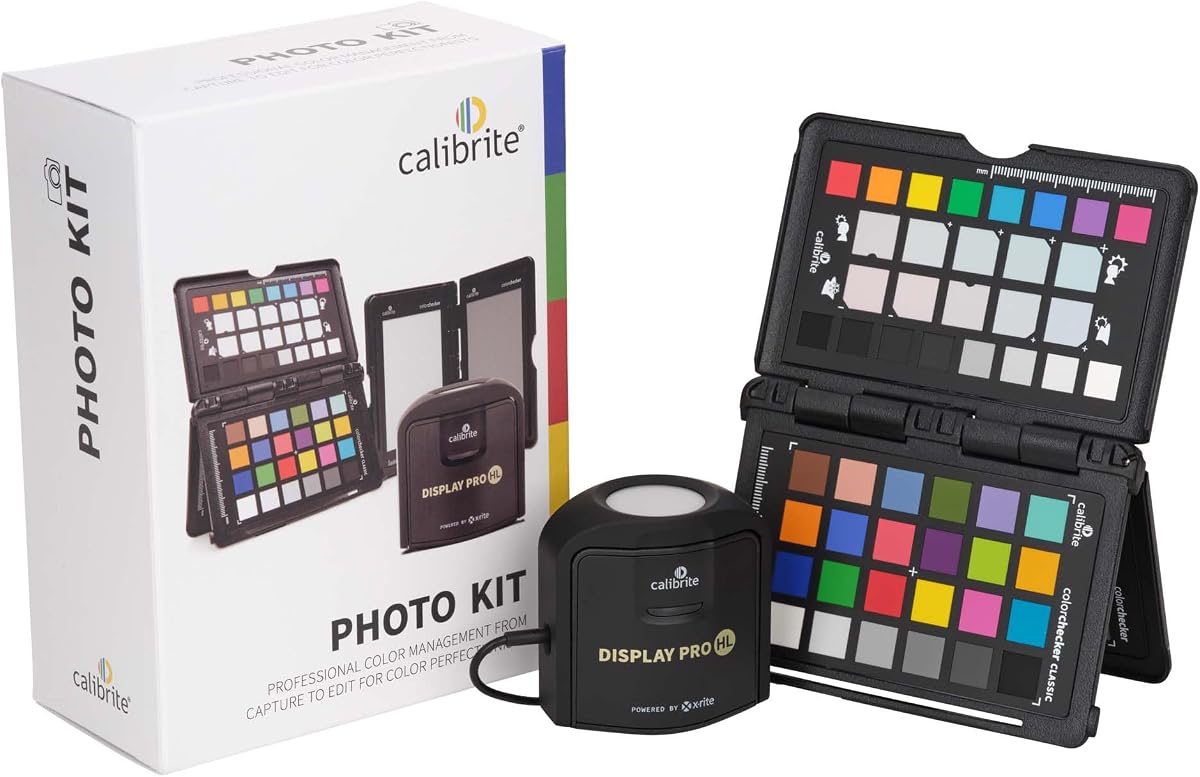
This kit combines a high luminance monitor colorimeter with a camera profiling tool to create a seamless workflow from capture to final edit. It carries a strong rating among professionals who demand consistency across their entire production chain. The inclusion of the ColorChecker Passport Photo 2 allows for precise custom camera profiling alongside accurate display calibration.
We may earn a commission when you buy through this link, at no additional cost to you.
The Display Pro HL sensor handles modern panel technologies including Mini LED and OLED with ease. It ensures that what you see on screen matches your final output whether that is print or digital. The Calibrite PROFILER software provides extensive controls for white point gamma and luminance so you can fine tune results to your specific needs.
While the price is higher than basic tools the value lies in the complete ecosystem. You avoid the cost of buying camera and monitor tools separately. The main trade-off is the time required to profile both your camera and monitor properly but this effort pays off in consistent results.
Photographers and hybrid shooters who work with RAW files will find this kit indispensable. It builds trust in your editing environment by ensuring your display reflects the truth of your capture. For anyone serious about color management from lens to screen this is a top recommendation.
By pairing monitor calibration with camera profiling you ensure the entire pipeline maintains color integrity without relying on guesswork.
The high luminance sensor accurately measures bright HDR panels ensuring you can trust your highlights and blacks during editing.
We may earn a commission when you buy through this link, at no additional cost to you.
The Calibrite Display 123 offers an accessible entry point into monitor calibration with a focus on simplicity and speed. Its rating reflects satisfaction from users who need reliable color without complex settings. The guided 1 2 3 software workflow makes it approachable for those new to color management.
We may earn a commission when you buy through this link, at no additional cost to you.
It features a compact body that is easy to store and transport which is great for freelancers. The USB C connection ensures modern compatibility and the ability to calibrate up to two displays helps maintain consistency across multi screen workspaces. The before and after check lets you see immediate improvements.
The trade-off is a lack of deep customization options found in higher end models. You may not have full control over every gamma or white point curve but for most photo editing tasks this is not necessary. The simplicity allows for quick regular calibration which is often better than infrequent precise tuning.
Beginners and casual creators who want trustworthy colors without learning a steep curve should choose this tool. It delivers accurate results for the price and keeps the process frictionless. If you prioritize ease of use and value this is an excellent choice.
The guided workflow removes guesswork and ensures anyone can achieve better color accuracy without needing technical expertise.
Support for two monitors ensures your extended desktop maintains matching color which is vital for accurate editing across screens.
We may earn a commission when you buy through this link, at no additional cost to you.
The Calibrite Display Plus HL is designed for professionals working with high dynamic range and super bright displays. Its advanced HL sensor measures up to 10000 nits which is essential for HDR content creation. The rating indicates strong performance among users who demand precise control over their grading environment.
We may earn a commission when you buy through this link, at no additional cost to you.
It supports broadcast standards like Rec.709 and BT.1886 ensuring your workflow aligns with industry expectations. The Calibrite PROFILER software offers full adjustment of white point luminance and contrast ratio allowing for tailored profiles. Validation tools help you trust the calibration results consistently.
The main drawback is the price which is significantly higher than general purpose calibrators. For casual users this capability is unnecessary but for video editors and colorists it is critical. The high luminance measurement prevents washed out highlights and ensures accurate grading decisions.
If you work with HDR video or bright OLED panels this tool provides the accuracy needed to deliver professional work. It justifies the cost through reliability and advanced features that standard tools cannot match. Choose this for demanding visual production workflows.
Measuring up to 10000 nits ensures accurate calibration for HDR monitors preventing blown highlights and lost shadow detail.
Compliance with Rec.709 and BT.1886 keeps your work compatible with industry standards for video production and delivery.
We may earn a commission when you buy through this link, at no additional cost to you.
The datacolor Spyder Monitor Calibrator brings speed and modern features to the table with a strong rating for usability. It offers a DevicePreview Beta feature that simulates how photos appear on other devices right on your calibrated screen. This is helpful for creators who need to ensure consistency across different outputs.
We may earn a commission when you buy through this link, at no additional cost to you.
Calibration takes about 90 seconds which is among the fastest available. The ambient light sensor tracks room conditions and suggests adjustments to brightness and contrast. This adapts your display to shifting lighting conditions throughout the day automatically or with custom profiles.
The speed is a trade-off against deep manual controls found in other tools. You might find fewer granular options for gamma or white point adjustment compared to advanced suites. However for most workflows the automated balance is efficient enough to maintain accuracy without constant tweaking.
Users who value time savings and a modern experience will appreciate this tool. It works well with OLED and Mini LED screens and ensures a solid starting point for editing. It is a reliable choice for those who want fast consistent results.
Simulating how your photos look on other devices helps you avoid surprises when clients view your work on different screens.
The ambient light sensor adjusts your display to match room lighting keeping your perception of brightness and contrast consistent.
We may earn a commission when you buy through this link, at no additional cost to you.
The Calibrite Creator Kit is designed for hybrid shooters who need control over both photo and video color. It includes the Display 123 colorimeter and the ColorChecker Passport Video 2. A perfect rating suggests users love the cohesive workflow it provides for content creation.
We may earn a commission when you buy through this link, at no additional cost to you.
The Passport Video 2 helps set accurate white point and verify exposure on set. It allows filmmakers to match multiple cameras easily which is crucial for scenes shot with different angles. The monitor calibration ensures your grading environment reflects these capture settings accurately.
While ideal for video this kit may have extra features if you only shoot stills. The time spent on camera profiling is an investment that pays off in consistent footage but might feel excessive for pure photography. The value is high for anyone doing both media types.
Photographers and videographers who want a unified system should consider this option. It removes the guesswork of color matching across devices and software. If you deliver work that requires consistent color from capture to screen this kit is a strong fit.
Matching multiple cameras on set ensures your footage looks consistent regardless of which camera captured the scene.
Combining capture and calibration tools creates a reliable system that reduces errors and speeds up your editing process.
We may earn a commission when you buy through this link, at no additional cost to you.
The Calibrite ColorChecker Display Pro offers an optical design that delivers high repeatability across different display types. It carries a solid rating for consistency and reliability. The device includes a rotatable diffuser arm and a tripod mount making it versatile for projector profiling in larger venues.
We may earn a commission when you buy through this link, at no additional cost to you.
It is powered by X-Rite technology which has a long history in color science. You can use it with ccProfiler or i1Profiler software to generate precise profiles. The hardware is built to last and ensures consistent readings over time which is critical for professional environments.
The physical build is robust but can feel bulkier than modern compact sensors. Also it relies on software workflows that may seem complex to beginners. However the accuracy and durability make it a trustworthy tool for colorists who need stable results day after day.
Professionals who require stable and consistent color profiles over long periods will appreciate this tool. It is especially useful if you work with projectors or need to share profiles across teams. Choose this for reliability and proven optical performance.
The tripod mount and diffuser arm allow you to calibrate projectors accurately which is rare for standard monitor tools.
High repeatability ensures that the device gives the same reading each time you calibrate maintaining your color trust.
We may earn a commission when you buy through this link, at no additional cost to you.
The Datacolor Spyder5PRO is a classic tool designed for serious photographers who need accurate prints and screen matches. It rates highly for its room light monitoring feature which determines optimal brightness to see fine details. The Before and After evaluation uses your own photos to show improvements.
We may earn a commission when you buy through this link, at no additional cost to you.
It features a Display Analysis function that lets you compare performance of different monitors in under five minutes. The calibration process ensures your edited images match your prints reducing ink and paper waste. This focus on print consistency makes it a favorite among traditional photographers.
While newer models have emerged this device still performs well for standard displays. The main limitation is that it may not fully support the newest OLED or Mini LED panels without software updates. However for reliable LCD and desktop displays it remains effective.
Photographers who prioritize print matching will find this tool valuable. It helps close the gap between screen and paper effectively. If you need a sturdy reliable calibrator for photography workflows this is a solid choice.
By optimizing brightness for room light you ensure your prints look exactly as you intended without surprise shadows.
The display analysis feature helps you compare monitors quickly ensuring all your screens perform to the same standard.
We may earn a commission when you buy through this link, at no additional cost to you.
The ASUS ProArt CaliContrO MCA02 offers a unique 3-in-1 approach combining a colorimeter with display OSD control and ASUS Dial features. It supports high luminance measurement up to 10000 nits which is useful for HDR screens. The device aims to integrate control directly into the workspace workflow.
We may earn a commission when you buy through this link, at no additional cost to you.
It allows hardware and software calibration via exclusive ASUS tools which can maintain long-term accuracy without third-party dependencies. The reversible USB-C connection makes setup quick and the 5-way navigator provides intuitive OSD access. This integration is appealing for users invested in the ProArt ecosystem.
However user feedback indicates some inconsistencies with the tool reliability and software compatibility. It is important to check current reviews before purchasing to ensure it meets your specific needs. While the concept is strong practical execution may vary depending on your system configuration.
Those using ASUS ProArt monitors may find added value in this tool. If you want to control OSD settings without navigating monitor buttons this device offers a convenient shortcut. Ensure compatibility with your workflow before committing to this specialized option.
Integrated OSD control lets you adjust monitor settings directly from your workspace without using physical buttons.
Hardware calibration support helps maintain color accuracy over time by adjusting settings directly within the monitor.
We may earn a commission when you buy through this link, at no additional cost to you.
The Datacolor Spyder4Pro delivers stable color calibration with a focus on accuracy and consistency. It has been tested for double-shielded color filters that improve accuracy by up to 26 percent compared to earlier versions. Users value the ReCAL feature which makes recalibrating easy when conditions change.
We may earn a commission when you buy through this link, at no additional cost to you.
This single sensor can calibrate multiple displays ensuring consistency across different setups. It is particularly useful for users who need a reliable tool without complex settings. The full-spectrum color sensor helps match CIE standards closely which builds trust in your display results.
While this is an older generation it remains functional for many LCD monitors. It lacks some modern features like light sensors found in newer tools but performs its core job well. For those on a budget who need stable calibration this is a proven option.
If you need a dependable tool for regular checks this device offers good value. It is easy to use and provides the accuracy needed for standard editing tasks. Check compatibility with your current OS before purchasing to ensure smooth operation.
The ReCAL assistant allows quick adjustments over time maintaining accuracy without running a full calibration cycle.
Calibrating multiple displays with one sensor ensures all your screens show similar colors for a unified workspace.
We may earn a commission when you buy through this link, at no additional cost to you.
The Datacolor Spyder X Pro provides high accuracy color calibration using a lens-based color engine that improves precision. It carries a strong rating for being intuitive and ideal for first-time users. The wizard workflow includes 12 predefined targets making it easy to start without complex settings.
We may earn a commission when you buy through this link, at no additional cost to you.
It supports multiple monitors and features automatic profile changing based on ambient conditions. The SpyderProof functionality lets you compare before and after results using your own images so you see the difference immediately. Room light monitoring helps maintain optimal shadow detail and highlights.
While this tool offers excellent accuracy it sits at a higher price point for entry level. However the ease of use and advanced features justify the cost for many users. You get professional level results without needing to be a color expert.
First-time users who want a professional tool without the steep learning curve should choose this. It balances high performance with simplicity effectively. If you value trust in your color results this is a recommended entry into advanced calibration.
The lens-based color engine provides a higher level of color accuracy that helps you trust your final edits.
SpyderProof shows you real differences using your photos so you understand how calibration improves your viewing.
We may earn a commission when you buy through this link, at no additional cost to you.
Selecting the right colorimeter involves several technical and practical factors to ensure it fits your specific display technology and workflow needs.
Modern displays like OLED and Mini LED require colorimeters that can measure higher luminance and wider color gamuts. Check if the device supports HDR and specific panel types to avoid inaccurate results on bright screens.
Always verify the sensor can handle the brightness and contrast ratios of your specific monitor.
Calibration speed affects how often you are willing to recalibrate. Some tools take over ten minutes while others complete the process in under two minutes. Faster devices encourage regular maintenance for consistent color.
Choose a speed that matches your workflow to keep your display accurate without slowing down your day.
The included software should offer intuitive controls and advanced options if needed. Look for features like validation tools, preset targets, and support for multiple displays. Some software also integrates with photo editing programs for seamless workflows.
Ensure the software runs on your operating system and offers the level of customization you require.
Room lighting affects how you perceive screen brightness and contrast. Devices with ambient light sensors can recommend or automatically adjust your display settings based on current conditions.
This feature helps maintain consistent viewing experiences throughout the day without manual tweaking.
If you work with multiple monitors, ensure the colorimeter supports profiling more than one screen. Consistent color across your workspace is critical for editing and color grading tasks.
Look for devices that allow easy switching between displays during the calibration process.
A durable build ensures your investment lasts over time. Consider the size and weight if you travel frequently. Some devices come with storage pouches and compact designs.
Portable tools make it easy to calibrate monitors in different locations.
For photographers, a colorimeter paired with a camera profiling tool creates a full capture to print workflow. This ensures your camera matches your calibrated monitor.
Consider kits that include both monitor calibration and camera profiling if you shoot RAW.
Video professionals should look for colorimeters that support broadcast standards like Rec.709 or BT.2020. This ensures your grading aligns with industry requirements.
Check for tone curve options that match your specific video pipelines.
To get the best results, start by warming up your monitor for at least 30 minutes before calibration. This stabilizes brightness and color output ensuring the sensor reads the final state of your display. Place the colorimeter on a clean flat surface if it has a tripod stand or hook it over the screen as instructed.
Run the calibration software and follow the on-screen steps to generate a profile. Most tools measure patterns and adjust settings automatically. Save the profile and verify it by checking the before and after view if available. This step confirms that adjustments were applied correctly.
Clean the colorimeter lens gently with a soft cloth when not in use and store it in its protective case. Avoid exposing the sensor to direct sunlight or extreme temperatures. Recalibrate your display every month or whenever you notice color shifts to maintain consistency.
For professional work, recalibrate every two to four weeks to account for monitor aging. Casual users can check every two months. Environmental changes like shifting room light also prompt recalibration.
No, standard sensors may struggle with high brightness panels. Look for devices with high luminance measurement capabilities specifically noted for HDR or OLED support to ensure accuracy.
Yes, most colorimeters are designed to work with laptops and desktop monitors. Ensure the mounting style fits your screen and the software supports your operating system for best results.
Calibration corrects color shifts but cannot fix poor display hardware. High-end panels benefit most as the tool ensures the physical screen matches its intended color targets.
Color calibration adjusts the display settings to match a target. Profiling creates a file that tells applications how to interpret colors on that display. Both steps ensure accurate viewing.
Yes, a colorimeter will adjust the white point to neutralize tints like blue or yellow. This ensures the display shows clean whites and accurate colors.
We have reviewed ten top colorimeters offering options for every budget and workflow. From the Calibrite Display 123 for budget needs to the Display Plus HL for premium HDR control, there is a tool for everyone.
When selecting, prioritize display compatibility and ease of use. Ensure the device supports your screen type and offers software that fits your editing style. Regular calibration maintains the trust you need in your creative work.
Prices and availability change frequently so verify the latest details before purchasing. Use this guide to find the right balance of features and value for your specific needs.