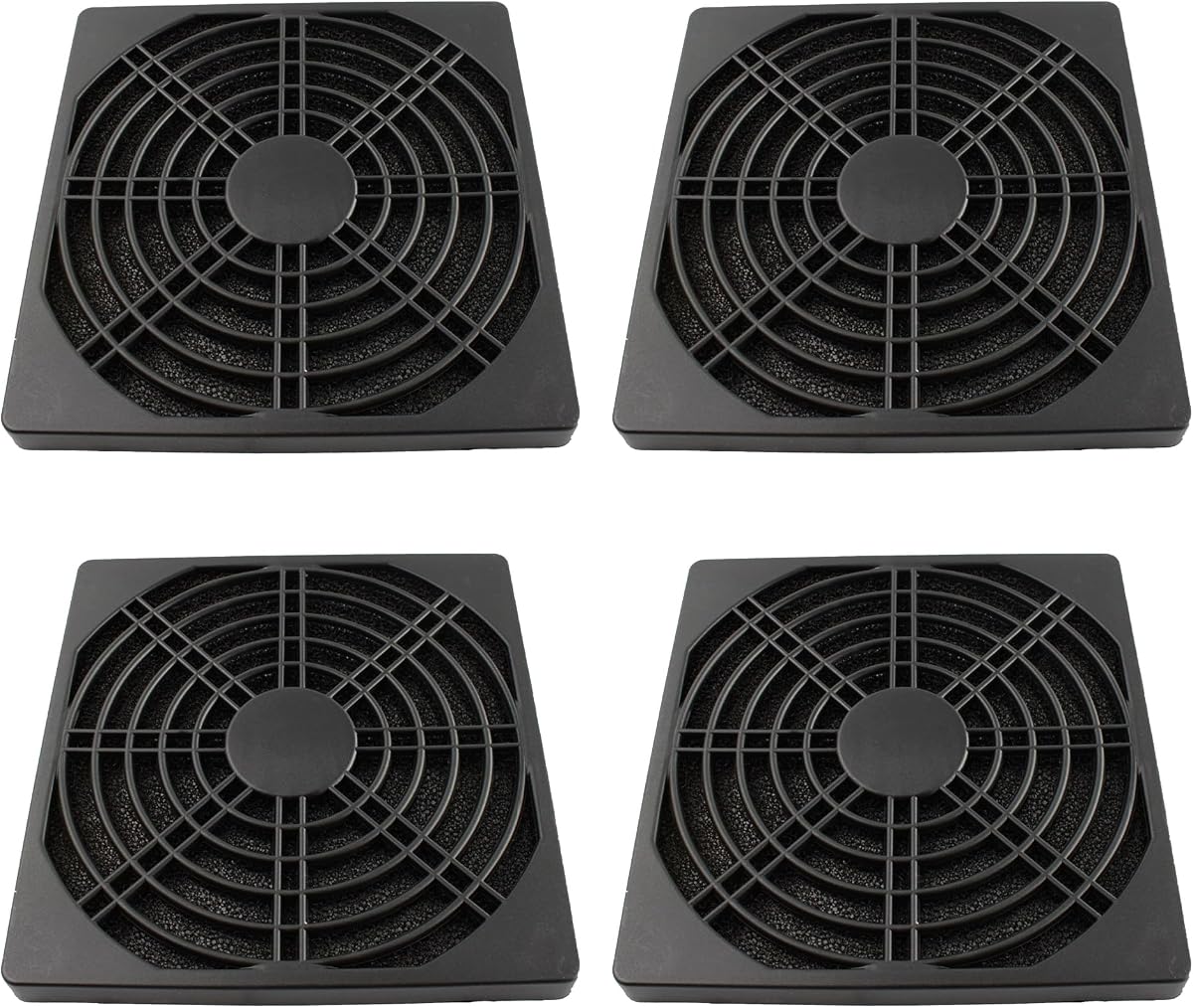
4 Pcs 120mm Black Square Plastic Cooling Fan Filter Cover
4.4Editor score
Affordable four pack
Standard 120mm size
Durable plastic material
Keeping your computer clean is essential for performance and longevity. Dust accumulation can block airflow and cause overheating. Computer fan dust filters are the first line of defense against debris and pet hair entering your system.
We compared ten highly rated options based on mesh quality, ease of installation, and airflow balance. Each product offers unique features like magnetic frames or DIY cut-to-fit designs. Our analysis focuses on real-world usability and protective capabilities.
Each pick highlights specific strengths such as budget friendliness or premium build quality. Note that prices and availability change frequently so verify current deals before purchasing. This list helps you find the right filter for your specific case and fan sizes.
4.4Editor score

4.8Editor score

4.7Editor score
As an Amazon Associate we earn from qualifying purchases.
The following table provides a side by side look at all ten selected filters. We highlight key specifications like size material and mounting style to help you compare options quickly.


This filter stands out as the top choice for its large magnetic frame and superior build quality. With a high user rating it delivers reliable protection without requiring any tools. The premium PVC material ensures longevity while maintaining excellent airflow for your cooling system.
We may earn a commission when you buy through this link, at no additional cost to you.
The ultra fine mesh design effectively blocks dust particles and reduces noise levels inside your case. It is designed for easy placement and removal which simplifies maintenance routines significantly. The material resists deformation so it maintains its shape over long term use.
While it works best on metal surfaces the magnetic strength is robust enough for most modern cases. Some users may need to ensure their intake vents have enough steel exposure for full adhesion. However the convenience of tool free use outweighs this minor limitation.
Ideal for anyone seeking a balance of performance and ease of use this filter is highly recommended. It protects sensitive components from debris while ensuring your fans breathe freely. This product represents a smart investment for maintaining a clean PC environment.
The magnetic frame allows you to snap the filter in place without any screws or drills. This makes cleaning incredibly fast since you can remove it with one hand.
The fine mesh traps small particles that could otherwise clog your heatsinks. This keeps your internal temperatures lower and extends the lifespan of your components.
We may earn a commission when you buy through this link, at no additional cost to you.
This filter offers a premium metal solution for users who want a permanent robust installation. The aluminum frame and stainless steel mesh provide a sturdy barrier against dust and accidental contact. It comes with screws ensuring a fixed position that does not shift.
We may earn a commission when you buy through this link, at no additional cost to you.
The sturdy construction prevents bending and ensures the mesh stays flat over time. It protects fingers and cables from touching spinning blades which adds a safety layer to your build. The design aligns with standard hole spacing for easy compatibility.
Installation requires screws which may not suit all case designs but offers better stability. Cleaning is less convenient than magnetic options since you must remove screws to take it off. However the durability makes this a worthwhile trade off for many enthusiasts.
Best for those prioritizing long term durability and security this grill is a top pick. It shields your hardware effectively while providing a clean professional look to your system. Choose this if you prefer a solid fixed filter over flexible options.
The thickened aluminum frame and stainless steel mesh resist bending and corrosion. This ensures the filter looks good and functions well for years of use.
The rigid grid acts as a finger guard preventing accidental contact with fans. It also stops cables from slipping into the blades during maintenance or movement.
We may earn a commission when you buy through this link, at no additional cost to you.
This four pack offers exceptional value for anyone needing multiple filters for their case. Made from durable plastic it effectively blocks dust while maintaining good airflow. The simple design makes it easy to install on standard 120mm fan openings.
We may earn a commission when you buy through this link, at no additional cost to you.
The unique mesh design allows air to pass through while catching debris. It fits a wide range of computer case models without requiring adapters. Using four filters lets you cover intake and exhaust points for balanced protection.
While the plastic may not feel as premium as metal it is resistant to wear and tear. The lack of screws or magnets means you rely on friction or existing case clips. This simplicity keeps the price low and the setup straightforward.
Ideal for budget conscious builders this set provides essential protection at a low cost. It helps keep your system clean without breaking the bank. Choose this if you need to cover multiple fans affordably and effectively.
Getting four filters in one pack saves money compared to buying individually. This makes it easy to protect all intake points without high expenses.
The square shape matches standard fan mounts so installation is intuitive. You can place them quickly without needing extra tools or modifications.
We may earn a commission when you buy through this link, at no additional cost to you.
This DIY filter gives you the flexibility to cover large or irregular openings with ease. The 400x300mm mesh can be cut to match your specific case vent size perfectly. Magnetic strips are included for quick secure attachment to metal surfaces.
We may earn a commission when you buy through this link, at no additional cost to you.
The 1mm holes balance dust prevention with airflow to keep your components cool. It works not just for PCs but also for consoles and speakers needing protection. The PVC material is washable and can be reused many times without degrading.
You will need to measure and cut the mesh which adds a small step to setup. However this ensures a custom fit that off the shelf filters might not provide. It is a great solution for non standard cases or custom builds.
Best for users who want a custom fit for large vents this filter is excellent. It allows you to adapt to your specific hardware needs without buying multiple sizes. Choose this if you need to cover areas larger than standard fan sizes.
The large sheet allows you to cut the mesh to any shape or size. This ensures you can cover non standard vents that other filters miss.
Beyond PCs it works for consoles and other electronics with air vents. The wide range of use makes it a versatile accessory for your setup.
We may earn a commission when you buy through this link, at no additional cost to you.
This filter provides basic but effective protection for your PC fans with a simple design. The 120mm size matches standard case fans and is made from durable black PVC. It helps minimize noise while keeping the internal environment clean and free of debris.
We may earn a commission when you buy through this link, at no additional cost to you.
Keeping components clean extends their lifespan and prevents overheating issues over time. The mesh is fine enough to catch dust but open enough to allow airflow. It fits into most cases without modification and stays in place well.
Installation is straightforward but lacks magnets or screws for extra security. You rely on the friction fit which is sufficient for most stationary cases. It is a practical solution for those who want protection without complex installation steps.
Choose this filter if you need a reliable cover for standard fans without extra features. It offers essential protection at a reasonable price point. It is a solid choice for general maintenance and dust prevention in home computers.
The mesh can help slightly dampen the sound of air moving through the fan. This creates a quieter environment for your daily computing tasks.
By catching dust early you prevent buildup inside your cooling system. This ensures your PC runs cooler and lasts longer without issues.
We may earn a commission when you buy through this link, at no additional cost to you.
This product offers two large sheets of magnetic mesh for custom dust protection solutions. You can cut them to fit any device or case with magnetic surfaces. The fine mesh pattern allows cool air to pass while trapping dust effectively.
We may earn a commission when you buy through this link, at no additional cost to you.
It is designed for easy maintenance since you can rinse it under water and dry it. This keeps your filters clean without needing replacements which saves money over time. The magnetic strips attach securely to steel surfaces without screws or tools.
You will need scissors to cut the mesh to size which requires some effort. The result is a perfect fit that matches your specific needs. It is ideal for custom builds where standard sizes do not align.
Best for users who enjoy customizing their setup this filter provides great flexibility. It ensures your PC stays clean while maintaining optimal cooling performance. Choose this if you have unique intake areas needing tailored protection.
The large sheets allow you to create filters for any opening size. This flexibility is perfect for unique cases or DIY electronics projects.
Strong magnetic strips mean no screws or glue are needed for installation. You can place and remove the filter easily whenever needed.
We may earn a commission when you buy through this link, at no additional cost to you.
This twelve pack offers plenty of filters for multiple fans or even multiple computers. Each 120mm mesh covers standard intake vents effectively to keep dust out. It is suitable for home PCs speakers and other electronic devices needing protection.
We may earn a commission when you buy through this link, at no additional cost to you.
The PVC material is durable and can block dust and hair from entering your case. Keeping components clean helps maintain performance and extend the life of your hardware. The simple design makes it easy to place on various fan locations.
Installation is basic without included screws or magnets so it relies on friction. You may need to secure them with existing case clips or adhesive if needed. Despite this the sheer number makes it a great stock up option for maintenance.
Ideal for households with multiple PCs this bulk pack is a smart value choice. It ensures you have enough filters to cover all your intake points easily. Choose this if you need quantity over advanced features.
Getting twelve filters means you can protect many fans at a low cost. This is perfect for setups with multiple intake points or several machines.
Beyond PCs it works for speakers and other electronics with grilles. The wide range of use adds flexibility to your protection needs.
We may earn a commission when you buy through this link, at no additional cost to you.
This filter is designed for 140mm fans which are common in many modern cases. The magnetic frame makes installation fast and removal easy for cleaning. It protects electronic components while ensuring optimal airflow circulation inside your system.
We may earn a commission when you buy through this link, at no additional cost to you.
The ultra fine PVC mesh captures fine dust particles to extend hardware life. You can wash the filters regularly without deformation to maintain performance. The universal design fits most gaming computers and workstations needing protection.
While the magnetic attachment is convenient it needs a steel surface to work best. If your case uses plastic intake areas you may need to adapt installation. The durability is good for repeated washing which saves long term costs.
Best for owners of 140mm fans this filter offers excellent convenience and protection. It keeps your case clean without requiring tools or permanent installation. Choose this if you want a flexible solution for larger cooling fans.
This filter is sized specifically for 140mm intake fans which are popular. It ensures a snug fit that blocks dust effectively around the edges.
The PVC material can be rinsed and dried repeatedly without damage. This allows you to keep your filters clean and functional for longer.
We may earn a commission when you buy through this link, at no additional cost to you.
This pack includes ten filters and screws so you can mount them securely to your case. The 0.8mm mesh offers excellent airflow while blocking large dust clumps and hair. It is designed to maximize cooling efficiency and protect your hardware effectively.
We may earn a commission when you buy through this link, at no additional cost to you.
The rigid PVC grid prevents fingers from touching blades which adds safety. Included screws ensure a permanent fix that will not fall off during operation. This is a robust solution for those who need a solid secure installation.
While the mesh is fine it may collect hair more than larger hole filters. You will need to wash it regularly to maintain optimal airflow. The convenience of included screws makes installation straightforward without extra purchases.
Choose this filter if you want a secure installation with all parts included. It offers a good balance of airflow and protection for standard PC fans. It is a practical option for users prioritizing stability and safety.
The inclusion of forty screws saves you from needing extra hardware. You can install all ten filters quickly and securely on any case.
The mesh size is tuned to stop pet hair from entering your case. This is especially useful for homes with cats or dogs near computers.
We may earn a commission when you buy through this link, at no additional cost to you.
This filter is versatile enough to fit both fans and power supply units for complete protection. The magnetic frame allows quick and easy placement on any metal chassis. It is washable and can be reused many times to save money.
We may earn a commission when you buy through this link, at no additional cost to you.
The fine mesh blocks dust effectively when cold air enters the case. It reduces noise while maintaining efficient airflow to keep temperatures low. Gentle hand washing ensures the material stays in good condition over time.
Installation is tool free but you must ensure the surface has metal for the magnets. You cannot bend the filter so it needs careful handling during cleaning. The durability is good for regular use and repeated washing.
Best for users wanting to cover both fans and PSUs this filter is a strong pick. It offers convenience and reliability for maintaining a clean internal environment. Choose this if you need to filter multiple intake points easily.
You can mount this filter on your power supply as well as fans. This provides comprehensive dust protection for all critical cooling points.
The filter helps reduce air noise which makes your PC quieter. This creates a more pleasant experience for daily use.
We may earn a commission when you buy through this link, at no additional cost to you.
Choosing the right filter depends on your case design and specific needs. This guide breaks down the factors you should consider before making a purchase.
The mesh material determines how well dust is blocked and how airflow is affected. PVC and metal are common options with metal being more durable and PVC being flexible. Look for a fine mesh that traps particles without restricting too much air.
Select a material that balances durability with airflow to keep your system cool.
Mounting styles vary from magnetic to screw based installation. Magnetic options are convenient and tool free but require a metal surface. Screw based filters offer a more permanent fix that does not shift during use.
Choose the mounting style that best fits your case design and maintenance preferences.
Ensure the filter matches your fan or vent size for a snug fit. Standard sizes like 120mm are common but some cases need custom dimensions. DIY cut to fit options exist for irregular openings.
Verify dimensions before buying to ensure proper coverage and airflow.
Filters need regular cleaning to maintain performance. Removable magnetic filters are easiest to take out and rinse. Screw based filters may require unscrewing which takes more time.
Prioritize designs that allow quick access for maintenance.
A good filter should not restrict airflow significantly. Too fine a mesh may trap dust but also clog quickly. Look for designs that promise high airflow while keeping debris out.
Balance filtration with air movement to ensure your fans work efficiently.
Quality filters should resist bending and wear over time. Metal frames last longer than plastic but cost more. Check user reviews for reports of warping or degradation.
Invest in a durable filter to avoid frequent replacements.
Many filters come in packs to cover multiple fans. Buying a pack can be more cost effective than single units. Ensure the pack includes enough for all your intake points.
Calculate how many filters you need before purchasing.
Some filters help dampen fan noise slightly due to the mesh material. While not a primary feature this can improve the user experience. Look for models that mention quiet operation.
Consider noise reduction if you value a quieter workspace.
Install the filters on intake fans or vents where air enters your case. Ensure they fit snugly so air is not escaping around the edges. Remove any protective backing if using magnetic versions before placement.
Clean the filters every few weeks or whenever dust builds up visibly. Use water and mild soap for PVC filters and let them dry completely before reattaching. Avoid using harsh chemicals that could damage the mesh.
Check the filters regularly to ensure they are secure and not damaged. Replace them if they lose shape or develop holes that let dust through. Regular maintenance ensures your PC stays clean and runs efficiently.
High quality dust filters are designed to minimize airflow restriction. While they add a tiny amount of resistance the benefit of a clean system outweighs this. A dust free system often runs cooler and more efficiently over time.
Yes most PVC plastic filters are washable under running water. Gently rinse them to remove dust and let them air dry completely before reinstalling. Do not use hot water or harsh scrubbing as it may damage the mesh.
Magnetic filters are quite secure on metal surfaces and do not need screws. They can be removed easily for cleaning but stay in place during normal use. Ensure your case has enough steel to support the magnets properly.
Measure your fan or vent opening to find the correct size. Most PC fans are 120mm or 140mm standard sizes. DIY options allow you to cut to fit larger or irregular openings as needed.
Clean filters every two to four weeks depending on your environment. If you have pets or live in a dusty area you may need to clean them more often. Regular cleaning maintains airflow and prevents dust buildup.
Filters are typically used on intake fans to stop dust entering the case. Using them on exhaust fans can trap dust inside and restrict airflow. It is best to place them only on where air is pulled into the system.
This guide highlights ten excellent dust filters ranging from budget packs to premium metal builds. Each option offers unique benefits for keeping your PC clean and running smoothly. Whether you need magnetic ease or custom sizes there is a pick for you.
Prioritize airflow and ease of cleaning when selecting your filter. A filter that is hard to clean may be ignored and let dust build up. Choose one that fits your maintenance habits and case design perfectly.
Check current prices and availability before purchasing as they can change frequently. This list provides a strong starting point for your decision making. Invest in quality protection to extend the life of your computer components.