
NZXT H5 Flow
4.6Editor score
Exceptional GPU Cooling
Large Radiator Support
High-Performance Airflow
This guide compares the top 10 cooling computer case models for airflow and thermal performance to help you choose the right chassis for your next PC build.
Finding the right cooling computer case is essential for maintaining optimal performance and extending the lifespan of your PC components. High airflow designs prevent overheating during intense gaming sessions or heavy workloads. This guide explores ten top-rated cases that prioritize ventilation and thermal management.
We evaluated each model based on airflow potential, fan inclusion, radiator support, and build quality. Our analysis focuses on cases designed to move air efficiently while minimizing noise. Whether you prefer air cooling or liquid setups, these options offer robust thermal solutions for modern hardware.
Each pick highlights specific strengths like modular layouts, panoramic views, or budget-friendly pricing. We include detailed pros, cons, and specs to help you decide. Prices and availability change frequently, so verify current listings before purchasing your ideal cooling computer case today.
4.6Editor score

4.7Editor score

4.6Editor score
Here is a side-by-side comparison of the top 10 cooling computer case models ranked by performance and value.


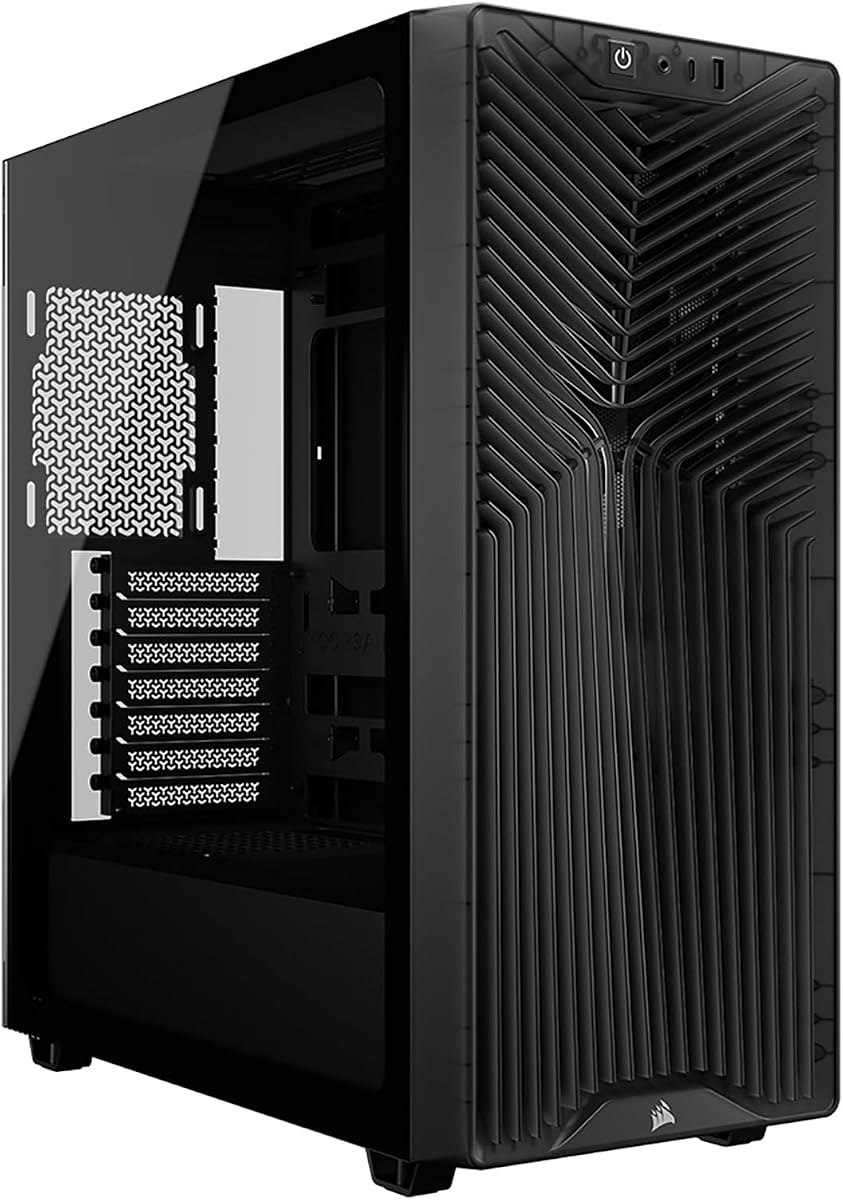


The CORSAIR 4000D RS ARGB stands out as the best overall cooling computer case with its revolutionary FRAME modular system. Rated 4.7 stars, it offers near limitless customization for airflow and aesthetics. Three pre-installed RS ARGB fans ensure strong thermal performance right out of the box.
We may earn a commission when you buy through this link, at no additional cost to you.
Its InfiniRail mounting system provides unmatched flexibility for fan placement anywhere on the front or roof panels. The 3D Y-Pattern airflow panel minimizes restriction to maximize cool air intake. You can use the internal side panel as a cable cover or remove it for additional fan mounting points.
While the frame upgrades might require extra purchases, the base case delivers exceptional value. The Zero RPM mode on fans ensures silent operation during light loads. This case is ideal for builders who want future-proof cooling options without compromising on visual design or build quality.
If you prioritize airflow and modularity in your cooling computer case, this model should be at the top of your list. It supports ASUS BTF and other reverse-connector technologies for cleaner builds. The combination of quality components and thoughtful engineering makes it a top-tier choice.
The steel rail system allows fans up to 200mm to be mounted anywhere on the front panel for targeted cooling.
Use the internal side panel for clean cable hiding or remove it to mount fans directly for increased airflow.
We may earn a commission when you buy through this link, at no additional cost to you.
The NZXT H5 Flow is an excellent budget-friendly cooling computer case that delivers exceptional GPU cooling despite its compact footprint. Rated 4.6 stars, it features a perforated PSU shroud to enable optimal air intake. Two included Quiet Airflow fans provide solid performance without extra costs.
We may earn a commission when you buy through this link, at no additional cost to you.
Ultra-fine mesh covers the top, front, and side panels to create maximum airflow while filtering dust effectively. Support for up to a 360mm radiator in the front makes liquid cooling viable for powerful CPUs. The design prioritizes thermal efficiency without sacrificing aesthetics or build quality.
While RGB lighting is absent, the focus remains on pure cooling performance and value. Cable management is seamless with wide channels and hooks hidden behind panels. The case is perfect for gamers who want a clean, efficient system without overspending on unnecessary features.
If you need a cooling computer case that balances price and performance, the H5 Flow is a fantastic option. Its streamlined design keeps your system cool and quiet. It is highly recommended for budget builds that still demand reliable thermal management.
The perforated PSU shroud allows air from side fans to flow directly into the GPU area for targeted cooling.
Supports a 360mm radiator at the front and 240mm at the top for powerful AIO cooler installations.
We may earn a commission when you buy through this link, at no additional cost to you.
The CORSAIR AIR 5400 RS offers superior cooling performance through its innovative triple-chamber design. Rated 4.6 stars, it isolates the CPU, GPU, and PSU into separate zones for optimal thermal management. An isolated CPU chamber prevents heat crossover to other components effectively.
We may earn a commission when you buy through this link, at no additional cost to you.
Innovative airflow ducts accelerate air velocity without increasing fan noise, ensuring powerful cooling silently. The central chamber uses massive vertical airflow to exhaust hot air efficiently. This design is unmatched for high-end systems needing strict temperature control.
While the price is premium and cable routing can be complex, the cooling gains are worth it. The panoramic glass panels show off your hardware beautifully without compromising thermal performance. This case is ideal for enthusiasts seeking top-tier airflow and isolation.
If you want the best cooling computer case available, the 5400 RS sets the standard. Its engineering focuses on maximizing airflow efficiency. Consider this for builds with high-TDP CPUs or extreme overclocking requirements.
Separate chambers prevent heat from the GPU and PSU affecting CPU cooling performance.
Bottom ducts force air through narrow channels to boost velocity and cooling power silently.
We may earn a commission when you buy through this link, at no additional cost to you.
The Antec Flux Pro is a full-tower cooling computer case designed for maximum ventilation and component support. Rated 4.7 stars, it includes six PWM fans for immediate high performance. The multi-directional vent design supports up to 12 fans for extreme airflow needs.
We may earn a commission when you buy through this link, at no additional cost to you.
Its unique iShift PSU mount allows 90-degree rotation for better cable routing and clearance. Supports simultaneous 420mm and 360mm radiators making it ideal for dual-loop setups. The wood and metal texture gives it a high-quality premium aesthetic.
While its size requires significant desk space, the cooling capabilities are exceptional for enthusiast builds. Cable management is simplified by removable brackets. This case suits users needing extensive cooling options without buying additional fans separately.
If you need a cooling computer case for a full system, the Flux Pro delivers. Its included fans and radiator support are unmatched. It is perfect for extreme gaming or workstation PCs needing robust thermal solutions.
Multi-directional vents allow flexible air paths across multiple sides and the top.
Holds both a 420mm and 360mm radiator simultaneously for advanced liquid cooling loops.
We may earn a commission when you buy through this link, at no additional cost to you.
The Lian Li V100RX is a cooling computer case focused on aesthetics and lighting with included ARGB fans. Rated 4.8 stars, it comes with four PWM-controlled fans and a 26-LED strip for full color control. Tool-less side panels make component access incredibly fast.
We may earn a commission when you buy through this link, at no additional cost to you.
It supports high-end hardware including GPUs up to 420mm and top radiators up to 360mm. Daisy-chain connectivity simplifies RGB setup without extra hubs. The design balances visual appeal with strong thermal performance.
While RGB lighting dominates the look, airflow remains efficient. The clean build quality is excellent for visible builds. This case is ideal for gamers wanting a showpiece PC with ready-to-go lighting and fans.
If you want a cooling computer case that looks impressive out of the box, consider this model. It offers great airflow and ease of use. It suits builds prioritizing lighting and simplicity.
Multiple ARGB zones highlight your hardware with vibrant synchronized lighting.
Side panels remove instantly with tool-less mechanisms for fast maintenance.
We may earn a commission when you buy through this link, at no additional cost to you.
The Cooler Master HAF II 500 is a cooling computer case built for high-volume airflow with massive fans. Rated 4.8 stars, it features two 220mm front intake fans and one 180mm rear exhaust. Low resistance design ensures maximum air throughput.
We may earn a commission when you buy through this link, at no additional cost to you.
The split-level cable management optimizes space for the oversized rear exhaust. MasterRail mounting supports multiple fan and radiator sizes flexibly. The Dual-Mode GPU Holder stabilizes heavy cards securely. This case is designed for extreme thermal performance.
While large and heavy, the cooling capability is exceptional for high-power systems. Storage options adapt based on PSU length. It is perfect for users needing extreme airflow without adding extra fans.
If you need a cooling computer case for maximum air movement, the HAF II 500 is unmatched. Its oversized fans move vast air volumes. Choose this for builds requiring top-tier ventilation.
Oversized fans provide high volume airflow with low noise levels.
Dual-mode GPU clamp stabilizes heavy graphics cards up to 72mm thickness.
We may earn a commission when you buy through this link, at no additional cost to you.
The MSI MAG Forge 321R is a cooling computer case combining premium looks with solid thermal performance. Rated 4.6 stars, it includes ARGB fans with 1 to 6 LED control board options. Optimized airflow supports up to 11 system fans.
We may earn a commission when you buy through this link, at no additional cost to you.
Mystic Light Sync allows complete lighting control within one software. The magnetic dust filter on top makes cleaning easy. Ventilation panels ensure stability for the whole system. This case suits MSI users and RGB enthusiasts.
While RGB controls can be complex for beginners, the performance is reliable. The tempered glass panels show off components beautifully. It is a great choice for balanced aesthetics and cooling.
If you want a cooling computer case that looks premium, the Forge 321R delivers. Its lighting options are extensive. Consider this for gaming rigs with visual priorities.
Bundle includes board to decorate your rig with up to 6 ARGB LED controls.
Top magnetic filter offers easy removal and cleaning experience.
We may earn a commission when you buy through this link, at no additional cost to you.
The CORSAIR 3200D RS is a cooling computer case designed for easy building and clean cables. Rated 4.6 stars, it includes three RS120 ARGB fans and supports nine 120mm fans total. A built-in GPU anti-sag arm stabilizes heavy cards.
We may earn a commission when you buy through this link, at no additional cost to you.
Reverse-connector motherboard compatibility and a single front connector simplify routing. USB Type-C and Type-A ports provide modern connectivity. The shroud hides cables effectively for a neat look. It offers great DIY features for straightforward assembly.
While slightly smaller than larger models, it remains capable for most setups. The smoked glass panel adds a touch of stealth. This case is perfect for builders prioritizing cable management.
If you want a cooling computer case with smart cable solutions, the 3200D RS is ideal. It supports modern motherboards and simplifies builds. A strong choice for clean aesthetics.
Built-in shroud hides cables for a clean organized look.
Anti-sag arm supports super-heavy GPUs without bending.
We may earn a commission when you buy through this link, at no additional cost to you.
The CORSAIR AIR 5400 LX is a cooling computer case with panoramic glass and triple-chamber cooling. Rated 4.7 stars, it isolates CPU, GPU, and PSU chambers for optimal airflow. Massive vertical airflow cools components thoroughly.
We may earn a commission when you buy through this link, at no additional cost to you.
Airflow ducts increase velocity without extra fan noise. The panoramic glass showcases your hardware beautifully. This design supports the most powerful hardware with superior thermal performance. It combines aesthetics with engineering.
While expensive, the visual appeal is unmatched. It suits high-end builds needing isolation and clarity. This case is ideal for showpiece PCs requiring top-tier cooling.
If you want a cooling computer case with panoramic views, the LX delivers. Its thermal isolation is strong. Consider this for ultimate visual and thermal performance.
Panoramic glass offers stunning hardware visibility from multiple angles.
Isolated CPU chamber ensures no heat affects other components.
We may earn a commission when you buy through this link, at no additional cost to you.
The MONTECH XR Panoramic is a cooling computer case offering glass aesthetics at a budget-friendly price. Rated 4.7 stars, it features panoramic tempered glass panels. Two side-mounted reverse-blade fans present illuminated faces inward for cleaner looks.
We may earn a commission when you buy through this link, at no additional cost to you.
It fits high-end hardware with 420mm GPU clearance. A wood-grain I/O area adds a warm accent. Magnetic filters simplify routine cleaning. This case balances affordability with modern design.
While reverse-blade fans are not premium, they enhance visual appeal. Cleaning glass panels is routine maintenance. It suits gamers wanting panoramic looks without breaking the bank.
If you want a cooling computer case with glass panels on a budget, the XR delivers. Its clearance is strong. Consider this for stylish affordable builds.
Reverse-blade fans show lights to the interior not the frames.
Removable magnetic filters simplify cleaning top side and bottom.
We may earn a commission when you buy through this link, at no additional cost to you.
Selecting the right cooling computer case requires evaluating airflow, size, and features that match your build.
Look for cases with mesh front panels and perforated panels. These allow maximum air intake to keep components cool.
Prioritize open layouts over solid panels for better thermal performance.
Check how many fans are included pre-installed. Pre-installed fans save money and ensure good starting airflow.
Ensure fans have PWM control for automatic speed adjustments.
Measure your GPU and CPU cooler dimensions against case clearance specs. Full-tower offers more room than mid-tower.
Choose the right size for your desk space and component needs.
Verify radiator support at the front and top. 360mm support is standard for most liquid cooling setups.
Ensure clearance for both radiator and fans.
Look for built-in shrouds and tie-down points. Good management improves airflow and aesthetics.
Hidden channels keep clutter away from airflow paths.
Steel cases are durable while aluminum is lighter. Check glass panel quality for safety.
Sturdy build quality ensures stability.
Flexible fan mounting like rails allows customization. Modular trays enable part upgrades later.
Check if reverse connector motherboards are supported.
Balance cost with included features. Budget options may lack fans or glass panels.
Invest in cooling features that prevent overheating.
Ensure all mesh panels remain clear for optimal airflow. Dust filters trap particles that block vents over time.
Regularly clean fans with compressed air to maintain rotation speeds. Replace dusty filters to prevent dust buildup.
Route cables through channels to avoid airflow obstruction. Tighten mounting screws periodically to prevent vibrations.
Yes, a cooling computer case with mesh panels increases airflow significantly. Better airflow removes hot air faster. This reduces CPU and GPU thermal throttling during high loads.
Yes, pre-installed fans save money and ensure immediate cooling. Buying fans separately adds cost and compatibility checks. Look for PWM fans for noise control.
Mid-tower cases usually support ATX, Micro-ATX, and Mini-ITX boards. Check specific clearance for larger E-ATX boards. Some models include support for specialized layouts.
Remove dust filters and use compressed air to clear debris. Washable filters can be rinsed with water. Regular cleaning prevents airflow restriction and overheating.
Yes, most cooling computer cases support AIO radiators. Check top and front clearance for radiator and fan thickness. Some designs offer removable panels for install.
Fan speed and quality affect noise levels. PWM fans adjust speed based on load for silence. Solid panels also block sound better than mesh.
Reverse-blade fans show the hub instead of the blades. They look cleaner on front intakes. Airflow performance is similar to standard fans.
Glass cases can overheat if not vented properly. Choose models with mesh intake panels. Glass is mostly for sides to prevent heat buildup.
The CORSAIR 4000D RS ARGB and NZXT H5 Flow lead our picks for modularity and budget value. These cases offer strong thermal performance for most users.
Prioritize airflow design and fan quality when selecting a case. Ensure it supports your motherboard and cooling preferences.
Check current prices and availability before purchasing. Deals change often so verify your choice today.