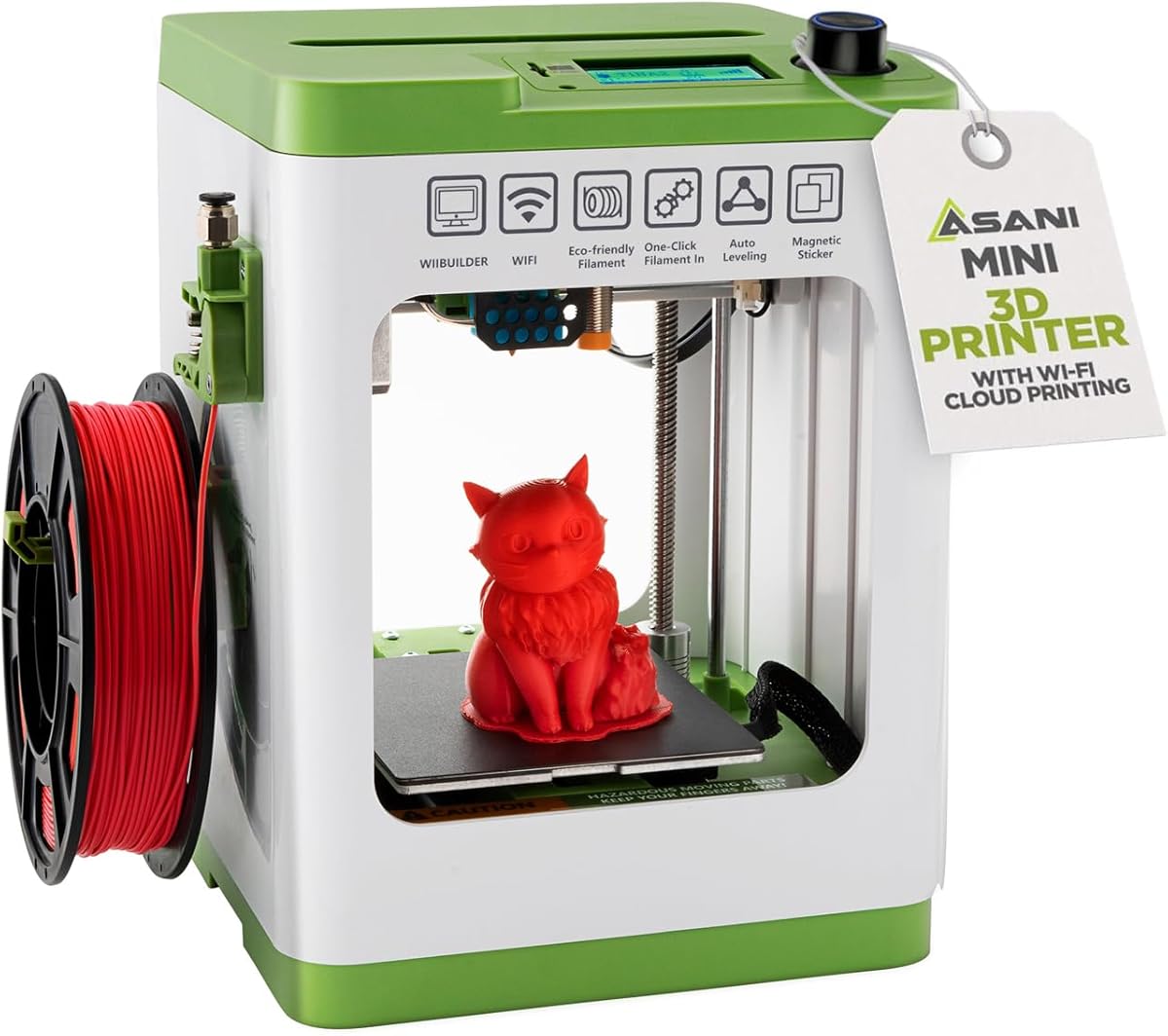
TINA2S Fully Assembled
4.6Editor score
Fully assembled out of box
Complete starter kit included
Auto leveling technology
This guide compares ten easy to use 3D printers featuring auto leveling, fast speeds, and beginner friendly designs for makers and kids looking to start
Finding a reliable machine that simplifies the creative process is essential for anyone looking to enter the world of additive manufacturing. Modern devices now offer automatic calibration and intuitive interfaces that remove the technical barriers traditionally associated with this hobby.
We have evaluated ten top rated models based on their setup time, printing speed, build quality, and user interface design. Our analysis focuses on features that make operation seamless, such as auto leveling, quiet motors, and accessible mobile apps for remote monitoring.
Each selection highlights unique strengths ranging from budget friendly options to premium enclosed systems capable of advanced materials. Keep in mind that availability and pricing fluctuate frequently, so check the latest details before making your final purchase decision.
4.6Editor score

4.7Editor score

4.5Editor score
This table provides a side by side overview of the ten selected models highlighting their key specifications and unique selling points to help you find the perfect match for your specific needs.


The Bambu Lab A1 stands out as a top contender for anyone seeking an easy to use 3D printer that delivers professional results without the typical setup headaches. With a high rating reflecting user satisfaction, it combines speed precision and automation in a sleek package designed for modern makers.
We may earn a commission when you buy through this link, at no additional cost to you.
Its standout feature is the full-auto calibration system which eliminates the need for manual bed leveling and Z-offset adjustments. The high-speed capabilities allow you to complete projects much faster than traditional models while maintaining exceptional accuracy. The active flow rate compensation ensures smooth surfaces and consistent detail in every print.
While the printer itself is highly capable, users should note that multi-color printing requires purchasing the AMS lite separately. Additionally the price point is higher than entry-level models but the time saved on setup and troubleshooting often justifies the investment for serious hobbyists.
This printer is ideal for beginners who want a reliable machine that works right out of the box as well as experienced users looking for speed. If you value convenience and quality the A1 is a strong recommendation for your next purchase.
The automated calibration means you can start printing almost immediately without needing tools or technical knowledge.
With acceleration up to 10,000 mm/s² you can finish prints significantly faster than with standard FDM printers.
We may earn a commission when you buy through this link, at no additional cost to you.
The FLASHFORGE Adventurer 5M offers impressive speed capabilities that appeal to users who need to produce parts quickly. Its CoreXY structure and high acceleration make it a strong choice for rapid prototyping. However the mixed reviews suggest that while the hardware is robust the software experience may vary.
We may earn a commission when you buy through this link, at no additional cost to you.
Key strengths include the one-click automatic printing feature which handles bed leveling for consistent first layers. The 3-second nozzle change system allows for versatile printing options without tools. You can also monitor progress remotely via the Flash Studio app which adds convenience for large jobs.
Some users have reported inconsistencies with the initial setup or software connection which impacts the overall rating. While the hardware is powerful it may require more patience and troubleshooting compared to more polished systems out of the box.
This printer is best for those who prioritize raw speed and are comfortable tweaking settings to get the most out of the machine. If you need fast prototyping and have some technical know-how the Adventurer 5M is worth considering.
With speeds up to 600mm/s you can iterate designs much faster than with standard consumer printers.
The mobile app allows you to track print progress and receive alerts from anywhere.
We may earn a commission when you buy through this link, at no additional cost to you.
The Bambu Lab A1 mini is designed specifically to make 3D printing accessible from day one. It comes with an LED Lamp Kit which encourages creative DIY projects right out of the box. The automatic calibration ensures a smooth experience even for those who have never printed before.
We may earn a commission when you buy through this link, at no additional cost to you.
Its compact size fits naturally into homes or studios without taking up much space. The connection to the Bambu ecosystem provides access to a huge library of ready-to-print models and easy management through the Handy app. Printing is fast and quiet making it suitable for shared spaces.
The main limitation is the smaller build volume which restricts the size of single-piece prints. However for small toys decorations or prototypes this is rarely an issue. The included lamp kit adds value by giving you an immediate project to tackle.
This model is perfect for students or families who want a reliable machine for everyday creativity. If you have limited space and want an easy start the A1 mini is an excellent choice.
The included LED Lamp Kit provides an instant project that showcases the printers capabilities.
Access MakerWorlds library of models to find ready-to-print designs effortlessly.
We may earn a commission when you buy through this link, at no additional cost to you.
The Bambu Lab P1S is a robust solution for users who need an enclosed environment for advanced filaments. It offers lightning-fast printing speeds and multi-material capabilities making it a versatile tool for professional and hobbyist use alike. The setup is incredibly quick allowing you to start creating within minutes.
We may earn a commission when you buy through this link, at no additional cost to you.
Its enclosed design improves print performance and reduces warping issues common with materials like ABS and ASA. The automatic bed leveling and user-friendly interface simplify operation even for complex projects. With support for various filaments it can handle both basic PLA and engineering-grade materials.
The primary drawback is the higher cost and the need to buy the AMS unit separately for multi-color printing. However the build quality and reliability make it a solid long-term investment. The speed and automation save significant time over manual setups.
This printer is recommended for those who want a high-performance machine that can handle a wide range of materials. If you plan to print functional parts or need a quiet reliable machine the P1S is a top choice.
The enclosed body enables printing with engineering materials like ABS and ASA without warping.
You can assemble and start printing in as little as 15 minutes.
We may earn a commission when you buy through this link, at no additional cost to you.
The AOSEED AI 3D Printer is a unique offering designed to spark creativity in kids using AI tools. It allows children to create custom models using voice or image prompts removing the need for design skills. The enclosed design ensures safety while the one-tap printing makes it easy to use.
We may earn a commission when you buy through this link, at no additional cost to you.
It comes with a comprehensive starter kit including filament and tools which simplifies the initial experience. The built-in camera allows parents to monitor progress and create time-lapse videos of the creation process. With over 8,000 models available it provides endless inspiration for projects.
While it supports only single-color printing the AI features compensate by making design accessible. The safety features and compact footprint make it suitable for home use. The price is competitive for the features provided including the educational aspect.
This printer is an excellent gift for families wanting to engage kids in STEM learning. If you want a safe easy-to-use machine that encourages imagination the AOSEED AI printer is a great option.
Children can create custom 3D models using voice text or image prompts without design skills.
The enclosed pinch-resistant design and built-in camera keep kids safe while watching prints.
We may earn a commission when you buy through this link, at no additional cost to you.
The Entina Tina2C is designed for first-time users and kids with a focus on simplicity and education. It arrives fully assembled so you can start printing in as little as 8 minutes. The guided setup through the app ensures a frustration-free experience for beginners.
We may earn a commission when you buy through this link, at no additional cost to you.
It includes STEM learning courses and interactive tools that turn creativity into an educational experience. The auto-leveling system and power-loss recovery help ensure successful prints even for those new to the technology. The compact size fits easily in classrooms or on a desk.
The build volume is small which limits the size of prints but is ideal for small projects and STEM lessons. The offline printing mode via TF card adds flexibility if you need to use it without a network connection. It is a solid budget-friendly option for education.
This printer is best for schools or families looking for an affordable educational tool. If you need a compact machine that is easy to set up and use the Tina2C is a strong candidate.
Regularly updated STEM learning courses turn the printer into a comprehensive educational tool.
Being fully assembled allows you to print your first project in just 8 minutes.
We may earn a commission when you buy through this link, at no additional cost to you.
The FLASHFORGE AD5M is engineered for speed and precision using a durable CoreXY all-metal structure. It features a fully automatic one-click leveling system that ensures accurate offsets and flawless first layers. The quick-release nozzle simplifies maintenance for users of all skill levels.
We may earn a commission when you buy through this link, at no additional cost to you.
Its high speed capabilities allow for efficient production cycles and rapid prototyping. The Orca-flashforge slicer enables batch file transmission and multi-printer monitoring for advanced users. Additionally the resume function allows prints to continue after power outages saving time and material.
While the hardware is impressive the software experience may require some familiarity to get the best results. The speed and structural stability are major advantages but some users may find the interface less intuitive than others. It is a solid choice for efficiency.
This printer is recommended for users who need fast turnaround times and reliable mechanical performance. If you prioritize speed and structure quality the AD5M offers excellent value.
The high-speed capabilities reduce production cycles and improve efficiency.
Quick-release nozzles allow for easy swaps in as little as 3 seconds.
We may earn a commission when you buy through this link, at no additional cost to you.
The TINA2S Fully Assembled printer offers exceptional value for beginners and families seeking a ready-to-use experience. It comes as a complete starter kit with filament and accessories so everything is included to start immediately. The auto-leveling feature ensures reliable first layers without manual adjustments.
We may earn a commission when you buy through this link, at no additional cost to you.
Its compact and lightweight design makes it perfect for homes or classrooms where space is limited. The open-source compatibility allows you to use various slicing software which is great for learning. The one-touch filament loading simplifies material changes for kids.
Users must use the specific included platform plate to avoid sensor issues. While it is not as fast as premium models it provides consistent results and a smooth experience. The rating reflects high satisfaction among those looking for an easy entry into printing.
This is the ideal choice for budget-conscious buyers who want a reliable machine without assembly hassles. If you want a complete package that is easy to use the TINA2S is a top recommendation.
Everything is included in the box so you can start printing immediately.
Auto-leveling and one-touch loading make operation simple for everyone.
We may earn a commission when you buy through this link, at no additional cost to you.
The Creality Ender 3 V3 SE is a popular budget-friendly option that brings modern features to an affordable price point. It features high-speed printing up to 250mm/s and automatic leveling to simplify setup. The Sprite Direct Drive extruder supports a wide range of filaments smoothly.
We may earn a commission when you buy through this link, at no additional cost to you.
Its dual synchronized Z-axis and precision shafts help reduce vibration for consistent quality. The silent mainboard ensures a quiet operation suitable for home offices. While it requires some assembly it is designed to be straightforward and manageable for beginners.
The main trade-offs are a basic interface and the need to assemble the unit before first use. However the performance and features at this price make it a strong contender. It is a proven model with a large community for support.
This printer is perfect for those looking to try 3D printing without spending much. If you want a reliable and affordable machine with modern features the Ender 3 V3 SE is a great choice.
It offers high-speed printing and auto leveling at a very competitive price.
The 32-bit silent mainboard keeps noise levels low for a comfortable experience.
We may earn a commission when you buy through this link, at no additional cost to you.
The Anycubic Kobra X stands out with its native 4-color capability allowing for multicolor prints without extra accessories. It features the LeviQ 3.0 leveling system to ensure bed flatness and accurate first layers. The hardened steel nozzle ensures durability for long printing sessions.
We may earn a commission when you buy through this link, at no additional cost to you.
With AI monitoring and detection features you can manage prints remotely with confidence. The large library of models and large print size offer versatility for various projects. It supports dual-band Wi-Fi for stable connectivity and easy control through the app.
Filament is not included which may increase initial setup costs. While the color capabilities are impressive the setup may be more complex than single-color units. It is a great option for those specifically wanting color functionality in a single system.
This printer is best for users who prioritize multicolor options and advanced features. If you want to print colorful projects without buying an external multi-color system the Kobra X is a strong choice.
The built-in 4-color system allows you to print colorful models without extra hardware.
Spaghetti and foreign object detection help prevent failed prints automatically.
We may earn a commission when you buy through this link, at no additional cost to you.
Selecting the right printer depends on your specific needs such as budget space and the types of projects you plan to undertake. Understanding these factors will help you narrow down the options and find a machine that matches your skill level and goals.
Look for features like auto leveling and automatic calibration which significantly reduce the time and effort required to prepare for printing. These tools eliminate manual adjustments and help ensure consistent first layers which is critical for success especially for beginners.
Prioritize models that offer a guided setup process or pre-assembled units to get started quickly.
The build volume determines the maximum size of objects you can print in one piece. Compact models are great for small projects and limited spaces but larger volumes allow for bigger functional parts. Consider where the printer will sit and the types of items you wish to create.
Choose a build size that fits your physical space and project requirements.
Faster printers with high acceleration can complete projects in less time which is beneficial for prototyping and high-volume needs. High-speed capabilities often come with better motion systems that maintain quality while moving quickly through the print path.
Opt for higher speeds if you need to finish projects efficiently without sacrificing detail.
Some printers support a wide range of filaments including PLA PETG TPU and advanced engineering materials. Others may be limited to basic plastics due to enclosure or temperature constraints. If you plan to use specific materials ensure the printer supports them natively.
Verify that the printer can handle the filaments you plan to use.
A intuitive touchscreen or a companion mobile app makes controlling prints easier. Remote monitoring allows you to check progress without being physically present and receive alerts for issues. Good software integration reduces the learning curve and enhances usability.
Look for user-friendly interfaces and reliable mobile apps for better control.
Printers can be noisy during operation which may be distracting in shared living spaces. Models with silent mainboards or noise-canceling features are preferable for bedrooms or offices. Quiet operation improves the overall experience especially if the printer runs overnight.
Consider noise levels if you plan to place the printer in quiet areas.
Access to a large community and online resources helps solve problems and find new designs. Active support channels and user forums make troubleshooting easier and expand the value of the printer. A strong ecosystem ensures you can grow with the machine over time.
Choose a brand with strong community support to ensure long-term satisfaction.
While price is important consider the total value including included accessories and software. A slightly higher cost may save money in the long run by reducing wasted filament and troubleshooting time. Balance upfront cost with the features that matter most to your workflow.
Assess the overall value rather than just the initial price tag.
Start by ensuring the printer is on a level stable surface and properly assembled according to the manual. Power it on and run any initial calibration routines recommended by the manufacturer to align the bed and nozzle before the first print.
Keep the build surface clean and free of dust to prevent adhesion issues. Regularly check the nozzle for clogs and clean it using appropriate tools if necessary. Lubricate moving parts as needed to maintain smooth operation and reduce wear over time.
Store filaments in a dry cool place to prevent moisture absorption which can affect print quality. After completing a job allow the printer to cool down before handling hot parts. Perform routine maintenance checks every few weeks to ensure continued reliability.
Most easy-to-use printers come with proprietary slicer software or are compatible with open-source options like Cura. These tools allow you to prepare your models by slicing them into instructions for the printer. Many modern printers also support direct uploading from mobile apps.
PLA is the most recommended filament for beginners because it is easy to print and does not require a heated bed or enclosure. It is biodegradable and comes in many colors making it ideal for learning the basics. Avoid materials like ABS until you gain more experience.
With modern easy-to-use printers you can start printing simple objects within an hour of unboxing. The learning curve for understanding settings and design tools may take a few weeks of practice. However basic operation is designed to be intuitive for first-time users.
This issue is often caused by a clogged nozzle or incorrect temperature settings. Check that the filament is loaded correctly and that the nozzle is not blocked. Ensuring the bed is leveled properly can also prevent extrusion problems during the first layers.
While many modern printers are safe to run unattended it is always best practice to monitor the first few layers of a print. Ensure the printer has safety features like power loss recovery and thermal runaway protection. Never leave a printer running in a completely isolated area.
Use warm soapy water to clean the bed and dry it thoroughly before use. For stubborn residue you can use isopropyl alcohol to remove oils or glue. Keeping the surface clean improves adhesion and prevents defects in your prints.
The ten models reviewed here offer a wide range of features tailored to different needs from budget-friendly options to premium enclosed systems. Whether you choose the Bambu Lab A1 for speed or the TINA2S for simplicity each option provides a user-friendly experience.
Prioritize features that matter most to your workflow such as automation speed or multi-color support. Taking the time to evaluate these factors will ensure you select a machine that grows with your skills and projects.
Remember to check current prices and availability as these details can change frequently. By considering the recommendations and buying guide provided you are well-equipped to make a smart purchase for your 3D printing journey.