
Sonnet Breakaway Box 850 T5
4.5Editor score
850W power supply included
Triple-wide GPU support
Built-in Thunderbolt 5 dock
This comprehensive guide compares the top ten external GPU enclosures for Thunderbolt and USB4 laptops, detailing performance, compatibility, and features for
External GPU enclosures transform your laptop into a desktop powerhouse by allowing you to connect a dedicated graphics card. This upgrade is essential for creative professionals and gamers who need more graphical power than integrated chips can provide.
We evaluated ten leading eGPU models based on bandwidth speed, power supply capacity, cooling efficiency, and overall build quality. Our analysis focuses on how well each unit supports modern GPUs and maintains stability under heavy workloads.
Each pick highlights specific strengths like AI compatibility, dual-mode connectivity, or compact designs. Please note that product availability and pricing change frequently, so verify details on the official retailer page before purchasing.
4.5Editor score

4.0Editor score
5.0Editor score
The following table provides a side-by-side technical comparison of all ten external GPU enclosures. We highlight key specifications such as power output, port availability, and physical dimensions to help you find the best fit for your setup.


The Razer Core X V2 stands out as the top choice for most users seeking high performance. With Thunderbolt 5 support offering up to 80 Gbps bandwidth, it delivers near-desktop speeds for demanding applications. Its ability to fit four-slot wide cards ensures compatibility with nearly any modern GPU.
We may earn a commission when you buy through this link, at no additional cost to you.
Key strengths include its modular design allowing you to swap ATX power supplies or GPUs easily. The included thumbscrews make installation tool-free and convenient. Additionally, the 140W power delivery ensures your laptop stays charged while connected. The built-in 120mm fan provides active cooling to maintain performance under heavy loads.
Trade-offs involve the lack of macOS support for newer Apple silicon devices. Also, you must buy the graphics card and power supply separately which adds to the initial cost. These are acceptable limitations given the raw performance and future-proof connectivity offered.
Gamers and creators needing maximum power should buy this unit. It transforms compatible Windows laptops into powerful workstations instantly. The easy setup and robust build quality make it the recommended choice for serious users.
Thunderbolt 5 provides double the bandwidth of previous generations ensuring smooth gameplay and fast data transfers.
Tool-free installation allows you to upgrade your GPU or power supply without needing extra screws or tools.
We may earn a commission when you buy through this link, at no additional cost to you.
The Sonnet Breakaway Box 850 T5 is a premium solution designed for professionals who need reliable performance. It includes an 850W power supply ready to handle high-end graphics cards out of the box. The Thunderbolt 5 connection ensures maximum data transfer speeds for creative workflows.
We may earn a commission when you buy through this link, at no additional cost to you.
Its standout feature is the integrated Thunderbolt 5 dock offering multiple USB ports and Ethernet connectivity. This turns the enclosure into a full workstation hub. The variable-speed cooling fan keeps temperatures low while running quietly. The variable supports triple-wide cards ensuring future compatibility.
While expensive, the included power supply saves money compared to buying separate components. The large size might be an issue for desk space but is necessary for thermal management. These factors justify the cost for users needing robust connectivity and power.
Professionals working with 3D rendering or AI applications should choose this model. The built-in ports reduce cable clutter and the high power ensures stability. It is a complete package for those prioritizing features over cost.
Multiple USB and Ethernet ports allow you to connect peripherals directly to the enclosure reducing laptop port usage.
The 850W power supply supports the most demanding graphics cards ensuring consistent performance during long tasks.
We may earn a commission when you buy through this link, at no additional cost to you.
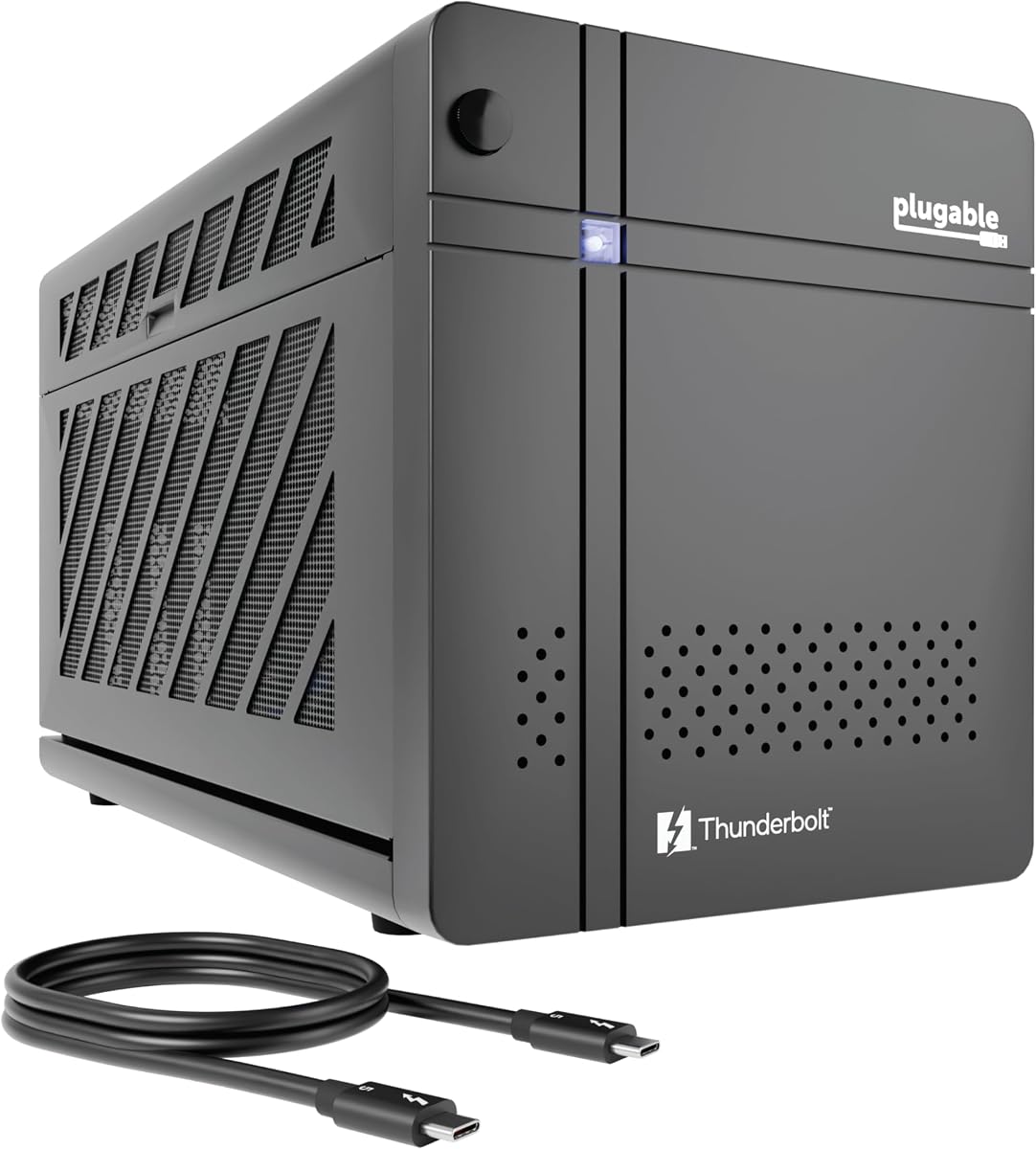
The Plugable Thunderbolt 5 AI enclosure offers an excellent balance of performance and value. It includes an 850W power supply which is rare at this price point. The design specifically supports offline AI models allowing private local computing without cloud risks.
We may earn a commission when you buy through this link, at no additional cost to you.
Features include 80Gbps Thunderbolt 5 speeds and a robust 2.5Gbps Ethernet port for network stability. The 96W power delivery keeps your laptop charged during use. Lifetime support from their North American team adds significant value for long-term reliability.
The AI focus might seem niche but benefits users in privacy-conscious workflows. It does not work with macOS which limits some users. However for Windows users this model provides a comprehensive package with strong support guarantees.
Users building AI setups or needing reliable local GPU power should buy this. The included PSU and support make it a top budget choice. It delivers desktop-grade performance at a competitive price.
Run large language models locally ensuring your data stays on your device without external cloud processing.
The included 850W PSU allows you to install high-end GPUs immediately without extra purchases.
We may earn a commission when you buy through this link, at no additional cost to you.
This enclosure is designed for portability offering a lightweight aluminum shell and carrying case. It supports Thunderbolt 4 and USB4 interfaces making it versatile for various laptops and handhelds. The 240W power supply handles mid-range graphics cards effectively.
We may earn a commission when you buy through this link, at no additional cost to you.
Its compact design fits easily into backpacks allowing you to take desktop graphics anywhere. The Thunderbolt port includes 85W power delivery to keep your laptop charged. Setup is simple with just one cable needed to connect everything.
The power supply is limited to 240W so high-end GPUs may not fit. GPU dimensions are restricted to 205mm length limiting options. These constraints are acceptable for users prioritizing mobility over maximum power.
Travelers and handheld console owners should choose this model. The included case and light weight make it ideal for on-the-go use. It is perfect for light gaming or rendering while traveling.
A custom carrying case protects the enclosure during transport ensuring safe travel for creative professionals.
85W power delivery keeps your device charged while providing GPU acceleration for immediate tasks.
We may earn a commission when you buy through this link, at no additional cost to you.
This mini enclosure is specifically optimized for handheld gaming consoles like the ROG Ally X. It supports 32Gbps transfer speeds with PCIe 4.0 x4 connectivity ensuring smooth data flow. The flexible power design allows you to use ATX or SFX power supplies as needed.
We may earn a commission when you buy through this link, at no additional cost to you.
It offers broad compatibility with Windows Linux and macOS systems which is rare. The 85W PD fast charging supports turbo modes for handhelds. Dual Thunderbolt ports allow you to daisy chain additional devices if required.
Not including a power supply means extra setup steps. Support for RTX 50 series GPUs is limited so future proofing is uncertain. Still the portability and handheld focus make it valuable for portable gamers.
Owners of portable gaming PCs should buy this unit. Its compact design and charging features integrate seamlessly with handhelds. It turns portable devices into desktop gaming stations quickly.
Optimized for devices like ROG Ally X and MSI Claw 8 enabling seamless portable gaming experiences.
Support for ATX SFX and Flex power supplies allows you to choose the size that fits your setup.
We may earn a commission when you buy through this link, at no additional cost to you.
The VK-Y900 uses an official Intel controller ensuring stable data transfer for gaming and rendering. It supports dual Thunderbolt ports allowing versatile connectivity for peripherals. The 85W charging pass-through keeps your laptop powered during use.
We may earn a commission when you buy through this link, at no additional cost to you.
It supports both Thunderbolt 3 and 4 standards ensuring broad laptop compatibility. The design is tailored to support ROG Ally X turbo modes for better performance. Technical support is available for driver issues which helps with setup.
Users must provide their own ATX power supply which adds cost. Linux users may face driver complexities compared to Windows. These are manageable trade-offs for a unit offering reliable performance and charging features.
Users seeking a balanced setup at a reasonable price should buy this. The controller stability and charging features make it a practical choice. It delivers solid performance for creative and gaming tasks.
Official Intel certification ensures stable data transfer minimizing errors during intensive GPU workloads.
85W PD charging keeps your laptop active while the external GPU handles heavy graphical tasks.
We may earn a commission when you buy through this link, at no additional cost to you.
This model is ideal for users needing Thunderbolt 3 compatibility with both Mac and Windows systems. It includes a 750W power supply ready for most modern graphics cards. The additional USB and Ethernet ports add convenience for peripherals.
We may earn a commission when you buy through this link, at no additional cost to you.
It supports a wide range of NVIDIA and AMD GPUs ensuring flexibility. The variable-speed fan keeps the system cool and quiet during operation. Mac users with older models can utilize this for significant performance boosts.
Thunderbolt 3 speeds are slower than newer standards limiting data transfer. M1 and later Macs are not supported. These limitations are expected for legacy models but reduce future proofing for new hardware.
Users with older laptops needing Mac support should buy this unit. The power supply and ports make it a complete solution. It remains a reliable choice for existing Thunderbolt 3 ecosystems.
Works with both macOS and Windows systems allowing flexibility across different operating environments.
USB and Ethernet ports let you connect devices directly to the enclosure reducing cable clutter.
We may earn a commission when you buy through this link, at no additional cost to you.
This mini enclosure offers a compact solution for users needing basic GPU expansion. It supports 40Gbps USB4 speeds ensuring decent performance for standard tasks. The small footprint makes it easy to store or transport.
We may earn a commission when you buy through this link, at no additional cost to you.
It includes a Thunderbolt 3 cable to get started immediately. The controller ensures stable connection for graphics cards. Power flexibility allows you to use ATX SFX or DC supplies as needed.
Not including a power supply means you must source one separately. Some technical knowledge is needed for driver setup. These factors make it best for users comfortable with basic configuration.
Users needing a simple portable solution should buy this model. The small size and included cable provide immediate utility. It is a practical choice for light GPU tasks.
Its small size allows easy storage making it ideal for users with limited desk space.
Supports ATX SFX and DC power supplies letting you choose the best fit for your needs.
We may earn a commission when you buy through this link, at no additional cost to you.
The MINISFORUM DEG2 offers unique dual-link support for Thunderbolt 5 and OCuLink connectivity. It includes an M.2 NVMe slot for storing project files directly on the dock. A hardware switch lets you toggle between docking and pure GPU modes easily.
We may earn a commission when you buy through this link, at no additional cost to you.
The signal booster ensures stable transfers during high-bandwidth tasks like LLM inference. Single-cable workflow simplifies setup connecting display data and power. This flexibility suits advanced users with multiple devices.
The OCuLink feature needs compatible host hardware which limits availability. Switching modes adds complexity to daily use. Still the storage slot and dual-link support provide distinct advantages for pros.
Advanced users needing storage and dual connectivity should buy this. The flexibility and signal stability enhance high-end workflows. It is a versatile option for multi-device setups.
Switch between USB4 V2 and OCuLink to optimize speed based on your connected hardware.
The M.2 slot lets you store models directly on the dock improving workflow efficiency.
We may earn a commission when you buy through this link, at no additional cost to you.
This entry-level unit offers a complete kit with enclosure power supply and carrying case. It features Thunderbolt 4 connectivity ensuring modern laptop compatibility. The aluminum build provides durability while remaining lightweight for travel.
We may earn a commission when you buy through this link, at no additional cost to you.
The 240W power supply handles mid-range graphics cards well for general use. DisplayPort output allows connection to external monitors easily. Setup is plug-and-play with included cables and clear instructions.
Power limits restrict using high-end GPUs which may require more watts. The design prioritizes portability over maximum performance. This trade-off suits casual users or those needing a budget-friendly option.
Users looking for an easy-to-use portable GPU solution should buy this. The included case and cables make it ready for immediate use. It is ideal for light gaming or occasional creative work.
Includes all necessary cables and a case for immediate use without extra purchases.
Thunderbolt 4 support ensures fast data transfer and reliable connections with current laptops.
We may earn a commission when you buy through this link, at no additional cost to you.
Selecting the right external GPU enclosure requires evaluating several technical factors to ensure compatibility and performance for your specific workflow.
The connection type dictates maximum data transfer speeds. Thunderbolt 5 and USB4 V2 offer 80 Gbps bandwidth which is essential for high-end graphics cards. Older Thunderbolt 3 models offer 40 Gbps which may bottleneck newer GPUs during intensive tasks.
Always check your laptop supports the required Thunderbolt version before purchasing.
Modern graphics cards require significant power often exceeding 500W. Enclosures with included power supplies simplify setup but limit flexibility. Those supporting ATX power supplies allow you to upgrade power as needed for future cards.
Ensure the wattage matches your GPU requirements to prevent crashes.
Graphics cards vary in length and width so enclosures must support these dimensions. Compact units are portable but may not fit large triple-slot cards. Desktop-sized cases offer better cooling and accommodate larger cards effectively.
Measure your intended GPU and compare with enclosure specifications carefully.
Most enclosures work seamlessly with Windows 11 systems. macOS support is limited especially for Apple silicon chips. Linux support varies by model so verify specific driver availability for open-source users.
Confirm your OS is supported to avoid compatibility issues.
High-performance GPUs generate heat so active cooling is necessary. Enclosures with large fans maintain lower temperatures during heavy loads ensuring consistent performance. Silent fans are preferred for noise-sensitive environments.
Check cooling specs to ensure thermal management meets your needs.
Some enclosures include USB ports and Ethernet allowing you to connect peripherals directly. This reduces the need for extra docks and keeps your workspace clean. Built-in hubs add value by expanding laptop connectivity.
Look for models with extra ports to maximize desk utility.
Prices vary significantly based on included components like power supplies. Entry-level kits save money upfront but lack high power options. Premium models cost more but include robust power and hub features.
Balance your budget with the performance and features you need.
Choose units supporting newer standards like Thunderbolt 5 to extend longevity. Modular designs allow upgrades without replacing the entire enclosure. Dual-link options provide flexibility for emerging connectivity standards.
Invest in technology that supports upcoming hardware generations.
Install the graphics card carefully following the tool-free instructions if available to avoid damage. Ensure the power supply matches the GPU requirements before connecting the device.
Use a high-quality Thunderbolt cable to connect the enclosure to your laptop. Always connect the enclosure before booting your system for best stability.
Keep the enclosure vents clear and dust free to maintain cooling efficiency. Use compressed air periodically to clean the fans and prevent overheating.
Mac laptops with Apple Silicon chips like M1 are not supported by most current eGPU enclosures. Only older Intel-based Macs have full compatibility. Always check the manufacturer specs to confirm support for your specific model before buying.
Some enclosures include a built-in power supply which simplifies setup significantly. Others require you to provide an ATX or SFX power supply which offers upgrade flexibility. Check the product details to confirm if a PSU is included.
Thunderbolt 5 provides up to 80 Gbps bandwidth compared to 40 Gbps on Thunderbolt 4. This doubling of speed improves performance for high-end GPUs and data transfers. Look for TB5 support for maximum future-proofing.
Yes some mini enclosures are specifically optimized for handheld consoles to support turbo modes. Ensure the unit includes sufficient power delivery like 85W for charging while connected. Always verify compatibility with your specific handheld model.
Many modern enclosures feature tool-free designs with thumbscrews for easy installation. You typically slide the card in and secure it without needing screws. Just ensure the GPU dimensions fit within the case limitations.
Ensure you installed the latest graphics drivers on your host laptop. Also verify the Thunderbolt connection is secure and the power supply is active. Rebooting the system after connection often resolves detection issues.
Properly configured eGPUs do not slow down laptop performance when disconnected. When connected some battery drain may occur if charging is not enabled. Modern units are designed to minimize impact on host system resources.
Yes certain enclosures are optimized for running AI models locally without cloud reliance. Look for models supporting private AI processing and providing sufficient power for inference tasks. Local setups ensure data privacy and security.
The Razer Core X V2 leads the pack for overall performance and flexibility for high-end users. The Sonnet Breakaway Box 850 T5 provides excellent connectivity options with its built-in docking features. For budget-conscious users the Plugable Thunderbolt 5 AI offers strong value with included power.
Prioritize bandwidth speed and power capacity to match your GPU requirements effectively. Ensure compatibility with your operating system and laptop ports before finalizing a purchase decision.
Please check current availability and pricing on the official retailer pages as these details change frequently. Choose the model that best fits your workflow and budget for optimal results.