
iKKEGOL Upgraded USB Triple Foot Pedal
4.4Editor score
Programmable HID device
Optical quiet switches
Anti-slip TPU feet
This guide compares the top foot pedals for transcriptionists to help you choose the best device for speed comfort and software compatibility.
Transcription professionals rely heavily on efficient workflow tools to manage long audio files without straining their hands. A dedicated foot pedal allows you to control playback hands-free, keeping your focus on typing and accuracy during demanding sessions.
We evaluated ten leading models based on build quality, switch durability, software compatibility, and ergonomic design. Our analysis considers real-world usage patterns to ensure each recommendation supports professional-grade transcription environments effectively.
Each pick below highlights specific strengths like budget value, premium features, or specific software integration. Please note that product availability and pricing fluctuate frequently, so verify current details before making your final purchasing decision today.
4.4Editor score

4.5Editor score

4.1Editor score
This side-by-side comparison highlights key specifications across all ten models to help you quickly identify the right fit for your specific transcription software and physical workspace requirements.


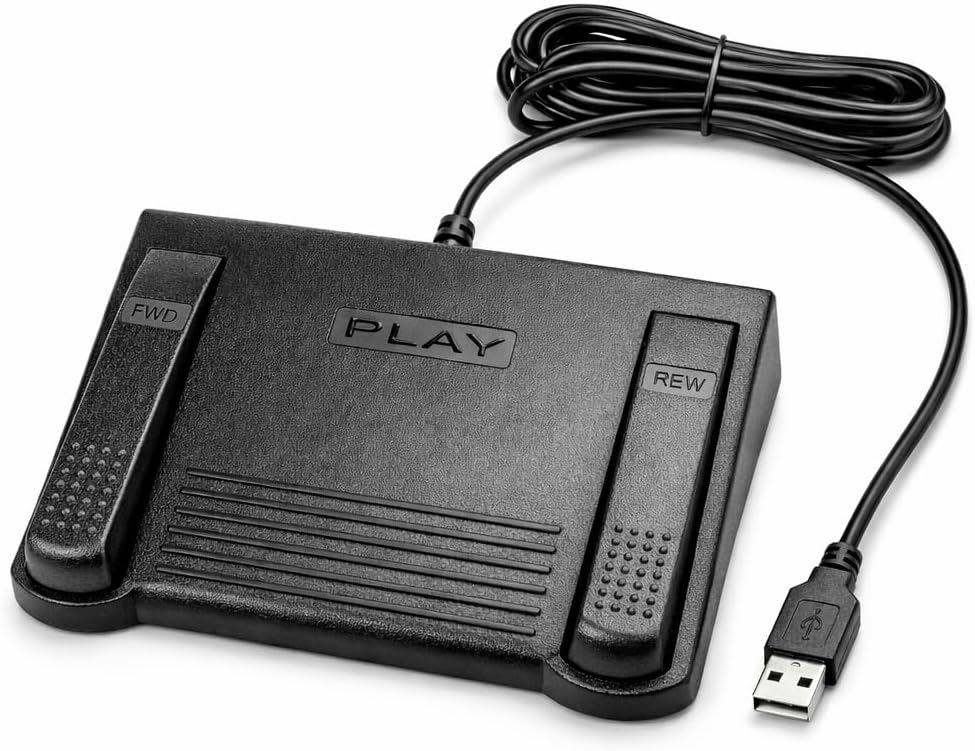


The Infinity 3 USB Foot Pedal Control stands out as a robust tool for transcriptionists needing reliable hands-free control. With a solid 4.5 rating from users, it balances simplicity and durability effectively for daily professional use.
We may earn a commission when you buy through this link, at no additional cost to you.
Its heavy-duty micro switches ensure countless hours of trouble-free performance without wear. The ergonomic design features a wide, central, sloping Play pedal that makes it easy to move your foot between functions smoothly.
While it lacks advanced programmable features, the straightforward layout prevents accidental inputs during fast typing. This simplicity ensures that transcriptionists can focus on their work rather than adjusting settings or troubleshooting complex interfaces.
This model is ideal for transcriptionists who value reliability over extra features. If you need a workhorse pedal that withstands rigorous use without breaking the bank, this Infinity 3 unit is a highly recommended choice.
The ultra-heavy-duty micro switches are built to endure millions of presses, ensuring consistent tactile feedback over years of daily transcription work without degradation.
The wide, sloping central pedal allows natural foot positioning, reducing strain during long sessions by enabling smooth transitions between play, rewind, and forward commands.
We may earn a commission when you buy through this link, at no additional cost to you.
The VEC in-USB-2 Infinity Digital Foot Control introduces a rechargeable battery feature that enhances flexibility for mobile or wireless setups. Its strong 4.4 rating reflects its robust build and user-friendly design for transcription tasks.
We may earn a commission when you buy through this link, at no additional cost to you.
Users appreciate the mechanical stop that prevents accidental triggering of the center pedal while stepping on side pedals. This control ensures precision during critical moments of transcription when accuracy is paramount.
The device supports a wide range of dictation software platforms, making it versatile for different professional environments. The heavy-duty components are designed for over two million depressions, guaranteeing long-term reliability.
Choose this model if you want a pedal that combines standard USB functionality with modern convenience features. The rechargeable aspect reduces cable clutter while maintaining the ergonomic comfort needed for extended work periods.
Powered by a rechargeable battery, this unit offers up to 1000 hours of digital recording time, reducing dependency on constant USB power sources for mobile users.
The mechanical stop feature actively prevents unintended center pedal presses, ensuring that your workflow remains uninterrupted by accidental key activations during active typing.
We may earn a commission when you buy through this link, at no additional cost to you.
The Philips ACC2330 4-Pedal Foot Control offers a specialized design tailored for professional digital dictation systems. With a rating of 4.1, it caters to users needing advanced control options like toe touch functionality.
We may earn a commission when you buy through this link, at no additional cost to you.
Its unique swing mechanism allows you to relax your foot during pauses, reducing strain over long hours. The increased width of the center pedal helps avoid unintended presses of other pedals during fast operation.
While it commands a higher price, the build quality and ergonomic features justify the investment for heavy-duty professional users. The distinct feel when changing control areas ensures you always know which function you are engaging.
This pedal is best suited for professional transcriptionists using specific digital systems that require precise foot control. If ergonomics and specialized features are your priority, this Philips model delivers premium performance.
The swing feature allows your foot to rest comfortably during pause times, significantly reducing physical fatigue during marathon transcription sessions.
Users can feel the change in control area with their toe, ensuring accurate transitions between playback commands without needing to look down at the device.
We may earn a commission when you buy through this link, at no additional cost to you.
The DAC 3 Function Foot Pedal offers a perfect fit for users running specific computer software designed for foot control. With a rare 5.0 rating, it meets the needs of professionals who need exact command matches.
We may earn a commission when you buy through this link, at no additional cost to you.
The buttons are clearly labeled as Next Job, Rew/Play, and Record, minimizing confusion during high-speed transcription work. The large button design ensures you can press them accurately even when typing with high intensity.
This unit is not universally compatible, making it a specialized tool rather than a general-purpose pedal. If your workflow depends on precise job navigation commands, this pedal delivers the exact functionality required without fluff.
Invest in this model only if your software explicitly supports it. For those scenarios, it offers a highly efficient and user-friendly interface that enhances productivity through targeted control features.
Designed specifically for certain computer software, this pedal ensures seamless integration and precise command execution tailored to specialized transcription needs.
The large, labeled buttons provide immediate visual confirmation of each function, reducing errors and speeding up the learning curve for new users.
We may earn a commission when you buy through this link, at no additional cost to you.
The Infinity USB Digital Foot Control (IN-USB3) is designed for professionals with limited desk space. Its low profile and non-slip surface area provide a stable and compact solution for hands-free transcription.
We may earn a commission when you buy through this link, at no additional cost to you.
Despite its compact size, it delivers the essential controls needed for standard transcription work. The non-slip features ensure the pedal stays right where you want it, preventing accidental movements during active typing.
While it lacks advanced features like programmability, it remains a reliable choice for those prioritizing desk real estate. The brand reputation for durability ensures this unit will withstand regular daily usage without issue.
If you are working in a constrained environment where every inch of desk space matters, this model offers a practical balance of function and footprint. It remains a strong option for standard needs.
The low profile design minimizes the device footprint, making it ideal for shared desks or setups where large foot pedals might obstruct other equipment.
Increased non-slip surface area ensures the pedal remains firmly grounded during intense typing sessions, preventing slips that could interrupt workflow.
We may earn a commission when you buy through this link, at no additional cost to you.
The Express Scribe Transcription Foot Pedal is exclusively designed for use with Express Scribe software on Windows and Mac. This specialization ensures seamless operation without requiring extra drivers or configuration steps for those users.
We may earn a commission when you buy through this link, at no additional cost to you.
Its oversized pedal layout facilitates easy movement between play, fast-forward, and rewind functions. This physical design supports comfortable, low-fatigue operation, which is critical during long transcription shifts.
The device is built specifically for Express Scribe's control board, guaranteeing reliable playback control. It is backed by a one-year mail-in warranty, providing confidence in its professional-grade reliability despite the lower rating.
If you are an Express Scribe user, this pedal is a logical choice to optimize your workflow. However, users of other software should consider more versatile alternatives to avoid compatibility limitations.
Built with an exclusive internal control board, this pedal ensures reliable and precise playback control specifically engineered for Express Scribe software.
Pre-programmed and ready to use out of the box, it requires no foot pedal wizard or manual configuration, allowing you to start transcribing immediately.
We may earn a commission when you buy through this link, at no additional cost to you.
The Infinity IN-USB-1 Foot Pedal focuses on delivering reliable hands-free audio playback control for transcriptionists. Its ergonomic design aims to reduce strain during extended use, supporting efficient workflows across major software platforms.
We may earn a commission when you buy through this link, at no additional cost to you.
Engineered for comfort, the pedal features a contoured layout that supports natural foot positioning. This design choice helps minimize physical fatigue, making it a solid choice for those with repetitive motion concerns.
Despite a lower rating, it remains a dependable option for general transcription environments. The device is backed by a one-year warranty, offering long-term reliability and added confidence for professional buyers.
If you prioritize ergonomics over advanced features, this model is worth considering. It provides consistent responsiveness for daily transcription workloads in medical, legal, or public safety applications.
The thoughtfully contoured layout supports natural foot positioning to help minimize strain and fatigue during long transcription sessions.
Designed to work with most major dictation and transcription software platforms, making it a versatile choice for professionals.
We may earn a commission when you buy through this link, at no additional cost to you.
The iKKEGOL Upgraded USB Triple Foot Pedal offers exceptional value for users willing to customize their workflow. With a 4.4 rating, its optical switches provide quiet operation perfect for shared or office environments.
We may earn a commission when you buy through this link, at no additional cost to you.
Its wide pedal design and large size enable lasting comfort for your feet during extended typing sessions. The durable build can bear significant weight, ensuring physical resilience even under heavy usage conditions.
While it is a generic HID device requiring some setup via software, it allows for customized macro assignment. This flexibility makes it a budget-friendly alternative to specialized transcription pedals.
If you are looking for an affordable option that can handle transcription tasks among other uses, this model is a strong contender. It balances cost and quality effectively for versatile users.
The optical switches provide quiet tactile feedback without mechanical clacking, ideal for environments where noise distraction is a concern.
As a standard HID device, it can be programmed to trigger keyboard commands or mouse clicks, allowing tailored control for specific software.
We may earn a commission when you buy through this link, at no additional cost to you.
The Philips LFH-2330 Configurable USB Foot Control offers four pedals that can be completely configured to suit your specific workflow. Its ergonomic design minimizes physical strain by reducing foot movement due to its slim profile.
We may earn a commission when you buy through this link, at no additional cost to you.
The user-friendly wizard allows you to customize the function of each pedal, ensuring it matches your software requirements perfectly. The anti-slip bottom surface keeps the device securely in place during active use.
This flexibility makes it an excellent choice for professionals with unique needs. While it requires some initial setup time, the result is a highly personalized transcription tool that boosts efficiency.
Invest in this model if you need custom control options that adapt to your specific software. It provides the versatility required for complex transcription workflows.
The 4 pedal design can be completely configured to suit you using a user-friendly wizard, ensuring precise control over every function.
The slim design minimizes physical strain by lessening movement of foot, allowing for more relaxed positioning during transcription.
We may earn a commission when you buy through this link, at no additional cost to you.
The iKKEGOL Mechanical Triple Foot Switch offers broad cross-platform support, working with Windows, Mac, and Linux systems. This versatility makes it a rare find for professionals using diverse operating environments.
We may earn a commission when you buy through this link, at no additional cost to you.
Its mechanical switches provide a distinct tactile feedback via a spring-loaded lever that physically closes the circuit. The durable construction supports over 100kg of weight, ensuring stability on hard floors.
You can configure the commands using the ElfKey software before using it on Linux. This allows for a plug-and-play experience after the initial setup on a configured system.
Choose this pedal if you need a solution that works seamlessly across different operating systems. It offers the flexibility needed for modern multi-platform transcription setups.
Supports Windows, Mac, and Linux systems, allowing it to work as a plug-and-play device across diverse professional environments.
The mechanical switch actuates a spring-loaded lever, providing clear physical feedback when pressed for precise control.
We may earn a commission when you buy through this link, at no additional cost to you.
Selecting the right foot pedal requires understanding your software needs, physical comfort requirements, and budget constraints. This guide breaks down the key factors to consider for making an informed decision.
Different pedals support different transcription software packages. Some are universally compatible with most platforms, while others are custom-designed for specific applications like Express Scribe. Verify that your chosen pedal works seamlessly with your primary software to avoid connectivity issues.
Always check compatibility lists before purchasing to ensure your workflow remains uninterrupted.
Transcriptionists often work for long hours, so foot comfort is critical to preventing strain. Look for pedals with sloping designs, wide surfaces, and non-slip bottoms that allow natural foot positioning and reduce fatigue over time.
Prioritize models with wide center pedals to minimize accidental presses during intensive use.
Professional pedals should withstand millions of presses. Heavy-duty micro switches and solid construction materials ensure longevity. A durable device reduces the need for frequent replacements and maintains consistent performance over years of daily use.
Look for products with explicit durability ratings like millions of depressions.
Some pedals allow you to assign specific keys or macros to their foot buttons. This flexibility can streamline workflows by automating complex commands. If you need custom functions, choose a model with user-friendly configuration software.
Universal HID devices often offer more customization options than standard transcription pedals.
Most pedals use USB for plug-and-play functionality, but some models feature rechargeable batteries for cable-free operation. Consider your desk setup and whether mobility is a priority for your work style.
Rechargeable options add convenience but require monitoring to avoid power interruptions.
Pedals range from affordable generic options to specialized professional units. While higher price often correlates with better build quality, ensure you are not paying for features you will not use. Balance your budget with essential functionality.
Budget models can work well if they match your core software needs.
To start using your foot pedal, connect it to a USB port on your computer and install any required drivers or software. Most modern models are plug-and-play and will automatically configure with your transcription software.
Position the pedal on a flat, stable surface near your keyboard where your foot can rest naturally without stretching. Ensure the non-slip feet are firmly gripping the floor to prevent movement during active typing.
Regularly clean the pedal with a soft cloth to remove dust and debris from the switch gaps. Avoid using harsh chemicals that could damage the plastic casing or internal electronics.
Many modern foot pedals work plug-and-play without software, but some programmable models require configuration tools to assign specific keys. Check the product description to confirm if software is needed for full functionality.
Yes, most USB foot pedals are compatible with Mac and Linux as they use standard HID protocols. However, specialized transcription software compatibility should be verified for each operating system.
High-quality pedals typically last for millions of presses, often exceeding five years of daily professional use. Regular cleaning and proper placement extend their operational life significantly.
Not all pedals are universal. Some are generic HID devices that work broadly, while others are designed specifically for one software. Always check compatibility lists before buying.
Use a dry microfiber cloth to wipe the surface and a soft brush for crevices. Avoid water or liquids to prevent damage to the electronic components inside the casing.
While not strictly necessary, a foot pedal significantly improves efficiency by allowing hands-free playback control. This reduces strain and increases speed during long transcription sessions.
Most transcription pedals rely on USB for power and data, but some models feature rechargeable batteries for limited mobility. Fully wireless options are rare and may have latency issues.
Programmable models allow customization through configuration software. This lets you assign macros or shortcuts to foot buttons for complex tasks beyond standard playback controls.
The Infinity 3 USB Foot Pedal leads the pack for reliability and ergonomic design, while the iKKEGOL Optical Triple offers excellent budget value for customizable needs. Philips models provide specialized features for digital systems.
Prioritize software compatibility and ergonomic comfort when selecting your next device. A pedal that fits your workflow and reduces physical strain will deliver the best long-term value.
Please note that pricing and availability change frequently. Verify current details before making your final purchasing decision to ensure you get the best deal available today.