This guide compares the top 10 GPU backplates for 2026, analyzing cooling performance, material quality, and compatibility to help you protect your graphics
As an Amazon Associate we earn from qualifying purchases. We may earn a commission when you buy through links on this page, at no additional cost to you. Read our affiliate disclosure.As an Amazon Associate we earn from qualifying purchases.Purchases through our links may earn us a commission, at no extra cost to you. Read our affiliate disclosure.
GPU backplates serve as essential protective covers for your graphics card, shielding components from dust and damage while enhancing overall aesthetics and structural integrity.
We evaluated ten top-rated options based on material quality, thermal performance, ease of installation, and compatibility with various modern graphics card models to find the best choices.
Each pick highlights specific strengths and ideal use cases so you can choose the right solution for your build, though prices and availability may change over time.
Top 3 Picks for Best GPU Backplates
Best Budget
Large Aluminum Heat Sink 150x93x15 mm/ 5.9×3.66×0.59inch + Thermal Conductive Adhesive Tape, High Power Heatsink Cooler Fin for PCB LED Motherboard Cooling GPU Backplate Radiator Router RTX 3090
Below is a side-by-side comparison of all ten products analyzed in this guide to help you quickly identify the best fit for your specific graphics card model.
This aluminum heatsink offers a budget-friendly solution for GPU backplate needs with strong thermal properties. It carries a high 4.7 rating from users who appreciate its simplicity and effectiveness in reducing heat.
Pros
Affordable price point
Pre-applied adhesive tape
Passive cooling design
Wide application range
High aluminum quality
Cons
Generic fit requires measurement
Not tailored to specific models
We may earn a commission when you buy through this link, at no additional cost to you.
The pre-applied thermal conductive adhesive tape makes installation straightforward without requiring additional tools. Its large surface area and 294 fins ensure efficient passive heat dissipation across various components.
While it lacks model-specific precision, the universal design allows flexibility for different graphics cards and other hardware. Some users may need to verify dimensions before purchase for perfect alignment.
This option suits builders seeking reliable thermal protection without high costs. It is a practical choice for standard cases where custom fit is less critical than raw cooling performance.
Passive Cooling Efficiency
The fins increase surface area significantly to transfer heat away without active fan noise.
Installation Convenience
Pre-applied adhesive reduces steps needed for mounting directly onto the PCB or GPU.
This radiator brings active cooling to the back of your GPU with a 4 pin fan for better performance. It is rated 4.0 stars and praised for its sturdy aluminum alloy construction and CNC machining quality.
Pros
4 pin fan interface
CNC machined finish
Compatible with RTX models
Includes thermal pad
Durable alloy build
Cons
Fan adds complexity
May require cable management
We may earn a commission when you buy through this link, at no additional cost to you.
The 4 pin interface connects to the motherboard fan socket allowing precise speed control. Included thermal pads ensure efficient heat transfer between the memory and the aluminum radiator block.
While the fan adds airflow benefits it also needs cable management which may clutter compact cases. The thickness of 15mm provides robust heat dissipation but ensures space inside the chassis.
Ideal for RTX 3080 and 3090 users seeking extra cooling power beyond standard setups. The balance of durability and functionality makes it a top choice for performance-focused builders.
Active Heat Management
The fan connector offers flexible speed adjustments for noise and cooling trade-offs.
Material Durability
Aluminum alloy resists corrosion and offers long service life under heavy workloads.
Designed specifically for GIGABYTE RTX 5060 and 5050 Low Profile cards this backplate ensures perfect fit. Users note its 3.6 rating reflecting mixed experiences with fitment accuracy in some scenarios.
Pros
Perfect SFF alignment
Anti-sag support
Passive heat spreader
Pre-drilled holes
Reinforced aluminum
Cons
Lower user rating
Limited to specific models
We may earn a commission when you buy through this link, at no additional cost to you.
CNC-cut precision matches the PCB layout without blocking ports or interfering with low-profile brackets. The thick aluminum construction protects against PCB flex and accidental damage during transport.
Some reviews indicate minor alignment quirks that may require patience during installation. The passive heat spreader design helps distribute heat evenly though thermal benefits are moderate.
Best for SFF builds using compatible GIGABYTE models needing structural rigidity. The pre-drilled holes simplify DIY installation without modding for stable long-term performance.
Low Profile Precision
Designed to clear ports and brackets typical of compact small form factor cases.
Structural Reinforcement
Thick aluminum reduces flex to protect sensitive rear components from damage.
This radiator combines aluminum alloy strength with a 4 pin fan for active cooling. It holds a 4.0 rating and is suitable for RTX 3090 3080 and 3070 graphics cards.
Pros
Aluminum alloy build
4 pin fan interface
Fast heat dissipation
Compatible with RTX series
CNC machining finish
Cons
Fan requires power
Cable management needed
We may earn a commission when you buy through this link, at no additional cost to you.
The CNC machined finish adds durability and style while the 15mm thickness ensures robust heat dissipation. It connects to motherboard fan sockets for low noise operation during gaming.
The fan adds complexity to installation but delivers improved cooling compared to passive options. Some users may find cable management slightly challenging in tight cases.
Ideal for builders wanting active cooling without premium costs. It balances performance and practicality for high-end graphics cards needing extra heat relief.
Active Cooling Advantage
The fan interface allows better temperature control during intensive rendering sessions.
Sturdy Build Quality
Aluminum alloy resists wear and supports vertical mounting setups reliably.
With a strong 4.5 rating this radiator offers effective thermal performance for RTX 3090 3080 and 3070 cards. It combines aluminum alloy construction with a 4 pin fan for enhanced cooling.
Pros
High 4.5 rating
Aluminum alloy material
4 pin fan interface
Fast heat dissipation
Includes thermal pad
Cons
Fan adds noise risk
Not universal for all cases
We may earn a commission when you buy through this link, at no additional cost to you.
The 15mm thickness and included thermal pad support fast heat dissipation. CNC machining ensures a clean finish that adds visual appeal to your build interior.
Some users may find the fan generates slight noise under load. The design is optimized for standard cases though vertical mounting support varies by case setup.
A top choice for thermal efficiency without excessive cost. It suits builders needing reliable active cooling for modern GPUs in performance-oriented systems.
Thermal Efficiency
Thermal pad and thick alloy ensure rapid heat transfer from memory to aluminum.
Aesthetic Quality
Anodized black finish complements modern dark builds with sleek appearance.
This bracket focuses on anti-sag support for heavy graphics cards rather than thermal cooling. It earns a 4.7 rating for sturdy aluminum alloy construction and height adjustability.
Pros
Prevents GPU sag
All-aluminum build
Height adjustable fit
Easy tool-free install
24/7 support
Cons
Brackets only not backplate
Does not cover PCB
We may earn a commission when you buy through this link, at no additional cost to you.
The tool-free setup and secure base ensure stability preventing long-term damage to the motherboard from card weight. It fits most ATX M-ATX and ITX cases universally.
While it protects against sag it does not cover the PCB or dissipate heat like full backplates. Some users may prefer integrated cooling solutions for complete protection.
Ideal for prioritizing structural stability over thermal features. It is a reliable fix for GPU sag without permanent modification or complex installation.
Structural Stability
Strong support reduces PCB flex ensuring long-term component protection.
Universal Adjustability
Adjustable height accommodates different GPU sizes and case configurations easily.
This large aluminum heatsink features 294 fins for superior passive heat dissipation across components. With a 4.6 rating it is trusted for reducing overheating risks effectively.
Pros
Passive cooling design
High fin count
Large surface area
Reduces hardware failure risk
Wide hardware compatibility
Cons
Requires adhesive
No pre-cut mounting holes
We may earn a commission when you buy through this link, at no additional cost to you.
The dimensions of 150x93x15mm offer a massive surface area to transfer heat away from hotspots. It works across computers GPUs and power transistors for versatile cooling needs.
Installation requires adhesive and some manual alignment which may challenge beginners. Lack of model-specific mounting means it suits standard or custom setups better than OEM cards.
Best for DIY enthusiasts seeking maximum passive cooling. It delivers robust thermal relief without fan noise or power draw for quieter systems.
Thermal Safety
Reduces overheating risks to protect hardware from failure and power loss.
Fin Efficiency
Increased surface area from fins boosts heat transfer efficiency significantly.
This bracket is specifically designed for EVGA RTX models like the 3080 and 3090. It offers precise slot protection though thermal features are absent.
Pros
EVGA FTW3 fit
Durable zinc alloy
Precise size fit
Slot cover design
Easy installation
Cons
Limited to EVGA cards
No thermal cooling features
We may earn a commission when you buy through this link, at no additional cost to you.
Sturdy black zinc alloy ensures durability against wear. The size fits the graphics card slot precisely to safeguard external connections from dust.
It focuses on slot protection rather than cooling or structural support for the PCB. Users need screws for installation which may be slightly less convenient.
Best for EVGA owners wanting external slot protection. It adds durability and neatness to the build without impacting cooling performance.
EVGA Precision
Engineered for FTW3 XC3 models to ensure perfect external slot alignment.
Slot Protection
Prevents dust ingress into external slots to maintain clean connections.
Designed for ZOTAC RTX 5060 and 5050 Solo 8GB this backplate offers a perfect factory-like fit. It has a flawless 5.0 rating indicating high customer satisfaction.
Pros
Perfect ZOTAC fit
Anti-sag reinforcement
CNC aluminum build
Ventilation design
Pre-drilled holes
Cons
Model-specific
No active cooling
We may earn a commission when you buy through this link, at no additional cost to you.
Precision engineering ensures zero interference with ports or mounting holes. CNC-machined aluminum provides rigidity to prevent sag and extend card lifespan.
The ventilation cutouts assist airflow though passive cooling offers moderate thermal relief. Some users may prefer models with thermal pads for better heat spread.
Ideal for ZOTAC solo owners needing structural stability. It simplifies installation with pre-drilled holes and no permanent modifications.
Structural Support
Reinforced aluminum prevents long-term PCB bending from gravity and usage.
Ventilation Design
Strategically placed cutouts improve airflow around the GPU core.
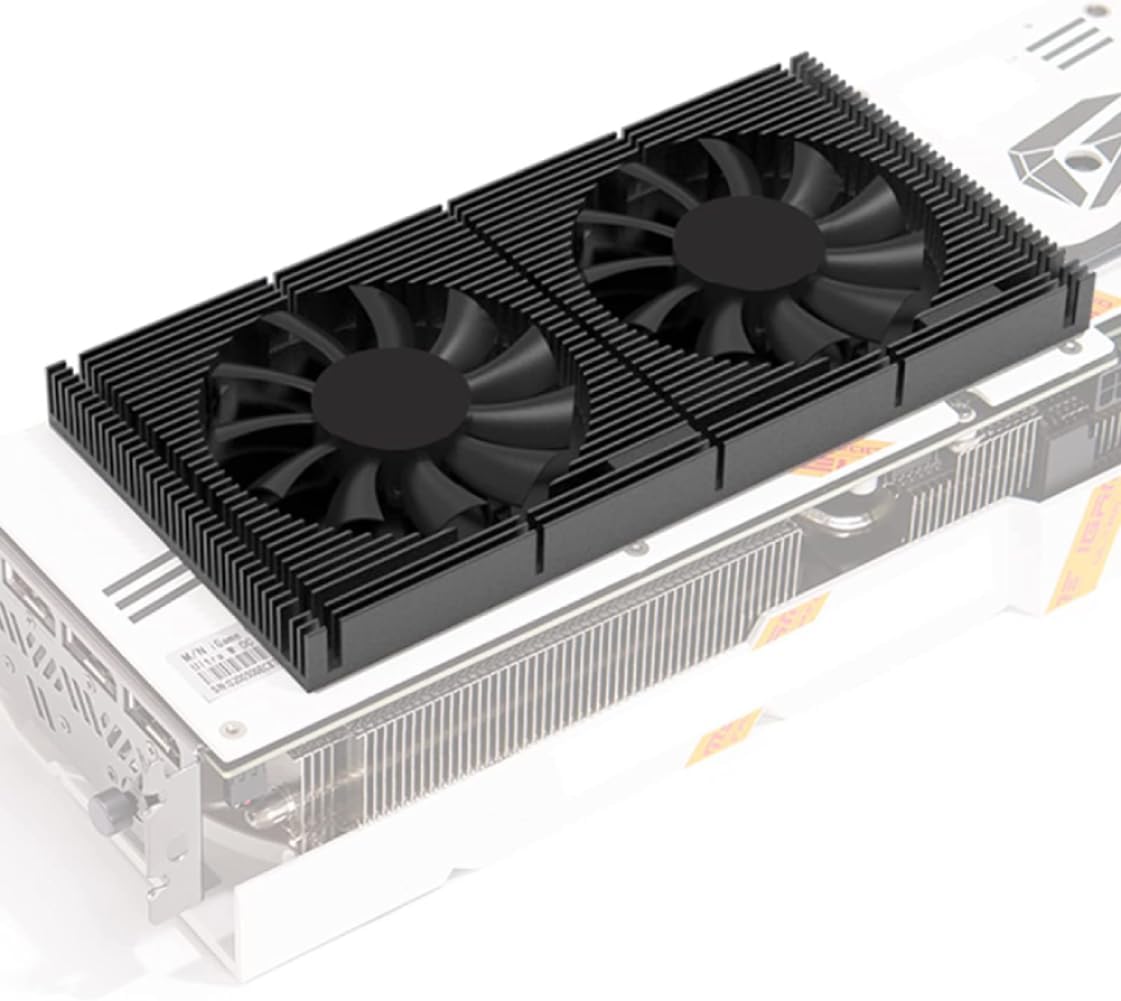
This premium backplate features dual 70mm PWM fans for maximum cooling power. With aviation aluminum and a 7W thermal pad it delivers top-tier performance.
Pros
Dual 70mm fans
7W thermal pad
Aviation aluminum build
Upgraded elastic latch
Adjustable fan speed
Cons
Requires flat surface
Complex installation
We may earn a commission when you buy through this link, at no additional cost to you.
The PWM fans adjust speed from 1500 to 2800RPM automatically for balanced noise. Elastic latches offer secure mounting without permanent modification.
Installation is more complex and requires a flat surface. The larger size may not fit all compact cases.
Best for enthusiasts prioritizing cooling performance. It provides advanced thermal management for high-end GPUs without compromising stability.
Dual Fan Efficiency
Larger 70mm fans move more air for superior heat dissipation.
Advanced Thermal
7W pad ensures better heat transfer than standard 5W options.
We may earn a commission when you buy through this link, at no additional cost to you.
Buying Guide – How to Choose the Best GPU Backplates
Selecting the right GPU backplate involves weighing thermal performance material quality and compatibility to ensure optimal protection.
Compatibility
Ensure the backplate matches your GPU model PCB layout and mounting holes to avoid interference with ports or cables. Always check specific compatibility notes before buying.
Prioritize exact fit models to avoid installation issues.
Material Quality
Aluminum alloys offer excellent balance of heat dissipation and durability. CNC-machined finishes improve aesthetics and corrosion resistance while aviation aluminum adds premium strength.
Select high-grade alloys for lasting structural support.
Thermal Design
Passive designs rely on surface area and fins while active designs include fans for faster heat removal. Consider your case airflow needs when choosing between the two.
Active fans suit hot cases passive designs suit quiet builds.
Cooling Features
Look for integrated thermal pads with high wattage ratings for better heat transfer. Dual fans provide stronger cooling than single fan setups but require more space.
Pre-drilled holes and adhesive tapes simplify DIY installation without modifications. Some models require screws or tools which adds steps to the process.
Choose pre-installed hardware for faster setup.
Thickness
Thickness affects both heat capacity and fit within cases. Thicker backplates dissipate more heat but may need clearance in compact builds.
Verify case clearance for thicker models.
Anti-Sag Support
Structural rigidity prevents GPU sag which can damage motherboard slots. Reinforced designs are critical for heavy cards or vertical mounting.
Opt for reinforced designs to prevent bending.
Fan Interfaces
Fan connectors should match motherboard headers for noise control. 4 pin PWM interfaces allow speed adjustments while 3 pin offers simpler connection.
Select 4 pin for better fan control.
How to Use and Care for Your GPU Backplates
Install the backplate after removing the original GPU cover and ensure thermal pads are correctly aligned for maximum heat transfer.
Regularly check that screws and latches remain tight to prevent flexing which may lead to hardware damage.
Clean the surface with soft cloth periodically to prevent dust buildup that affects thermal performance and appearance.
Frequently Asked Questions
Do GPU backplates improve cooling performance?
Yes, backplates with thermal pads and fins can dissipate heat more effectively. Active models with fans offer even greater cooling benefits for high-performance GPUs.
Are all GPU backplates universal?
No, many backplates are designed for specific GPU models or series. Always check compatibility charts to ensure proper fit and mounting alignment.
What materials are best for backplates?
Aluminum alloys provide a good balance of thermal conductivity and durability. Aviation aluminum and CNC-machined finishes offer premium strength and aesthetics.
How do I install a GPU backplate?
Use pre-drilled holes or adhesive pads to align with the PCB mounting points. Secure with screws provided without applying excessive force to components.
Do backplates cause GPU sag?
No, properly designed backplates add structural rigidity to prevent sagging. Reinforced designs protect against bending and stress on the motherboard slots.
Can I use a backplate with RGB lighting?
Some backplates include RGB elements, but most focus on structural and thermal performance. Check product details to confirm lighting compatibility with your build.
Are passive or active backplates better?
Active models provide better cooling but add noise while passive options remain silent. Choose based on your noise tolerance and cooling needs.
What size thermal pad do I need?
Typically 1.2mm to 1.5mm thickness works for most GPU backplates. Check your model's specs to confirm exact pad dimensions for optimal contact.
Final Thoughts on Choosing the Best GPU Backplates
These ten options cover a range of thermal performance structural support and compatibility for modern GPUs. The top picks offer balanced solutions for budget and premium builders alike.
Focus on material quality and precise fit to protect your investment and enhance cooling efficiency without unnecessary modifications or risks.
Always verify current prices and availability on Amazon before purchasing to ensure you get the best value for your specific GPU model.
This guide compares the top heavy duty Cat6 cables for outdoor and indoor use, focusing on durability, shielding, conductor quality, and long-term performance.
Discover the top laptop skin stickers for 2026. This guide compares ten highly rated options for durability, style, and easy application on various laptop