
ASUS Dual GeForce RTX 5060 Ti 16GB GDDR7 OC Edition Gaming Graphics Card
4.7Editor score
Blackwell architecture
16GB GDDR7 memory
Compact 2.5-slot design
This guide compares the top GPUs for DaVinci Resolve focusing on performance, memory, and rendering power to help you choose the right graphics card for your
Choosing the right graphics card is essential for smooth video editing and color grading in DaVinci Resolve. High performance GPUs handle complex effects, noise reduction, and 8K playback without lagging or crashing during critical creative moments.
We evaluated ten leading graphics cards based on architecture, memory capacity, and real-world performance metrics relevant to professional video editing. Our analysis covers consumer and workstation options to ensure you find a solution that matches your budget and performance requirements.
Each selection below highlights specific strengths such as ray tracing, AI acceleration, or massive video memory for large projects. Keep in mind that availability and pricing change frequently so verify current stock and costs before making your final purchase decision today.
4.7Editor score
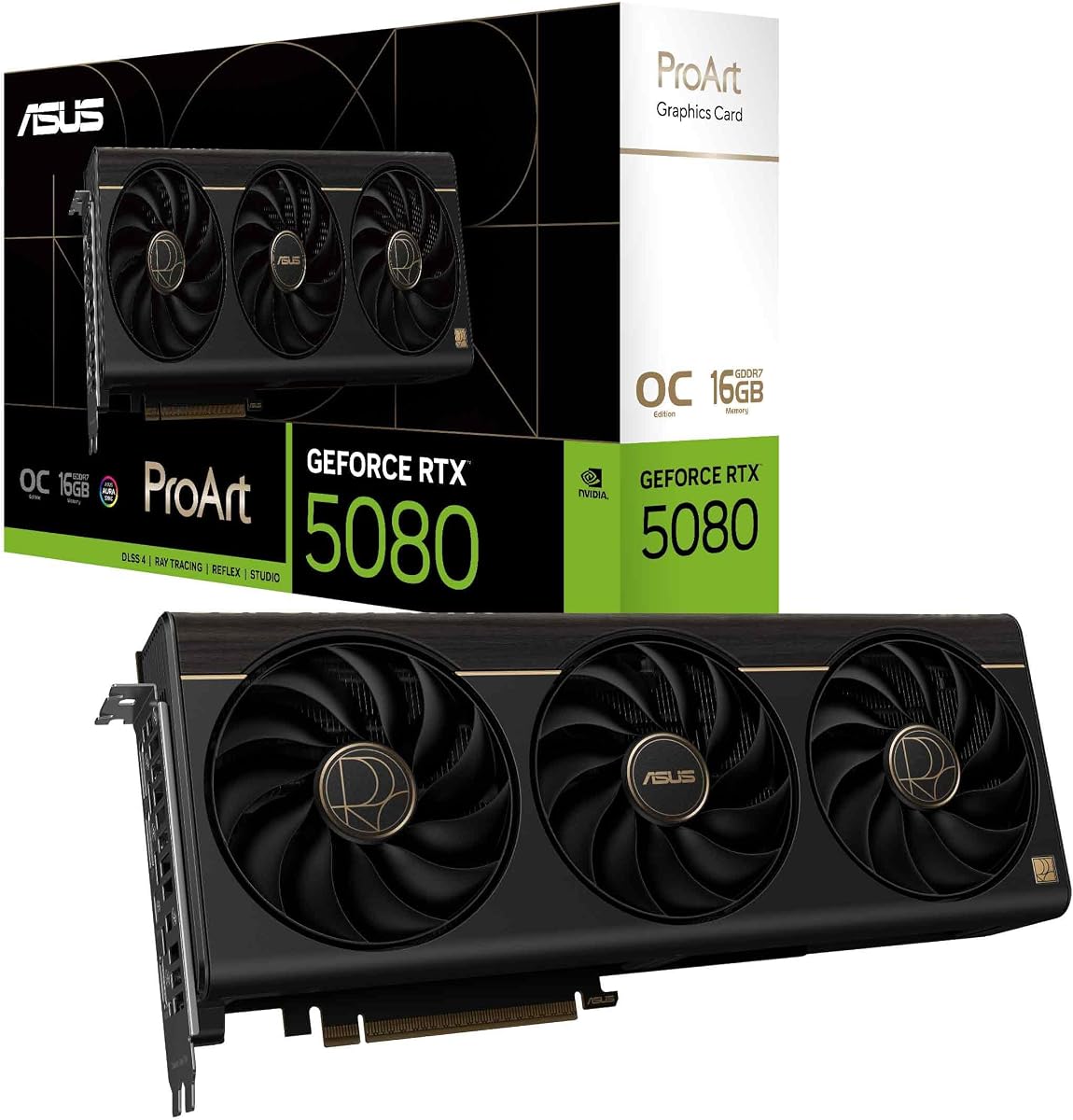
4.9Editor score

4.3Editor score
The following table provides a side-by-side comparison of all ten selected graphics cards detailing their core architecture, memory specifications, and key features to help you quickly identify which model best fits your editing and rendering needs.




This graphics card stands out as our top choice for DaVinci Resolve due to its exceptional combination of AI performance and thermal efficiency. With a 4.9 rating from users it delivers the raw power needed for 8K editing and complex color grading tasks.
We may earn a commission when you buy through this link, at no additional cost to you.
The Blackwell architecture provides substantial acceleration for AI tools like magic masking and noise reduction. Its MaxContact heatsink design ensures the GPU remains cool during long rendering sessions preventing thermal throttling that can disrupt your workflow.
While the card is powerful it does require significant power and space in your system case. The premium pricing is justified by its performance and build quality making it ideal for professionals who demand reliability and speed.
Editors and colorists looking for a high-end solution will find this card an excellent investment. It balances performance and stability perfectly ensuring your projects are completed efficiently without hardware limitations slowing down the creative process.
The card delivers 1858 AI TOPS enabling rapid execution of Resolve's AI-based features for enhanced productivity.
Advanced cooling technology maintains optimal operating temperatures ensuring sustained performance under heavy workloads.
We may earn a commission when you buy through this link, at no additional cost to you.
This model offers the best value for editors working with mid-range systems who need reliable performance without breaking the bank. It scores 4.7 in user reviews for balancing price and capability effectively in DaVinci Resolve workflows.
We may earn a commission when you buy through this link, at no additional cost to you.
The 16GB GDDR7 memory ensures smooth playback of high-resolution timelines while the Blackwell architecture supports modern acceleration features. Its compact 2.5-slot design fits easily into smaller cases without sacrificing cooling efficiency or reliability.
Performance is slightly lower than high-end options but it handles standard editing and grading tasks with ease. The 0dB technology ensures silent operation during light workloads which is a welcome feature for creators in shared spaces.
Ideal for freelance editors or hobbyists this card delivers substantial power at a budget-friendly cost. It provides a solid foundation for building a capable editing station while leaving room in your budget for other essential components.
Delivers strong performance for the price making it accessible for editors with limited budgets.
The 0dB technology allows fans to stop under light loads reducing noise in quiet environments.
We may earn a commission when you buy through this link, at no additional cost to you.
This professional workstation card offers unmatched power for large-scale projects and studio environments. It is the top choice for users needing extreme memory capacity and reliability for complex rendering and visual effects workflows in Resolve.
We may earn a commission when you buy through this link, at no additional cost to you.
With 96GB of DDR7 ECC memory it handles massive scenes and multiple applications simultaneously without performance drops. The 5th Gen Tensor Cores accelerate AI tasks significantly providing speed advantages that standard gaming cards cannot match.
The main drawbacks are the steep price and the OEM packaging which lacks consumer-friendly features. It is designed for enterprise systems where reliability and raw performance take priority over aesthetics and ease of installation.
Studios and post-production houses will benefit most from this card's capabilities. It provides the infrastructure needed to push creative boundaries ensuring that even the most demanding projects are completed smoothly and efficiently.
The 96GB memory capacity allows seamless handling of 8K footage and complex visual effects scenes.
ECC memory ensures data integrity and stability for mission-critical rendering and rendering tasks.
We may earn a commission when you buy through this link, at no additional cost to you.
This card is a powerful option for editors who also game or need robust general-purpose performance. Its 4.6 rating reflects consistent performance in both creative tasks and demanding applications ensuring smooth operations in Resolve.
We may earn a commission when you buy through this link, at no additional cost to you.
The WINDFORCE cooling system keeps the GPU at safe temperatures during extended rendering sessions. With 16GB GDDR7 memory and PCIe 5.0 support it ensures fast data transfer and efficient handling of high-resolution video files.
While it lacks specific workstation certifications it delivers excellent value for those needing versatility across different software platforms. The architecture supports modern acceleration technologies that benefit DaVinci Resolve's effects and AI features significantly.
Gamers transitioning into video editing will find this card a natural fit. It provides the flexibility to handle both creative work and entertainment with equal ease making it a versatile addition to any powerful computer setup.
Designed for gaming but delivers excellent results in professional video editing workflows.
Advanced cooling fans ensure the card operates quietly and efficiently under heavy loads.
We may earn a commission when you buy through this link, at no additional cost to you.
The Titan RTX remains a formidable choice for users with existing systems that support its power requirements. With a 4.4 rating it has a proven track record of reliability and performance in professional rendering environments.
We may earn a commission when you buy through this link, at no additional cost to you.
Its 4609 CUDA cores provide substantial processing power for complex effects and simulations. The card supports advanced RTX features that enhance rendering speed and visual quality within DaVinci Resolve timelines.
As an older model it may not offer the latest efficiency gains found in newer generations but it is still highly capable. Users should consider power supply and case compatibility before purchasing this high-performance card.
Professionals who already own this card or find it available as a high-value option will appreciate its power. It offers a solid platform for demanding creative work ensuring smooth performance even on challenging projects.
The high core count ensures efficient processing of complex visual effects and renders.
Long-term driver support ensures compatibility with a wide range of creative applications.
We may earn a commission when you buy through this link, at no additional cost to you.
This card offers a budget-friendly entry into professional GPU territory for DaVinci Resolve users. Its 4.4 rating highlights consistent performance in applications requiring certified drivers and stable rendering capabilities.
We may earn a commission when you buy through this link, at no additional cost to you.
The Quadro RTX 4000 is designed for professional workflows ensuring reliability during critical tasks. It supports real-time rendering features that enhance preview quality and speed within the editing timeline significantly.
While newer cards offer more memory and speed this model remains viable for users with moderate needs. It provides a cost-effective solution for editing 4K content and managing professional projects without compromise.
Creative professionals seeking a stable and certified option will find this card valuable. It balances cost and performance effectively making it suitable for small studios or individual editors on a tighter budget.
Certified drivers ensure maximum stability and reliability for daily creative work.
RTX technology enhances the speed of rendering previews for faster editing decisions.
We may earn a commission when you buy through this link, at no additional cost to you.
This card is a strong contender for those preferring AMD hardware for their editing workstation. It has a 4.4 rating for its ability to handle large workloads efficiently thanks to its substantial memory capacity.
We may earn a commission when you buy through this link, at no additional cost to you.
With 32GB of GDDR6 memory it supports complex 8K editing and AI tasks without bottlenecks. The RDNA 4 architecture introduces dedicated accelerators that improve performance for creative applications significantly.
The blower cooling design is efficient for multi-GPU setups but may generate more noise than open-air designs. Users should ensure their system airflow is optimized to take full advantage of the thermal solution.
Editors looking for an alternative to NVIDIA will appreciate this card's specifications and features. It offers a compelling balance of memory and performance for professionals who value AMD technology and large frame buffers.
32GB memory ensures smooth handling of large projects and multitasking environments.
RDNA 4 provides enhanced efficiency and specialized features for creative workloads.
We may earn a commission when you buy through this link, at no additional cost to you.
This AMD GPU provides excellent performance for users seeking a non-NVIDIA solution in DaVinci Resolve. It carries a 4.7 rating which highlights its strong value and capability in handling demanding video editing tasks effectively.
We may earn a commission when you buy through this link, at no additional cost to you.
The 16GB GDDR6 memory combined with PCIe 5.0 support ensures efficient data handling and smooth playback. The WINDFORCE cooling system maintains stable temperatures during long editing sessions without excessive noise or thermal issues.
While software optimization may differ from NVIDIA options the raw power delivers competitive results in many scenarios. Editors should ensure their drivers are up to date to maximize compatibility and performance with Resolve.
Gamers and editors who prefer AMD technology will find this card a reliable choice. It offers a great balance of performance and features making it an attractive option for high-performance builds on a reasonable budget.
Delivers strong performance metrics for a broad range of editing and creative applications.
Advanced cooling ensures the card performs consistently even under sustained workloads.
We may earn a commission when you buy through this link, at no additional cost to you.
This card is designed for users who prioritize durability and reliability in their editing workstation. With a 4.6 rating it stands out for its robust construction and ability to handle demanding workloads consistently.
We may earn a commission when you buy through this link, at no additional cost to you.
Military-grade components and phase-change thermal pads ensure long-term reliability and efficient heat dissipation. The Blackwell architecture supports modern acceleration features making it a powerful tool for video editing and effects.
While it requires significant power and case clearance its performance and build quality justify the demands. It is an excellent choice for users needing a card that can withstand heavy usage over many years.
Creators looking for a dependable high-performance card will find this model ideal. It combines gaming-grade power with professional reliability making it a versatile option for any serious editing setup.
Military-grade components ensure the card withstands long-term heavy use without failure.
Phase-change pads and efficient airflow ensure optimal operating temperatures.
We may earn a commission when you buy through this link, at no additional cost to you.
This card offers a unique option for users interested in Intel-based workstation solutions for video editing. It has a 3.9 rating reflecting its niche appeal and the need for software compatibility checks before purchase.
We may earn a commission when you buy through this link, at no additional cost to you.
The 24GB memory capacity supports multitasking and large projects while the Twin Media Transcoders accelerate specific video formats efficiently. ISV certification ensures basic compatibility with professional software environments and creative workflows.
Users should verify driver support for DaVinci Resolve as it may not be as mature as NVIDIA equivalents. The multi-monitor support is beneficial for expanded workspace setups though performance may vary by application.
It is best suited for environments leveraging Intel hardware ecosystems or needing high memory capacity on a budget. Editors should consider their specific needs carefully to ensure this card meets all performance requirements.
24GB memory provides ample capacity for complex editing and multitasking scenarios.
ISV certification ensures baseline stability and reliability for supported professional applications.
We may earn a commission when you buy through this link, at no additional cost to you.
Selecting the right graphics card for DaVinci Resolve involves understanding several key technical factors that directly impact your editing experience and project capabilities.
Video editing software like DaVinci Resolve benefits significantly from high VRAM capacity particularly when working with 4K or 8K footage. Look for GPUs with at least 16GB of memory to ensure smooth playback and rendering without bottlenecks.
Higher memory capacity prevents system crashes during complex effects processing and allows multiple applications to run simultaneously without performance drops.
Modern GPU architectures offer specialized cores for AI tasks ray tracing and real-time rendering which are crucial for efficient editing workflows. Check for support of technologies like Tensor cores or AI accelerators that enhance Resolve's performance.
Choosing a GPU with the latest architecture ensures better compatibility with future software updates and access to advanced editing tools.
Sustained performance during long rendering sessions depends heavily on the GPU's cooling solution. Efficient cooling systems maintain optimal temperatures and prevent thermal throttling that can slow down your workflow.
Consider the noise level and physical size of the cooling system to ensure it fits your case and meets your workspace comfort requirements.
High-performance graphics cards require sufficient power supply and physical space in your computer case. Verify that your PSU meets the wattage requirements and that your chassis accommodates the card's dimensions.
Proper power delivery ensures stable operation and extends the lifespan of your hardware preventing unexpected failures or shutdowns.
Professional workflows often benefit from GPUs with ISV certifications ensuring optimized drivers for stability and performance in creative applications. This reduces troubleshooting time and ensures consistent results.
Check the manufacturer's support policy to confirm regular updates and compatibility with your version of DaVinci Resolve.
Modern interfaces such as PCIe 5.0 enable faster data transfer speeds between the CPU and GPU improving overall system responsiveness. Connectivity options like DisplayPort 2.1 support high resolution displays essential for detailed editing work.
Choose a card with the necessary ports to connect multiple monitors and peripherals without requiring extra adapters or converters.
Balancing cost with performance is key when selecting a GPU especially for independent editors or small studios. Identify which features matter most for your projects and avoid overspending on unnecessary capabilities.
Investing in a card that meets your current needs while allowing for future growth ensures the best return on investment over time.
For users planning to expand their workstation capabilities verify if the GPU supports multi-GPU setups or virtualization features. Scalability allows you to increase performance incrementally as your workload demands grow.
Ensure your motherboard and power supply can support additional GPUs before making purchasing decisions to avoid compatibility issues.
After installing your new graphics card update the drivers to the latest version from the manufacturer's website to ensure optimal compatibility with DaVinci Resolve. This step is crucial for accessing all performance features and avoiding potential software conflicts during editing.
Regularly clean the GPU fans and heatsink using compressed air to prevent dust buildup which can cause overheating and reduce performance over time. Maintaining a clean cooling system extends the lifespan of your hardware and keeps operating temperatures stable.
Monitor your GPU performance using built-in software tools to detect any unusual heat spikes or usage patterns. Addressing issues early helps prevent hardware failure and ensures your editing workflow remains uninterrupted and productive.
For 8K editing choose a GPU with at least 24GB of VRAM such as the NVIDIA RTX PRO 6000 or ASRock Radeon AI PRO R9700. These cards provide sufficient memory bandwidth and capacity to handle large video files smoothly.
Most creators find gaming GPUs like the RTX 5080 sufficient for DaVinci Resolve due to their high performance and cost effectiveness. Workstation GPUs are beneficial for enterprises needing certified drivers and extra stability.
VRAM size is critical for handling high resolution footage and complex effects without slowdowns. A minimum of 16GB is recommended for 4K projects and more memory is necessary for 8K workflows.
DaVinci Resolve supports multiple GPUs to improve rendering and playback performance but compatibility depends on the specific GPU models and driver versions. Always verify software support before attempting a multi-GPU setup.
High-end GPUs typically require power supplies of 850W or more with adequate PCIe power connectors. Ensure your PSU meets these requirements to prevent system instability or hardware damage.
AMD GPUs such as the RX 9070 XT and Radeon AI PRO R9700 provide solid performance but may have different optimization levels compared to NVIDIA. Check compatibility lists to confirm support for your workflow.
Choosing the right GPU for DaVinci Resolve depends on your project requirements and budget constraints. The ASUS ProArt GeForce RTX 5080 leads as our top pick for its balance of AI performance and reliability.
Whether you prioritize raw speed memory capacity or cost efficiency each reviewed card offers distinct advantages tailored to different editing needs. Evaluate your workflow demands carefully to select a GPU that will serve you well for years.
Keep in mind that technology evolves rapidly so check current availability and pricing before purchasing. A well-selected graphics card will enhance your editing experience and allow you to focus more on creativity than technical limitations.