
H10 Android 14
4.2Editor score
Integrated thermal printer
NFC contactless payment
All day battery life
Handheld pos systems transform how businesses accept payments by bringing the register directly to the customer. These mobile devices streamline transactions and improve service speed across various industries.
We evaluated ten top rated handheld pos terminals based on connectivity options battery life and software compatibility. Our analysis highlights models suitable for retail food service and mobile vendors.
Each review covers key features and real world performance notes to help you choose the right hardware. Prices and availability change frequently so verify current details before purchasing.
4.2Editor score

4.7Editor score

5.0Editor score
As an Amazon Associate we earn from qualifying purchases.
The following table provides a side-by-side overview of key specifications and features across all ten reviewed handheld pos systems to aid your selection process.




The Square Handheld delivers a sleek portable solution for businesses needing flexible payment processing. Its slim profile fits easily in pockets while maintaining robust payment capabilities.
We may earn a commission when you buy through this link, at no additional cost to you.
Built for mobility this device supports offline transactions ensuring you never miss a sale due to connectivity issues. The battery easily lasts through long shifts without interruption.
While it excels in convenience the hardware ties you to Square software which may limit flexibility for some merchants. An optional protective case adds bulk but protects against drops.
Ideal for food trucks and retail staff this terminal balances portability with reliability. Choose it if you prioritize ease of use and all-day operation without constant recharging.
This terminal stores transactions locally when internet is unavailable syncing them once connectivity returns.
Inventory lookups and sales can be handled directly through the built-in scanner reducing input errors.
We may earn a commission when you buy through this link, at no additional cost to you.
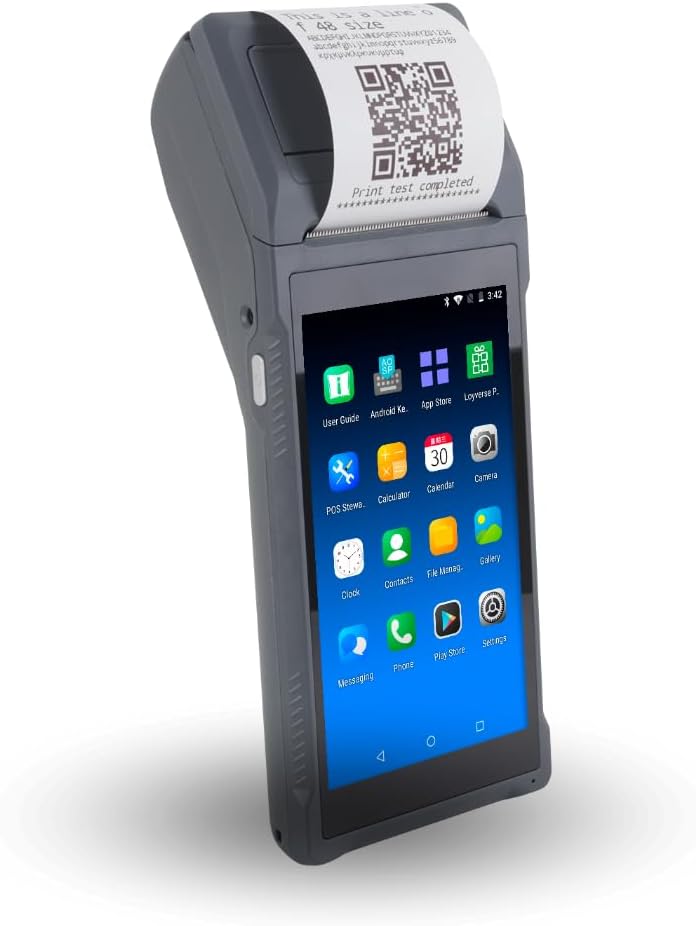
The H10 handheld terminal offers a comprehensive all-in-one experience at an accessible price point. It combines Android 14 performance with essential receipt printing directly in the device.
We may earn a commission when you buy through this link, at no additional cost to you.
Its large battery supports up to fourteen hours of runtime making it suitable for long workdays. The NFC reader streamlines contactless payments for faster customer service.
The thermal printer is functional but may not match high volume speed requirements. Connectivity options are robust but setup can vary by carrier or network configuration.
This unit is ideal for small businesses needing a full terminal without high costs. Prioritize it if you want integrated hardware simplicity and modern OS support.
Running Android 14 allows access to a wide range of business apps and updates.
Ten watt fast charging ensures quick turnaround when power levels drop during shifts.
We may earn a commission when you buy through this link, at no additional cost to you.
The Alacrity PDA represents high end performance with a spacious display and versatile printing options. It handles complex tasks efficiently thanks to strong processor and memory specs.
We may earn a commission when you buy through this link, at no additional cost to you.
Its six point five inch screen provides clarity for data entry and customer signatures. The thermal printer accommodates both standard receipts and wider labels for inventory needs.
The larger size may be cumbersome for tight pockets but offers better visibility in bright light. Setup requires attention to network settings given the extensive connectivity options.
Choose this device for logistics or retail environments needing robust hardware. It justifies its cost through superior display quality and adaptable printing capabilities.
Adjustable print width supports both receipt and label media for broader use cases.
The dedicated scan module reads difficult codes quickly even in challenging lighting.
We may earn a commission when you buy through this link, at no additional cost to you.
The Bisofice POS terminal provides a straightforward mobile payment solution with built-in printing. Its compact design makes it easy to carry around cafes and small shops.
We may earn a commission when you buy through this link, at no additional cost to you.
Operating on Android 8.1 it ensures stability for basic POS tasks though it lacks latest features. The thermal printer keeps costs low by eliminating ink cartridge needs.
Bluetooth and WiFi support offer decent connectivity but speeds may lag compared to newer standards. The battery holds charge well but not as long as top tier models.
This model fits small operations prioritizing simple functionality over advanced features. It works well where basic printing and payment acceptance are the main goals.
Direct thermal technology reduces ongoing expenses by removing ink and ribbon costs.
Connectivity options allow quick pairing with peripheral devices for enhanced workflow.
We may earn a commission when you buy through this link, at no additional cost to you.
The Bisofice 4G PDA offers modern software and complete network coverage for remote work. It arrives ready to print receipts immediately with included paper rolls.
We may earn a commission when you buy through this link, at no additional cost to you.
Supporting both 1D and 2D barcodes it handles inventory management efficiently. The five inch screen offers clear visuals for quick navigation during busy periods.
Battery life is adequate for short shifts but may need mid day charging for extended use. Build quality is functional but lacks the ruggedness of industrial grade devices.
This terminal suits mobile sales teams needing constant connectivity. It balances updated software with practical hardware features for daily retail tasks.
Supports 4G and 2G networks ensuring signal availability in varied locations.
Five MP camera captures barcodes quickly to speed up checkouts and scans.
We may earn a commission when you buy through this link, at no additional cost to you.
The Square Terminal serves as a robust countertop device with mobile capabilities. It processes chip cards quickly ensuring secure and smooth transactions for customers.
We may earn a commission when you buy through this link, at no additional cost to you.
Payouts happen as soon as the next business day providing quick access to funds. The battery lasts all day allowing flexible use across different store areas.
While not as pocketable as other models it offers stability for fixed locations. The printer integration keeps receipts organized without extra hardware on the counter.
Opt for this if you prefer a dedicated checkout station that moves. It balances security and convenience for small retail environments.
Card transactions finalize in seconds reducing wait times at the checkout counter.
Simple pricing with no hidden charges keeps financial planning straightforward for owners.
We may earn a commission when you buy through this link, at no additional cost to you.
The Q2i Terminal supports multiple POS software providers making it flexible for existing systems. It prints receipts rapidly to keep lines moving during peak hours.
We may earn a commission when you buy through this link, at no additional cost to you.
Running Android 11 ensures access to many business tools through the Play Store. The dual-band Wi-Fi helps maintain connection stability in crowded retail spaces.
Scanning is limited to standard barcodes so QR code needs are not met. Setup depends on third party app integration which may require technical support.
This device works well for businesses needing hardware that adapts to various software. Check compatibility before buying to ensure it fits your specific stack.
Thermal printing reaches eighty millimeters per second for quick transaction records.
Dual-band support minimizes dropouts in environments with heavy network traffic.
We may earn a commission when you buy through this link, at no additional cost to you.
The P1 terminal delivers reliable performance with hybrid connectivity options for busy stores. Its Dejavoo hardware ensures secure processing for all major payment types.
We may earn a commission when you buy through this link, at no additional cost to you.
Staff prefer the physical keypad alongside the touchscreen for quick entry and accuracy. The display is crisp making it easy to review transaction details for customers.
Connectivity includes both Ethernet and WiFi reducing downtime risks during busy periods. It is designed more for stationary use than for mobile sales rounds.
Select this unit for retail counters needing consistent uptime and clear inputs. It offers a balanced blend of security and usability for fixed locations.
Hybrid connectivity ensures transactions continue even if one network mode fails.
Combining touch and physical keys reduces errors during high volume processing.
We may earn a commission when you buy through this link, at no additional cost to you.
This PDA excels at order management and scanning rather than direct payment processing. It delivers exceptionally fast print speeds for kitchen tickets and receipts.
We may earn a commission when you buy through this link, at no additional cost to you.
The ten core CPU ensures smooth multitasking even during peak order times. The professional scanning engine reads damaged codes reliably reducing data entry errors.
It lacks encrypted card reading so requires pairing with an external reader for payments. The paper cutter is useful but may need occasional adjustment for clean cuts.
Ideal for restaurant kitchens or retail queues this device keeps workflows moving. Use it where speed and scanning accuracy are more critical than payment acceptance.
Ten core CPU architecture prevents slowdowns when running multiple background apps.
Built-in zigzag cutter creates professional looking receipts without manual tearing.
We may earn a commission when you buy through this link, at no additional cost to you.
Clover GO fits in your pocket turning any smartphone into a payment terminal. It pairs via Bluetooth making it simple to set up for temporary locations.
We may earn a commission when you buy through this link, at no additional cost to you.
Security is robust with end-to-end encryption protecting both your business and customer data. Custom tips and tax settings add flexibility for different service types.
Paperless receipt options help reduce waste and keep records organized digitally. However it requires new payment processing setup which might affect existing accounts.
This reader is perfect for vendors needing minimal hardware and high security. It works best when integrated with existing Clover or SwyftPAY accounts.
Bluetooth connectivity eliminates cables allowing true movement with customer transactions.
Text and email receipts streamline compliance and simplify customer communication.
We may earn a commission when you buy through this link, at no additional cost to you.
Selecting the right handheld pos system requires evaluating hardware capabilities alongside your business needs and payment processing requirements.
Modern handheld devices run on Android which determines app availability and security updates. Newer OS versions support advanced features and longer software support lifespans. Older versions may lack compatibility with new POS applications.
Choose a model with the latest supported OS to ensure access to security patches and business tools.
Battery capacity directly impacts operational hours away from a power source. Devices with 5000mAh or more typically support full shifts without interruption. Charging speed is also important for quick top-ups between shifts.
Look for units offering at least ten hours of runtime if you move frequently between locations.
Reliable connectivity ensures transactions are processed smoothly. Dual-band Wi-Fi and cellular support like 4G LTE keep devices online in varied environments. Bluetooth allows pairing with external card readers or peripherals.
Verify that the device supports networks available in your operating area before purchasing.
Integrated thermal printers reduce the need for separate hardware. Print widths vary between 58mm for receipts and 80mm for labels. Speed affects how quickly customers receive their copies.
Select a printer size that matches your specific receipt or ticket printing needs.
Barcode scanners improve accuracy and speed during inventory or checkout. Two-dimensional scanning handles QR codes and complex product codes. Autofocus and high resolution cameras help read damaged or low contrast codes.
Ensure the scanner supports all code types you encounter in daily operations.
Some devices handle payments directly while others pair with external readers. Verify if the unit supports encrypted card processing or if it is for scanning only. Processing provider compatibility impacts transaction fees and account setup.
Check processor compatibility and payment processing rules before buying to avoid extra costs.
Handheld units face drops spills and daily wear. Look for water and dust resistance ratings to ensure longevity. Protective cases may be sold separately but add necessary safety for rugged use.
Prioritize models with proven durability if your staff moves frequently in dynamic environments.
The device software determines which POS apps you can run. Some hardware is tied to specific providers limiting flexibility. Open systems allow installation of multiple third-party applications via the Play Store.
Choose a device that supports the specific POS software your business relies on.
Begin by downloading your preferred POS application and configuring settings. Pair any external card readers via Bluetooth and test connectivity in your operating area.
Charge the battery fully before first use and keep spare cables on hand. Ensure the thermal printer has enough paper loaded before starting shifts to prevent interruptions.
Regularly clean the screen and scanner lens with a soft dry cloth. Store the device in a protective case when not in use to prevent accidental damage.
Many modern terminals store transactions locally and sync them once connectivity is restored. This offline mode ensures you can continue accepting payments even during temporary network outages. Always check if your specific model supports offline processing before relying on it.
Most models offer between eight to fourteen hours of continuous use on a single charge. Battery duration depends on screen brightness and printing frequency. Carrying a spare charger is recommended for long shifts.
Some devices are tied to specific payment processors requiring new merchant accounts. Others support third party integrations for more flexibility. Always verify compatibility with your current processor before purchasing.
Thermal printers eliminate the need for ink or toner cartridges reducing maintenance costs. They produce receipts quickly and are generally more durable for portable use. However thermal paper can fade over time compared to standard inkjet.
Hold the scanner steady and ensure proper lighting for optimal results. Devices with autofocus and flash handle low light better. Clean the lens regularly to prevent blurry scans that slow down transactions.
Reputable handheld pos systems use end-to-end encryption to protect sensitive card data. Look for devices certified by major payment networks to ensure compliance. Security features prevent unauthorized access and protect both business and customers.
Units with cellular support require a SIM card for mobile data connectivity. Devices relying only on Wi-Fi do not need one. Check if your model includes SIM functionality if you operate outside store premises.
Essential accessories include a protective case and spare thermal paper rolls. A fast charger and portable power bank add flexibility for long days. Consider a stand if you plan to use it as a fixed counter.
The Square Handheld and Alacrity PDA top our list for overall performance and features. They balance robust hardware with flexible connectivity for various business needs.
Prioritize battery life and payment compatibility when deciding on a model. These factors impact daily workflow and operational reliability more than raw specs.
Verify current pricing and processing details before purchasing to ensure the best fit. Regular updates may change features so check the latest product pages.