
Guermok Video Capture Card
4.4Editor score
Affordable USB 3.0 design
Plug and play setup
Works with major software
HDMI recorders allow you to capture high-definition video directly from consoles and cameras without needing a powerful computer. They are essential for gamers who want to preserve their best moments or educators recording lectures.
We evaluated ten models based on resolution support, ease of use, and reliability. Our analysis covers standalone units and USB capture cards to help you find the perfect fit for your workflow.
Each pick highlights key strengths and limitations based on user feedback. Prices and availability change frequently so verify details before purchasing to ensure you get the best value for your needs.
4.4Editor score
4.0Editor score

4.1Editor score
As an Amazon Associate we earn from qualifying purchases.
The following table provides a side-by-side comparison of all ten models reviewed in this guide. It highlights core specifications like resolution support and input types to help you quickly identify the model that fits your specific recording requirements.





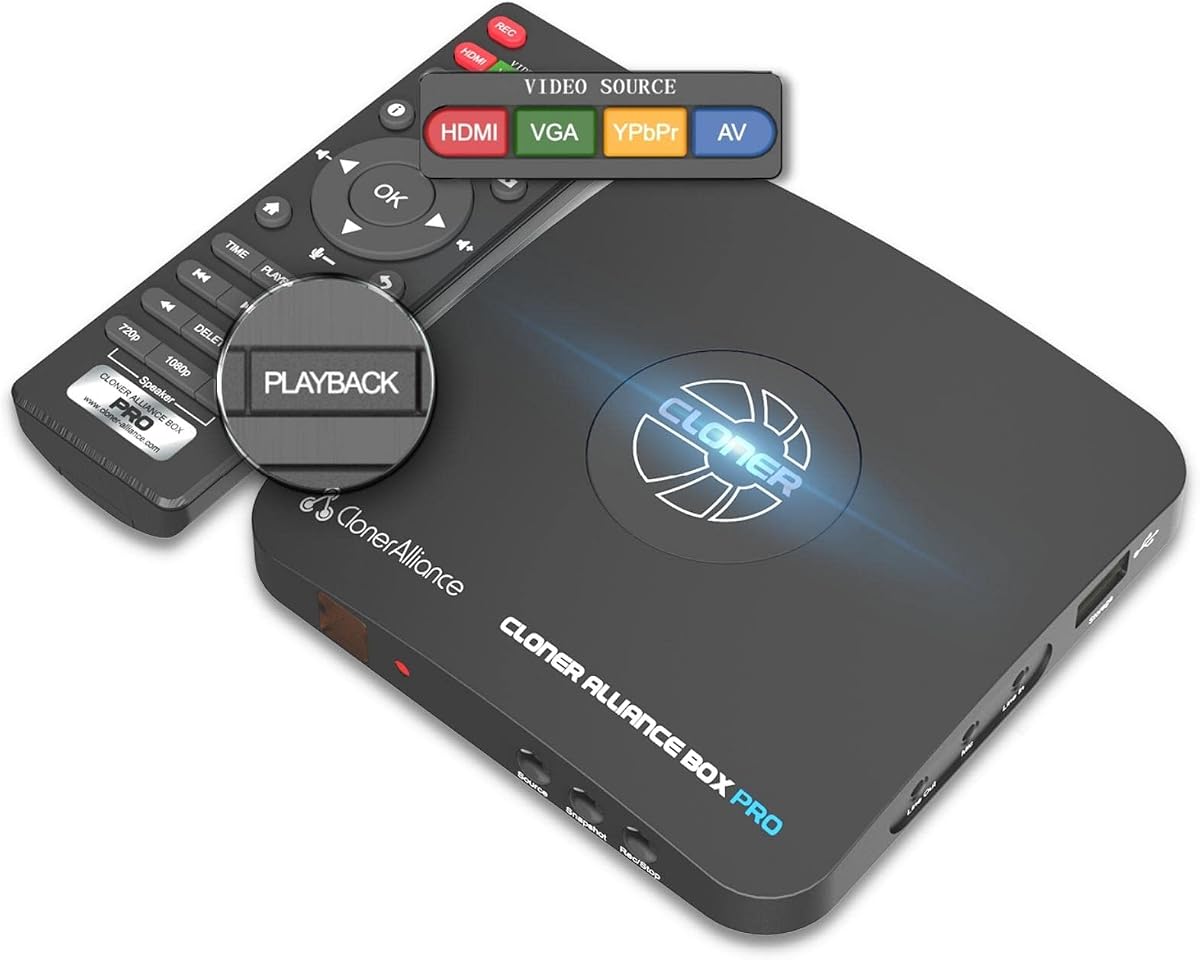
The ClonerAlliance Box Pro stands out as a robust standalone video recorder designed for ease of use. With a rating of 4.0 stars it delivers reliable 1080p capture at 60fps without needing a computer connected.
We may earn a commission when you buy through this link, at no additional cost to you.
Its key strength lies in versatility supporting HDMI RCA VGA and more allowing you to digitize old tapes or capture modern game consoles easily. The ultra-low latency ensures your gameplay remains smooth while recording.
While it lacks support for HDCP protected content the limitation is expected for devices in this category. The interface is straightforward making it accessible for beginners or older adults looking to archive their memories.
We recommend this model for users who want a plug and play solution for analog to digital conversion or simple gameplay recording. It offers excellent value for those avoiding complex PC setups.
This device allows you to record and playback directly on a TV without needing a computer or software installation.
Connect VHS players or camcorders to convert old analog footage into digital MP4 files effortlessly.
We may earn a commission when you buy through this link, at no additional cost to you.
The Guermok Video Capture Card offers an exceptional entry point for streamers on a tight budget. It delivers solid 1080p60fps performance and maintains high user satisfaction with a 4.4 star rating.
We may earn a commission when you buy through this link, at no additional cost to you.
Its USB 3.0 connection ensures fast data transfer for lag free streaming on platforms like Twitch or YouTube. The compact build makes it ideal for creators who travel or need a portable recording solution.
You must use external capture software as this is not a standalone unit. It does not support reverse transmission so it cannot turn a monitor into an input source for other devices.
This card is perfect for students or hobbyists wanting to start streaming without investing in expensive hardware. It balances performance and cost effectively for casual recording needs.
Get high quality video capture capabilities at a price point that is accessible to everyone.
Its lightweight form factor allows you to pack it easily in a bag for mobile streaming setups.
We may earn a commission when you buy through this link, at no additional cost to you.
The ClonerAlliance UHD Pro is a powerhouse for capturing high resolution content directly to storage. With 4K recording and H.265 codec support it delivers professional quality without needing a PC.
We may earn a commission when you buy through this link, at no additional cost to you.
Its 4K pass-through ensures you can play games at full resolution while recording. The pause resume feature gives you precise control over your recording sessions for better editing later.
While the price is higher than budget USB cards the standalone convenience justifies the cost for serious archivists. It supports both H.264 and H.265 for flexible file management.
We recommend this for users who want to capture 4K content from consoles or cameras and store it directly on a USB drive. It is a top choice for quality focused creators.
Capture ultra high definition video directly to your storage device with impressive clarity and detail.
The H.265 codec reduces file sizes without compromising quality allowing longer recording sessions.
We may earn a commission when you buy through this link, at no additional cost to you.
This capture card is tailored for streamers who need reliable performance with minimal setup effort. It delivers crisp 1080p60fps video and includes a loop out port for instant monitoring without lag.
We may earn a commission when you buy through this link, at no additional cost to you.
The inclusion of a mic input allows you to add live commentary directly into your capture stream. It supports a wide range of devices from Xbox to DSLR cameras making it highly versatile.
While it does not support high refresh rate 4K input for most gamers it handles standard HD content well. The build is functional but not premium compared to high end models.
It is an excellent choice for new streamers or those upgrading from older USB 2.0 solutions. The compatibility with OBS and Windows makes it a practical daily driver for content creators.
The HDMI loop out ensures you see your gameplay instantly on your monitor with no processing delay.
Use the 3.5mm mic jack to add your voice to streams without extra audio hardware.
We may earn a commission when you buy through this link, at no additional cost to you.
The Audio Express AXHDCAP is a compact and affordable option for basic recording needs. It supports HDMI input at 4K and outputs clean 1080p video suitable for conferences and casual gameplay.
We may earn a commission when you buy through this link, at no additional cost to you.
Its design includes advanced thermal dissipation ensuring it remains stable during long recording sessions. The ultra-low latency technology keeps the preview smooth so you never miss a moment.
Because it uses USB 2.0 it is capped at 30fps which may not be ideal for fast action sports. However it offers excellent compatibility with Mac Linux and Windows systems.
We recommend this for educators or presenters who need to record video calls or lectures on a budget. It is a simple reliable tool for non-critical recording tasks.
Built-in heat management keeps the device stable during extended use without overheating issues.
Seamlessly works with Windows Mac and Linux allowing flexible setup options for any user.
We may earn a commission when you buy through this link, at no additional cost to you.
This capture card is designed for creators who are always on the move. It is extremely lightweight and supports 1080p60fps capturing ensuring your mobile streams look professional.
We may earn a commission when you buy through this link, at no additional cost to you.
It works instantly without needing drivers allowing you to focus on content rather than configuration. It supports major consoles like the Switch and PS5 for versatile gaming setups.
The low latency design ensures your broadcast stays synchronized with your gameplay. It is well suited for LAN parties or travel recording sessions where convenience matters.
We recommend this for gamers who want a reliable backup card or a travel solution. It balances portability and performance well for on the go streaming needs.
Its small footprint and light weight make it perfect for fitting into laptop bags easily.
Connect to any HDMI enabled device and start recording immediately without complex setup.
We may earn a commission when you buy through this link, at no additional cost to you.
This device stands out for its dual HDMI inputs allowing you to mix or switch between sources easily. It features a built-in 7 inch screen for previewing content without a TV or monitor.
We may earn a commission when you buy through this link, at no additional cost to you.
It supports Picture in Picture modes which are useful for tutorials or commentary video. The option to run on a battery makes it highly portable for field recording or on site work.
The interface may feel complex for beginners compared to simpler USB cards. Also HDCP protected content will result in a black screen so it is not suitable for streaming movies.
We recommend this for video professionals or content creators who need multi-source mixing on the fly. It is a unique tool for presentations or event recording.
Connect two devices like a console and a camera to switch between them seamlessly.
See your video feed instantly on the built-in screen without needing a large monitor.
We may earn a commission when you buy through this link, at no additional cost to you.
The ZowieREC 4K combines sleek aesthetics with reliable standalone recording performance. Its premium aluminum casing makes it durable for both home and professional environments.
We may earn a commission when you buy through this link, at no additional cost to you.
It supports 4K recording and includes a scheduling feature to automate your capture sessions. The pause and resume functionality gives you full control over your video file management.
As a standalone unit it offers convenience but lacks the extensive feature set of higher rated rivals. Note that AV adapters are not included so ensure your devices match its inputs.
We recommend this for users who value build quality and a clean design. It is a solid choice for recording gameplay or presentations without needing a computer.
The aluminum casing provides durability and a professional look that fits well in any setup.
Set scheduled recordings to capture content at specific times without your intervention.
We may earn a commission when you buy through this link, at no additional cost to you.
This model offers the convenience of a built-in screen making it a truly self-contained recording unit. With a 7 inch display you can preview and play back footage anywhere without extra gear.
We may earn a commission when you buy through this link, at no additional cost to you.
It supports a wide array of inputs from HDMI to VGA allowing you to digitize almost any video source. The included remote control makes navigation intuitive for all ages.
While the price is higher the portability and screen justify the cost for mobile use cases. It is ideal for recording conferences or capturing old tapes on the go.
We recommend this for users who need a truly portable standalone recorder with a preview screen. It removes the need to hook up to a TV or monitor constantly.
The built-in screen allows you to operate and view content independently without external monitors.
Capture from RCA or VGA sources preserving your vintage video collections in digital format.
We may earn a commission when you buy through this link, at no additional cost to you.
This is a professional grade capture device intended for broadcast and high end production workflows. It utilizes SDI inputs which provide reliable high speed video transmission.
We may earn a commission when you buy through this link, at no additional cost to you.
Its loop outputs allow multiple monitors or recorders to receive the same signal simultaneously. It is built to handle demanding environments where stability is critical.
For casual users it may be overkill and expensive compared to consumer models. Also it requires SDI sources rather than standard HDMI making it less versatile for gamers.
We recommend this for studios or professionals requiring SDI connectivity. It is a top choice for reliable broadcast quality recording and monitoring.
Uses SDI inputs for stable high bandwidth video transmission ideal for broadcast environments.
Multiple loop outputs let you connect several monitors for real-time video distribution.
We may earn a commission when you buy through this link, at no additional cost to you.
Choosing the right HDMI recorder depends on your specific use case whether it is gaming streaming or archiving. This guide breaks down the essential factors you need to consider.
Ensure the recorder supports the resolution you need. Some devices capture only 1080p while others support true 4K. Check both input and output specs carefully.
Higher resolution means clearer video but also larger file sizes. Choose a model that matches your storage capacity and display quality.
Standalone recorders work without a computer making them easier to use. PC capture cards require software like OBS but offer more editing flexibility.
Select standalone units for simplicity and PC cards for advanced control and streaming features.
Check if the device supports USB drives or SD cards. Some models allow direct recording to storage while others rely on computer hard drives.
USB storage options provide portability so you can carry footage easily without transferring files later.
Low latency is crucial for gaming to avoid lag between your actions and what is recorded. Look for specs mentioning ultra-low latency or pass-through.
High latency can disrupt gameplay or make live streaming difficult so prioritize models with fast processing.
Verify that the device supports your source signals like HDMI RCA or VGA. Analog converters are necessary if you want to capture old tapes.
Ensure all your devices match the recorder inputs to avoid buying extra adapters unnecessarily.
Most consumer recorders do not support HDCP protected content like streaming services. This means you cannot record Netflix or Blu-ray directly.
Be aware of this limitation if you intend to record commercial content as it may result in a black screen.
Codecs like H.264 or H.265 affect file size and quality. H.265 offers better compression but needs a newer device.
Choose a model with modern codecs to save storage space while maintaining high video quality.
Some recorders allow you to schedule automatic recording at specific times. This is useful for capturing live TV or scheduled events.
Look for this feature if you need to record content when you cannot be present manually.
Start by connecting your HDMI source to the recorder and storage device to the USB port. Ensure cables are secure to avoid signal loss during recording sessions.
Use the built-in screen or software to monitor the feed before starting. This helps you frame your shot or confirm levels are correct.
Keep your device in a well ventilated area to prevent overheating during long captures. Regularly check firmware updates to ensure optimal performance.
Yes standalone recorders like the ClonerAlliance Box Pro allow you to record directly to a USB drive. You only need a monitor to preview the output without a computer.
This usually means the source is protected by HDCP which these devices do not support. You must use unprotected video sources like consoles or cameras to record successfully.
Use high-speed USB drives or SD cards with fast write speeds. This ensures smooth recording without dropped frames or data corruption during long sessions.
You cannot capture directly from a TV output but you can capture from boxes that connect to the TV. Use the HDMI output from your cable box instead.
PC capture cards require software like OBS but standalone recorders do not. Check the product details to see if drivers or apps are needed for your model.
If you have a 4K display or want future proofing 4K is worth it. However it requires more storage and processing power than 1080p.
We reviewed ten top HDMI recorders covering options from budget USB cards to standalone premium units. Each model offers unique features tailored to different recording needs and budgets.
Prioritize factors like resolution support and whether you need standalone operation. Choosing the right device will make your recording process smoother and more efficient.
Remember that prices and availability change frequently so check current details before buying. This guide remains updated to reflect the latest models and user experiences.