
ASRock Intel Arc A580 Challenger 8GB OC
4.6Editor score
8GB GDDR6 Memory
Dual Fan Cooling Design
DirectX 12 Ultimate
This comprehensive guide compares the top 10 Intel Arc GPU models available in October 2026, analyzing performance, memory, and features for buyers.
Selecting the right graphics processor involves balancing performance, memory capacity, and specific workload requirements. Intel Arc GPUs offer a compelling mix of modern architecture, AI acceleration, and versatile connectivity options for diverse users.
We evaluated ten distinct models ranging from budget-friendly gaming cards to high-end workstation solutions. Our analysis focuses on architectural features, cooling efficiency, display outputs, and real-world application support across various professional and consumer scenarios.
Each pick highlights unique strengths and potential trade-offs to help you make an informed decision. Product specifications and availability change frequently, so always verify current stock and pricing details before finalizing your purchase decision today.
4.6Editor score

4.7Editor score

3.9Editor score
The following table provides a side-by-side comparison of all ten selected Intel Arc GPU models. It outlines key specifications including memory size, architecture generation, cooling solutions, and display connectivity options to facilitate quick decision-making.



The ASRock Arc B570 Challenger stands out as a versatile option for gamers and creators seeking a balance between performance and affordability. It features a robust 10GB of GDDR6 memory and the latest Xe2-HPG architecture, ensuring it handles modern titles and creative workloads effectively.
We may earn a commission when you buy through this link, at no additional cost to you.
Its standout strength lies in the inclusion of Intel XeSS 2 technology and high clock speeds of 2600 MHz. These features significantly enhance frame rates and visual fidelity in supported games. The dual fan cooling system maintains optimal thermal performance without excessive noise during intense sessions.
While the build quality is impressive with a metal backplate, users should ensure their power supply has an 8-pin connector. Additionally, drivers continue to evolve, so checking for updates before gaming marathons is recommended for the best experience.
This card is ideal for users targeting 1440p gaming or content creation on a budget. It offers future-ready connectivity and strong AI features, making it a solid investment for those needing reliable performance without premium pricing.
XeSS 2 and XMX engines deliver enhanced upscaling and AI acceleration for smoother gameplay and faster rendering times.
Three DisplayPort 2.1 and one HDMI 2.1a output support high-resolution, high-refresh-rate displays for immersive visuals.
We may earn a commission when you buy through this link, at no additional cost to you.
Targeted at professionals, the ASRock Arc Pro B60 Creator delivers exceptional memory capacity and workstation-grade reliability. The 24GB GDDR6 memory allows for handling large datasets and complex rendering tasks without bottlenecks, making it ideal for AI and design work.
We may earn a commission when you buy through this link, at no additional cost to you.
Its Xe2-HPG architecture provides significant AI acceleration with 197 INT8 TOPS. The inclusion of dual media transcoders supports fast video export in high-resolution formats. ISV certification ensures stability across critical engineering and manufacturing software suites.
However, the blower-style cooling design prioritizes airflow in multi-GPU setups over silent operation, which may be noisy in quiet environments. Users must verify chassis clearance and PSU capacity before installation due to its 200W TDP requirement.
This GPU is perfect for AI researchers and designers needing high memory bandwidth and multi-monitor support. Its scalability for Linux multi-GPU deployments makes it a powerful tool for local LLM inference and complex computational tasks.
ISV drivers validate performance for AI, design, and engineering software to ensure stability during critical projects.
Optimized for Linux environments to allow scaling AI performance across multiple cards for complex inference tasks.
We may earn a commission when you buy through this link, at no additional cost to you.
The ASRock Arc A580 Challenger offers an accessible entry point into the Arc ecosystem without sacrificing core performance. With 8GB of GDDR6 memory and a factory overclocked clock speed, it handles 1440p gaming and multimedia tasks efficiently.
We may earn a commission when you buy through this link, at no additional cost to you.
Its dual-fan cooling system ensures temperatures remain stable during heavy loads while offering silent operation at idle. The inclusion of a stylish metal backplate adds structural rigidity and a premium aesthetic suitable for modern builds.
Users should note the requirement for two 8-pin PCIe power connectors and verify chassis space due to its dimensions. Despite being PCIe 4.0, it delivers excellent bandwidth for most current games and creative applications.
This card is ideal for budget-conscious gamers and students needing solid performance. Its support for modern graphics APIs and efficient cooling makes it a reliable choice for everyday computing and entertainment.
Dual-fan design with ultra-fit heatpipe maintains stable temperatures while stopping fans at low loads for silence.
Full DirectX 12 Ultimate support and XeSS technology ensure compatibility with the latest gaming titles.
We may earn a commission when you buy through this link, at no additional cost to you.
The Sparkle Arc B580 Titan OC brings a compelling combination of capacity and cooling innovation. Its 12GB of GDDR6 memory provides a comfortable buffer for high-resolution textures and complex rendering tasks in modern applications.
We may earn a commission when you buy through this link, at no additional cost to you.
Equipped with Torn Cooling 2.0, the card ensures efficient heat dissipation during extended gaming sessions. The blue breathing light adds a unique aesthetic touch, while the included sag bracket protects the hardware from physical stress.
Performance is solid for its segment, though users should check for specific driver optimizations. The metal backplate offers structural support, ensuring the card remains stable over time even with heavy workloads attached.
Ideal for gamers wanting extra VRAM without jumping to flagship tiers, this card balances performance and visual flair. It is a strong candidate for those prioritizing thermal efficiency and hardware protection in their builds.
Torn Cooling 2.0 ensures efficient heat dissipation during extended sessions to maintain stable performance levels.
Included sag bracket and metal backplate protect the hardware from physical stress and improve stability.
We may earn a commission when you buy through this link, at no additional cost to you.
Designed for heavy AI workloads, the WEELIAO MAXSUN Arc Pro B60 48G delivers incredible compute power in a single card form factor. Its dual-GPU design combines two Arc Pro B60 units to offer 48GB of memory for complex tasks.
We may earn a commission when you buy through this link, at no additional cost to you.
This capacity allows running 70B-class quantized models like DeepSeek-R1:70B entirely on local hardware. It supports major software frameworks including PyTorch and vLLM, eliminating the need for expensive cloud services.
While highly efficient, it requires a motherboard that supports PCIe lane bifurcation to achieve full bandwidth. The triple-thermal design ensures sustained performance during long inference tasks without overheating.
This is the top choice for researchers needing local LLM inference without multi-card setups. It lowers system costs for deployment and provides reliable cooling for server-like workloads in standard consumer platforms.
48GB memory allows running large models like DeepSeek locally, eliminating the need for cloud services.
Combined 394 TOPS provide high concurrency for multi-turn dialogues and complex AI inference workloads.
We may earn a commission when you buy through this link, at no additional cost to you.
The MAXSUN Arc Pro B60 Dual 48G features two Arc Pro B60 GPUs working in tandem for exceptional parallel processing power. This design provides a massive 48GB of dedicated graphics memory for large-scale rendering and AI inference tasks.
We may earn a commission when you buy through this link, at no additional cost to you.
Its compact dual-slot form factor fits neatly into standard PCIe slots without monopolizing expansion space. The turbo cooling system efficiently exhausts heat, keeping thermals in check during sustained heavy workloads in professional environments.
Engineered to accelerate machine learning and creative applications, it offers high-bandwidth memory access. Users should ensure their power supply is sufficient to handle the combined load of the dual chips during peak performance.
This solution is ideal for professional studios needing high capacity without multi-card setups. It simplifies system complexity while delivering significant compute power for demanding visual computing tasks.
Dual GPU design delivers exceptional parallel processing power for demanding professional workloads efficiently.
Turbo cooling system exhausts heat efficiently to maintain stable thermals during sustained heavy workloads.
We may earn a commission when you buy through this link, at no additional cost to you.
This bundle combines the ASRock Arc B570 Challenger with a reliable PRO-650G power supply for a complete gaming solution. The GPU delivers smooth 1440p gaming performance while the 80 PLUS Gold PSU ensures stable and clean power delivery.
We may earn a commission when you buy through this link, at no additional cost to you.
Leveraging Intel XeSS 2 and XMX, it offers AI-powered frame generation to boost image quality and frame rates. The PSU is ATX 3.1 ready, offering future compatibility with modern system requirements for longevity.
Ideal for first-time builders, it removes the guesswork of power supply selection. However, users may prefer more power headroom for future upgrades, though the included unit is sufficient for this specific card.
This is a smart choice for those wanting a plug-and-play experience without compatibility issues. It provides essential power infrastructure alongside strong graphics performance for an accessible entry into gaming PCs.
PRO-650G PSU delivers stable clean power with 80 PLUS Gold certification for system efficiency and stability.
XeSS 2 technology enhances performance and image quality through AI-powered frame generation in supported titles.
We may earn a commission when you buy through this link, at no additional cost to you.
The GUNNIR Arc PRO B50 LP is an ultra-compact solution for small form factor and edge workstations. Despite its slim 167x69x18.4mm dimensions, it delivers 16GB of high-speed GDDR6 memory on a 128-bit bus.
We may earn a commission when you buy through this link, at no additional cost to you.
It draws 70W directly from the slot, requiring no external PCIe power connector. This makes it a perfect upgrade for mini-towers where space and power connectivity are limited. The turbo fan ensures heat exhausts efficiently from the chassis.
Its architecture supports up to 170 TOPS of INT8 compute power for accelerating AI inference and deep learning tasks. It bridges the gap between compact design and professional performance in a unique package.
This card is ideal for SFF builds needing professional-grade compute without external power. It allows users to maintain small systems while accessing substantial memory capacity for rendering and inference.
Slim low-profile design fits into mini-towers and edge workstations without requiring external power connectors.
Delivers up to 170 TOPS of INT8 compute power for efficient AI inference and parallel processing tasks.
We may earn a commission when you buy through this link, at no additional cost to you.
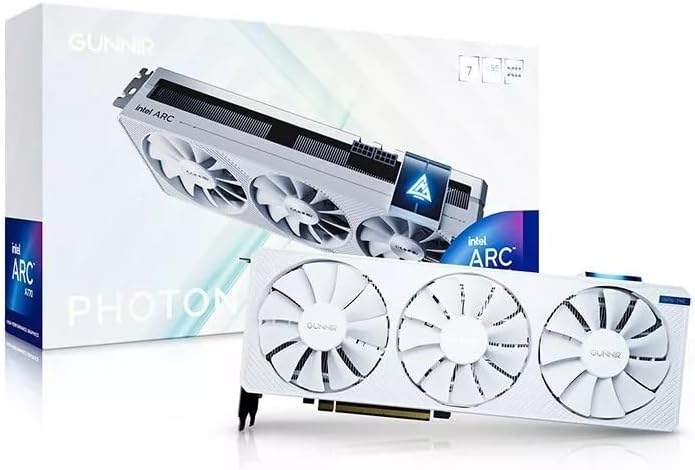
The WEELIAO GUNNIR Arc A770 Photon stands out with its striking white aesthetic, perfect for visually focused builds. It packs 8GB of GDDR6 VRAM and a triple fan design to ensure efficient cooling and stable temperatures during workloads.
We may earn a commission when you buy through this link, at no additional cost to you.
This card is ready to connect to the latest displays with support for 4K monitors via HDMI and DisplayPort. Its 2400MHz core clock delivers exceptional performance for gaming and content creation tasks requiring high frame rates.
The triple fan setup provides ample airflow to maintain stability, ensuring the card runs quietly under moderate loads. Users should ensure their power supply is adequate for the card's TDP and dimensions.
Ideal for those wanting a clean build aesthetic without compromising on performance, this card offers both form and function. It handles demanding graphics workloads with ease while looking elegant in any PC case.
Stunning white aesthetic and triple fan design ensure both performance and an elegant visual appearance.
HDMI and DisplayPort support enables connection to latest 4K monitors for immersive visual experiences.
We may earn a commission when you buy through this link, at no additional cost to you.
Designed for multi-monitor setups, the Sparkle Arc A310 Omni View offers four HDMI outputs in a single-slot profile. Its low 50W power design allows it to fit into systems without robust power supplies or cooling.
We may earn a commission when you buy through this link, at no additional cost to you.
With 4GB of GDDR6 memory, it handles basic display tasks and light rendering effectively. This card is perfect for trading desks, digital signage, or extended desktop setups where power efficiency is key.
The single fan ensures silent operation while maintaining safe thermal levels. Users should note it is not designed for high-end gaming but excels in productivity and display versatility.
This is the best choice for users needing multiple display outputs without complex power requirements. It provides reliable performance for professional monitoring tasks and casual use in energy-efficient environments.
Four HDMI outputs enable expansive multi-monitor workflows without requiring adapters or complex wiring.
Low 50W power draw allows operation without external connectors for energy efficient workstation upgrades.
We may earn a commission when you buy through this link, at no additional cost to you.
Choosing the right Intel Arc GPU depends on your specific workload needs and budget. Consider memory size, architecture, and cooling to match your hardware goals.
Memory size determines how large models or textures you can load simultaneously. For AI and rendering, prioritize cards with at least 16GB or more. Bandwidth ensures data moves quickly between GPU and memory for smooth performance.
Select higher VRAM for complex tasks to prevent bottlenecks during intensive computing.
Newer architectures like Xe2-HPG offer better AI acceleration and efficiency. Check for support of features like XeSS 2 and XMX engines. These technologies boost gaming performance and reduce power consumption.
Choose the latest generation for future-proofing and enhanced AI capabilities.
Effective cooling keeps thermals in check during sustained workloads. Options range from blower designs for multi-GPU setups to dual or triple fan configurations for quieter single-card performance.
Ensure your case has sufficient airflow to support the chosen cooling method.
Verify your power supply meets the card's TDP and connector needs. Some models use single 8-pin connectors while others need dual pins. Bifurcation support is crucial for dual-GPU cards to achieve full bandwidth.
Match power delivery to the GPU to avoid instability and ensure longevity.
Modern outputs like DisplayPort 2.1 and HDMI 2.1a support high resolutions and refresh rates. For multi-monitor workflows, prioritize cards with multiple ports or HDMI clusters.
Check your monitor inputs match the available outputs on the graphics card.
ISV certification and ISV drivers ensure stability for professional applications like CAD and AI. Open-source model support is essential for local LLM deployments. Check for active community updates and framework compatibility.
Verify software compatibility with your intended creative or research applications.
Compact users should look for single-slot or low-profile designs that fit small cases. Workstations may need larger cards with robust heatpipes. Always measure case clearance before purchasing.
Ensure the card dimensions fit within your chassis limits.
Compare features against price to find the best value. Bundles can offer better deals by including essential power supplies. Evaluate long-term costs versus immediate savings for your setup.
Prioritize performance features that directly impact your primary use case.
Install the graphics card in a secure PCIe slot ensuring it sits flat. Connect the necessary power cables firmly to the designated connectors on the card.
Install the latest drivers from Intel or the manufacturer to ensure full feature support. Update periodically to benefit from performance patches and bug fixes.
Monitor temperatures during heavy workloads using system tools. Clean dust from fans and vents regularly to maintain optimal airflow and cooling performance.
Yes, all modern Intel Arc GPUs feature dedicated hardware ray tracing units. These units handle light simulation for realistic visuals in supported games and applications.
Absolutely. Intel Arc GPUs support frameworks like PyTorch and vLLM. Features like Xe Matrix Extensions help accelerate AI inference and deep learning tasks significantly.
Drivers have improved significantly over recent months. Most issues are resolved with updates, though checking the latest patches before launch titles is recommended.
Most require PCIe 4.0 or higher for optimal bandwidth. Some models work with PCIe 3.0 but may see slight performance reductions depending on the workload.
Yes, Intel Arc GPUs support Resizable BAR technology similar to AMD Smart Access Memory. This feature boosts performance by allowing the CPU to access more VRAM at once.
Yes, some listings include power supplies for convenience. Bundles often provide better value by ensuring power compatibility with the graphics card included.
This guide covered ten distinct models ranging from entry-level cards to high-end workstation solutions. Selecting the right one depends on balancing memory needs against budget constraints.
Prioritize architecture and cooling for long-term stability. Ensure your power supply and case dimensions accommodate the specific model you choose.
Always verify current availability and pricing before purchasing. Hardware markets shift quickly and bundles may offer the best overall value for your setup.