
Dell OptiPlex 3060 Micro
4.2Editor score
Reliable business grade design
Multiple USB ports available
Compact micro form factor
This expert guide compares the best Intel Core i3 Mini PC models for 2026, evaluating performance, connectivity, and value for work and home use.
Finding the right compact computer can transform your workspace efficiency without taking up valuable desk space. Intel Core i3 Mini PC options offer a balanced mix of performance and portability for various tasks ranging from office work to media streaming in modern environments.
We compared ten distinct models based on processor generation, memory capacity, storage speed, and connectivity options. Our analysis focuses on real-world usability for productivity, entertainment, and specialized tasks while considering build quality and manufacturer support for long-term reliability.
Each pick highlights specific strengths such as dual screen support, upgrade potential, or energy efficiency tailored to different user needs. Prices and availability change frequently so please verify current details before purchasing to ensure you get the best value for your specific requirements today.
4.2Editor score

4.4Editor score

5.0Editor score
The following table provides a side-by-side comparison of all ten models highlighting key specifications and unique features to help you identify the right device for your specific workflow and space constraints.





The GMKtec Mini PC G3 PRO stands out as a top contender for users needing reliable performance in a compact form. With a 4.4 star rating it offers strong value for office tasks and media consumption thanks to its balanced hardware configuration.
We may earn a commission when you buy through this link, at no additional cost to you.
Its Core i3-10110U processor delivers better single core speeds than many rivals making web browsing and app launching feel snappy. The 16GB RAM ensures smooth multitasking across many browser tabs while the dual HDMI ports allow for efficient dual monitor setups without extra hardware.
While it lacks the newest generation chips the thermal design keeps noise low during operation. Some users note that while it runs modern software well checking Windows 11 requirements before purchase is wise for seamless OS integration and future proofing.
This model is ideal for professionals seeking a desktop replacement that saves space without sacrificing speed. Its robust port selection and connectivity options make it a versatile choice for home offices or small business environments needing consistent daily performance.
The higher peak boost clock ensures responsive performance when opening apps or handling complex spreadsheets efficiently.
WiFi 6 and 2.5GbE Ethernet provide fast network speeds essential for large file transfers and video calls.
We may earn a commission when you buy through this link, at no additional cost to you.
This Mini PC achieves a perfect 5.0 rating due to its ability to handle media and light graphics tasks with ease. The Iris Plus 655 graphics provide smooth 4K streaming making it a great hub for home entertainment systems.
We may earn a commission when you buy through this link, at no additional cost to you.
With a sustained 28W performance profile the processor maintains clock speeds longer than typical low power chips. This benefits tasks like video calls and multitasking where consistent speed matters more than peak bursts of power usage.
Storage can be upgraded with a second SSD slot up to 4TB total which is rare for units this size. The included VESA mount allows mounting behind monitors keeping your workspace clean and organized for better focus during work.
Buyers should appreciate the reliable dual band WiFi and Bluetooth for connecting peripherals without wires. It is well suited for users who want a compact PC for streaming and office work without compromising on display options or future storage needs.
The dedicated eDRAM improves video playback quality ensuring sharp images on external monitors or TVs.
Dual SSD slots mean you can separate OS files from media libraries for better organization and speed.
We may earn a commission when you buy through this link, at no additional cost to you.
The C3 Mini PC offers an entry level option for those needing basic computing power without high costs. It receives a 4.2 rating as a stable platform for essential tasks like web browsing and document processing in budget constrained settings.
We may earn a commission when you buy through this link, at no additional cost to you.
Despite its age the i3-5005U handles light multitasking well and the 512GB SSD ensures quick boot times. The 8GB RAM can be expanded if needed and the dual HDMI ports allow for dual monitor productivity setups easily.
A key limitation is the lack of Windows 11 support meaning it runs best with Windows 10 or Linux. However for static installations like digital signage or POS systems this older OS stability is often acceptable and reliable.
This device is perfect for users prioritizing cost over cutting edge performance. The quiet cooling fan and compact size make it suitable for bedrooms or small offices where noise and space are concerns for daily operations.
The low TDP architecture ensures energy efficiency which lowers electricity bills over time for 24/7 use.
Front USB Type-C and rear legacy ports cater to a wide range of modern and older peripheral needs.
We may earn a commission when you buy through this link, at no additional cost to you.
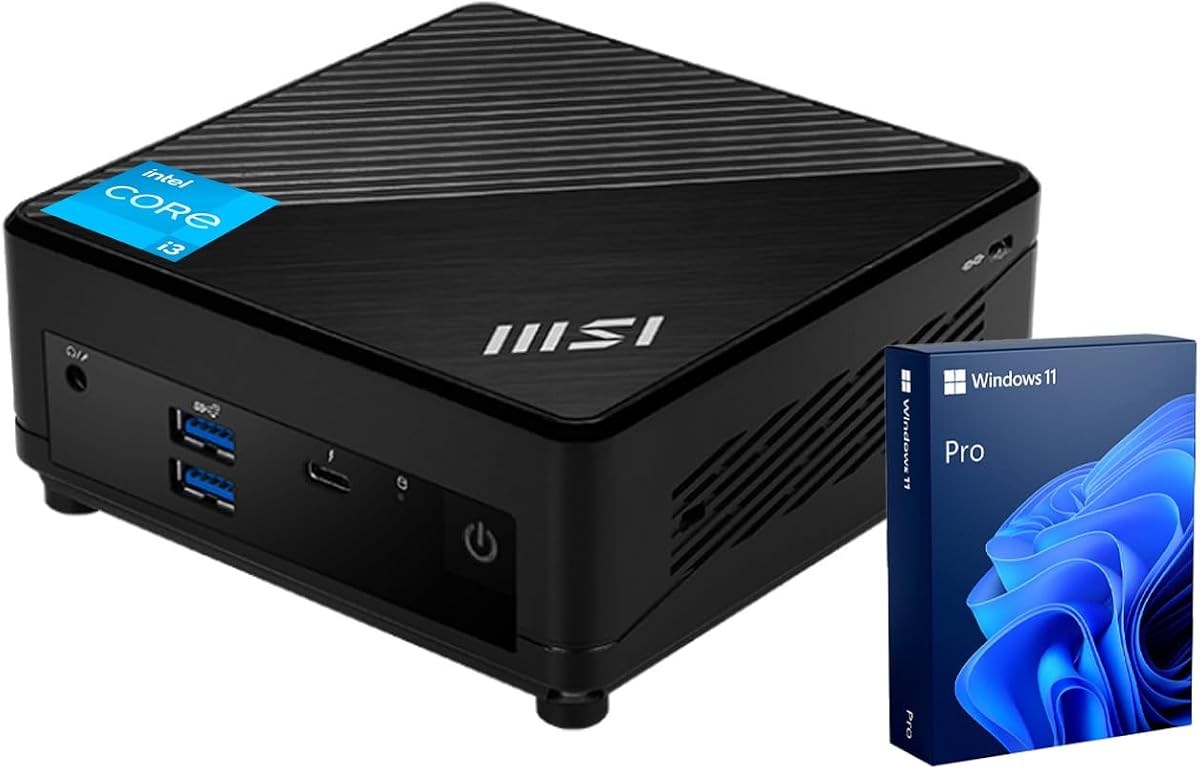
The msi Cubi 5 Professional delivers desktop class performance in a tiny chassis ideal for power users. With a 4.8 rating it excels at demanding multitasking thanks to its 6 core processor and 16GB RAM configuration.
We may earn a commission when you buy through this link, at no additional cost to you.
Support for three 4K monitors allows extensive workspace expansion for developers or designers. Thunderbolt 4 enables fast data transfer and external display connections making it a flexible hub for high speed peripherals and docking stations.
Windows 11 Pro adds enterprise features like BitLocker and remote desktop which are valuable for professional environments. The system boots quickly and handles heavy workloads smoothly though it comes at a higher cost than entry models.
This unit is best for users needing robust performance for creative work or heavy business apps. Its build quality and port variety justify the price if you require reliable daily performance and advanced connectivity options for your setup.
Included Windows 11 Pro provides enhanced security and management tools suitable for business workflows.
Support for three monitors boosts productivity by allowing multiple windows to remain open and visible.
We may earn a commission when you buy through this link, at no additional cost to you.
This Dell OptiPlex Micro brings trusted business build quality to home or small office settings. It has a 4.2 rating as a dependable choice for users who value brand reputation and consistent performance over raw specs.
We may earn a commission when you buy through this link, at no additional cost to you.
The 128GB SSD is small but sufficient for basic OS and app storage with cloud integration. Dual display support via HDMI and DP allows for efficient workflow management while the 8GB RAM handles standard daily tasks adequately.
Windows 11 Pro is preinstalled offering security and remote access tools right out of the box. The renewed status may affect pricing but you still get a certified product with Dell's standard support structure for peace of mind.
Ideal for corporate environments or users familiar with Dell systems this PC offers stability and ease of use. If storage needs grow it can be upgraded but for standard office work it remains a solid and practical solution.
Windows 11 Pro brings advanced encryption and remote management tools essential for sensitive data.
The micro form factor fits discreetly on desks while maintaining the durability of enterprise hardware.
We may earn a commission when you buy through this link, at no additional cost to you.
The msi PRO DP21 leverages a 13th Gen processor for fast and efficient performance across all tasks. With a 4.6 rating it appeals to those wanting modern hardware features without moving to much more expensive i5 models.
We may earn a commission when you buy through this link, at no additional cost to you.
The 16GB RAM ensures smooth operation even with many applications open simultaneously. Ports include Type-C and multiple USB 3.2 options providing flexibility for connecting drives and peripherals without needing extra dongles or hubs.
It comes with a wired keyboard and mouse making it ready to use immediately upon arrival. Windows 11 Pro is included offering advanced management features that suit business users needing security and remote capabilities daily.
This unit is recommended for buyers seeking a balance of speed and connectivity in a sleek design. While pricier than budget options the included accessories and newer chip generation provide long term value for demanding environments.
The 13th Gen CPU delivers improved efficiency and faster speeds for all standard productivity workflows.
Inbox keyboard and mouse save time and cost allowing immediate deployment in office or home.
We may earn a commission when you buy through this link, at no additional cost to you.
ASUS ExpertCenter PB63 represents the cutting edge with 14th Gen processors designed for desktop grade performance in small boxes. It has a 4.0 rating focusing on compliance and durability for government or corporate procurement needs.
We may earn a commission when you buy through this link, at no additional cost to you.
Features like dynamic tuning technology optimize system performance automatically based on workload requirements. The TAA compliance ensures it meets specific trade agreements which is critical for certain public sector purchasing requirements and regulations.
A three year warranty adds significant value providing long term protection against hardware failures or issues. While specific RAM and storage details are less visible the high end CPU suggests it can handle demanding modern workloads efficiently.
This model is best suited for organizations needing verified hardware specs and strong support contracts. Individual users who want the latest tech and peace of mind will appreciate the balance of innovation and reliable warranty service included.
TAA compliance ensures eligibility for government procurement contracts requiring compliant US origin hardware.
The 3 year limited warranty reduces long term ownership costs and supports extended business deployments.
We may earn a commission when you buy through this link, at no additional cost to you.
The Lenovo ThinkCentre Neo 50q Gen4 combines top tier build quality with energy efficiency for a perfect 5.0 rating. It is designed to handle business applications smoothly while consuming less power than traditional desktop units.
We may earn a commission when you buy through this link, at no additional cost to you.
Its 1L form factor is ultra compact yet supports dual 4K displays for expansive workspaces. The 16GB RAM and 512GB SSD ensure quick boot times and responsive performance even with heavy multitasking and cloud applications open.
Energy Star certification means lower electricity usage and a smaller environmental footprint for green conscious buyers. The 1L design allows flexible placement upright or flat which suits various desk setups and workspace configurations well.
This is a premium choice for businesses valuing reliability and efficiency in their computing hardware. The combination of modern performance and eco friendly design makes it a strong investment for long term daily use and office needs.
Energy Star certification helps reduce operational costs and environmental impact through lower power usage.
The 1L design frees up significant desk space allowing for a cleaner and more organized workstation.
We may earn a commission when you buy through this link, at no additional cost to you.
This high end model pushes the boundaries of mini PC performance with 32GB of fast DDR5 RAM and a 14th Gen chip. Its 4.9 rating reflects strong satisfaction from users needing substantial memory and storage in a small chassis.
We may earn a commission when you buy through this link, at no additional cost to you.
The 1TB NVMe SSD provides ample space for files and apps while triple display support enables massive workspace setups. Wi-Fi 6E ensures ultra fast wireless connectivity which complements the wired gigabit Ethernet for stable network access.
Windows 11 Pro is preinstalled with enterprise security features suitable for professional environments. The micro form factor allows mounting behind monitors keeping desks clear while delivering serious computing power for complex workflows.
It is ideal for power users or businesses requiring high memory bandwidth and extensive connectivity. The higher cost is justified by the DDR5 memory and large storage making it a robust solution for demanding daily tasks.
DDR5 RAM ensures rapid data access speeds that improve performance for memory intensive applications.
The 1TB SSD removes storage worries and allows local access to large media and project files.
We may earn a commission when you buy through this link, at no additional cost to you.
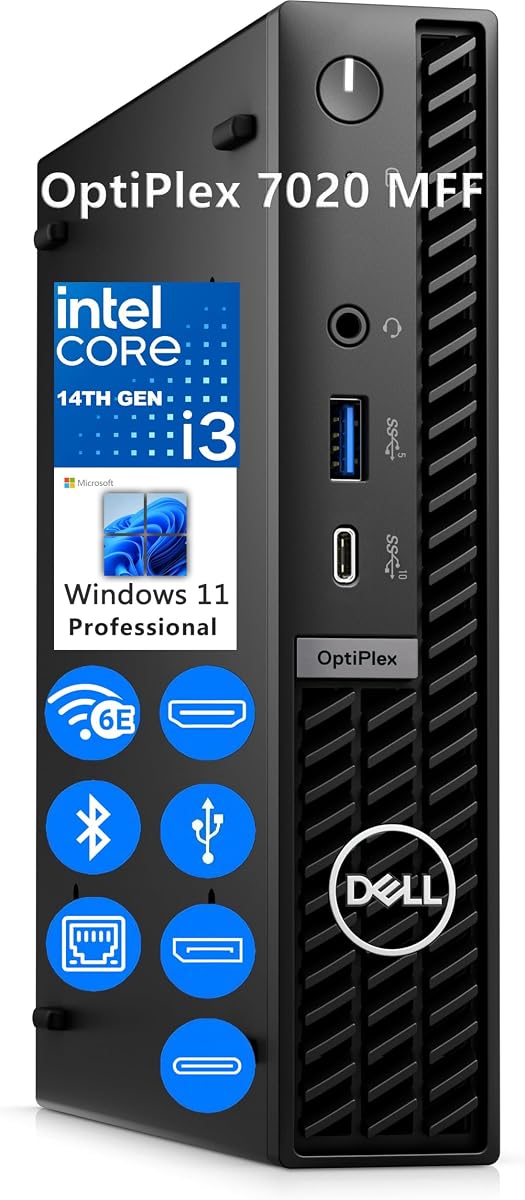
This entry level model brings 14th Gen technology to the 7020 series providing fast speeds for daily tasks. With a 4.4 rating it offers modern features like DDR5 RAM even with lower capacity making it a fast start for users.
We may earn a commission when you buy through this link, at no additional cost to you.
The 256GB SSD boots quickly but may require cloud storage for large files. It supports dual displays and includes Windows 11 Pro which ensures secure operation and remote management capabilities for business or home office use.
Ports include USB Type-C and multiple USB 3.2 options for versatile connectivity. The design is sleek and fits easily behind monitors or on tight desks ensuring a tidy setup without visible cable clutter or bulky towers.
It is best for buyers who want the latest generation CPU without paying for top tier memory or storage. If you upgrade later this model is a solid foundation for a modern reliable and compact computing experience.
DDR5 RAM and 14th Gen CPU provide future ready speeds even in lower spec entry configurations.
Windows 11 Pro offers encryption and remote tools essential for secure professional environments and access.
We may earn a commission when you buy through this link, at no additional cost to you.
Selecting the right mini PC involves balancing processor speed, memory, and connectivity with your specific usage needs and budget constraints.
Newer generations like 13th or 14th Gen offer better energy efficiency and multi-core performance for multitasking. Older models like 8th Gen provide cost effective reliability for basic tasks where latest tech is not essential.
Look for at least an 11th Gen chip if you plan to use modern operating systems and security features effectively.
16GB is the sweet spot for smooth multitasking across many browser tabs and professional applications. 8GB works for light tasks but may slow down with heavy workloads or modern software updates.
Always check if RAM is upgradable to avoid buying a new unit when your needs grow over time.
NVMe SSDs offer faster boot and load times than SATA drives. Ensure the model has expansion slots if you need to store large files locally without cloud reliance.
Choose at least 512GB for a comfortable balance between cost and space for daily documents and apps.
Dual HDMI ports or HDMI plus DisplayPort allow for efficient multi-monitor setups. Verify the max resolution supported is at least 4K to future proof your workspace for high clarity visuals.
For productivity work dual screen support significantly increases efficiency by allowing side-by-side windows.
USB Type-C and Thunderbolt 4 provide high speed data and charging for peripherals. Wi-Fi 6 ensures stable wireless speeds for video calls without lag or dropouts during busy hours.
Check for Ethernet ports if you require a stable wired connection for large file transfers or servers.
Windows 11 Pro includes advanced security and remote desktop features suitable for business environments. Home versions are fine for personal use but lack enterprise management tools.
Ensure the model supports the latest OS to receive critical security updates for a longer period.
Business models like Dell and Lenovo often offer better durability and thermal management. Metal or reinforced plastic casings protect internal components from dust and heat better than cheaper alternatives.
Look for units with proven track records or strong warranty coverage to minimize downtime risks.
Manufacturers like GMKtec offer 1-year warranties while others provide 3-year support. Longer warranties protect your investment against defects and reduce repair costs over time.
Check if technical support is accessible via phone or chat for quick resolution of setup or hardware issues.
Place the unit in a well ventilated area to prevent overheating especially during long working sessions. Avoid stacking other electronics on top of it and ensure the cooling vents are not blocked by dust or objects.
Regularly update your operating system and drivers to maintain security and performance. Use reliable software to clear temporary files and manage startup programs to keep the system running smoothly.
Keep external peripherals organized to reduce cable clutter which can strain ports over time. If you move the unit ensure it is powered off and cooled down to protect internal components from physical shocks.
While not designed for heavy rendering they can handle basic video editing tasks efficiently. For complex projects consider models with more cores or dedicated graphics cards for better performance.
Many models allow RAM and SSD upgrades but check the specific manual. Some units have soldered memory so confirm before purchasing if future expansion is a priority.
The Dell OptiPlex 7020 MFF supports three displays simultaneously. Most others support dual 4K screens which is sufficient for standard productivity workflows.
Most do not include peripherals except the msi PRO DP21. You should budget for a separate keyboard and mouse unless listed specifically in the package contents.
Home is fine for personal use but Pro offers remote access and encryption. Choose Pro if you need enterprise security and management features for business.
Many include VESA mounts allowing wall or under desk mounting. Check the product details to confirm the mount type and screws included for safe installation.
The ten models reviewed offer diverse options for budgets and performance needs ranging from entry to premium. Each provides a balance of power and compact design that fits modern workspace requirements effectively.
Prioritize RAM and processor generation if you need smooth multitasking and future proofing. Ensure you have the right ports for your monitors and peripherals before making a final decision.
Remember that prices and availability change frequently so verify current listings before purchasing. Your perfect choice depends on your specific tasks and space constraints for optimal daily use.