
LACIE Z230636-240FLaCie Rugged Mini
4.6Editor score
Includes protective case bundle
Password protection built-in
USB 3.0 fast speeds
Finding reliable storage is crucial for professionals who work in demanding environments. The Lacie Rugged External Hard Drive series has long been a standard for durability, offering protection against drops, dust, and moisture while maintaining high performance standards for creative workflows.
We have analyzed ten distinct models from the Lacie Rugged lineup to help you find the perfect fit. Our comparison considers connectivity options like USB-C and Thunderbolt, storage capacities ranging from 1TB to 8TB, and specific features like RAID support or SSD technology.
Each product in this list highlights key strengths and potential trade-offs based on the provided data. Prices and availability can change frequently, so please verify the current details on the retailer site before making your final purchasing decision for your data needs.
4.6Editor score

4.4Editor score

4.5Editor score
As an Amazon Associate we earn from qualifying purchases.
The following table provides a side-by-side comparison of all ten Lacie Rugged models available. This overview helps you quickly identify the key specifications, storage capacities, and connectivity types for each drive to streamline your selection process.
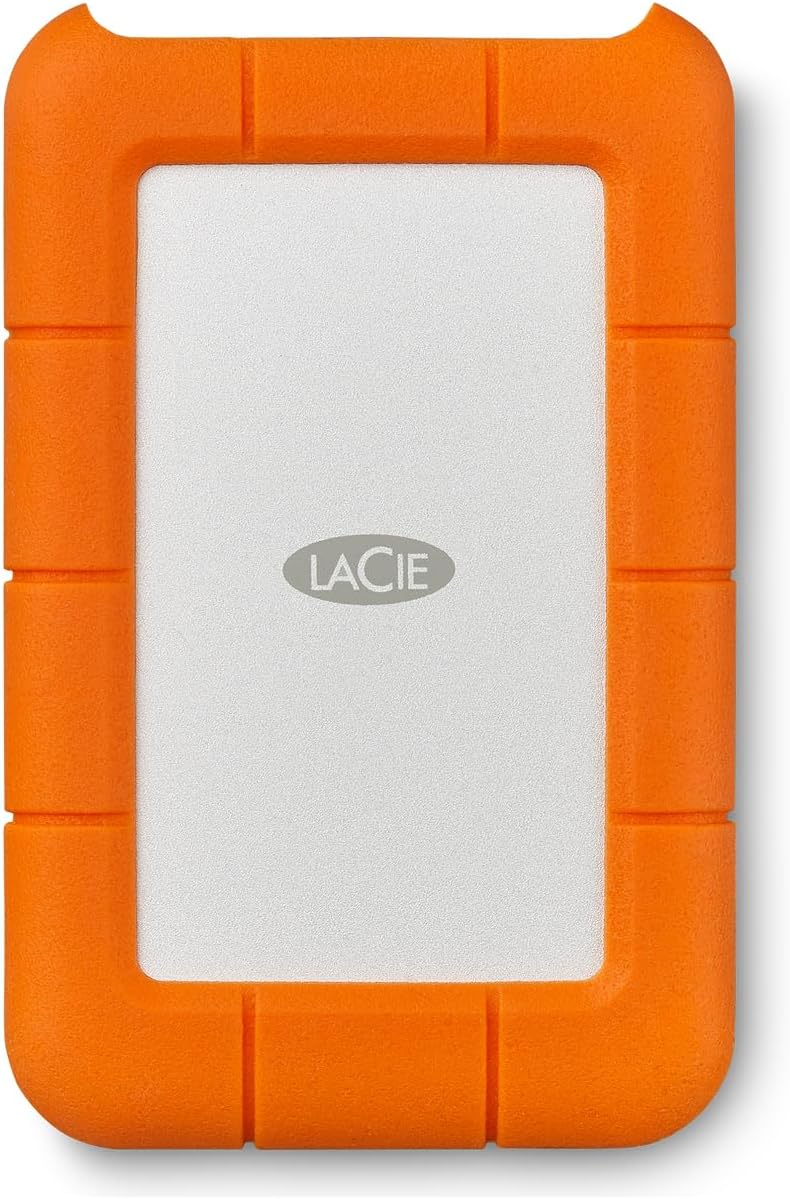


This LaCie Rugged USB-C model stands out as a top choice for professionals who need reliable storage on the go. With a rating of 4.4 stars, users appreciate its robust build that protects against drops, shocks, and rain. The 4TB capacity offers ample space for large media files and backups.
We may earn a commission when you buy through this link, at no additional cost to you.
The USB-C interface ensures fast and reliable data transfers with modern laptops and desktops. Its broad compatibility with both Mac and PC systems makes it a versatile solution for mixed environments. The rugged protection keeps your data safe even in tough conditions.
While the drive offers excellent protection and speed, it comes at a premium price point compared to standard external drives. Additionally, you may need an adapter if your device only has USB-A ports. These trade-offs are often acceptable given the durability and performance.
If you are a creative professional or field worker needing secure storage, this drive is a strong recommendation. It balances capacity, speed, and ruggedness effectively. Ensure you check the current availability and pricing before purchasing to get the best deal.
The drive is built to withstand drops and environmental hazards, ensuring your critical data remains safe during travel or outdoor work.
USB-C connectivity provides high-speed transfers and future-proofing for newer devices, while maintaining compatibility with older systems via adapters.
We may earn a commission when you buy through this link, at no additional cost to you.
This bundle offers a great entry point into the Lacie Rugged lineup with a high rating of 4.6 stars. It includes a Logic portable case for extra protection during transport. The drive itself features shock and water resistance for all-terrain use.
We may earn a commission when you buy through this link, at no additional cost to you.
Users benefit from USB 3.0 speeds which are up to 4 times faster than USB 2.0. The built-in password protection adds a layer of security for sensitive data. It also includes a complimentary Adobe Creative Cloud membership which is a nice bonus for creatives.
Note that for Mac compatibility, the drive requires reformatting which can be a minor hurdle for some users. The connector is USB-A rather than the newer USB-C which might limit direct compatibility with modern devices. However, the included case adds value.
This option is ideal for budget-conscious users who still want rugged protection. The included case makes it ready for travel immediately. Check the current details on the retailer site to confirm the Adobe membership redemption terms before buying.
The package includes a Case Logic portable hard drive case, providing an extra layer of security and organization for your drive.
Built-in password protection allows you to keep your personal files secure and prevent unauthorized access to your storage.
We may earn a commission when you buy through this link, at no additional cost to you.
This 4TB Rugged Mini model is highly rated at 4.6 stars and offers unique compatibility with iPads and iPhones. It provides ample storage for files and videos on the go. The rugged design ensures it can withstand drops and rain in demanding environments.
We may earn a commission when you buy through this link, at no additional cost to you.
A standout feature is the included Data Rescue Service plan which helps recover lost or corrupted files when you need it most. The 2.5-inch form factor makes it easy to carry in a bag or pocket. It works seamlessly with PC and Mac systems too.
While it supports mobile devices, you may need specific cables for your iPhone or iPad which are not always included. As a traditional hard drive, transfer speeds are lower than SSDs. However, the protection and service make up for this limitation.
This drive is perfect for mobile creators or travelers who need to connect directly to their devices. The Data Rescue service adds significant value for peace of mind. Verify the current connection requirements for your specific device before purchase.
Designed to work with PC, Mac, iPad, and iPhone, this drive offers seamless integration with the devices you use every day.
The included Data Rescue Service plan provides professional help to recover your important data in case of corruption or loss.
We may earn a commission when you buy through this link, at no additional cost to you.
This model offers a massive 5TB of portable storage capacity giving you plenty of room for large files and backups. The USB-C interface delivers fast, reliable data transfers compatible with the latest Mac and PC systems. Its rugged design keeps data safe in tough conditions.
We may earn a commission when you buy through this link, at no additional cost to you.
The compact and lightweight build makes it easy to carry your data wherever you go from the office to the field. It works seamlessly with both Mac and PC making it a versatile solution for a wide range of users and workflows. The dust and rain resistance adds durability.
While capacity is high, the lack of a specific user rating might make some buyers hesitant. You should check customer reviews on the retailer site for current feedback. The price is likely higher than lower capacity options but justified by the space.
Ideal for users who need to store large video projects or extensive backups on a single drive. The USB-C connectivity ensures you are future-proofed for modern computers. Ensure your system supports USB-C speeds for optimal performance.
With 5TB of capacity, you can store extensive video projects, photo libraries, and system backups without worrying about running out of space.
The USB-C interface ensures compatibility with newer laptops and provides faster transfer speeds compared to older USB standards.
We may earn a commission when you buy through this link, at no additional cost to you.
This drive is designed for high-speed file transfers and extreme durability. It features speeds up to 130MB/s using the integrated Thunderbolt cable which wraps around the enclosure. The rugged build is drop, dust, and water resistant for field confidence.
We may earn a commission when you buy through this link, at no additional cost to you.
Users receive a one-month complimentary membership to Adobe Creative Cloud All Apps Plan which is valuable for photo and video editing. The included three-year limited warranty protection plan and Rescue Data Recovery services provide long-term peace of mind. It is compatible with USB 3.0 too.
The primary trade-off is the higher cost and the need for a Thunderbolt port on your computer for maximum speed. If your system only has USB-C, you will still get good speeds but not Thunderbolt performance. The Adobe membership is a nice bonus.
This is the best choice for professionals who edit 4K video or need fast access to large libraries. The speed and durability justify the price. Ensure your computer has the right ports before purchasing this premium drive.
The integrated Thunderbolt cable seamlessly wraps around the enclosure when not in use, preventing loss and ensuring you always have the right cable.
Enjoy long-term peace of mind with an included three-year limited warranty protection plan and Rescue Data Recovery services.
We may earn a commission when you buy through this link, at no additional cost to you.
Store and send out content like never before with 8TB of massive capacity in a Rugged external hard drive built uniquely flat. You can easily configure RAID 0/1 using the step-by-step wizard to optimize the system for performance or redundancy. Protect projects with self-encrypting password system.
We may earn a commission when you buy through this link, at no additional cost to you.
The flat design makes it ideal for jam-packed gear bags and shipping envelopes. It includes a one-month complimentary membership to Adobe Creative Cloud All Apps Plan for access to awesome photo and video editing apps. The available storage capacity may vary slightly.
RAID configuration adds complexity but offers flexibility for professionals needing backup or speed. The self-encryption adds security for sensitive client data. The price is higher but the capacity and features are unmatched in this list.
This drive is perfect for post-production teams or photographers storing large volumes of raw data. Ensure you understand RAID modes before configuring to prevent data loss. Check the current details on the retailer site for any additional software requirements.
Configure RAID 0 or RAID 1 easily to choose between performance speed or data redundancy and security.
Built uniquely flat for jam-packed gear bags, this design ensures you can carry it easily without bulk.
We may earn a commission when you buy through this link, at no additional cost to you.
This Triple model is perfect for storing up to 1TB of content on older systems. It features dual FireWire ports for daisy chaining and a USB 3.0 port for speed transfers of up to 110MB/s. The rugged build offers all-terrain durability of drop, dust, and water resistance.
We may earn a commission when you buy through this link, at no additional cost to you.
You can take advantage of a complimentary one-month membership to the Adobe Creative Cloud All Apps Plan for access to awesome photo and video editing apps. Enjoy long-term peace of mind with the included two-year limited warranty protection.
Since it supports FireWire 800, this is valuable for users with older Mac setups. However, USB-C drives are faster and more common now. The 1TB capacity is also smaller than modern needs. It remains a solid choice for legacy compatibility.
If you are maintaining a studio with older workstations, this drive fits perfectly. The ruggedness ensures it survives in a workshop environment. Verify your system ports before purchasing to ensure compatibility.
Connect to FireWire 800 and USB 3.0 computers easily making it ideal for older workstation setups.
Dual FireWire ports allow you to connect multiple devices in a chain without needing extra hubs.
We may earn a commission when you buy through this link, at no additional cost to you.
Capture and edit content like a pro with this Rugged Thunderbolt USB 3.0 drive. Transfer with speeds of up to 130MB/s using the integrated Thunderbolt cable that wraps around the enclosure. Trek confidently with a portable external hard drive that is drop, dust, and water resistant.
We may earn a commission when you buy through this link, at no additional cost to you.
Includes a one month complimentary membership to Adobe Creative Cloud All Apps Plan for access to awesome photo and video editing apps. Enjoy long term peace of mind with the included three year limited warranty protection. The available storage capacity may vary slightly.
The capacity is small at 1TB but the speed and ruggedness remain high. This is useful for boot drives or small project caches. Ensure your computer supports the Thunderbolt generation this drive uses for best performance.
If you need a portable drive for quick edits and have a Thunderbolt port, this is a reliable choice. The integrated cable saves you from carrying extra wires. Check the current details on the retailer site for specific Thunderbolt version details.
The integrated Thunderbolt cable seamlessly wraps around the enclosure when not in use keeping your workspace tidy.
With a high user rating this model has proven reliability and satisfaction among creative professionals over time.
We may earn a commission when you buy through this link, at no additional cost to you.
This 4TB drive offers Thunderbolt and USB 3.0 connectivity for fast data transfers. It features RAID functionality for improved performance or redundancy. The rugged design protects your data in tough conditions.
We may earn a commission when you buy through this link, at no additional cost to you.
It requires a computer with a Thunderbolt, USB 3.0, or USB 2.0 port. The available storage capacity may vary due to formatting. This drive is suitable for users who need RAID features and older Thunderbolt support.
The technical setup might be complex for casual users but beneficial for pros. The 4TB capacity balances size and utility. Ensure your workflow benefits from RAID before purchasing.
Ideal for post-production studios needing robust storage solutions. Check system requirements carefully before buying.
Use RAID modes to enhance speed or redundancy based on your workflow needs.
Support for Thunderbolt and USB 3.0 ensures compatibility with a range of systems.
We may earn a commission when you buy through this link, at no additional cost to you.
This Rugged SSD provides a read speed of 950 MB/s for fast data transfer. With extreme water and 3m drop resistance this SSD is built to withstand harsh conditions. It works with both Mac and PC desktop devices.
We may earn a commission when you buy through this link, at no additional cost to you.
Portable storage that can be easily carried for large amounts of data. Includes a 1 month Adobe CC All Apps and Data Rescue Service for added value and security. The durable design ensures your drive survives tough environments.
The main trade-off is the price per TB compared to mechanical drives. However the speed is significantly higher for editing directly from the drive. Ensure your workflow benefits from SSD speeds before purchasing.
Perfect for video editors who need fast access to footage on the go. The data rescue service adds an extra layer of protection. Verify current pricing and specs before making your final decision.
Read speeds of 950 MB/s allow for fast data transfer and smooth playback of high-resolution media.
Built to withstand 3m drops and extreme water conditions ensuring data safety in any environment.
We may earn a commission when you buy through this link, at no additional cost to you.
Selecting the right storage solution depends on your specific needs for capacity, speed, and durability. Consider these key factors to find the best Lacie Rugged External Hard Drive for your workflow.
Storage capacity determines how much data you can store on a single drive. For photo archives or video editing, look for 2TB or higher. If you need less space for documents or light media, a 1TB model may suffice.
Choose capacity based on your current data and future growth to avoid running out of space quickly.
Modern computers use USB-C or Thunderbolt ports while older systems use USB-A or FireWire. Ensure the drive matches your computer's ports for maximum speed. USB-C offers versatile connections and faster transfers.
Verify your computer's available ports before purchasing to avoid needing extra adapters or cables.
All models in this guide are designed for rugged use with resistance to drops, dust, and water. For harsh field environments, prioritize drives with higher drop resistance ratings. This ensures your data remains safe during transport.
Look for specific resistance ratings like rain or drop resistance to match your working conditions.
Transfer speeds affect how quickly you can move large files or edit media directly from the drive. SSDs offer the highest speeds followed by Thunderbolt HDDs and standard USB drives. High speed is crucial for video editors.
Prioritize speed if you edit large files directly off the drive without importing first.
RAID functionality allows you to combine drives for redundancy or speed. If data safety is critical, RAID 1 provides a mirror. If speed is key, RAID 0 is useful. Not all models support this so check the specs.
Select RAID support if you need enhanced security or performance for professional workflows.
Some drives include complimentary memberships to Adobe Creative Cloud or Data Rescue services. These bonuses can save money and provide essential tools. Check the terms and redemption dates for these offers.
Verify the duration and value of any bundled software to ensure it meets your needs.
Warranty terms vary from two to three years depending on the model. Longer warranties provide peace of mind for expensive drives. Look for drives that include data recovery services for added safety.
Choose a drive with a strong warranty to protect your investment over the long term.
To ensure your drive functions correctly plug it into a compatible USB-C or USB 3.0 port. If your computer does not recognize it immediately try reformatting the drive using the appropriate software for your operating system.
Store the drive in a cool dry place away from direct sunlight. Avoid exposing it to extreme temperatures or moisture beyond its rated limits. Use the included or a separate protective case for extra safety when transporting.
Regularly backup important data to another location to prevent loss. Use disk management tools to monitor drive health and free up space. Keep the firmware and drivers updated for optimal performance and compatibility.
Yes, most models in the Lacie Rugged series work seamlessly with Mac systems. Some drives may require reformatting to APFS or ExFAT for full compatibility. Always check the product details for specific requirements before purchase.
Some models like the Rugged Mini 4TB are compatible with iPad and iPhone. You may need specific cables for your device. Check the product specs to confirm iOS support before buying for mobile use.
Thunderbolt offers higher speeds and more bandwidth compared to standard USB-C. It is ideal for video editing and large file transfers. Ensure your computer supports Thunderbolt to utilize the full speed.
These drives are built to withstand drops, dust, and rain. Specific models offer resistance up to 3 meters or have specific IP ratings. Check the detailed specs for the exact durability level of each drive.
Some bundles include a Logic portable case for extra protection. Others are sold separately. Check the product title and description to confirm if a case is included with your purchase.
Warranty periods vary from two to three years depending on the model. Some drives also include Data Rescue services. Review the product details for specific warranty terms and coverage before buying.
We have reviewed ten top models in the Lacie Rugged series offering a wide range of capacities and features. Whether you need fast SSD performance or high storage capacity there is a drive to suit your needs.
Prioritize speed if you edit video directly on the drive and durability if you work in field conditions. For large archives consider models with RAID or high TB options to ensure ample space.
Prices and availability change frequently so please verify the current details on the retailer site before making your final purchasing decision for your data needs. Ensure you select the right model for your specific workflow.