
Laptop Monitor Light Bar with Clip USB LED Task Lamp No Screen Glare
4.6Editor score
Easy clip-on installation
No screen glare design
USB powered with memory
This guide compares the top 10 laptop monitor light bars for eye care, glare reduction, and workspace efficiency in October 2026.
A laptop monitor light bar transforms your workspace by providing focused illumination without screen glare. These devices mount directly on your screen to save desk space and reduce eye strain during long work sessions.
We compared ten top-rated models based on optical design, brightness control, color temperature options, and build quality. Each product was evaluated for its ability to protect eyes while enhancing productivity in home and office environments.
Every pick shows unique features like auto-dimming, USB power, or curved compatibility. Prices and availability change frequently, so check current listings before purchasing to ensure you get the best deal for your needs.
4.6Editor score

4.6Editor score

4.7Editor score
This side-by-side comparison highlights key specifications across all ten models to help you choose the right light bar for your monitor size and workspace needs.

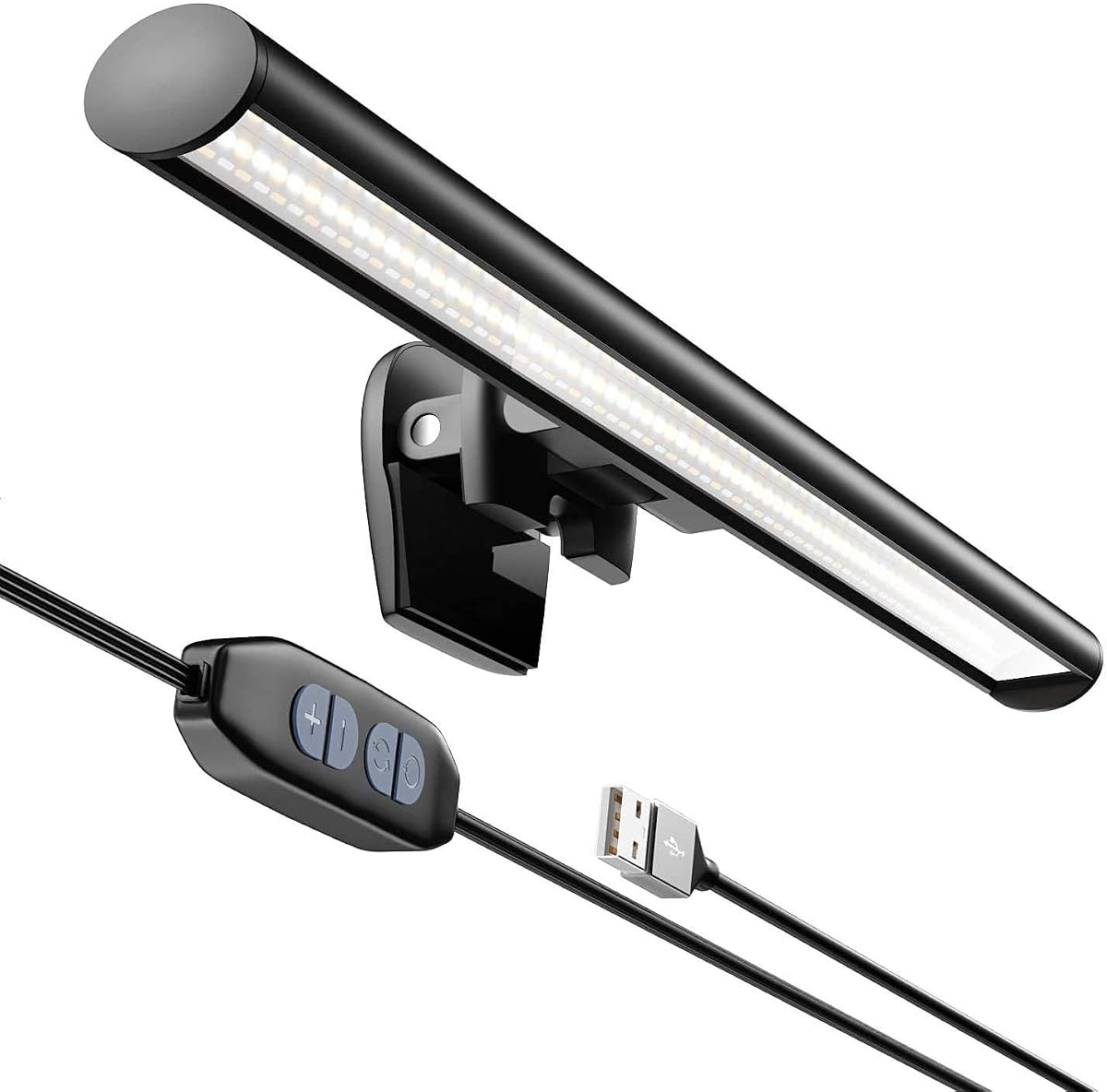





This laptop monitor light bar stands out as an affordable solution for eye care and workspace illumination. With a 4.6 rating from thousands of users, it delivers reliable performance without breaking the bank. The asymmetrical optical design ensures light hits your desk rather than your screen, reducing glare significantly.
We may earn a commission when you buy through this link, at no additional cost to you.
The light offers three color temperatures ranging from warm relaxing light to cool focus-enhancing tones. Ten brightness levels allow precise adjustments to match your environment. USB power means you can plug it into your laptop or power bank, and the memory function remembers your last preference for instant access.
While it lacks advanced sensors like auto-dimming, the manual controls are intuitive and responsive. The clip design fits monitors between 0.2 and 0.4 inches thick, which covers most standard laptops and desktop screens. It is not as robust as premium models but performs its core function well.
Ideal for students and home office users on a tight budget, this light bar provides essential eye protection and workspace lighting. If you need a simple no-fuss upgrade to your setup without high costs, this model is a strong recommendation. Check current availability for the best value.
The asymmetrical design directs light downward to prevent reflections on your screen, which is critical for reducing eye strain during long sessions.
USB power and memory settings eliminate the need for constant adjustments, making it easy to maintain a consistent workspace environment.
We may earn a commission when you buy through this link, at no additional cost to you.
The Wodgreat laptop monitor lamp balances affordability with thoughtful design features aimed at eye care. It uses 54 LED beads to provide even lighting across your desk. The matte black frame complements modern setups, and the clip-on design ensures it fits securely without damaging your screen.
We may earn a commission when you buy through this link, at no additional cost to you.
Adjustable brightness and three color temperatures offer flexibility for different tasks. Warm light helps you relax while cool light improves concentration. The USB cable connects easily to laptops or power banks. The design ensures your webcam remains unobstructed, which is vital for video calls and meetings.
While the rating is slightly lower than top competitors, it still delivers consistent performance for daily use. The 75cm cable provides decent reach but may not suit all desk layouts. Build quality is solid for the price, with materials designed to withstand regular wear and tear.
This light bar is a good choice for users who value style and camera visibility alongside basic illumination. It is suitable for students and remote workers needing an upgrade from standard desk lamps. Consider your desk space and cable routing needs before purchasing.
The mounting structure is engineered to avoid blocking your laptop camera, ensuring seamless video communication without moving the light.
High-quality LED beads promise a long lifespan, reducing the need for frequent replacements and maintaining lighting quality over time.
We may earn a commission when you buy through this link, at no additional cost to you.
CATPOWER offers a portable solution for laptop users who need reliable lighting on the go. The flicker-free design minimizes eye fatigue during long work hours. It sits securely on your monitor, providing focused light without taking up desk space. The slim profile makes it easy to transport between home and office.
We may earn a commission when you buy through this link, at no additional cost to you.
Three color modes and ten brightness levels let you customize lighting for reading or relaxing. The USB power supply is universal, working with almost any USB-enabled device. The clip adapts to various screen thicknesses, ensuring a stable fit without tools. The materials feel durable enough for daily use.
While it lacks advanced features like sensors or RGB options, it excels at core functionality. Users appreciate the simple controls and steady performance. The flexible design allows angle adjustments to suit different viewing positions. It is a practical option for those prioritizing portability over complex controls.
Ideal for travelers or students in shared spaces, this light bar delivers consistent illumination without clutter. If you need a lightweight, affordable way to improve your workspace lighting, it is worth considering. Check current stock levels for availability and pricing.
The slim and lightweight construction makes it easy to carry in a laptop bag, ensuring good lighting wherever you work.
Flicker-free technology reduces eye strain caused by constant screen use, promoting healthier visual habits during long sessions.
We may earn a commission when you buy through this link, at no additional cost to you.
The Quntis monitor lamp leads the field with advanced eye-care features and smart technology. Certified to meet strict safety standards, it eliminates harmful blue light and flicker. The built-in ambient light sensor auto-dims the output to maintain comfortable brightness. This model earns our Editor's Choice for its superior protection and performance.
We may earn a commission when you buy through this link, at no additional cost to you.
With a CRI of 98, colors appear vibrant and true, ideal for design work. The 900 lux output provides ample illumination without harsh reflections. The weighted clip mounts securely without damaging screens. Stepless dimming allows fine-grained control for precise lighting conditions across different times of day.
The auto-dimming feature requires occasional calibration but delivers significant comfort benefits over time. It is more expensive than basic models but offers features that justify the cost for power users. Professionals who spend hours in front of screens will appreciate the consistent eye relief.
Highly recommended for designers, developers, and anyone prioritizing eye health. It balances functionality with high build quality and reliable operation. If budget is less of a concern and comfort is key, this is the top pick for a monitor light bar upgrade.
IEC standards ensure the light is free from harmful blue light hazards, making it safer for long-term visual health.
Ultra-high CRI ensures accurate color rendering, which is crucial for professionals working with images or design projects.
We may earn a commission when you buy through this link, at no additional cost to you.
This 11.8-inch monitor light bar delivers broad coverage ideal for wider desks or dual monitor setups. The ultrawide design minimizes dark spots and ensures uniform light across your workspace. It reaches up to 800 lux of brightness, providing clear visibility for tasks without causing glare on your screen.
We may earn a commission when you buy through this link, at no additional cost to you.
The patented counterweight clip ensures a stable fit on various screen types, including curved ones. Controls are mechanical and straightforward: press for power and color, hold for brightness. The memory function recalls your last settings for quick use. USB power keeps the setup flexible and cable-free.
While the interface is simpler than touch models, the reliability is high. Users praise the even spread of light which reduces strain in large spaces. It is a practical option for those who need more than standard lamp reach. The compact profile avoids clutter on your desk.
Recommended for gamers or multi-monitor users needing broad illumination. It offers solid value for the coverage provided. If you need a wide light source without complex controls, this model is a worthy contender for your workspace.
The extended length ensures even lighting across large desks, preventing shadowed areas that can cause eye fatigue.
The clip design accommodates curved screens securely, expanding compatibility beyond flat monitors.
We may earn a commission when you buy through this link, at no additional cost to you.
This monitor light bar offers a sleek minimalist look suitable for tidy workstations. The 45-degree asymmetric optical structure lights up your keyboard and desktop while avoiding screen reflections. Dual control modes let you adjust settings without touching the light directly, enhancing convenience during use.
We may earn a commission when you buy through this link, at no additional cost to you.
It provides 800 lux at the center to ensure your workspace is well lit. The clamp is sturdy and fits curved screens effectively. The design maintains a professional aesthetic that blends with modern office setups. USB power keeps installation simple with a plug-and-play approach.
The control modes are intuitive, allowing quick changes between color temperatures and brightness levels. While it lacks smart features, the core performance is reliable. Users appreciate the anti-glare layout that sharpens focus. It is a solid middle-ground choice for those who value design and function.
Ideal for office workers and home users needing a clean, effective lighting solution. If you want a no-nonsense light bar with a modern touch, this option is worth considering. Verify current availability for the best deal.
The minimalist frame complements neat desk setups, adding value without visual clutter.
Dual control options provide intuitive access to settings, reducing interaction time during work.
We may earn a commission when you buy through this link, at no additional cost to you.
This laptop monitor light bar focuses on eye protection with a simple and light design. The ABS housing is gentle to hands and the reflector design improves lighting efficiency. It aims to reduce fatigue from staring at screens by providing focused illumination for keyboards and reading tasks.
We may earn a commission when you buy through this link, at no additional cost to you.
The four-key controller offers precise control over color and brightness. It connects via standard USB interfaces on computers or adapters, making it versatile. The adjustable angle ensures the light suits your specific needs. Packaging makes it ready for gifting, adding value for personal or shared use.
While the build is basic, it meets core needs for portable office lighting. Users value the safety of low voltage and easy setup. The counterweight fixture keeps it stable without tools. It is a practical choice for those needing a reliable light for travel.
Best for students and professionals traveling between sites who need eye care. It balances portability with essential features. Check current availability for pricing before purchase.
Low voltage DC5V power ensures safe operation even when plugged into various USB sources.
Color box packaging makes it a thoughtful gift for friends or family needing workspace upgrades.
We may earn a commission when you buy through this link, at no additional cost to you.
YEELIGHT delivers a premium lighting solution with a full-metal body and RG0 blue light safety. The Ra95 CRI ensures accurate color rendering for professional tasks. The metal body helps with heat conduction, keeping the device cool during extended use. This model combines durability with advanced optical performance.
We may earn a commission when you buy through this link, at no additional cost to you.
Stepless dimming and color adjustment provide personalized control via intuitive long-press controls. Three fixed modes offer quick access for work or reading. The retractable clip adapts to various thicknesses including curved screens. The design avoids webcam obstruction, supporting seamless video calls without blocking your view.
The construction quality justifies the higher price, offering longevity beyond plastic alternatives. Users appreciate the elegant finish and reliable performance. It is a great choice for creators and professionals valuing color accuracy and build quality. The USB cable length is generous for flexible placement.
Ideal for designers and professionals needing top-tier eye care. If you prefer metal construction and high safety ratings, this is a strong pick. Check current offers for the best value on this premium model.
Metal construction dissipates heat effectively, preventing burn risks during prolonged daily use.
Ra95 CRI ensures true color representation, crucial for content creators and designers.
We may earn a commission when you buy through this link, at no additional cost to you.
OOWOLF stands out with dual light technology that combines front and rear ambient lighting. This unique design reduces eye strain from dark surroundings while providing task light. The high CRI ensures colors appear natural. It passes multiple safety tests ensuring reliable performance over its long lifespan.
We may earn a commission when you buy through this link, at no additional cost to you.
The memory function saves your last settings for convenience. Type C power ensures compatibility with modern devices. The silicone mount base provides a secure fit without damaging screens. Touch buttons allow easy adjustment of brightness and color. The filter helps neutralize blue rays for better eye health.
While the backlight feature is innovative, some users may find the setup slightly complex. The light is designed for comfort during long reading sessions. It is a great option for those seeking a unique approach to eye protection. The durability tests confirm its long-term reliability.
Recommended for users wanting more than just a front lamp. It adds ambient light to balance screen contrast. Check current availability for pricing and stock.
Rear lights reduce irritation from dark environments, offering balanced illumination for eyes.
Passes over 10,000 tests to ensure safety and reliability for daily office use.
We may earn a commission when you buy through this link, at no additional cost to you.
This curved monitor light bar is engineered for ultrawide screens with RGB backlights and high brightness. It fits curved monitors over 34 inches securely. The dual light system offers 1400 lux for wide coverage. It stands out as the Best Premium pick for immersive lighting setups.
We may earn a commission when you buy through this link, at no additional cost to you.
Fifteen RGB modes let you customize ambiance for gaming or movies. The ambient sensor adjusts brightness automatically based on room light. Memory function and touch controls ensure convenience. The clamp fits thick and irregular monitors stably. It minimizes dark corners and glare effectively.
The advanced features justify the higher cost for enthusiasts and professionals. Users love the blend of task and ambient lighting. It enhances workflow efficiency and comfort. While complex, the results are worth it for those needing top performance. Verify stock for availability.
Fifteen modes add creativity and immersion, perfect for gaming or entertainment setups.
Auto-brightness adjustment ensures comfort without manual tweaks across varying lighting conditions.
We may earn a commission when you buy through this link, at no additional cost to you.
Selecting the right light bar requires understanding key factors that impact eye health and workspace efficiency.
The best light bars use asymmetrical optical designs to prevent screen glare. This directs light downward to your desk while avoiding reflections on your monitor. Look for models with specific anti-glare certifications to ensure eye safety.
Prioritize options that mention glare reduction to maintain focus during work.
Adjustable color temperatures let you switch between warm and cool light for different tasks. Warm light is ideal for relaxing, while cool light enhances focus. Models offering multiple presets save time and improve workflow efficiency.
Choose a unit with at least three color modes for maximum versatility.
Stepless or multi-level brightness control allows precise adjustments. Avoid flicker-free lighting to reduce eye strain over long sessions. Higher lumen counts offer better illumination but ensure they remain comfortable.
Look for memory functions to recall your preferred brightness settings.
USB power is the standard for monitor light bars, offering flexibility to connect to laptops or adapters. Ensure the cable length suits your desk setup to avoid clutter. Some models include USB-C connectivity for modern devices.
Opt for USB power to maintain a clean and portable workspace.
Secure clamps with anti-slip pads prevent the light from sliding or falling. Check compatibility with your monitor thickness and shape. Curved monitors need flexible clips that conform to the screen without damage.
Ensure the mount fits your screen thickness before purchase.
Materials like metal or reinforced ABS plastics enhance durability and heat dissipation. Premium models often feature full-metal bodies for better longevity. Check for safety certifications regarding blue light and flicker.
Choose durable materials to avoid frequent replacements over time.
Advanced features like ambient sensors or RGB backlights enhance functionality. Auto-dimming helps maintain consistent lighting. RGB modes can improve your setup aesthetics but may not be essential.
Decide if smart features add value based on your specific needs.
Install the light bar by clipping it onto the top edge of your monitor. Adjust the angle so the light covers your desk without hitting your screen. Ensure the clamp is tight to prevent sliding during adjustments.
Connect the USB cable to your laptop or a power adapter. Select your preferred color temperature and brightness using the touch or mechanical controls. Set your settings before starting work to minimize interruptions.
Clean the light bar occasionally with a soft dry cloth to remove dust. Avoid using harsh chemicals or spraying water directly on the unit. Store it safely when moving to prevent damage to the clip or lens.
Yes, because they provide focused illumination without screen glare. By lighting your desk and not your eyes, they help you see clearly without squinting. This reduces fatigue during long computer sessions significantly.
Many models are designed to fit curved monitors with flexible clamps. Check the product specs to confirm compatibility with your screen's curvature and thickness. Not all standard clips work on highly curved displays.
Most run on USB power, so you can plug them into your laptop or power bank. This avoids needing extra outlets and keeps your desk tidy. Just ensure your USB port provides enough power.
LED units often last over 30,000 hours of use. This translates to many years of daily usage. High-quality models with metal bodies may last even longer due to better heat dissipation.
Yes, the focused light is excellent for reading documents or books on your desk. It minimizes shadows and glare, making text clearer. Adjust the angle to light your reading material effectively.
Many models are certified to filter harmful blue light. Look for RG0 or IEC certifications to ensure eye safety. This reduces the risk of long-term eye damage during prolonged use.
This guide highlights ten models offering unique solutions for eye care and workspace lighting. From budget picks to premium RGB options, there is a bar for every user. Choosing the right one depends on your monitor type and lighting needs.
Prioritize optical design and brightness control to ensure comfort during long sessions. Advanced features like auto-dimming add value for professionals. Focus on quality and safety ratings to protect your health.
Prices and availability change frequently so check current listings before finalizing. Investing in the right light bar improves productivity and eye comfort. Ensure the model you select fits your current setup perfectly.