
ASUS NUC 14 Pro
4.7Editor score
Intel Ultra 7 processor
Linux Mint preinstalled
Thunderbolt 4 connectivity
Compare the top 10 Linux Mini Pcs for 2026 including performance, connectivity, and OS compatibility to find the perfect compact desktop for your needs.
Finding the right compact computer can transform your workspace efficiency. Linux Mini Pcs offer powerful performance in a tiny footprint, ideal for developers and home users seeking open-source flexibility without bulk.
We compared ten models based on processor power, memory capacity, storage options, and Linux compatibility. Our analysis focuses on real-world usability, thermal management, and value for money in the current market.
Each pick highlights specific strengths like dual LAN for networking or triple 4K support for multitasking. Prices fluctuate often so check current listings before buying to ensure you get the best deal available today.
4.7Editor score

4.5Editor score

4.2Editor score
This side-by-side comparison helps you visualize the differences between each model. Look at processor types, RAM limits, and display support to match a device with your specific workflow requirements.


The TK Node Mini PC stands out as a top choice for Linux users seeking reliability and performance. It ships with Zorin OS Core preinstalled, offering a familiar desktop environment that eases the transition from Windows while providing open-source flexibility.
We may earn a commission when you buy through this link, at no additional cost to you.
Its AMD Ryzen R2314 processor delivers efficient multitasking capabilities suitable for development and automation tasks. The dual NVMe SSD slots allow you to expand storage up to 4TB while the dual SO-DIMM slots support up to 64GB of RAM for heavy workloads.
While the base model comes with 8GB RAM, the expandability makes it a long-term investment. The only trade-off is the price compared to generic boxes, but the US-based assembly and support justify the cost for professional users.
We recommend this unit for developers or small businesses needing a secure Linux environment without extensive configuration. It is a robust choice for 24/7 operation in home labs or office settings.
Zorin OS Core is optimized for productivity making it easy to install software and manage updates without command line complexity.
Dual slots for memory and storage ensure you can adapt the machine to future needs without replacing the entire system.
We may earn a commission when you buy through this link, at no additional cost to you.
The Beelink SER3 is a workhorse for everyday computing tasks and light development. With 16GB of DDR4 RAM and a 500GB SSD it handles multiple browser tabs and office applications without stuttering making it ideal for students or remote workers.
We may earn a commission when you buy through this link, at no additional cost to you.
The AMD Ryzen 3 3200U processor ensures efficient energy use while maintaining speed. Its integrated Radeon Vega 3 graphics are capable of 4K video playback and light graphical tasks allowing you to connect two screens for better productivity.
While it uses an older processor architecture it still outperforms many entry-level Celeron models. The main limitation is in heavy video editing or 3D rendering but for general Linux use it remains a solid contender.
Buyers looking for a reliable daily driver under budget should consider this model. The lifetime technical support and robust build quality add value beyond the initial hardware price.
The combination of quad-thread processing and ample memory ensures smooth switching between applications even under load.
Multiple USB ports and dual HDMI allow you to connect peripherals and monitors easily for a fully setup workstation.
We may earn a commission when you buy through this link, at no additional cost to you.
The ASUS NUC 14 Pro represents the pinnacle of mini PC performance for Linux users. It comes with Linux Mint preinstalled ensuring a secure and open-source environment tailored for developers and creators who need serious computing power in a small box.
We may earn a commission when you buy through this link, at no additional cost to you.
Its Intel Core Ultra 7 155H processor with 16 cores handles AI workloads and virtualization effortlessly. The 64GB DDR5 RAM and 2TB PCIe SSD provide blazing-fast storage and memory speeds allowing for heavy multitasking and large data processing without bottlenecks.
Premium features like Thunderbolt 4 and WiFi 6E ensure future-proof connectivity. The only downside is the cost which is significantly higher than standard options but justified for professional environments where performance is critical.
We suggest this model for AI researchers or power users requiring top-tier specifications. It transforms into a compact workstation capable of replacing bulky towers while maintaining high efficiency and quiet operation.
Linux Mint offers a clutter-free experience with powerful open-source tools ideal for coding and virtualization tasks.
The advanced cooling system with aluminum fins keeps the device cool during intense workloads without loud fan noise.
We may earn a commission when you buy through this link, at no additional cost to you.
The Beelink S12 Pro is designed for efficiency and everyday tasks making it perfect for home offices or light server use. Powered by the Intel N100 processor it offers significant performance gains over previous generations while keeping power draw extremely low.
We may earn a commission when you buy through this link, at no additional cost to you.
It supports up to two 4K@60Hz displays allowing for an immersive dual-screen setup. The ability to connect storage up to 2TB makes it a versatile candidate for a Network Attached Storage device or personal cloud setup.
While it lacks the raw power for heavy gaming it excels at office productivity and media streaming. The single memory slot might limit future upgrades but the 16GB included is sufficient for most daily scenarios.
This device is ideal for users needing a compact Linux terminal or media center. Its low thermal output ensures it runs silently even during long hours of operation.
With support for both M.2 and SATA drives you can build a large storage pool cheaply for backups or media.
Gigabit Ethernet and WiFi 6 ensure fast file transfers and stable connections for streaming and video calls.
We may earn a commission when you buy through this link, at no additional cost to you.
The KAMRUI Pinova P2 excels at multi-monitor productivity thanks to its triple 4K display capability. This is particularly useful for traders or professionals who need to keep multiple windows open simultaneously. The AMD Ryzen 7 3300U provides ample processing power for this workload.
We may earn a commission when you buy through this link, at no additional cost to you.
Its Zen3 architecture delivers strong single-core performance making it snappy for daily tasks. The 16GB of high-speed memory ensures smooth operation even when driving multiple screens. Two storage expansion slots allow you to add significant capacity over time.
While the base storage is only 256GB the ability to expand means you can tailor the system later. The compact footprint makes it easy to mount behind a monitor saving valuable desk space in your office.
We recommend this for home office users who need visual real estate. It balances cost and performance well making it a practical choice for multitasking setups.
Driving three 4K screens simultaneously allows for seamless workflow across spreadsheets code editors and browsers.
Expansion slots ensure you can upgrade to larger drives as your data needs grow without buying a new PC.
We may earn a commission when you buy through this link, at no additional cost to you.
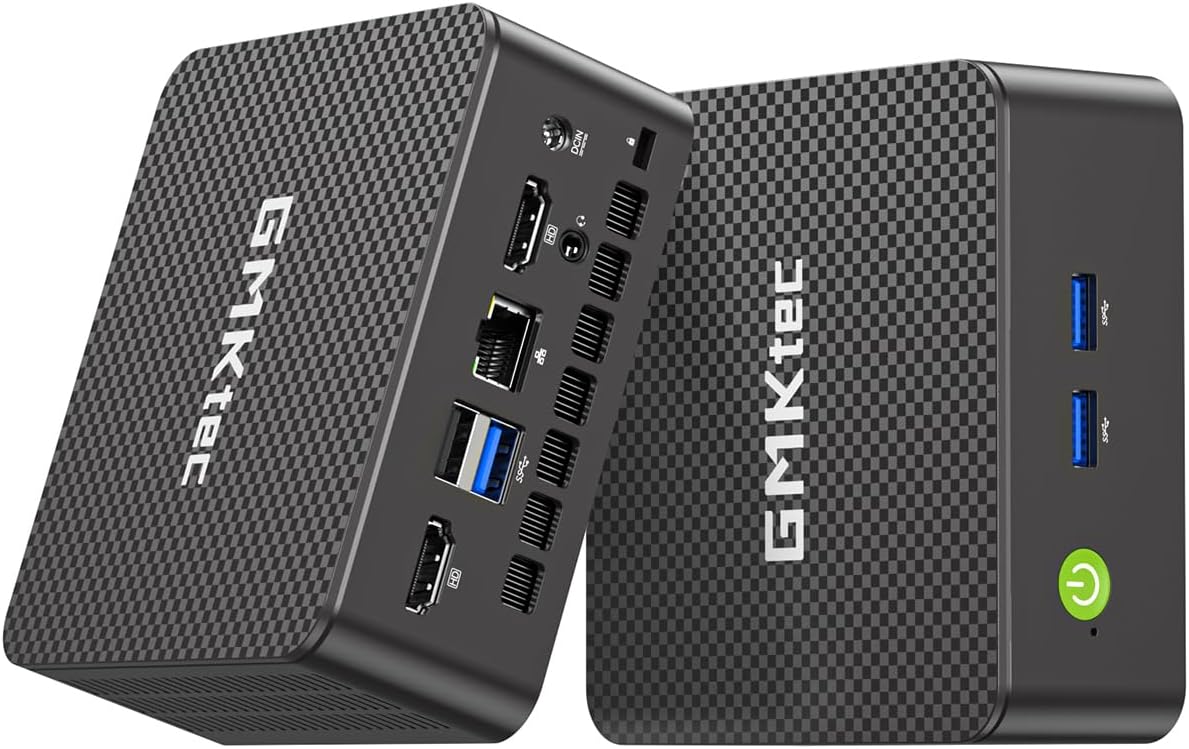
The GMKtec G11 is a standout for networking enthusiasts due to its dual 2.5GbE LAN ports. This hardware feature makes it perfect for running pfSense or OPNsense firewalls providing enterprise-level network security in a compact form factor.
We may earn a commission when you buy through this link, at no additional cost to you.
Its Ryzen Embedded R2514 processor supports dual-channel memory which improves performance significantly over single-channel designs. The graphics capabilities allow it to handle three 4K displays making it versatile for both server and desktop duties.
While designed for professional environments it can serve as a robust home lab server. The main trade-off is that you may need to install your own OS unless you prefer a Linux server distribution out of the box.
IT professionals looking for a dedicated router or media server will find this model compelling. It offers hardware features rarely found at this price point ensuring reliable network performance.
Dual high speed Ethernet ports allow you to segregate WAN and LAN traffic efficiently for better security.
Dual channel RAM ensures the GPU and CPU have sufficient bandwidth for multitasking and data processing.
We may earn a commission when you buy through this link, at no additional cost to you.
The CyberGeek Mini PC offers desktop-level performance with an Intel i9 11900H processor. This makes it capable of handling demanding software compilation tasks and virtualization workloads. Preloading Ubuntu Linux ensures a solid foundation for development and server applications.
We may earn a commission when you buy through this link, at no additional cost to you.
With 32GB of RAM it manages heavy multitasking effortlessly. The triple 4K display support via HDMI DP and Type-C allows for extensive screen real estate which is rare in this form factor.
While the processor is from the 11th generation it remains a powerful choice for sustained workloads. The only limitation compared to newer models is the efficiency of power consumption but performance remains high.
We recommend this for power users who need raw processing power in a small box. It is a reliable choice for rendering or coding projects that require significant resources.
Eight cores and sixteen threads ensure that even the most demanding apps run without slowing down.
Six USB ports and dual LAN connections provide ample options for external drives and network setups.
We may earn a commission when you buy through this link, at no additional cost to you.
The BOSGAME E5 delivers a balanced experience for daily workflows. Its AMD Ryzen 3 5300U processor ensures smooth handling of business software and web applications. The 512GB NVMe SSD provides fast boot times and application loading.
We may earn a commission when you buy through this link, at no additional cost to you.
A standout feature is the dual 2.5GbE LAN ports making it an excellent choice for home servers or network experimentation. The full-function Type-C port adds versatility for connecting displays or charging peripherals.
While it lacks extreme processing power it excels in stability and connectivity. The cooling system is optimized for low noise ensuring it remains unobtrusive in an office environment.
This model is perfect for users needing a reliable and efficient workstation. It handles spreadsheets and media tasks with ease while offering professional networking features.
Dual high speed LAN ports allow for efficient file transfers and secure network segmentation for home labs.
Quiet operation and compact size make it easy to integrate into any workspace without distraction.
We may earn a commission when you buy through this link, at no additional cost to you.
The BOSGAME E4 Air is an accessible option for entry-level users. With a Ryzen 5 3500U and Vega 8 graphics it handles web browsing and media streaming effectively. The triple 4K display support allows for basic multi-monitor setups at a low cost.
We may earn a commission when you buy through this link, at no additional cost to you.
Its dual Gigabit Ethernet ports offer surprising networking utility for a budget device. While the 256GB SATA SSD is slower than NVMe it still provides adequate speed for system boot and basic applications.
The main limitation is the 8GB RAM which may not suffice for heavy multitasking. However for simple tasks like video playback or document editing it performs reliably without noise.
We recommend this for users on a strict budget or needing a media center. It delivers solid value for everyday computing without breaking the bank.
A solid entry point for Linux users needing basic functionality and multi-screen capability at low cost.
Graphics capabilities support smooth playback of HD content on multiple screens for entertainment setups.
We may earn a commission when you buy through this link, at no additional cost to you.
The GMKtec G3S brings a modern processor to a budget-friendly package. The Intel N95 delivers noticeable improvements over older entry-level chips ensuring smoother performance for web browsing and light productivity tasks.
We may earn a commission when you buy through this link, at no additional cost to you.
Dual HDMI ports support simultaneous 4K output making it suitable for digital signage or dual monitor setups. The compact design ensures it fits easily into tight spaces or small office cubicles.
While 8GB RAM is standard for this class it is sufficient for most daily uses. The main limitation is the lack of high-speed storage options or additional connectivity ports compared to premium models.
We recommend this for users needing a simple reliable Linux terminal. It is a practical choice for schools or basic home use where simplicity is key.
The Alder Lake N95 CPU offers better performance per watt than previous generations for efficient computing.
Dual HDMI ports allow you to easily connect two monitors without adapters for a versatile workspace.
We may earn a commission when you buy through this link, at no additional cost to you.
Selecting the right Linux Mini Pc involves balancing hardware specs with your specific use cases. This guide breaks down the essential factors to consider before making a purchase.
The CPU determines how well your system handles tasks. Look for Intel N series for efficiency or AMD Ryzen for better multi-threaded performance. Core Ultra processors are available for high-end AI and development work.
Choose a processor that matches your workload intensity. High core counts benefit virtualization while high clock speeds aid single-threaded applications.
RAM is crucial for multitasking. 8GB is the baseline for web browsing but 16GB is recommended for development or heavy browsing. Some models allow upgrades to 64GB which future-proofs your investment.
Prioritize models with expandable RAM slots. This flexibility ensures you can upgrade memory without replacing the entire unit as needs grow.
Storage speed impacts system responsiveness. M.2 NVMe SSDs are significantly faster than SATA drives. Check if the model has multiple slots for expansion if you plan on storing large media files or VMs.
Aim for at least 256GB of storage to accommodate Linux distributions and applications. Expandability via extra slots adds significant value to the device.
Port selection dictates your peripheral setup. Look for models with at least two HDMI or DisplayPort outputs if you need a multi-monitor setup. USB-C with DP Alt Mode offers versatile connectivity for modern monitors.
Ensure the GPU supports your desired resolution. For triple 4K displays verify that the graphics engine can drive them simultaneously without lag or stuttering.
Networking ports are essential for servers. Some models offer dual Gigabit Ethernet or even 2.5GbE LAN ports which are valuable for running firewalls or NAS servers. WiFi 6E support ensures wireless stability.
Consider dual LAN for routing tasks. This hardware feature allows you to isolate network traffic efficiently without needing external switches.
Preinstalled Linux can save time. Some brands include distributions like Zorin OS or Linux Mint. Others may ship with a free OS or Windows requiring you to install your preferred Linux distro manually.
Verify the installation process is straightforward. Preinstalled systems often come with drivers tuned for that specific hardware ensuring better out-of-box performance.
A robust chassis protects internal components. Metal enclosures generally dissipate heat better than plastic. Thermal management is critical for 24/7 operation to prevent throttling or hardware damage.
Check reviews regarding fan noise. Efficient cooling ensures the device remains quiet even under load which is vital for home office environments.
Reliable support is key for long-term use. Brands like Beelink and TK Node offer warranties ranging from one to two years. US-based support can simplify troubleshooting and replacement processes.
Always check the warranty terms. Limited warranties covering defects and workmanship provide peace of mind for your hardware investment.
Set up your Mini Pc by connecting it to a monitor keyboard and mouse. Ensure all cables are securely plugged into the correct ports to avoid connection issues. Once connected power on the device and follow the initial setup wizard to configure your user profile.
Install necessary updates immediately after setup to ensure security and stability. Use the package manager of your Linux distribution to fetch the latest software versions. Regularly check for system updates to patch vulnerabilities and improve performance.
Maintain the hardware by keeping it in a well-ventilated area. Dust can accumulate over time so use compressed air to clean vents periodically. Avoid placing the device in direct sunlight or near heat sources to prolong its lifespan.
Some models like the TK Node and ASUS NUC come with Linux distributions preinstalled. Others may ship with a free OS or Windows requiring you to install Linux manually. Always check the product description for OS details before buying.
Most Linux Mini Pcs use integrated graphics which are suitable for light gaming or retro emulation. For modern AAA titles you will need a dedicated GPU. However devices like the CyberGeek handle older games well due to strong CPU power.
Many models feature expandable slots. The TK Node and BOSGAME E5 support memory upgrades up to 64GB. Most have at least one M.2 slot for SSD expansion. Check specific product specs for slot availability before purchasing.
Dual LAN ports allow you to create a dedicated network segment. This is ideal for setting up firewalls or home labs where you want to separate internet traffic from internal devices. It improves security and network management.
Most models are designed to be quiet during light use. Under heavy load fans may spin up but they generally remain unobtrusive. The TK Node and BOSGAME models specifically mention silent cooling systems for office environments.
Yes many models support triple 4K displays. The KAMRUI Pinova P2 and ASUS NUC 14 Pro offer three independent outputs. This allows for extensive multitasking setups in a compact footprint.
Choosing the right Linux Mini Pc depends heavily on your specific needs. The TK Node offers a balanced start with Zorin OS while the ASUS NUC 14 Pro delivers top-tier performance for professionals.
Prioritize features that matter most to you. If networking is key look at the GMKtec G11 for dual LAN. If you need multi-monitor productivity the KAMRUI Pinova P2 is an excellent choice.
Always verify current prices and availability before making a final decision. Technology prices fluctuate so checking listings ensures you get the best value for your budget today.