
2026 Mac OS Shortcuts Sticker for MacBook Neo, Air & Pro (1-Pack)
4.6Editor score
52 essential macOS shortcuts included
Zero residue premium vinyl adhesive
Fits 13 and 15 inch models
The MacBook Neo brings powerful performance and sleek design to users who demand efficiency. To get the most out of this machine you need reliable accessories that protect it and extend its capabilities without adding bulk.
We evaluated ten top rated products based on compatibility build quality and user feedback. Our analysis focuses on items that fit the 2026 Neo models perfectly while offering real value for students professionals and creatives alike.
Each pick highlights specific strengths from protective shells to connectivity hubs. Keep in mind that prices and availability change frequently so check the current listings before making your final decision to secure the best deal.
4.6Editor score
4.6Editor score

4.2Editor score
As an Amazon Associate we earn from qualifying purchases.
This side-by-side comparison helps you evaluate the key features and specifications of each accessory to find the perfect match for your workflow and budget needs.


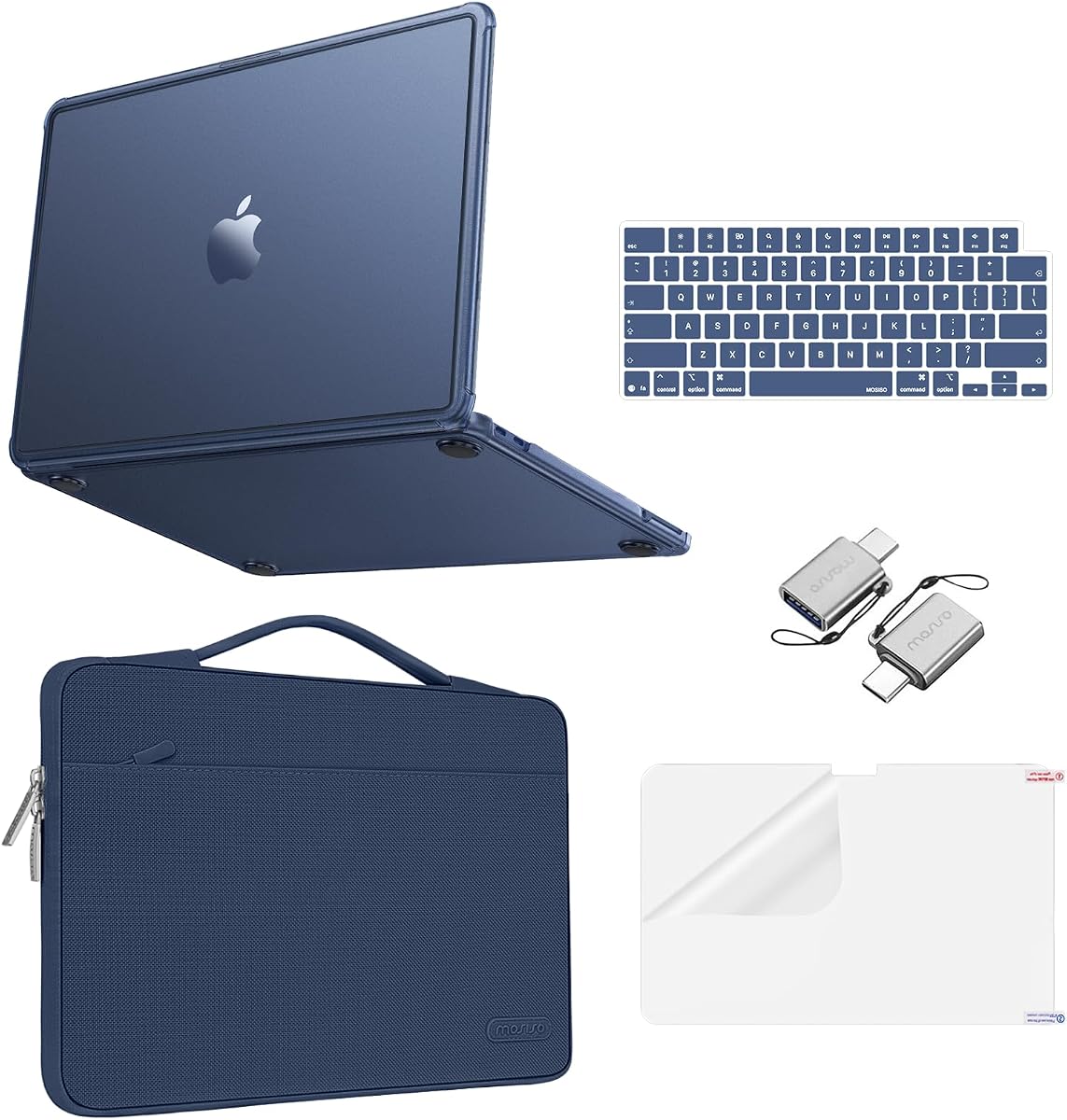
This MOSISO case is our top pick for overall protection due to its comprehensive kit and specialized finish. It holds a strong 4.6 rating from users who appreciate the thoughtful inclusion of a carrying sleeve and screen accessories.
We may earn a commission when you buy through this link, at no additional cost to you.
The matte finish actively repels fingerprints and smudges which keeps your Neo looking clean after hours of use. The included 360 degree protective sleeve provides an extra layer of security against bumps during travel in your daily commute.
One trade-off is ensuring you verify the model number A3404 on your laptop as it is designed specifically for the 2026 Neo 13 inch model. This specificity ensures a perfect fit but limits compatibility with older MacBooks.
If you need full body protection right out of the box this kit is the clear choice for students and professionals who move around frequently. It balances style with durability better than any other case in our list.
The inclusion of a 360 degree protective sleeve means you do not need to buy a separate bag for transport.
The matte finish is designed to actively repel daily scuffs and fingerprints keeping the laptop pristine longer.
We may earn a commission when you buy through this link, at no additional cost to you.
This sticker sheet offers the highest value for money by putting essential macOS shortcuts directly under your fingertips. With a 4.6 rating it helps users of all skill levels work faster without breaking flow to search for commands online.
We may earn a commission when you buy through this link, at no additional cost to you.
The layout groups shortcuts by task like navigation and screenshots making them easy to find and remember. Made of premium vinyl it is thin enough to feel invisible but durable enough to resist coffee spills and smudges.
While the adhesive is designed to lift off cleanly you should apply it carefully to avoid bubbles. It is a simple modification that transforms your workspace into a productivity hub without altering the hardware itself.
Students and new Mac users will find this particularly helpful for mastering keyboard commands quickly. It is a small investment that pays off daily in saved time and improved workflow efficiency for any MacBook owner.
Stop Googling how to screenshot and glance down to find the command instantly.
The premium vinyl lifts off clean with no glue marks when you are ready to remove it.
We may earn a commission when you buy through this link, at no additional cost to you.
This VENTION hub stands out for its 80Gbps transmission speed and 140W charging capability which are top-tier specs for modern MacBooks. It supports stunning 8K video output making it ideal for content creators and professionals who need high fidelity displays.
We may earn a commission when you buy through this link, at no additional cost to you.
The magnetic detachable connector offers convenience for iPad and laptop users who want to plug and play without frustration. The aluminum shell ensures better heat dissipation during heavy tasks compared to standard plastic hubs.
Users should note that the standard dual-plug connection might not fit if your Neo has a bottom case attached. In that scenario a 7-shaped single plug might be required which can affect appearance or connection stability.
If you require high bandwidth for external drives or multiple monitors this hub is the ultimate accessory. It future proofs your connectivity and handles the demands of 2026 software and hardware seamlessly.
Up to 80Gbps bandwidth enables ultra-clear video output and fast file transfers for professionals.
Support for up to 140W pass-through charging ensures your laptop stays powered while using heavy peripherals.
We may earn a commission when you buy through this link, at no additional cost to you.
This MOSISO case is designed for those who want to protect their Neo without hiding its original design. It features high-transparency shell that resists yellowing and fading keeping your device looking new for years.
We may earn a commission when you buy through this link, at no additional cost to you.
The kit includes dustproof keyboard covers and a clear screen protector adding value to the hard shell case. The precision-molded top and bottom covers fit securely with a gentle push requiring no tools for installation.
While the material is crack-resistant it can show dust or lint inside the clear case. Cleaning is easy however and the slim profile adds virtually no bulk to your laptop in the bag.
If you prefer a minimalist look that lets your Neo shine this case is a reliable choice. It offers solid defense against scratches and bumps while maintaining the aesthetic appeal of your device.
Crystal-clarity lasts with no yellowing so your MacBook Neo design remains visible and stylish.
Includes keyboard covers and screen protector to protect your device from spills and debris immediately.
We may earn a commission when you buy through this link, at no additional cost to you.
This option pairs a protective case with a sixteen grid puffy laptop sleeve for maximum travel comfort. The plush interior cushions your Neo against scratches and bumps so you can slip it into a backpack safely.
We may earn a commission when you buy through this link, at no additional cost to you.
The case itself shields your device from daily scratches and scuffs while the sleeve handles the heavier impacts. Includes keyboard covers and a screen protector to ensure full coverage for your hardware.
The puffy design adds a bit of style but can be slightly more bulky than a slim sleeve. It is still portable and lightweight making it suitable for business trips and daily commutes.
For users who travel often and need extra padding this combo is ideal. It prioritizes impact protection which is critical when your laptop is tossed around in a crowded bag.
The plush interior cushions against scratches and everyday shocks for worry-free transport.
Everything you need for full-body protection including keyboard covers comes right out of the box.
We may earn a commission when you buy through this link, at no additional cost to you.
EooCoo offers a highly rated clear case that fully shows off your Neo's beautiful design. The 4.7 rating reflects user satisfaction with the durability and the useful inclusion of a USB-C to USB-A adaptor.
We may earn a commission when you buy through this link, at no additional cost to you.
The slim design adds minimal bulk while providing full edge wrap protection against fingerprints and dust. It is perfect for those who want safety without a heavy or bulky cover on their device.
One limitation is that it is only compatible with the 2026 Neo model A3404 so verify your model number carefully. This ensures a precise fit that aligns with the buttons and ports accurately.
If you want a clear and practical accessory this case is excellent value. The included adaptor adds real utility for connecting older peripherals to the modern USB-C only system.
Transparent PC material fully shows off your MacBook Neo beautiful color and design.
Includes a versatile USB-C to USB-A adaptor for connecting legacy devices seamlessly.
We may earn a commission when you buy through this link, at no additional cost to you.
This screen protector uses strong magnets to allow instant installation without any adhesive residue. It blocks side views beyond 30 degrees ensuring your private data is safe in public places like airports and cafes.
We may earn a commission when you buy through this link, at no additional cost to you.
The anti-glare and blue light blocking technology helps relieve eye strain during long work sessions. It is ultra-thin at 0.065mm so it does not affect the closure of your laptop lid or interfere with cases.
Privacy screens can sometimes reduce brightness slightly which is a trade-off for security and eye comfort. However the clarity remains high so you still enjoy vivid visuals from the front.
For professionals handling sensitive data this accessory is essential. It provides peace of mind and physical protection for your screen without the hassle of sticky adhesives.
Strong magnetic attachment enables one-second installation without residue protecting your screen integrity.
Anti-glare and blue light blocking technology relieves eye strain and visual discomfort.
We may earn a commission when you buy through this link, at no additional cost to you.
This privacy screen emphasizes eye health with high-quality filters imported from Japan and Germany. It reduces 95% of blue light and 92% of UV light offering significant protection for long working hours.
We may earn a commission when you buy through this link, at no additional cost to you.
The removable design comes with a storage clip so you can take it on and off as needed easily. The magnetic mounting method ensures a perfect 1:1 restoration of the screen size for a seamless look.
It is slightly more expensive but the added eye protection and high definition clarity justify the cost. The matte surface intercepts 95% of reflected light reducing glare effectively.
If you spend long hours in front of your screen this option is beneficial. It combines privacy with physical health benefits making it a standout for health conscious users.
Reduce 95% of blue light and 92% of UV light to protect your eyesight during use.
Comes with a storage clip for easy use in various occasions like offices or trains.
We may earn a commission when you buy through this link, at no additional cost to you.
This sticker is designed for Air and Pro models offering a classic cheatsheet for essential commands. It is made in the USA and backed by responsive customer support providing extra peace of mind for buyers.
We may earn a commission when you buy through this link, at no additional cost to you.
The adhesive is stronger and the laminated surface resists wear better than non-laminated versions. The instructions suggest a careful application method to ensure the smoothest finish without bubbles.
Note that this is not for the Neo model 11 or 12 inch so check compatibility before buying. For Air and Pro users it is a reliable tool to master Mac shortcuts efficiently.
The satisfaction guarantee adds trust to this purchase. If you prefer a trusted American brand this is a solid option for upgrading your workflow.
Designed printed and packaged in the USA with responsive customer support and satisfaction guarantee.
Master Mac shortcuts instantly by keeping essential commands visible to boost speed and skills.
We may earn a commission when you buy through this link, at no additional cost to you.
This set covers the essential ports on your Neo with flexible silicone plugs that keep out debris. It includes USB-C plugs MagSafe 3 HDMI SDXC and headphone jack covers plus two webcam covers.
We may earn a commission when you buy through this link, at no additional cost to you.
The low-profile design maintains your MacBook's aesthetic while protecting your ports from scratches and spills. High-quality silicone ensures the plugs stay securely in place without leaving residue when removed.
Webcam covers add an extra layer of privacy for video calls. This is a small but significant accessory for anyone concerned about security or physical damage to their connection points.
For minimalists who want to keep their device clean this is an affordable way to do it. The inclusion of webcam covers makes it a comprehensive protection kit for all inputs.
High-quality silicone protects ports from debris liquid splashes without damaging your MacBook ports.
Includes two webcam covers to secure your camera lens against unwanted access during calls.
We may earn a commission when you buy through this link, at no additional cost to you.
Choosing the right accessories for your MacBook Neo requires careful consideration of compatibility and functionality. This guide breaks down the key factors to help you make an informed decision for your specific needs.
The MacBook Neo 2026 release has specific model numbers like A3404. Always check the compatibility section to ensure the case or protector fits your exact device. Some items are designed for older MacBooks which will not fit the Neo correctly.
Verify your model number before purchasing to avoid returns or poor fits.
Decide how much protection you need based on your usage. Hard shell cases protect against scratches while sleeves protect against bumps and drops. For travelers a combination of a case and a padded sleeve is best.
Choose a protection level that matches your daily environment.
Look for high-quality materials like polycarbonate for cases and premium vinyl for stickers. Quality materials ensure durability and prevent issues like yellowing or residue. Silicone plugs should be flexible to avoid damage.
Invest in durable materials to ensure long-term use and value.
If you need extra ports look for hubs with high bandwidth like 80Gbps. Ensure the hub supports the power delivery your laptop needs to keep it charged while in use. Magnetic connectors offer convenience.
Match the hub specs to your specific data transfer and charging requirements.
Privacy screens help keep your data secure in public spaces. Check the viewing angle and ease of installation. Magnetic options are easy to remove which is helpful for those who move between private and public settings.
Prioritize privacy features if you work in shared environments.
Accessories should be easy to install and use daily. Stickers should have residue-free adhesive and covers should fit easily. Look for designs that do not interfere with opening and closing your laptop lid.
Opt for user-friendly designs that save you time and effort.
Many products come as a bundle with extra items like screen protectors or keyboard covers. These bundles often save money compared to buying items individually. Assess what is included to determine true value.
Consider bundles for cost-effective comprehensive protection.
Choose a look that matches your style. Clear cases show off the design while matte cases reduce fingerprints. Puffy sleeves add a different vibe than slim ones. Consider how the accessory affects the overall look.
Select options that align with your personal style preferences.
For cases and protectors ensure your laptop is clean and dry before installation to prevent dust from getting trapped underneath. Use a soft cloth to wipe the surface and gently align the accessory.
When using USB hubs avoid plugging in high-power devices without checking the wattage limits. If you notice the hub getting warm give it time to cool down and ensure it is connected to a thunderbolt port.
For stickers and privacy screens follow the application instructions carefully. Apply slowly to avoid air bubbles and clean the screen regularly to maintain clarity and reduce scratches on the protector.
Most items in this guide are specifically designed for the 2026 MacBook Neo 13 inch model A3404. Check the compatibility notes on each listing as older MacBooks have different dimensions and ports.
Most thin cases will not interfere with charging. However some thicker sleeves or cases might cover ports or block airflow. Ensure your case leaves the MagSafe or USB-C ports accessible for charging.
Remove the plugs and wash them gently with soap and water. Dry them thoroughly before inserting them back into your ports to prevent moisture buildup.
Privacy screens can slightly reduce brightness due to the filtering layer. However high-quality ones maintain clarity so you still get a good visual experience without significant darkening.
A magnetic USB hub allows for quick and easy connection and detachment. It reduces wear on your laptop ports and offers convenience for users who switch devices often.
Yes premium vinyl stickers are designed to lift off cleanly. Just ensure you apply them on a clean surface and follow the instructions to avoid residue on the device.
You can find the model number by checking the back of your laptop or using the System Information menu on your macOS. Look for A3404 for the 2026 Neo model.
Keyboard covers made of silicone are safe for daily use. They protect against spills and dust. Remove them occasionally to clean the keys underneath to maintain best performance.
Our top picks highlight the best balance of protection utility and value for your new Neo. The MOSISO case bundle offers comprehensive protection while the VENTION hub provides high-end connectivity.
When choosing prioritize what matters most to your workflow whether it is privacy durability or ease of use. The right accessories will enhance your experience and extend the life of your device.
Remember to verify your model number and check current prices before buying. Prices change frequently so checking the latest listings ensures you get the best deal possible.