
SYNERLOGIC Mac OS + Word/Excel
4.7Editor score
Includes Word and Excel shortcuts
Military-grade durable vinyl
Compatible with M-chip and Intel
Finding the right Mac Keyboard Shortcut Sticker can transform your daily workflow by keeping essential commands visible at all times. These small decals help users of all skill levels navigate macOS efficiently without constantly searching for help menus or forgetting critical key combinations.
We analyzed top-rated products based on user feedback, adhesive quality, and design clarity. Our comparison covers various styles including clear, white, and specialized layouts for apps like Word and Excel. Each option aims to balance visibility with a sleek aesthetic that complements your device.
Every pick in this list highlights unique strengths whether you need residue-free removal or universal compatibility. While prices may fluctuate over time, these products consistently deliver value. We recommend checking current availability and customer reviews before making your final decision to ensure the best fit.
4.7Editor score

4.6Editor score

4.6Editor score
As an Amazon Associate we earn from qualifying purchases.
This side-by-side comparison reviews all ten products to highlight their unique features, compatibility ranges, and design philosophies for your selection.

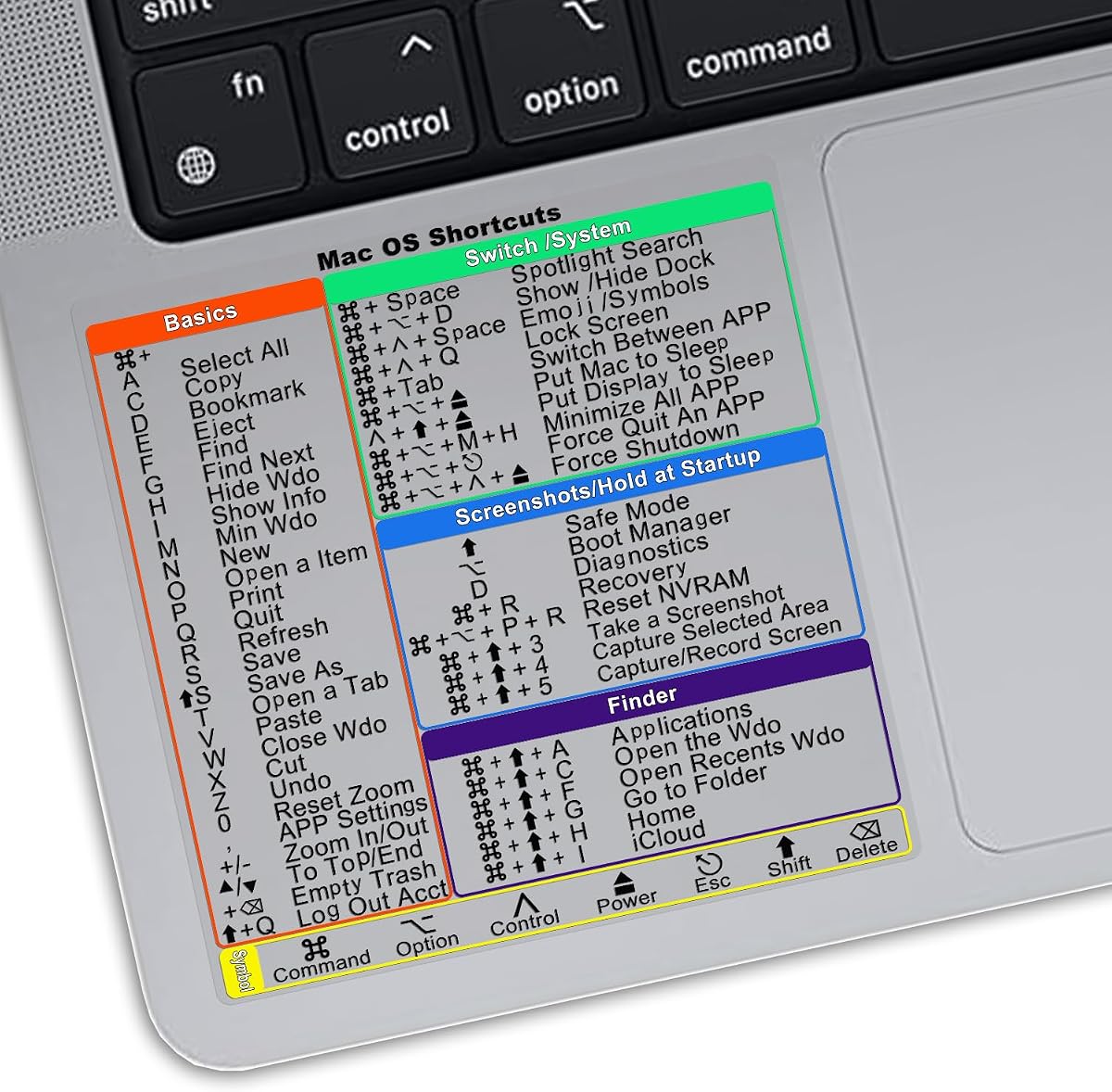


This Synerlogic sticker offers a reliable way to keep essential Mac commands visible. It holds a strong rating for its clear design and durability. The laminated vinyl ensures it withstands daily use without peeling easily.
We may earn a commission when you buy through this link, at no additional cost to you.
Users appreciate the comprehensive list of shortcuts that cover everyday tasks. The adhesive has been updated for a stronger hold compared to older versions. It fits perfectly on Air and Pro models including iMacs and Mac Minis.
While the adhesive is strong, removal might leave a light residue that wipes off with soap and water. Application requires care to avoid bubbles so peeling gradually is recommended. The design works well for both new and experienced Mac users.
It is a solid choice for anyone wanting to boost productivity immediately. The USA manufacturing adds a layer of quality assurance. Overall this sticker balances visibility and durability for most standard Mac setups.
Keep the most important commands visible to stop searching online and work faster every day.
Compatible with Air Pro iMacs and Mac Minis regardless of CPU type or macOS version.
We may earn a commission when you buy through this link, at no additional cost to you.
This product stands out by including Word and Excel shortcuts alongside standard Mac commands. It is rated highly for its military-grade vinyl and professional OEM look. The design helps users work faster with both OS and Office tools.
We may earn a commission when you buy through this link, at no additional cost to you.
It fits a wide range of models from older Intel to newer Apple Silicon chips. The adhesive requires careful application to avoid air bubbles but offers a secure hold once placed. Customer support is noted for being responsive to any issues.
The clear design blends well but ensures your surface contrasts with the black text for readability. It is an affordable solution for those who need quick reference for productivity apps. The durability ensures it lasts through daily typing and friction.
Ideal for students or professionals using Mac for document work. The bundle saves you from buying separate stickers for apps. Overall it offers great value with a focus on efficiency and comprehensive command access.
Access critical Word and Excel shortcuts directly on your keyboard for smoother document workflows.
Designed to work with both M-chip and Intel Mac models for broad device support.
We may earn a commission when you buy through this link, at no additional cost to you.
This premium sticker features a zero residue adhesive that lifts off cleanly without damaging your device. It is water repellent and matte which resists smudges and spills effectively. The ultra-thin profile ensures you won't feel it under your wrists.
We may earn a commission when you buy through this link, at no additional cost to you.
The layout curates only the essential shortcuts to keep the visual line clean. It specifically supports the 2026 MacBook Neo alongside Air and Pro models. The design is perfect for those who want a sleek look without clutter.
While the price is slightly higher the durability and residue-free removal justify the cost. The matte vinyl ensures the print stays sharp for years without fading. It is a thoughtful choice for users who value high-quality materials and design.
Best for those who want a premium feel and worry about surface damage. The clean removal process is a significant advantage. Overall it combines high performance with an elegant aesthetic for modern Mac users.
Peel it off later with zero glue marks or discoloration to keep your device pristine.
Matte vinyl shrugs off coffee spills and sweat while resisting daily typing friction.
We may earn a commission when you buy through this link, at no additional cost to you.
This sticker offers over 50 essential shortcuts in a clean easy-to-read layout. It is designed for 13 to 16 inch models with a residue-free adhesive. The design is user-friendly and allows for quick installation and removal.
We may earn a commission when you buy through this link, at no additional cost to you.
The vinyl resists scratches and water making it durable for daily use. You can choose from various colors to match your MacBook finish. Ensure the color contrasts with your device for optimal readability especially on dark surfaces.
It simplifies the learning process for new users while aiding pros. The installation is simple with a peel-and-stick method that avoids mess. The layout helps streamline workflows by making commands instantly visible.
Good for users who need a variety of commands at a glance. The color options help it blend in with your style. Overall it balances practicality with aesthetic customization for a range of Mac owners.
Access more than fifty shortcuts to cover most daily tasks without opening help menus.
Choose from various sticker colors to complement your specific MacBook finish.
We may earn a commission when you buy through this link, at no additional cost to you.
This set includes two stickers so you can keep a spare or share one with a colleague. The clear design blends seamlessly with the backlight for a clean look. It supports M1 through M5 chips ensuring future compatibility.
We may earn a commission when you buy through this link, at no additional cost to you.
The UV-resistant ink prevents fading while the scratch-proof vinyl handles daily contact. You get instant access to 50 plus commands to boost your workflow. The no-residue adhesive protects your device value by allowing clean removal.
It is laser-cut to align perfectly with US layout spacing and avoid overlapping keys. The transparency helps maintain the original aesthetic of your device. This is a practical solution for those needing a reliable backup sticker.
Best for teams or those who want a spare set ready. The value is high given the quality and durability. Overall it offers a transparent and efficient way to learn shortcuts without cluttering your workspace.
Get a spare set to share or keep as a backup replacement for convenience.
The clear vinyl blends into your keyboard backlight keeping the sleek Mac look intact.
We may earn a commission when you buy through this link, at no additional cost to you.
This pack offers three clear stickers providing ample options for multiple devices or sharing. It is compatible with a wide range of Apple devices including MacBooks and Mac Minis. The high rating indicates strong satisfaction among users.
We may earn a commission when you buy through this link, at no additional cost to you.
The clear design ensures it remains visible but unobtrusive on most surfaces. It supports Apple Silicon chips as well as older models for broad utility. This makes it a versatile choice for households with different Mac devices.
While it lacks specific app shortcuts it covers the essential OS commands efficiently. The transparency keeps your device looking clean without adding color. It is a straightforward solution for those who need multiple sets.
Ideal for families or offices with multiple Macs needing consistent guidance. The universal fit simplifies purchasing decisions. Overall it is a reliable and versatile option for widespread shortcut access.
Three stickers mean you can label multiple devices at once for consistent workflow.
Works with Mac M1 through M5 models as well as older Intel devices.
We may earn a commission when you buy through this link, at no additional cost to you.
This sticker is designed to fit any MacBook including Neo and Air Pro models. It features laminated vinyl for durability and strong adhesive to stay in place. It is made in the USA ensuring quality standards.
We may earn a commission when you buy through this link, at no additional cost to you.
The clear-white design ensures readability across various keyboard layouts. It works regardless of CPU type or macOS version for maximum utility. Users can access essential commands without needing to search manuals online.
While the adhesive is strong removal might require warm soapy water for residue. The design helps avoid frustration for beginners and power users alike. It is a reliable tool for everyday productivity tasks.
Best for those needing a universal solution across different device types. The laminated finish protects against wear and tear. Overall it is a trustworthy choice for comprehensive command coverage.
Fits Neo Air Pro iMacs and Mac Minis regardless of CPU or OS version.
Backed by responsive customer support and made in the USA.
We may earn a commission when you buy through this link, at no additional cost to you.
This pack includes four styles offering variety for different preferences or devices. It uses military-grade vinyl for durability and maintains an OEM look. The design works for both basic and advanced users seeking better proficiency.
We may earn a commission when you buy through this link, at no additional cost to you.
Compatible with older Intel MacBooks and various Air Pro models. The adhesive is strong and customer service is ready to resolve issues. It provides essential shortcuts to save time and frustration daily.
The rainbow option adds a unique touch though some may prefer standard colors. The stickers are easy to apply and stay secure through use. This variety ensures you find a suitable match for any setup.
Ideal for households with different Mac models or color preferences. The durability ensures long-term use without peeling. Overall it is a versatile kit for those wanting multiple options.
Choose from four styles to match your device color or personal preference.
Professional design gives the stickers a factory-installed look.
We may earn a commission when you buy through this link, at no additional cost to you.
This sticker focuses specifically on Word and Excel shortcuts for productivity users. It is laminated for durability and fits various Air and Pro models. It helps users learn new commands quickly without needing to Google commands.
We may earn a commission when you buy through this link, at no additional cost to you.
The strong adhesive holds well though removal may need soapy water. It is designed to fit newer and older models effectively. Users can work faster and smarter with these essential app commands at hand.
Ideal for professionals who spend hours in spreadsheets or documents. The clear design keeps the keyboard looking clean. It saves time by providing immediate access to formatting and navigation tools.
Best for those needing a targeted tool for office apps. The durability ensures it lasts through intense typing sessions. Overall it is a practical addition for Word and Excel power users.
Access specific Word and Excel commands to streamline document creation tasks.
Laminated vinyl ensures the text stays sharp through regular office use.
We may earn a commission when you buy through this link, at no additional cost to you.
This large sticker offers a clear professional design from a trusted training brand. It uses no-residue adhesive to protect your device surface. The laminated material ensures it is waterproof and scratch-resistant for longevity.
We may earn a commission when you buy through this link, at no additional cost to you.
The shortcuts are alphabetized making them easy to locate quickly. It is designed for larger laptops ensuring a precise fit. The brand offers extensive training resources for further learning.
Ideal for those who want a clear and large reference guide. The adhesive ensures clean removal without leaving marks. It balances practicality with educational resources to enhance skills.
Best for students or professionals needing a detailed guide. The large format aids visibility without clutter. Overall it is a high-quality choice for systematic learning.
Shortcuts are alphabetized for quick location when you need a specific command.
Backed by TeachUcomp a publisher of educational products since 2001.
We may earn a commission when you buy through this link, at no additional cost to you.
Selecting the right sticker requires understanding your device model, desired layout, and adhesive quality.
Ensure the sticker matches your specific MacBook size and model. Some are designed for 13 to 16 inch screens while others cover smaller devices. Check if it supports your CPU type such as M1 or Intel.
Always verify the dimensions before purchasing to avoid fit issues.
Look for strong adhesives that prevent peeling but allow clean removal. Some premium options offer residue-free technology. Others may leave light residue that requires warm soapy water.
Consider how often you plan to remove the sticker to choose the right adhesive.
Decide if you need general OS shortcuts or specific app commands like Word and Excel. Essential only layouts reduce clutter while comprehensive ones cover more ground. Alphabetized or grouped layouts aid quick searching.
Choose a layout that matches your specific workflow needs.
Vinyl and laminated finishes protect against scratches and spills. Matte surfaces resist smudges better than glossy ones. UV-resistant ink ensures the print stays sharp over time.
Prioritize materials that withstand daily typing and desk conditions.
Clear designs blend well but need contrast with your surface. White or black text works best depending on your device color. Ensure the font size is large enough to read from a distance.
A clean aesthetic preserves the look of your device while aiding utility.
Stickers vary from small 3.25 inch to larger 3.25 square formats. Measure your palm rest or keyboard area to ensure it fits without overlapping keys. Large stickers are easier to read but may take more space.
Select a size that balances readability with keyboard real estate.
Some require careful peeling to avoid bubbles while others offer simple application. Look for gradual peel methods that minimize air traps. Instructions often suggest smoothing gradually from one side.
Proper application ensures a smooth finish and better durability.
Established brands often provide better customer support and quality guarantees. Reading reviews helps verify adherence to claims like residue-free removal. Trusted training brands offer additional educational value.
Researching the manufacturer helps ensure reliability and value.
Clean your palm rest surface thoroughly before applying the sticker to ensure it adheres properly. Use a soft cloth to remove dust and oils that might interfere with the adhesive.
Apply the sticker gradually starting from one edge to prevent air bubbles. Smooth out the material as you peel back the backing to ensure a flat finish.
Clean the sticker with a dry cloth to remove smudges and avoid harsh chemicals that may damage the vinyl. If you need to remove it, peel slowly and use warm soapy water if residue remains.
No, most high-quality stickers are made with vinyl that protects the surface. They are designed to be thin so they do not interfere with typing. Ensure you choose a residue-free adhesive if you plan to remove it later.
Yes, many models offer universal compatibility across different CPU types. However always check the product description to confirm specific model support. Most cover Air and Pro models from recent years.
Premium options feature no-residue adhesive that peels off cleanly. Standard adhesives may leave a light film that wipes off with warm soapy water. Test a small corner if you are concerned about your surface.
Some products include dedicated shortcuts for Word and Excel. These are useful for users who rely heavily on document processing tools. Check the product details to see if app-specific commands are included.
Durability depends on material and daily use but many last for years. Laminated vinyl resists scratches and spills while UV-resistant ink prevents fading. Proper application and cleaning help extend their lifespan.
Yes, several models offer universal fits for desktop keyboards as well. They are designed to match standard US layouts found on Apple peripherals. Verify the dimensions to ensure they fit your specific keyboard area.
The Synerlogic Mac OS Shortcuts Sticker and SYNERLOGIC Word/Excel bundle offer excellent value for most users. These options balance clarity with durability to support daily workflows effectively.
Prioritize adhesive quality and layout to ensure the sticker meets your long-term needs. A residue-free option is ideal for those who want to protect their device surface.
Remember to check current availability and verify your model compatibility before buying. The right sticker can significantly improve your speed and confidence on macOS.