
ASUS Prime AP201 Micro-ATX PC Case
4.7Editor score
High airflow mesh design
Supports large radiators
Tool-free side panels
Explore our expert guide comparing the top ten ASUS PC cases for performance and aesthetics, helping you choose the perfect chassis for your next build.
Choosing the right chassis is essential for any PC build. An ASUS PC case offers robust build quality, excellent airflow, and distinctive design elements that stand out in today's market.
We evaluated ten models based on cooling, compatibility, and features. This guide covers everything from compact micro-ATX options to massive full-tower systems designed for high-end gaming.
Each pick highlights key strengths and ideal use cases. Please note that availability and pricing vary by retailer. Always check current listings before making your final purchase decision.
4.7Editor score

4.8Editor score

4.6Editor score
This table compares the ten best ASUS PC cases side by side. Review key specifications like chassis type, fan support, and unique features to find the perfect match for your components.


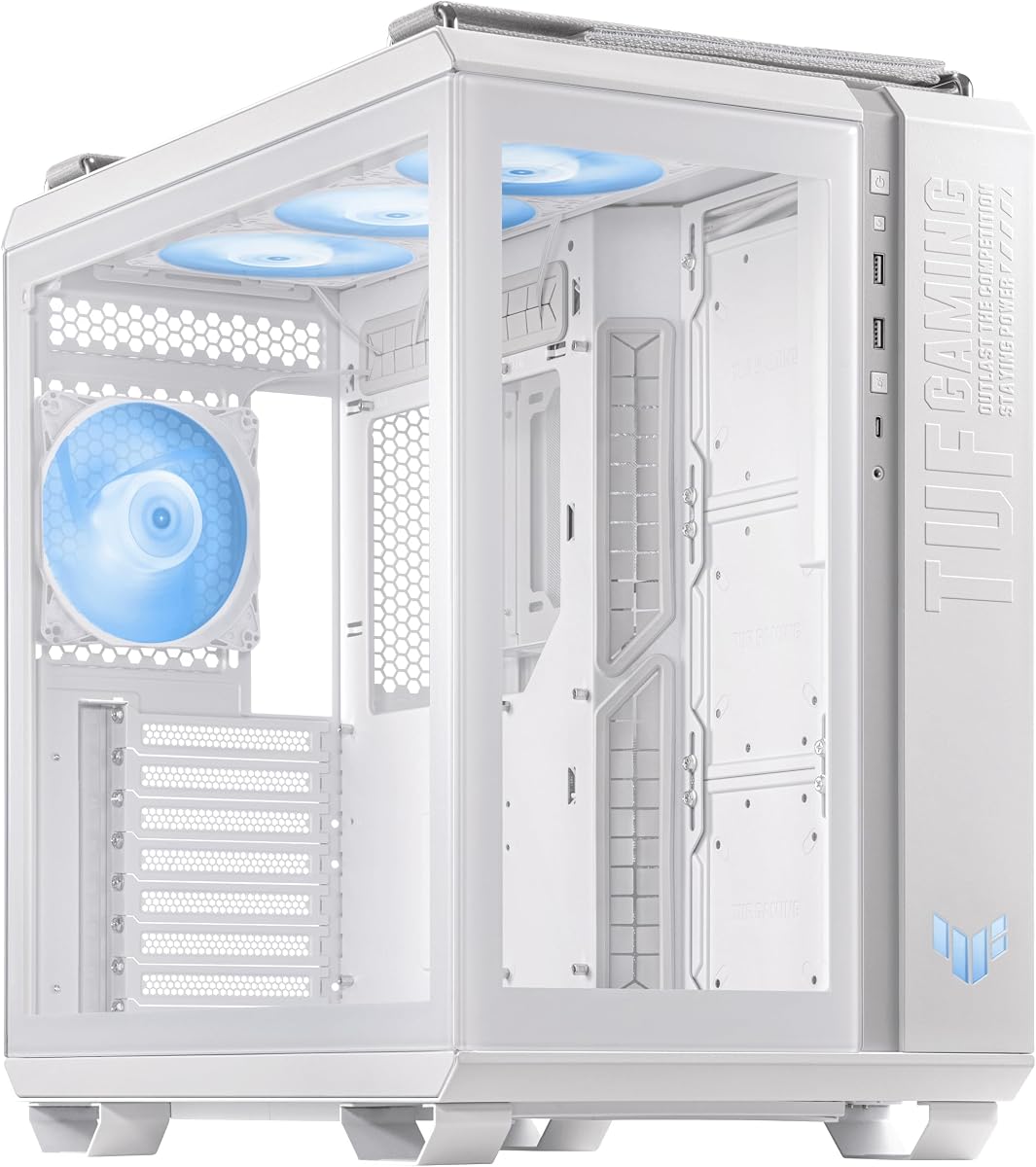
This case stands out as the top choice for enthusiasts seeking a reliable ASUS PC case. It scores highly for its build quality and comprehensive feature set suitable for high-end gaming rigs.
We may earn a commission when you buy through this link, at no additional cost to you.
Its support for E-ATX motherboards and vertical GPU installation makes it versatile. The included RGB fans and dedicated cooling zones ensure your components stay cool during intense workloads.
While the weight and glass panels demand careful handling, the trade-off is a premium look. These factors are acceptable given the structural integrity and modern aesthetics it provides.
Buyers looking for a robust full-tower with excellent airflow will find this ideal. It remains the strongest recommendation for those prioritizing durability and upgrade potential in their build.
With support for large radiators and multiple fan mounts, this case ensures efficient heat dissipation for powerful CPUs and GPUs.
The reinforced steel chassis and custom TUF patterns offer a durable and distinct look that withstands daily use.
We may earn a commission when you buy through this link, at no additional cost to you.
This Micro-ATX case is the best value option in our list. It delivers impressive cooling performance at a fraction of the cost of larger full-tower models.
We may earn a commission when you buy through this link, at no additional cost to you.
The mesh design with over 57,000 holes maximizes airflow. Despite its small size, it accommodates substantial hardware including long graphics cards and high-end coolers.
Its limitations in motherboard support are minor for those with compact builds. The simple design is a fair trade for the significant savings and thermal benefits.
Perfect for budget builders needing reliable performance, this case is a top pick. It proves you do not need to spend a fortune to get a capable chassis.
Precision-machined holes create a highly effective cooling environment for performance components.
Fits surprisingly large hardware like 360mm radiators in a tiny footprint.
We may earn a commission when you buy through this link, at no additional cost to you.
This chassis defines the premium end of the ASUS PC case market. It offers unparalleled cooling capabilities and robust materials for those who want the best hardware enclosure.
We may earn a commission when you buy through this link, at no additional cost to you.
Its semi-open structure and support for massive radiators make it ideal for custom water cooling. The aluminum frame and integrated storage add significant convenience and style.
The high cost and size limit it to enthusiasts. However, the build quality and unique features like the storage drawer justify the investment for dedicated builders.
For anyone seeking maximum cooling and luxury features, this is the ultimate choice. It combines high-end performance with thoughtful design details.
Capable of supporting dual 420mm radiators for ultimate thermal management.
Features like a built-in drawer and tool-free hinges enhance the building experience.
We may earn a commission when you buy through this link, at no additional cost to you.
This mid-tower offers a unique dual-chamber layout that separates CPU and GPU cooling zones. It is a strong choice for those prioritizing visibility and airflow.
We may earn a commission when you buy through this link, at no additional cost to you.
The panoramic glass design provides an unobstructed view of your build. Tool-free panels and modular parts make it easy to install components and manage cables.
While the glass panels attract fingerprints, the visual impact is significant. The modular design helps mitigate dust issues by allowing easy cleaning.
Buyers wanting a balance of style and function will appreciate this model. It stands out as a versatile option for modern gaming systems.
Dual chambers allow for targeted airflow management to CPU and GPU.
Tinted glass on front and side creates a stunning panoramic display.
We may earn a commission when you buy through this link, at no additional cost to you.
This case is designed specifically for motherboards with hidden connectors. It simplifies cable management and reduces clutter significantly in the main chamber.
We may earn a commission when you buy through this link, at no additional cost to you.
The panoramic glass design and pre-installed ARGB fans offer a clean aesthetic. It supports large graphics cards and radiators while maintaining a compact profile.
While it lacks premium materials like aluminum, the focus on cable routing is valuable. The angled base enhances both airflow and the viewing angle for viewers.
Ideal for clean builds with modern hidden-connector boards, it is a practical choice. It delivers good value by focusing on essential organization and display.
Built specifically for motherboards with hidden connectors to hide wires.
Panoramic glass and ARGB fans create a beautiful and functional look.
We may earn a commission when you buy through this link, at no additional cost to you.
A white version of the popular GT501, this case offers the same robust features in a distinct color. It is perfect for builders targeting a clean or light-themed setup.
We may earn a commission when you buy through this link, at no additional cost to you.
Its E-ATX support and heavy-duty handles ensure it can handle large, heavy components. The cooling system is identical to the black model, ensuring performance is not sacrificed.
White cases often show dust more quickly, but the build quality compensates. The ergonomic handles make transporting a fully loaded system much easier.
Choose this if you want a premium look with high-end capabilities. It balances style and performance effectively for white-themed systems.
White finish and smoked glass create a unique contrast for your build.
Maintains the full durability and capacity of the original GT501.
We may earn a commission when you buy through this link, at no additional cost to you.
This model focuses heavily on airflow with its honeycomb front panel. It is a solid mid-tower choice for those who prioritize thermal performance and included features.
We may earn a commission when you buy through this link, at no additional cost to you.
The integrated RGB controller allows for easy lighting management. Its included headphone hanger adds a touch of convenience for gamers who use headsets often.
While it lacks a front USB-C port, the thermal performance is strong. The design is simple but effective for managing heat in high-end components.
Great for gamers wanting good cooling and RGB without extra parts. It is a reliable choice for standard ATX builds requiring steady airflow.
Perforated front panel ensures air reaches components directly.
Built-in RGB hub and headphone hook add practical value.
We may earn a commission when you buy through this link, at no additional cost to you.
The white version of the Horizon brings advanced features like USB-C and dual cooling. It is a premium mid-tower designed for builders who want flexibility.
We may earn a commission when you buy through this link, at no additional cost to you.
Its fully modular design lets you remove most parts easily. The USB-C port provides fast charging for devices, which is increasingly common in modern setups.
While modular panels add steps during assembly, they offer great utility. The glass panels are tinted to reduce glare while maintaining visibility.
This case is ideal for white builds needing high speeds and organization. It balances performance and aesthetics well for custom setups.
20Gbps USB Type-C on the front supports rapid data transfer.
Most panels and hardware are removable to simplify installation.
We may earn a commission when you buy through this link, at no additional cost to you.
This model has a top rating due to its efficient design for hidden connector boards. It offers a clean look and reliable performance for modern builds.
We may earn a commission when you buy through this link, at no additional cost to you.
The concealed port support helps keep cables hidden inside the chassis. This design choice significantly improves the aesthetic appeal of any internal setup.
It is compatible with large graphics cards and radiators. The angled base ensures proper airflow while providing a stable foundation for the tower.
Ideal for users with specific motherboard models, it is a top pick. The high user rating suggests reliability and satisfaction among buyers.
Designed for motherboards that support hidden connector layouts.
Angled base and wide footprint improve airflow and stability.
We may earn a commission when you buy through this link, at no additional cost to you.
This white model offers dual cooling zones and a premium look. It is a strong contender for white builds needing high-speed connectivity and modularity.
We may earn a commission when you buy through this link, at no additional cost to you.
Tool-free side panels and modular mounts make it easy to install parts. The USB-C port is a modern touch that supports fast data transfer for peripherals.
Glass panels require regular cleaning to maintain their appearance. The dual chamber design is effective for keeping hot components separated.
A great choice for those wanting a white case with advanced cooling. It delivers solid performance and modern features for the price.
Two chambers create separate zones for CPU and GPU airflow.
USB 32 Gen 2 Type-C provides rapid transfer speeds.
We may earn a commission when you buy through this link, at no additional cost to you.
Selecting the right chassis requires considering size, cooling, and features. This section breaks down the most important factors to help you choose the best ASUS PC case.
The first step is determining the motherboard size you need. Micro-ATX cases like the AP201 save space while supporting ATX PSUs. Full-towers like the Hyperion offer room for E-ATX boards.
Choose a size that fits your desk and component needs.
Effective airflow is critical for thermal performance. Mesh panels like those on the GT301 allow maximum intake. Dual-chamber designs like the GT502 separate heat zones.
Look for models with high fan counts and large radiator support.
Steel and aluminum chassis offer durability. The Hyperion uses diecast aluminum for a sturdy frame. Budget options might use thinner steel but remain durable.
Select metal construction for longevity and structural integrity.
Modern builds benefit from USB-C ports. Models like the GT502 Horizon offer USB 20Gbps Type-C for fast charging. Others may only have standard USB 3.2.
Ensure the ports match your devices and charging needs.
Hidden connector support simplifies wiring. The A31 PLUS is built for motherboards with concealed ports. Tool-free panels allow easy access for cable routing.
Prioritize cases with cutouts and management systems.
Vertical GPU expansion adds style. The GT501 supports vertical mounting for modern graphics cards. Traditional slots are common across all models.
Check slot count and orientation for your graphics card.
Design choices vary from black to white. The GT501 White Edition offers a distinct look. RGB fans and panels are common in the lineup.
Match the case style to your personal gaming setup.
Carry handles help move heavy rigs. Headphone hangers and storage drawers are included in premium models. These features add practical value.
Consider these extras for daily usability and transport.
Install your motherboard and PSU first. Secure cables using the designated zones. Ensure all fans are connected to the motherboard.
Clean the mesh panels regularly. Dust can clog holes and reduce airflow. Use compressed air to clear dust from components.
Secure glass panels properly. Avoid excessive pressure on tempered glass. Handle with care to prevent accidental breakage.
Several models in the lineup support E-ATX boards. The TUF Gaming GT501 and the ROG Hyperion GR701 are designed for these larger boards. They provide ample space for advanced cooling and components.
The ASUS A31 PLUS series is built specifically for this. It optimizes cable management for motherboards with hidden ports. This ensures a clean interior with minimal visible wiring.
Yes, specific models like the TUF Gaming GT501 include this feature. It allows your graphics card to be mounted vertically. This enhances visibility and modern aesthetics.
The GT502 Horizon ARGB White and TUF GT502 Plus support fast USB-C. They feature USB 20Gbps Type-C on the front panel. This is ideal for high-speed data transfer and charging.
Yes, the Prime AP201 is a strong budget option. It provides excellent cooling for a low price. Despite its cost, it supports large radiators and has a compact design.
Several models offer white editions for a distinct look. The TUF GT501 White and GT502 ARGB White are popular choices. They feature similar specs to black models.
Yes, almost all models support liquid cooling. They accommodate radiators up to 360mm. Premium options like the Hyperion support dual 420mm radiators for extreme cooling.
The GT301 features a honeycomb front panel for high airflow. The AP201 uses 57,000 precision holes for maximum cooling. Both are excellent for thermal performance.
We reviewed ten excellent options for your next build. The GT501 and Hyperion stand out for premium enthusiasts needing top-tier cooling.
Budget builders should consider the AP201 for its high airflow and value. Hidden connector fans will prefer the A31 PLUS for its clean design.
Always check current availability before buying. Prices and stock fluctuate often. Verify specifications match your hardware needs.