
Harvopu for iPad A16
4.3Editor score
7 RGB backlit keys
420mAh battery life
Adjustable viewing angles
Discover the top iPad A16 Folio Case with Keyboard options for productivity. We compare features, trackpads, battery life, and protection to help you choose
Transforming your tablet into a portable workstation requires the right accessories. An iPad A16 Folio Case with Keyboard offers typing comfort and protection in one sleek package. Whether for school or work, these cases bridge the gap between tablet and laptop.
We evaluated ten top-rated models based on build quality, typing experience, and connectivity. Each option supports the latest iPad A16 and 10th Generation models. Our analysis focuses on trackpad precision, battery longevity, and overall versatility for daily use.
Each selection highlights unique strengths like detachable designs or rugged protection. Real-world usage data informs our rankings to ensure reliability. Note that availability and stock levels change frequently, so verify details before purchasing your ideal companion.
4.3Editor score

4.4Editor score

4.4Editor score
This side-by-side comparison highlights key differences across all ten models. Focus on compatibility, trackpad support, battery capacity, and backlight options to find your perfect match.




The Apple Magic Keyboard Folio stands out as the premier companion for your iPad. With a 4.4 star rating, users praise its seamless integration and typing quality. This device transforms your tablet into a laptop without extra cables or pairing steps.
We may earn a commission when you buy through this link, at no additional cost to you.
Its standout quality is the detachable two-piece design that attaches magnetically. You get front and back protection with a versatile keyboard and back panel. The built-in trackpad supports multi-touch gestures, allowing precision control for tasks and navigation.
Trade-offs include the higher cost compared to third-party alternatives. The white finish may show dirt more easily than darker options. However, the lack of required charging and the robust build quality make it a worthy investment for daily use.
Anyone seeking the most reliable and seamless typing experience should buy this model. It is perfect for professionals needing consistent performance. We recommend it for those prioritizing quality and ease of use over budget savings.
Simply attach the keyboard and start typing without pairing or charging steps. It connects instantly via magnetic contact and provides consistent performance every time you open it.
The design includes a detachable keyboard and protective back panel for front and back protection. This allows you to customize the setup based on your current task or environment.
We may earn a commission when you buy through this link, at no additional cost to you.
This Harvopu case offers excellent value for students and budget-conscious buyers. It holds a 4.3 rating from users who appreciate its feature-rich design. The illuminated typing experience and trackpad control make it a strong contender in the mid-range market.
We may earn a commission when you buy through this link, at no additional cost to you.
Key strengths include the full row of iPadOS shortcuts and 7 RGB backlit levels. You can adjust brightness to suit any lighting condition. The multi-finger gesture control allows efficient web browsing and document editing without touching the screen.
Trade-offs involve the need for manual pairing via Bluetooth. The battery life is good but requires periodic charging. However, the low cost and stylish lighting features make these minor inconveniences acceptable for the price.
Buy this if you want premium features without the premium price tag. It is ideal for casual users and students. We recommend it for those who value aesthetics and functionality over absolute simplicity.
Enjoy 7 RGB pure backlit levels with adjustable brightness for any environment. This allows you to personalize your setup and type comfortably in dim conditions.
The high sensitive trackpad allows multi-finger gesture control for better productivity. You can swipe, scroll, and switch apps easily, elevating your tablet experience.
We may earn a commission when you buy through this link, at no additional cost to you.
The typecase Edge delivers a premium experience with its unique floating magnetic stand. It maintains a 4.4 rating thanks to its laptop-like setup and ergonomic design. This model is designed for serious productivity and creative work on the go.
We may earn a commission when you buy through this link, at no additional cost to you.
Its standout feature is the floating magnetic stand that holds the iPad above the keyboard. This creates a comfortable typing position similar to a laptop. The precision multi-touch trackpad includes palm rejection to reduce accidental cursor movement while typing.
Trade-offs include a slightly heavier profile due to the stand mechanism. You must charge the keyboard periodically for use. However, the robust hinge stability and 12-month support make these trade-offs acceptable for the build quality.
Buy this if you prioritize ergonomics and advanced design features. It is suitable for remote workers and professionals. We recommend it for those who type extensively and need a stable, professional setup.
The magnetic floating stand holds your iPad above the keyboard for a laptop-like setup. This design works well for typing, studying, and remote work.
Enjoy ergonomic keys with 11 backlight colors and a full row of iPadOS shortcut keys. This setup allows efficient navigation for brightness, media, and volume control.
We may earn a commission when you buy through this link, at no additional cost to you.
This typecase Folio is known for its ultra-light design and high user rating. With 4.6 stars, users praise its balance of protection and portability. It is ideal for students who need a case that fits easily in a bag.
We may earn a commission when you buy through this link, at no additional cost to you.
Key strengths include the built-in pencil holder and quiet scissor-style keys. You get 7 backlight colors and laser-etched letters for clear visibility. The detachable magnetic keyboard allows you to remove it for reading or watching videos.
Trade-offs involve a lack of adjustable viewing angles on the back panel. It offers protection but not heavy-duty ruggedness. However, the lightweight feel and high compatibility make it a great daily driver.
Buy this if you need a slim and portable solution. It is perfect for commuting and class. We recommend it for users who value portability and stylus storage.
Designed to be lightweight, this case combines synthetic leather and flexible TPU edges for easy carrying. It protects your iPad without adding unnecessary bulk.
A built-in pencil holder keeps your stylus secure and within reach for quick access. This feature is essential for artists and note-takers using the iPad.
We may earn a commission when you buy through this link, at no additional cost to you.
This CHESONA case is praised for its ability to pair with two devices simultaneously. It holds a 4.5 rating, reflecting solid performance in multi-device workflows. Users appreciate the convenience of switching between devices with a single click.
We may earn a commission when you buy through this link, at no additional cost to you.
Its standout quality is the 2 wireless channels feature for easy device switching. The integrated multi-touch trackpad adapts to the iOS system for comfortable navigation. With a 500mAh battery, it offers a standby time of 120 days.
Trade-offs involve a slightly more complex setup compared to simpler models. The price is higher than basic cases. However, the connectivity and convenience features make it valuable for power users with multiple devices.
Buy this if you manage work and personal devices on one keyboard. It is suitable for multitaskers. We recommend it for those who value connectivity and long standby times.
Pair with up to 2 devices simultaneously and switch between them with one click. This capability streamlines workflow between personal and work tablets.
With a 500mAh battery, the standby time lasts up to 120 days. It enters sleep mode automatically if not in use, ensuring power efficiency.
We may earn a commission when you buy through this link, at no additional cost to you.
This Logitech model offers exceptional durability for demanding environments. It carries a 4.3 rating and is built to exceed military standard drop tests. The case is designed for those who need robust protection against spills and drops.
We may earn a commission when you buy through this link, at no additional cost to you.
Key strengths include the proprietary shock-absorbent technology and waterproof membrane. The Smart Connector connection means instant pairing and power from the iPad. It features four unique modes like Type, Write, and Read for flexibility.
Trade-offs include the lack of a built-in trackpad compared to other models. It is also limited to the 10th Generation model. However, the rugged build and waterproof design justify this limitation for tough conditions.
Buy this if you need extreme protection for your iPad. It is perfect for students in active environments. We recommend it for those prioritizing durability over advanced navigation features.
Proprietary shock-absorbent technology helps the case exceed military standard drop tests. This ensures your device stays safe from drops and mishaps.
A durable membrane seals in the keyboard to protect from spilled drinks. You can wipe it clean easily to maintain a clean workspace.
We may earn a commission when you buy through this link, at no additional cost to you.
This typecase model offers versatility with both portrait and landscape flexibility. It holds a 4.4 rating for its adaptability to different use cases. Users enjoy the seamless transition between typing and reading modes.
We may earn a commission when you buy through this link, at no additional cost to you.
Its standout feature is the magnetic detachable design allowing two setups in one. You can snap on the keyboard for typing and detach it for reading. The precision trackpad supports multi-touch gestures for better control.
Trade-offs include a price point higher than basic cases. The battery requires charging every few weeks. However, the 12-month warranty and design flexibility make it a strong choice for creative users.
Buy this if you switch frequently between work and media. It is suitable for artists. We recommend it for those who value design versatility and warranty support.
Enjoy comfortable viewing in landscape and a low-angle setup for writing or drawing. The adaptable stand holds its position with more freedom than fixed designs.
Get 7-color backlighting that keeps keys easy to see in any setting. This adds personality to your setup while maintaining functionality in dim rooms.
We may earn a commission when you buy through this link, at no additional cost to you.
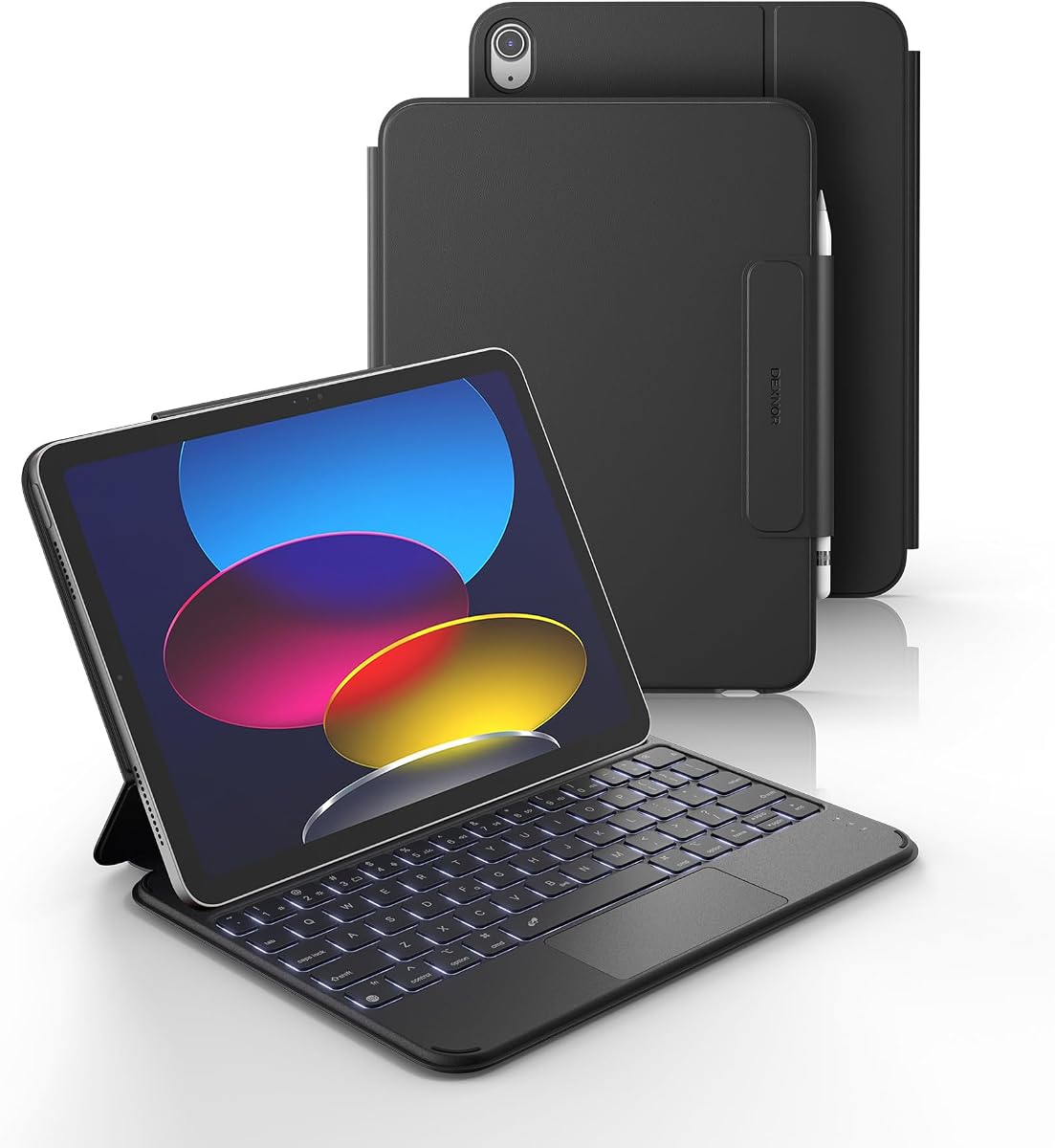
The Dexnor case is designed for travel with an ultra-light weight of 1.16 lbs. With a 4.3 rating, it offers reliable performance for commuters and business travelers. The battery capacity is impressive for its size.
We may earn a commission when you buy through this link, at no additional cost to you.
Key strengths include the 650mAh battery and scissor-switch keys for laptop-like typing. You get smooth navigation with the built-in multi-touch trackpad. The power-saving design ensures long standby times without frequent charging.
Trade-offs involve a standard flat design without a floating stand. It is not suitable for users needing screen elevation. However, the portability and battery life make it a practical choice for mobile work.
Buy this if you carry your iPad daily and need light gear. It is perfect for students. We recommend it for those who prioritize weight and battery life over complex stands.
Weighing just 1.16 lbs, this case is ideal for commuting and campus life. It reduces load while providing essential typing and protection features.
The 650mAh battery supports up to 200 hours of typing without backlight. This reduces the need for frequent charging during long trips.
We may earn a commission when you buy through this link, at no additional cost to you.
This ESR case features an extra-large trackpad for effortless navigation. It holds a 4.4 rating due to its smooth controls and slim profile. Users enjoy the spacious touchpad for multitasking and browsing.
We may earn a commission when you buy through this link, at no additional cost to you.
Its standout quality is the 65% larger touchpad compared to regular keyboards. You can choose between 65° for working and 20° for sketching. The detachable magnetic design allows seamless switching between tablet and keyboard modes.
Trade-offs include the absence of a backlight for dark typing. It has fewer viewing angles than some competitors. However, the larger trackpad and lightweight build offer distinct advantages for productivity.
Buy this if you want superior trackpad performance and a slim profile. It is suitable for office users. We recommend it for those who prioritize navigation and simplicity.
Enjoy a 65% larger touchpad than regular keyboards for effortless navigation. It supports intuitive gestures from one-finger drag to three-finger scroll.
Choose between a 65° angle for working and a 20° angle for sketching. The triangular support keeps everything steady without wobbling.
We may earn a commission when you buy through this link, at no additional cost to you.
This CC Store case is rated highly for its marathon battery life and low cost. It holds a 4.6 rating, showing users appreciate the reliability and value. The large capacity battery supports extended use sessions.
We may earn a commission when you buy through this link, at no additional cost to you.
Key strengths include the 200+ hours of working time after just 2-3 hours of charging. The adjustable kickstand offers multiple tilt angles for ideal viewing. It comes with a convenient pencil holder and premium PU leather protection.
Trade-offs include a basic trackpad compared to premium models. It lacks backlighting for dark environments. However, the battery performance and cost make it a smart buy for users needing endurance.
Buy this if you need long battery life on a budget. It is perfect for students and travelers. We recommend it for those who value endurance and affordability.
The built-in large capacity battery delivers 200+ hours of working time. This minimizes downtime for frequent charging during busy schedules.
Designed with a pencil holder and pen slot on top for easy access. This keeps your stylus safe and ready to use at any moment.
We may earn a commission when you buy through this link, at no additional cost to you.
Selecting the right case involves considering multiple factors like compatibility, connectivity, and build materials. Here are the key elements to evaluate.
Always verify that the case supports your exact iPad model number. Some options are limited to specific generations while others cover multiple. Check the product details to ensure a perfect fit.
Confirm the model number on the back of your tablet matches the listing. This ensures proper cutouts for ports and correct magnetic alignment.
Decide between Bluetooth wireless keyboards or Smart Connector types. Smart Connector requires no pairing and draws power from the iPad directly. Bluetooth offers more flexibility for device switching.
Bluetooth allows use with other devices but needs charging. Smart Connector is simpler but tied to the iPad's battery.
Look for models with multi-touch trackpads if you need mouse-like control. These support gestures for scrolling, clicking, and switching apps easily. Some cases omit this to save weight or cost.
Trackpad size and gesture support vary by brand. Ensure it meets your navigation needs before buying.
Check if the keyboard includes backlighting for typing in low light. Options range from single color to multi-color RGB with adjustable brightness levels. Not all models include this feature.
Backlighting adds to the cost but improves usability at night. Decide if you need it based on your lighting environment.
Evaluate the battery capacity and expected standby time. Higher mAh ratings generally mean longer use between charges. USB-C ports are standard for efficient recharging.
Consider how often you can charge before it impacts your workflow. Long battery life is essential for travel and remote work.
Consider if you need a detachable keyboard for tablet-only mode. Lightweight cases are better for carrying daily. Floating stands offer better ergonomics but add bulk.
A slim profile is ideal for commuting. A rugged build suits active environments better.
Inspect materials like PU leather and TPU for durability and drop protection. Look for features like military-standard drop tests for extra safety. A magnetic latch keeps the device secure when closed.
High-quality materials prevent wear over time. Ensure the case protects the screen and ports fully.
Check the warranty period provided by the manufacturer. Most reputable brands offer 12-month warranties for defects. Responsive customer service is vital for resolving issues.
A solid warranty reduces risk. Ensure the brand has a history of good support.
To connect a Bluetooth keyboard, open settings on your iPad and locate Bluetooth devices. Press the function key combination usually Fn and C to pair. Confirm connection in your device list.
For smart connector cases, simply place the keyboard on the iPad edge. The magnetic connection will align the pins and power up the device instantly. No settings are needed for basic typing.
Clean the case regularly with a dry microfiber cloth to prevent stain buildup. Avoid harsh chemicals. Remove the keyboard for charging when needed. Close the case fully to activate sleep mode.
No, most cases listed are designed for the iPad A16 11th and 10th generations. Always check your model number before purchasing to ensure compatibility. Using the wrong case may lead to fit issues.
Not every model includes a trackpad. Some budget or rugged options omit it to save weight or cost. Check the product specifications to confirm trackpad support before buying.
Yes, many of these cases feature a detachable magnetic keyboard. This allows you to use the iPad as a standalone tablet without the keyboard attached. It offers flexibility for reading or media.
Battery life varies by model but typically lasts up to 200 hours of typing without backlight. Standby times can reach several months if auto sleep modes are enabled. Charging is via USB-C.
Most cases are stain-resistant and protect against light splashes but are not fully waterproof. The Logitech Rugged Folio offers better resistance due to its membrane design. Clean spills immediately.
Smart Connector models connect instantly without pairing. Bluetooth models pair once and auto-reconnect when turned on. You only need to pair initially unless you change devices.
The Harvopu and CC Store models offer excellent value with features like RGB backlight and long battery. They provide essential productivity tools at a lower price point than premium options.
We reviewed ten top models with the Apple Magic Keyboard Folio leading for seamless integration. The Harvopu and typecase Edge offer strong alternatives for budget and premium needs respectively. Each provides unique features for productivity.
Prioritize trackpad support and battery life if you use your iPad for work. Choose lightweight options for travel and rugged ones for safety. Verify compatibility to ensure a perfect fit.
Prices and stock change frequently, so check current listings before buying. We recommend comparing features against your daily needs to find the ideal companion. Your perfect setup is just a click away.