
Memory Card Reader, BENFEI 4in1 USB 3.0 and USB-C to SD Micro SD MS CF Card Reader Adapter
4.5Editor score
4 Cards Simultaneously Read
USB-C and USB 3.0 Support
160MB/sec Transfer Speed
This guide compares the top Compact Flash Card Reader models for photographers and professionals seeking fast data transfer and broad memory card compatibility.
Finding the right Compact Flash Card Reader is crucial for professionals who need reliable data access. These devices bridge the gap between cameras and computers efficiently.
We evaluated ten top-rated models based on speed, compatibility, and build quality. Our list covers options for various budgets and specific workflow needs.
Each pick highlights key strengths and potential trade-offs for informed decisions. Note that product pricing and availability may change over time.
4.5Editor score

4.7Editor score

4.3Editor score
Compare the features of all ten selected readers side-by-side to find the perfect match for your specific memory card needs.



The Lexar Multi-Card 3-in-1 stands out as a top choice for speed and reliability. It offers impressive transfer rates suitable for large media files.
We may earn a commission when you buy through this link, at no additional cost to you.
Its support for USB 3.1 ensures quick data offloading. The versatile design handles SD, microSD, and CompactFlash cards seamlessly.
While it lacks simultaneous multi-card reading, its speed compensates well. Users benefit from a solid two-year limited warranty for peace of mind.
Photographers seeking high performance should prioritize this model. It delivers consistent results for professional workflows.
Achieves up to 312MB/s speeds for efficient file management and quick camera offloading.
Compatible with SD, microSD, and CompactFlash formats to meet diverse camera requirements.
We may earn a commission when you buy through this link, at no additional cost to you.
This reader excels in simultaneous access, reading up to six cards at once. Its aluminum chassis offers durability and efficient heat dissipation.
We may earn a commission when you buy through this link, at no additional cost to you.
The USB 3.0 interface ensures rapid data transfer. It supports modern CFast and legacy XD cards for extensive compatibility.
While it carries a premium price tag, the workflow efficiency justifies the cost. It is ideal for complex multi-camera setups.
Professionals managing large volumes of footage will find it invaluable. The dual connector design adds further convenience.
Access multiple cards at once to streamline data offloading from various cameras.
Crafted from robust aluminum alloy for superior durability and thermal management.
We may earn a commission when you buy through this link, at no additional cost to you.
BENFEI delivers a solid budget option with simultaneous four-card reading capability. It supports both USB-C and USB 3.0 interfaces for broad device compatibility.
We may earn a commission when you buy through this link, at no additional cost to you.
The transfer rate reaches up to 160MB/sec, which is sufficient for most standard photography needs. Users appreciate the responsive customer support.
While it is made of plastic, it remains reliable for everyday use. The inclusion of an 18-month warranty adds significant value.
Budget-conscious users will find this reader a practical solution. It balances cost and functionality effectively for general tasks.
Works seamlessly with both USB-C laptops and USB 3.0 ports for maximum flexibility.
Offers essential multi-card features at an accessible price point for students and hobbyists.
We may earn a commission when you buy through this link, at no additional cost to you.
The UGREEN SD Card Reader offers robust performance with simultaneous four-card access. Its USB 3.0 interface delivers impressive 5Gbps transmission rates for quick file transfers.
We may earn a commission when you buy through this link, at no additional cost to you.
Designed with portability in mind, it fits easily into bags. It supports a wide array of card types including CF and MS.
Users may find the cable length a limiting factor for some setups. However, the speed and convenience are significant benefits.
It suits users needing reliable multi-card functionality without premium costs. A strong contender for general professional use.
Achieves 5Gbps speeds for rapid offloading of large video and photo files.
Small footprint and short cable make it easy to carry during travel.
We may earn a commission when you buy through this link, at no additional cost to you.
This reader stands out by supporting five simultaneous card connections. It features a slim aluminum alloy cover that ensures durability and heat management.
We may earn a commission when you buy through this link, at no additional cost to you.
The USB 3.0 interface provides fast data access speeds. Built-in intelligent protection safeguards against electrical issues during use.
Users should note that brand support might be less accessible than major names. However, the hardware quality remains solid.
Ideal for users needing more than four slots simultaneously. It is a practical choice for diverse card formats.
Supports five simultaneous connections to reduce workflow interruptions during transfers.
Includes built-in safety mechanisms to protect against over-current and short circuits.
We may earn a commission when you buy through this link, at no additional cost to you.
This reader is designed specifically for modern USB-C devices. It supports simultaneous access to four cards for efficient data handling.
We may earn a commission when you buy through this link, at no additional cost to you.
With 5Gbps speeds, it handles large files quickly. Compatibility extends to iPhones and Android phones with USB-C ports.
Users with older laptops may need additional adapters for use. However, it is perfect for new MacBooks and tablets.
A great choice for mobile photographers using current devices. It simplifies direct transfer to phones.
Seamlessly works with USB-C smartphones for instant photo viewing on the go.
Allows reading four different cards at once without swapping.
We may earn a commission when you buy through this link, at no additional cost to you.
The SmartQ C368 offers a straightforward solution for standard card reading. It features a blue LED indicator for clear device status visibility.
We may earn a commission when you buy through this link, at no additional cost to you.
Users benefit from 5Gbps speeds via USB 3.0. It supports four major card types without needing drivers.
Lack of simultaneous reading means users must swap cards. However, the setup is incredibly easy for all systems.
It suits those needing a reliable, simple tool for travel. The included organizer keeps the cable tidy.
Blue LED light provides immediate visual feedback on power and connection status.
Includes a cable organizer for tidy storage during trips.
We may earn a commission when you buy through this link, at no additional cost to you.
This reader is essential for professionals using CFast 2.0 cards. It reads up to five cards simultaneously for maximum workflow efficiency.
We may earn a commission when you buy through this link, at no additional cost to you.
The aluminum body ensures durability and thermal management. It supports legacy XD cards which are rare elsewhere.
Users with older equipment will appreciate the extensive format support. However, it targets specific professional niches.
Recommended for videographers using high-end camera formats. It provides a complete archive solution.
Specialized slot for professional CFast 2.0 cards used in high-end video.
Reads five cards at once to minimize downtime during large projects.
We may earn a commission when you buy through this link, at no additional cost to you.
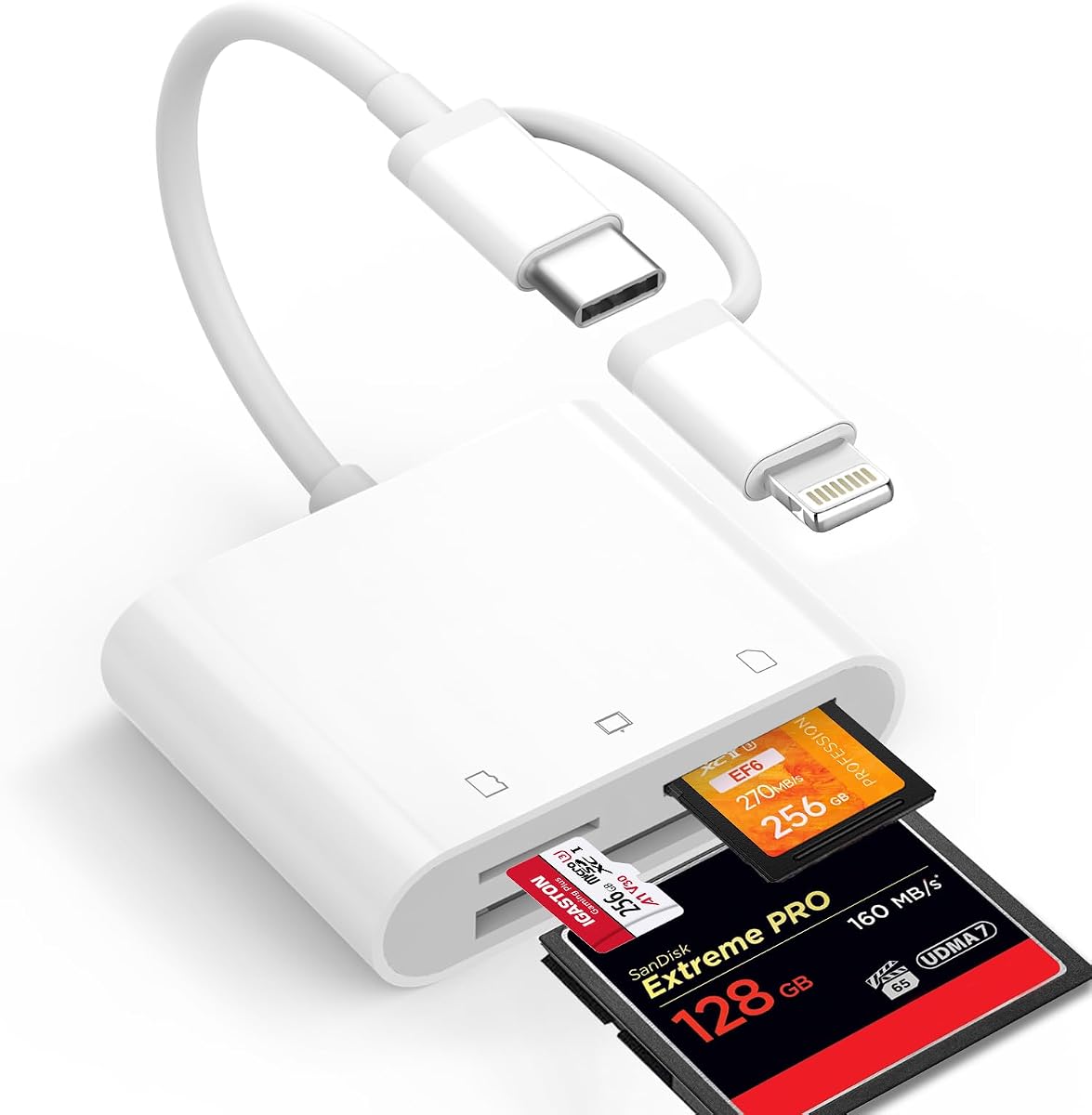
This reader bridges older Lightning devices with newer USB-C ones. It supports three common memory card types for broad compatibility.
We may earn a commission when you buy through this link, at no additional cost to you.
Being Apple MFi certified ensures reliable performance on iPhones and iPads. Bi-directional transfer allows saving space on the phone.
Users cannot use both connectors at the same time. However, it remains versatile for mixed device environments.
Perfect for travelers who rely on Apple devices. It simplifies sharing photos directly from cameras.
Includes Lightning and USB-C connectors to support a wide range of Apple devices.
Transfer photos directly without needing apps or internet connectivity.
We may earn a commission when you buy through this link, at no additional cost to you.
ChiaoPio offers a simple built-in cord solution for USB-C iPads and iPhones. It supports CF and SD cards for easy access.
We may earn a commission when you buy through this link, at no additional cost to you.
The compact design avoids blocking other ports on your device. No extra power or drivers are required for operation.
This model is specifically for USB-C devices only. Users with older iPhones must use a different model.
It is an excellent choice for casual iPad users. It provides straightforward memory card access.
The built-in cord design ensures your charging port remains accessible.
Draws power directly from the device for a lightweight, cable-free experience.
We may earn a commission when you buy through this link, at no additional cost to you.
Selecting the right reader requires considering speed, card types, and connection standards. This guide outlines essential factors for an informed decision.
Ensure the reader supports the specific memory cards you use, including CF, SD, and any legacy formats. Some readers support multiple slots simultaneously while others require swapping.
Check that the reader matches your primary card types to avoid compatibility issues.
Choose between USB-C or USB 3.0 based on your devices. Newer laptops require USB-C, while older systems use standard USB-A ports.
Dual connector models offer flexibility if you have multiple device types.
Look for USB 3.0 or USB 3.1 compatibility for fast data transfer speeds. Slower USB 2.0 ports will bottleneck performance even with fast cards.
Speed matters significantly when handling high-resolution photos and 4K video files.
Models supporting multiple card slots reduce workflow time by reading cards at once. However, many basic readers only support one card at a time.
Prioritize simultaneous support if you work with multiple cameras.
Aluminum housings provide better durability and heat dissipation than plastic alternatives. Consider the physical size for portability if you travel often.
A robust build ensures long-term reliability in professional environments.
Plug and play readers require no software installation, making setup instant. Operating system compatibility like Mac or Windows is standard for most modern devices.
Avoid models that require complex software for basic file transfers.
A longer warranty period indicates manufacturer confidence in product durability. Most reputable brands offer at least one year of coverage for hardware faults.
Check customer service availability before purchase for better support.
Always insert the card fully until it clicks into place to ensure a secure connection. Improper insertion can lead to data corruption or physical damage.
Use the built-in eject option in your operating system before unplugging the reader. This prevents data loss caused by sudden disconnection.
Store the reader in a dry, dust-free place when not in use. Regularly clean the contacts with a soft cloth to maintain optimal performance.
Yes, most modern USB 3.0 readers are backward compatible with USB 2.0 ports. However, data transfer speeds will be significantly slower on older USB 2.0 connections.
No, the majority of these readers are plug-and-play devices. They do not require any additional software installation to function on Windows or Mac systems.
It depends on the specific model. Some support only one card at a time while others support up to six slots simultaneously for faster multi-camera workflows.
Yes, readers with USB-C connectors work seamlessly with the iPhone 15. You can directly connect the reader to the phone for instant photo access.
High-end models support speeds up to 312MB/s depending on the card and interface used. Real-world speeds vary based on the memory card quality and port type.
Most readers allow bidirectional transfer. You can copy files from your camera to a computer or load backups onto your memory card for extended use.
Choosing the right Compact Flash Card Reader ensures efficient data management for your photography needs. Our top picks offer reliable speeds and versatile compatibility options.
Consider your specific card types and device connections when prioritizing features. Balancing speed and cost will help you find the perfect fit.
Always verify current product specifications and pricing before making a purchase. This ensures you get the best value for your specific workflow requirements.