As an Amazon Associate we earn from qualifying purchases. We may earn a commission when you buy through links on this page, at no additional cost to you. Read our affiliate disclosure.As an Amazon Associate we earn from qualifying purchases.Purchases through our links may earn us a commission, at no extra cost to you. Read our affiliate disclosure.
Finding the right barcode scanner for iPad can transform how you manage inventory or process sales efficiently. Modern wireless devices offer seamless integration with mobile apps and provide reliable performance across various business environments without the need for complex setups.
We analyzed ten highly rated models based on connectivity options scanning speed battery endurance and compatibility with iOS devices. Each product was evaluated for its ability to handle different barcode types and its overall durability in real world work settings.
Each pick highlights key strengths and ideal use cases to help you choose the best fit for your specific needs. Please note that product availability and pricing may change over time so verify details before making your final purchase decision today.
Top 3 Picks for Best Barcode Scanner for iPad
Best Budget
Bluetooth 1D&2D Barcode Scanner, 3-in-1 Bluetooth & USB Wired & 2.4G Wireless QR Barcode Reader, PDF417 Data Matrix Handheld Bar Code Scanner Work with Windows, Android, iOS (TM-10B)
Top 10 Best Barcode Scanner for iPad in 2026 Compared
This side by side comparison table allows you to quickly evaluate the core specifications and capabilities of each top rated barcode scanner compatible with iPad devices.
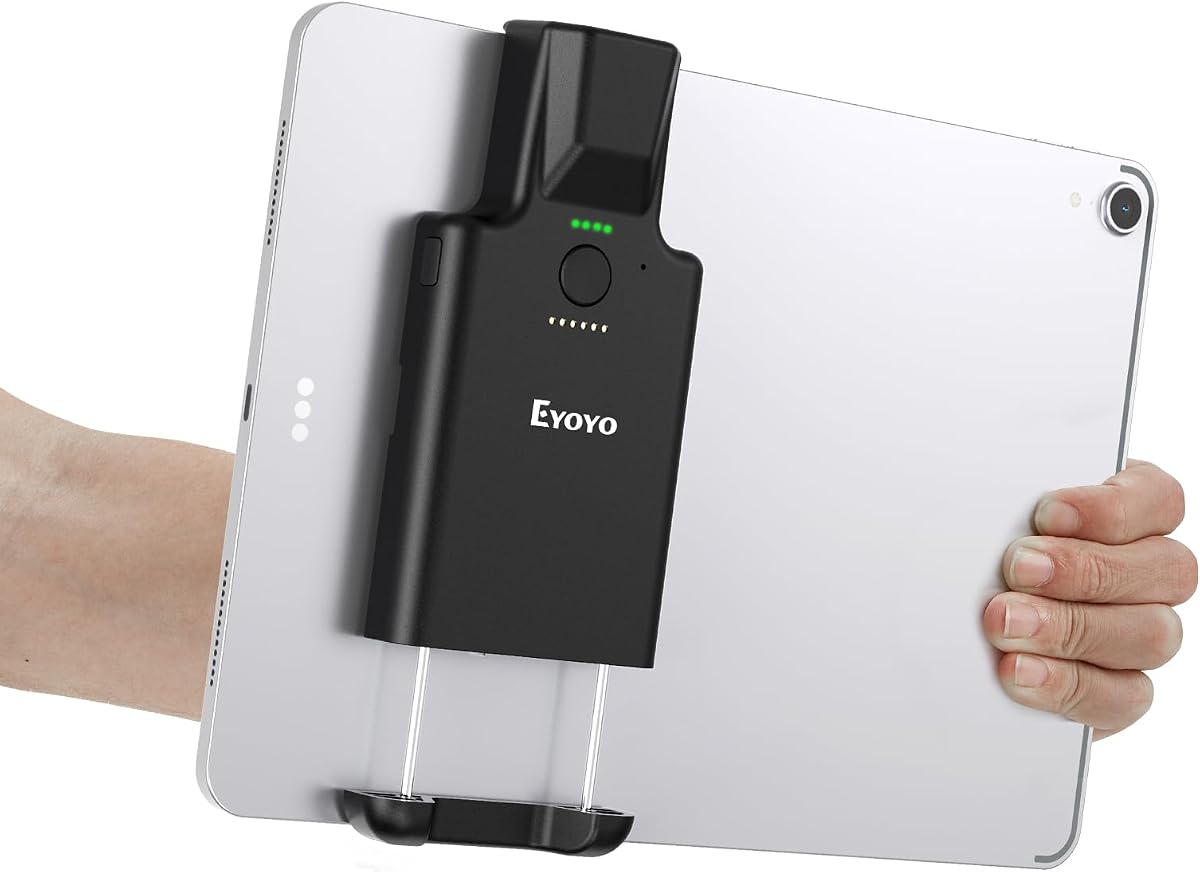
Eyoyo 1D 2D Portable Bluetooth Barcode Scanner Compatible with iPad Tablet
Retractable clip design
3000mAh battery life
1D and 2D support
This device stands out as the top pick for iPad users due to its specialized clip design and robust performance. It earned a high user rating for its versatility in scanning various code types from paper and screens.
Pros
Excellent iPad clip fit
Long battery endurance
Clear LED indicators
Supports damaged codes
Cons
No 2.4G option
We may earn a commission when you buy through this link, at no additional cost to you.
The advanced 2D CMOS imaging technology ensures accurate reading of digital and physical barcodes alike. Its 3000mAh battery supports extended shifts with clear LED indicators for power status management.
While it lacks 2.4G connectivity the Bluetooth and wired options cover most mobile use cases effectively. The clip design requires checking device size compatibility before purchase to ensure a secure fit.
Ideal for retail and inventory teams needing reliable handheld scanning directly on tablets. We recommend this model for its balance of features durability and seamless iPad integration.
Secure Tablet Integration
The vertical retractable clip fits a wide range of tablet sizes providing a stable grip during scanning tasks.
Superior Battery Management
Smart LED indicators show remaining power levels so you can plan recharges before the battery runs out.
Bluetooth 1D&2D Barcode Scanner, 3-in-1 Bluetooth & USB Wired & 2.4G Wireless QR Barcode Reader, PDF417 Data Matrix Handheld Bar Code Scanner Work with Windows, Android, iOS (TM-10B)
Three connection modes
2600mAh battery capacity
70m wireless range
This scanner offers a compelling mix of features at an accessible price point for small businesses. It supports both 1D and 2D codes which expands its utility beyond basic barcode reading tasks.
Pros
Affordable pricing point
Flexible connectivity options
Supports 2D QR codes
Cons
Basic build materials
We may earn a commission when you buy through this link, at no additional cost to you.
The ability to switch between Bluetooth 2.4G and USB wired modes provides significant flexibility across different environments. A substantial 2600mAh battery ensures it lasts through busy shifts without frequent interruptions.
Build quality is functional but not industrial grade which may limit use in very rough warehouse conditions. The 2.4G option is a strong addition for stable local connectivity without pairing steps.
Best suited for budget conscious buyers needing 2D capabilities and reliable wireless options. It delivers strong performance for the cost making it a smart entry level choice.
Versatile Connectivity
Three distinct connection modes allow you to choose the best method for your specific device and setup needs.
Extended Battery Life
The large battery capacity supports over nine hours of continuous scanning on a single full charge cycle.
Inateck 1D Bluetooth Barcode Scanner, 2600mAh Battery, 115FT Range, BCST-70
115ft wireless range
Rugged TPU case
Programmable prefix suffix
Designed for demanding environments this scanner prioritizes range and durability above all else. Its extended wireless capability allows users to work far from their tablet or receiver without losing connection.
Pros
Industry leading range
High drop protection
Customizable scan output
Cons
Premium price tag
We may earn a commission when you buy through this link, at no additional cost to you.
The robust construction with external TPU protection withstands repeated drops on concrete floors making it ideal for warehouses. Customizable output settings like prefixes and suffixes add workflow efficiency for data entry.
While the price is higher than standard models the investment pays off in longevity and performance for large scale operations. Battery life is strong with a standby time that spans months between uses.
Perfect for enterprises needing reliable long range scanning in tough conditions. We recommend it for users who value durability and advanced customization over basic features.
Superior Wireless Range
Reach distances of up to one hundred fifteen feet ensure you can scan items from anywhere in your workspace.
Built to Endure
Triple consolidation treatment and a thick protective case protect the internal components from impact and stress.
NETUM Bluetooth Barcode Scanner, Support 2.4G Wireless & Bluetooth & Wired
100k storage capacity
Automatic scanning modes
Multi connectivity modes
This scanner is engineered for high volume scanning tasks requiring extensive offline storage capabilities. It allows users to store up to one hundred thousand barcodes when out of range and upload them later.
Pros
Large offline storage
Strong scan recognition
Multi mode connection
Cons
No Square POS support
We may earn a commission when you buy through this link, at no additional cost to you.
The automatic scanning modes reduce manual effort during repetitive inventory counts. Its CCD sensor handles damaged or tightly spaced codes well ensuring accurate reads in cluttered environments.
The battery life is solid and lasts up to a month in typical light usage scenarios. However it explicitly notes incompatibility with Square POS systems which may limit some retail use cases.
Recommended for warehouse managers needing robust offline data collection features. It provides a sturdy solution for organizations prioritizing data retention and scan efficiency.
Offline Data Storage
Store up to one hundred thousand scans internally to continue working even when wireless connectivity is unavailable.
Versatile Operation Modes
Three scanning modes including auto sensing allow you to adjust the workflow to your specific needs.
Weighting only 35 grams this scanner is among the lightest options available for mobile scanning tasks. Its compact size makes it easy to carry in a pocket for quick on the go checks.
Pros
Extremely light weight
Long Bluetooth range
Pocket friendly size
Cons
1D scanning only
We may earn a commission when you buy through this link, at no additional cost to you.
The Bluetooth range extends up to 50 meters which is impressive for a device of this size. It works well for basic inventory management in libraries or small retail shops where portability is key.
Users should note that it only supports 1D codes and cannot read QR codes from screens. This limitation makes it less suitable for environments requiring 2D scanning capabilities.
Ideal for users needing a lightweight handheld tool for basic tasks. It offers excellent portability and battery life for its small footprint.
Pocket Sized Convenience
The miniature design allows you to carry the scanner effortlessly during daily mobile work tasks.
Impressive Bluetooth Range
Connect from up to fifty meters away ensuring freedom of movement within large storage areas.
NetumScan Desktop Barcode Scanner, USB QR Code Reader
Handsfree omnidirectional
Auto-sensing trigger
Anti-slip base
This desktop unit is designed for scenarios where handsfree scanning is necessary for efficiency. Its omnidirectional sensor captures codes from multiple angles without requiring precise positioning by the user.
Pros
Handsfree operation
Anti-slip base
Dust resistant
Cons
Fixed desktop position
We may earn a commission when you buy through this link, at no additional cost to you.
The auto-sensing technology activates the scanner when an item is detected under the window reducing the need for manual triggers. It features an anti-slip base that keeps the unit stable during heavy use.
Being a desktop model it lacks portability but excels at high throughput tasks like checkout counters. It is not compatible with Square or Shopify systems which should be verified before purchase.
Best for retail counters or packing stations needing consistent automated scanning. It simplifies the workflow by removing the manual effort of aiming a handheld device.
Automated Sensing Technology
The scanner automatically activates when an item is present allowing for continuous and effortless operation.
Stable Desktop Design
A non-slip base and anti-shock design ensure the unit remains secure and protected on any surface.
NetumScan Bluetooth Barcode Scanner with Charging Dock
Integrated charging dock
1200mAh battery
Silent vibration mode
This model simplifies charging and connectivity with an integrated base that serves as both receiver and dock. It is optimized for seamless pairing with iPhones and iPads for mobile inventory apps.
Pros
Dock included
Compact grip
Quiet operation
Cons
Lower battery capacity
We may earn a commission when you buy through this link, at no additional cost to you.
The ergonomic design fits comfortably in the hand for long periods of use. It offers a silent vibration mode which is helpful for environments where noise must be minimized like libraries.
The battery capacity is moderate at 1200mAh requiring more frequent charges than larger models. The dock helps mitigate this by providing a convenient place to top up power during shifts.
Recommended for retail staff needing a tidy setup with easy charging. It balances portability with convenience through its all-in-one base design.
Integrated Dock Base
The base acts as a fast-charging station and data receiver reducing cable clutter in your workspace.
Noise Free Operation
Switch to vibration mode to scan items quietly without disturbing customers or coworkers nearby.
NetumScan Bluetooth Barcode Scanner with Charging Doc
2m drop protection
Dual-button smart control
2D CMOS sensor
Known for its rugged build this scanner withstands drops from two meters onto concrete. It features smart controls to prevent accidental power offs during intense work sessions.
Pros
High drop rating
Accidental power off prevention
Global shutter CMOS
Cons
Premium pricing
We may earn a commission when you buy through this link, at no additional cost to you.
The global shutter CMOS sensor provides fast and accurate reads of various barcode types. Its dock helps keep the device charged and organized when not in active use.
The design focuses on durability and reliability for field work. It is suitable for environments where equipment might face occasional impacts or rough handling.
Best for field technicians needing a tough handheld scanner. The combination of drop protection and smart controls makes it a reliable long-term tool.
Impact Resistant Construction
Built to survive drops from heights of up to two meters ensuring longevity in rugged conditions.
Smart Power Controls
Dual buttons prevent accidental shutdowns allowing you to focus on scanning without interruptions.
Bluetooth Wireless Handheld Barcode Scanner with Base 2.4G Wireless+USB Wired 1D 2D Barcode Scanner QR PDF417 Data Matrix UPC Rechargeable Bar Code Scanner for Laptops/PC/Android/Apple iOS
50k offline storage
2.4G dual Bluetooth
Ergonomic 110g weight
This scanner supports substantial offline storage allowing you to save up to fifty thousand QR codes. It combines 2.4G wireless and Bluetooth to offer flexibility in connecting to your iPad or PC.
Pros
Large memory capacity
Dual wireless modes
Comfortable grip
Cons
Lower user rating
We may earn a commission when you buy through this link, at no additional cost to you.
The ergonomic design weighs only 110 grams reducing fatigue during extended use. It supports a wide range of barcode types including PDF417 and Data Matrix codes.
Some users report mixed experiences with connectivity stability compared to other models. However the high offline capacity makes it a viable choice for disconnected workflows.
Best for users who need significant offline storage and dual wireless options. It offers a solid feature set at a competitive price point.
Offline Data Retention
Built-in memory supports storage of up to fifty thousand QR codes for later upload when online.
Flexible Connection Options
Choose between 2.4G wireless and Bluetooth to suit your network environment and device preferences.
KUIIYER Bluetooth Barcode Scanner, 2D QR 1D Wireless Bar Code Reader
IP54 dust and waterproof
800×600 CMOS
2000mAh battery
This scanner features an IP54 rating that protects it against dust and water splashes. The 800×600 CMOS sensor delivers high resolution reads of various code types including screens.
Pros
Water resistant rating
High resolution sensor
Long battery life
Cons
Standard build design
We may earn a commission when you buy through this link, at no additional cost to you.
It supports a 2000mAh battery for extended usage without frequent recharging. The auxiliary light helps in low light conditions ensuring accurate scans regardless of environment.
The durable shell and shockproof performance make it suitable for warehouses and logistics. It offers a good balance of protection and scanning speed for demanding environments.
Ideal for outdoor or dusty environments needing reliable protection. The IP rating and battery capacity make it a practical choice for daily heavy use.
Environmental Protection
IP54 rating protects against dust and water allowing use in diverse work conditions safely.
High Resolution Sensor
The 800×600 CMOS technology captures clear reads even on damaged or low contrast codes.
We may earn a commission when you buy through this link, at no additional cost to you.
Buying Guide – How to Choose the Best Barcode Scanner for iPad
Selecting the right barcode scanner involves evaluating several key factors to ensure compatibility and performance.
Connectivity Options
Most modern scanners offer Bluetooth 2.4G wireless or USB wired connections. Bluetooth provides the most freedom for iPad use while 2.4G offers a stable direct link to a receiver. Wired connections are best for stationary setups where wireless interference is a concern.
Prioritize Bluetooth or 2.4G for mobile iPad workflows.
Scanning Technology
Traditional laser scanners work only on printed 1D codes whereas imaging scanners can read both 1D and 2D QR codes. If you need to scan digital codes from screens or digital wallets an imaging sensor is essential.
Choose imaging technology for screen and QR code compatibility.
Battery Life
Battery capacity determines how long you can use the scanner before recharging. Models with 2000mAh or higher batteries are suitable for full shifts. Look for devices with clear battery indicators to manage downtime effectively.
Select a model with at least 2000mAh for all-day use.
Offline Storage
Some scanners include offline storage to save scanned data when out of wireless range. This is crucial for large warehouses where connectivity might be spotty. Check the maximum storage capacity to ensure it meets your daily volume.
Verify offline storage capacity if working in low connectivity areas.
Durability Rating
For warehouse or outdoor use a rugged design with drop protection is vital. Look for specifications like IP ratings for dust and water resistance or drop height limits. Plastic and ABS materials should be robust enough to withstand falls.
Ensure the unit meets required IP and drop protection standards.
iPad Compatibility
Ensure the scanner explicitly supports iOS and iPad OS to avoid pairing issues. Some devices may require specific drivers or apps to function correctly on an iPad. Check the product details for confirmed Apple device support.
Confirm explicit iPad and iOS support before purchasing.
Ergonomics
The physical weight and grip design affect comfort during long sessions. Lightweight models are better for travel but sturdy ones offer stability. Consider if you need a handheld or desktop configuration based on your workflow.
Test ergonomics or choose a lightweight model for comfort.
POS System Compatibility
Check if the scanner integrates with your Point of Sale system. Many models work with generic systems but some brands like Square have specific restrictions. Verify that the device supports your specific software to avoid return hassles.
Verify POS system support to prevent integration issues.
How to Use and Care for Your Barcode Scanner for iPad
To set up your scanner pair it via Bluetooth in the iPad settings. Most scanners require scanning a specific setup barcode from the manual to enter pairing mode. Ensure your inventory or POS app has the necessary permissions to receive keystrokes from the scanner.
Always turn off the device when not in use to preserve battery life. Store it in a protective case or dock if available to prevent physical damage. Regularly check for firmware updates to maintain compatibility with your iPad system.
Clean the scanning window with a soft dry cloth to avoid scratches. Avoid exposing the device to extreme temperatures or direct sunlight which can degrade the battery. Follow manufacturer guidelines for charging cycles to maximize battery health.
Frequently Asked Questions
Do all barcode scanners work with iPad?
Not all scanners support iOS devices specifically. You should look for models that explicitly state compatibility with iPad and iPad OS. Bluetooth scanners are typically the easiest to pair with an iPad without needing extra drivers.
Can I scan digital barcodes from an iPad screen?
Only scanners with imaging sensors can read digital codes from screens. Laser scanners will not work on backlit displays. Check the product details to confirm it supports screen scanning before buying.
How do I put my scanner into pairing mode?
Most scanners enter pairing mode by scanning a specific barcode found in the user manual. Some devices have a dedicated button to toggle Bluetooth visibility. Refer to the manual for the exact steps for your model.
What is the range of Bluetooth scanners?
Bluetooth range varies by model but typically extends up to 50 meters in open space. Factors like walls and interference can reduce this effective distance. Look for high range models if you work in large facilities.
How long does a barcode scanner battery last?
Battery life depends on usage intensity and capacity. Some models offer days of standby while others provide hours of active scanning. Models with 2000mAh or higher batteries generally last longer.
Are there offline storage scanners for warehouses?
Yes several models feature offline storage to save scans when disconnected. This allows you to continue working without internet and sync later. Check the storage limit to ensure it meets your daily volume.
Why is my scanner not connecting to my iPad?
Ensure the device is in pairing mode and within range. Restart both the scanner and the iPad to refresh the connection. Verify that the battery is charged and that no other device is already paired.
Do I need to install apps for a barcode scanner?
Most Bluetooth scanners work like a keyboard and need no apps. However some systems may require specific software to interpret the data correctly. Your iPad apps should usually receive the data automatically.
Final Thoughts on Choosing the Best Barcode Scanner for iPad
Our review highlights the Eyoyo 1D 2D Portable Bluetooth Scanner as the top overall choice for its specialized iPad design and features. The TM-10B model stands out for budget buyers needing 2D capabilities and multiple connection options.
Prioritize connectivity type and battery life based on your daily workflow demands. Durable models with offline storage are best for large warehouses while lightweight ones suit retail and field use.
Prices and stock levels fluctuate so check current listings before purchasing. Verify compatibility with your specific POS system to ensure smooth integration and long-term satisfaction.
This guide compares the top 10 MacBook Neo Tempered Glass Screen Protector options for 2026, evaluating clarity, hardness, fit, and installation ease to help