
Apevia TFX-PFC500W
4.2Editor score
Universal voltage auto-switching
Standard TFX form factor
Silent start cooling fan
This guide compares the top 10 low power PSU units for 2026, focusing on efficiency, form factor, reliability, and value for small form factor builds.
Choosing a reliable low power PSU is essential for building efficient and compact computer systems. Whether you are assembling a home theater PC or a compact workstation, the right power supply ensures stability and energy savings without sacrificing performance.
We have evaluated the top 10 low power PSU options available in the market today. Our analysis covers form factor compatibility, efficiency ratings, connector variety, and safety features to help you make an informed decision for your specific build requirements.
Each product on this list highlights key specifications and real-world performance traits. Keep in mind that prices and availability can change frequently, so verify current details before finalizing your purchase to ensure you get the best value.
4.2Editor score

4.7Editor score

5.0Editor score
The following table provides a side-by-side comparison of all ten selected low power PSU models, highlighting their key specifications to help you quickly identify the best fit for your system.




The MSI MAG A650BE stands out as a top contender in the low power PSU market. With an 80 Plus Bronze certification and a 4.7 rating from users, it delivers reliable performance for compact builds.
We may earn a commission when you buy through this link, at no additional cost to you.
Its semi-modular design reduces cable clutter while maintaining flexibility. The low-noise fan ensures quiet operation, which is crucial for small form factor systems where acoustics matter.
While it lacks full modularity, the industrial level protections such as OVP and OCP ensure your components stay safe. The Active PFC design helps improve power efficiency significantly.
This PSU is ideal for users seeking a balance between performance and noise. If you value reliability and brand warranty support, this unit is a strong recommendation for your next build.
The 80 Plus Bronze certification means less energy waste and lower electricity bills over time.
The 120mm low-noise fan provides effective cooling without disrupting your workspace or home theater setup.
We may earn a commission when you buy through this link, at no additional cost to you.
The Apevia TFX-PFC500W is an excellent choice for budget-conscious builders needing a reliable low power PSU. Its full range active PFC ensures stable power across different regions.
We may earn a commission when you buy through this link, at no additional cost to you.
The smart silent cooling feature keeps the fan stationary during low loads to minimize noise. This is perfect for office PCs or HTPC environments where silence is paramount.
However, it uses fixed cables which might limit flexibility in very tight spaces. Additionally, compatibility is strictly for TFX cases so check your chassis dimensions first.
If you need a straightforward and affordable power solution for small cases, this model delivers solid performance. The auto-voltage feature adds peace of mind for international users.
Automatic voltage detection prevents damage from incorrect manual settings and simplifies setup for global users.
Standard TFX form factor dimensions ensure compatibility with a wide range of small form factor cases.
We may earn a commission when you buy through this link, at no additional cost to you.
This 600W Flex ATX PSU represents the top tier of low power PSU options. With a perfect 5.0 rating and over 92 percent efficiency, it minimizes heat and energy waste effectively.
We may earn a commission when you buy through this link, at no additional cost to you.
The fully modular system allows for clutter-free builds which is essential in compact mini ITX cases. It also includes modern connectors like the 12VHPWR for high-end GPUs.
The use of Japanese capacitors ensures long-term stability and reliability under varying loads. However, this premium quality comes with a higher price point compared to standard ATX units.
Choose this if you are building a powerful but compact system that demands maximum efficiency and clean cable management. The investment pays off in performance and longevity.
Generating less heat thanks to efficiency means your system runs cooler and quieter even under heavy loads.
Support for 12VHPWR connectors future proofs your build for next-generation graphics card power requirements.
We may earn a commission when you buy through this link, at no additional cost to you.
The Apevia ITX-PFC500W offers a fully modular solution for those who prioritize clean airflow. Its modular design allows you to connect only the cables you need reducing clutter inside the case.
We may earn a commission when you buy through this link, at no additional cost to you.
With Active PFC supporting a wide voltage range from 90 to 264V it is versatile for different regions. This makes it a reliable option for international users without needing voltage switches.
The 40mm fan provides forced air ventilation but might generate noise under load. Users should ensure proper case airflow to mitigate thermal issues given the small fan size.
For mini ITX builds requiring flexible cabling this unit provides excellent utility. Just be mindful of the fan noise and plan your cables carefully during installation.
Fully modular connectors allow for a cleaner build which improves airflow and aesthetics in small cases.
Active PFC technology adjusts to different voltages ensuring stable operation regardless of local power standards.
We may earn a commission when you buy through this link, at no additional cost to you.
This Apevia ITX-AP300W is designed for very compact builds where space is tight. Its small dimensions make it suitable for 1U cases and other minimal form factors effectively.
We may earn a commission when you buy through this link, at no additional cost to you.
The manual voltage switch requires attention during setup to match your region's outlet. However the split connectors allow it to support both modern and legacy motherboards flexibly.
With only 300W output it is best for low power tasks like office work or media playback. It includes necessary ports like SATA and Molex for standard storage components.
If you need a small affordable PSU for simple tasks this fits the bill. Just ensure you set the voltage switch correctly before turning on the system.
Designed specifically for standard Mini-ITX and Flex-ATX cases to maximize internal storage and component space.
Separable 20+4 and 4+4 connectors ensure compatibility with a wide range of motherboard power interfaces.
We may earn a commission when you buy through this link, at no additional cost to you.
The Thermaltake Smart 500W has a strong reputation for reliability. With an 80 Plus White certification and a 4.6 user rating it offers consistent performance for general computing tasks.
We may earn a commission when you buy through this link, at no additional cost to you.
It features a 120mm fan that operates quietly which helps maintain a peaceful environment. The industry grade protections safeguard against common power issues like overvoltage or short circuits.
While the efficiency is not as high as Bronze units it still meets basic standards. Fixed cables are present but the design is straightforward for standard ATX cases.
For users wanting a tried and tested power supply without extra costs this is a good option. Its simplicity and protection features make it suitable for basic home PCs.
The ultra quiet 120mm fan provides ample airflow while keeping noise levels low for comfortable usage.
Built-in industrial protections ensure that your components remain safe from electrical surges or failures.
We may earn a commission when you buy through this link, at no additional cost to you.
The NovaMist model offers a solid entry point into low power PSU options. With an 80 PLUS Bronze certification it meets standard efficiency requirements for modern builds.
We may earn a commission when you buy through this link, at no additional cost to you.
Users appreciate the five year limited warranty which shows confidence in the unit's durability. The low noise feature is beneficial for environments where silence is valued highly.
It is a great choice for basic systems that do not require high wattage. The black finish blends well with most PC cases keeping the look clean and professional.
If you are looking for an affordable and efficient unit with warranty support this model is worth considering. Check connector lists before buying to ensure compatibility with your parts.
Bronze certification ensures that the PSU does not waste excessive energy as heat during operation.
The five year limited warranty provides long term peace of mind for your investment in the hardware.
We may earn a commission when you buy through this link, at no additional cost to you.
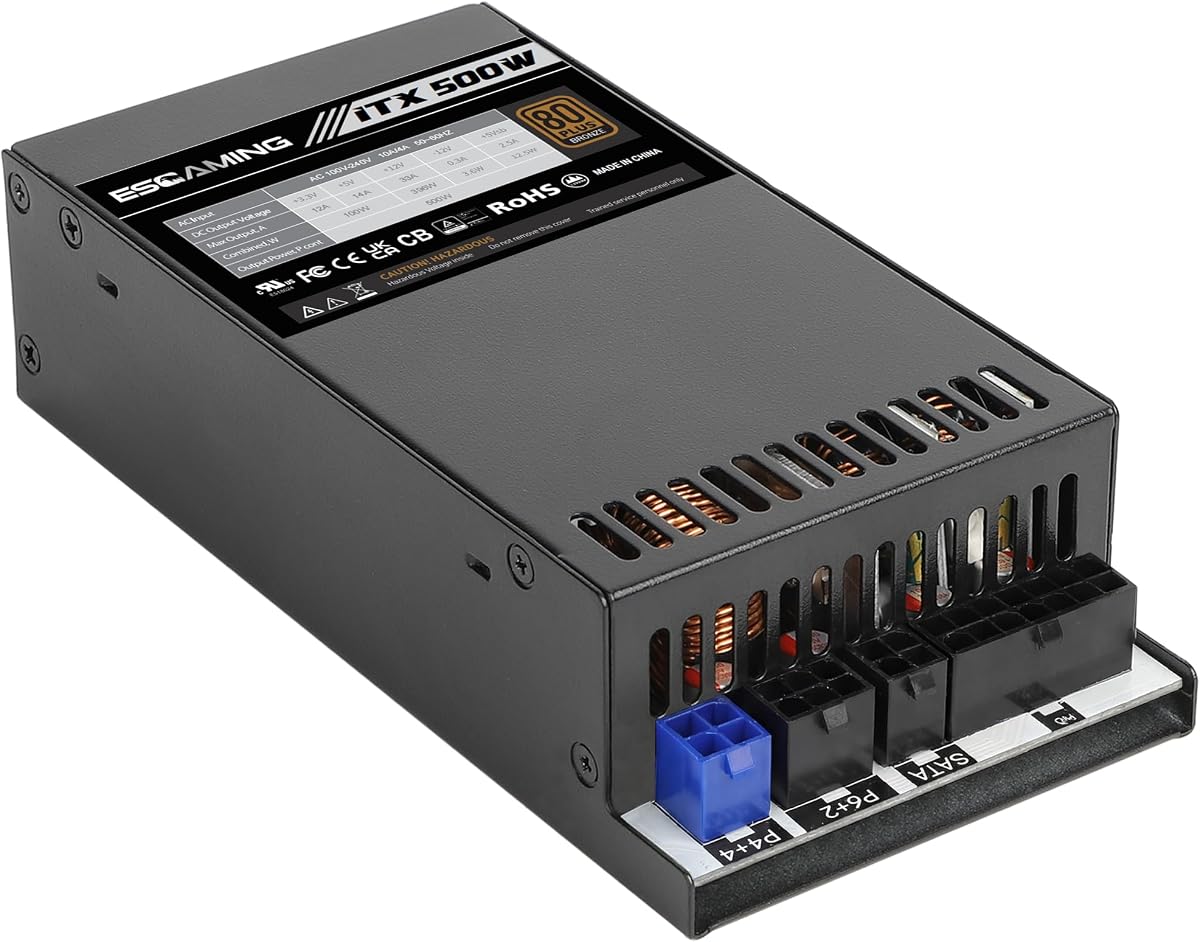
ESGAMING provides a fully modular unit that simplifies installation in tight spaces. The active PFC supports full range voltage input making it adaptable for various regions.
We may earn a commission when you buy through this link, at no additional cost to you.
With up to 85 percent efficiency it reduces energy waste significantly. This is ideal for compact systems where reducing heat and airflow resistance is critical.
The modular system helps keep cable clutter to a minimum which is key in small chassis. Ensure your motherboard connectors are compatible before finalizing the purchase decision.
This unit is great for compact server or mini PC builds needing flexible cabling. Support can vary so check return policies and reviews before buying.
Fully modular cables allow you to connect only what is needed reducing clutter and improving airflow.
Active PFC supports voltages from 90 to 264V so it works globally without manual switch toggling.
We may earn a commission when you buy through this link, at no additional cost to you.
The APEVIA VENUS500W offers essential features at a competitive price point. It includes comprehensive protections to safeguard your system components from electrical damage effectively.
We may earn a commission when you buy through this link, at no additional cost to you.
The 120MM fan uses auto-thermal control to manage speeds based on temperature. This helps maintain balance between cooling performance and operational noise levels.
It is a solid choice for standard ATX cases where cost is a priority. However efficiency standards are basic so expect higher power consumption compared to higher rated units.
For simple builds where budget is the main concern this PSU provides necessary power. Check that your case clearance is sufficient for the fan size.
Auto-thermally controlled fan speeds adjust automatically to keep the system quiet during low loads.
Versatile connector options support various internal components including storage and peripheral devices.
We may earn a commission when you buy through this link, at no additional cost to you.
This Smart W3 Series PSU meets the latest ATX v3.1 specification which ensures compatibility with newer components. It offers up to 80 percent efficiency for better power management.
We may earn a commission when you buy through this link, at no additional cost to you.
The 120mm FDB fan is built for long-term durability and smooth operation. DC to DC design helps provide stable voltage regulation under varying load conditions.
With a 5 year warranty it promises long-term reliability and support. This model is suitable for systems that require modern standards and stable power delivery.
If you want a modern PSU that aligns with current standards this is a top choice. The warranty coverage adds value for long-term peace of mind.
Full compatibility with Intel ATX v3.1 ensures it works well with latest motherboard and CPU requirements.
The 5 year warranty reflects the manufacturer's confidence in the unit's build quality and longevity.
We may earn a commission when you buy through this link, at no additional cost to you.
Selecting the right low power PSU requires understanding several key factors that affect performance and compatibility.
Ensure the PSU matches your case size such as ITX, TFX, or Flex ATX. Incorrect dimensions can lead to installation issues or poor airflow.
Always check your case specifications for supported PSU types and clearance before purchasing.
Calculate the total power consumption of your components to choose the right wattage. A PSU that is too small may fail while one that is too large wastes energy.
For most low power builds, 300W to 500W is sufficient unless you plan to add high-end components later.
Look for 80 Plus certifications like Bronze, Silver, or Gold to ensure efficient power usage. Higher ratings reduce heat and electricity costs over time.
Efficiency helps maintain lower system temperatures and contributes to better overall stability.
Modular cables allow for better airflow and easier installation in small cases by connecting only needed wires. Fixed cables are cheaper but can be bulky.
If space is tight, semi or fully modular units provide significant convenience for cable management.
Check that the PSU has enough connectors for your motherboard, GPU, and storage drives. Missing connectors can require adapters which may add cost.
Standard ATX and PCIe connectors are common but ensure your specific hardware needs are met.
Safety protections like OVP, OCP, and SCP protect your components from electrical surges or short circuits. These are crucial for long-term reliability.
Always prioritize units with industrial grade protection suites to avoid hardware damage.
Consider the fan size and type since smaller fans can be noisier. Look for units with silent or smart cooling technology for quiet operation.
If noise is a concern, check reviews for fan performance under load before buying.
A longer warranty period indicates manufacturer confidence in product quality. It also provides peace of mind in case of defects.
Look for brands that offer at least a 3 to 5 year warranty for better protection.
When installing, ensure all cables are securely connected to both the PSU and components. Loose connections can cause instability or power failures.
Keep the PSU vents clear of dust and debris to maintain airflow. Use compressed air regularly to clean the fan and prevent overheating.
Avoid placing the PSU in humid or hot environments. Maintain a stable room temperature to ensure the unit operates within safe thermal limits.
A low power PSU can be safe for gaming if it provides enough wattage for your GPU and CPU. Always check your component requirements to avoid overloading the unit.
Active PFC corrects power factor more efficiently reducing energy waste and supporting wider voltage ranges. Passive PFC is simpler but less efficient and typically supports fixed voltages.
Generally no because TFX PSUs are smaller and may not secure properly in larger ATX cases. Always use a PSU that matches your case's form factor specification.
Modular PSUs do not improve electrical performance but they help airflow and cable management. Cleaner airflow can indirectly help cool components better in small cases.
Add up the power ratings of your components and choose a PSU with at least 10 to 20 percent headroom. This ensures stability without overtaxing the power supply.
80 Plus Bronze certification means the PSU is at least 82 percent efficient at typical loads. It is a standard level of efficiency for budget and mid-range units.
It is better to use the computer's power button to shut down. Turning off the PSU switch is only necessary during maintenance or transport to save energy.
Many modern entry-level cards work with low power PSUs if the wattage matches. Always check the GPU's recommended power supply requirements on the manufacturer's website.
We have reviewed the top low power PSU options including budget picks and premium choices to help you find the best fit.
Prioritize form factor and wattage needs first then look for efficiency and safety features to ensure your system runs smoothly.
Prices and availability can change quickly so always verify current product details before making your final purchase decision.