
Epson Workforce ES-50
4.3Editor score
Compact single-sheet design
USB powered operation
OCR included in software
Discover the top document scanner for iPhone 18 users. We compare portable scanners, connectivity, and features to help you digitize files effortlessly.
Finding a reliable document scanner for iPhone 18 users requires careful consideration of connectivity and portability. Modern mobile scanners must integrate seamlessly with iOS devices to ensure smooth workflows on the go.
We evaluated ten top-rated models based on speed, resolution, and mobile compatibility. Our comparison highlights which devices offer the best balance of performance and ease of use for professional needs.
Each pick in this guide showcases unique strengths suited for different users. Keep in mind that prices and availability can change frequently, so verify current details before making your final purchase decision.
4.3Editor score

4.3Editor score
4.4Editor score
This side-by-side comparison highlights key specifications across all ten selected models to help you quickly identify the best fit for your mobile scanning needs.





The Epson Workforce ES-50 stands out as a top contender for mobile professionals. It offers a compact design that fits easily into bags while delivering fast single-sheet scanning capabilities.
We may earn a commission when you buy through this link, at no additional cost to you.
Its speed is a major advantage, scanning pages in about 5.5 seconds. The included Epson ScanSmart software makes organizing and saving files intuitive for everyday tasks.
While it lacks wireless connectivity, the USB power ensures consistent operation without battery concerns. This trade-off is acceptable for users prioritizing reliability over mobility.
This scanner is ideal for travelers or office workers who need quick access to digital copies. Its balance of performance and portability makes it a strong recommendation.
The intuitive software suite allows users to scan and organize files quickly without complex setups.
It supports documents up to 8.5 x 72 inches, making it perfect for receipts and long contracts.
We may earn a commission when you buy through this link, at no additional cost to you.
The Brother DS-640 offers an affordable entry point into high-quality mobile scanning. Its ultra-compact design allows it to fit in a purse or pocket easily.
We may earn a commission when you buy through this link, at no additional cost to you.
Scanning speed reaches up to 16 pages per minute, which is impressive for its class. Color scanning does not slow down the process, ensuring efficiency.
It relies on a micro USB cable for power, which means you need access to a port. However, the included free software provides robust scanning and OCR features.
This model is perfect for students or small business owners on a budget. It balances cost with essential features effectively for daily digitization needs.
Weighing only 1.5 lbs and under a foot long, it is one of the most portable scanners available.
Users can send scans to various destinations including network shares, cloud services, and email directly.
We may earn a commission when you buy through this link, at no additional cost to you.
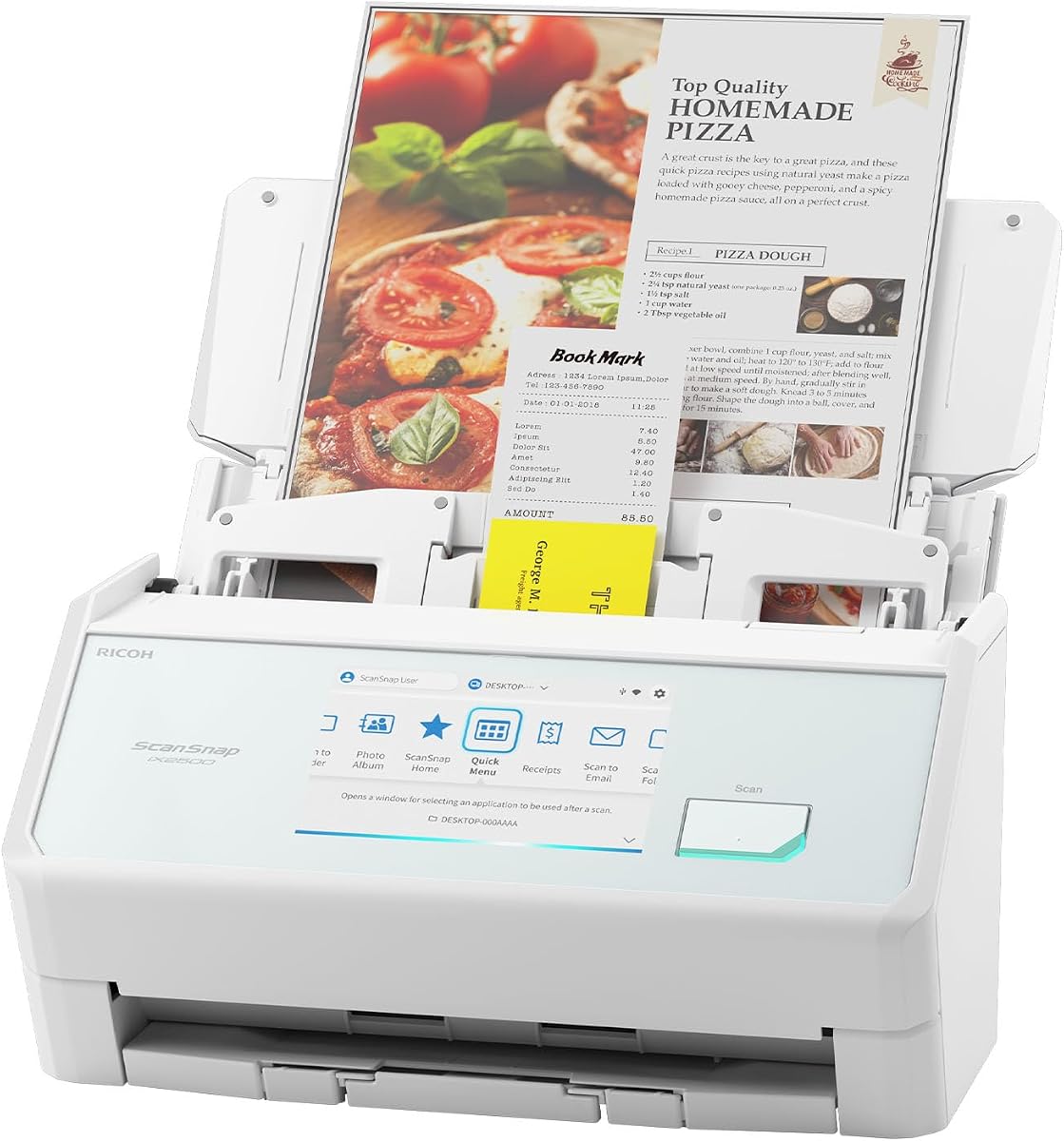
The ScanSnap iX2500 represents the pinnacle of home office scanning technology. It combines a large touchscreen with blazing-fast speeds to streamline workflows.
We may earn a commission when you buy through this link, at no additional cost to you.
With speeds of up to 45ppm, it handles double-sided documents efficiently. The Wi-Fi 6 connectivity ensures stable wireless connections for mobile devices without cables.
Automatic optimization features reduce manual adjustments needed for photos or receipts. This level of automation justifies the higher cost for power users.
If you need a robust solution for heavy scanning loads, this device delivers. It is the best choice for professionals prioritizing speed and automation.
Smart sorting and naming features organize files automatically, saving significant time over manual entry.
The 100-sheet feeder and advanced sensors prevent jams, ensuring smooth operation even with large batches.
We may earn a commission when you buy through this link, at no additional cost to you.
The CZUR Shine Ultra is a unique scanner designed primarily for digitizing books. Its camera-based approach avoids the limitations of flatbed scanners for thick materials.
We may earn a commission when you buy through this link, at no additional cost to you.
It features a 13MP sensor and patented flattening technology to correct curved pages. This makes it ideal for scanning older books without damaging them.
While it offers high resolution, it is not fully compatible with iOS devices. Users must rely on a desktop PC for full functionality.
This scanner serves niche needs for librarians or historians who need to preserve books. Its specialized technology solves problems other scanners cannot handle easily.
Patented curved page technology flattens images after capture, ensuring readable text from binding curves.
With 13MP resolution, the images are sharp enough for detailed analysis and archival storage purposes.
We may earn a commission when you buy through this link, at no additional cost to you.
The Brother DS-740D is an excellent choice for those needing double-sided scanning on the go. It scans both sides of a document in a single pass.
We may earn a commission when you buy through this link, at no additional cost to you.
Speed remains fast at 16ppm even when scanning color. Its compact design fits well into travel bags or small desk spaces effectively.
The desk saving design reduces the footprint, making it suitable for shared workspaces. However, it requires a USB connection for power during use.
For office environments with high volumes of contract scanning, this is a reliable tool. It balances speed and portability well for professional use.
The desk saving design reduces the space required to operate the device, ideal for tight desks.
The included app allows sending scans to cloud services or email, streamlining document distribution.
We may earn a commission when you buy through this link, at no additional cost to you.
The Canon imageFORMULA R10 is designed for simplicity and mobility. It offers plug-and-play functionality that minimizes setup time for new users.
We may earn a commission when you buy through this link, at no additional cost to you.
While its 12 pages per minute speed is moderate, the duplex scanning feature saves time on two-sided documents. It handles various media types well.
The built-in software removes the need for complex installations, which is great for travel. However, the feeder capacity is smaller than some rivals.
This model is perfect for light office users needing a reliable companion scanner. Its ease of use makes it a strong contender for beginners.
Users can start scanning immediately upon connection without needing to install extra drivers first.
It digitizes business cards and plastic cards smoothly, expanding its utility beyond standard paper.
We may earn a commission when you buy through this link, at no additional cost to you.
The Epson Perfection V19 II is tailored for users who prioritize photo scanning quality. Its high resolution ensures details are captured accurately for prints.
We may earn a commission when you buy through this link, at no additional cost to you.
With a flatbed design, it can handle photos, book pages, or documents. The kickstand feature allows for vertical storage, saving desk space when not in use.
It lacks an automatic feeder, meaning you must load each page manually. This makes it slower for large batches compared to sheet-fed models.
For hobbyists or archivists focusing on image quality, this is a great option. It delivers high-fidelity scans for personal collections.
The Easy Photo Fix technology automatically restores color to faded images with a single click.
A built-in kickstand allows vertical placement, reducing the horizontal footprint on your desk.
We may earn a commission when you buy through this link, at no additional cost to you.
The Epson Workforce ES-60W excels at wireless flexibility. It allows you to scan directly to iOS or Android devices without physical cables.
We may earn a commission when you buy through this link, at no additional cost to you.
Its speed is among the fastest at 4 seconds per page. Automatic switching between USB and battery mode adds convenience for different scenarios.
The battery requirement for wireless operation is a trade-off. However, it ensures true mobility when you cannot access an outlet easily.
For professionals working in coffee shops or client sites, this is the best choice. It offers the best wireless convenience in its category.
Scan directly to mobile devices via Wi-Fi without needing a computer connection at all.
The scanner automatically detects and switches between USB and wireless modes for seamless use.
We may earn a commission when you buy through this link, at no additional cost to you.
This handheld scanner offers a low-cost solution for basic digitization. Its wand design allows you to move it over documents freely.
We may earn a commission when you buy through this link, at no additional cost to you.
It comes with a 16G SD card for storage, eliminating the need for a computer connection. AA batteries power the device, making it fully portable.
Scanning quality is decent at 900 DPI but requires a steady hand. It is better for occasional use rather than high-volume professional needs.
Students or casual users who need to scan notes quickly will find this useful. It provides a budget-friendly way to go digital.
Files are saved directly to the SD card, allowing instant access without transferring to a PC first.
Weighing only 0.31 lbs, it fits easily in any bag without adding noticeable weight to your load.
We may earn a commission when you buy through this link, at no additional cost to you.
The Portable Scanner Silver is similar to the Blue model but in a different color. It shares the same handheld wand features and storage capabilities.
We may earn a commission when you buy through this link, at no additional cost to you.
Its simple operation involves a few button presses to capture images. The included SD card ensures you can store files immediately after scanning.
Since it relies on manual movement, consistency depends on your hand stability. It is best for quick notes or single documents rather than full reports.
For budget-conscious buyers needing occasional scanning, this works well. It offers essential features without the cost of advanced automatic feeders.
Pressing the scan button and holding steady ensures consistent capture without needing complex software.
With an affordable price point, it provides a low-risk entry into digital document management.
We may earn a commission when you buy through this link, at no additional cost to you.
Selecting the right document scanner requires understanding connectivity, speed, and form factor to match your mobile workflow needs.
Modern mobile scanners should ideally offer wireless connectivity like Wi-Fi to sync directly with your iPhone 18. Wired USB models require a host device or adapter, which adds bulk.
Prioritize wireless capability if you need true independence from laptops while scanning.
Speed is measured in pages per minute (ppm). Higher numbers mean you can digitize documents faster. For heavy users, look for speeds above 15 ppm to save time.
For occasional use, slower speeds around 5 to 10 ppm are acceptable.
Since this guide focuses on mobile use, size and weight matter significantly. A scanner that fits in a bag without taking up too much space is essential.
Lightweight models around 1 to 2 pounds are ideal for daily travel.
An automatic document feeder (ADF) allows scanning multiple pages at once without manual placement. Models with ADFs are faster for bulk scanning tasks.
If you scan one page at a time, flatbed or single-feed units are sufficient.
Resolution determines how clear your scanned text and images appear. Standard 300 DPI is fine for text, but 600 DPI or higher is better for photos or detailed graphics.
Ensure the resolution meets your specific needs for editing or printing.
Optical Character Recognition (OCR) converts scanned images into editable text. This feature is crucial for organizing searchable PDFs without retyping.
Check if the included software supports your operating system and provides mobile apps.
Most mobile scanners rely on USB power, but battery-powered models offer more freedom away from outlets. Consider where you will use the device most often.
Battery models add convenience but may require more maintenance for charging or replacement.
Prices range from affordable handhelds to premium automatic scanners. Set a budget but do not compromise on essential features like reliability or connectivity.
Investing slightly more often leads to better long-term durability and software support.
To start scanning, connect your device to the scanner via Wi-Fi or USB. Install the companion app on your iPhone 18 to manage files and settings effectively.
Clean the scanning glass or rollers regularly with a soft, dry cloth to maintain image quality. Dust or debris can cause smudges or lines on your scans.
Store the scanner in a dry, cool place when not in use. Avoid exposing it to direct sunlight or extreme temperatures to protect internal electronics.
Most modern scanners support mobile apps or Wi-Fi. However, some older models require a PC. Always check compatibility before purchasing to ensure seamless iOS integration.
For standard documents and receipts, 300 DPI is sufficient. For photos or high-detail work, choose 600 DPI or higher for sharper results.
Yes, many mobile scanners support direct Wi-Fi scanning to iOS devices. Look for models with specific mobile apps for standalone operation.
Most scanning apps allow cloud integration. Configure the software settings to upload directly to iCloud or other cloud storage providers automatically.
OCR technology converts scanned images of text into editable digital text. This allows you to search and edit the content of PDFs without retyping.
Wireless is more convenient for mobile use without cables. USB is reliable and requires no batteries but ties you to a host device physically.
We have reviewed the top ten scanners to help you find the perfect tool for your needs. From budget-friendly options to premium solutions, there is a fit for everyone.
Prioritize connectivity and speed based on how often you scan. Wireless models offer the most flexibility for users who move between locations daily.
Always check current prices and deals before buying. Technology prices change frequently, so finding a sale can help you save money on your purchase.