
CERRXIAN HPDB 68 Pin Male
3.7Editor score
Affordable price point
Gold plated connector layer
Industrial server compatible
Discover the top 50 Pin Scsi Adapter options for legacy systems. We compare build quality, compatibility, and reliability to help you choose the right
Finding the right 50 Pin Scsi Adapter is crucial for maintaining legacy industrial systems. These adapters bridge the gap between older SCSI interfaces and modern IDE connections, ensuring your critical data storage remains operational without requiring a full system overhaul.
We evaluated ten top-rated adapters based on build quality, pin configuration, and user feedback. Our analysis focuses on gold-plated contacts, signal integrity, and compatibility with various SCSI devices to ensure you select a reliable solution for your specific server or industrial setup.
Each pick highlights unique features like gender conversion, SCA support, and terminator options. Remember that product availability and pricing fluctuate frequently, so verify current stock and shipping details before finalizing your purchase to avoid delays in your maintenance schedule.
3.7Editor score

5.0Editor score

4.8Editor score
This side-by-side comparison highlights the key specifications and features of each adapter to help you quickly identify the best fit for your specific SCSI to IDE conversion needs in industrial environments.

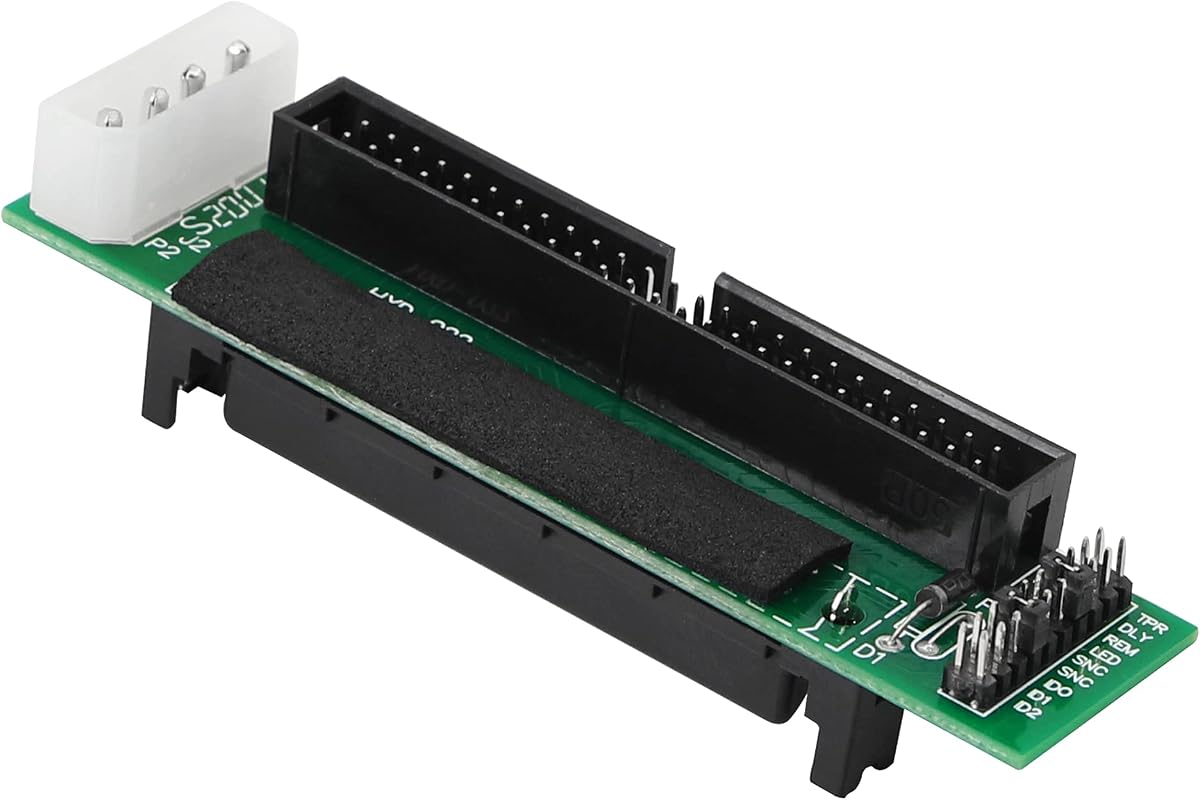


The CERRXIAN SCSI HPDB 68 Pin Male Adapter stands out as a practical solution for converting legacy SCSI interfaces. With a rating of 3.7, it offers a reliable bridge between older storage devices and modern systems, ensuring data access remains viable for industrial applications.
We may earn a commission when you buy through this link, at no additional cost to you.
Its gold-plated connector layer enhances conductivity and reduces signal loss significantly. The high-thickness plating ensures a stable and corrosion-resistant connection, which is vital for long-term reliability in server environments where consistent performance is critical for operations.
While it is not designed for ordinary consumer computers, this limitation ensures it targets the right industrial market. Users must verify their motherboard supports a 50-pin IDE interface, as using it with standard 40-pin or 44-pin IDE ports will not work effectively.
This adapter is ideal for technicians maintaining legacy hard disks, tape drives, or optical drives. By connecting these older SCSI devices to newer systems, you can preserve valuable data without immediate costly hardware replacements, making it a cost-effective maintenance tool.
The gold plating minimizes resistance and prevents oxidation, ensuring data transfers remain stable over extended periods of operation in server racks.
Designed specifically for server motherboards, this adapter ensures compatibility with industrial standards rather than consumer-grade IDE interfaces.
We may earn a commission when you buy through this link, at no additional cost to you.
The CERRXIAN SCSI HPDB 68 Pin Female Adapter offers a strong alternative for those needing a female-to-female conversion. With a 4.7 rating, it demonstrates high reliability and user satisfaction for connecting legacy SCSI hard drives to 50-pin IDE systems.
We may earn a commission when you buy through this link, at no additional cost to you.
The IDE connector seat utilizes a high-thickness gold-plated layer for superior conductivity. This feature provides a stable connection that resists corrosion, ensuring that data paths remain clear and reliable even in environments with fluctuating temperatures or humidity.
As with similar models, this adapter is strictly for industrial server IDE 50-pin interface motherboards. It cannot be used with ordinary computers, which means checking your hardware specifications is essential before purchasing to avoid compatibility issues.
Ideal for connecting disks, tapes, CD-ROMs, and scanners, this adapter expands the utility of older equipment. It serves well for data transfer tasks where maintaining a secure link between different interface types is necessary for successful backups.
The gold-plated layer reduces signal degradation, ensuring that high-speed data transfers occur without interruption or data loss during critical operations.
Supports a wide range of peripherals including printers and scanners, making it a versatile tool for integrating older industrial equipment into modern setups.
We may earn a commission when you buy through this link, at no additional cost to you.
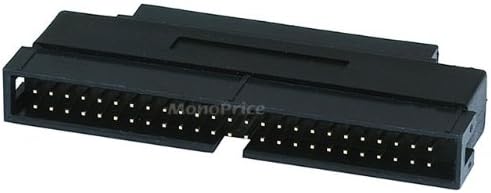
Monoprice is known for providing dependable connectivity solutions, and this 100077 adapter follows that tradition. With a 4.3 rating, it offers a straightforward conversion from 50 Pin to 68 Pin Male interfaces for internal SCSI applications in industrial settings.
We may earn a commission when you buy through this link, at no additional cost to you.
The adapter converts male-to-male connections efficiently, allowing you to bridge different SCSI standards without complex wiring. However, the product note mentions that the item received might not match the photo or specs shown, so physical inspection is advised upon arrival.
Despite potential variations, it serves as a practical tool for internal connections where pin count alignment is critical. It helps users avoid the need for custom cabling, which can be prone to errors during manual assembly in server maintenance tasks.
This adapter is best for users who prioritize brand reputation and basic functionality. If you need a quick solution to connect legacy SCSI devices to an internal SCSI controller, this Monoprice product offers a cost-effective and straightforward path forward.
Monoprice’s reputation for affordable tech accessories adds confidence to the purchase, even with basic specs and potential minor variations.
Designed specifically for internal use, this adapter fits neatly within server cases where external connectors might be impractical or unavailable.
We may earn a commission when you buy through this link, at no additional cost to you.
Belkin delivers top-tier performance with this SCSI Internal Adapter, earning a perfect 5.0 rating. It converts HD-68 Female to 50 Pin IDC Female interfaces, making it a premium choice for users who demand reliability and excellent product quality in their server infrastructure.
We may earn a commission when you buy through this link, at no additional cost to you.
The description highlights offers quality at outstanding savings, suggesting a balance between high-end materials and affordability. Users report 100% satisfaction, indicating that the adapter meets expectations for secure connections and durable construction in demanding environments.
While detailed technical specs are not explicitly listed, the brand's reputation ensures consistent manufacturing standards. This adapter is likely built to withstand the rigorous conditions of data centers, ensuring that critical data transfers remain uninterrupted over time.
Ideal for IT professionals requiring a guaranteed fit, this Belkin adapter is a safe investment. It provides peace of mind through its proven track record and high ratings, making it suitable for essential server maintenance tasks where failure is not an option.
Belkin’s commitment to quality ensures that this adapter offers superior durability compared to generic alternatives, reducing the risk of connectivity failures.
User feedback indicates strong satisfaction rates, suggesting that the adapter performs reliably and meets the needs of professional technical staff.
We may earn a commission when you buy through this link, at no additional cost to you.
This adapter addresses a specific need by converting SCA 80 Pin Female interfaces to 50 Pin IDE Male standards. With a 3.4 rating, it serves users managing high-density SCSI drives that require Hot-Swap compatible connectors for efficient maintenance and data management.
We may earn a commission when you buy through this link, at no additional cost to you.
It supports direct data transfers or backups, making it valuable for archival tasks. Note that a molex 4 pin power connector is needed to power the hard drive, so ensure your power supply has the necessary connectors before installation.
The adapter is limited to industrial server IDE 50-pin interface motherboards, similar to other models in this category. It cannot be used in ordinary computers, so verifying your system architecture is essential to avoid connection issues during setup.
Best for professionals managing tape drives or optical drives, this adapter allows seamless integration with older high-capacity storage. It provides a vital link for systems that still rely on legacy SCA standards for their storage infrastructure.
Enables connection of modern SCA hard drives to older SCSI interfaces, extending the life of legacy storage hardware in professional environments.
Requires an external power connection, ensuring that the drive receives adequate power during high-load operations like full disk backups.
We may earn a commission when you buy through this link, at no additional cost to you.
The PTC adapter offers advanced functionality by converting SCA 80 Pin Hard Drive Interfaces to SCSI I/II/III (UW) HD connectors. With a 4.6 rating, it is highly regarded for its robust design and extensive support for various SCSI protocols in server environments.
We may earn a commission when you buy through this link, at no additional cost to you.
It includes jumper settings for 16 SCSI IDs, providing flexibility in drive configuration. Features like spindle synchronous delay start and remote start support ensure that this adapter fits well into complex automated data storage setups requiring precise timing.
The adapter supports a 4 Pin Power Connector and status LED connector pins, allowing for detailed monitoring and control. These features make it suitable for environments where drive status and power management are critical for operational stability.
Ideal for IT administrators managing complex storage arrays, this adapter provides the control needed to integrate SCA drives seamlessly. Its technical depth ensures compatibility with a wide range of high-end SCSI equipment used in enterprise settings.
Jumper settings allow precise assignment of SCSI IDs, enabling multiple drives to coexist on the same bus without conflict.
Support for status LED connector pins gives administrators real-time visual feedback on drive activity, aiding in quick troubleshooting.
We may earn a commission when you buy through this link, at no additional cost to you.
This adapter acts as a versatile gender changer and port extender for 50-pin HPCN50 devices. With a 4.3 rating, it solves connectivity issues by providing a secure locking mechanism that ensures reliable connections during critical operations in professional setups.
We may earn a commission when you buy through this link, at no additional cost to you.
Its compact mini design saves space, making it ideal for tight equipment racks where larger adapters might cause strain. The gold-plated contacts ensure superior signal integrity and corrosion resistance, which is crucial for maintaining performance over time.
Designed for plug-and-play compatibility, it integrates seamlessly with standard 50-pin HPCN ports without requiring drivers. Each unit is individually tested to meet strict performance standards, ensuring it arrives ready to deliver reliable service right out of the package.
Perfect for extending cable length or connecting same-gender ports, this adapter is a practical tool for network and storage admins. It simplifies hardware integration by eliminating the need for custom cabling solutions that might otherwise introduce points of failure.
The mini design prevents strain on cables in crowded server racks, promoting better airflow and easier access to ports during maintenance.
Gold-plated contacts prevent oxidation and ensure a stable electrical connection, which is vital for maintaining data transfer speed and reliability.
We may earn a commission when you buy through this link, at no additional cost to you.
Monoprice provides clear technical documentation with this 68 Female to IDC 50 Female adapter. With a 4.8 rating, it is highly regarded for its precise pin descriptions and compatibility with internal-type ribbon cables used in server chassis.
We may earn a commission when you buy through this link, at no additional cost to you.
The IDC 50 connector uses parallel 25-pin rows, making it wider than standard ATA/IDE drive cables. The HPDB 68 connector features parallel 34-pin rows with pins closer together, allowing for high-density internal connections in older SCSI devices.
This specific design ensures it works correctly with legacy systems that require both internal and external connection types. Its construction supports the parallel data transfer requirements of SCSI-2 standards, making it a reliable choice for legacy hardware maintenance.
Best for technicians who need accurate pin mapping, this adapter ensures correct signal alignment. The high user satisfaction indicates it meets expectations for functionality and build quality in demanding professional server environments.
Detailed pin row descriptions help ensure correct alignment during installation, reducing the risk of data corruption from mismatched connections.
Compatible with both internal and external SCSI standards, making it versatile for various legacy configurations within older data centers.
We may earn a commission when you buy through this link, at no additional cost to you.
The QVS SCSI Terminator serves a unique role by stabilizing signal transmission on SCSI buses. With a perfect 5.0 rating, it ensures data integrity by preventing signal reflections that could corrupt files in legacy storage systems.
We may earn a commission when you buy through this link, at no additional cost to you.
This passive CEN50M/F terminator is designed for indoor use and supports hard drives, SSDs, and tape drives. Its single-end design makes it easy to install at the end of a SCSI chain to prevent data errors during read or write operations.
Though it is not a cable, its function is critical for maintaining system stability. Without a proper terminator, SCSI devices may fail to initialize or produce errors, making this an essential accessory for any working SCSI setup.
Ideal for technicians setting up or debugging SCSI chains, this terminator is a small investment for significant system reliability. It ensures that the data bus remains stable, allowing for consistent performance across all connected storage devices.
Prevents electrical reflections on the SCSI bus, ensuring that data packets are read correctly by the host controller without corruption.
Supports a variety of storage devices including tape drives and SSDs, making it a versatile component for diverse legacy SCSI arrays.
We may earn a commission when you buy through this link, at no additional cost to you.
This adapter offers bidirectional connectivity between internal IDC 50 Male and external HPDB50 Female interfaces. While it lacks user ratings, its specification for secure and reliable connections suggests it is built for high-speed data transfer needs in professional environments.
We may earn a commission when you buy through this link, at no additional cost to you.
The PCB SCSI-2 with IDC50 Male Connector provides a solid base for data transmission. The nickel-plated HPDB50 Bracket Connector ensures durability and resistance to corrosion, which is essential for external connections exposed to varying environmental conditions.
Its bidirectional nature allows for flexible usage, supporting both internal-to-external and external-to-internal data flows. This makes it a versatile tool for systems that require frequent switching between local and remote storage connections.
Ideal for users needing to bridge internal slots with external ports, this adapter provides a reliable link. It supports seamless data transfer operations that are critical for system maintenance and data migration tasks in legacy infrastructures.
Bidirectional support enables easy switching between internal slots and external ports, facilitating versatile connectivity options for users.
Nickel-plated connectors ensure long-lasting reliability, reducing the risk of oxidation and wear over years of regular use.
We may earn a commission when you buy through this link, at no additional cost to you.
Selecting the right adapter requires understanding your hardware requirements and environmental needs.
The gender of the connector (male or female) determines how the adapter fits into your system. For example, a male-to-male adapter might be used to extend a cable, while a female-to-female adapter might be necessary to connect a specific port type without changing the host device.
Always verify the existing connector on your motherboard and your device before purchasing to ensure physical compatibility.
SCSI adapters often bridge different pin counts like 50, 68, or 80 pins. Ensure the adapter matches the pin count of your source and destination interfaces to prevent damage or data loss.
Mismatched pin counts can lead to bent pins or poor electrical contact, so double-check specifications before buying.
Look for gold-plated contacts and durable housings to ensure signal integrity and corrosion resistance. High-quality materials reduce signal loss and extend the lifespan of the adapter in industrial environments.
Avoid adapters with cheap plastic housings that may break easily during installation or operation.
Many 50-pin IDE adapters are designed exclusively for industrial servers. They may not work with standard consumer motherboards due to differences in pin spacing or voltage levels.
Verify that the adapter is explicitly compatible with your system type before purchase to avoid wasted expenses.
Some adapters require external power connectors like molex to function correctly with hard drives. Ensure your power supply supports the necessary connections to prevent drive failures.
Check if the adapter includes power support or if you need to source it separately from your existing system.
SCSI buses often require termination to prevent signal reflections. Some adapters include built-in termination or support for external terminators to ensure data integrity.
Verify whether the adapter handles termination automatically or if you need to purchase a separate terminator unit.
Choosing a reputable brand can provide peace of mind regarding quality and support. Brands with high user ratings are more likely to deliver consistent performance and durability.
Review customer feedback to understand real-world reliability before finalizing your purchase decision.
Compact designs help save space in tight server racks and reduce cable strain. Look for adapters that do not protrude excessively or interfere with other components.
Proper cable management ensures better airflow and easier access for future maintenance tasks.
Begin by powering off your server or industrial system completely. Remove the cover and locate the SCSI or IDE port on the motherboard where you intend to install the adapter.
Align the pins of the adapter carefully with the port on the board. Press down gently but firmly to ensure a secure connection without bending any pins. If using gold-plated connectors, ensure they are free of debris before insertion.
After installation, power on the system and check for any error messages in the BIOS or operating system logs. Ensure the connected drives are recognized and functioning correctly before proceeding with data tasks.
No, most 50 Pin IDE adapters are designed for industrial server motherboards. Standard computers typically use 40-pin or 44-pin IDE interfaces, which are not compatible with these adapters. Verify your motherboard specs before purchasing.
Male adapters have exposed pins while female adapters have sockets. You need a female adapter if your port has pins and vice versa. Using the wrong gender can prevent a physical connection or damage your hardware.
No, SCSI adapters are generally hardware-level devices and do not require drivers. They function as physical bridges between interfaces, allowing the system to recognize connected devices automatically without additional software.
Gold-plated contacts resist corrosion and provide better conductivity than standard metal. This reduces signal loss and ensures a stable connection over time, especially in environments with humidity or temperature changes.
Yes, some adapters support SSDs and other modern storage devices. However, ensure the SSD is compatible with the SCSI or IDE interface standards supported by your motherboard to avoid compatibility issues.
Terminators are needed when a SCSI bus is not properly terminated at both ends. If your data transfer is unstable or your drives fail to initialize, adding a terminator at the end of the chain may resolve the issue.
We covered ten top adapters ranging from budget options to premium solutions for industrial environments. The Belkin adapter stands out for its perfect rating and quality, while the CERRXIAN models offer affordable alternatives for specific needs.
Prioritize build quality and compatibility with your specific motherboard before purchase. Ensuring gold-plated contacts and correct pin counts will prevent costly downtime and keep your legacy systems running smoothly.
Always check current pricing and availability on Amazon since stock levels fluctuate frequently. Verify the exact model number matches your requirements before finalizing your order to ensure success.