
ARCTIC P8 (5 Pack)
4.6Editor score
Static pressure optimized
Five pack value
Low noise motor
Compare the top 80mm case fans for quiet cooling and performance. We review budget, premium, and silent options to help you choose the right fan for your build.
Finding the right cooling solution is crucial for maintaining optimal system temperatures and longevity. Eighty millimeter fans are essential for compact builds, NAS units, and specialized hardware where space is limited. A quality fan ensures efficient airflow without excessive noise.
We evaluated ten leading models based on performance, noise levels, bearing technology, and value. Our analysis covers PWM controlled options, static pressure optimized designs, and budget friendly picks. Each product was assessed against real world usage scenarios to ensure reliability.
Each selection highlights key specifications and ideal use cases for different hardware configurations. Please note that pricing fluctuates regularly so check current listings before purchasing. This guide aims to simplify your decision process with clear comparisons and expert insights.
4.6Editor score

4.9Editor score

4.8Editor score
The following table provides a side by side comparison of all ten selected models. We highlight key specifications including speed, noise levels, and bearing types to help you quickly identify the best fit for your specific cooling needs.


The Noctua NF-A8 PWM stands out as the premier choice for users prioritizing silence and reliability. With a rating near perfect in our analysis, it delivers exceptional cooling without compromising acoustic comfort. Its advanced design ensures consistent performance over years of operation.
We may earn a commission when you buy through this link, at no additional cost to you.
This fan features Flow Acceleration Channels and an Advanced Acoustic Optimisation frame. These technologies significantly reduce turbulence and noise while maximizing airflow efficiency. The 4-pin PWM interface allows precise speed control via motherboard headers for automated thermal management.
While the cost is higher than average options the longevity and quiet operation justify the investment. Users may find the brown color scheme less compatible with black chassis unless using the chromax version. Accessories like anti-vibration mounts are included to further reduce vibration noise.
Recommend this fan for HTPCs, ITX builds, and any scenario where low noise is critical. It is ideal for users seeking a reliable, long-term solution for chassis ventilation or device cooling. The included cables support multi-fan setups on a single header for convenience.
The frame design minimizes resonance and turbulence for a whisper-quiet experience even at high speeds.
With a MTTF exceeding 150,000 hours this fan is built to last for many years of continuous operation.
We may earn a commission when you buy through this link, at no additional cost to you.
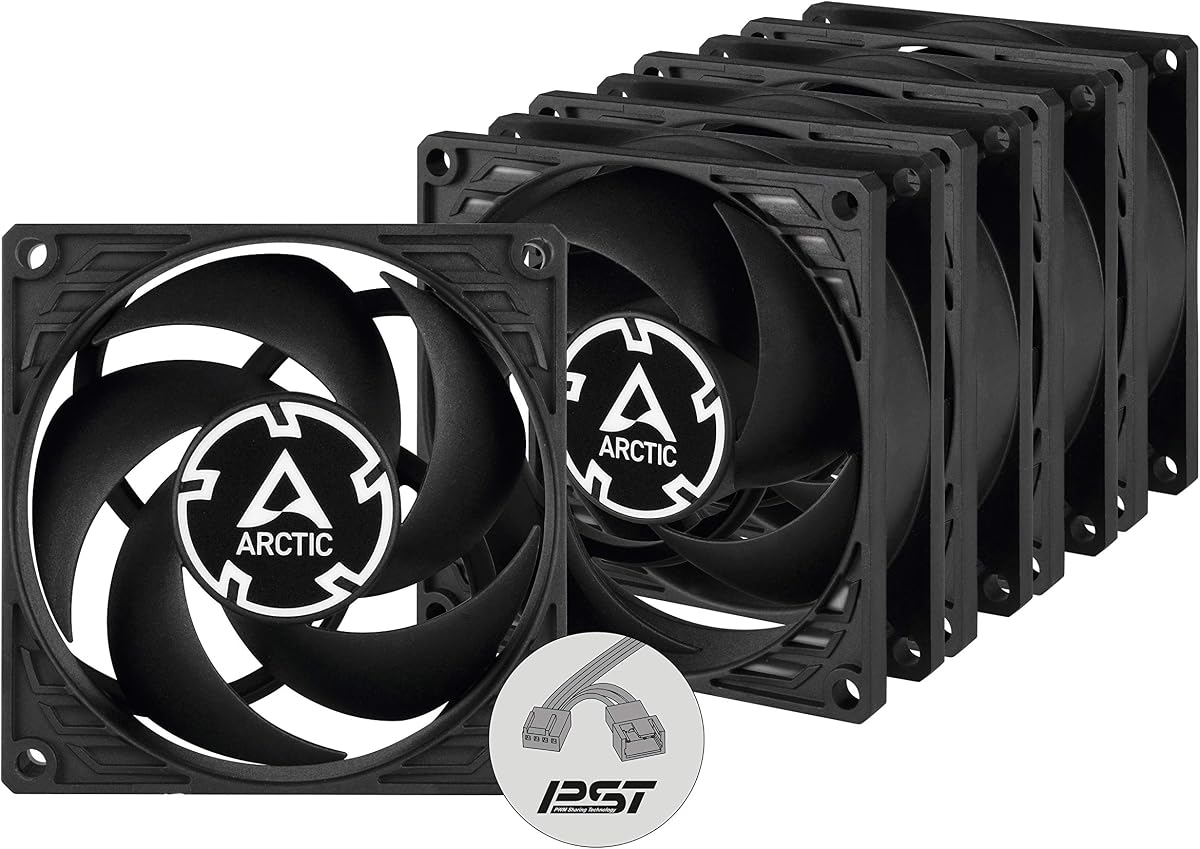
The ARCTIC P8 five pack offers outstanding value for buyers needing multiple fans at a low cost. It balances performance and affordability better than most competitors. The Fluid Dynamic Bearing ensures reduced friction and quiet operation comparable to sleeve bearings.
We may earn a commission when you buy through this link, at no additional cost to you.
Optimized for static pressure this fan excels when pushing air through radiators or dust filters. The alloy lubricant combination developed in Germany enhances efficiency and service life. Users get five identical fans for less than the cost of a single premium model.
The 3-pin connector limits automatic speed control unless a splitter or adapter is used. Maximum speed is rated at 3000 RPM which might generate more noise at full throttle than PWM options. However for basic ventilation needs this model is highly effective and durable.
This set is perfect for budget builds, server racks, or replacing multiple failing fans simultaneously. It suits users who need reliable cooling without spending heavily on individual units. The black design blends well with most standard computer cases easily.
Designed to maintain airflow even with increased resistance from heatsinks or radiator obstacles.
The bearing design includes an oil capsule to prevent lubricant leakage over time.
We may earn a commission when you buy through this link, at no additional cost to you.
This chromax version brings the renowned NF-A8 performance with a sleek all-black design. It maintains the same high-efficiency A-series technology and quiet operation. The customization aspect allows builders to match their case color scheme perfectly without compromise.
We may earn a commission when you buy through this link, at no additional cost to you.
Flow Acceleration Channels and acoustic optimization frame ensure superior cooling performance. The 4-pin PWM version supports speeds from 450 to 2200 RPM with full motherboard control. It also stops at 0 percent PWM for semi-passive cooling systems that prefer silence at idle.
The premium price reflects the quality of components and included accessories like mounting screws. Swappable pads come in multiple colors for fine-tuning appearance and vibration dampening. Users seeking a high-end look with top performance will appreciate this option highly.
Choose this fan for custom builds where aesthetics and performance are equally important. It suits enthusiasts who want the best available cooling in a compact 80mm form factor. The black finish integrates seamlessly into dark themed PC configurations.
Includes swappable anti-vibration pads in various colors for personalized style.
Fan stops completely at low PWM to ensure silent operation when cooling is not needed.
We may earn a commission when you buy through this link, at no additional cost to you.
The redux edition offers proven Noctua quality at a more accessible price point. It delivers excellent balance between performance and quietness for general chassis ventilation. The streamlined design cuts unnecessary packaging and accessories to keep costs down.
We may earn a commission when you buy through this link, at no additional cost to you.
With a max speed of 1800 RPM it provides powerful airflow when needed yet runs silently at idle. The 4-pin PWM version supports automatic motherboard speed control for efficient thermal management. Over 100 awards validate its reliability across various hardware configurations.
While it lacks some premium accessories this model still includes anti-vibration mounts and screws. The lower RPM compared to the A-series reduces noise and power consumption slightly. It is a smart choice for users seeking reliability without premium pricing.
Buy this fan for NAS devices, office desktops, and replacement needs where budget matters. It suits users who prioritize function over form and want long-lasting performance. The brown frame blends well with standard cases without standing out.
Reduces costs by removing optional accessories while keeping core performance intact.
The 1800 RPM limit optimizes airflow while maintaining low noise levels consistently.
We may earn a commission when you buy through this link, at no additional cost to you.
The Kingwin fan provides a practical solution for cooling tasks in demanding environments. It is marketed heavily for mining rigs but works well for standard case cooling too. The low noise profile makes it suitable for office desktops and quiet homes.
We may earn a commission when you buy through this link, at no additional cost to you.
Its optimized blade design delivers efficient airflow to reduce system heat buildup effectively. The long life bearing ensures consistent performance over extended periods of operation. At an entry level price it remains a popular choice for bulk replacement needs.
Specific RPM and decibel values are less detailed in official specs compared to premium brands. Users should verify fitment for specific cases though it is designed to standard mounts. The rugged black frame withstands continuous use in high temperature settings.
Select this fan for crypto mining setups or as a cost-effective replacement option. It is ideal for users needing reliable ventilation without advanced control features. The black finish matches most standard hardware aesthetics without extra customization.
Built to handle high-performance environments with consistent airflow and minimal overheating risk.
Rugged black casing ensures longevity even in demanding industrial or mining conditions.
We may earn a commission when you buy through this link, at no additional cost to you.
The P8 Silent focuses on delivering cooling efficiency at the lowest possible noise levels. With 0.08 Sone at 1600 RPM it is one of the quietest options available. Its motor is engineered in Germany to reduce friction and unwanted noise.
We may earn a commission when you buy through this link, at no additional cost to you.
It excels in high air resistance scenarios such as pushing air through dense radiators or filters. The alloy lubricant bearing ensures greater efficiency and quiet operation. This makes it particularly suitable for water cooling loops requiring silent operation.
Lacking PWM control this fan runs at a fixed speed unless voltage modulated externally. The single pin configuration offers simplicity but limits flexibility for advanced speed profiles. For passive systems the low RPM is a significant benefit for noise reduction.
Use this fan for quiet water cooling setups or low-noise server environments. It suits users prioritizing silence over maximum airflow capacity. The black design is unobtrusive and blends well with other components inside.
Low speed design reduces motor noise significantly even at full operational RPM.
Enhanced bearing reduces friction to maintain quietness and energy efficiency.
We may earn a commission when you buy through this link, at no additional cost to you.
This chromax edition offers top tier performance with a customizable color option. It maintains the same flow acceleration channels and acoustic optimization as the standard model. The all-black frame provides a sleek look that appeals to modern builds.
We may earn a commission when you buy through this link, at no additional cost to you.
Users can swap the anti-vibration pads to match other components in their PC. This feature adds a layer of personalization rarely found in stock cooling fans. The 4-pin PWM control ensures precise speed adjustment via motherboard software.
The premium price may deter budget shoppers but the quality and aesthetics justify it. It performs well as a replacement fan for NAS and small form factor cases. The included accessories support easy installation without extra purchases.
Pick this fan for custom rigs where matching color schemes is a priority. It suits enthusiasts who want both silence and style. The pads allow easy customization without modifying the fan structure.
Swap vibration pads to match your build's color theme seamlessly.
Advanced frame design optimizes airflow efficiency to reduce turbulence noise.
We may earn a commission when you buy through this link, at no additional cost to you.
This five pack delivers a bundle of silent cooling fans for large projects. Each unit runs at 1600 RPM ensuring low noise across multiple installation points. It is ideal for servers or cases requiring several exhaust points.
We may earn a commission when you buy through this link, at no additional cost to you.
Optimized for static pressure these fans work well on radiators and vents. The virtually silent motor design makes them suitable for home offices or quiet environments. You get consistent performance across all units in the set.
Fixed speed operation simplifies wiring but requires careful planning for noise balance. Users may need splitters if connecting multiple fans to one header. Still the bundle price makes this a smart buy for bulk needs.
Use this pack for server racks, multi-fan cases, or replacing several noisy units. It suits users needing multiple silent units without individual component purchases. The black finish remains consistent across the bundle.
Five units ensure full coverage for large enclosures requiring balanced airflow.
Get multiple silent units at a lower cost per fan than buying individually.
We may earn a commission when you buy through this link, at no additional cost to you.
The P8 Max pushes performance boundaries with a top speed of 5000 RPM. It is designed for high density server racks needing extreme heat dissipation. The PWM control allows variable speed adjustment for different thermal loads.
We may earn a commission when you buy through this link, at no additional cost to you.
High static pressure ensures airflow through dense component clusters and heat sinks. The Fluid Dynamic Bearing supports silent operation at lower speeds. This flexibility makes it versatile for both standard and server cooling.
At maximum RPM noise levels increase significantly which may not suit consumer PCs. It is best suited for industrial or server environments where cooling priority trumps acoustics. Users should confirm voltage requirements before purchase.
Choose this fan for 2U server racks or specialized cooling setups. It suits users needing high airflow in a compact 80mm footprint. The PWM connector supports automated speed profiles for thermal management.
Designed specifically to dissipate heat in high density 2U server enclosures.
Speed ranges from 500 to 5000 RPM for flexible thermal control.
We may earn a commission when you buy through this link, at no additional cost to you.
This 15mm thick fan is perfect for tight spaces where clearance is limited. It works well as a supplemental CPU cooler or low profile case exhaust. The PWM interface allows automated speed control similar to other premium fans.
We may earn a commission when you buy through this link, at no additional cost to you.
Thermalright brings 20 years of development experience to this model. The S-FDB V2 bearings minimize noise while delivering 28.4 CFM airflow at max speed. Its low noise rating of 23.3 dBA ensures it remains quiet under load.
The slim design might limit structural rigidity compared to 25mm models. Accessories like mounting screws are basic but sufficient for standard applications. It is a great fit for custom loops with narrow radiators.
Use this fan where vertical space is constrained like compact ITX cases. It suits users needing slim cooling without sacrificing PWM control. The gray frame offers a distinct neutral aesthetic for clean builds.
The 15mm thickness allows installation where standard 25mm fans will not fit.
Developed bearings solve blade shake and keep noise minimal during operation.
We may earn a commission when you buy through this link, at no additional cost to you.
Selecting the right 80mm case fan involves weighing performance against noise, connectivity, and physical constraints. We outline key factors to help you make an informed choice.
PWM (Pulse Width Modulation) fans allow dynamic speed control via motherboard headers. This reduces noise during idle and maximizes cooling when needed. Fixed speed fans are simpler but lack thermal responsiveness.
Always opt for 4-pin PWM connectors if your motherboard supports automatic speed adjustments.
Static pressure measures a fan's ability to push air through resistance like radiators or filters. Airflow (CFM) indicates volume for open case ventilation. Choose static pressure optimized fans for radiators and airflow fans for open cases.
Check manufacturer specifications to ensure the fan matches your cooling needs effectively.
Noise is measured in decibels (dB) or Sones. Lower numbers mean quieter operation. For home offices or HTPCs look for fans below 20 dB. Industrial setups may prioritize performance over acoustics.
Read reviews to confirm real world noise levels at operating speeds.
Fluid Dynamic and Sleeve bearings balance cost and longevity. Fluid Dynamic bearings last longer and reduce vibration. Sleeve bearings are budget friendly but may wear out faster under heat.
Longer MTTF ratings indicate a more durable and reliable long-term solution.
Standard 80mm fans are often 25mm thick but slim versions exist for tight spaces. Ensure your case or radiator allows for the required height. Measure mounting points before purchasing.
Verify the fan fits your chassis or cooler to avoid installation issues.
Purchasing fans in bundles often reduces the cost per unit significantly. This is ideal for replacing multiple units or building multi-fan systems. However ensure connectors match your motherboard headers.
Compare single unit prices to confirm bulk savings are worthwhile.
Premium models include anti-vibration mounts, extension cables, and adaptors. These accessories enhance noise reduction and installation flexibility. Budget fans may require extra purchases for mounting hardware.
Check the included accessories list to avoid unexpected costs later.
Color choices like black or brown affect visual integration. Some fans offer swappable parts for customization. Ensure the fan matches your case and other components.
Consider chromax versions for all-black setups to maintain visual consistency.
Ensure the fan is mounted securely using the provided anti-vibration mounts. Tighten screws evenly to prevent wobble which increases noise and wear. Orient the fan for intake or exhaust based on your airflow plan.
Clean dust buildup monthly using compressed air. Blocked blades increase noise and reduce cooling efficiency. Check bearings for unusual noises indicating lubricant wear.
Connect the fan to a PWM header for automatic speed control. Monitor fan curves in BIOS to balance noise and cooling. Replace fans showing vibration or bearing failure promptly.
Most 80mm fans follow standard square mounting holes. Ensure the thickness matches your case requirements especially for slim or deep fans. Some chassis may require adapters for non-standard depths.
PWM allows automatic speed adjustment based on system temperature. This reduces noise during idle periods and maximizes cooling when needed. It is essential for efficient thermal management.
For silent setups aim for under 20 dB. Industrial fans may reach 30 dB or more. Check Sone ratings for a relative measure of perceived noise in real environments.
Fluid Dynamic bearings generally outlast sleeve bearings under heat. They reduce friction significantly and offer higher MTTF ratings. Consider this for continuous operation like NAS or servers.
Yes using Y-splitters or daisy chain connectors. Ensure your motherboard header supports the total current draw. Most 80mm fans draw minimal power making this feasible.
Choose static pressure optimized models for radiators. Standard airflow fans may struggle with the density of radiator fins. Look for fans rated for high static pressure.
Balanced performance lies between 1500 and 2500 RPM. Higher speeds increase noise significantly. Choose PWM models to adjust RPM dynamically based on cooling needs.
Remove old screws and disconnect the power cable. Align new fan mounting holes and secure with included screws. Connect to the same header for consistent behavior.
We reviewed ten reliable models ranging from budget friendly to premium high-end. Each option offers distinct benefits depending on noise tolerance and airflow needs. The top picks balance performance value and build quality effectively.
Prioritize PWM control and static pressure if you plan to use radiators or filters. For silent builds consider Fluid Dynamic bearings and acoustic optimization. Match the fan size to your case clearance before buying.
Please note that prices fluctuate regularly on Amazon and other retailers. Check current listings and bundle deals to find the best value for your build. Always verify compatibility before placing your order.