
Gwolves Skoll Mini SK-S Black
4.4Editor score
50g ultralight weight
Honeycomb design build
Detachable cable included
This guide compares the top claw grip gaming mice for small hands based on sensor quality, weight, ergonomics, and wireless performance to help you find the
Finding the right claw grip gaming mouse for small hands is crucial for precision and comfort during long sessions. A good mouse should feel light, responsive, and tailored to your hand shape to prevent fatigue.
We evaluated ten top models focusing on sensor accuracy, build quality, weight distribution, and grip suitability. Our analysis covers wireless and wired options designed specifically for competitive play and daily use.
Each pick highlights key strengths and trade-offs to help you decide based on your needs. Remember that prices and availability can change, so verify details before purchasing to ensure you get the best value.
4.4Editor score

4.6Editor score

4.3Editor score
This side-by-side comparison highlights the key specifications and features of each mouse to help you make an informed decision quickly.


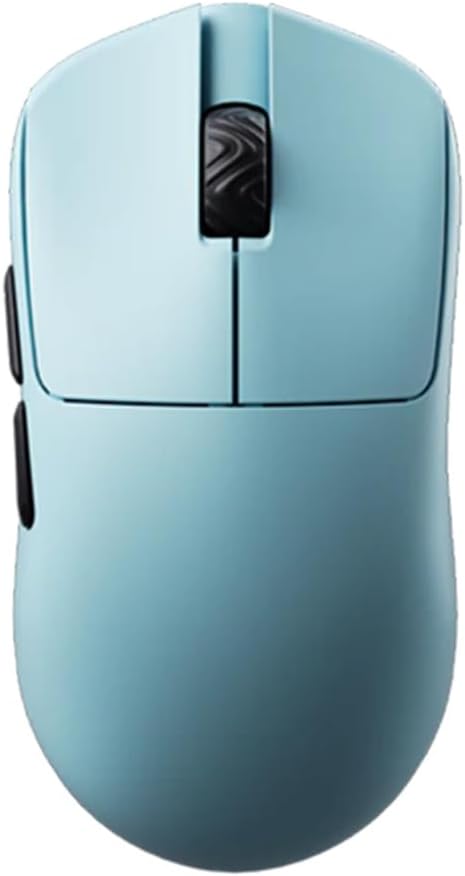

The Lamzu Atlantis Mini Champion Edition stands out with its ultra lightweight design and high performance sensor. It has a strong rating for its balanced shape and fast optical switches.
We may earn a commission when you buy through this link, at no additional cost to you.
Its 30000 DPI sensor ensures precise tracking while the hourglass shape supports claw grip users well. The optical switches provide quick response times essential for competitive gaming.
While the price is higher, the build quality and dust proof features justify the cost. Battery life is solid but not infinite compared to some wired options.
This mouse is ideal for players seeking top tier performance in a small form factor. It delivers on precision and comfort for extended sessions without fatigue.
Weighing only 51 grams, it reduces wrist strain and eases fatigue during long gaming sessions.
The PAW3950 sensor supports up to 30000 DPI and ensures energy efficiency with low latency.
We may earn a commission when you buy through this link, at no additional cost to you.
The Gwolves Skoll Mini offers excellent value with its ultralight weight and ergonomic design. It features a honeycomb shell to reduce mass while maintaining durability for daily use.
We may earn a commission when you buy through this link, at no additional cost to you.
Its 3389 sensor provides reliable tracking up to 16000 DPI which suits most gamers well. The detachable cable adds convenience for transport and storage without damage risks.
The honeycomb design helps with weight but may collect dust over time requiring regular cleaning. It is a wired mouse so wireless freedom is not available but performance is solid.
This model is perfect for budget conscious gamers needing a lightweight claw grip mouse. It balances cost and performance effectively for entry to mid level players.
The honeycomb shell reduces weight while providing an ergonomic shape for claw grip users.
Includes a detachable cable for easy transport and better cable management during gameplay.
We may earn a commission when you buy through this link, at no additional cost to you.
The Pulsar X3 LHD Crazylight redefines lightweight gaming with an unreal 43g weight. It features a hybrid ergonomic design that balances palm and claw comfort for diverse users.
We may earn a commission when you buy through this link, at no additional cost to you.
Its XS-1 sensor delivers unmatched precision and speed while optical switches minimize unintended clicks. The dust proof structure ensures long term reliability and consistent performance over time.
This model is left handed which may limit right handed users despite its broad appeal. The premium price reflects high end components but may not suit all budgets easily.
Ideal for left handed claw gamers seeking top performance and comfort. It offers a unique shape and lightweight build that stands out in competitive scenes.
Weighing lighter than an egg, it reduces strain and enhances speed during fast paced games.
The RelaxClaw shape offers comfort and control while ensuring lasting comfort for extended sessions.
We may earn a commission when you buy through this link, at no additional cost to you.
The Pulsar X2H mini Wireless offers a symmetrical design with wireless freedom for claw gamers. It weighs 52g and features optical switches for quick response times during gameplay.
We may earn a commission when you buy through this link, at no additional cost to you.
Its PAW3395 sensor ensures precise tracking while the battery lasts up to 100 hours on a single charge. The symmetrical shape supports various grip styles including claw comfortably.
This model is a renewed product which may carry minor cosmetic risks. Battery life is impressive but requires charging breaks for long continuous use sessions.
Great for players wanting wireless convenience without sacrificing weight or speed. It balances performance and portability well for competitive and casual gaming alike.
The 2.4 Ghz 1 ms connection ensures responsive and lag-free performance for both gaming and daily use.
Experience up to 100 hours of usage all at a hyper-responsive 1000Hz polling rate.
We may earn a commission when you buy through this link, at no additional cost to you.
The Bloody V7 Ergonomic focuses on programmability with eight buttons for macros and scripting. Its rubberized coating provides grip comfort suitable for claw and palm users alike.
We may earn a commission when you buy through this link, at no additional cost to you.
While the sensor maxes out at 3200 DPI it remains responsive for most gaming needs. The ergonomic shape reduces strain during extended use sessions comfortably.
This mouse is heavier than ultralight options which may not suit all users. Its older design and higher weight limit appeal but functionality remains strong.
Ideal for users needing complex macros and customization. It balances ergonomics and button count well for productivity and gaming needs.
The 6 software allows CPI adjustments and report rate adjustments for different levels of responsiveness.
Compatible with Windows 7/8/10/XP, Vista7/8, Linux, and MAC for versatile desktop use.
We may earn a commission when you buy through this link, at no additional cost to you.
The Corsair IRONCLAW Wireless SE offers massive battery life up to 532 hours via Bluetooth. It features a 26K DPI sensor and RGB customization for personalization.
We may earn a commission when you buy through this link, at no additional cost to you.
Its asymmetric shape suits larger hands primarily but may still appeal to some claw users. The 10 programmable buttons add utility for complex games.
This model is heavier and may not fit small hands comfortably due to its design. Battery life is a strong point but the size limits small hand usability.
Best for users prioritizing battery and customization over lightweight feel. It suits those needing long sessions without frequent charging.
With up to 285 hours on 2.4GHz and 532 hours on Bluetooth you have enough battery for marathon sessions.
Program macros and map keybinds via iCUE software for peak performance and productivity.
We may earn a commission when you buy through this link, at no additional cost to you.
The V8 Gaming Mouse Scyrox delivers an ultra lightweight 36g build with symmetrical design. It supports claw and fingertip grip styles for versatile users.
We may earn a commission when you buy through this link, at no additional cost to you.
Its PAW3950 sensor provides accurate tracking while optical switches ensure fast response times. The web based driver simplifies customization without software installation.
The yellow color may not suit all aesthetic preferences but performance remains strong. Symmetrical shape aids adaptability for different hand sizes and grip preferences.
Perfect for competitive gamers seeking minimal weight and strong sensors. It offers high performance without complex software requirements.
Weighing approximately 40g it helps reduce hand fatigue during long gaming sessions.
Allows users to adjust settings without software installation using a stable 2.4GHz wireless connection.
We may earn a commission when you buy through this link, at no additional cost to you.
The Pulsar X2H Wireless Mini features a compact design with wireless freedom and optical switches. Its white aesthetic offers a clean look suitable for minimal setups.
We may earn a commission when you buy through this link, at no additional cost to you.
Equipped with a PAW3395 sensor it delivers precise tracking and fast response times. Battery life lasts up to 100 hours ensuring consistent performance.
This model suits those preferring wireless over wired options for clutter free desks. Size may limit use for larger hands but is ideal for small hands.
Great for gamers valuing aesthetics and wireless convenience. It balances performance and style effectively for competitive use.
Fuelled by a Nordic MCU this technology ensures efficiency and fast processing with extended battery life.
Minimizing chances of unintended double clicks these switches ensure swift and pinpoint responses.
We may earn a commission when you buy through this link, at no additional cost to you.
The V6 Gaming Mouse Scyrox weighs 40g with a no hole shell to reduce dust accumulation. Its concave buttons offer better control and comfort for claw users.
We may earn a commission when you buy through this link, at no additional cost to you.
Featuring a PAW3950 sensor it provides accurate tracking and stability. The web based driver simplifies settings adjustments without complex software.
The no hole design helps maintain shell integrity and longevity over time. It suits users preferring solid build quality over honeycomb options.
Ideal for competitive gamers seeking lightweight and durable options. It balances weight and build quality effectively for consistent performance.
The no hole design reduces dust accumulation and maintains shell integrity for longer durability.
Ergonomic concave main buttons naturally fit the fingers for clear click positioning and improved consistency.
We may earn a commission when you buy through this link, at no additional cost to you.
The BenQ Zowie S2-C is a driverless mouse designed for small hands and claw grip. It features a paracord cable to minimize drag during movement.
We may earn a commission when you buy through this link, at no additional cost to you.
With a 3360 sensor and adjustable DPI levels it offers reliable performance without software. The symmetrical shape provides comfort for extended use.
Its driverless design simplifies setup but limits customization. The paracord cable reduces friction and improves handling over standard cables.
Best for players preferring plug-and-play setups and compact shapes. It focuses on comfort and simplicity over advanced software features.
Our mission is to craft a mouse made for your hand with ideal competitive performance and comfort.
Designed for comfort and competition a paracord cable allows freedom of movement minimizing drag on any surface.
We may earn a commission when you buy through this link, at no additional cost to you.
Choosing the right claw grip gaming mouse for small hands involves evaluating several key factors to ensure comfort and performance.
Lighter mice reduce wrist strain and allow faster movements essential for claw grip users. Look for designs between 40g and 60g for optimal control.
Choose lightweight materials like polycarbonate or honeycomb shells without sacrificing durability for daily gaming.
A high quality sensor ensures precise tracking without acceleration or spinouts during rapid movements. Aim for sensors like PAW3950 or similar models with high IPS.
Higher DPI ranges allow customizable sensitivity settings tailored to different game types and personal preferences.
The mouse shape should support claw grip with a curved top and broad back to prevent finger cramps. Symmetrical designs offer versatility for different grip styles.
Prioritize models with comfortable contours that match your hand size to avoid fatigue during extended play.
Wireless mice offer freedom of movement but require battery management and may cost more. Wired options eliminate battery concerns and often provide lower latency.
Choose based on your preference for convenience versus simplicity and consistent power supply during long sessions.
Optical switches offer faster response times and greater durability compared to mechanical switches. They reduce risks of double clicks during intense gameplay.
Select mice with proven switch technology to ensure reliable clicks and long term performance.
Software allows DPI adjustment, macro programming, and button mapping to tailor the mouse to your needs. Driverless models simplify setup but limit customization options.
Consider if advanced features are necessary or if a plug-and-play experience suits your style better.
For wireless mice battery life determines how often you must recharge during extended use. Look for models offering 50 hours or more for consistent performance.
Quick charging features and battery status indicators help maintain uptime without unexpected power loss.
Prices vary widely with premium models offering better sensors and build quality. Determine your budget balance with required features for gaming.
Higher cost does not always mean better fit so prioritize ergonomics and weight over brand name alone.
Proper grip involves placing fingers on the buttons with fingertips curved naturally and palm resting lightly on the back. This position allows quick movements and reduces strain.
Keep the mouse surface clean to prevent tracking issues and ensure smooth gliding. Use a soft cloth to wipe dirt and oils regularly to maintain performance.
Adjust DPI and sensitivity settings in software to match your game type. Test different rates to find what feels most responsive for your play style.
A suitable mouse for claw grip and small hands features a compact size with a curved top and broad back to support finger positioning. Lightweight designs around 40 to 60 grams reduce strain and enable faster movements essential for competitive play.
Wireless mice provide freedom of movement but wired options eliminate battery concerns and often offer lower latency. The best choice depends on your preference for convenience versus simplicity and consistent power supply during long gaming sessions.
Sensor quality is crucial for accurate tracking without acceleration or spinouts during rapid movements. High quality sensors ensure precise control essential for competitive gaming and responsive gameplay across various surfaces.
Optical switches offer faster response times and greater durability compared to mechanical switches. They reduce risks of double clicks during intense gameplay ensuring reliable and consistent input.
Symmetrical mice offer versatility and can accommodate claw grip users depending on personal preference. They provide balanced ergonomics supporting different grip styles while remaining adaptable for various hand sizes.
Keep the mouse surface clean and free of dirt to prevent tracking issues. Store it properly avoiding moisture or extreme heat and regularly check firmware updates for performance improvements.
Selecting the ideal claw grip gaming mouse for small hands involves balancing weight, ergonomics, and sensor performance. Our top picks highlight excellent options for various needs and budgets.
Prioritize models that reduce strain and provide precise tracking to enhance your gameplay experience. Consider wireless convenience or wired simplicity based on your personal preferences.
Always verify current prices and availability before purchasing to ensure the best value. Your perfect mouse is within reach with the right features tailored to your gaming style.