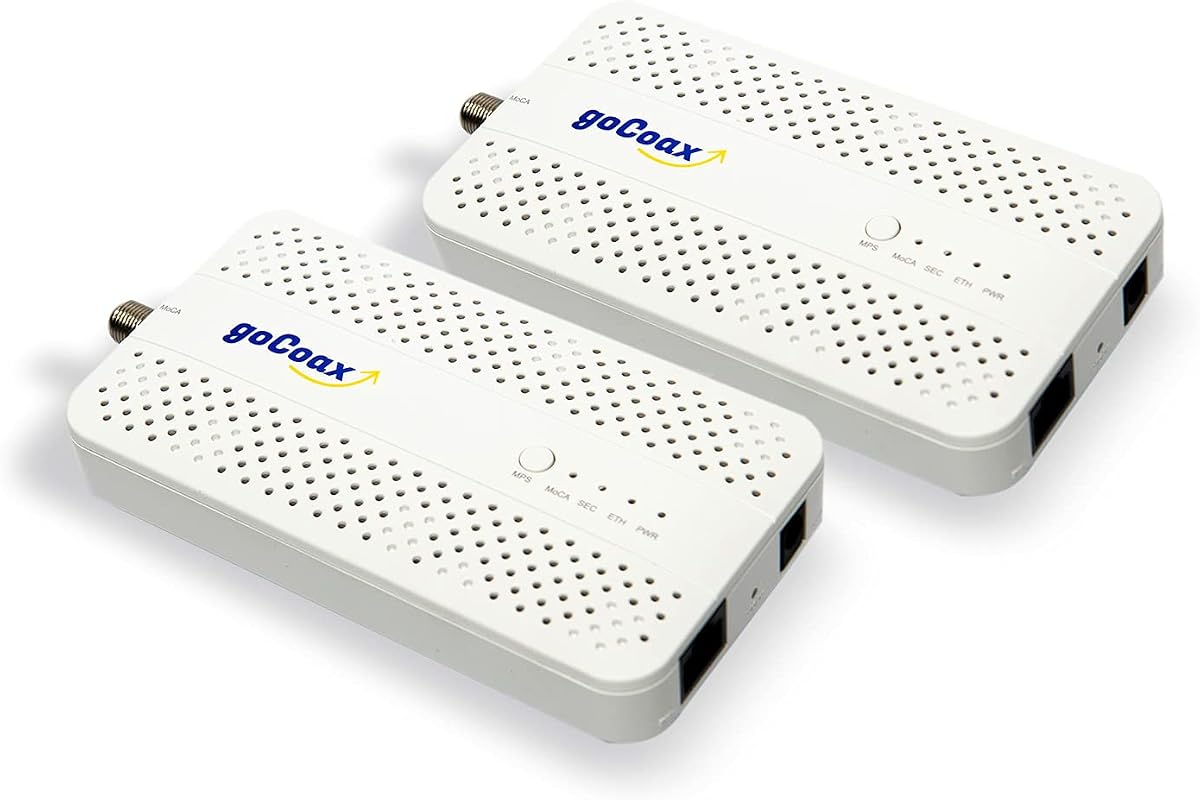
goCoax MoCA 2.5 Adapter (2-Pack) with 2.5GbE Ethernet Port
4.6Editor score
Plug and Play setup
Includes all necessary cables
Under 3ms latency performance
This guide compares the top coax to Ethernet adapters for home networking, evaluating speed, compatibility, and ease of setup for reliable wired connections.
Finding the right coax to Ethernet adapter can transform your home network significantly. These devices leverage existing coaxial wiring to deliver fast, stable internet speeds without new cabling. Choosing a quality adapter ensures minimal latency and maximum throughput for streaming and gaming needs.
We evaluated ten leading models based on speed capabilities, compatibility with major ISPs, and ease of installation. Our analysis covers MoCA 2.5 standards, PoE support, and overall reliability. This list helps you identify the best solution for your specific home wiring setup.
Each pick highlights key strengths and potential limitations to guide your decision. We include detailed specs and usage scenarios for every product. Note that availability and pricing may fluctuate, so verify current details before purchasing.
4.6Editor score

4.8Editor score

4.4Editor score
Below is a side-by-side comparison of all ten adapters to help you visualize their key specifications and capabilities at a glance.


This TRENDnet adapter offers a robust solution for upgrading home networks using existing coaxial wiring. Rated highly for its 2.5Gbps performance, it delivers consistent speeds ideal for heavy data tasks.
We may earn a commission when you buy through this link, at no additional cost to you.
Key strengths include its support for MoCA 2.5 technology, which ensures low latency and high bandwidth. The compact housing makes it easy to install in various locations without clutter.
While it requires existing coax wiring and lacks PoE, these trade-offs are acceptable given the speed and reliability it provides. Most users find the setup straightforward without needing extra configuration.
Homeowners looking for a reliable way to extend their Ethernet network should consider this adapter. It is particularly well-suited for households prioritizing speed and stability over wireless connectivity.
MoCA 2.5 technology ensures you get the most out of your coaxial wiring with reduced latency and higher throughput.
The compact design and plug-and-play setup mean you can get your network running quickly without technical expertise.
We may earn a commission when you buy through this link, at no additional cost to you.
goCoax delivers a budget-friendly option without compromising on performance. This 2-pack provides everything you need to get started with MoCA 2.5 networking right out of the box.
We may earn a commission when you buy through this link, at no additional cost to you.
Its primary strengths lie in the included accessories and low latency, making it perfect for gaming and streaming. The plug-and-play nature simplifies setup for non-technical users.
Users should note that it is not compatible with satellite TV systems and may require a PoE filter for optimal performance. These are minor considerations for the price and reliability offered.
For those seeking an affordable upgrade to their home network, this adapter stands out. It effectively bridges the gap between coax wiring and modern Ethernet speeds.
The kit includes all necessary coax and Ethernet cables, saving you the hassle of purchasing additional components separately.
With under 3ms latency, this adapter ensures smooth gameplay and minimal lag during competitive gaming sessions.
We may earn a commission when you buy through this link, at no additional cost to you.
This ScreenBeam starter kit offers a premium experience with bonded MoCA 2.5 technology. It is designed to surpass Wi-Fi speeds and provide a reliable wired backbone for your home.
We may earn a commission when you buy through this link, at no additional cost to you.
The inclusion of splitters and cables makes it a complete solution. The 2.5Gbps speed is ideal for demanding applications like 4K streaming and remote work.
Users need to check compatibility with their ISP and modem to avoid conflicts. The higher price reflects the quality and comprehensive nature of the kit.
Best for users who want a top-tier networking solution without buying separate components. It ensures high performance and reliability across your entire home network.
Everything needed is included, from adapters to splitters, ensuring a hassle-free installation process for new users.
Bonded MoCA 2.5 delivers speeds that significantly outperform typical Wi-Fi, providing a stable connection for data-intensive tasks.
We may earn a commission when you buy through this link, at no additional cost to you.
Kiwee introduces a unique adapter with dual 2.5GbE ports. This allows connecting multiple devices at full speed without additional switches.
We may earn a commission when you buy through this link, at no additional cost to you.
Its standout feature is the dual port design, which enhances flexibility in device connectivity. The MoCA 2.5 standard ensures high performance for streaming and gaming.
While limited availability might be a consideration, the features justify the interest. Users should verify compatibility with their existing network setup.
Ideal for users who need multiple wired connections from a single coax point. It offers a versatile solution for modern home networking needs.
With two Ethernet ports, you can connect multiple devices simultaneously without needing extra hardware.
MoCA 2.5 technology ensures your network remains capable of handling increasing bandwidth demands over time.
We may earn a commission when you buy through this link, at no additional cost to you.
Hitron provides a reliable option for extending networks via coaxial cables. It is designed to work with most major cable and fiber providers.
We may earn a commission when you buy through this link, at no additional cost to you.
Its strengths include technical support and a complete 2-pack kit. The 2.5 Gbps speed ensures you can handle modern data demands effectively.
Not compatible with AT&T fiber, so users must verify their provider. However, the support team is available to help with wiring verification and setup.
Good for households with cable TV wiring looking for a simple extension solution. It balances performance and usability well for most users.
Free technical support helps resolve any wiring or compatibility issues quickly and effectively.
Adapters, cables, and power adapters are included to streamline the installation process.
We may earn a commission when you buy through this link, at no additional cost to you.
LNOVISION offers an industrial-grade solution for PoE over coax. It is suited for upgrading analog systems to IP surveillance without new cabling.
We may earn a commission when you buy through this link, at no additional cost to you.
Its primary advantage is the PoE support, which allows power and data transmission through a single cable. The industrial design ensures reliability in demanding environments.
Bandwidth is lower compared to MoCA adapters, but sufficient for surveillance. Point-to-point connections may limit flexibility in larger setups.
Best for security systems or industrial applications requiring PoE. It provides a robust way to extend existing coaxial wiring for cameras.
Supports PoE standards, enabling power and data transmission over coaxial cables seamlessly.
Built with a heat sink and durable design for reliable operation in industrial settings.
We may earn a commission when you buy through this link, at no additional cost to you.
This G.hn adapter is designed specifically for unused dark coax wiring. It offers a secure wired connection without interfering with active cable services.
We may earn a commission when you buy through this link, at no additional cost to you.
Its strength lies in utilizing dark coax to extend the network independently. The 1.2Gbps speed is sufficient for streaming and gaming applications.
Users must ensure their coax is dark and not shared with cable TV. This requirement limits general usability but benefits specific setups.
Ideal for properties with unused coax runs looking for a dedicated network extension. It provides a cost-effective solution for those with existing infrastructure.
Designed to work with dark coax, avoiding conflicts with active TV or internet services.
Offers a secure wired connection for devices needing reliable performance without wireless interference.
We may earn a commission when you buy through this link, at no additional cost to you.
This adapter kit combines MoCA 2.5 speed with PoE+ power. It is ideal for powering Wi-Fi access points and IP cameras via the same cable.
We may earn a commission when you buy through this link, at no additional cost to you.
Its unique feature is the PoE+ capability, simplifying installations for devices needing both data and power. The 2.5G Ethernet port ensures fast throughput.
While more expensive, it offers significant convenience. Users should be aware of setup requirements for PoE devices.
Best for smart home setups requiring PoE. It provides a powerful and flexible networking solution for modern devices.
Provides up to 30W of power, ideal for Wi-Fi access points and IP cameras.
Combines data and power transmission, reducing cable clutter and simplifying installations.
We may earn a commission when you buy through this link, at no additional cost to you.
TRENDnet offers a single-unit option with a Gigabit port. It provides reliable MoCA 2.5 performance for standard home networking needs.
We may earn a commission when you buy through this link, at no additional cost to you.
Its strengths include a 3-year manufacturer protection and compact design. The Gigabit port ensures smooth flow for most everyday applications.
Not ideal for users needing speeds over 1Gbps, but sufficient for many households. The protection offers peace of mind for long-term use.
Good for users needing a simple adapter without extra costs. It delivers consistent performance and reliability for standard setups.
Backed by 3 years of manufacturer protection, ensuring long-term reliability and support.
The lightweight housing fits easily in tight spaces like entertainment centers.
We may earn a commission when you buy through this link, at no additional cost to you.
This ScreenBeam adapter serves as an add-on for existing MoCA 2.0 networks. It offers a cost-effective way to expand your wired connectivity.
We may earn a commission when you buy through this link, at no additional cost to you.
Its key feature is compatibility with existing setups. The 1Gbps Ethernet port provides decent speeds for general use.
Requires an existing network to function, making it unsuitable as a standalone starter kit. It is best for adding connections to a home network.
Ideal for budget-conscious users expanding a network. It offers a reliable and affordable way to connect more devices.
Designed to work with existing MoCA networks, expanding your wired connections efficiently.
A cost-effective solution for users needing to add more devices without replacing existing hardware.
We may earn a commission when you buy through this link, at no additional cost to you.
Selecting the right adapter involves considering speed, compatibility, and specific needs. This section explores key factors to ensure you make an informed decision.
The MoCA version determines speed and compatibility. MoCA 2.5 offers up to 2.5Gbps while 2.0 is limited to 1Gbps. Always check if your provider supports the version you choose.
Opt for MoCA 2.5 for future-proofing unless your setup does not support it.
Not all providers support MoCA. Some ISPs like AT&T Fiber may interfere. Verify compatibility with your provider before purchasing to avoid issues.
Confirm with your ISP or check product documentation for a list of supported providers.
Existing coax wiring must be interconnected. Satellite TV wiring often isolates coax outlets. Ensure your outlets are part of a shared network.
Test outlets by checking if they connect to a main splitter in your home.
Adapters offer varying Ethernet speeds. 2.5Gbps ports are ideal for high-speed plans. Ensure the port matches your needs for gaming or streaming.
Higher port speeds ensure you get the most out of your internet plan.
Some adapters support Power over Ethernet. This is useful for IP cameras or access points. Check if you need this feature before choosing a model.
PoE support simplifies power and data transmission for compatible devices.
Some models include splitters and cables. Others sell these separately. A complete kit can save money and setup time.
Check if the kit includes all necessary components for installation.
Higher speed adapters cost more. Balance your budget with performance needs. A 1Gbps adapter might suffice for general use.
Invest in higher speeds if you have high-bandwidth applications.
Reliable support is crucial if issues arise. Look for models with good warranty terms. Check reviews for customer service quality.
Choose a model with a strong warranty to protect your investment.
Connect one adapter to your router using an Ethernet cable. Connect the other adapter to your device or access point. Ensure both are powered on.
Plug the coax cables into the adapters and wall outlets. If using a splitter, ensure it is compatible with MoCA. Wait for the status lights to stabilize.
Regularly check for firmware updates. Keep the adapters in a cool, ventilated area to prevent overheating. Restart them if connection issues arise.
No, some ISPs like AT&T Fiber may interfere. Check compatibility with your provider before purchasing. Most cable and fiber providers support MoCA 2.5.
Generally no. Satellite wiring often isolates coax. Ensure your outlets are interconnected for MoCA adapters to work properly.
It is a standard for networking over coax. It offers speeds up to 2.5Gbps. It is ideal for modern high-bandwidth needs.
Some providers recommend it for optimal performance. It prevents signal leakage. Check with your ISP to see if it is required.
Yes, MoCA networks support up to 16 nodes. Each room needs its own adapter. Ensure your splitter supports multiple connections.
Check with your ISP or verify your coax wiring. Ensure outlets are interconnected. Product documentation usually lists supported providers.
No. It extends your existing network via coax. You still need a router to manage your internet connection.
No. Most adapters are plug and play. Simply connect coax and Ethernet cables. Configuration is usually automatic.
The TRENDnet, goCoax, and ScreenBeam adapters lead the list for overall performance and value. Each offers unique benefits depending on your setup and budget.
Prioritize MoCA 2.5 compatibility and speed for future needs. Ensure your ISP supports the adapter you choose for optimal results.
Always verify current availability and pricing before buying. These adapters can transform your home network significantly.